









-
 Unlimited Activations
-
 Instant delivery
-
 Easy to install


 Unlimited Activations
Instant delivery
Easy to install
Unlimited Activations
Instant delivery
Easy to install
 Free Update
 Free Install Support

AGI FX1 EA MQ4 is an automated Expert Advisor designed for the MetaTrader 4 (MT4) platform, specializing in EURUSD trading on the M30 timeframe. Developed using a combination of technical indicators and algorithmic trading logic, the EA analyzes market conditions to identify potential trading opportunities and execute trades automatically according to its programmed strategy.
AGI FX1 aims to simplify forex trading by automating market analysis, entry decisions, and trade execution. Instead of relying entirely on manual chart analysis or emotional decision-making, traders can use the EA to follow a systematic trading process based on predefined rules.
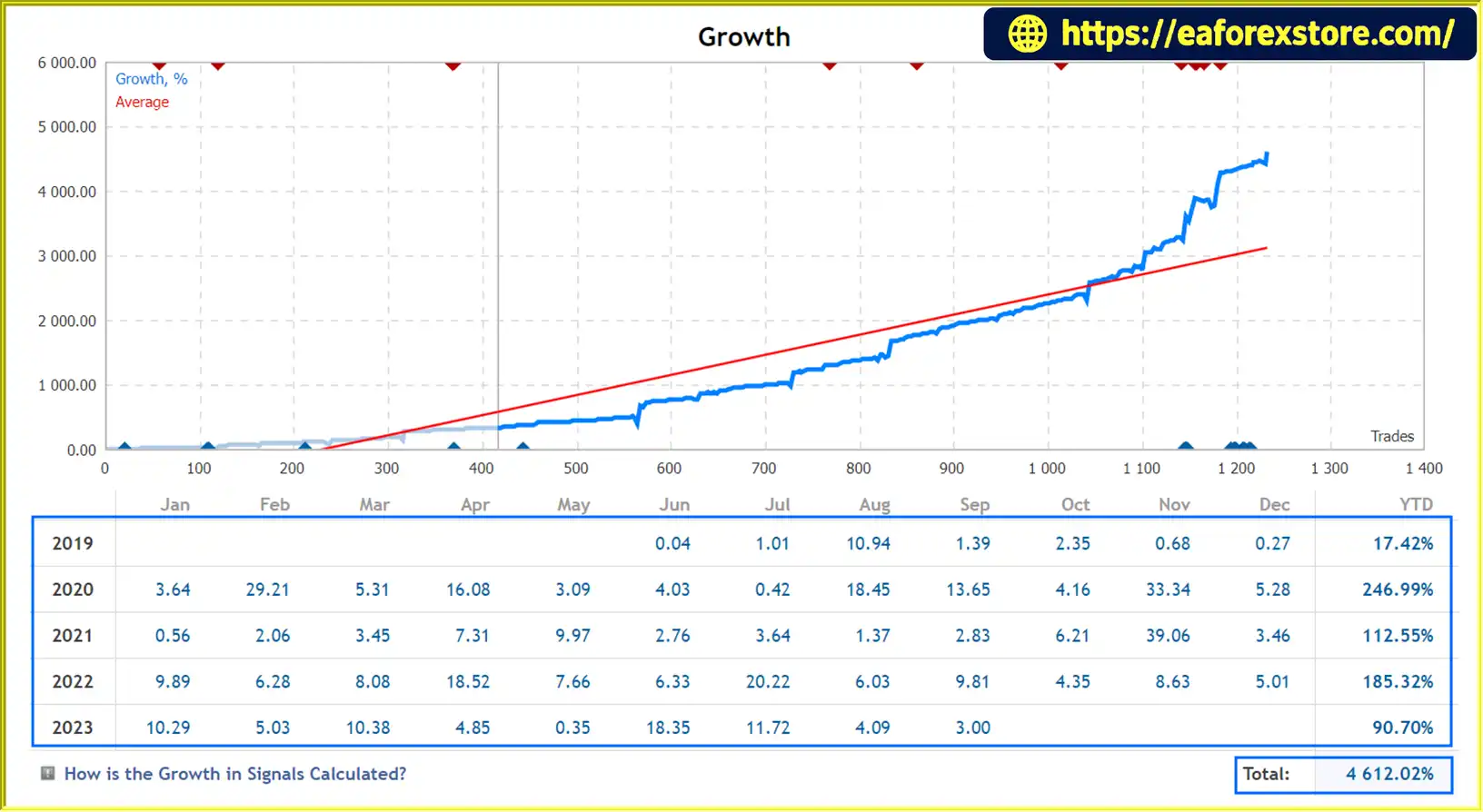
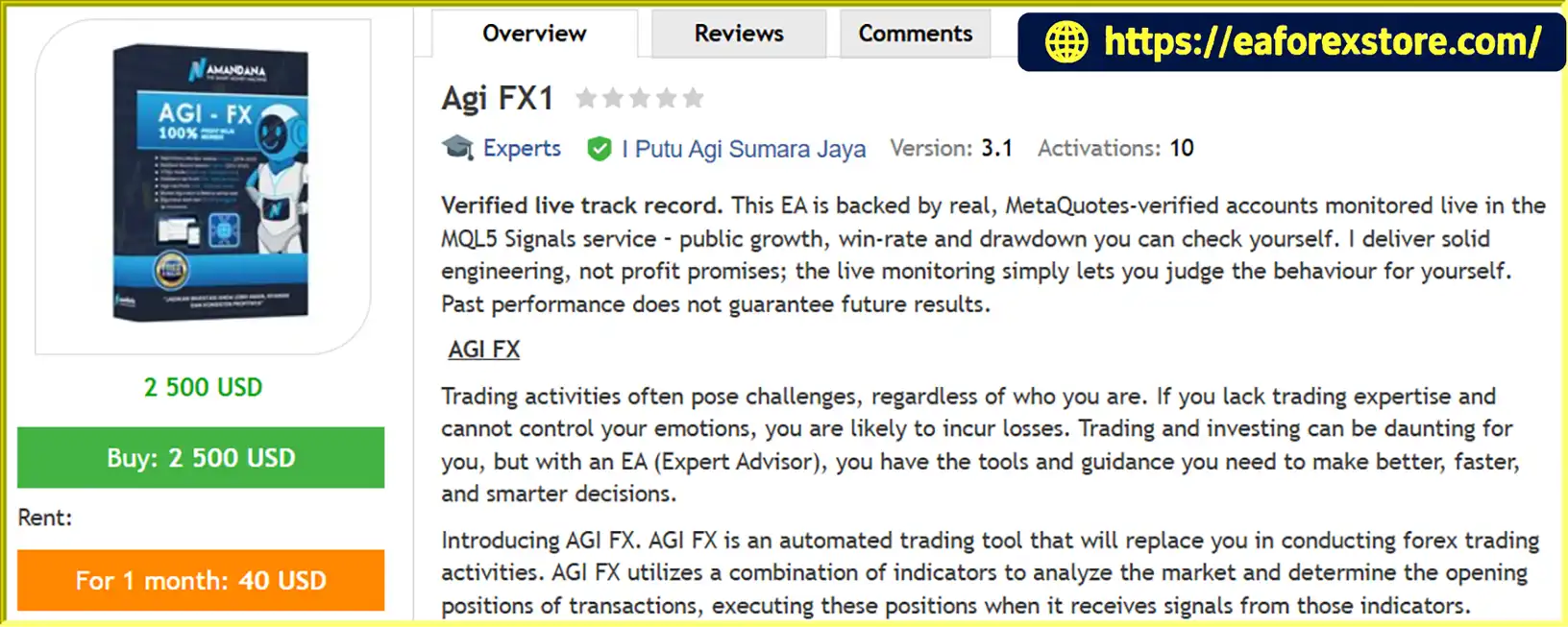
One of the product’s main selling points is its reported live trading history. The developer states that AGI FX1 is supported by MetaQuotes-verified trading accounts monitored through the MQL5 Signals service, allowing users to review publicly available performance statistics. The developer also reports eight years of historical backtesting covering 2015–2022 and four years of real-time testing covering 2019–2023. These testing periods are developer-provided claims and should be checked against the available reports and account records.
The EA uses an averaging and martingale-based trading strategy combined with cash management. This approach can help manage a sequence of positions according to predefined rules, but it also introduces substantial risk because exposure may increase as trades move against the strategy. Consequently, understanding the position-sizing method, maximum exposure, and potential drawdown is essential before using the system on a live account.
AGI FX1 EA MQ4 offers two preset configurations: Standard Risk and High Risk. It is designed for different account sizes, with a suggested minimum deposit of $100 for a Cent account or $4,000 for a Standard account, according to the developer.
With automated execution, configurable risk presets, and a claimed publicly verifiable trading history, AGI FX1 EA MQ4 provides an automated forex trading solution for traders who want to evaluate a rules-based EURUSD strategy on MT4.
Reviewed by Jason Stap <<<
AGI FX1 EA MQ4 Overview
AGI FX1 EA MQ4 is designed specifically for EURUSD, one of the most actively traded currency pairs in the forex market.
The EA monitors market data and uses its internal indicator-based logic to identify potential trading opportunities. Once its programmed conditions are satisfied, it can execute trades automatically without requiring the trader to place each order manually.
The EA combines multiple technical indicators and algorithmic conditions to evaluate market behavior.
This approach is intended to identify trading patterns and potential entry opportunities using predefined rules. However, the exact indicators, signal thresholds, and entry logic have not been fully specified in the supplied product description.
AGI FX1 uses an averaging martingale-based strategy to manage trades.
Depending on its implementation, this approach may involve opening additional positions or adjusting exposure when existing trades move against the intended direction. The objective is generally to manage a group of positions as market conditions change.
Although averaging and martingale strategies can produce profitable sequences under certain market conditions, they can also accumulate significant exposure during prolonged adverse price movements. Traders should verify the maximum number of positions, lot progression, spacing rules, and account-level risk limits before deployment.
AGI FX1 EA MQ4 provides two preset configurations:
The exact risk differences between the presets should be verified using the supplied configuration files. A Standard Risk label does not necessarily mean that the strategy has low risk, particularly when martingale or averaging techniques are involved.
The developer states that AGI FX1 is supported by live trading accounts monitored through the MQL5 Signals service.
A publicly accessible signal page can help traders review historical growth, drawdown, trading activity, and other available performance statistics.
Before relying on this information, verify that the signal belongs to the correct EA and examine the account’s history, monitoring period, deposit and withdrawal activity, equity drawdown, and current status. Verification of an account does not guarantee future profitability or eliminate strategy risk.
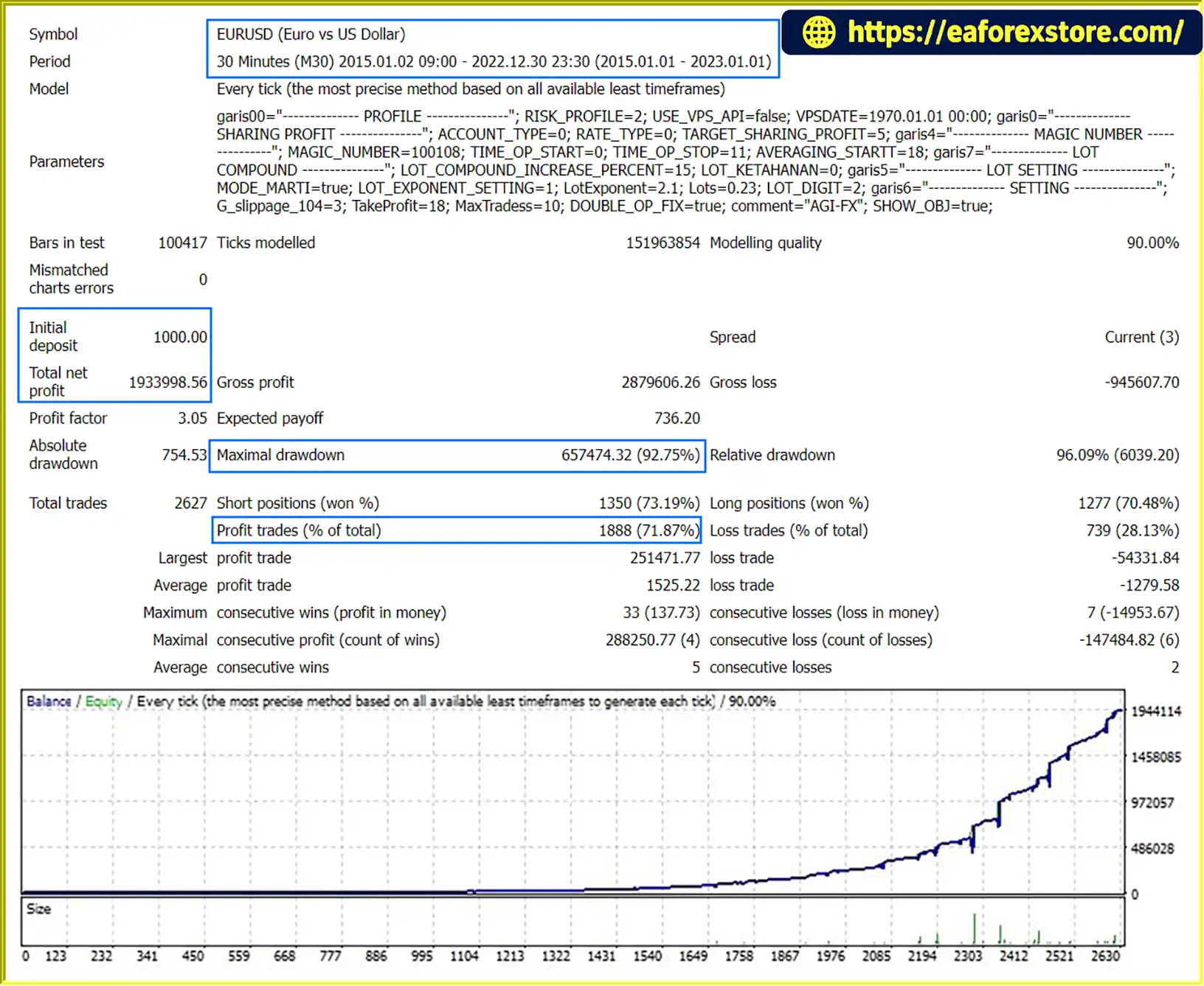
The developer reports eight years of backtesting from 2015 to 2022 and four years of real-time testing from 2019 to 2023.
Longer testing periods can help evaluate how a strategy behaved under different historical market conditions. However, the quality of the results depends on the underlying data, spread assumptions, commissions, execution modeling, and parameter selection.
Historical testing should be supplemented with independent testing using realistic broker conditions.
AGI FX1 uses a cash management approach to control trade sizing and account exposure according to its configuration.
Traders should review how the EA determines lot size, manages floating losses, and responds to changes in account equity. These details are particularly important for a strategy that uses averaging and martingale techniques.
The EA is designed for MetaTrader 4 and uses the MQ4/MT4 Expert Advisor environment.
This makes it suitable for traders who use MT4-compatible brokers and want to automate their EURUSD trading strategy. It should not be assumed to run natively on MT5 without a compatible version.
The developer describes AGI FX1 as easy to install and states that training is available for novice traders.
Installation support and educational guidance can help users understand the platform and configuration process. Nevertheless, beginners should learn how averaging and martingale strategies behave during extended drawdowns before using real capital.
AGI FX1 combines indicator-based analysis, automated trade execution, and an averaging martingale strategy within a predefined trading framework.
The EA monitors EURUSD price data on the M30 timeframe.
Its internal algorithm evaluates market conditions using a combination of technical indicators and programmed rules to identify potential trading opportunities.
When the EA’s entry conditions are satisfied, it generates a potential trading signal.
The specific indicator combinations and signal confirmation rules depend on the EA’s internal implementation and should be confirmed through the official documentation.
After identifying a valid signal, AGI FX1 can place trades automatically through the connected MT4 account.
Execution depends on broker availability, spreads, market liquidity, and order-processing conditions. Actual execution prices may differ from expected prices during periods of volatility.
The EA applies its averaging martingale logic according to its configured rules.
Depending on the strategy implementation, additional positions may be opened or position exposure may be adjusted when the market moves against an existing trade sequence. The goal is to manage the overall position group rather than relying exclusively on a single entry.
This process can increase exposure and floating losses during sustained market movements in the unfavorable direction. Understanding the strategy’s maximum position count and total potential lot size is therefore essential.
The EA uses its configured money management approach to determine trade sizing and manage account exposure.
The actual risk depends on the preset, lot progression, number of open positions, account balance, margin requirements, and the EA’s internal exit rules.
Traders can review the MT4 account history and any available MQL5 Signals records to evaluate the EA’s activity.
Monitoring equity drawdown, maximum floating loss, position accumulation, and margin usage provides a more complete assessment than looking at net profit alone.
AGI FX1 focuses on EURUSD trading using the M30 timeframe. This dedicated configuration provides a specific environment for evaluating its trading logic rather than applying the same settings indiscriminately across different instruments.
The EA performs market analysis and executes qualifying trades automatically according to its internal rules.
This can reduce the need for continuous manual chart monitoring and help maintain a consistent execution process.
Two preset configurations offer different starting points for traders with varying risk preferences.
However, users should compare the actual settings rather than relying on preset names alone, especially because averaging and martingale techniques can create substantial hidden exposure through floating losses.
The developer’s stated use of MetaQuotes-verified accounts provides a potential route for independent performance evaluation.
Reviewing the original MQL5 Signals page can help users assess the strategy’s reported historical behavior. Live records should be examined for drawdown, leverage, deposits, withdrawals, and consistency over time.
The developer reports historical testing covering 2015–2022 and real-time testing covering 2019–2023.
These claims offer a starting point for further investigation, but traders should inspect the actual reports and verify the testing methodology before drawing conclusions about reliability.
AGI FX1 EA MQ4 is intended for MetaTrader 4, a widely used platform for automated forex trading.
Its MT4 compatibility may appeal to traders who already use the platform and want to evaluate an automated EURUSD strategy within their existing trading environment.
The developer states that training is available for novice traders.
This may help users learn how to install the EA, select presets, and monitor performance. However, educational support should complement—not replace—an understanding of the risks associated with averaging and martingale trading.
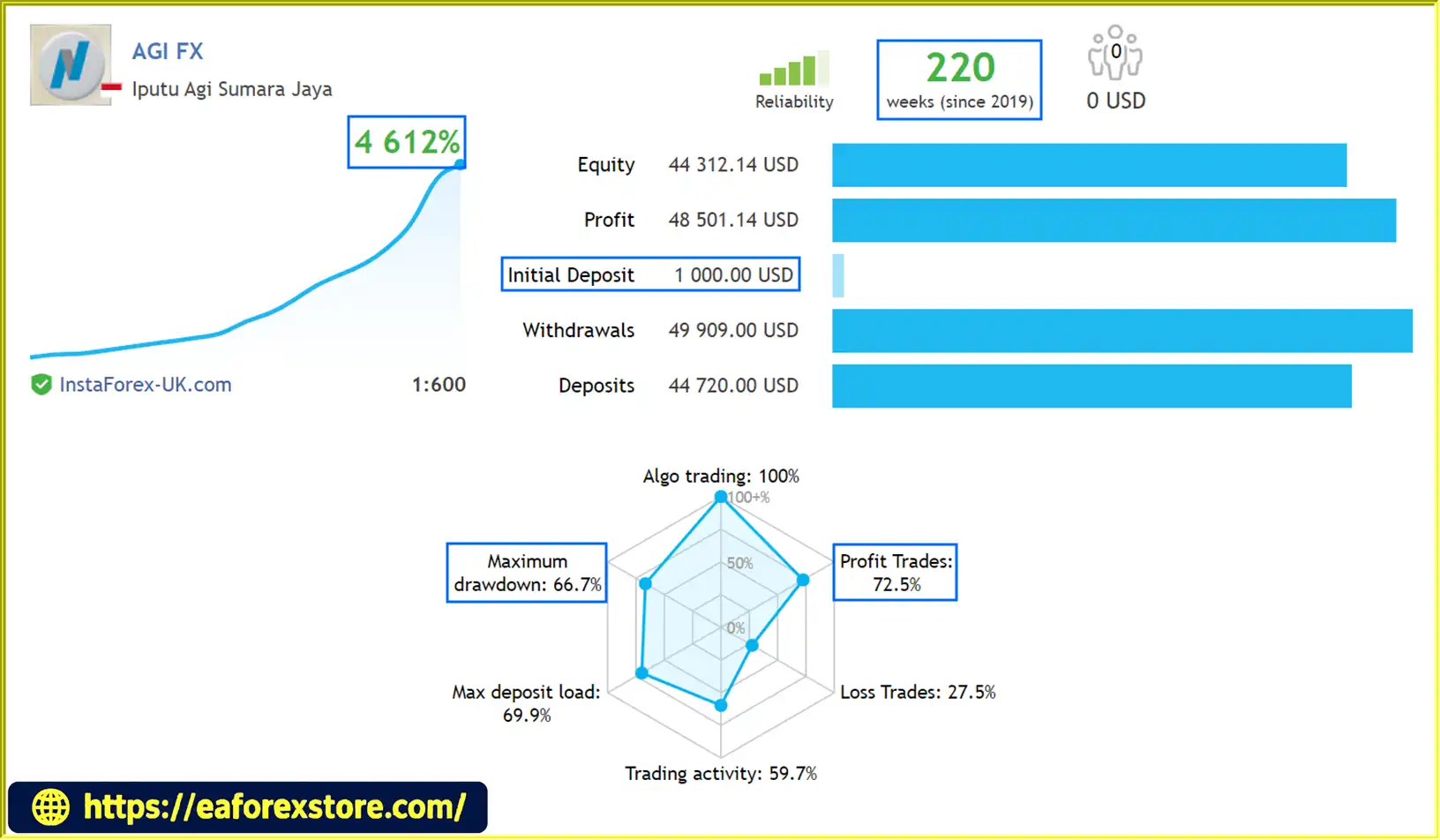
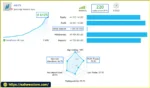
🔺AGI FX – 220 consecutive weeks
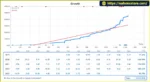
AGI FX1 EA MQ4 Signal Results
AGI FX1 MQ4 Signal Results
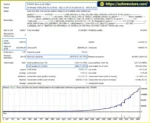
AGI FX1 EA MQ4 backts
Risk management is especially important when evaluating AGI FX1 EA MQ4 because its averaging martingale strategy can increase market exposure during unfavorable conditions.
Although the EA offers cash management and two risk presets, the supplied information does not specify every protective mechanism or its precise operating limits.
The Standard Risk configuration is intended to provide the default risk profile, while High Risk is designed for traders who accept greater exposure.
Before selecting either preset, verify the actual lot sizes, progression rules, maximum number of positions, and exit conditions. A lower initial lot size does not necessarily mean the overall strategy has low risk if additional positions can accumulate.
Averaging and martingale systems can experience extended periods of floating losses when the market trends persistently against their positions.
As more positions accumulate, total exposure and margin requirements can increase. A strong market move may cause significant drawdown or a margin call before the strategy can reach its intended exit conditions.
Traders should determine the maximum plausible position size and potential account loss under adverse market scenarios.
The EA’s cash management system should be assessed based on how it calculates position sizes and responds to account equity changes.
Check whether position sizing uses balance, equity, fixed cash amounts, or another method. Also verify whether the system has a hard limit on cumulative lot size or total exposure.
The developer’s reported MQL5 Signals monitoring can provide useful historical evidence, but a verified signal does not establish that future results will match the past.
Review the longest available history, equity drawdown, floating losses where visible, leverage, deposits, withdrawals, and the consistency of the results.
Different brokers may offer different leverage, margin requirements, execution conditions, and trading restrictions.
Even if the EA is described as compatible with all brokers, actual compatibility and performance must be tested with the specific broker and account type.
The supplied product information does not confirm whether AGI FX1 includes push notifications, email alerts, or dedicated margin-call warnings.
Check the official documentation for available alerts and monitor the MT4 Experts, Journal, and account history sections for execution errors and abnormal position accumulation.
Recommended risk management practices:
Follow these steps to install and configure AGI FX1 EA MQ4 on MetaTrader 4.
Obtain the official AGI FX1 EA MQ4 package from the developer or authorized provider.
Confirm that the supplied file is compatible with MT4 and review the included documentation, preset files, and installation instructions.
Launch MT4 and log in to your broker account.
Confirm that the platform is connected and the EURUSD symbol is available for trading.
.mq4 or compiled .ex4 file into the Experts folder.If the package includes source code in .mq4 format, compilation may be required through MetaEditor. If the developer supplies a compiled .ex4 file, install it as provided.
Open the EURUSD chart and select the M30 timeframe.
The M30 timeframe is the developer’s stated default configuration. Verify the correct symbol and ensure that sufficient historical price data is available for testing.
Locate AGI FX1 in the Navigator panel and drag it onto the EURUSD M30 chart.
Enable automated trading and review the EA’s properties. Confirm that any required permissions are appropriate for the supplied software.
Choose one of the available configurations:
Review the actual input values and preset files before proceeding. Confirm how the EA handles averaging, position sizing, and cumulative exposure.
According to the developer’s specifications:
These deposit figures are developer-provided guidelines, not guarantees that the account will have sufficient margin under all trading conditions.
Use the MT4 Strategy Tester to evaluate the EA with historical EURUSD data.
Where possible, use realistic spreads, commissions, and execution assumptions. Examine net profit, maximum drawdown, equity curve, trade frequency, and the largest number of simultaneously open positions.
Pay particular attention to prolonged adverse trends that could cause averaging positions to accumulate.
Run the EA on a demo account to observe its real-time behavior.
Verify that trade entries, averaging rules, exit conditions, position sizing, and margin usage behave as expected.
Compare the demo results with the developer’s published performance information where available.
Only consider live deployment after independently evaluating the strategy and understanding its risks.
Use an account size and risk configuration appropriate for your financial circumstances, monitor equity and margin regularly, and avoid increasing exposure solely to recover previous losses.
>>> Join VIP Membership Now <<<
AGI FX1 EA MQ4 is an automated EURUSD trading solution for MetaTrader 4 that combines indicator-based market analysis, averaging martingale trading, and cash management. Its two risk presets and claimed MQL5 Signals monitoring offer traders different ways to configure and evaluate the system.
The developer’s reported historical testing and live-account verification are useful starting points for due diligence. However, the original signal records and complete testing reports should be reviewed before relying on these claims.
The most important consideration is the EA’s averaging martingale strategy. While such systems may produce profitable results under certain market conditions, they can accumulate substantial floating losses when the market moves persistently against their positions. The resulting margin pressure can be significant even when the strategy’s historical win rate appears attractive.
AGI FX1 may be worth evaluating for traders who understand automated forex systems and want to investigate a predefined EURUSD trading strategy. Beginners should be particularly cautious and should not interpret the developer’s training offer or Standard Risk preset as evidence that the strategy is inherently safe.
Ultimately, the decision to use AGI FX1 EA MQ4 should be based on independently verified results, realistic drawdown analysis, and a clear understanding of its maximum potential exposure. Backtest and forward-test thoroughly, monitor live account behavior, and remember that historical performance does not guarantee future profits.
1. What Is AGI FX1 EA MQ4?
AGI FX1 EA MQ4 is an automated Expert Advisor designed for EURUSD trading on the MetaTrader 4 (MT4) platform. It uses technical indicators and programmed trading rules to identify potential market opportunities and execute trades automatically. The EA also incorporates averaging, martingale-based trade management, and cash management, making it important for users to understand its risk exposure before live deployment.
2. Which Currency Pair and Timeframe Does AGI FX1 EA MQ4 Support?
AGI FX1 EA MQ4 is designed specifically for EURUSD and primarily operates on the M30 timeframe. Traders should use a compatible MT4 broker and verify the EA's settings before trading. Although EURUSD is a highly traded currency pair, spreads, slippage, market volatility, and broker execution conditions can still affect the EA's performance.
3. How Does the Averaging and Martingale Strategy Work in AGI FX1 EA MQ4?
AGI FX1 uses an averaging and martingale-based approach to manage groups of trades according to its programmed rules. Depending on the implementation, the EA may add positions or adjust exposure when the market moves against an existing trade sequence. This approach may help manage certain trading scenarios, but it can also increase floating losses, total position size, and margin requirements during prolonged adverse market movements. Traders should verify the maximum number of positions and cumulative exposure before using the EA.
4. What Is the Difference Between Standard Risk and High Risk?
AGI FX1 EA MQ4 offers two preset configurations: Standard Risk and High Risk. Standard Risk is intended as the standard configuration, while High Risk is designed for traders willing to accept greater exposure. The exact differences depend on the preset parameters, so users should inspect the actual lot-sizing rules, averaging settings, and maximum position limits rather than relying on the preset names alone. Neither configuration guarantees a specific level of risk or return.
5. Does AGI FX1 EA MQ4 Have a Verified Live Trading Track Record?
The developer states that AGI FX1 has been monitored through MetaQuotes' MQL5 Signals service and reports historical backtesting from 2015 to 2022, alongside real-time testing from 2019 to 2023. These claims should be independently verified using the original signal page and available testing reports. Traders should examine equity drawdown, floating losses, deposits and withdrawals, leverage, and the monitoring period. A verified account does not guarantee future profitability.
6. What Are the Reported Performance Results of AGI FX1 EA MQ4?
The supplied product information reports a live signal win rate of 72.5% with a maximum drawdown of 67%. Its eight-year backtest reports a win rate of 71.87% and a maximum drawdown of 92.75%. These figures indicate substantial historical risk and should be checked against the original reports. A high win rate or large historical profit does not necessarily indicate a sustainable strategy, particularly when averaging and martingale techniques are involved.
7. What Is the Recommended Minimum Deposit for AGI FX1 EA MQ4?
According to the developer, the suggested minimum deposit is $100 for a Cent account or $4,000 for a Standard account. These are guidelines rather than guarantees of sufficient capital or safe operation. The appropriate balance depends on the broker's leverage, margin requirements, minimum lot size, averaging rules, and maximum potential exposure. Traders should test the EA on a demo account before committing real funds.
8. How Do You Install AGI FX1 EA MQ4 on MetaTrader 4?
To install AGI FX1 EA MQ4, obtain the official EA file, open MT4, and select File → Open Data Folder → MQL4 → Experts. Copy the supplied .mq4 or compiled .ex4 file into the Experts folder, refresh the Navigator panel, and attach the EA to an EURUSD M30 chart. Enable automated trading, select a risk preset, and review the EA's position-sizing and averaging settings. Finally, backtest the strategy and conduct demo forward testing before considering live trading.
In stock
In stock
In stock
In stock
In stock
Out of stock
No account yet?
Create an Account












 Automatic EA
 EA Best Seller
 Expert Advisor MT4
 Expert Advisor MT5
 HFT EA


Reviews
Clear filtersThere are no reviews yet.