









-
 Unlimited Activations
-
 Instant delivery
-
 Easy to install




 Unlimited Activations
Instant delivery
Easy to install
Unlimited Activations
Instant delivery
Easy to install
 Free Update
 Free Install Support

Alpha Compass FX EA MT4 is an automated Forex and CFD trading Expert Advisor designed primarily for Gold (XAUUSD) trading on the MetaTrader 4 platform. It aims to simplify short-term trading by analyzing market conditions and managing trades automatically according to its internal trading logic.
One of the main characteristics of Alpha Compass FX EA is its compact configuration structure. Instead of presenting users with a large number of visible technical parameters, the EA focuses on practical settings such as fixed lot size, trading hours, trade identification, and chart display. This setup gives traders direct control over several key operating preferences without requiring them to adjust numerous inputs.
The EA is designed to manage both buy and sell positions and operate within a user-defined trading schedule. Its chart display option also helps users monitor the EA’s status directly from the MT4 interface.
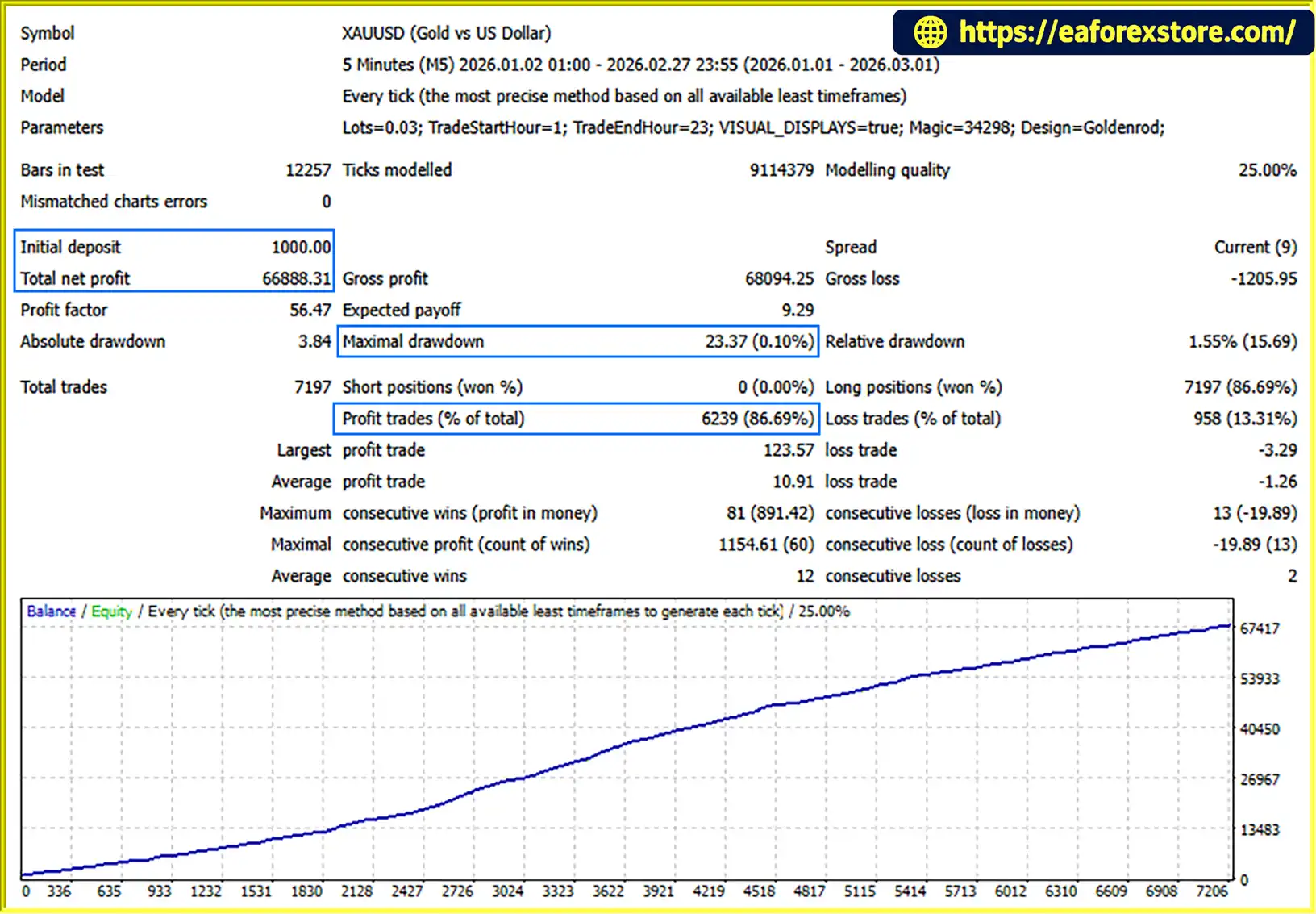
The supplied historical test reportedly shows a high profit factor, a high proportion of profitable trades, and relatively low displayed drawdown. However, the modelling-quality limitation means these results should be interpreted cautiously. Backtest statistics alone cannot establish how the EA will perform in live trading.
Alpha Compass FX EA MT4 is best evaluated through its trading records, execution behavior, and risk characteristics rather than its historical statistics alone. Gold can experience rapid price movements, and automated trading involves the risk of financial loss.
Alpha Compass FX EA is primarily designed for XAUUSD trading. It monitors market conditions and uses its internal trading logic to identify potential opportunities and execute trades automatically.
This approach can reduce the need for constant manual chart monitoring, although users should still supervise the EA and review its performance regularly.
The EA features a relatively compact Inputs structure focused on its main operating controls. These include trading volume, trading hours, visual display options, trade identification, and chart appearance.
This streamlined configuration may make the setup process easier for traders who prefer straightforward controls over extensive parameter adjustment.
Alpha Compass FX EA allows users to define its permitted trading period. The supplied configuration references a trading window from 01:00 to 23:00.
This broad schedule may allow the EA to operate across different intraday market sessions. Actual trading activity depends on the configured schedule, broker server time, and the EA’s internal trading conditions.
The EA supports fixed lot sizing, allowing users to specify the trading volume used by the system.
This provides direct control over position size. However, a fixed lot does not automatically mean fixed risk: the potential monetary loss can vary with stop-loss distance, market volatility, and the behavior of the EA’s position-management logic.
Alpha Compass FX EA can manage both buy and sell trades, allowing it to respond to potential opportunities in upward or downward price movements.
The exact entry conditions, exit rules, and criteria for choosing trade direction are determined by the EA’s internal algorithm. These details should not be inferred solely from its visible settings.
The EA uses a dedicated trade identifier, commonly implemented through a magic number in MetaTrader 4, to distinguish its positions from manual trades and those opened by other Expert Advisors.
This can support more organized trade management when several trading systems operate on the same account. Users should still verify how the EA handles existing positions and interactions with other automated strategies.
Alpha Compass FX EA includes a visual display option that can show trading information or interface elements directly on the MT4 chart.
This may help users monitor the system’s operating status without repeatedly opening separate windows. The precise information displayed depends on the EA’s implementation and configuration.
Alpha Compass FX EA is designed to automate several stages of the Gold trading process.
The EA monitors Gold price movements and evaluates market conditions using its internal trading logic. The exact indicators and analytical methods are not fully established by the visible Inputs structure.
When the EA’s internal conditions are satisfied, it may identify an opportunity to open a buy or sell position. The precise signal-generation rules should be confirmed through the developer’s documentation or further technical testing.
The system can open positions without requiring the user to enter each trade manually. The configured fixed lot size determines the trading volume, subject to broker requirements and the EA’s implementation.
The EA manages its trading activity according to its internal rules and available settings. Since the complete entry and exit algorithm is not disclosed in the supplied information, specific stop-loss, take-profit, trailing-stop, or other exit features should not be assumed without verification.
The EA operates within the trading hours specified by the user. The referenced 01:00–23:00 window offers a broad potential operating period, but users should confirm whether these times follow broker server time and how the EA handles positions near the beginning or end of the schedule.
When the visual display option is enabled, the EA can present information on the chart to help users monitor its operation.
Although these features provide insight into the EA’s configuration and behavior, they do not reveal the full strategy behind each trading decision.
Alpha Compass FX EA is designed around Gold, an instrument known for its liquidity and substantial price fluctuations. Traders who prefer concentrating on one market may find a dedicated XAUUSD system easier to evaluate than an EA designed to trade numerous unrelated instruments.
However, Gold’s volatility can increase both profit opportunities and potential losses.
The compact configuration structure emphasizes practical settings such as lot size, trading hours, and chart display. This may make the EA more approachable for users who want to control its basic operation without adjusting many visible parameters.
The ability to define trading hours allows users to determine when the EA is permitted to operate. This can be useful for testing different market periods and evaluating how the system behaves under varying trading conditions.
Automated execution can help reduce the need for manual order entry and make it easier to follow a consistent trading process. Nevertheless, automation does not eliminate market risk or guarantee that every trade will be executed at the expected price.
A dedicated trade identifier helps separate the EA’s positions from those of other systems. This can be useful for traders who operate multiple Expert Advisors or combine automated and manual trading on one MT4 account.
The supplied backtest reportedly shows favorable historical statistics, including a high profit factor, a high proportion of profitable trades, and relatively low displayed drawdown.
These figures should be reviewed alongside the test’s modelling quality, data source, spread assumptions, commission settings, and execution conditions. Without reliable modelling and sufficiently detailed reports, historical performance may not accurately represent real-market behavior.
Alpha Compass FX EA MT4 backtets
Risk evaluation is essential when using Alpha Compass FX EA MT4, particularly because it trades Gold, which can experience sharp price changes during economic announcements, market openings, and periods of changing liquidity.
The fixed lot setting allows users to control trade volume, but it does not by itself establish how much money can be lost on an individual trade or across multiple positions.
Before using the EA, verify whether it includes stop-loss protection, take-profit rules, maximum open-position limits, or account-level equity protection. These functions should not be assumed unless confirmed by the software or its documentation.
The supplied 01:00–23:00 trading window covers a broad portion of the day. Longer operating hours may expose the EA to more market conditions, but they can also increase exposure to volatile periods, spread widening, and unexpected price movements.
Confirm the time zone used by the EA and consider testing its behavior around major economic releases and periods of reduced liquidity.
A high profit factor or high percentage of winning trades does not necessarily indicate low risk. A strategy can report many profitable trades while remaining vulnerable to occasional large losses.
The stated modelling-quality limitation is especially important. Review the complete backtest report, including:
No automated trading system can eliminate the possibility of loss. Users should only trade with capital they can afford to lose.
Follow these general steps to install Alpha Compass FX EA on MetaTrader 4. The exact process may vary depending on the file supplied by the developer.
Step 1: Download the EA
Obtain the official Alpha Compass FX EA MT4 file from the authorized source. Confirm that the package is compatible with MetaTrader 4.
Step 2: Open the MT4 Data Folder
Launch MetaTrader 4 and select File → Open Data Folder.
Step 3: Copy the EA File
Open the MQL4 folder and then the Experts folder. Copy the supplied EA file into this directory.
Step 4: Refresh the Navigator
Return to MT4 and refresh the Navigator panel. If the EA does not appear, restart the platform.
Step 5: Open a Gold Chart
Open an XAUUSD chart and attach Alpha Compass FX EA to it. Follow the developer’s recommended chart and timeframe settings if they are provided, as the supplied information does not establish a required timeframe.
Step 6: Configure the Inputs
Set the fixed lot size, trading schedule, trade identifier, and visual display options according to your preferences. Verify the schedule’s time zone and ensure that the selected lot size is appropriate for your account.
Step 7: Enable Automated Trading
Enable MT4’s automated-trading function and confirm that the EA is permitted to trade.
Step 8: Test and Monitor
Run the EA on a demo account first. Review its trading activity, execution quality, drawdown, and behavior around the configured trading hours before considering live deployment.
For the most accurate setup, consult the developer’s documentation and verify all available risk-management settings before running the EA on a live account.
>>> Join VIP Membership Now <<<
Alpha Compass FX EA MT4 is an automated Gold trading Expert Advisor that emphasizes a simple configuration structure, fixed lot sizing, adjustable trading hours, buy and sell position management, and on-chart monitoring. These features may appeal to traders who want a straightforward way to automate parts of their XAUUSD trading process.
Its reported historical statistics may provide a starting point for evaluation, but the modelling-quality limitation means the results should be treated cautiously. The visible settings also do not reveal the complete trading algorithm or confirm the availability of specific protective features.
Before choosing Alpha Compass FX EA, prioritize reliable testing, realistic trading costs, and a clear understanding of its potential drawdown. A simple interface can make an EA easier to configure, but it does not necessarily make the underlying strategy safer.
As with all automated trading systems, past performance does not guarantee future results, and losses are possible.
1. What Is Alpha Compass FX EA MT4?
Alpha Compass FX EA MT4 is an automated trading Expert Advisor designed primarily for Gold (XAUUSD) trading on the MetaTrader 4 platform. It uses its internal trading logic to identify potential trading opportunities and manage buy and sell positions automatically. The EA features configurable lot sizes, trading hours, trade identification, and an on-chart visual display.
2. Is Alpha Compass FX EA MT4 Profitable?
Alpha Compass FX EA MT4 has reported historical backtest results with favorable performance statistics. However, the reliability of these results requires careful evaluation because the supplied backtest has a modelling-quality limitation. Actual trading performance may vary depending on market conditions, spreads, slippage, commissions, and broker execution. Past performance does not guarantee future results, and traders may lose money.
3. Which Currency Pair Does Alpha Compass FX EA MT4 Trade?
Alpha Compass FX EA MT4 is designed primarily for Gold (XAUUSD) trading. Gold can experience significant price fluctuations during economic announcements and periods of changing market liquidity. Before using the EA, verify the recommended symbol and broker compatibility, including contract specifications, spreads, and minimum lot requirements.
4. Does Alpha Compass FX EA MT4 Support Fixed Lot Sizing?
Yes. Alpha Compass FX EA MT4 includes a fixed lot size setting that allows users to specify their preferred trading volume. However, fixed lot sizing does not guarantee a fixed financial risk. Potential losses depend on price movements, stop-loss settings, position management, and the EA's internal trading logic. Choose a lot size appropriate for your account balance and risk tolerance.
5. Can I Customize the Trading Hours in Alpha Compass FX EA MT4?
Yes. The EA provides configurable trading hours, with the supplied configuration referencing a trading window from 01:00 to 23:00. This allows users to define when the EA is permitted to trade. However, you should confirm whether the schedule follows broker server time and test how the EA handles open positions when the permitted trading period ends.
6. Is Alpha Compass FX EA MT4 Suitable for Beginners?
Alpha Compass FX EA MT4 may appeal to beginners because it offers a relatively simple configuration structure with practical settings such as lot size, trading hours, and chart display. Nevertheless, automated trading still involves financial risk. Beginners should understand position sizing, margin requirements, drawdown, and Gold market volatility before using the EA. Testing on a demo account is recommended before live trading.
7. Does Alpha Compass FX EA MT4 Have Stop-Loss and Risk Protection Features?
The available product information does not confirm the EA's complete stop-loss logic, maximum open-position limits, or account-level equity protection. Users should review the official documentation and test the EA to determine which protective mechanisms are implemented. A fixed lot size alone is not sufficient to control all potential losses, particularly when trading volatile instruments such as Gold.
8. How Do I Install Alpha Compass FX EA MT4 on MetaTrader 4?
To install Alpha Compass FX EA MT4, download the authorized EA file and open MetaTrader 4. Select File → Open Data Folder, navigate to MQL4/Experts, and copy the EA file into that folder. Refresh the Navigator panel or restart MT4, then attach the EA to an XAUUSD chart and configure the available inputs. Enable automated trading and test the EA on a demo account before considering live deployment. Follow the developer's documentation for any additional setup requirements.
In stock
In stock
In stock
In stock
In stock
Out of stock
No account yet?
Create an Account












 Automatic EA
 EA Best Seller
 Expert Advisor MT4
 Expert Advisor MT5
 HFT EA


Reviews
Clear filtersThere are no reviews yet.