


What is Blue Xpert Prime +3.0 EA?
Blue Xpert Prime is a reliable and straightforward Expert Advisor (EA) designed to promote stable, controlled growth of your trading account. With its conservative settings and a clear risk-to-reward strategy, this EA is perfect for traders who prioritize low-risk trading and a long-term investment approach.
Focusing on quality trades rather than quantity, Blue Xpert Prime helps traders achieve consistent profits while minimizing drawdowns. This makes it an excellent automated trading solution for those seeking steady growth and risk-managed performance.
Core Features of Blue Xpert Prime +3.0 EA
-
Conservative Lot Sizing for minimal exposure
-
Single-Trade Focus to prevent overexposure and reduce drawdowns
-
Fixed Stop Loss (SL) and Take Profit (TP) for a balanced risk-to-reward ratio
-
Dedicated Trade Tracking with unique magic number to avoid conflicts
Additional Features of Blue Xpert Prime +3.0 EA
-
Long-Term Setup with larger stop loss to avoid premature exits
-
Simple yet effective configuration promoting steady account growth
-
Overexposure protection by limiting open trades to one at a time
Why Choose Blue Xpert Prime +3.0 EA?
-
High Capital Protection through conservative risk management
-
Prioritized High Profitability with 1:2 risk-to-reward framework
-
Stable and Consistent trading for long-term reliability
-
User-Friendly Interface suitable for all experience levels
Blue Xpert Prime +3.0 EA Backtest Results and Performance Review
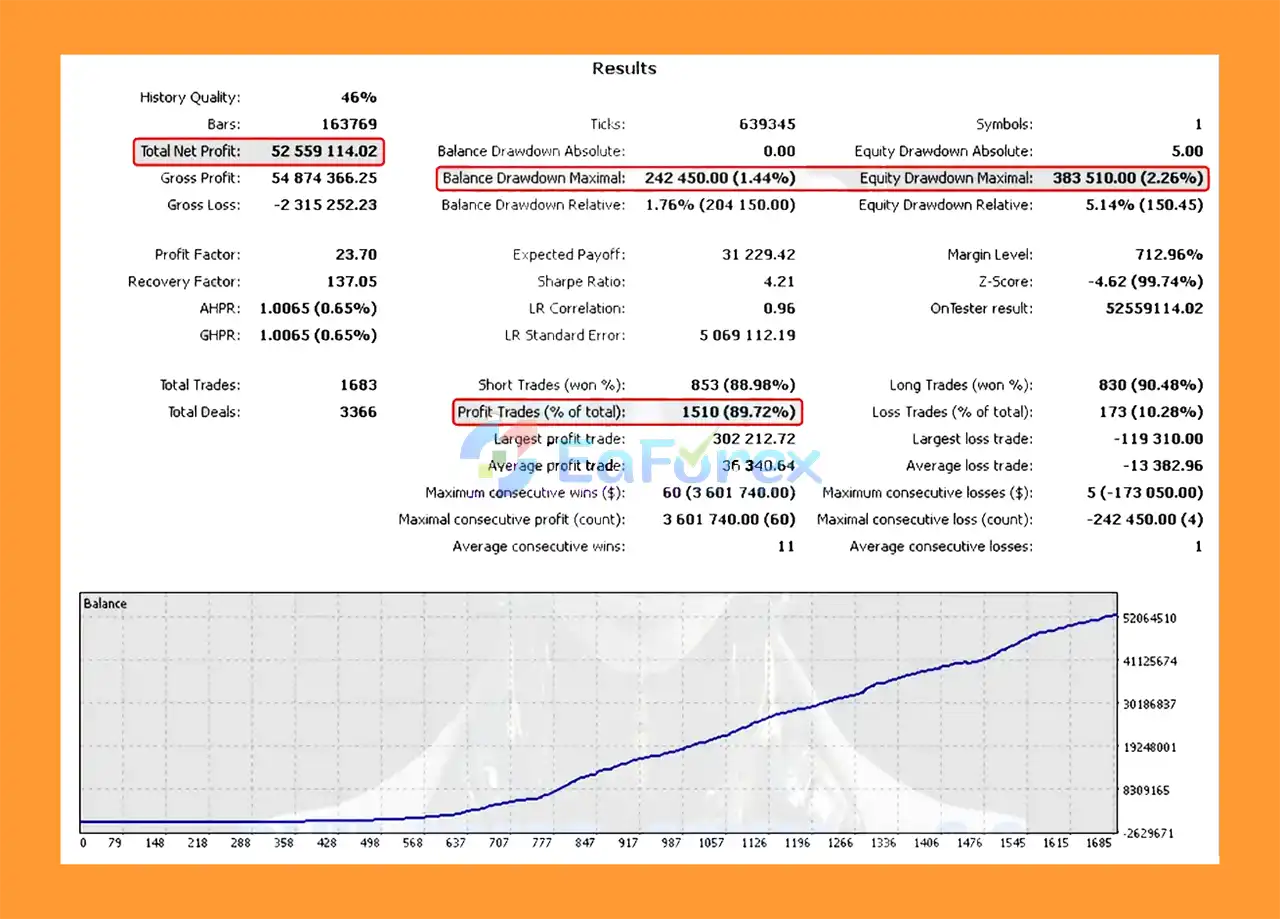
🔻Overview of impressive backtest statistics demonstrating profitability and stability.
- Total Net Profit: 52.56 million
- Win Rate: 89.72%
- Maximal Balance Drawdown: 1.44%
- Maximal Equity Drawdown: 2.26%
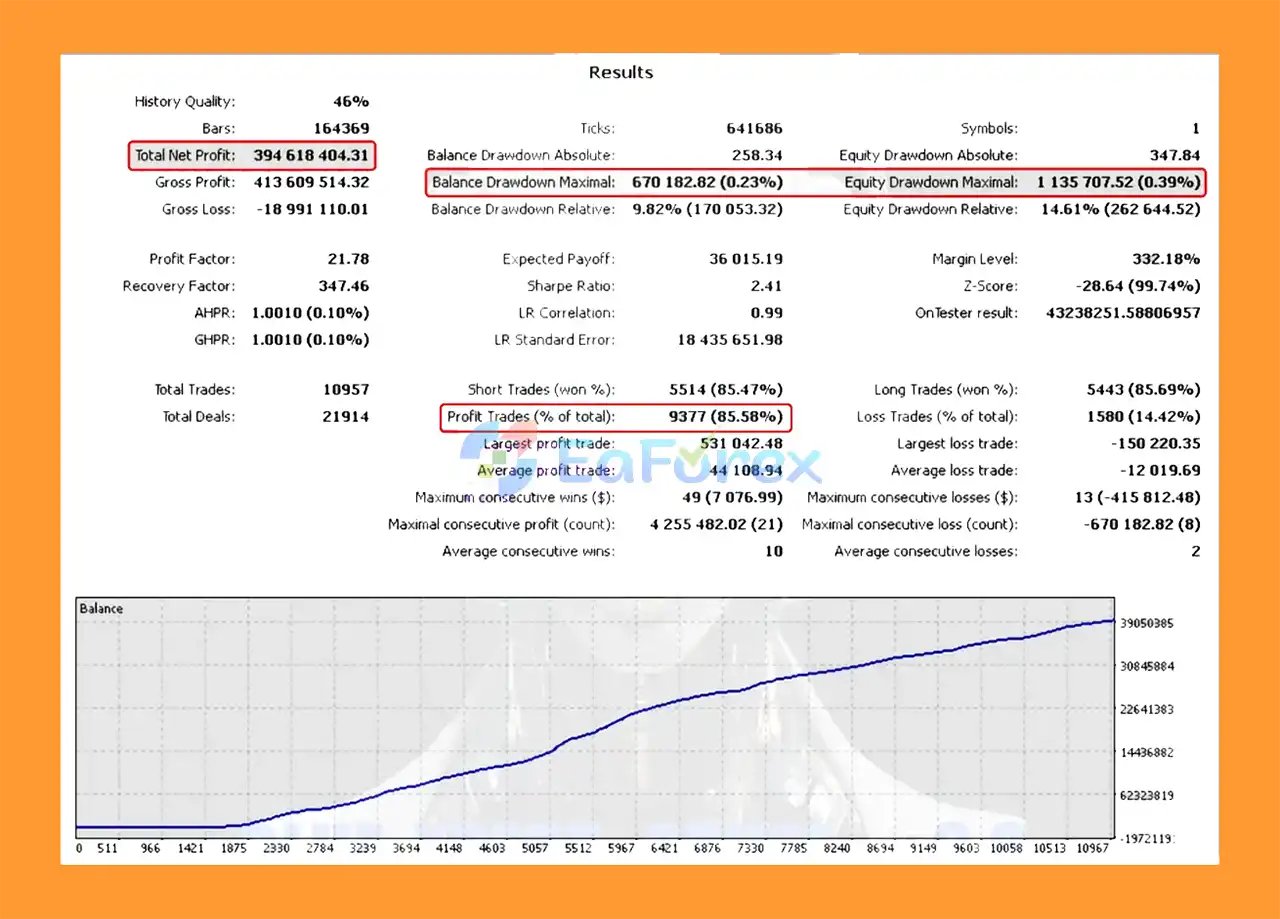
- Total Net Profit: 394.62 million
- Win Rate: 85.58%
- Maximal Balance Drawdown: 0.23%
- Maximal Equity Drawdown: 0.39%
What’s Included in the Download Package?
- Experts: Blue Xpert Prime +3.0.ex5
>>> Join VIP Membership Now <<<
How To Set Up EA
🔻The Blue Xpert Prime is designed for cautious, longer-term trading on MetaTrader 4, focusing on solid risk management and a favorable risk-to-reward ratio. Follow this simple guide to set up the EA correctly.
🟢 Quick Installation Steps
🔻Download the Blue Xpert Prime +3.0 1.0 EA File
- Ensure you have the
.ex4file for MT4. - Get the file from your provider or official source.
🔻Open MetaTrader 4 Platform
- Click
File > Open Data Folder. - Navigate to
MQL4 > Experts.
🔻Install the EA
- Copy the Blue Xpert Prime
.ex4file into theExpertsfolder. - Restart MetaTrader 4.
🔻Attach the EA to a Chart
- Open any currency pair chart (preferably a pair with good volatility).
- Use the default timeframe or the timeframe recommended by the provider.
- Drag the EA from the Navigator panel onto the chart.
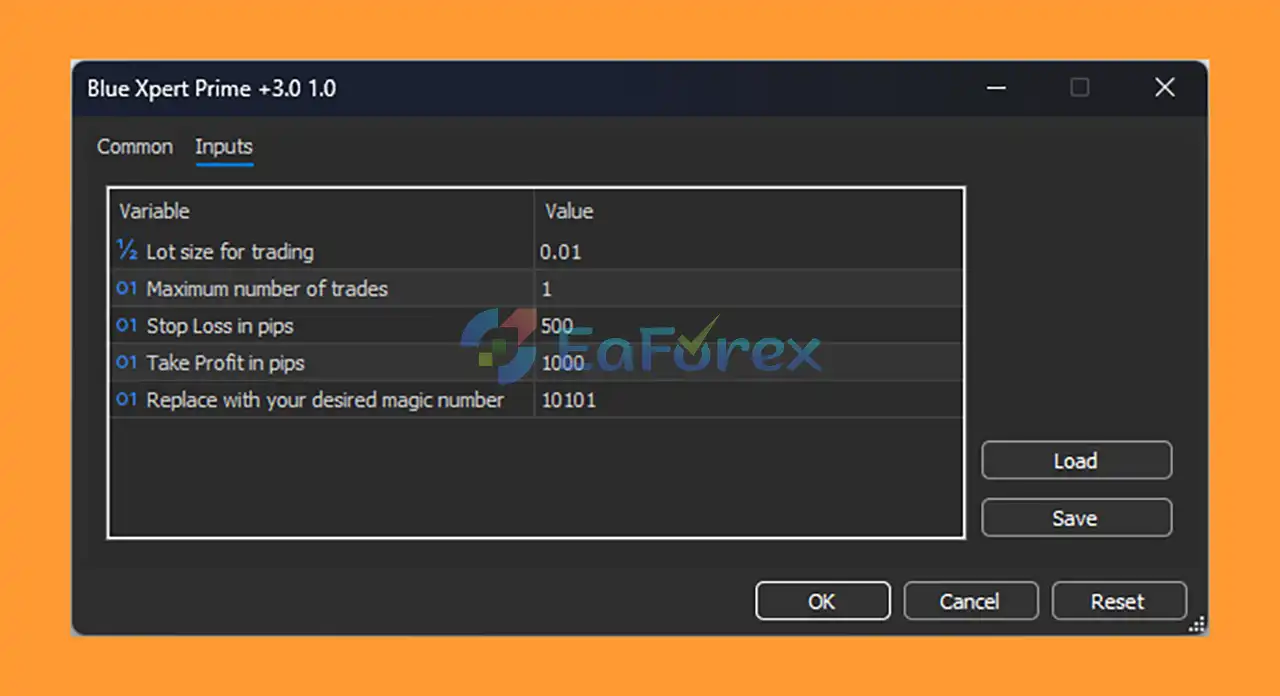
🔻Set the Recommended Input Parameters:
- Lot Size:
0.01(small, low-risk trades) - Maximum Number of Trades:
1(limits to one open trade for safer risk management) - Stop Loss:
500 pips(wide stop loss for swing/position trading) - Take Profit:
1000 pips(aiming for a 1:2 risk-reward ratio) - Magic Number:
10101(unique trade ID for clean order management)
🔻Enable AutoTrading
- Make sure the AutoTrading button is active in MT4.
- Confirm “Allow live trading” is checked in EA properties.
Conclusion
In summary, Blue Xpert Prime +3.0 EA is a highly reliable and user-friendly Expert Advisor designed for traders who prioritize conservative risk management and consistent long-term growth. Featuring a single-trade focus, fixed stop loss and take profit levels, and a solid 1:2 risk-to-reward ratio, this EA minimizes drawdowns while maximizing stable profits. Its emphasis on quality over quantity trades makes it an excellent choice for those seeking a safe, steady automated trading strategy.
>>> Reviewed by Jason Stap <<<



