


What is Dolphin EA MT4?
Dolphin EA for MT4 is a fully automated Forex trading robot built for the MetaTrader 4 platform, designed to deliver consistent results through trend-based strategies and intelligent risk control. Inspired by the agility and precision of a dolphin, this EA adapts to changing market conditions, making it suitable for both volatile and stable environments.
Key Features of Dolphin EA MT4
🔹Smart Hedging Strategy
- Uses hedging-based trade logic for frequent small wins
- Avoids prolonged exposure during market swings
🔹Conservative Entry Logic
- Prioritizes safe entries during low-risk periods
- Avoids impulsive entries in volatile market conditions
🔹 Intelligent Risk Management
- Auto lot adjustment, optimized drawdown recovery
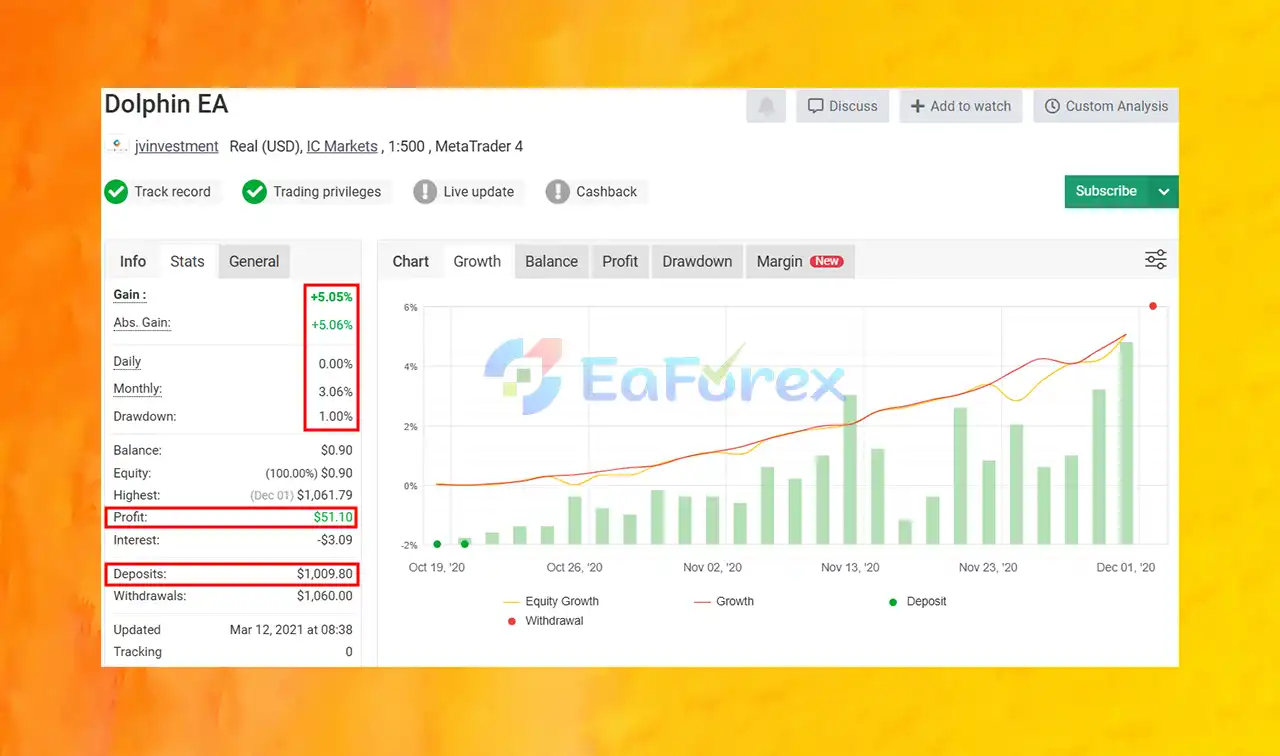
- Keeps max drawdown extremely low (1.06%)
🔹 Time-Restricted Trading
- Operates during selected trading sessions
- Avoids high-risk market hours (e.g., news spikes, illiquid times)
🔹 Fully Customizable
- Parameters like lot size, hours, and risk level can be tweaked
- Suited to various capital sizes and risk profiles
🔹EURUSD Optimization
- Specially tuned for EURUSD on the MT4 platform
- Performs well even with low starting capital
Why choose Dolphin EA MT4?
- No Martingale or Grid – Safe strategy by design
- Backed by Real Results – Verified by Myfxbook
- Ultra-Low Drawdown – Just 1.06%, ideal for capital protection
- Profitable Yet Stable – Delivers steady monthly returns (~3.06%)
- Beginner-Friendly – Simple setup, user guides included
- Flexible Capital Requirements – Works even with small deposits
Dolphin EA MT4 Evaluantio
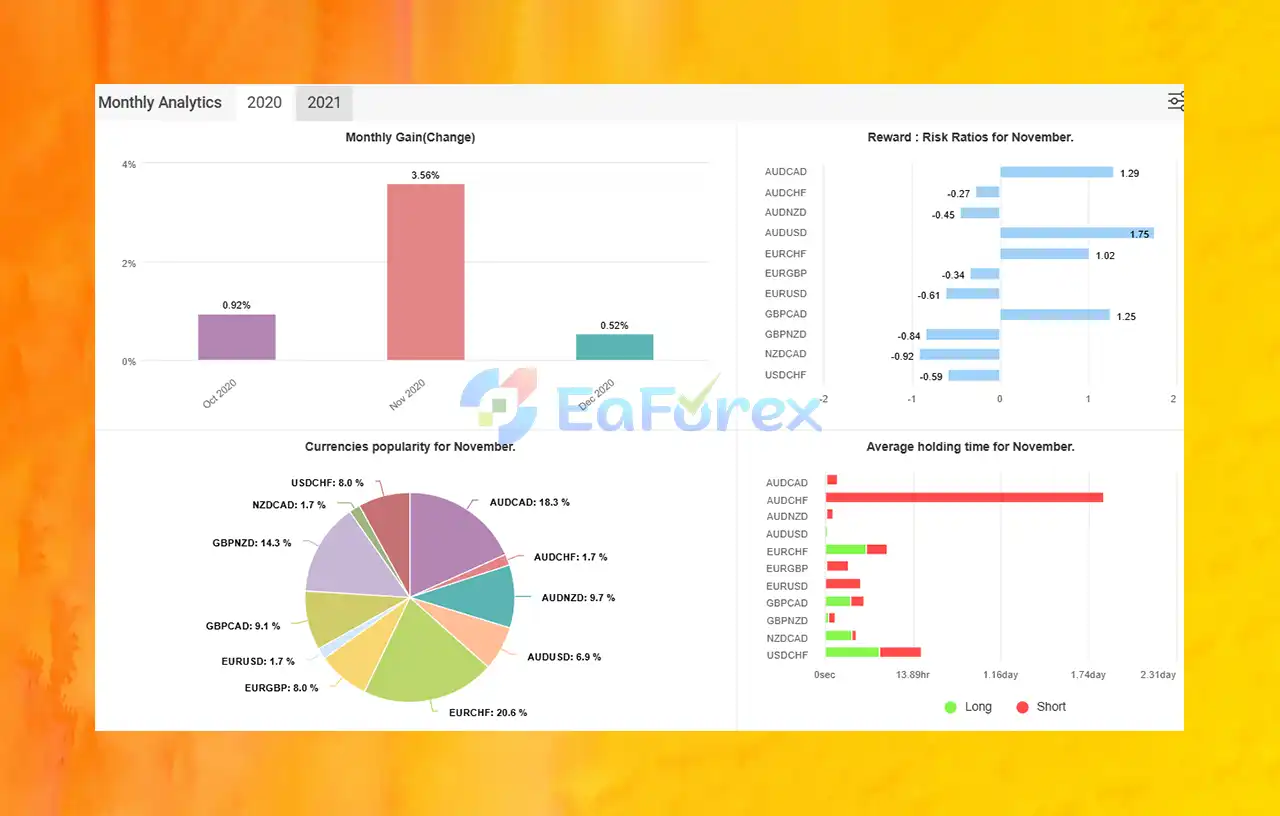
🔹Myfxbook Verified Live Results:
- Total Return: +5.05%
- Initial Deposit: $1,009
- Total Withdrawn: $1,060
- Monthly Return: 3.06%
- Maximum Drawdown: 1.06%
- Focus on steady, low-risk growth
What’s Included in the Download Package?
Expert Advisor File: Dolphin EA v1.0_fix.ex4
>>> Join VIP Membership Now <<<
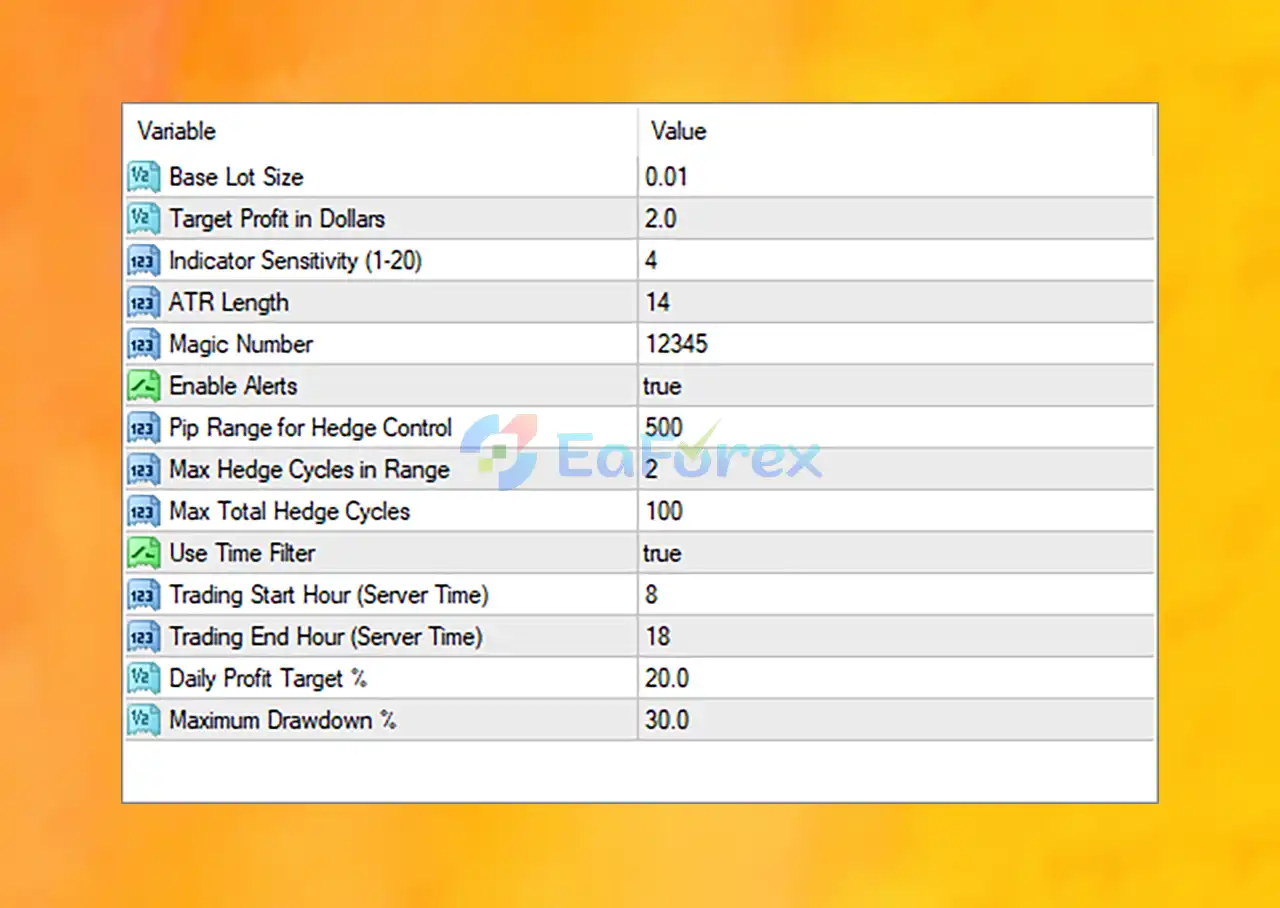
Dolphin EA MT4 Settings Overview
Dolphin EA MT4 is a smart, hedging-based trading robot designed for XAUUSD (Gold) on the MetaTrader 4 platform. Follow this quick installation guide to deploy it efficiently and safely:
🔹 Step 1: Download & Install the EA File
- Download the Dolphin EA MT4 (.ex4) file.
- Open MetaTrader 4.
- Go to File → Open Data Folder → MQL4 → Experts.
- Paste the EA file into the Experts folder.
- Restart MetaTrader 4 to load the EA.
🔹 Step 2: Attach to a Chart
- Open an XAUUSD (Gold) chart with the M15 or H1 timeframe.
- Drag Dolphin EA MT4 from the Navigator panel onto the chart.
- Ensure AutoTrading is enabled in the top toolbar.
🔹 Step 3: Configure Core Settings
📌 Basic Inputs
- Base Lot Size:
0.01 - Target Profit per Trade:
$2.00
→ Supports low-risk growth through small, consistent gains.
📌 Signal & Volatility Filters
- Indicator Sensitivity:
4 - ATR Length:
14
→ Ensures accurate entries by filtering out low-quality signals during ranging markets.
📌 Hedging System
- Hedge Pip Range:
500 - Max Hedge Cycles in Range:
2 - Max Total Hedge Cycles:
100
→ Provides controlled drawdown protection with a smart recovery method.
📌Trade Timing
- Use Time Filter:
true - Start Hour:
8 - End Hour:
18
→ Limits trading to peak volatility hours (London–New York overlap) for better performance.
📌Daily Risk Management
- Daily Profit Target:
20.0% - Maximum Drawdown Limit:
30.0%
→ Auto shutdown upon reaching limits—ideal for protecting capital.
📌Miscellaneous
- Enable Alerts:
true - Magic Number:
12345
→ Enables seamless use with multiple EAs or trading pairs.
Conclusion
Overall, Dolphin EA MT4 is a reliable and safe forex robot tailored for traders who prioritize capital protection and consistent performance. With its hedging-based strategy, smart risk control, and low drawdown, this EA offers a conservative yet effective approach to automated trading. Verified Myfxbook results and EURUSD-specific optimization make it a go-to choice for low-risk forex automation. Whether you’re just starting out or looking to diversify with a stable strategy, Dolphin EA MT4 offers a proven, user-friendly solution for sustainable trading success.
>>> Reviewed by Jason Stap <<<



