
What is Eclipse Trading EA MT4?
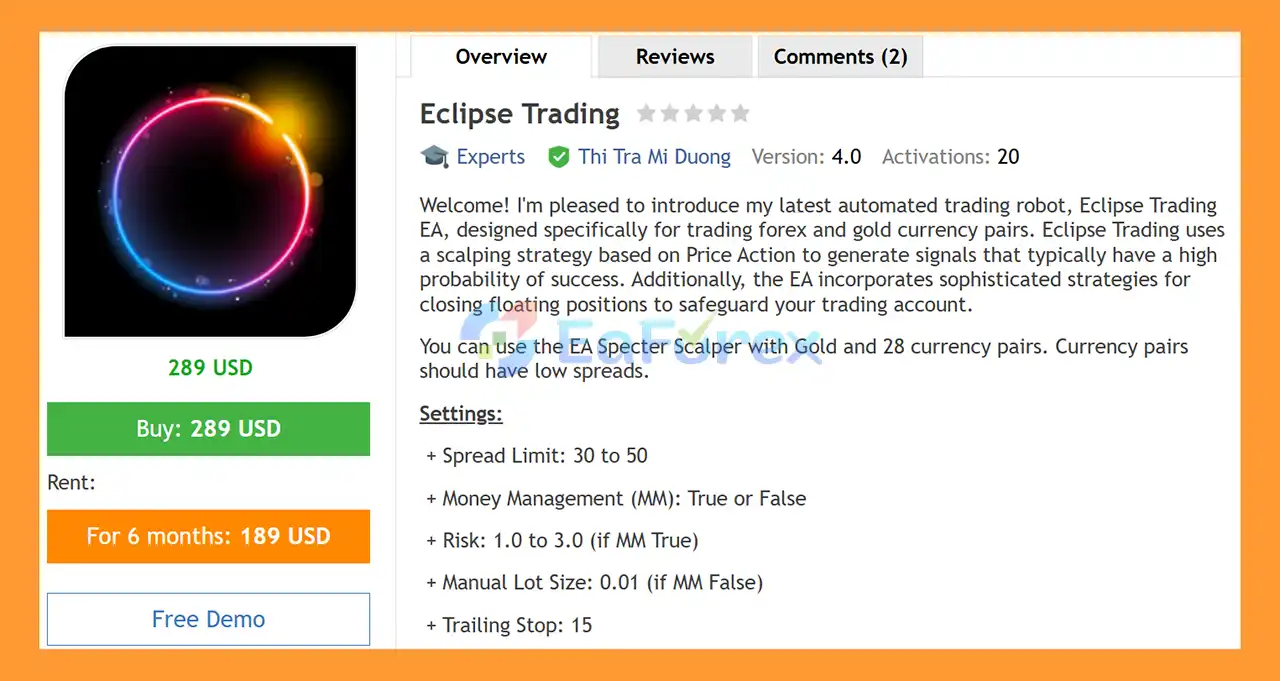
Eclipse Trading EA MT5 is a fully automated scalping Expert Advisor designed for trading Forex and Gold (XAUUSD) with high precision. The EA is built around a Price Action–based scalping strategy, aiming to capture short-term market movements with a high probability of success.
About the Developer
- Author: Thi Tra Mi Duong
- Experience: Over +4 years of experience on MQL5.
- Notable Products: Eclipse Trading EA MT4, Epic Gold EA MT4, Micro Scalper MT4, Epic Gold EA MT4 and other advisors.
- Flagship Product: Eclipse Trading EA MT4 is rated as the best performing product of the year.
>> Join our Channel Telegram <<<
Main Features of Eclipse Trading EA MT4
- Price Action Scalping Strategy: Generates high-probability trade signals based on real market behavior.
- Multi-Asset Trading: Supports Gold (XAUUSD) and up to 28 Forex currency pairs with low spreads.
- Fully Automated Trading: Operates 24/5 without manual intervention.
- Hidden Stop Loss Protection: Conceals stop levels to help protect capital from broker manipulation.
- Trailing Stop Management: Uses dynamic trailing stops to secure profits efficiently.
- High Accuracy Focus: Designed to achieve a win rate above 80% under optimal conditions.
Additional Features
- Flexible Money Management: Supports both automatic risk-based MM and fixed lot sizing.
- Low Capital Requirement: Does not require a large initial deposit to start trading.
- Floating Position Control: Advanced exit logic helps manage and close open trades safely.
- Spread Filtering: Trades only when spread conditions are within defined limits.
- Fast Scalping Execution: Optimized for low-latency environments and ECN brokers.
- Magic Number Support: Enables safe operation alongside other Expert Advisors.
Why Choose Eclipse Trading EA MT4?
- High-Probability Scalping: Built for traders who prefer frequent, precise market entries.
- Gold & Forex Versatility: One EA for both XAUUSD and multiple currency pairs.
- Beginner-Friendly Setup: Simple parameters and clear recommendations.
- Account Safety Focus: Hidden stop loss and intelligent trade management protect capital.
- Low Entry Barrier: Minimum recommended balance of $200.
- Optimized for ECN Brokers: Best performance with low spreads and fast execution.
Eclipse Trading EA MT4 Backtest Results
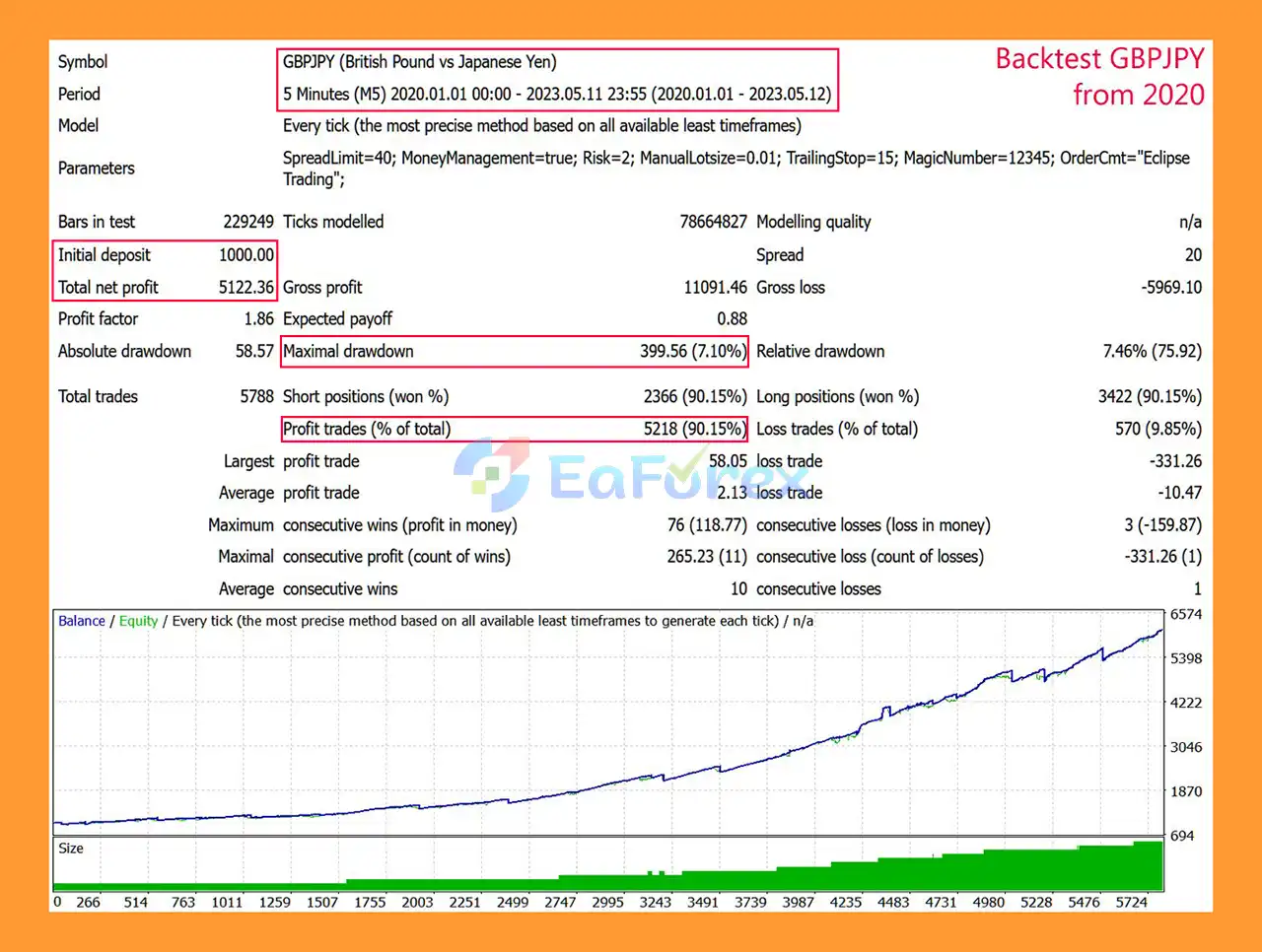
🔺GBPJPY pair – 3 years
- Initial Deposit: $1,000
- Total Net Profit: $5,122.36
- Win Rate (% of total): 90.15%
- Maximum Drawdown: 7.10%
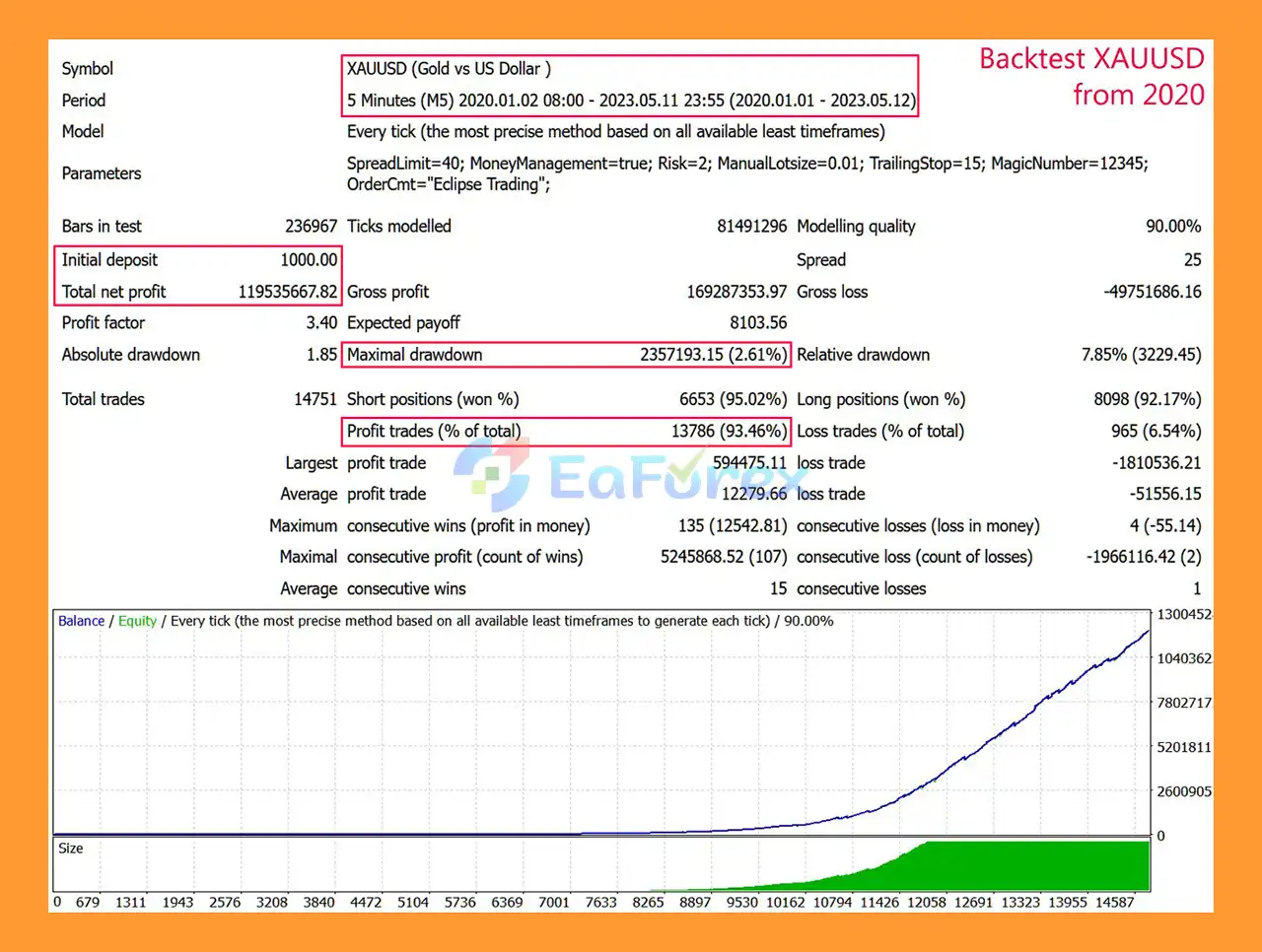
🔺XAUUSD pair – 3 years
- Initial Deposit: $1,000
- Total Net Profit: $119.36 million
- Win Rate (% of total): 93.46%
- Maximum Drawdown: 2.61%
What’s Included in the Download Package?
- Experts: Eclipse Trading EA v4.0_fix.ex4
- EA SETUP.txt
How To Set Up EA
🔺Eclipse Trading EA is an automated Forex robot designed for MetaTrader 4 . It focuses on risk-controlled trading with flexible money management and trailing stop options, making it suitable for both beginner and intermediate traders. Follow these steps to correctly install Eclipse Trading EA MT4 on MT4:
Step 1: Prepare for Installation
🔺Before starting, make sure you have:
- MetaTrader 4 or 5 installed
- The EA file:
Eclipse_Trading_EA.ex4(MT4) or.ex5(MT5) - A trading account with low-spread conditions (ECN recommended)
Step 2: Install Eclipse Trading EA in MetaTrader
- Open MetaTrader
- Go to File → Open Data Folder
- Navigate to:
- MT4:
MQL4 → Experts
- MT4:
- Copy the Eclipse Trading EA file into the Experts folder
- Restart MetaTrader
Step 3: Attach EA to a Chart
- Open a currency pair chart (recommended: EURUSD, GBPUSD, USDJPY)
- Select a timeframe (M15 or H1 recommended)
- Drag Eclipse Trading EA from the Navigator panel onto the chart
- Enable the following options in the settings window:
- ✅ Allow Live Trading
- ✅ Allow DLL Imports (if applicable)
- Click OK
Step 4: Configure EA Settings
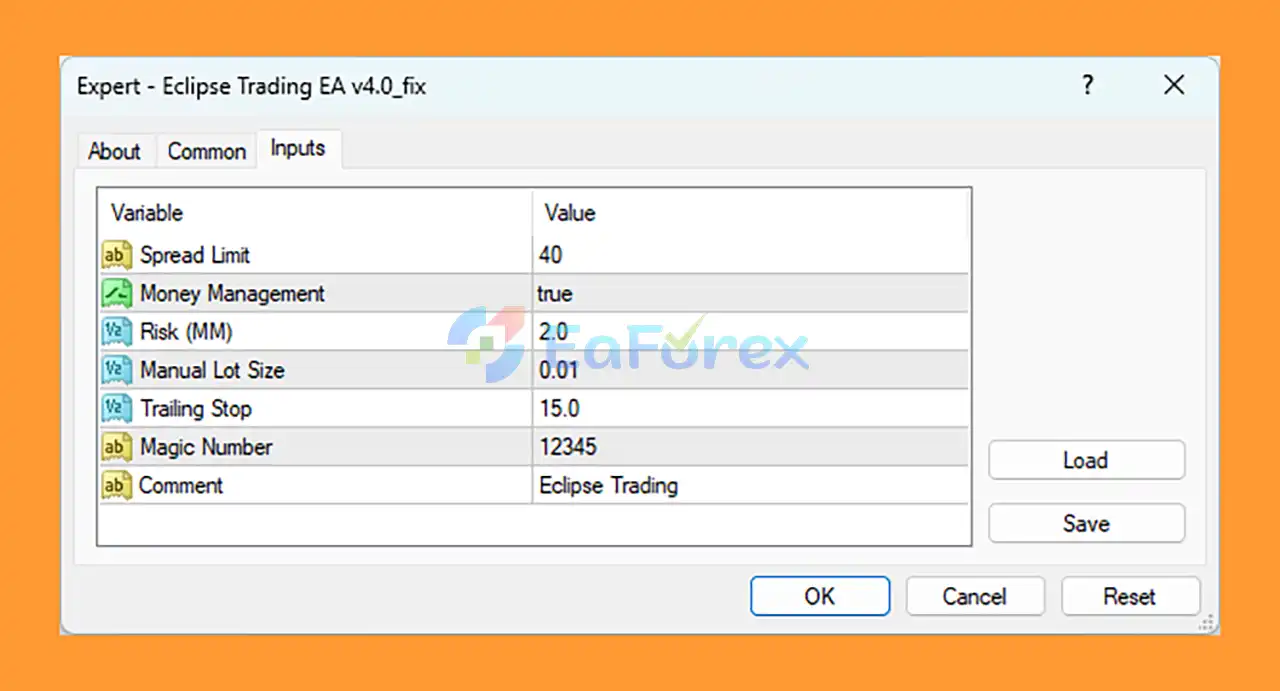
🔺Based on the image:
| Parameter | Recommended Value | Description |
|---|---|---|
| Spread Limit | 40 | EA will not trade if spread exceeds this limit |
| Money Management | true | Enables automatic risk-based lot calculation |
| Risk (MM) | 2.0% | Risk per trade when money management is enabled |
| Manual Lot Size | 0.01 | Used if Money Management is disabled |
| Trailing Stop | 15 | Automatically trails stop-loss by 15 points |
| Magic Number | 12345 | Unique ID for EA trades |
| Comment | Eclipse Trading | Text shown on trades |
Step 5: Enable Auto Trading
-
MT4: Turn on AutoTrading
🔺The EA is running when a smiley face or play icon appears in the chart.
🟡Recommended Trading Tips
- Use low-spread brokers to reduce slippage
- Suitable for M15–H1 timeframe
- Adjust risk percentage based on account size
- Avoid trading during major news events
🟡Final Notes
🔺Eclipse Trading EA is easy to set up and uses smart money management with trailing stop to protect your capital. Once installed and properly configured, it will execute trades automatically with minimal intervention, making it ideal for both beginner and intermediate Forex traders.
Conclusion
In summary, Eclipse Trading EA MT4 is a high-precision, fully automated scalping robot designed for both Forex and Gold (XAUUSD) traders who seek accuracy, speed, and consistent performance. Built on a price action–based scalping strategy with hidden stop loss protection, advanced trailing stops, and flexible money management, Eclipse Trading EA MT4 delivers high win rates with controlled drawdowns. Backed by strong multi-year backtests, ECN broker optimization, and a beginner-friendly setup, this Expert Advisor is an excellent choice for traders looking for a reliable, low-capital, and efficient scalping solution on MetaTrader 4.
>>> Reviewed by Jason Stap <<<