

What is EuroStable EA MT4?
EuroStable EA MT4 is an automated Forex trading robot built specifically for EUR/USD on the M15 timeframe, designed for stable, long-term performance with low maintenance. It features dual trading modes, news filtering, grid and mild Martingale logic, auto-lot scaling, and fully customizable risk settings. The EA is crafted for traders who want consistent account growth, beginner-friendly setup, lifetime updates, and 24/7 support. Operating exclusively on MetaTrader 4, EuroStable EA provides a balanced approach between safe, conservative trading and higher-frequency opportunities through its two built-in strategy versions.
About the Developer
• Author: RobotForexPro
• Experience: Over +5 years of experience on MQL5.
• Notable Products: EuroStable EA, Smart Profit TrendPro EA, MultiPair EA, JapanStrike EA and other advisors.
• Flagship Product: EuroStable EA is rated as the best performing product of the year.
>> Join our Channel Telegram <<<
Main Features of EuroStable EA MT4
- Pair-specific optimization, engineered exclusively for EUR/USD on M15 to maximize stability and long-term consistency.
- Dual strategy modes (Scalping + Conservative) allowing users to choose between more active trading or safer, slower growth.
- Integrated News Filter, reducing exposure during high-impact events and preventing grid escalation during price spikes.
- Automatic lot scaling, increasing trade volume proportionally to balance for controlled account compounding.
- Advanced grid entry system, placing buy/sell orders at fixed Step intervals to capture mean-reversion patterns.
- Mild Martingale recovery, using a low multiplier to correct losing cycles without aggressive lot jumps.
- Beginner-friendly configuration, enabling new traders to start immediately using safe default settings.
Additional Features
- Clear parameter visibility, allowing experienced traders to fine-tune TP, TRS, grid spacing, and risk levels.
- Short TP targets (around 50 points) designed to capture frequent micro-profits suited to scalp-style grid trading.
- Customizable grid and Martingale spacing, giving users precise control over distance between orders and recovery strength.
- No fixed SL by default, relying instead on controlled grid logic and equity-based protection for drawdown stability.
- Auto-lot growth for profitable accounts, expanding position size as the balance increases to accelerate long-term growth.
- Stable performance during liquid sessions, benefiting from EUR/USD’s tight spreads and predictable volatility patterns.
- Supports long-term compounding, ideal for traders who maintain strict drawdown settings and conservative risk parameters.
Why Choose EuroStable EA MT4?
- Perfect for beginners, offering simple defaults and zero optimization requirements for initial setup.
- Consistent, long-term growth, thanks to steady grid logic, precise EUR/USD tuning, and smart recovery mechanics.
- Enhanced safety tools, including a News Filter, controlled Martingale, and risk-limiting grid behavior.
- Built for stability, avoiding aggressive lot multipliers and focusing on gradual, safe account expansion.
- Flexible customization, allowing advanced users to adjust TP, grid spacing, and risk to match personal strategies.
- Ideal for disciplined traders, as auto-lot scaling and grid behavior require proper risk management for best results.
- Lifetime updates & 24/7 support, ensuring long-term reliability and continuous improvement for MT4 users.
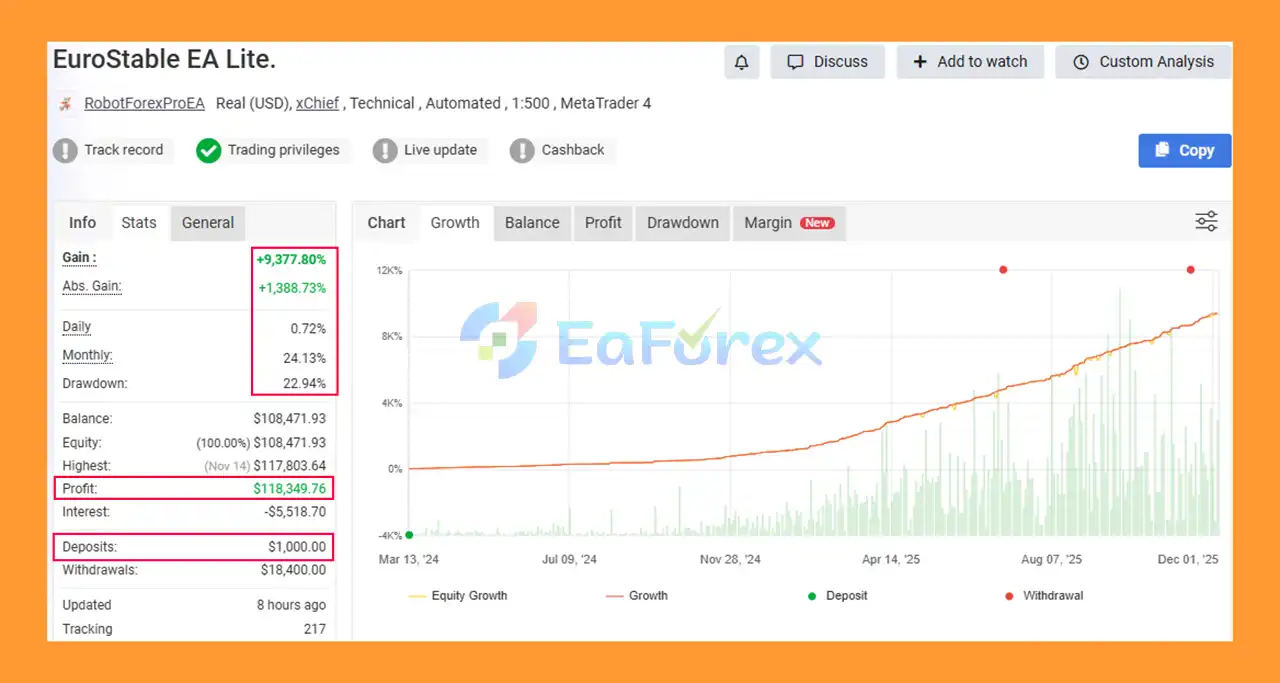
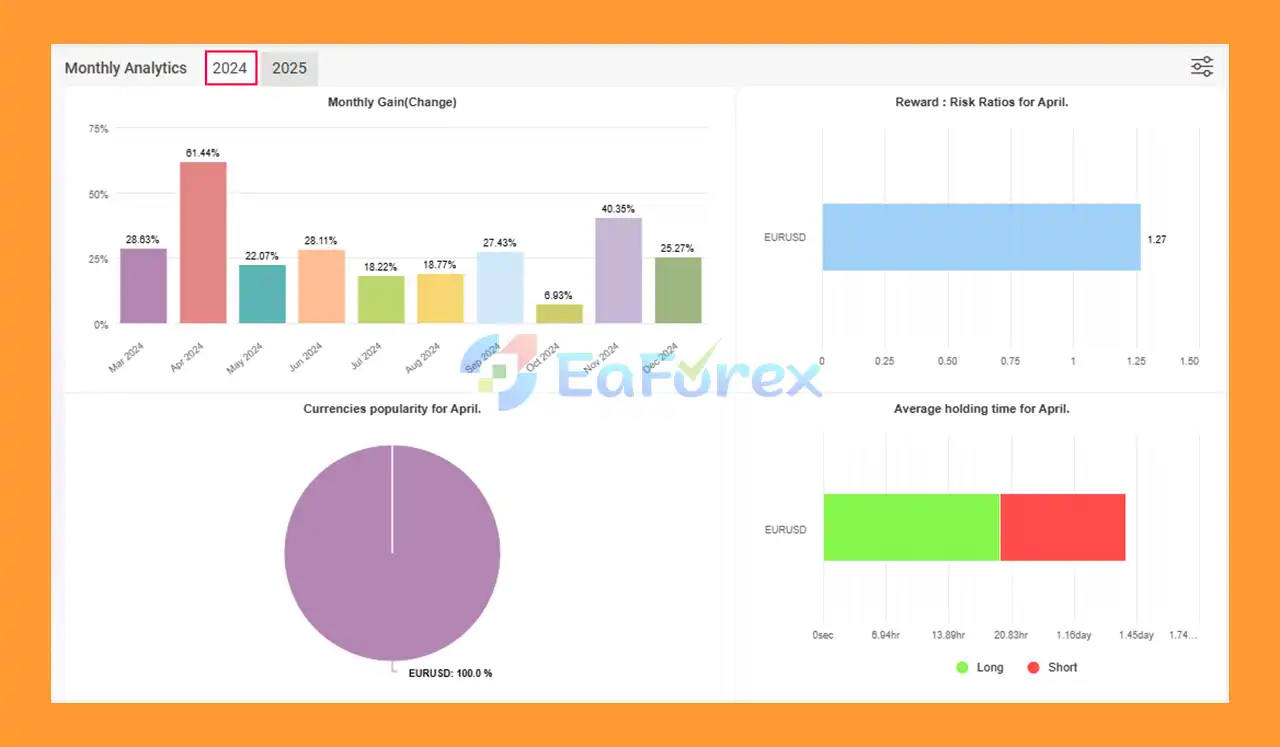
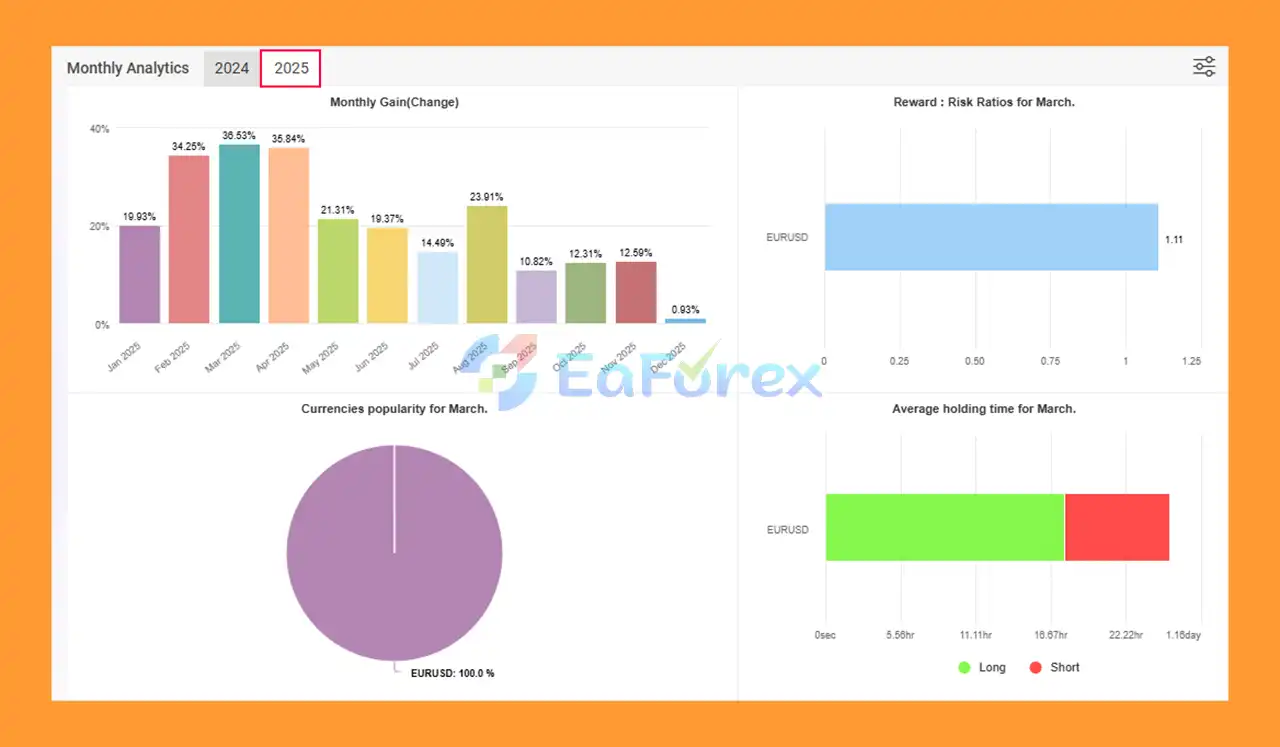
EuroStable EA MT4 Verified Profitable By MyFxBook
🔺EUR/USD - 12 consecutive months
- Initial Deposit: $1,000
- Total Gain: +9,354.38%
- Average Daily Profit: 0.72%
- Average Monthly Profit: 24.21%
- Maximum Drawdown: 22.94%
What’s Included in the Download Package?
- Experts: EuroStable EA v3.3_fix.ex4
- Indicators: ESIndicator.ex4
- SetFiles: ICE FX NEWS FILTER SIGNAL.set
How To Set Up EA
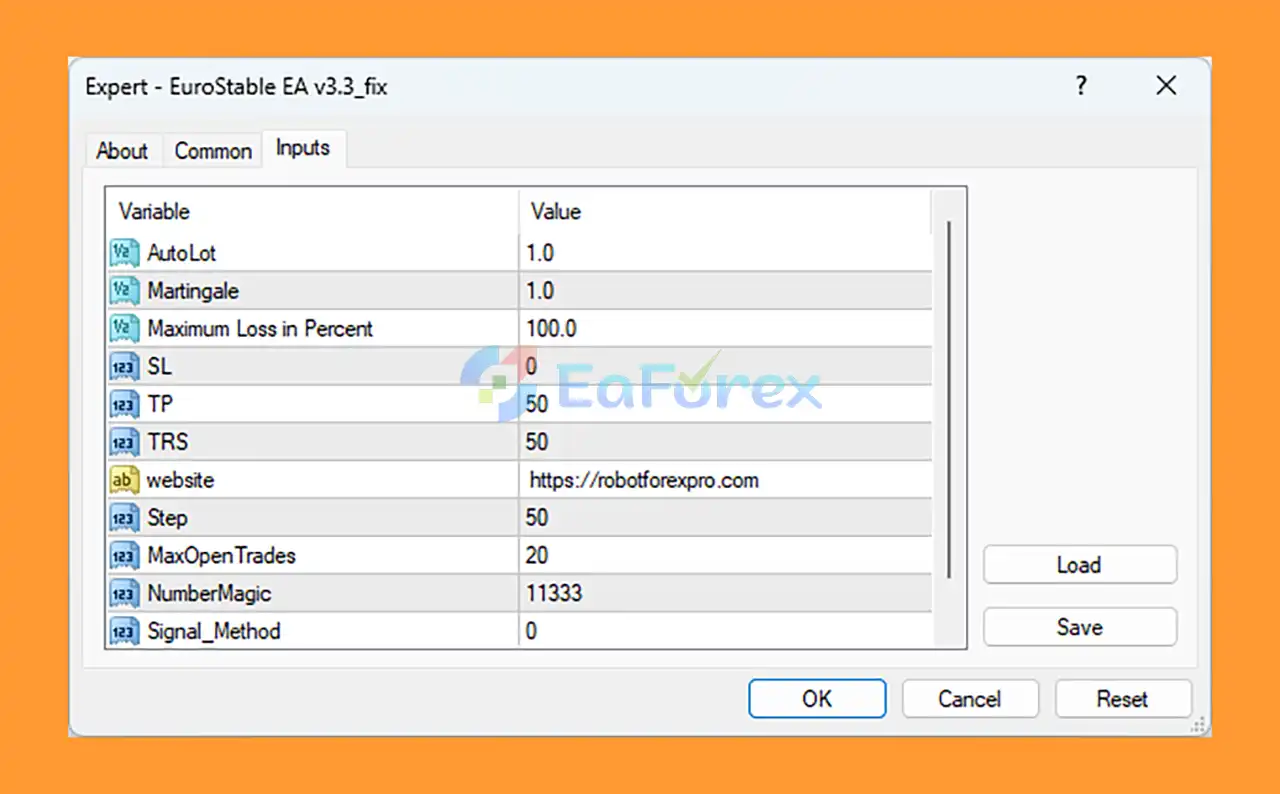
🟢Installing and configuring EuroStable EA MT4 is straightforward when the EA file is placed correctly in the MQL4 Experts folder and the input settings are applied exactly as shown. Parameters like AutoLot, Martingale, Step, MaxOpenTrades, and TP control the EA’s trading behavior, allowing you to manage risk and optimize performance. By following this guide, you ensure the EA runs smoothly, executes trades automatically, and maintains stable operation across market conditions.
🔺Step 1: Download the EA File
- Obtain the EuroStable EA file (
.ex4or.mq4) from your provider or download page.
🔺Step 2: Open MT4
- Launch your MetaTrader 4 platform.
🔺Step 3: Access the MQL4 Experts Folder
- Go to File → Open Data Folder
- Navigate to:
MQL4 → Experts - Copy the EA file into the Experts directory.
🔺Step 4: Restart MT4
- Close and reopen the MT4 platform to load the new EA.
🔺Step 5: Enable Automated Trading
- Click AutoTrading (button must turn green)
- Go to Tools → Options → Expert Advisors, enable:
- Allow automated trading
- Allow DLL imports
🔺Step 6: Attach EuroStable EA to a Chart
- From the left Navigator panel:
- Expand Expert Advisors
- Drag EuroStable EA v3.3_fix onto your trading chart
- Choose the currency pair recommended by your provider (commonly EURUSD)
🟢Final Check Before Running EuroStable EA
- ✔ Auto trading is ON
- ✔ Correct chart timeframe (usually M5 or M15)
- ✔ Low spread broker recommended
- ✔ VPS recommended for 24/7 stability
- ✔ Margin level safe enough for diverse trading strategies
Conclusion
In summary, EuroStable EA MT4 is a EUR/USD-optimized automated trading system built on the M15 timeframe, offering stable long-term growth through dual trading modes, smart grid logic, mild Martingale recovery, and an integrated News Filter for safer operation. Designed for both beginners and advanced traders, it features auto-lot scaling, customizable risk parameters, and reliable compounding performance backed by verified Myfxbook results. With simple installation, lifetime updates, and 24/7 support, EuroStable EA MT4 provides a balanced, low-maintenance solution for consistent Forex profitability and disciplined account expansion.
>>> Reviewed by Jason Stap <<<