


What is Idol EA MT4?
Idol EA MT4 is a sophisticated trend scalping Expert Advisor designed specifically for the MetaTrader 4 (MT4) platform. This powerful trading robot accurately detects key buy and sell zones by analyzing price consolidation levels and calculating the probability of trend continuation, ensuring highly optimized and precise trade execution for consistent profitability.
About the Developer
- Author: Evgeniy Zhdan
- Experience: 12 years in MQL5 development
- Other notable products: Infinity Trader EA, GOLD Scalper PRO
- Idol EA MT4: his top-performing product to date
>>> Join our Channel Telegram <<<

Key Features of Idol EA
🔻 Advanced Trend Scalping Strategy
- Analyzes price consolidation zones
- Uses probability-based analysis to detect optimal buy/sell signals
- Prioritizes trend continuation setups
🔻Conservative, Risk-Controlled Trading
- Avoids Martingale and other risky strategies
- Designed to protect capital in all market conditions
🔻 Dynamic Trade Management Tools
- Built-in Stop Loss, Take Profit, and Trailing Stop features
- Smart exit options for increased flexibility
🔻 Multi-Pair Support & Full Automation
- Supports major Forex pairs (USDJPY, EURUSD, GBPUSD)
- Optimized for M5 timeframe
- 100% hands-free trading
Why choose Idol EA MT4?
🔻 Precision with Advanced Algorithms
- Detects high-probability entries using cutting-edge logic
- Ensures accurate and timely trade execution
🔻 Fully Automated & Beginner-Friendly
- No manual input required
- Simple setup with pre-configured presets
🔻 Robust Risk Management
- Configurable lot sizing, SL/TP ratios, and account protection mechanisms
🔻 Multi-Currency Performance
- Works effectively across multiple Forex pairs
- Proven results in varied market conditions
Idol EA MT4 Performance Review
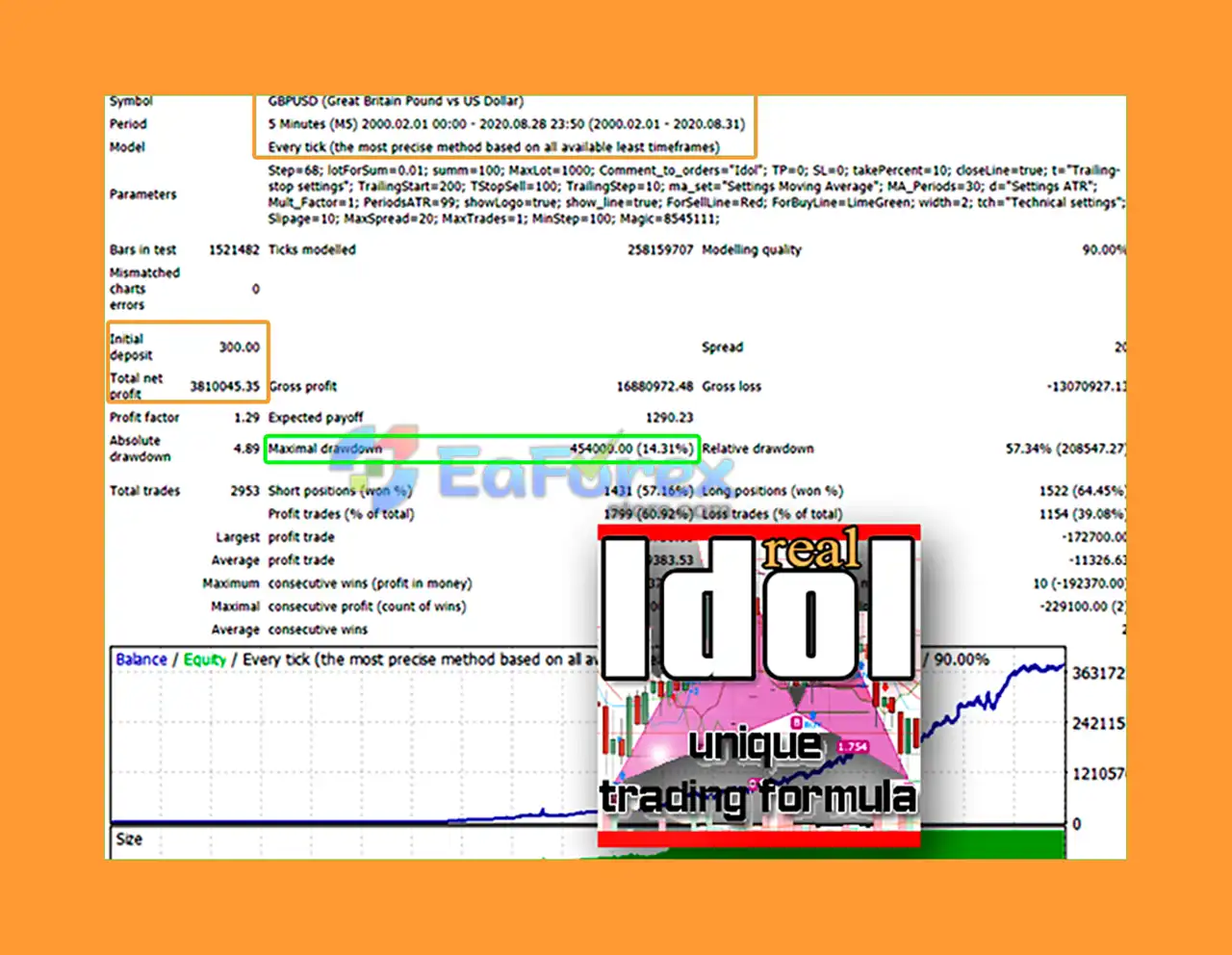
🔻GBPUSD Backtest (2000–2020)
- Initial Deposit: $300
- Total Net Profit: $3.8M
- Win Rate: 60.92%
- Max Drawdown: 14.31%
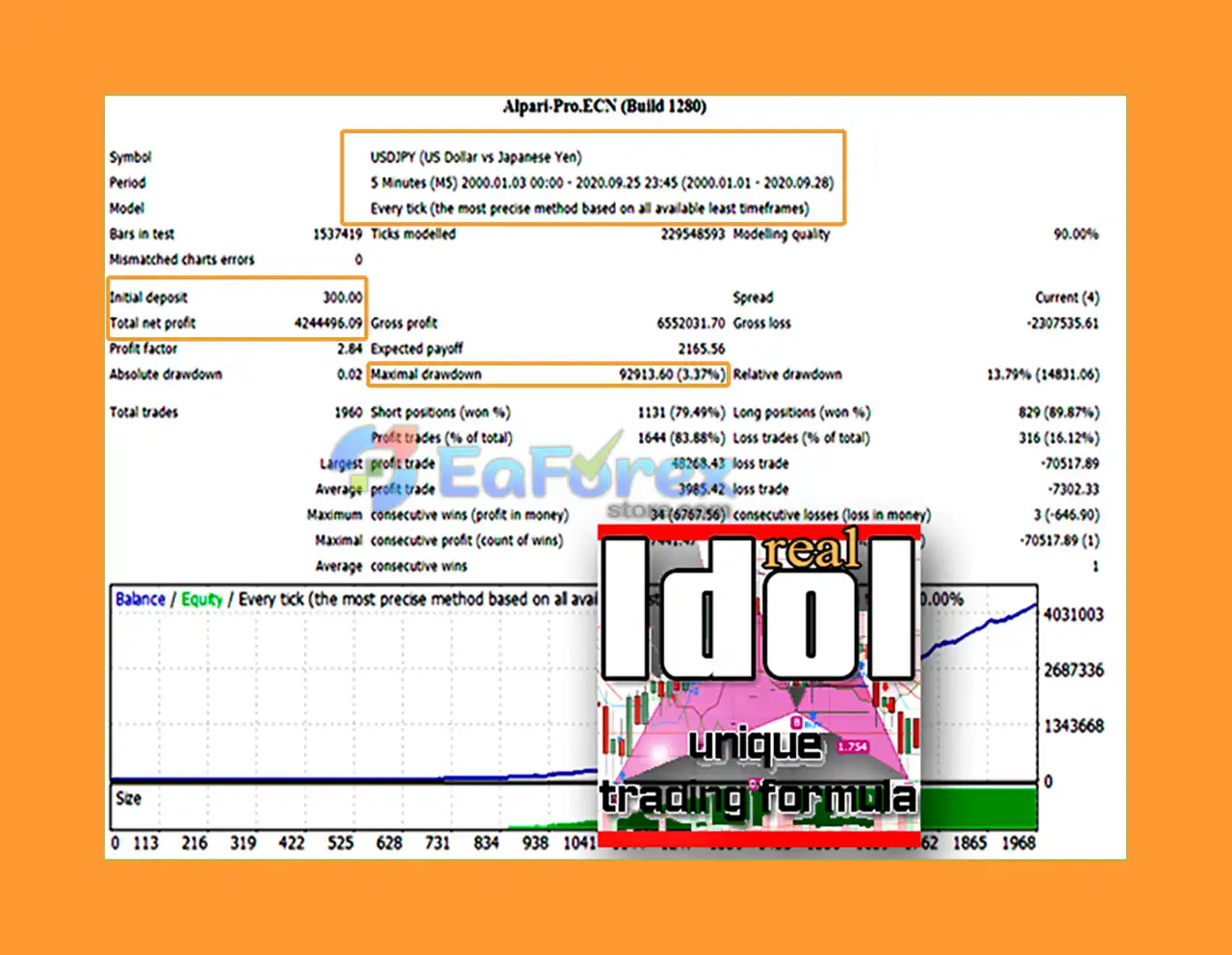
🔻USDJPY Backtest
- Initial Deposit: $300
- Total Net Profit: $4.24M
- Win Rate: 91.47%
- Max Drawdown: 3.37%
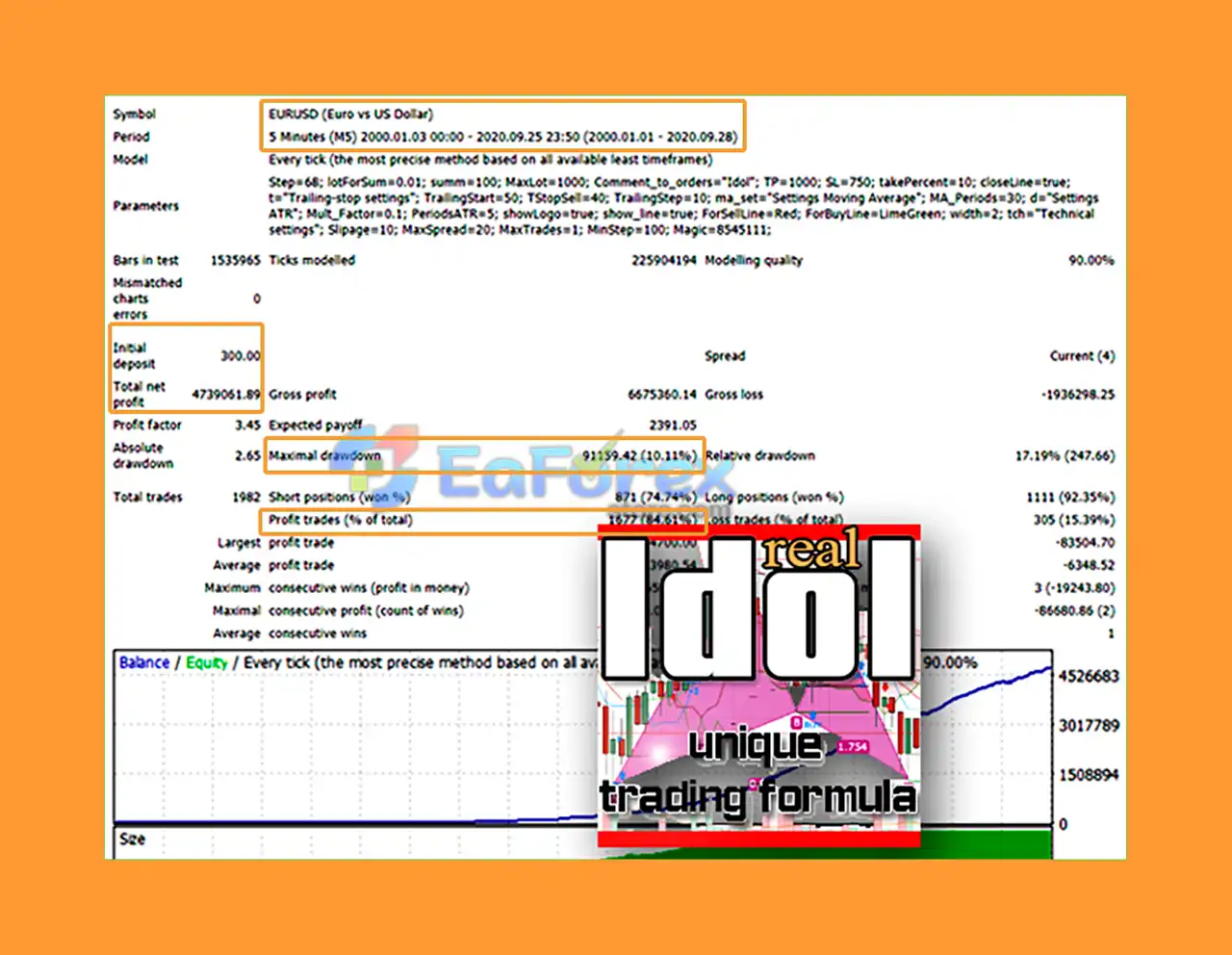
🔻EURUSD Backtest
- Initial Deposit: $300
- Total Net Profit: $4.7M
- Win Rate: 84.61%
- Max Drawdown: 10.11%
What’s Included in the Idol EA MT4 Package?
🔻Expert Advisor File: Idol EA MT4 v1.2.ex4
🔻Presets:
Idol EA_Autolot_USDJPY_Mindd$300.setIdol EA_Autolot_EURUSD_Mindd$300.setIdol EA_Autolot_GBPUSD_Mindd$300.set
>>> Join VIP Membership Now <<<
How To Set Up EA
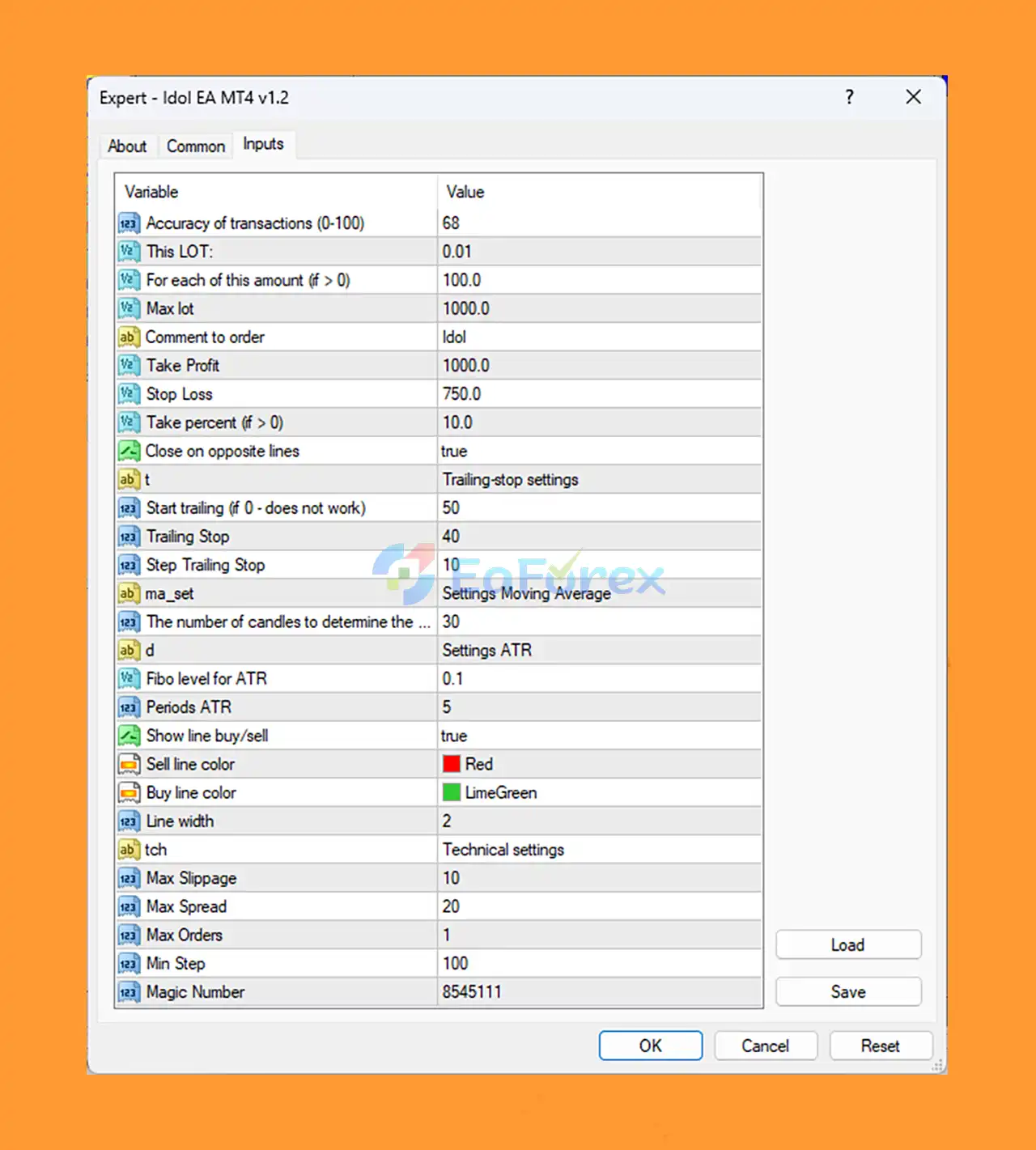
🔻 Idol EA MT4 v1.2 is a low-risk, trend-based Expert Advisor for MetaTrader 4. It uses technical indicators, trailing stops, and fixed risk-reward settings to manage trades. Follow the steps below for quick installation and optimal performance.
🟢 Step 1: Download & Install EA on MT4
- Download the
Idol EA MT4 v1.2file (.ex4or.mq4). - Open MetaTrader 4.
- Go to File > Open Data Folder.
- Navigate to:
MQL4 > Experts. - Paste the EA file into the Experts folder.
- Restart MT4 or refresh the Navigator panel (Ctrl+N).
🟢 Step 2: Attach EA to a Chart
- Open a suitable chart (e.g., EURUSD, BTCUSD, or any major pair).
- Drag Idol EA v1.2 from Navigator > Expert Advisors to the chart.
- Check the boxes:
- 🔻 Allow Live Trading
- 🔻 Allow DLL Imports
- Click OK to apply the settings.
🟢 Step 3: Recommended Settings for Idol EA v1.2
| Parameter | Value | Purpose |
|---|---|---|
| Lot Size | 0.01 | Conservative position size |
| TP / SL | 1000 / 750 | Targets swing moves; 1.33:1 reward:risk ratio |
| Take Percent | 10 | Closes all trades after 10% account gain |
| Trailing Start / Stop | 50 / 40 | Enables dynamic profit protection early |
| Step Trailing Stop | 10 | Tight trailing adjustment – locks profits quickly |
| MA, ATR, Trend Filter | Active | Technical indicators filter entries during trends |
| Max Orders | 1 | Single trade at a time – avoids martingale/grid |
| Max Spread / Slippage | 20 / 10 | Accepts mild volatility – ideal for crypto or volatile markets |
| Close on Opposite Lines | True | Exits trades on reversal – reduces losses during trend shifts |
| Magic Number | 8545111 | Unique EA ID for trade tracking |
🟢 Visual & Display Options
| Visual Setting | Value | Function |
|---|---|---|
| Show Line Buy/Sell | True | Displays entry lines on the chart |
| Buy/Sell Line Colors | LimeGreen/Red | Easily identifies trade direction |
| Line Width | 2 | Balanced visual thickness for clarity |
🟢 Step 4: Enable AutoTrading
- Click the AutoTrading button at the top of MT4.
- A smiley face on the top-right of the chart confirms the EA is active.
Conclusion
In summary, Idol EA is a state-of-the-art trend scalping robot designed for MetaTrader 4 (MT4), delivering highly optimized trade execution through a robust and secure trading strategy. Developed by expert trader Evgeniy Zhdan, this fully automated EA combines advanced trend-based scalping techniques with disciplined risk management, making it suitable for both beginners and professional traders alike.
Backtested over a 20-year period, Idol EA has demonstrated exceptional profitability, achieving a remarkable $4.24 million net profit from an initial $300 deposit. Proven reliable in real trading conditions, this EA supports major forex pairs and offers customizable settings alongside sophisticated exit strategies, ensuring precision, flexibility, and consistent trading success.
>>> Reviewed by Jason Stap <<<



