


What is PropEA MT4?
Prop EA MT4 is a cutting-edge Expert advisor (EA) built for traders aiming to pass proprietary trading firm challenges with greater control and lower risk. Utilizing a unique hedging strategy, this EA simultaneously executes buy trades on a demo account and sell trades on a real account, effectively balancing exposure and minimizing potential losses. Designed for flexibility and capital protection, Prop EA MT4 is ideal for traders of all experience levels.
Vendor website: Click here
Key Features of PropEA MT4
🔻Intelligent Hedging Strategy
Simultaneously places:
- Buy orders on demo account
- Sell orders on real account
- Balances risk while keeping one account profitable.
- Ideal for risk-averse trading during prop evaluations.
🔻Fully Automated Execution
- Runs 100% hands-free with no need for manual input.
- Beginner-friendly setup, yet powerful for advanced users.
🔻Compatible with Top Prop Firms
Optimized for:
- FTMO
- MyForexFunds
- True Forex Funds
- Other leading prop firms
🔻Adaptable Rule Compliance
Configured to match specific prop firm restrictions:
- Daily loss limits
- Max drawdown
- Minimum trading days
- News trading rules
Why choose Prop EAMT4?
🔻Effective Risk Control
- Prioritizes capital preservation.
- Smart logic to avoid excessive exposure or unnecessary drawdown.
🔻Boost Success Rate in Challenges
- Over 95% of traders fail prop firm evaluations.
- PropEA improves success probability by using automated risk balancing.
🔻Maximize Profit With Controlled Risk
- Designed to deliver consistent returns under strict trading conditions.
- Trades are optimized for low drawdown and stable performance.
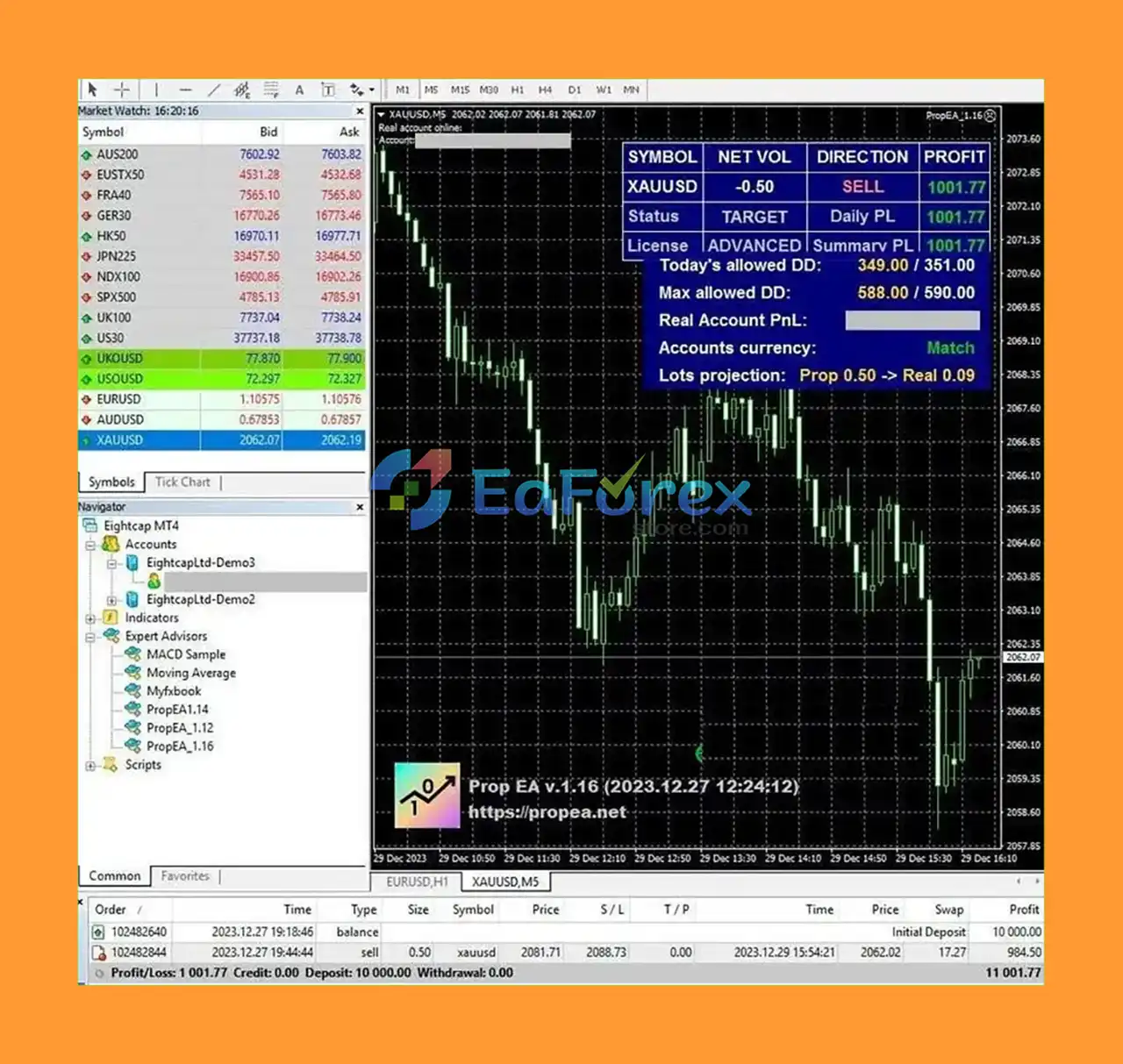
PropEA MT4 Performance Review
Overview of real or backtested trading performance.
🔻Results: Click here

What is included in the package?
🔻Experts: PropEA MT4.ex4
>>> Join VIP Membership Now <<<
How To Set Up EA
🔻PropEA v1.64 is a specialized Expert Advisor for traders aiming to pass and manage prop firm challenges like FTMO, MyForexFunds, and FundedNext. Designed with built-in risk management rules, it aligns with the strict guidelines of proprietary trading firms. Follow this simple guide to install and configure the EA on your MT4 platform.
🔵 Step-by-Step Installation Guide
🔻Download PropEA v1.64 File
- Obtain the
.ex4or.mq4file for PropEA v1.64.
🔻Launch MetaTrader 4
- Open your MT4 trading terminal.
🔻Open the Experts Folder
- Go to:
File→Open Data Folder→MQL4→Experts.
🔻Copy the EA File
- Paste the PropEA file into the
Expertsdirectory.
🔻Restart MT4
- Close and reopen the platform to load the EA.
🔻Attach EA to a Chart
- Open a new chart (e.g., EURUSD or GBPUSD).
- Drag
PropEA v1.64from the Navigator panel onto the chart.
🔻Enable AutoTrading
- Turn on AutoTrading (green icon should appear).
- Ensure a smiley face appears in the top-right corner of the chart.
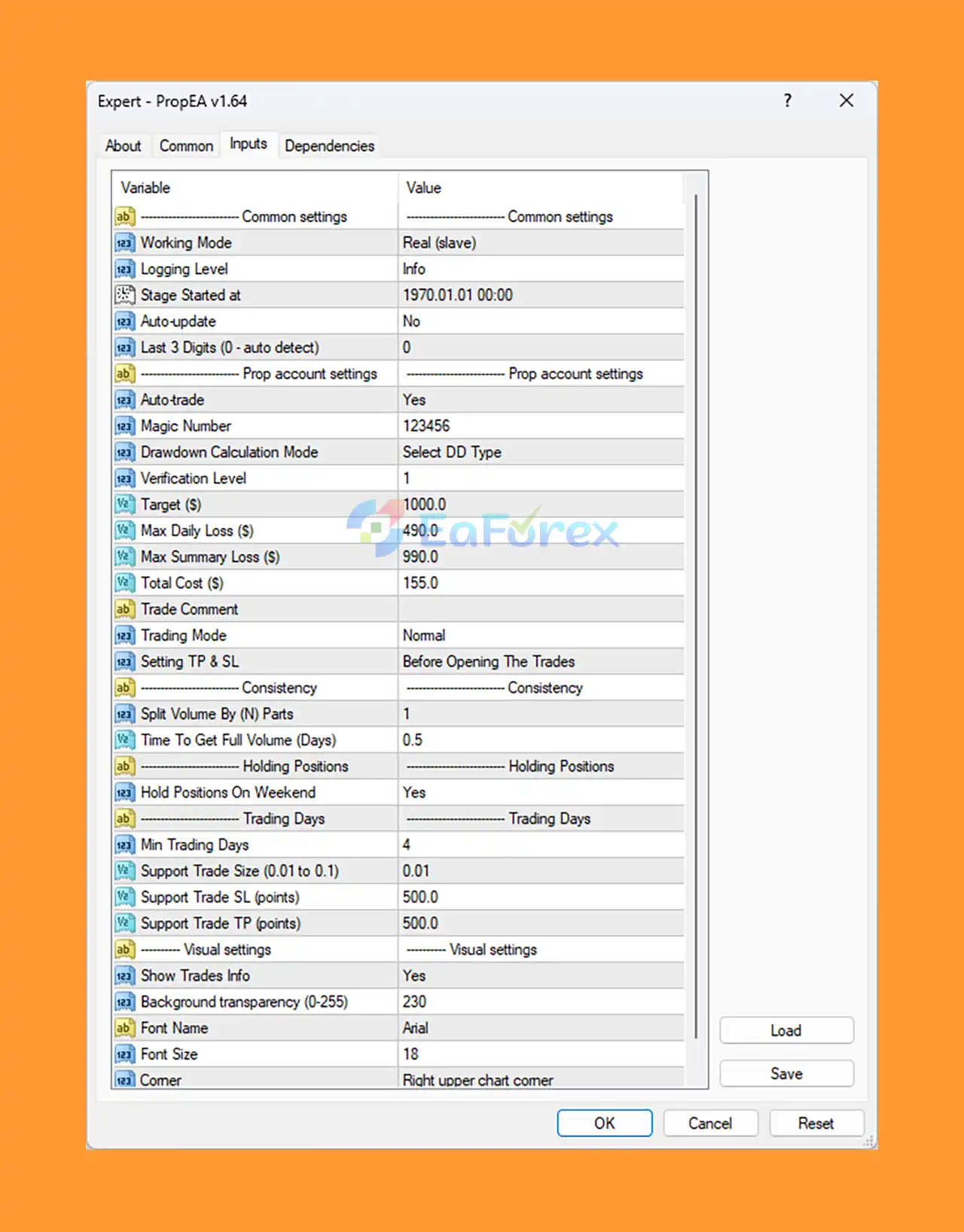
🔻Configure Key Input Parameters
- Auto-trade: YES (enables live trading).
- Max Daily Loss ($): Set to 490 (or per your firm’s limits).
- Max Summary Loss ($): 990 (≈9.9% drawdown).
- Target ($): 1000 (or as required by your challenge).
- Hold Positions On Weekend: YES/NO (adjust per firm rules).
- Min Trading Days: 4 (matches most prop firm minimums).
- TP/SL: Set before trades open for rule compliance.
- Drawdown Mode: Make sure to set this based on firm logic (manual input required).
Conclusion
In summary, PropEA MT4 stands out as a powerful, fully automated Expert Advisor specifically designed to help traders successfully pass proprietary trading firm challenges like those from FTMO, MyForexFunds, and True Forex Funds. By employing a unique hedging strategy—executing buy trades on demo accounts while placing sell trades on real accounts—this EA offers an innovative solution to minimize risk, balance market exposure, and protect capital under real trading conditions.
>>> Reviewed by Jason Stap <<<



