


Product Overview
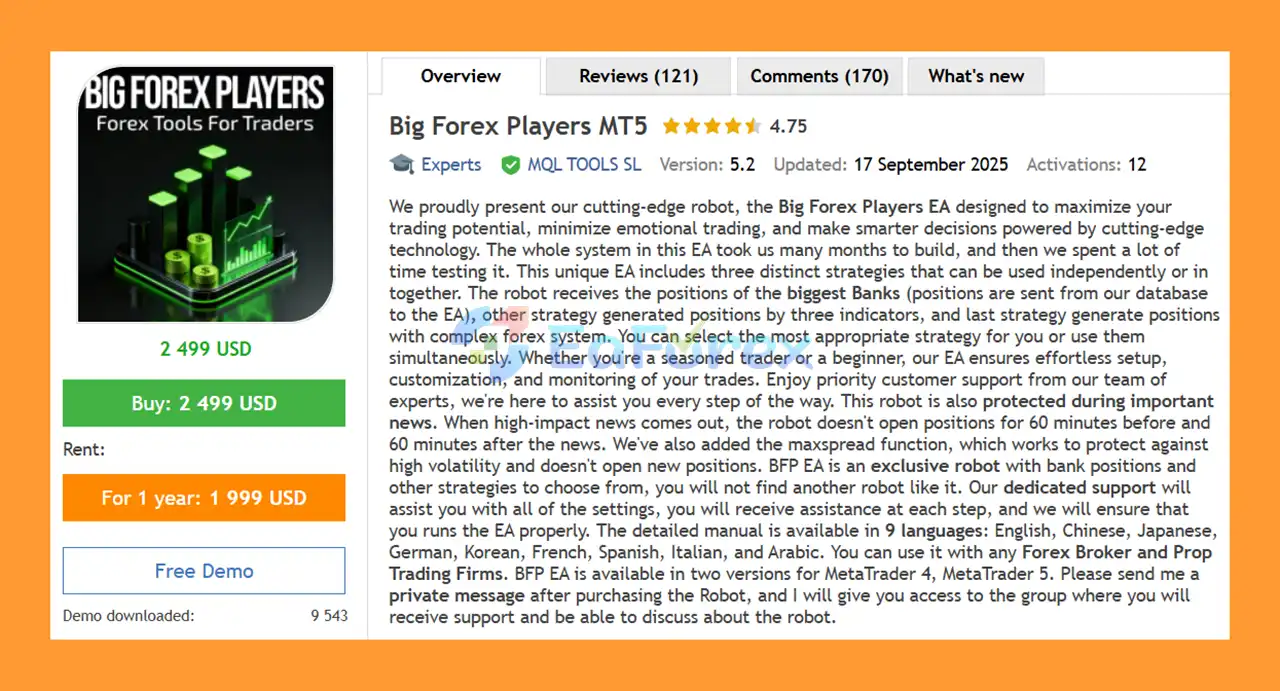
Big Forex Players MT5 is an advanced Forex Expert Advisor for MetaTrader 5 designed to help traders automate market analysis, trade execution, and risk management. The EA combines multiple trading approaches, including bank position analysis, technical indicator signals, and a multicurrency automated trading strategy, giving traders the flexibility to choose one strategy or run several strategies together.
The Big Forex Players EA is designed to reduce emotional decision-making and provide a structured approach to automated Forex trading. It can trade major Forex pairs as well as XAUUSD (Gold) and supports different account types and brokers.
One of the key features of this MT5 trading robot is its focus on market protection. The EA includes a high-impact news filter, maximum spread protection, risk-based lot sizing, Stop Loss, Take Profit, trailing functionality, trading-hour controls, and automatic trading restrictions after predefined losses.
Big Forex Players MT5 is suitable for both experienced traders and users who are new to automated trading. The developer also provides detailed documentation, multilingual support, regular updates, and assistance with configuration.
About the Developer
- Author: Marzena Maria Szmit
- Experience: Over +2 years of experience on MQL5.
- Notable Products: Big Forex Players MT5, Big Forex Players MT4, Bitcoin Robot MT5,Bitcoin Robot Grid MT4, GbpUsd Robot MT5, Scalping Robot MT5 and other advisors.
- Flagship Product: Big Forex Players MT5 is rated as the best performing product of the year.
>> Delivery time 24h-48h after payment.
>>> Refund if not delivered.
>>> You will receive the latest version without any limitations (ID+Time).>> Reviewed by Jason Stap <<<
Key Features of Big Forex Players MT5
Three Core Trading Strategies
Big Forex Players MT5 provides three primary strategies that can be enabled or disabled independently.
Trading with Banks
This strategy uses positions based on research and analysis of major banks and investment funds. Trading signals are delivered from the developer's database to the EA for market execution.
The strategy is designed primarily for medium- and long-term trading and normally uses Take Profit and Stop Loss protection.
Trading with Indicators
The indicator strategy generates trading signals using widely recognized technical indicators, including:
- RSI
- MACD
- Stochastic
- H4 and D1 market analysis
The EA uses these indicators to identify potential trading opportunities and can open positions with predefined Take Profit and Stop Loss levels.
Trading with Robots
The multicurrency strategy combines several market-analysis components, including:
- Price Action
- Cycle Strength
- SMA Strength
- RSI
- Custom built-in indicators
This strategy provides Low, Medium, and High risk modes, allowing traders to select a configuration that better matches their trading objectives and risk tolerance.
Additional Trading Features
Big Forex Players MT5 also includes:
- Risk percentage-based lot sizing
- Low, Medium, and High risk modes
- Take Profit and Stop Loss
- Trailing Stop and Trailing Step
- Maximum Spread protection
- Trading-hour filters
- Trading-day controls
- News filter
- High-impact news protection
- Automatic Stop Loss during important news
- Maximum drawdown protection
- Automatic EA shutdown after predefined losses
- Buy-only or Sell-only trading
- Orders Step control
- Custom trade comments
- Magic Number identification
- Individual order profit targets
- Account-balance-based loss protection
- End-of-day position closing
- Hidden TP/SL option
- Holiday trading controls
- Manual position-closing buttons
- On-chart trading and information panel
The EA also supports multiple currencies for the economic news filter, including USD, EUR, GBP, CAD, AUD, JPY, CHF, CNY, and NZD.
How Does Big Forex Players MT5 Work?
Big Forex Players MT5 works by combining automated market analysis with predefined trading and risk-management rules.
Depending on the selected configuration, the EA can receive bank-related trading signals, analyze technical indicators, or use its built-in multicurrency trading algorithm.
For the bank strategy, trading positions are provided through the developer's signal infrastructure and executed by the EA according to the configured parameters.
For the indicator strategy, the EA evaluates RSI, MACD, and Stochastic conditions on higher timeframes such as H4 and D1 before generating potential trading signals.
The multicurrency robot strategy analyzes price action, market strength, SMA strength, RSI, and additional proprietary indicators to identify potential opportunities.
Once a valid trading signal is detected, the EA can automatically calculate the position size according to the selected risk percentage and execute the trade with the configured Stop Loss and Take Profit.
The system can also monitor spread conditions, trading hours, economic news, drawdown, and other restrictions before allowing new trades.
Why Choose Big Forex Players MT5?
Multiple Strategies in One EA
Instead of relying on a single trading method, Big Forex Players MT5 provides several approaches within one Expert Advisor. Traders can select bank-based trading, indicator-based trading, automated multicurrency trading, or combine available strategies according to their preferences.
Flexible Risk Settings
The Low, Medium, and High risk modes allow traders to adjust the behavior of the automated strategy. Risk percentage, lot size, trailing settings, Stop Loss, and drawdown controls can also be customized.
Bank Position Strategy
The bank-focused strategy is one of the distinctive features of the EA. It attempts to use information related to positions from major banks and investment funds as part of its trading methodology.
Built-In News Protection
High-impact economic events can cause rapid market movements and significant spread expansion. Big Forex Players EA includes a news filter designed to prevent new positions from being opened around important economic announcements.
The default news protection described by the developer blocks new entries 60 minutes before and 60 minutes after important news, although traders can customize the relevant parameters.
Broker and Account Compatibility
The EA is designed to work with a wide range of MetaTrader 5 brokers and account types, including Raw, Hedging, Zero, Cent, Micro, Standard, Premium, and ECN accounts, subject to broker conditions and correct configuration.
Multilingual Documentation and Support
The product includes detailed documentation and support designed to help traders configure the EA correctly. The manual is available in multiple languages, making the system more accessible to international Forex traders.
Regular Updates
The developer states that the EA receives free updates and may receive additional features based on customer feedback and market requirements.
Big Forex Players MT5 Performance Review
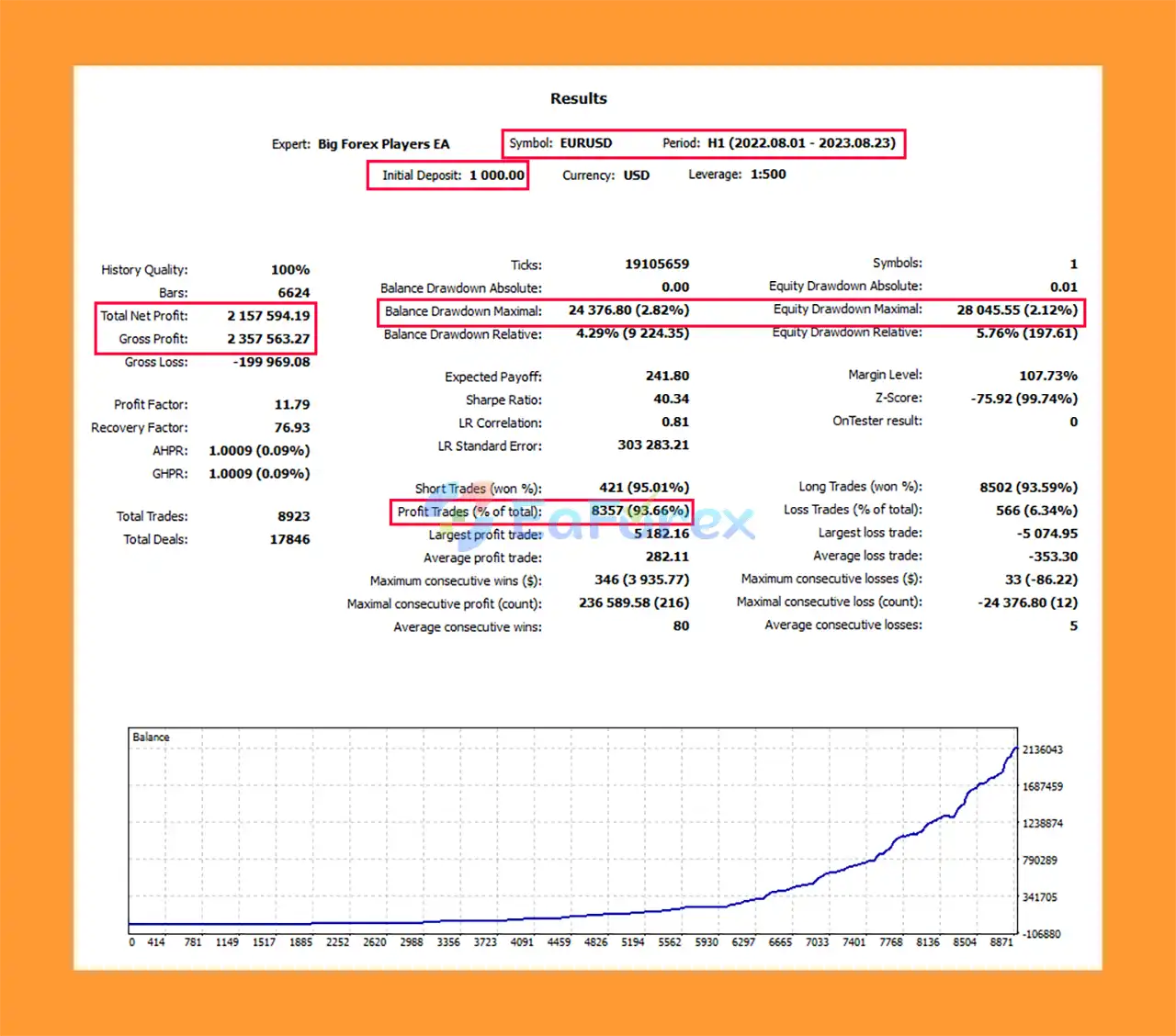
🔺 Backtest Results EURUSD (01/08/2022 – 23/08/2023)
- Initial Deposit: $1,000
- Total Net Profit: $2.16 million
- Win Rate: 93.66%
- Balance Drawdown Maximum: 2.82%
- Equity Drawdown Maximum: 2.12%
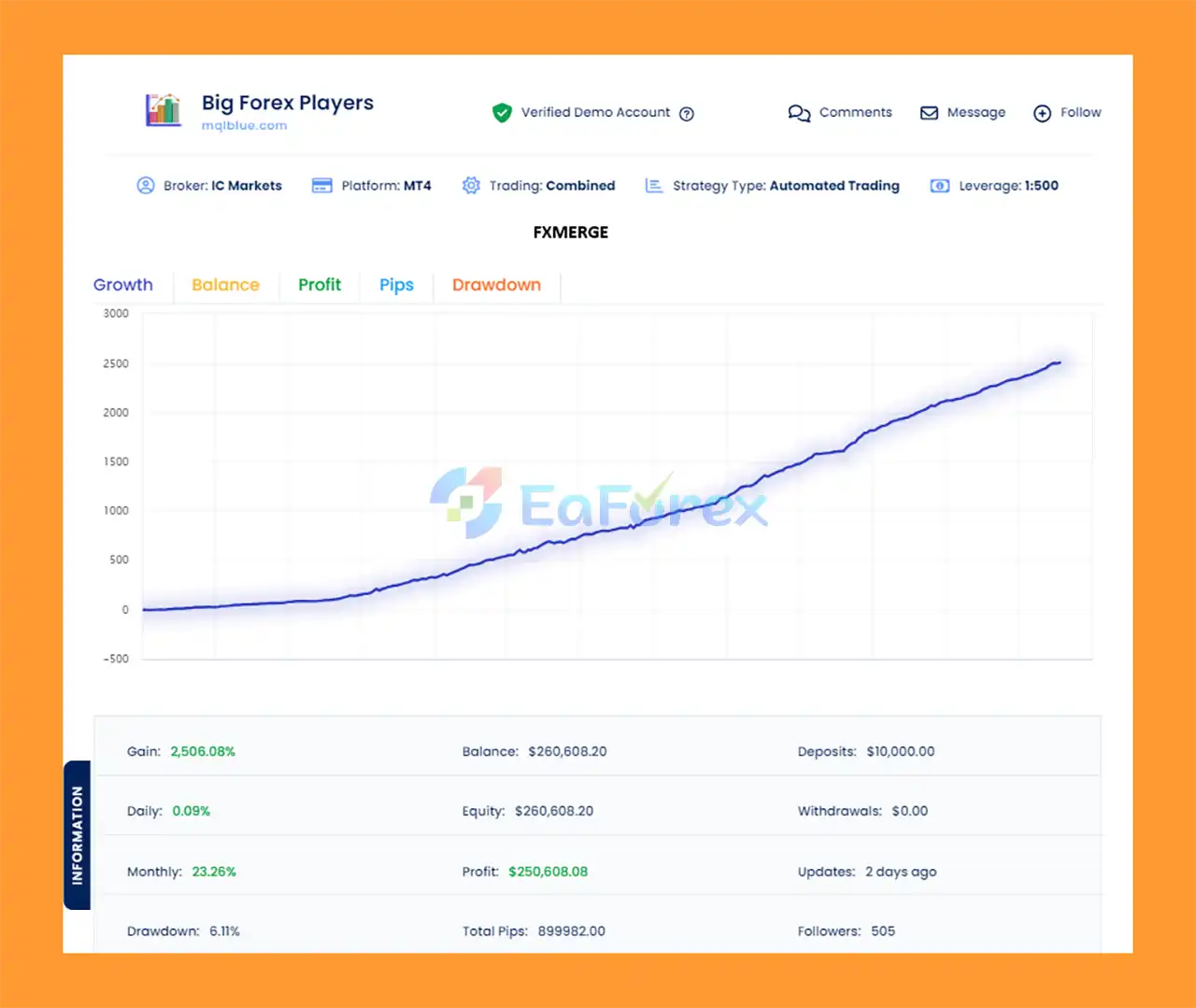
🔺 Verified by Mqlblue
- Initial Deposit: $10,000
- Total Gain: 2,506.08%
- Monthly Growth Rate: 23.26%
- Maximum Drawdown: 6.11%
Performance and Risk Management
Big Forex Players EA MT5 places significant emphasis on automated risk management. However, trading performance depends heavily on the broker, spread, leverage, account conditions, selected strategy, risk settings, and market environment.
The EA provides several tools for controlling trading exposure, including:
- Risk percentage position sizing
- Fixed lot configuration
- Stop Loss
- Take Profit
- Trailing Stop
- Maximum Spread filter
- Maximum drawdown protection
- News protection
- Trading-hour restrictions
- Daily closing functionality
- Loss-based EA shutdown
- Buy-only or Sell-only mode
- Orders Step control
- Additional news-based Stop Loss
The Disable EA after loss function can stop the robot from opening new trades after a predefined maximum drawdown or loss threshold has been reached.
The news filter can also be configured to monitor major economic events for several currencies. Traders can select specific currencies or use keyword filtering for events such as central-bank announcements and major monetary-policy releases.
For testing purposes, the developer recommends using the MetaTrader 5 Strategy Tester, the Every Tick modeling mode, and a starting deposit of approximately $1,000. Traders should test different risk levels and market conditions rather than assuming that backtest results will be reproduced in live trading.
A demo account and forward testing are strongly recommended before using the EA with real funds.
Weaknesses and Risk Warnings
Although Big Forex Players EA MT5 offers many features, automated trading always involves financial risk.
The use of bank-related signals does not guarantee that the EA will accurately predict future market movements. Institutional positions may change, become outdated, or behave differently from the expectations of retail traders.
The indicator strategy can also generate false signals during ranging, highly volatile, or rapidly changing market conditions.
Higher risk modes may increase both potential returns and potential losses. Traders using aggressive risk percentages or high leverage can experience substantial drawdowns.
News protection can reduce exposure around major economic announcements, but it cannot completely eliminate the risks associated with slippage, spread widening, gaps, or unexpected market volatility.
Broker execution conditions are also important. Differences in spreads, commissions, execution speed, liquidity, leverage, and trading rules can produce significantly different results between accounts.
Backtested or advertised results should not be interpreted as guaranteed future performance.
Never use money you cannot afford to lose. Always perform your own testing and use appropriate risk management before trading a live account.
Pros and Cons
Pros
- Multiple trading strategies in one MT5 Expert Advisor
- Bank position-based trading strategy
- RSI, MACD, and Stochastic strategy
- Multicurrency automated trading system
- XAUUSD and multiple Forex pairs supported
- Low, Medium, and High risk modes
- Risk percentage-based position sizing
- Take Profit and Stop Loss
- Trailing Stop functionality
- Maximum Spread protection
- High-impact news filter
- Drawdown and loss protection
- Flexible trading-hour settings
- Buy-only and Sell-only options
- Hidden TP/SL functionality
- On-chart information panel
- Supports many MT5 account types
- Multilingual manual
- Dedicated customer support
- Regular updates
Cons
- Results depend heavily on market conditions
- Bank-position signals do not guarantee profitable trades
- High-risk settings can create significant drawdown
- Broker conditions can affect live performance
- News protection cannot eliminate all volatility risks
- Requires proper configuration for each broker
- Backtest results may differ from live trading
- A VPS is recommended for continuous automated trading
How to Install Big Forex Players EA MT5
Installing Big Forex Players EA MT5 is straightforward, but correct configuration is important.
Step 1: Obtain the EA and Documentation
After purchasing the EA, contact the developer and provide the required purchase confirmation. You will receive access to the product documentation and support group.
Step 2: Read the Manual
Review the configuration manual before starting live trading. The documentation explains the available parameters and how to configure the EA according to your broker.
Step 3: Install the EA in MetaTrader 5
Open MetaTrader 5 and place the EA files in the appropriate MQL5/Experts directory. Restart MetaTrader 5 or refresh the Navigator window after installation.
Step 4: Enable AutoTrading
Make sure Algo Trading/AutoTrading is enabled in MetaTrader 5.
Step 5: Choose the Trading Pair
Attach the EA to the recommended chart and trading pairs. The primary timeframe specified for the system is H1, while supported instruments can include XAUUSD, EURUSD, GBPUSD, USDJPY, EURCHF, EURGBP, GBPCHF, and other compatible pairs.
Step 6: Configure Risk Parameters
Select the appropriate risk mode and configure parameters such as:
- Risk percentage
- Lot size
- Stop Loss
- Take Profit
- Trailing Stop
- Maximum Spread
- Trading hours
- News filter
- Maximum drawdown
- Trading direction
Do not automatically use the highest risk setting. Start conservatively and evaluate the EA through testing.
Step 7: Test on a Demo Account
Before using a live account, run the EA on a demo account and perform historical backtesting through the MetaTrader 5 Strategy Tester.
Step 8: Consider Using a VPS
A VPS can help keep MetaTrader 5 connected continuously, allowing the EA to monitor the market and manage trades around the clock.
Real User Reviews and Feedback
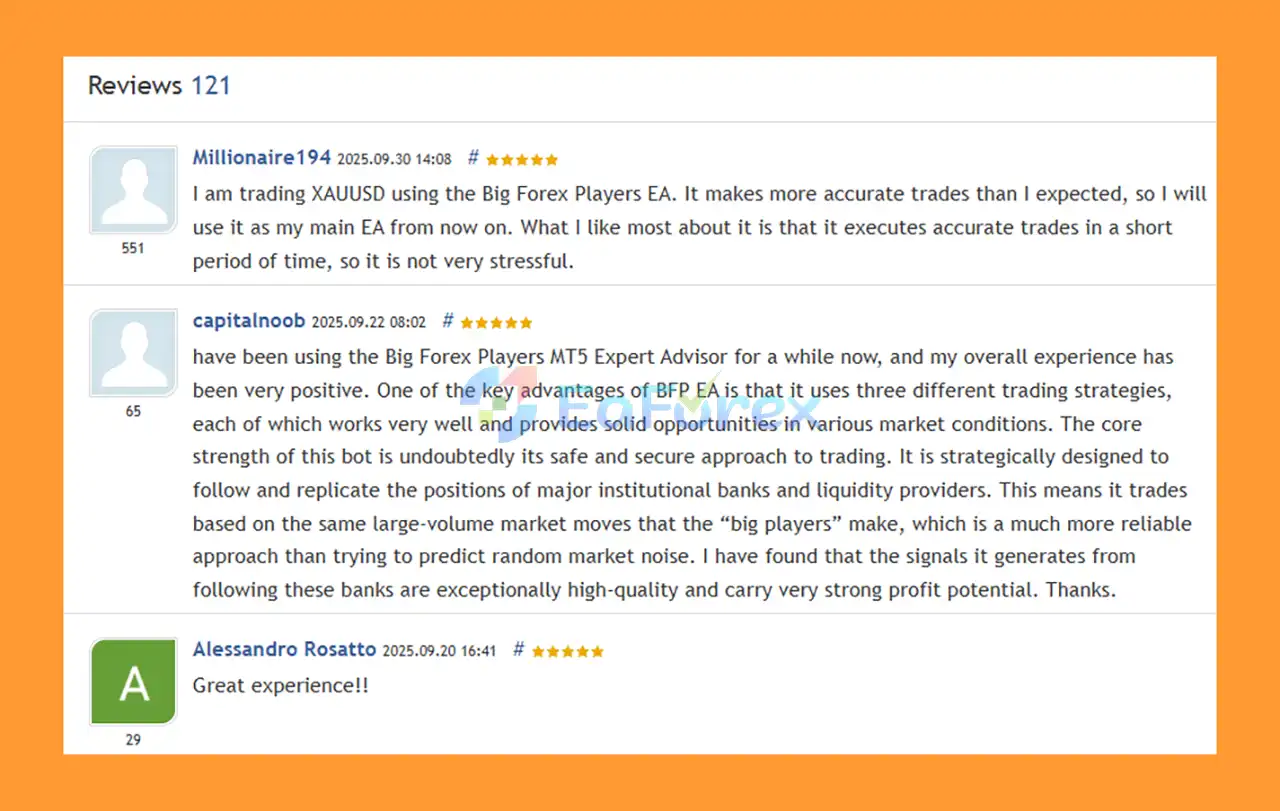
🔻Big Forex Players MT5 is highly appreciated by the MQL5 community for bringing stable and reliable profits. Below are 5 star reviews from users:
What’s Included in the Download Package?
- Setting (If Any).docx
- Installation Guide.docx
Final Thoughts
Big Forex Players MT5 is a feature-rich automated trading system designed for traders looking for multiple strategies within one MetaTrader 5 Expert Advisor. Its combination of bank position analysis, technical indicators, multicurrency trading logic, news protection, and automated risk management makes it a versatile solution for different trading approaches.
The ability to choose between Low, Medium, and High risk modes provides additional flexibility, while features such as Maximum Spread protection, Stop Loss, Take Profit, trailing functionality, drawdown controls, and economic-news filtering can help create a more structured trading environment.
However, no Forex EA can guarantee profits. Market conditions, broker execution, leverage, spread, risk settings, and trading strategy selection can all have a major impact on results.
For this reason, traders should backtest Big Forex Players EA MT5, forward-test it on a demo account, use conservative risk settings, and carefully evaluate live performance before committing significant capital.
Overall, Big Forex Players MT5 is an interesting option for traders who want a multi-strategy Forex robot with bank-based signals, technical analysis, automated trading, and built-in risk-management features in one MetaTrader 5 system.



