
Product Overview
Cepheus EA MT5 is an automated Expert Advisor developed specifically for Gold (XAUUSD) trading on the MetaTrader 5 platform. It combines two complementary trading engines, Cepheus Discipline and Cepheus Loyalty, within a unified algorithmic trading system designed to identify different market opportunities through independent entry logic and trade management.
Unlike trading robots that rely on a single strategy or attempt to recover losing positions through grid averaging and martingale techniques, Cepheus uses a structured approach based on trend direction, momentum, market structure, volume, and volatility. Each engine evaluates market conditions independently and applies its own execution filters before opening a trade.
A central feature of Cepheus EA MT5 is its defined-risk trading framework. Every position is submitted with a broker-side Stop Loss and Take Profit, while additional safeguards help manage spreads, execution conditions, daily drawdown, economic news, and weekend exposure.
The EA also incorporates broker Freeze Level and Stops Level protection to help manage stop-loss modifications within the restrictions imposed by different trading environments. Its native MetaTrader 5 Economic Calendar integration provides high-impact USD news filtering without requiring external URLs or third-party news services.
Cepheus includes configurable risk modes, automatic risk-budget allocation between its two engines, holiday protection, and a dark-mode dashboard for monitoring trading activity directly from the chart.
Designed exclusively for Gold, Cepheus EA MT5 offers traders an alternative to recovery-based trading systems by combining two independent strategies with automated trade management and multiple layers of risk control.
About the Developer
- Author: Thierry Ouellet
- Experience: Over + 1 years of experience on MQL5.
- Notable Products: Cepheus EA MT5, Logan MT5 and other advisors
- Flagship Product: Cepheus EA MT5 is rated as the best performing product of the year.
>>> Delivery time 24h-48h after payment.
>>> Refund if not delivered.
>>> You will receive the latest version without any limitations (ID+Time).Reviewed by Jason Stap <<<
Key Features
- Dual-Engine Trading Architecture: Combines Cepheus Discipline and Cepheus Loyalty in one automated XAUUSD trading system.
- Cepheus Discipline Engine: Focuses on trend continuation, momentum expansion, structural breakouts, and volume and volatility confirmation.
- Cepheus Loyalty Engine: Targets broader market structure, swing opportunities, directional cycles, and selective entries.
- XAUUSD Specialization: Developed specifically for Gold trading on MetaTrader 5.
- Broker-Side Stop Loss and Take Profit: Every position is placed with protective stop-loss and take-profit levels.
- No Grid or Martingale: Does not use grid averaging, martingale progression, or unlimited recovery sequences.
- Automatic Risk-Budget Allocation: Distributes the available risk budget between the two engines using a default 3:1 proportional allocation.
- Flexible Risk Configuration: Supports automatic risk presets, custom risk percentages, and fixed-lot trading.
- Broker Freeze Level and Stops Level Protection: Accounts for broker-specific minimum-distance restrictions when managing protective orders.
- Native MT5 Economic Calendar Filter: Can pause new trading around high-impact USD events without external WebRequest configuration.
- Pending-Entry Protection: Can remove pending entries before configured protected news periods.
- Global Bank Holiday Protection: Helps avoid selected major holidays, including Christmas, New Year, Good Friday, and Thanksgiving.
- Daily Drawdown Circuit Breaker: Provides optional daily loss protection based on day-start equity.
- Friday and Weekend Protection: Supports configurable Friday trading restrictions.
- Independent Spread and Execution Filters: Each engine evaluates execution conditions before opening positions.
- Dark-Mode Trading Dashboard: Displays engine status, strategy exposure, daily performance, floating P/L, drawdown usage, news protection, and trading statistics.
- Flexible Chart Timeframe: Can be attached to an XAUUSD chart on any timeframe because the EA performs its required timeframe analysis internally.
- Two- and Three-Digit Gold Support: Supports the specified two-digit and three-digit Gold symbol formats.
How It Works
Cepheus EA MT5 follows a dual-engine architecture in which two independent trading strategies analyze the Gold market and manage their respective trading opportunities.
1. Market Analysis and Condition Filtering
The EA evaluates multiple market characteristics, including price structure, trend direction, momentum, volume, volatility, and execution conditions.
Rather than depending exclusively on a single indicator or technical level, Cepheus combines these factors to identify potential opportunities and filter out setups that do not satisfy its programmed requirements.
2. Cepheus Discipline: Trend and Momentum Trading
The Discipline engine focuses on intraday price expansions and confirmed structural breakouts.
Its trading logic evaluates directional momentum and structural price movements, with volume and volatility confirmation helping determine whether market conditions meet the entry requirements.
Independent spread and execution filters provide an additional screening layer before an order is placed.
This engine is designed to target opportunities where price demonstrates sufficient directional strength to support a breakout-oriented trading approach.
3. Cepheus Loyalty: Structure and Swing Trading
The Loyalty engine uses a complementary approach based on broader market structure, swing dynamics, and directional market cycles.
It seeks selective entries using multiple layers of market confirmation and incorporates adaptive trade management and trailing protection.
By maintaining separate entry logic from Discipline, Loyalty allows Cepheus to pursue a different category of market opportunity rather than relying entirely on breakout momentum.
4. Independent Trade Execution
Each engine evaluates its own trading conditions and execution requirements. When the relevant criteria are satisfied, the EA can open a position with a broker-side Stop Loss and Take Profit.
Cepheus does not depend on adding progressively larger positions to recover losses. Its trading framework excludes grid averaging, martingale progression, and unlimited recovery sequences.
However, defined protective orders do not eliminate the possibility of slippage, gaps, or losses exceeding the initially expected amount under certain market conditions.
5. Automatic Risk-Budget Management
Cepheus includes an integrated risk-budgeting mechanism for its two engines.
By default, the available risk budget is allocated between Loyalty and Discipline using a 3:1 proportional distribution. If one engine is disabled, the available risk budget is automatically reallocated to the remaining active engine.
Traders can select an automatic risk preset, configure a custom risk percentage, or use fixed-lot trading according to their preferences.
The actual risk exposure depends on the EA's settings, position sizing, stop-loss distance, instrument specifications, and broker execution conditions.
6. Automated Position Protection
Once a position is opened, Cepheus manages its protective orders according to the configured trading rules.
The EA accounts for broker Freeze Level and Stops Level restrictions when modifying stop-loss and trailing-stop orders. This is intended to reduce rejected modifications when the requested order price falls within a broker's restricted distance.
The EA also incorporates spread and execution filters to help prevent new trades from being opened under unsuitable trading conditions.
7. News, Holiday, and Drawdown Protection
Cepheus integrates with the native MetaTrader 5 Economic Calendar to identify scheduled high-impact USD events, including Non-Farm Payrolls, CPI releases, FOMC announcements, and Federal Reserve interest-rate decisions.
Depending on the configured protection settings, the EA can pause new trading around protected events and remove pending entries before designated news periods.
Additional safeguards include selected bank holiday restrictions, optional daily drawdown protection, and customizable Friday trading limitations.
Together, these mechanisms provide a structured framework for automated Gold trading, although they cannot eliminate market or execution risk.
Why Choose Cepheus EA MT5?
Two Complementary Trading Engines
Cepheus combines breakout-oriented momentum trading with structure-based swing trading. The Discipline and Loyalty engines use separate entry logic, allowing the system to evaluate different market behaviours within one Expert Advisor.
This dual-engine design offers more flexibility than relying on a single entry model, although diversification between strategies does not guarantee lower losses or improved returns.
Defined-Risk Trading Philosophy
Cepheus is designed around broker-side Stop Loss and Take Profit orders rather than grid averaging or martingale recovery.
Every position is submitted with protective price levels, and the EA does not use unlimited recovery sequences or progressive lot escalation after losses.
This approach makes the system's intended trade-management framework more transparent. Nevertheless, a stop-loss level defines the intended exit price rather than guaranteeing the exact execution price in every market condition.
Adaptive Market Logic
The system combines price structure, momentum, volume, volatility, spreads, and execution conditions instead of depending exclusively on a large collection of narrowly optimized parameters.
Its design objective is to respond to changing market conditions rather than rely on historical date exclusions to create an artificially smooth backtest.
Actual robustness must still be evaluated through independent testing across different market periods and execution environments.
Broker-Aware Order Management
Gold can move rapidly, making stop-loss and trailing-stop modifications challenging when a broker enforces minimum order-distance restrictions.
Cepheus incorporates Freeze Level and Stops Level checks to improve its handling of these restrictions. This can help reduce rejected modifications, although successful execution still depends on broker rules, liquidity, and market conditions.
Integrated News and Capital Protection
The native MT5 Economic Calendar filter helps manage scheduled high-impact USD news without requiring external URLs or API keys.
Optional daily drawdown protection, selected holiday filters, Friday restrictions, and independent execution filters provide additional configuration options for traders who want more control over when the EA operates.
Convenient Risk Allocation
The automatic risk-budget allocation feature distributes the configured risk budget between the two trading engines using a default 3:1 ratio.
When one engine is disabled, the remaining engine receives the available risk budget automatically. This simplifies allocation between strategies, although traders should understand how the selected risk mode translates into actual account exposure.
Real-Time Monitoring
The dark-mode dashboard provides direct access to key trading information, including engine status, strategy exposure, daily realised profit, floating P/L, drawdown usage, news protection, and historical trading statistics.
This allows traders to monitor the system without relying entirely on external reporting tools.
Overall, Cepheus EA MT5 may suit traders looking for a dedicated Gold trading robot with two complementary strategies, broker-aware execution management, and a trading framework that avoids grid and martingale techniques.
Cepheus EA MT5 Performance Review
🟢Signal Results
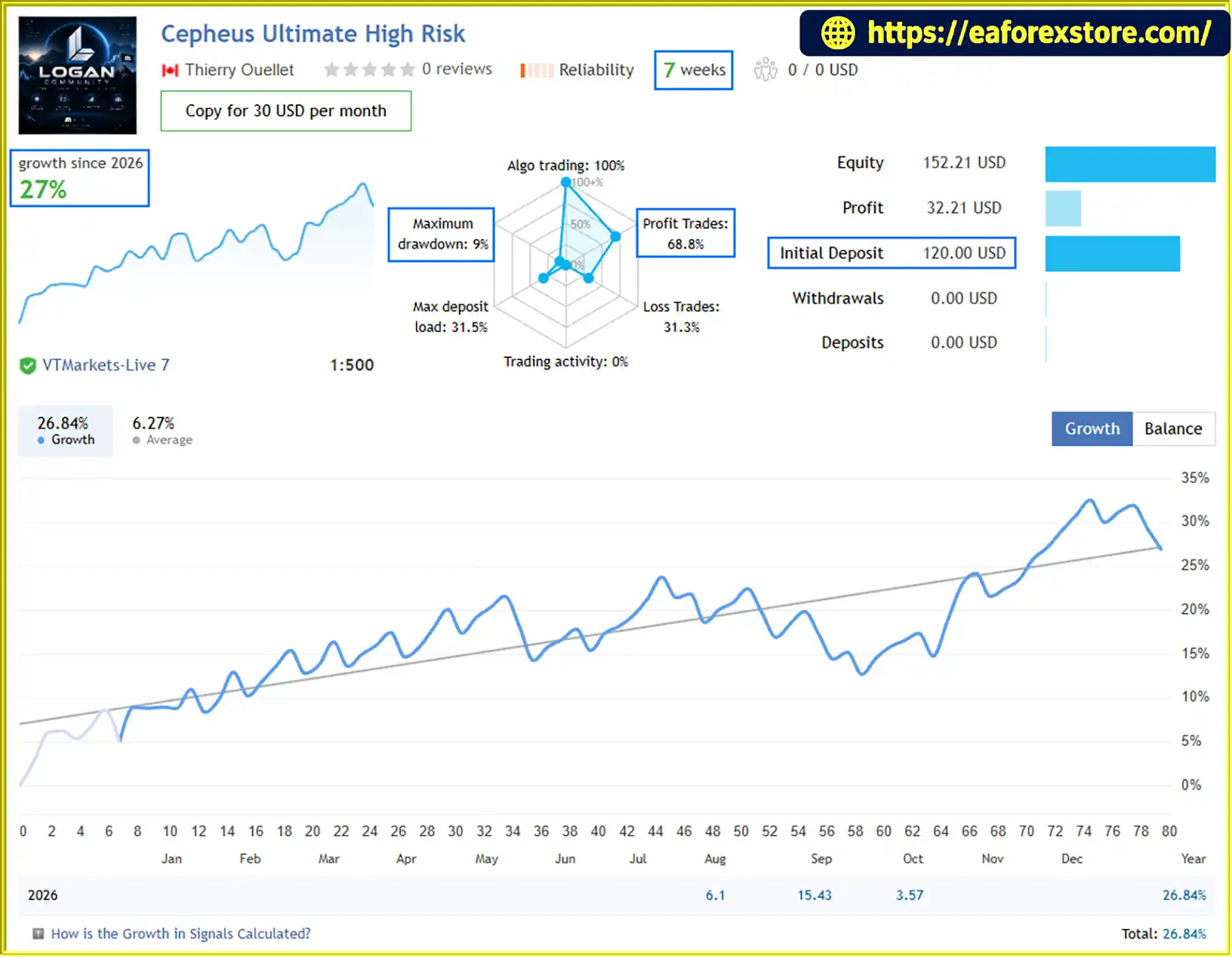
🔺Cepheus Ultimate High Risk - 7 Weeks
- Initial Deposit: $120
- Growth Rate: +27%
- Win Rate: 68,8%
- Maximum Drawdown: 9%
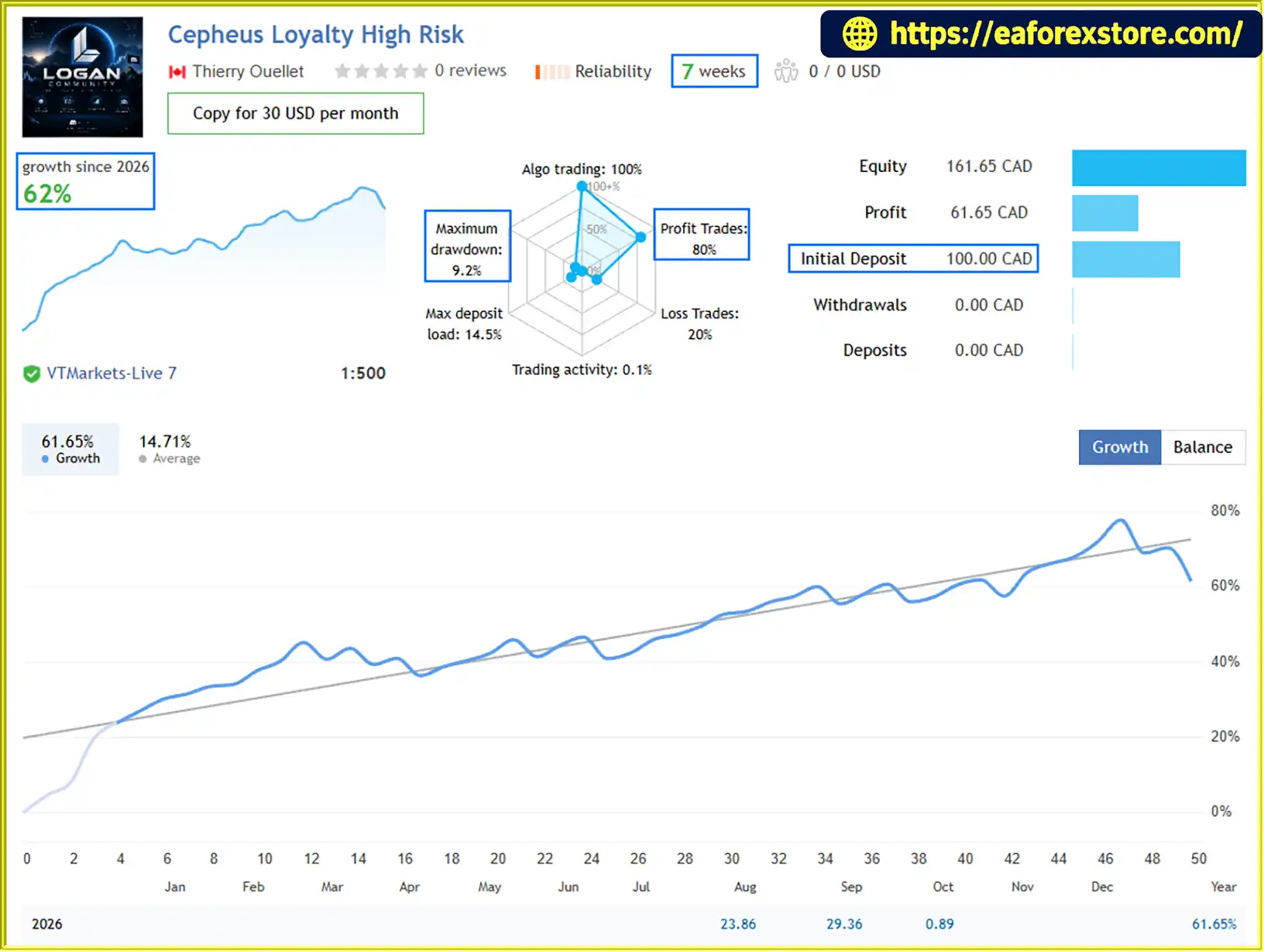
🔺Cepheus Loyalty High Risk - 7 Weeks
- Initial Deposit: $100
- Growth Rate: +62%
- Win Rate: 80%
- Maximum Drawdown: 9.2%
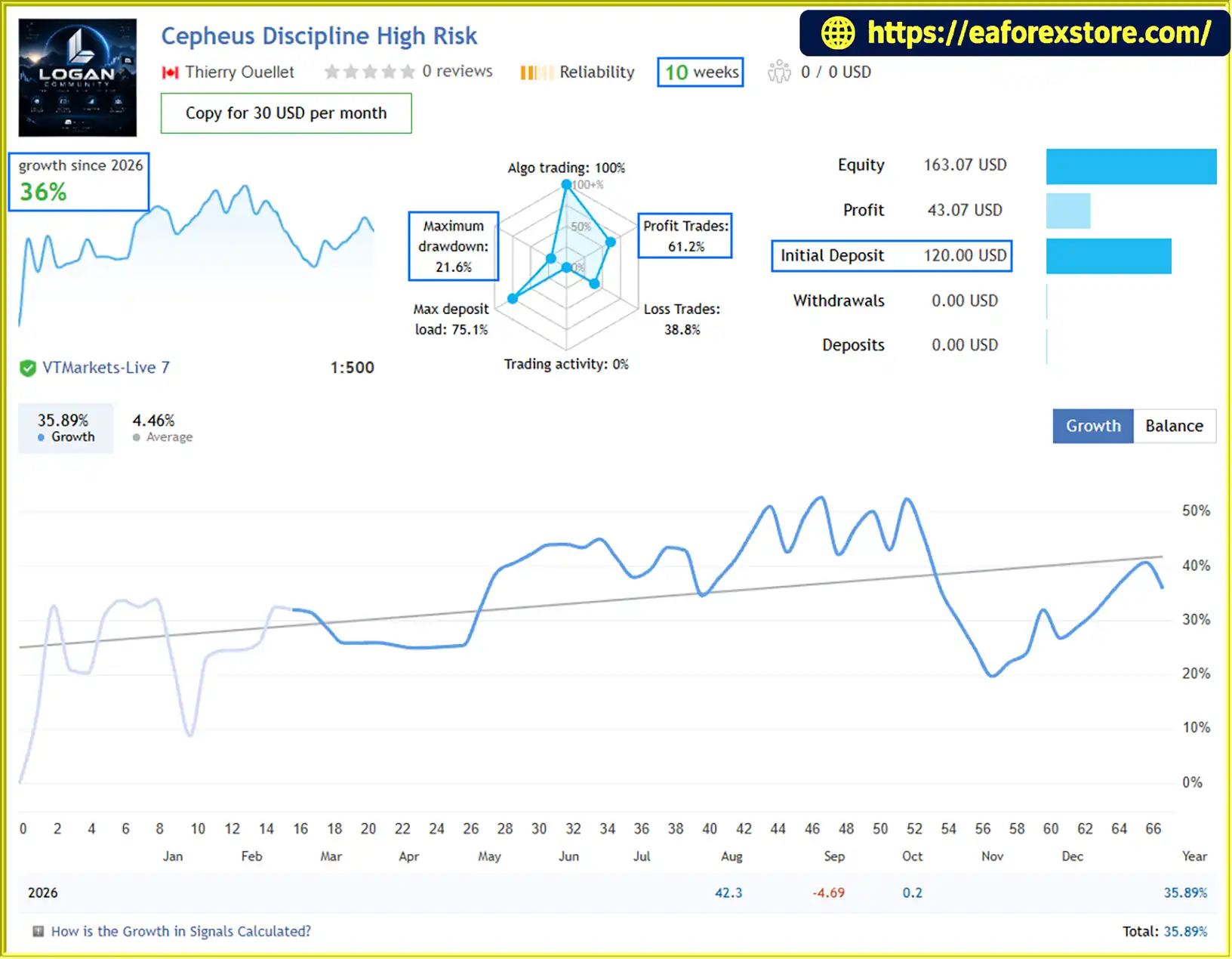
🔺Cepheus Discipline High Risk - 10 Weeks
- Initial Deposit: $120
- Growth Rate: +36%
- Win Rate: 61.2%
- Maximum Drawdown: 21.6%
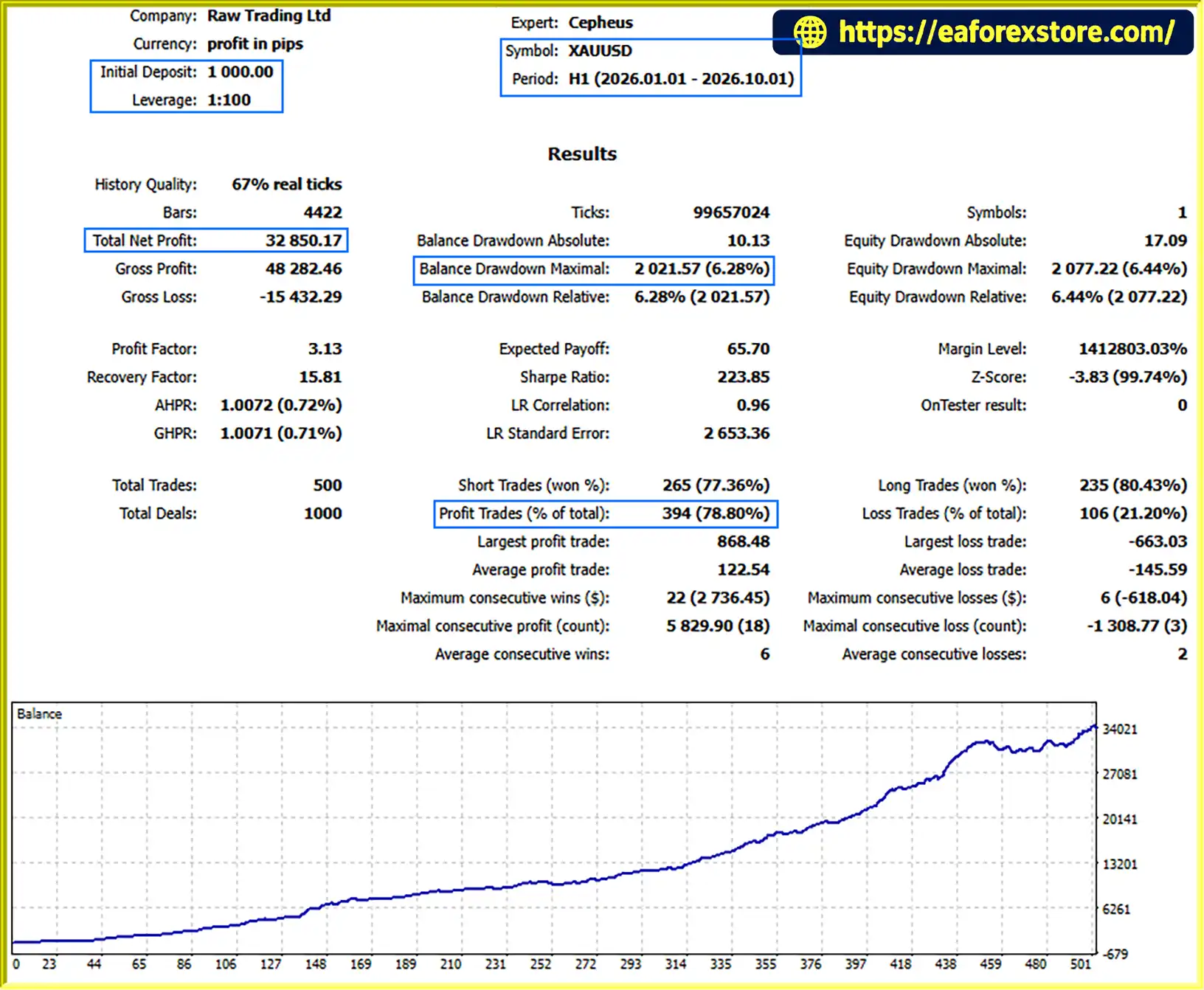
🟢Backtest Results
🔺XAUUSD (Gold) – 9 months
- Initial Deposit: $1.000
- Total Net Profit: $32.850,17
- Win Rate: 78.80%
- Maximum Drawdown: 6.28%
Risk Management & Alerts
Risk management is a central component of Cepheus EA MT5. Its protection features are designed to control trade exposure and filter potentially unfavourable trading conditions, but no automated system can remove all trading risks.
Broker-Side Stop Loss and Take Profit
Every position is submitted with a Stop Loss and Take Profit attached at the broker level.
This approach is intended to ensure that protective price levels are associated with the order rather than depending solely on the EA remaining active to initiate an exit.
However, stop-loss execution is not guaranteed at the specified price during gaps, severe volatility, or periods of limited liquidity.
Freeze Level and Stops Level Protection
Cepheus checks broker-specific order-distance restrictions when managing protective orders.
These checks help the EA account for the minimum permitted distance for stop-loss placement or modification and the restrictions that may apply near the current market price.
This is particularly relevant when trailing stops are adjusted during fast Gold price movements.
Automatic and Custom Risk Modes
Traders can choose from three risk configuration options:
- Automatic Risk Preset: Uses a predefined risk configuration.
- Custom Risk Percentage: Allows the trader to select a percentage-based risk setting.
- Fixed Lot Size: Uses a predetermined lot size for each trade.
The automatic risk-budget system distributes exposure between the engines according to the configured allocation rules. The default allocation is 3:1 between Loyalty and Discipline, with automatic reallocation if one engine is disabled.
Traders should verify the exact lot-sizing calculations and understand whether the selected risk percentage applies to individual trades, each engine, or another risk measure specified by the EA.
Daily Drawdown Circuit Breaker
The optional daily drawdown protection uses day-start equity as its reference point.
This feature is intended to restrict trading after the configured daily loss threshold is reached. Traders should confirm the EA's precise trigger and reset behaviour and should not assume that the circuit breaker eliminates losses from existing positions or protects against every market gap.
High-Impact USD News Filter
The native MT5 Economic Calendar integration can pause new entries around major USD announcements, such as:
- Non-Farm Payrolls (NFP)
- Consumer Price Index (CPI)
- Federal Open Market Committee (FOMC) announcements
- Federal Reserve interest-rate decisions
The EA can also remove pending entries before protected news periods when the relevant settings are enabled.
Correct operation depends on calendar availability, event classification, and the configured protection windows.
Bank Holiday Protection
Cepheus can avoid trading around selected major holidays, including Christmas, New Year, Good Friday, and Thanksgiving.
The objective is to reduce exposure during periods when liquidity or execution quality may be less favourable. Holiday protection does not guarantee that all low-liquidity periods will be avoided.
Friday and Weekend Protection
Customizable Friday trading restrictions help traders manage new entries as the weekend approaches.
These settings can be configured to reflect individual preferences regarding late-week volatility, market closures, and weekend exposure.
Spread and Execution Filters
Both trading engines independently evaluate spread and execution conditions before opening new positions.
These filters are designed to prevent trades from being initiated when the configured requirements are not satisfied. They cannot guarantee favourable fills or eliminate slippage.
No Grid or Martingale Recovery
Cepheus does not use grid averaging, martingale progression, or unlimited recovery sequences.
It does not attempt to recover a losing trade by continually increasing position sizes. Instead, its framework uses protective orders, configured position sizing, and optional drawdown controls.
Recommended risk precautions:
- Test the EA on a demo account before using real funds.
- Start with conservative risk settings and verify the actual exposure of both engines.
- Use a suitable RAW, ECN, or low-spread account where available.
- Check that news protection and broker-specific order management function correctly.
- Consider a VPS for uninterrupted operation.
- Never assume that broker-side stop-loss orders guarantee a fixed monetary loss under every market condition.
Trading forex and CFDs involves significant risk, and losses can exceed expectations during abnormal market conditions.
Pros and Cons
Pros
- Combines two complementary trading engines in one XAUUSD Expert Advisor.
- Uses independent entry logic for breakout momentum and structure-based swing opportunities.
- Designed without grid averaging, martingale progression, or unlimited recovery sequences.
- Attaches broker-side Stop Loss and Take Profit to every position.
- Supports automatic risk presets, custom percentage risk, and fixed-lot trading.
- Includes automatic risk-budget allocation between active engines.
- Accounts for broker Freeze Level and Stops Level restrictions.
- Integrates directly with the native MT5 Economic Calendar.
- Offers optional daily drawdown protection and selected holiday filters.
- Includes customizable Friday trading restrictions.
- Uses independent spread and execution filters for both engines.
- Provides a dark-mode dashboard with performance and risk information.
- Supports two-digit and three-digit Gold symbol formats.
- Can be attached to different chart timeframes because required timeframe analysis is handled internally.
Cons
- Trades exclusively on Gold, limiting diversification across other instruments.
- Requires MetaTrader 5 and a broker that supports the required XAUUSD trading configuration.
- Performance depends on spreads, slippage, liquidity, execution quality, and broker-specific restrictions.
- A dual-engine architecture does not guarantee independent performance or lower overall risk.
- Risk-budget allocation must be understood correctly to avoid unintended exposure.
- Economic calendar filtering depends on data availability and correct configuration.
- Stop Loss and Take Profit levels do not guarantee exact execution prices during volatile markets.
- Daily drawdown protection cannot eliminate every possible loss scenario.
- A stable internet connection or VPS is recommended for continuous operation.
- Requires independent testing before deployment on a live trading account.
How to Install Cepheus EA MT5
Follow these steps to install and configure Cepheus EA MT5 on MetaTrader 5.
Step 1: Prepare MetaTrader 5
Install MetaTrader 5 and log in to a compatible trading account. Confirm that your broker provides access to Gold and permits automated trading.
Check whether the broker uses XAUUSD, GOLD, or a symbol with a suffix. Use a symbol supported by the EA.
Step 2: Install the EA Files
Download Cepheus EA MT5 from the official provider.
In MetaTrader 5, select File → Open Data Folder. Navigate to the MQL5 directory and place the EA files in the appropriate Experts folder.
Restart MetaTrader 5 or refresh the Expert Advisors section in the Navigator panel.
Step 3: Open a Gold Chart
Open the XAUUSD chart for the symbol provided by your broker.
Cepheus can be attached to any chart timeframe because its required timeframe analysis is performed internally. Select a timeframe that is convenient for monitoring the EA.
Step 4: Attach Cepheus EA
Locate Cepheus in the Navigator panel and drag it onto the XAUUSD chart.
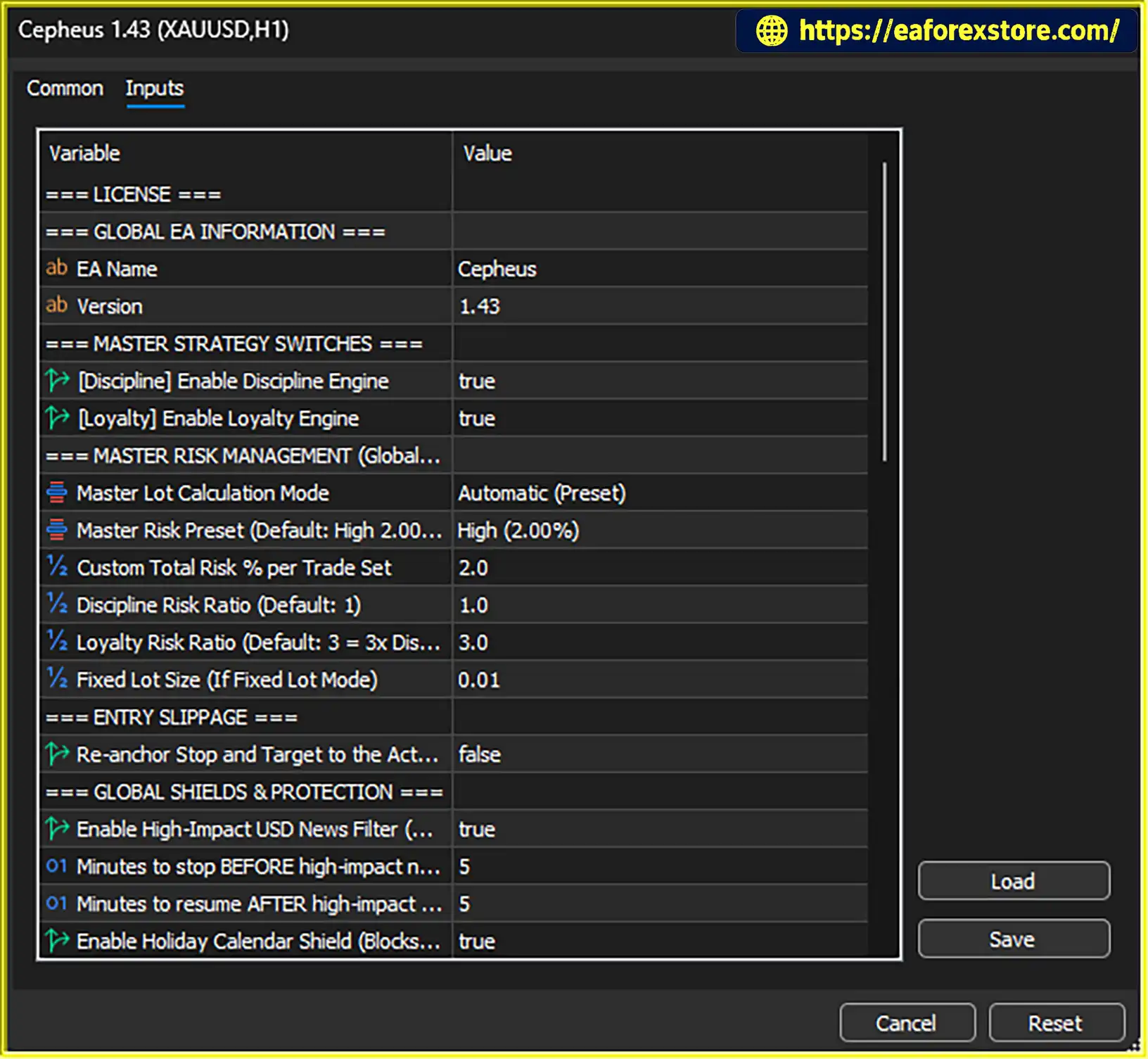
Review the available input parameters and confirm that the EA's trading permissions are configured correctly.
Step 5: Enable Algorithmic Trading
Enable Allow algorithmic trading in the EA settings and activate the platform's Algo Trading function.
Check the Experts and Journal tabs for errors and confirm that the dashboard displays the expected engine status.
Step 6: Select Your Risk Mode
Choose one of the supported risk configurations:
- Automatic Risk Preset
- Custom Risk Percentage
- Fixed Lot Size
Review the default 3:1 proportional allocation between Loyalty and Discipline. If you disable one engine, confirm that the resulting allocation matches your intended risk exposure.
Avoid selecting a lot size solely on the basis of account balance. Consider stop-loss distance, contract specifications, leverage, margin requirements, and potential slippage.
Step 7: Configure Protection Settings
Review the EA's available protection options, including daily drawdown limits, high-impact USD news filtering, holiday protection, and Friday restrictions.
The news filter uses the native MT5 Economic Calendar, so no external WebRequest URL or third-party news API key is required for this feature.
Confirm that the calendar is available and that the relevant event filters and protection windows are configured as intended.
Step 8: Verify the Dashboard
Once the EA is active, check that both trading engines display the expected status:
- Discipline: ACTIVE
- Loyalty: ACTIVE
These statuses indicate that the engines are enabled, not that a trade is guaranteed to open. Actual entries depend on market conditions, strategy rules, and execution filters.
Review the dashboard regularly to monitor exposure, floating P/L, realised performance, drawdown usage, and news protection.
Step 9: Test Before Live Trading
Run Cepheus EA MT5 on a demo account and evaluate its performance across different market conditions.
Check trade execution, stop-loss placement, trailing modifications, news filtering, risk allocation, and drawdown behaviour before committing real capital.
Recommended account configuration:
- Symbol: XAUUSD / supported Gold symbol
- Timeframe: Any supported chart timeframe
- Minimum Balance: $100 when using a fixed 0.01 lot, as suggested by the EA specifications
- Recommended Balance: $500–$2,000 or more for percentage-based dynamic risk configurations
- Account Type: Hedging
- Spread: RAW / ECN / Zero Spread preferred
- Gold Digits: Two-digit and three-digit formats supported
- Leverage: 1:30–1:500, subject to broker and jurisdictional restrictions
- VPS: Recommended for continuous 24/5 operation
These figures are configuration guidelines, not guarantees of sufficient margin or acceptable risk. The minimum balance should be evaluated against actual contract specifications, stop-loss distances, and the EA's position-sizing calculations.
Suggested brokers include VT Markets, TMGM, Vantage, and BlackBull, subject to account eligibility, regional availability, and independent verification of trading conditions.
What’s Included in the Download Package?
- Experts
- Cepheus EA.ex5
- SetFiles
-
- XAUUSD_Fixed Lot.set
- XAUUSD_AutoLot_Very Low Risk.set
- XAUUSD_AutoLot_Low Risk.set
- XAUUSD_AutoLot_Medium Risk.set
- XAUUSD_AutoLot_High Risk.set
- XAUUSD_AutoLot_Extreme Risk.set
>>> Join VIP Membership Now <<<
Final Thoughts
Cepheus EA MT5 is a dual-engine automated Gold trading system designed to combine trend and momentum breakouts with structure-based swing opportunities. By integrating Cepheus Discipline and Cepheus Loyalty, the EA offers two complementary approaches to analysing XAUUSD rather than relying on a single trading model.
Its key differentiators include broker-side Stop Loss and Take Profit, automatic risk-budget allocation, broker-aware order management, native MT5 economic news filtering, and optional daily drawdown protection. The system is also designed to avoid grid averaging, martingale progression, and unlimited recovery sequences.
The integrated dashboard provides convenient access to strategy status, account performance, exposure, drawdown usage, and upcoming news protection. Meanwhile, configurable risk modes allow traders to adjust position sizing according to their preferences and account requirements.
Cepheus may be worth evaluating for traders seeking a dedicated XAUUSD EA built around complementary strategies and structured risk controls. However, its actual performance and suitability depend on independent testing, broker execution conditions, market behaviour, and risk configuration.
Before deploying Cepheus EA MT5 on a live account, test it thoroughly on a demo account and verify how both engines behave during trending, ranging, and high-volatility conditions.
Defined risk does not mean risk-free trading. Stop-loss execution can be affected by slippage and market gaps, and no Expert Advisor can guarantee profits. Only trade with capital you can afford to lose.