
What is Dragon Expert EA MT4?
In the fast-paced world of forex trading, automated solutions like Dragon Expert EA have become essential for traders aiming to boost efficiency and accuracy. Dragon Expert is a powerful MetaTrader 4 Expert Advisor (EA) designed to intelligently navigate market volatility and execute trades with precision. This review explores the EA’s key features, real trading performance, and overall value, helping traders evaluate its potential as a reliable and advanced automated trading system.
Key Features of Dragon Expert EA
➫ Advanced Trading Algorithm:
- Detailed description of the intelligent algorithm.
- Real-time trend analysis and precision execution.
➫ Dynamic Risk Management:
- Adaptive Stop Loss, Take Profit, and position sizing.
- Designed to minimize drawdowns and protect capital.
➫ Multi-Currency Compatibility:
- Supports major and minor forex pairs.
- Enhances portfolio diversification and trading opportunities.
➫ Precision Execution & Trade Efficiency:
- Fast, accurate trade entries and exits.
- Low latency execution on MT4.
Why choose Dragon Expert EA MT4?
➫ Optimized for MetaTrader 4:
- Seamless installation and performance on MT4.
- Reliable platform integration.
➫ Proven Algorithmic Trading Results:
- High-precision trading decisions and profitability.
➫ Comprehensive Risk Control:
- Built-in tools to manage risk in volatile markets.
➫ Versatility Across Forex Pairs:
- Flexible strategy execution across different market conditions.
Dragon Expert EA MT4 Review
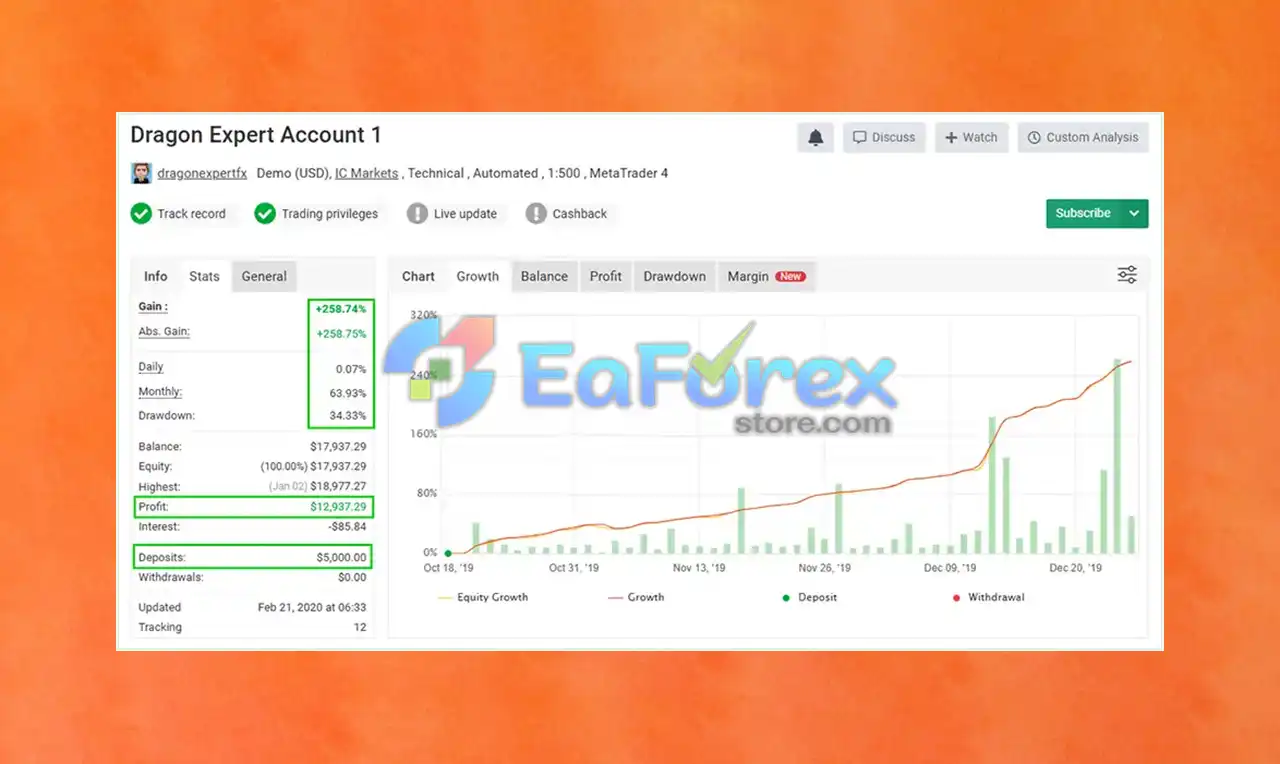
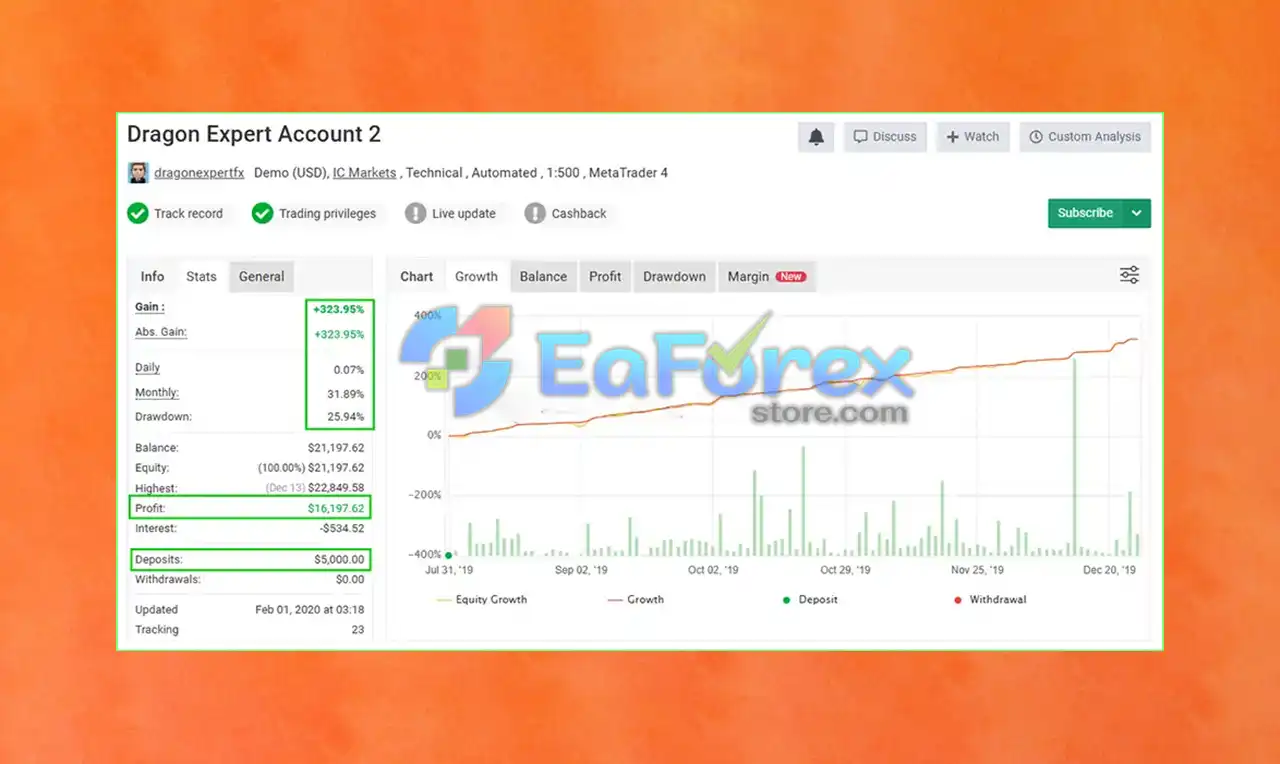
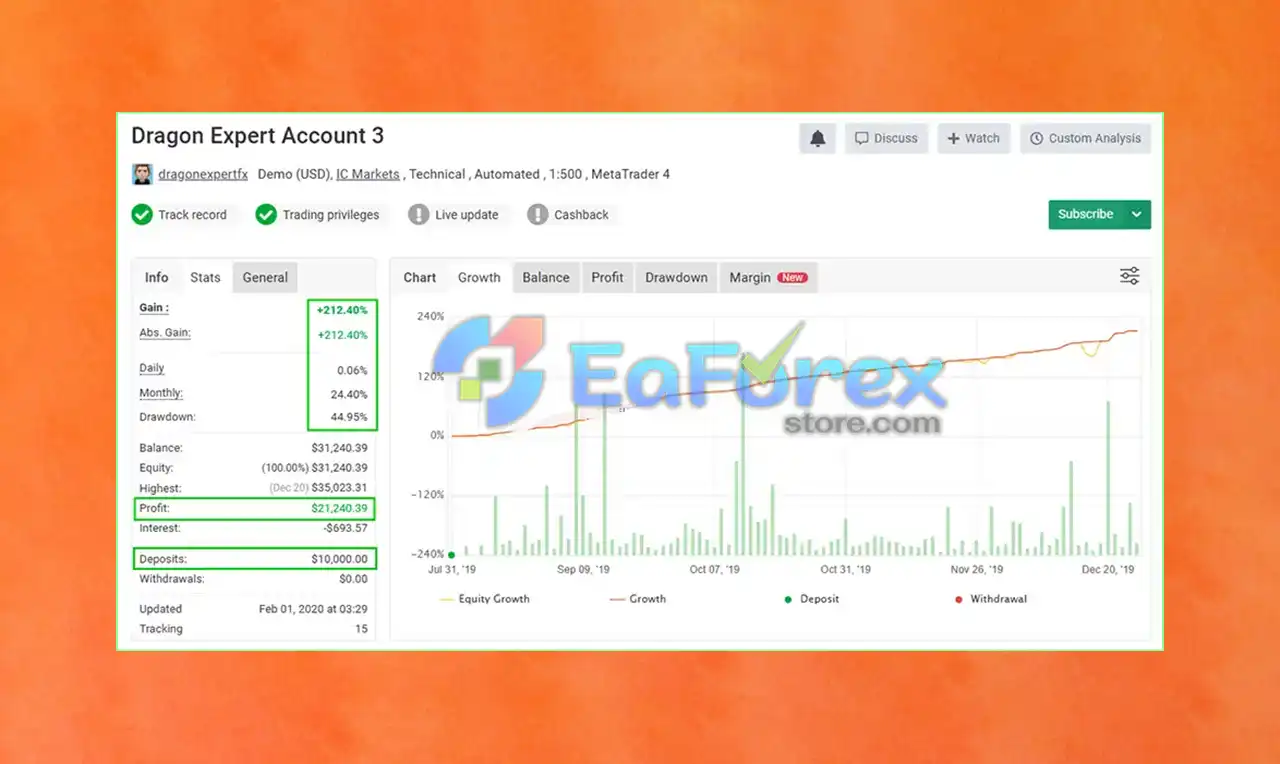
1. Live Verified by Myfxbook:
➫ Myfxbook account verification and real-world trading stats:
- Initial Deposit: $5,000
- Total Profit: +258.74% (in 4 months)
- Monthly Profit Avg: 63.93%
- Max Drawdown: 34.33%
- Signal Myfxbook 1: Click here
- Signal Myfxbook 2: Click here
- Signal Myfxbook 3: Click here
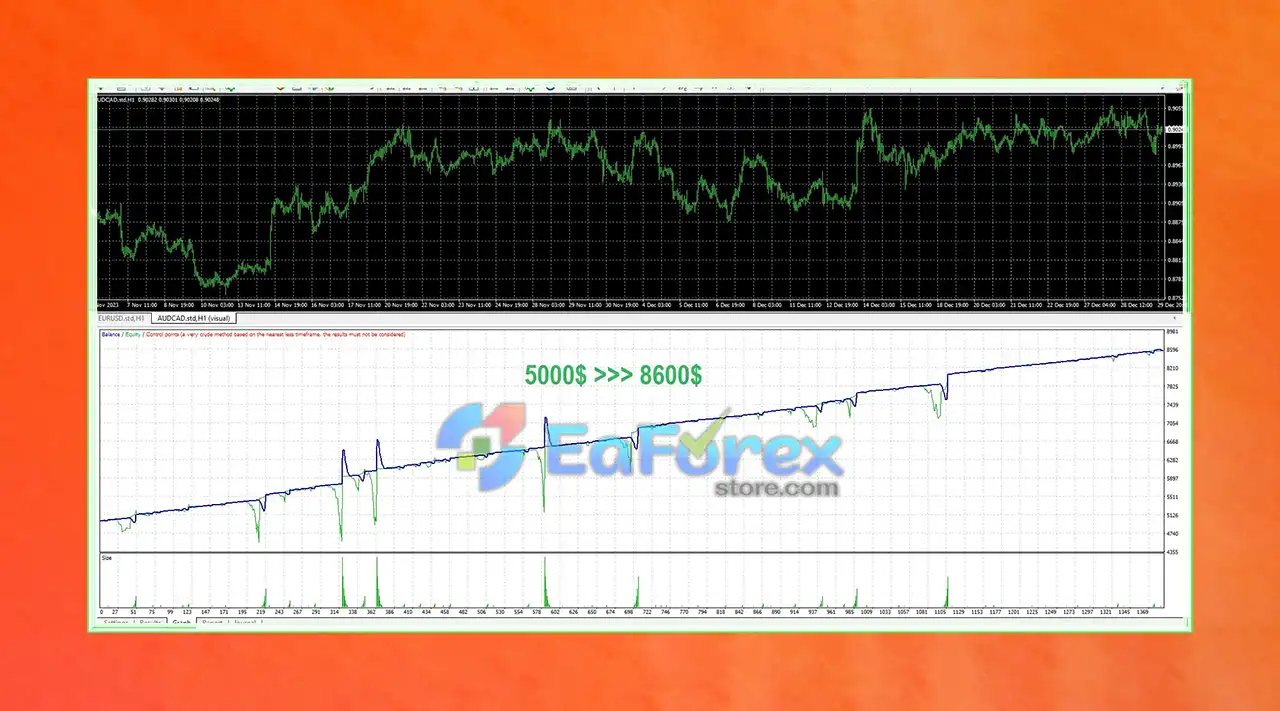
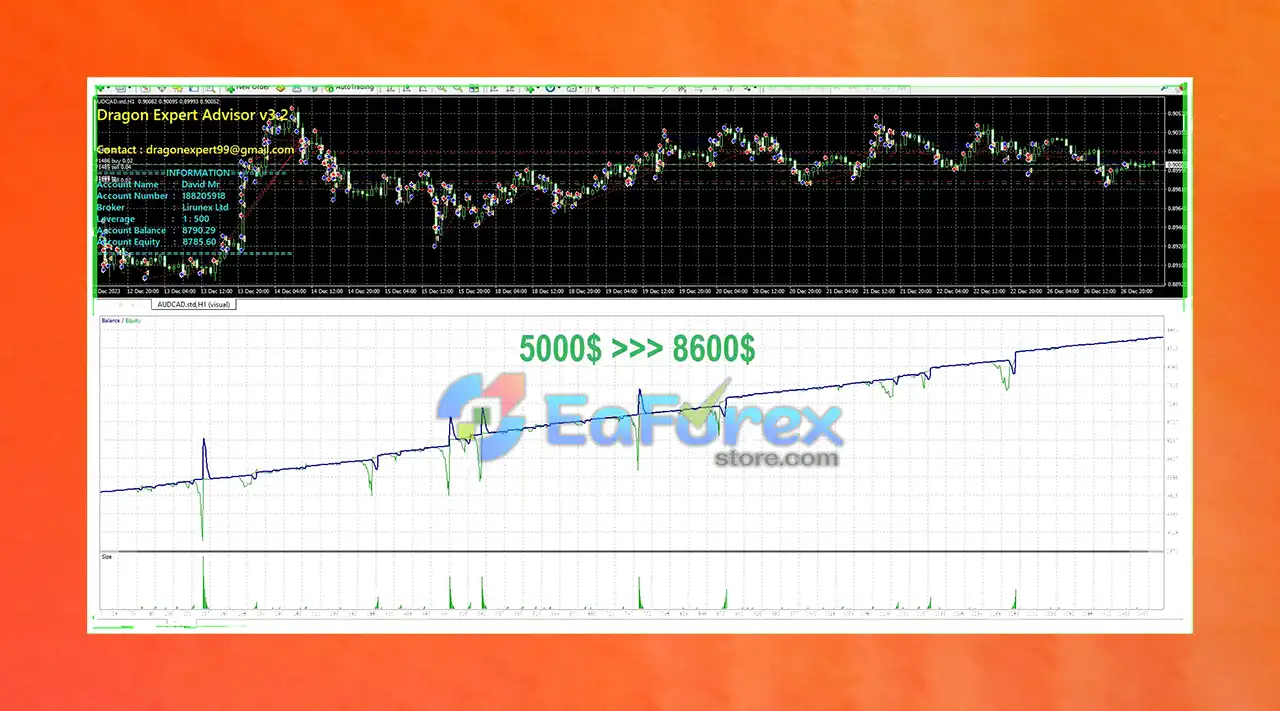
2. Backtest Results:
- Historical performance across various market conditions.
- Stable profitability and low-risk profile.
- Demonstrates adaptability and long-term reliability.
Installation and Product Package Overview
➫ Experts:
- Dragon Expert v2.0.ex4
- Dragon Expert v3.2.ex4
>>> Join VIP Membership Now <<<
How To Set Up EA
Setting up Dragon Expert EA MT4 v3.2 is easy and takes just a few steps. This guide ensures proper installation and optimized settings for your trading goals.
🟡 Install the EA
- Copy the Dragon Expert EA file into the
MQL4 > Expertsfolder in your MetaTrader 4 directory. - Restart MT4 and locate the EA under the Navigator panel.
🟡 Attach EA to a Chart
- Open your desired trading chart.
- Drag and drop Dragon Expert EA onto the chart.
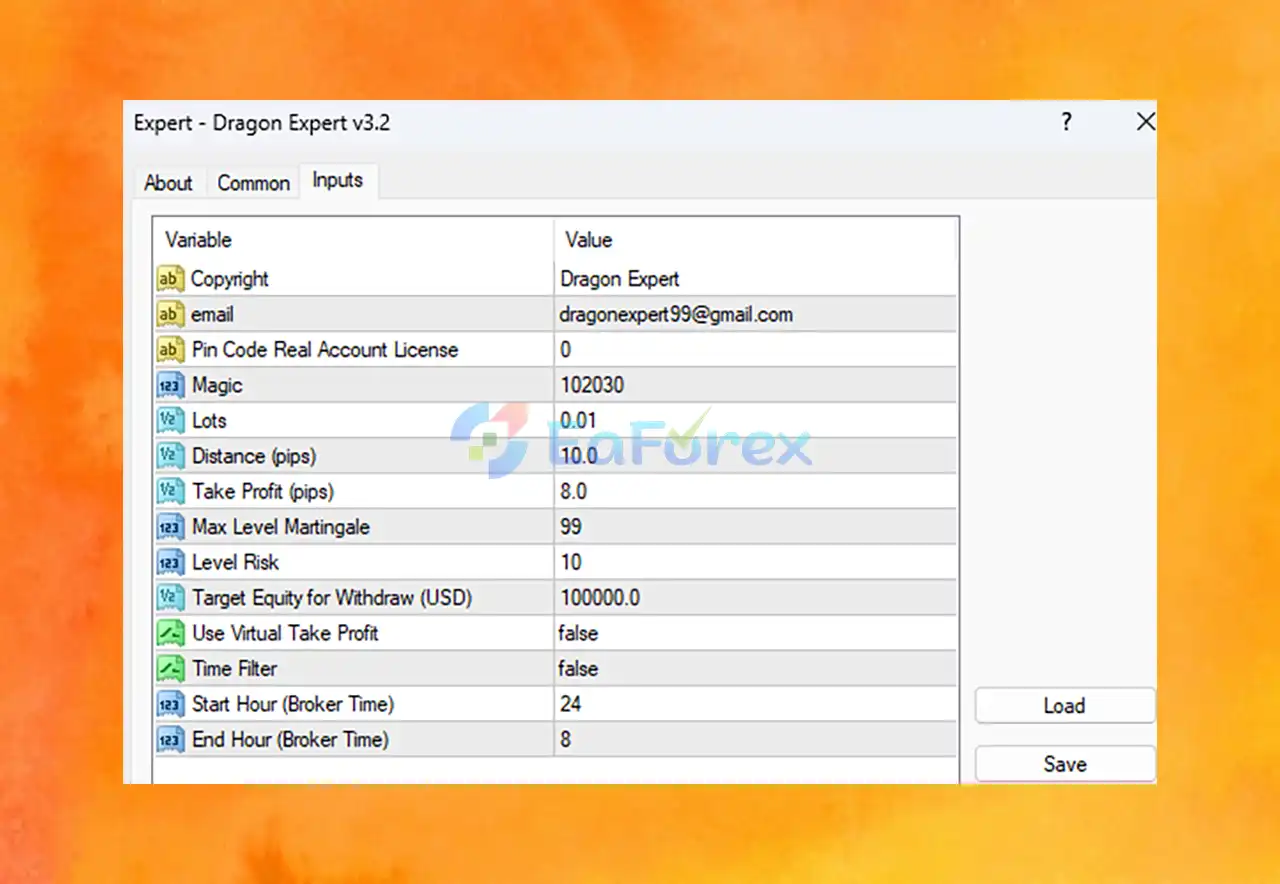
🟡 Key Settings Overview
- Lots = 0.01 → Micro lot for low-risk or small accounts.
- Distance (pips) = 10.0 → Spacing for grid or martingale trades.
- Take Profit (pips) = 8.0 → Fixed profit per trade for scalping or short-term strategies.
- Max Level Martingale = 99 → High-risk setting; adjust to lower values for safer trading.
- Level Risk = 10 → Controls risk level; likely impacts lot scaling.
- Magic = 102030 → Unique identifier to manage trades exclusively by this EA.
- Target Equity for Withdraw = 100,000.0 USD → Profit goal to trigger manual or auto-withdrawals.
- Use Virtual Take Profit = false → Uses broker TP; no virtual exit strategies.
- Time Filter = false → Trades 24/5; no trading hour restrictions.
- Start Hour = 24 / End Hour = 8 → Suggests night session trading; adjust for broker time zone.
🟡 License Note
-
Pin Code Real Account License = 0 → Demo or unlicensed setting; enter license for full access.
🟡 Activate the EA
-
Click AutoTrading in MT4 to start the EA.
Conclusion
In summary, Dragon Expert EA is a powerful and reliable tool in the world of automated forex trading. Engineered with advanced trading features, dynamic risk management, and a proven track record of consistent profitability, this Expert Advisor offers traders a smart way to optimize their strategies.
>>> Reviewed by Jason Stap <<<



