Product Overview
Edge Boost Pro EA MT5 is an automated Expert Advisor for MetaTrader 5 designed to trade Forex currency pairs and Gold (XAUUSD) using Support and Resistance (SnR) analysis. It identifies important market levels, evaluates current price behavior, and looks for potential trading opportunities when price breaks through or rebounds from these areas.
Unlike trading robots that rely on grid systems or martingale position sizing, Edge Boost Pro follows a structured approach with only one active trade at a time. Each trade is opened with predefined Stop Loss and Take Profit levels, while built-in risk controls help traders manage daily losses and overall drawdown.
The EA combines automatic Support and Resistance detection with advanced market filters, economic news monitoring, spread protection, and maximum trade holding time controls. It also includes a prop firm risk management panel, a chart-based status dashboard, and a graphical interface available in six languages.
Designed for traders who prefer clearly defined market levels and disciplined execution, Edge Boost Pro EA MT5 focuses on identifying selective trading opportunities rather than opening excessive positions. The developer estimates approximately three to five trades per pair per week, although actual trading frequency depends on market conditions, the selected instrument, and the EA configuration.
About the Developer
- Author: Andrey Barinov
- Experience: Over 14 years of experience on MQL5.
- Notable Products: Edge Boost Pro EA MT5, BruteForce EA MT5, Power Kick EA MT5, Quant Wizard EA MT5, Impulse Rider EA MT5 and other advisors.
- Flagship Product: Edge Boost Pro EA MT5 is rated as the best performing product of the year.
>>> Delivery time 24h-48h after payment.
>>> Refund if not delivered.
>>> You will receive the latest version without any limitations (ID+Time).Reviewed by Jason Stap <<<
Key Features of Edge Boost Pro EA MT5
Automated Support and Resistance Detection
Edge Boost Pro EA MT5 continuously analyzes market structure to calculate and display relevant Support and Resistance levels directly on the chart.
These levels provide reference points for evaluating potential entries, defining trade invalidation areas, and assessing possible price reactions. Automated level detection helps traders monitor market structure without manually drawing every important zone.
Breakout and Rebound Trading
The EA supports two primary trading approaches around important market levels:
- Breakout trading: Identifies potential opportunities when price moves through a significant Support or Resistance level.
- Rebound trading: Evaluates potential opportunities when price reacts to and moves away from an important market level.
The selected trade direction and setup depend on surrounding market conditions and the EA's internal confirmation filters.
Advanced Market Filters
Before allowing a Support and Resistance setup to be traded, Edge Boost Pro applies additional market analysis to filter trading conditions.
These filters are designed to help avoid lower-quality setups and focus on opportunities that meet the system's configured criteria. As with any automated trading strategy, filtering cannot eliminate false breakouts or losing trades.
Predefined Stop Loss and Take Profit
Every trade is opened with predefined Stop Loss and Take Profit levels. According to the supplied product specifications, these levels remain unchanged after execution.
The Risk/Reward Ratio parameter determines the relationship between the intended Stop Loss and Take Profit distances. The EA also checks whether the configured levels are compatible with the current Support and Resistance structure and market conditions.
Setups that do not meet the system's requirements may be ignored. Consequently, changing the Risk/Reward Ratio can affect not only trade outcomes but also the number of trades the EA takes.
Prop Firm Risk Management Panel
Edge Boost Pro includes a dedicated risk management panel designed to help traders monitor account limits commonly associated with proprietary trading challenges.
The panel provides color-coded warnings and practical guidance related to risk conditions. This allows traders to monitor important account information directly on the chart rather than relying exclusively on external calculations.
Although these tools can support disciplined trading, they do not guarantee compliance with every prop firm's rules. Traders should verify the firm's specific daily loss, drawdown, equity, and trading restrictions independently.
Maximum Daily Loss Protection
The EA includes a configurable Max Daily Loss Limit. Once the defined daily loss threshold is reached, the system automatically stops trading according to its protection rules.
This feature is intended to help limit continued trading after an unfavorable period. Traders should understand how the EA calculates daily losses and when its daily protection resets before relying on it for account management.
Total Drawdown Protection
Edge Boost Pro also provides a Total Drawdown Limit measured from the highest balance or equity peak, according to the supplied specifications.
This adds another layer of account-level risk monitoring alongside the daily loss control. The configured limit should be selected with sufficient room for trading costs, execution differences, and the specific drawdown rules of the trading account.
Economic News Filter
The EA uses two economic calendar sources and displays important news information directly on the chart.
News filtering can help restrict trading around selected economic events that may cause sudden price movements, wider spreads, or unpredictable execution. However, it cannot guarantee that every market-moving event will be identified or that all trades will avoid news-related volatility.
Spread Filter and Trade Holding Time Control
The built-in Spread Filter prevents new trades when the spread exceeds the configured maximum.
Edge Boost Pro also supports a maximum trade holding time. Positions that remain open beyond the configured period can be closed automatically, helping the system enforce its intended trade-duration rules.
These controls are particularly relevant when trading instruments with changing spreads or during periods of reduced liquidity.
One Active Trade at a Time
Edge Boost Pro allows only one active trade at a time, avoiding the accumulating grid positions and progressive recovery exposure associated with some automated strategies.
This design makes the system's open-trade exposure more straightforward to monitor. Nevertheless, a single trade can still incur a significant loss if position size is excessive or market execution differs from expectations.
Forex and Gold Compatibility
The EA is designed for Forex currency pairs and Gold, providing flexibility to evaluate Support and Resistance opportunities across different instruments.
The developer states that Edge Boost Pro supports both Hedging and Netting account types. Actual compatibility should still be verified with the broker's symbol specifications, execution conditions, and the EA's current version.
Six-Language Interface and On-Chart Dashboard
The graphical interface is available in six languages, making the EA more accessible to traders who prefer different interface languages.
Its on-chart dashboard displays the EA's current status and monitors important operational conditions, including terminal connection and AutoTrading status. These features help traders check whether the system is operating as expected.
How Edge Boost Pro EA MT5 Works
Edge Boost Pro combines automatic market-level detection, setup evaluation, trade protection, and account risk monitoring in a structured trading process.
Step 1: Identify Important Support and Resistance Levels
The EA analyzes current market structure and calculates relevant Support and Resistance levels. These levels are displayed directly on the chart and serve as reference points for potential trades.
Step 2: Evaluate Breakout and Rebound Opportunities
The EA monitors price behavior around the identified levels. Depending on the market situation, it can evaluate a potential breakout through a level or a rebound away from it.
Step 3: Apply Market and Execution Filters
Potential setups are evaluated using the EA's internal market filters and applicable trading restrictions. The Spread Filter can prevent new entries when spreads exceed the configured limit, while economic news filtering can restrict trading around selected events.
Step 4: Check Stop Loss, Take Profit, and Risk/Reward Settings
Before accepting a setup, the EA considers its configured Risk/Reward Ratio and the relationship between the intended trade levels and current Support and Resistance structure.
If the Stop Loss and Take Profit settings are unsuitable for the setup under the EA's rules, the opportunity may be ignored. This means configuration changes can influence both the risk/reward profile and trade frequency.
Step 5: Open and Manage the Trade
When a setup satisfies the applicable conditions, the EA opens a trade with predefined Stop Loss and Take Profit levels. These levels remain unchanged after execution, according to the supplied specifications.
The system permits only one active trade at a time, avoiding multi-position grid recovery sequences.
Step 6: Monitor Holding Time and Account Risk
The EA monitors its configured trade holding time and can automatically close a position that exceeds the permitted duration.
At the account level, the daily loss and total drawdown controls help monitor predefined risk limits. The prop firm panel displays warnings and account-related guidance to support ongoing supervision.
Step 7: Monitor Operational Status
The on-chart dashboard allows traders to review the EA's status and check terminal connection and AutoTrading availability. For continuous operation, the EA can be run on an appropriate VPS solution.
Why Choose Edge Boost Pro EA MT5?
Structured Support and Resistance Trading
Edge Boost Pro focuses on identifiable market levels rather than relying exclusively on a single indicator signal. Its breakout and rebound logic provides two ways to evaluate price behavior around important Support and Resistance areas.
No Grid or Martingale
The EA does not use grid recovery or martingale position sizing, according to the supplied product description. With only one active trade at a time, it avoids adding successive recovery positions when price moves against an open trade.
This simplifies exposure management, although it does not remove ordinary trading risk.
Dedicated Prop Firm Risk Tools
The prop firm risk management panel, daily loss protection, and total drawdown limit help traders monitor account risk more systematically.
These features may be useful for traders operating under strict account limits, provided the EA's settings and behavior are compatible with the applicable firm's rules.
Defined Trade Risk and Reward
Each trade uses predefined Stop Loss and Take Profit levels. Trading around Support and Resistance can sometimes allow a Stop Loss to be placed relatively close to the point where a setup becomes invalid.
However, favorable Risk/Reward opportunities depend on the market structure, the entry price, and the configured parameters. A favorable ratio alone does not guarantee positive trading results.
Multiple Market and Execution Filters
Economic news filtering, spread protection, and maximum trade holding time provide additional controls around the entry and management process.
These features are designed to help avoid selected unsuitable conditions and keep trading behavior within the EA's configuration.
Flexible Instrument Selection
Support for Forex pairs and Gold gives traders the option to evaluate different markets. The developer's estimated frequency of three to five trades per pair per week provides a general expectation rather than a guaranteed trading schedule.
Convenient Monitoring and VPS Support
The six-language interface and on-chart status dashboard simplify routine monitoring. Compatibility with the MQL5 VPS solution and regular desktop-access VPS also gives traders options for keeping the EA running continuously.
Edge Boost Pro EA MT5 Performance Review
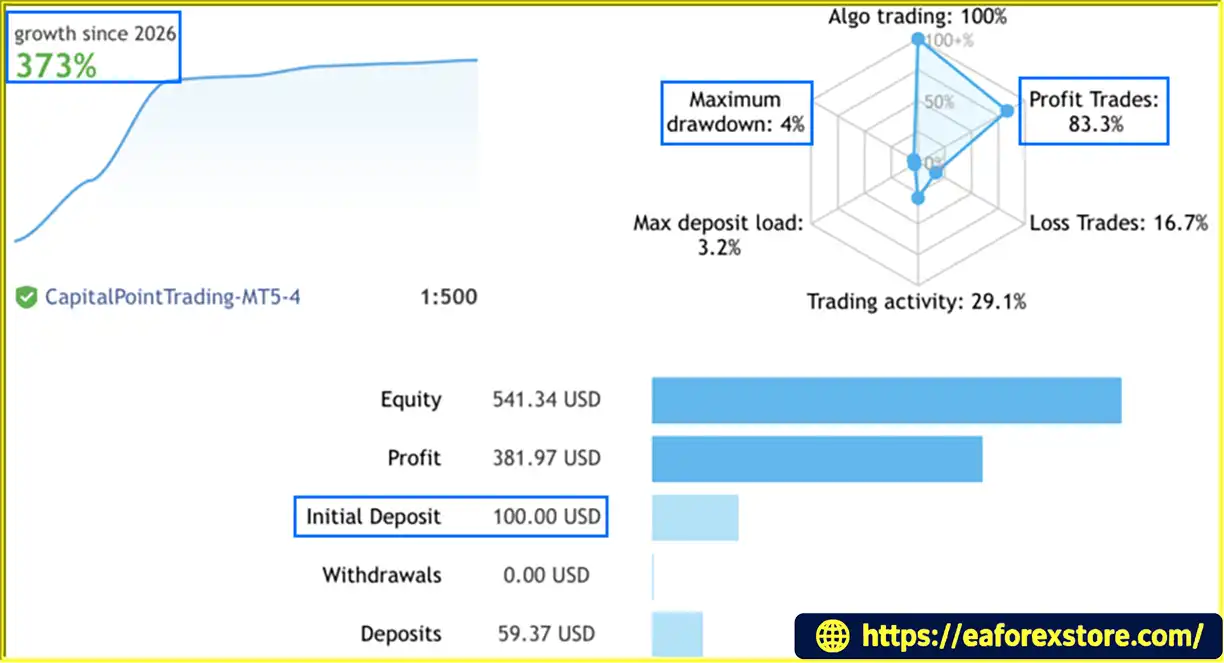
🟢Signal Results
- Initial Deposit: $100
- Growth Rate: +373%
- Win Rate: 83.3%
- Maximum Drawdown: 4%
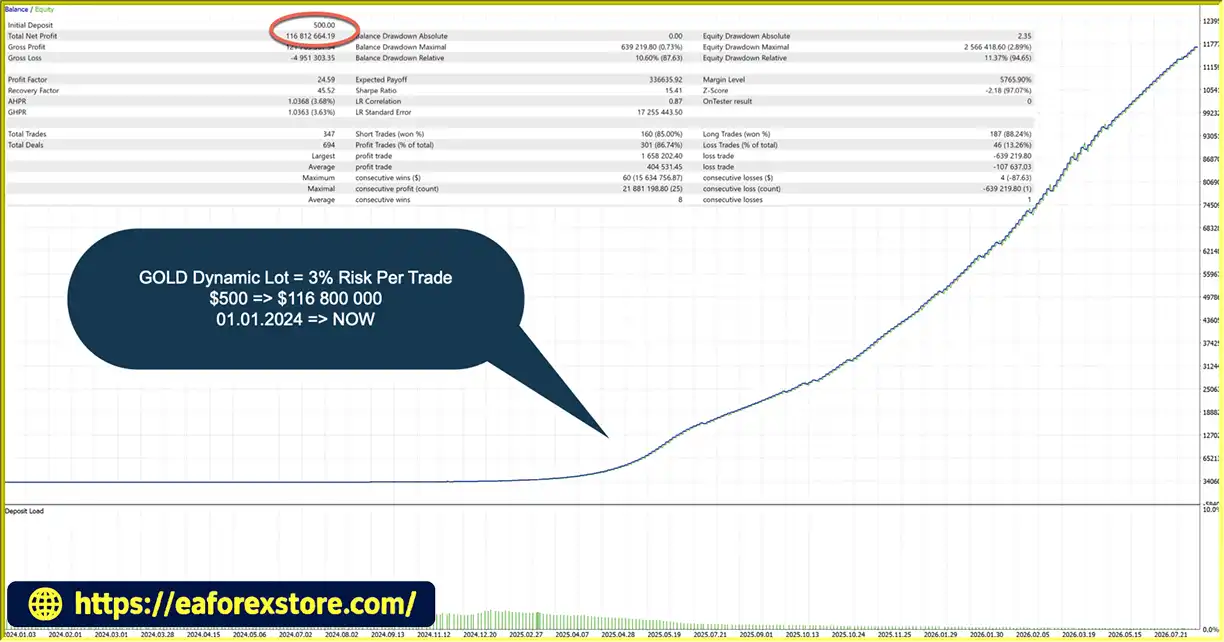
🟢Backtest Results
- Initial Deposit: $500
- Total Net Profit: $116,812,664.19
- Win Rate: 86.74%
- Maximum Drawdown: 0.73%
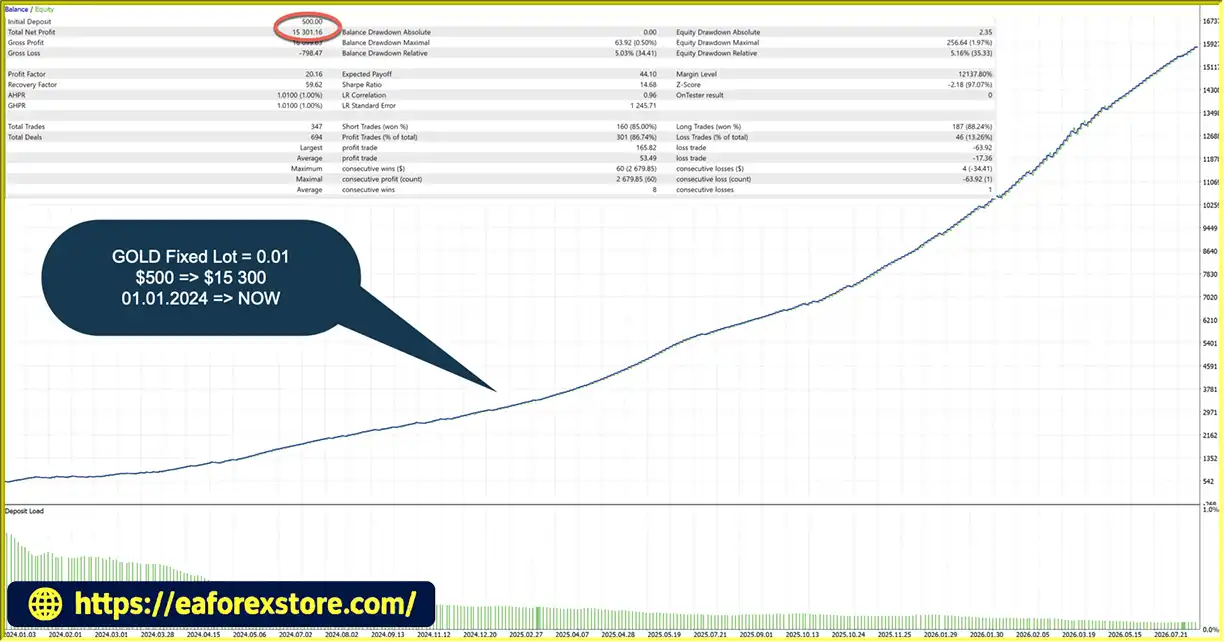
- Initial Deposit: $500
- Total Net Profit: $15,301.16
- Win Rate: 86.74%
- Maximum Drawdown: 0.50%
Risk Management & Alerts
Although Edge Boost Pro avoids grid and martingale systems, its performance still depends on position sizing, market conditions, broker execution, and the correct configuration of risk controls.
Configure the Risk/Reward Ratio Carefully
The Risk/Reward Ratio affects the intended relationship between Stop Loss and Take Profit levels. Because the EA may ignore setups when these levels do not fit the current Support and Resistance structure, changing this parameter can also change the number of trades.
Test different configurations before using the EA on a live account.
Set a Realistic Daily Loss Limit
Configure the Max Daily Loss Limit according to the account's equity, trading plan, and any applicable prop firm rules. Verify how daily loss is calculated, including whether floating losses, commissions, swaps, and other costs are included.
Define the Total Drawdown Limit
Use the Total Drawdown Limit to establish a clear threshold relative to the account's highest balance or equity peak. Confirm the EA's calculation method and test its behavior before relying on this control.
Monitor Spreads and Execution
The Spread Filter can prevent new trades when the configured spread threshold is exceeded. However, spreads can change rapidly, and slippage or gaps can still cause actual execution prices to differ from expected levels.
Understand Economic News Risk
The news filter uses two economic calendar sources, but traders should not assume that all news events or unexpected announcements will be captured. Sudden market reactions may still affect open positions.
Verify Prop Firm Compatibility
Risk management tools can assist with monitoring but cannot automatically ensure compliance with every proprietary trading firm's rules. Check restrictions involving daily losses, trailing drawdown, news trading, overnight positions, weekend exposure, and other account-specific requirements.
Test Across Different Instruments
Forex pairs and Gold can have different volatility, spreads, trading sessions, and execution characteristics. Test each instrument separately and avoid assuming that a configuration suitable for one market will work equally well on another.
Use a VPS for Continuous Operation
A suitable VPS can help maintain a stable connection when the local computer is offline. Traders should still monitor terminal connectivity, AutoTrading status, broker availability, and VPS performance.
Pros and Cons of Edge Boost Pro EA MT5
Pros
- Automated Support and Resistance detection: Calculates and displays important market levels directly on the chart.
- Breakout and rebound strategies: Evaluates two types of price behavior around key levels.
- No grid or martingale: Avoids grid recovery and progressive martingale exposure.
- One active trade at a time: Keeps the number of simultaneous trades limited by design.
- Predefined Stop Loss and Take Profit: Establishes trade protection levels at entry.
- Prop firm risk management panel: Provides color-coded warnings and account-related guidance.
- Daily and total drawdown controls: Supports predefined loss and drawdown limits.
- Economic news filtering: Uses two calendar sources and displays important news on the chart.
- Spread and holding time filters: Adds controls for trading costs and position duration.
- Forex and Gold support: Offers flexibility across multiple instruments.
- Hedging and Netting compatibility: Supports both account types according to the developer.
- Six-language interface: Provides a more accessible user experience.
- VPS compatibility: Can run through MQL5 VPS or a regular VPS with desktop access.
Cons
- No guaranteed profitability: Support and Resistance levels can fail, and breakouts or rebounds may produce losing trades.
- Trade frequency varies: The estimated three to five trades per pair per week is not guaranteed.
- Parameter sensitivity: Changing the Risk/Reward Ratio can affect both trade levels and the number of accepted setups.
- Broker conditions still matter: Spreads, slippage, execution quality, and symbol specifications can affect results.
- News filtering has limitations: Unexpected events and sudden market reactions can occur outside the filter's protection.
- Risk limits require verification: The exact calculation and reset behavior should be understood before live use.
- Multi-instrument risk can accumulate: Trading several Forex pairs and Gold can increase total account exposure even if each EA instance allows only one active trade.
How to Install Edge Boost Pro EA MT5
Follow these general steps to install and configure Edge Boost Pro EA MT5 on MetaTrader 5.
- Download the EA: Obtain the Edge Boost Pro EA MT5 package from the official provider.
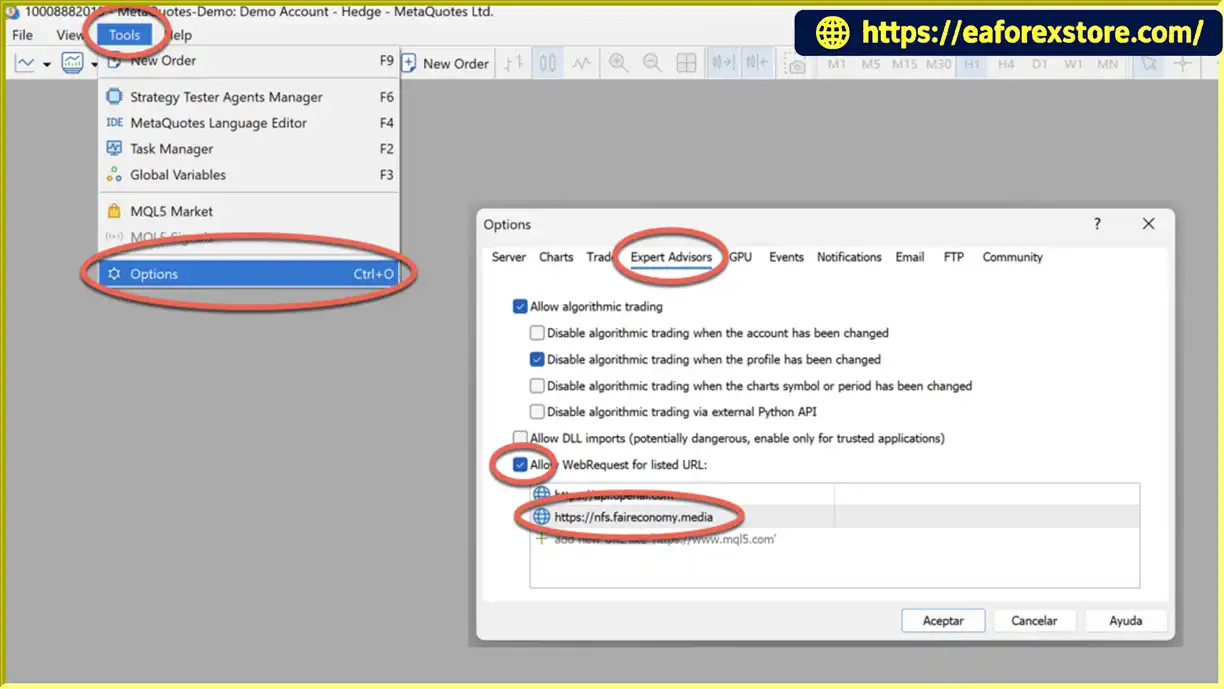
- Open MetaTrader 5: Launch the platform and log in to your trading account.
- Open the data folder: Select
File → Open Data Folder. - Install the EA file: Copy the supplied EA file into the
MQL5/Expertsdirectory, following the provider's installation instructions. - Refresh the Navigator: Refresh the Expert Advisors list or restart MetaTrader 5 if necessary.
- Choose a trading instrument: Open the chart for the Forex pair or Gold symbol you want to trade.
- Attach the EA: Add Edge Boost Pro EA MT5 to the chart and enable algorithmic trading as required.
- Configure the Risk/Reward Ratio: Review the Stop Loss and Take Profit configuration and understand how it affects setup selection and trade frequency.
- Set account protection: Configure the daily loss and total drawdown limits, and review the prop firm panel settings if applicable.
- Configure filters: Review news filtering, maximum spread, maximum holding time, and other available market filters.
- Set a unique Magic Number: Use a different Magic Number when running multiple EA instances on the same symbol, as recommended by the developer.
- Test before live trading: Use the MT5 Strategy Tester and a demo account to evaluate behavior under realistic spreads and execution assumptions.
- Monitor operation: Check the dashboard, terminal connection, AutoTrading status, and account risk controls regularly.
For continuous operation, Edge Boost Pro can be used with MQL5 VPS or a compatible regular VPS. Always consult the supplied documentation for version-specific installation requirements and settings.
Real User Reviews and Feedback
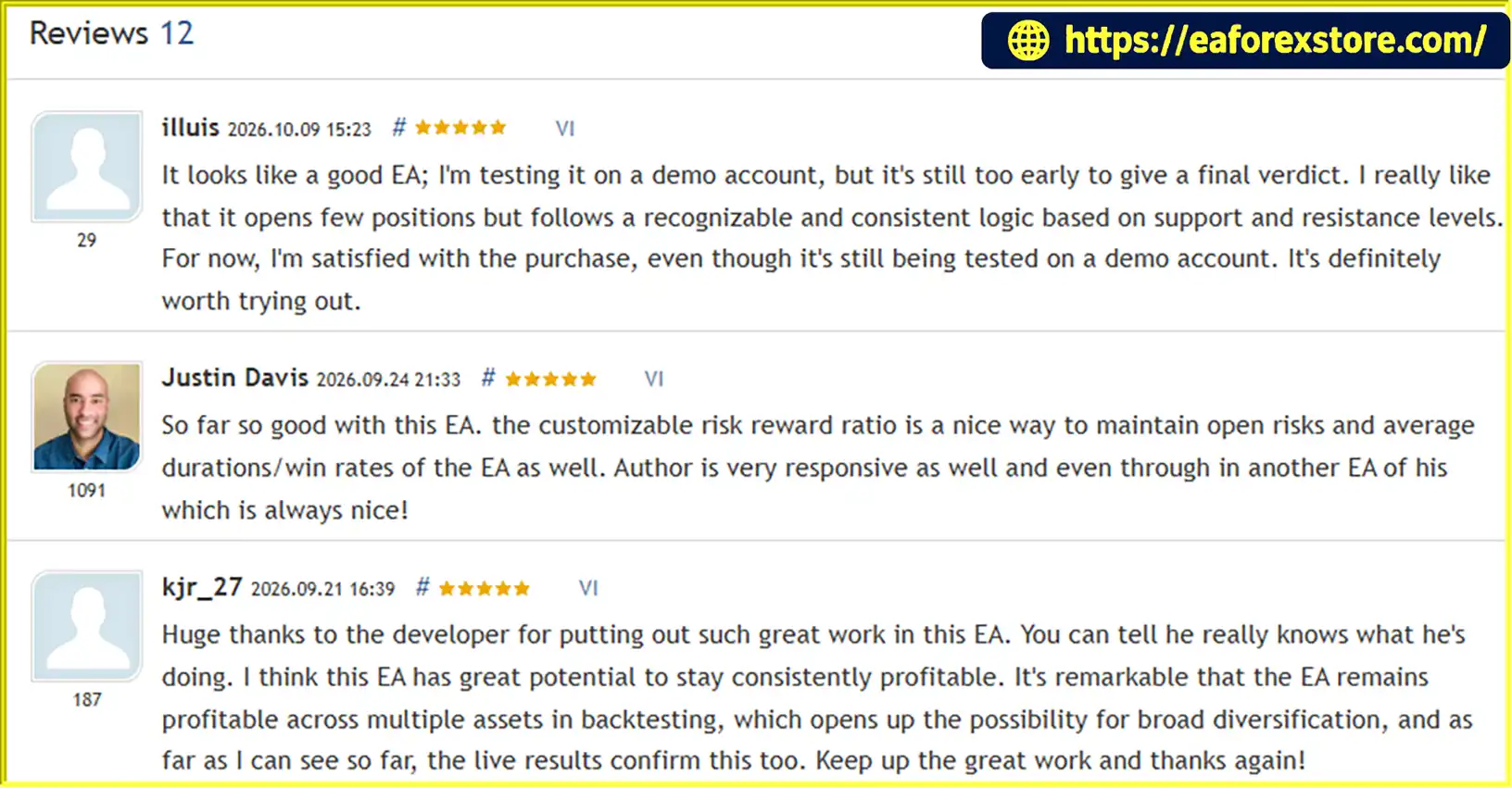
🔺Edge Boost Pro EA MT5 is highly appreciated by the MQL5 community for bringing stable and reliable profits. Below are 5 star reviews from users:
What’s Included in the Download Package?
- Experts:
- Edge Boost Pro_1.0_fix.ex5
- SetFiles
- gold_fx pair_risk 1%.set
- gold_fx pair_risk 1%.set
- gold_fx pair_risk 1%.set
- gold_fx pair_risk 1%.set
- gold_fx pair_risk 1%.set
- gold_fx pair_fixed lot_0.01.set
>>> Join VIP Membership Now <<<
Final Thoughts
Edge Boost Pro EA MT5 is a Support and Resistance trading robot for MetaTrader 5 that evaluates breakout and rebound opportunities across Forex pairs and Gold. Its automatic market-level detection, predefined Stop Loss and Take Profit, advanced filters, and prop firm risk management panel make it a structured option for traders who prefer controlled, selective trading.
One of its main distinctions is its no-grid, no-martingale design with only one active trade at a time. Daily loss protection, total drawdown controls, economic news filtering, spread checks, and maximum holding time further support its risk management framework.
However, these features do not eliminate trading risk. Market levels can fail, news can trigger unexpected volatility, and actual execution can differ from backtest assumptions. The estimated three to five trades per pair per week should also be treated as a general expectation rather than a promise.
Before deploying Edge Boost Pro EA MT5 on a live account or using it for a prop firm challenge, test the selected instruments and settings, verify how the risk limits work, and confirm compatibility with the broker and account rules.
For traders seeking an automated approach built around market structure, defined trade levels, and disciplined risk controls, Edge Boost Pro EA MT5 offers a focused alternative to grid-based and martingale trading systems. As with all automated trading tools, careful testing and realistic expectations remain essential.