
What is GerFX Forex Cyborg MT4?
GerFX Forex Cyborg MT4 is a well-established automated trading system that has been actively used since 2017. It is specifically designed for night scalping, a strategy that exploits small price fluctuations during low-liquidity market hours. Optimized to trade over 20 currency pairs, the EA combines aggressive trade execution with advanced professional risk management tools to help traders navigate the forex market efficiently.
About the Developer
• Author: Paul Exler
• Experience: Over +8 years of experience on MQL5.
• Notable Products: GerFX Density Scalper EA, GerFX EA Protection Filter MT5, GerFX Forex Cyborg EA and other products.
• Flagship Product: GerFX Forex Cyborg MT4 is rated as the best performing product of the year.
>>> Join our Channel Telegram <<<
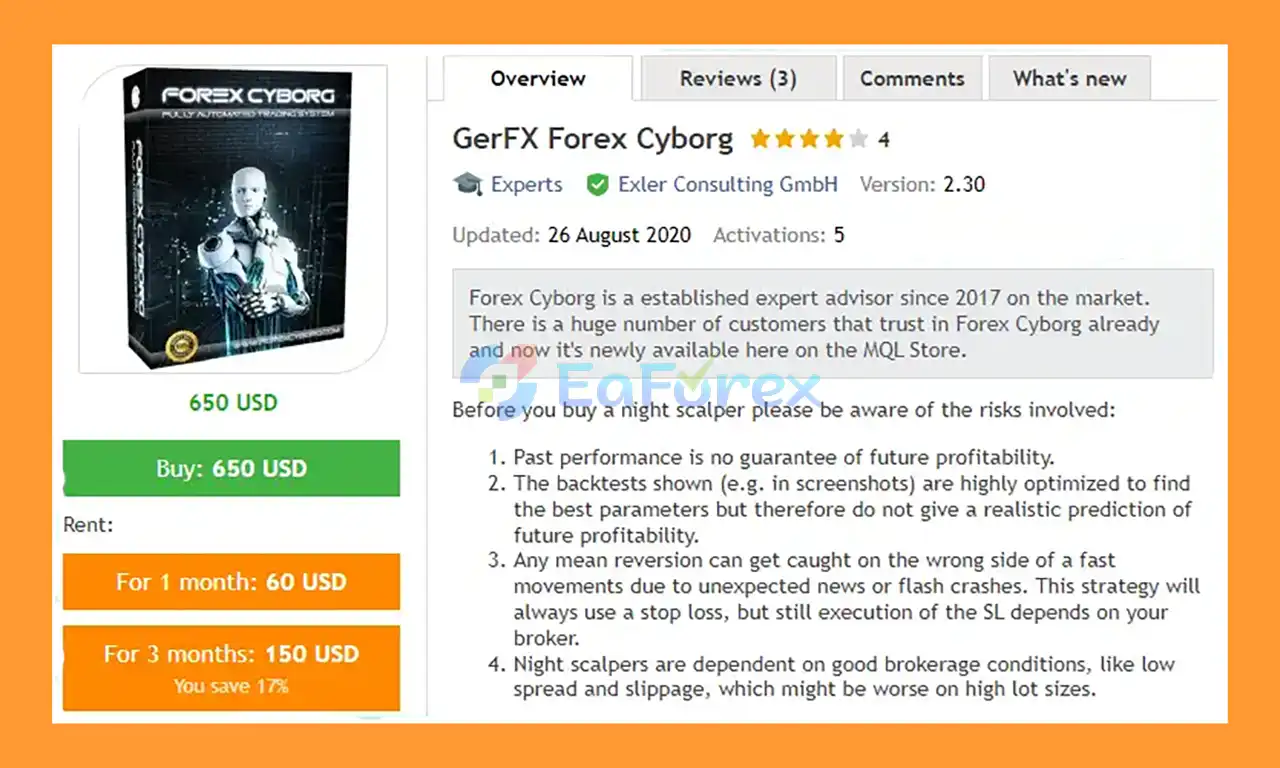
Core Features of GerFX Forex Cyborg MT4
- Night Scalping Strategy: Focuses on capturing small but consistent profits during quiet market hours.
- Low-Liquidity Market Exploitation: Takes advantage of reduced volatility and tighter price movements at night.
- Aggressive Trading Logic: Trades more frequently and targets larger average pip gains than typical night scalpers.
- Multi-Currency Support: Optimized to trade more than 20 major and minor currency pairs.
- M15 Timeframe Execution: Designed to run on the M15 chart for each individual trading symbol.
- Fully Automated Trading: Executes entries, exits, Stop Loss, and Take Profit automatically.
- Pre-Configured Default Settings: Ready to use immediately without complex optimization.
Additional Features
- Flexible Risk Management: Supports fixed lot size, percentage of balance, and other risk models.
- Currency Correlation Risk Manager: Limits exposure by preventing trades on highly correlated pairs.
- Equity Protection System: Stops trading automatically if equity drops below a defined threshold.
- Custom SL & TP Control: Allows traders to define professional Stop Loss and Take Profit levels.
- Daily Trading Schedule: Enables disabling trading on specific days of the week.
- Event-Based Trading Filter: Pauses trading during major events such as elections or exceptional market conditions.
- S&P 500 Crash Filter: Adds an extra safety layer during broader market stress scenarios.
Why Choose GerFX Forex Cyborg MT4?
- Proven Track Record Since 2017: One of the long-standing and trusted night scalping EAs on the market.
- Professional Risk Control Design: Integrates multiple protection layers to safeguard trading capital.
- Diversified Trading Approach: Spreads risk across many currency pairs instead of relying on a single market.
- Live Performance Monitoring: Provides trading signals so users can track results in real time.
- High Flexibility: Offers extensive settings for traders to fine-tune behavior and risk exposure.
- Market Anomaly Awareness: Includes filters for crashes, correlations, and abnormal conditions.
- Built for Serious Traders: Designed for users who understand night scalping risks and opportunities.
GerFX Forex Cyborg MT4 Performance Review
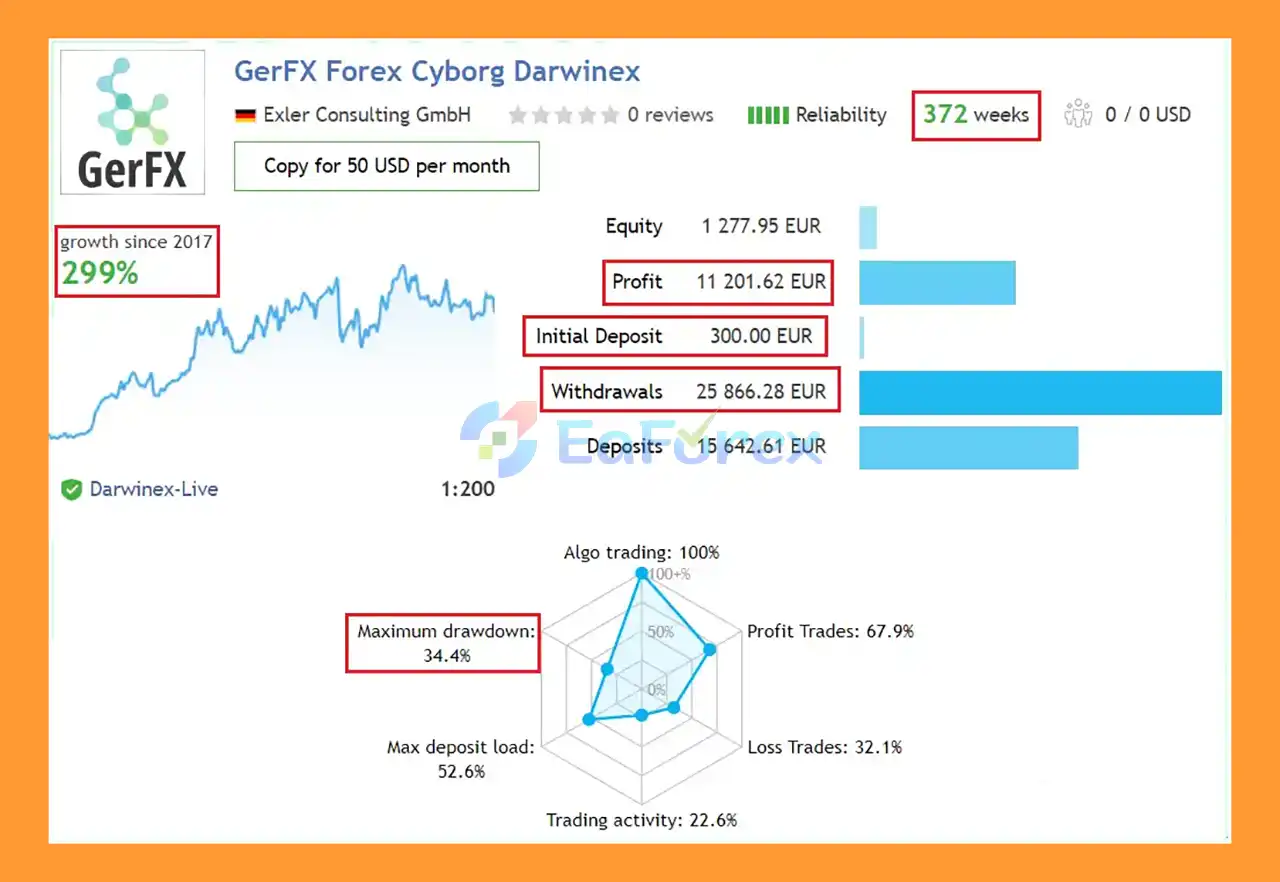
🟢Signal Results
- Initial Deposit: $300 (372 weeks)
- Growth Rate: +299%
- Win Rate (% of total): 67,9%
- Maximum Drawdown: 34,4%
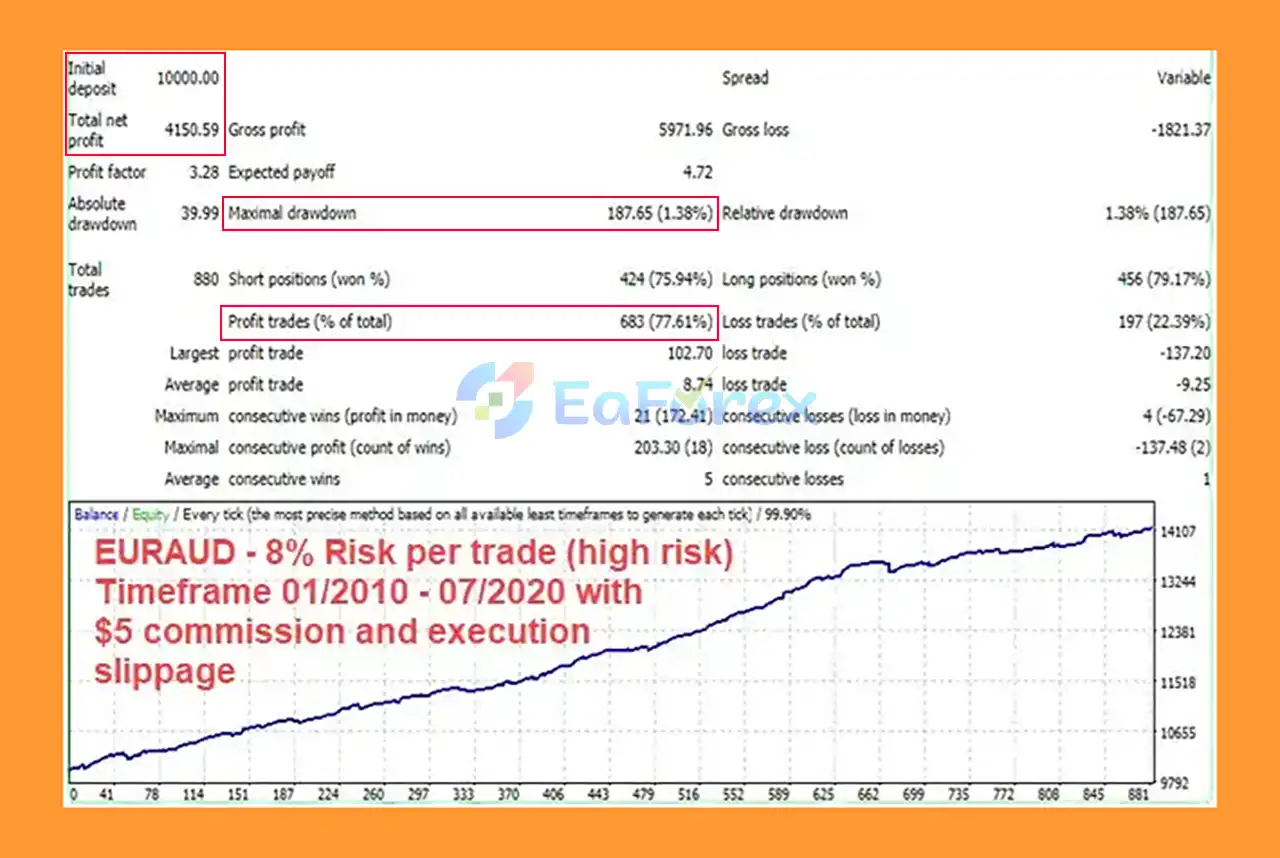
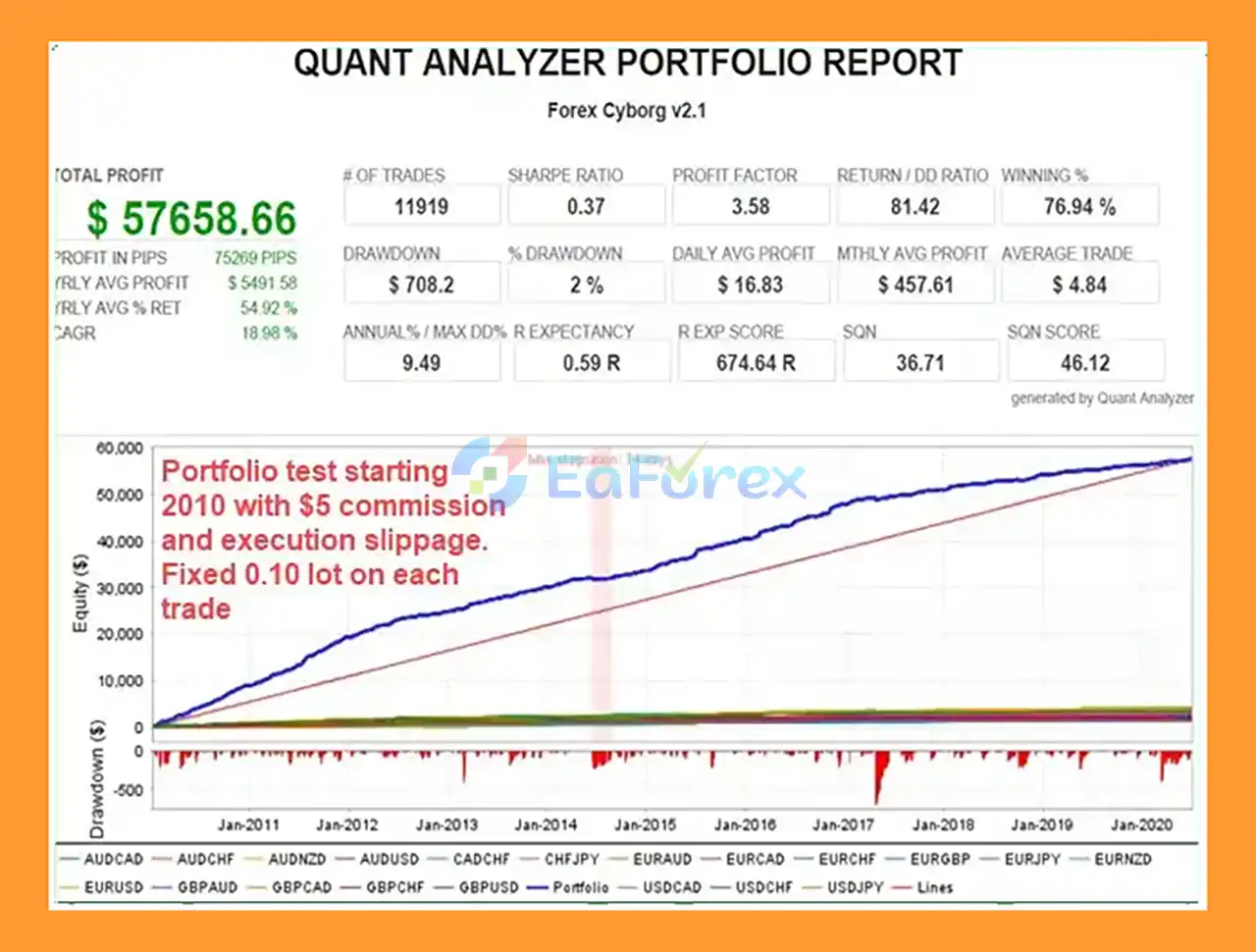
🟢Backtest Results
🔺EURUSD - 10Year
- Initial Deposit: $10,000
- Net Profit: $4.150,59
- Win Rate: 7,61%
- Max Drawdown: 1,38%
What’s Included in the Download Package?
- Experts: GerFX Forex Cyborg EA v2.30_fix.ex4
>>> Join VIP Membership Now <<<
How To Set Up EA
🔻 GerFX Forex Cyborg EA is an automated trading robot designed for the MetaTrader 4 (MT4) platform. Proper installation and configuration are crucial for the robot's optimal performance. Follow this guide to get your EA up and running efficiently.
Step 1: Installation on the MT4 Platform
.mq4 or .ex4 file.- Open MT4: Launch your MetaTrader 4 desktop platform.
- Access the Data Folder: Navigate to the top menu and click
File>Open Data Folder. This action opens the root directory of your MT4 installation. - Locate the Experts Folder: In the newly opened folder window, go to
MQL4>Experts. - Copy the EA File: Paste your
GerFX Forex Cyborg EAfile into theExpertsfolder. - Restart MT4: Close and restart your MT4 platform to register the new file. Alternatively, in the
Navigatorwindow, right-click onExpert Advisorsand selectRefresh.
Step 2: Activating and Configuring the EA
- Enable AutoTrading: Click the
AutoTradingbutton on the top toolbar of your MT4 platform. The button should turn green. - Attach to a Chart: In the
Navigatorwindow, expand theExpert Advisorslist and double-click the "Expert - GerFX Forex Cyborg EA". A settings window will pop up. - General Tab Settings:
- Check the box for
Allow live trading. - If applicable, check
Allow DLL imports(only for trusted robots).
- Check the box for
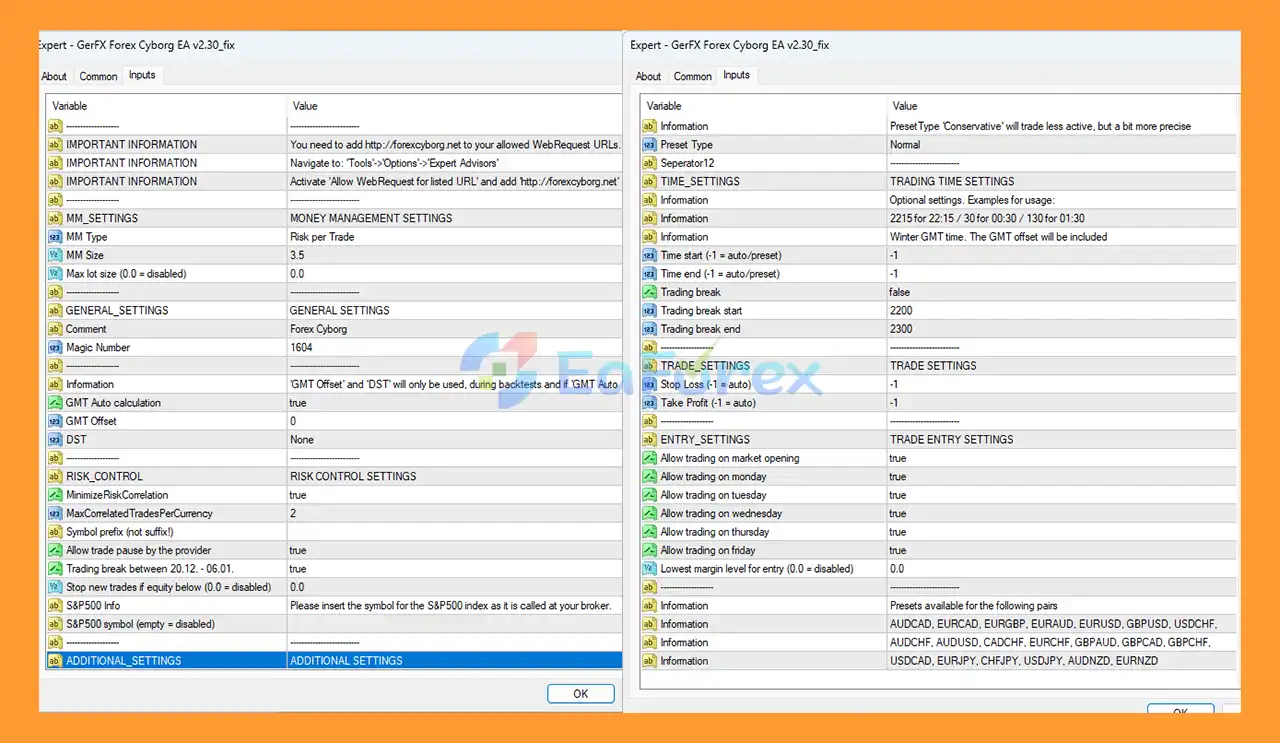
- Inputs Tab Settings: The image you provided shows several key inputs:
- MM SETTINGS (Money Management): You can set a specific
Risk per Trade(e.g.,3.5%as shown in the image) or use aMax lot size. - General Settings: Ensure the unique
Magic Numberis set to avoid conflicts with other EAs. - Time Settings: Configure
Time startandTime endfor specific trading sessions if desired. The image suggests using the 'Normal' preset type for typical activity. - WebRequest URL: Important Information from the image: You must allow web requests by navigating to
Tools>Options>Expert Advisorstab, activatingAllow WebRequest for listed URLand addinghttp://forexcyborg.netto the allowed URLs list. - Risk Control: Default settings often include options for
Stop Loss,Take Profit, and risk correlation minimization.
- MM SETTINGS (Money Management): You can set a specific
- Confirm: Click
OKto save your settings and attach the EA to the chart. - Verify Activation: A smiling face icon will appear in the top-right corner of the chart, confirming that the EA is active and running correctly.
Step 3: Best Practices
- Use a VPS: To ensure the EA runs uninterrupted 24/7, consider installing it on a Forex VPS (Virtual Private Server).
- Demo Test First: Always test the EA and your chosen settings on a demo account before moving to live trading to minimize risk.
Conclusion
In summary, GerFX Forex Cyborg MT4 is a long-standing and battle-tested automated trading system tailored for night scalping strategies in the forex market. With continuous use since 2017, this EA has proven its reliability by combining aggressive trade execution with professional-grade risk management and multiple protective filters. Its ability to trade over 20 currency pairs, manage correlation risk, pause during abnormal market events, and protect equity makes it a robust solution for serious traders who understand the dynamics of low-liquidity trading sessions. Supported by real signal performance, long-term backtests, and flexible configuration options, GerFX Forex Cyborg MT4 remains a solid choice for traders seeking a diversified, risk-aware, and experience-driven night scalping Expert Advisor on the MT4 platform.
>>> Reviewed by Jason Stap <<<



