
Product Overview
GoldOil EA MT5 is an automated Expert Advisor for MetaTrader 5 designed to trade Gold (XAUUSD) using information from multiple connected financial markets. Instead of analyzing Gold in isolation, the system can monitor Gold, Oil, and Nasdaq (US100) to evaluate cross-market conditions before entering a Gold trade.
The core concept behind GoldOil is that Gold price behavior can sometimes be influenced by broader market developments, including energy prices, inflation expectations, geopolitical uncertainty, and changes in equity market sentiment. By incorporating information from Oil and Nasdaq, the EA aims to identify trading opportunities using a broader market perspective.
Importantly, Gold is the only target trading market. Oil and Nasdaq are used as analytical inputs and market filters rather than instruments for opening trades.
GoldOil EA MT5 also introduces an Open Black Box Framework. Its internal trading engine remains protected, while users can access a wide range of configurable modules, filters, entry conditions, and trade-management options. These components can be combined to create different trading configurations with distinct characteristics.
The system supports multiple analytical approaches, including cross-market momentum, multi-timeframe trend analysis, liquidity sweeps, breakouts, Fair Value Gaps, order-block retests, session-based trading, volatility expansion, and technical divergence.
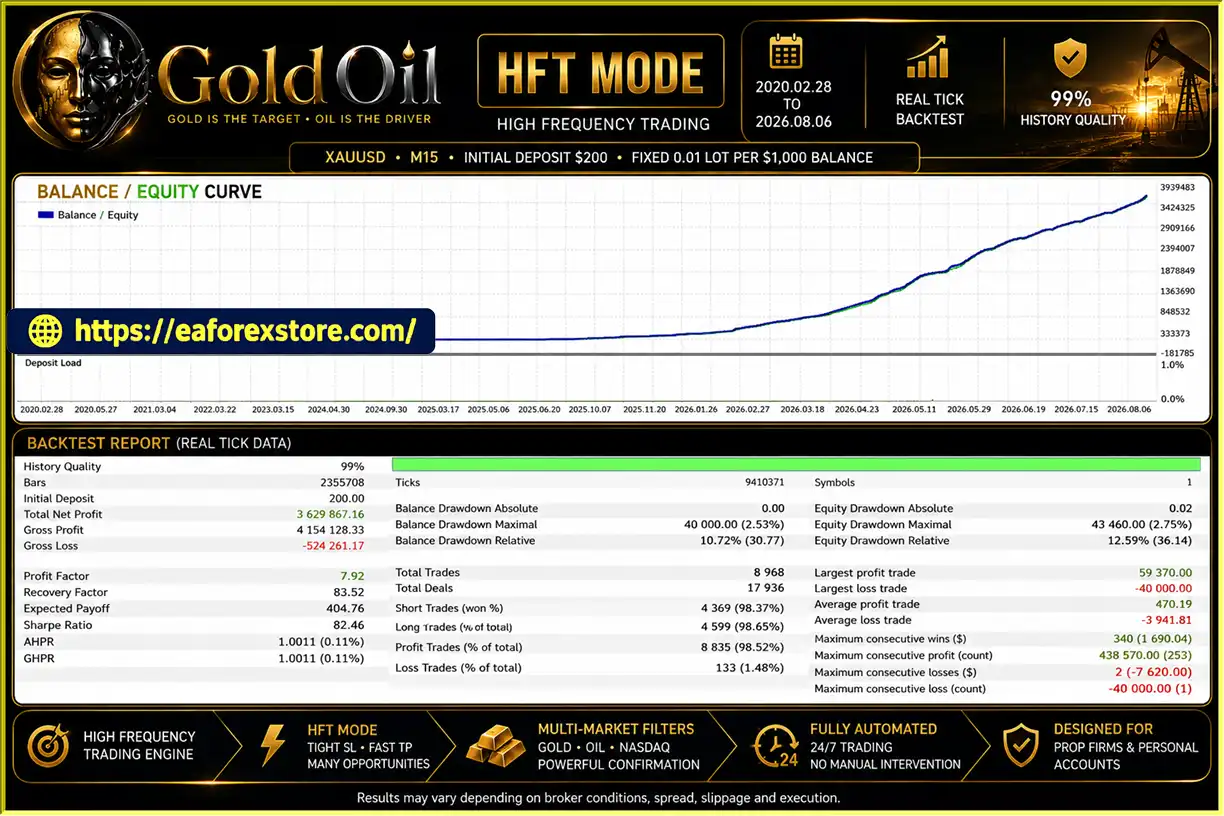
GoldOil is designed for both personal trading accounts and prop firm or funded accounts. The default configuration uses High-Frequency Trading (HFT) mode, primarily intended for prop firm verification and challenges. For personal real-account trading, the developer recommends using the supplied Intraday set files, which are described as less sensitive to broker conditions.
With its multi-market analysis and flexible configuration framework, GoldOil EA MT5 offers an alternative approach to automated Gold trading for users who want to explore different strategies within one trading engine.
About the Developer
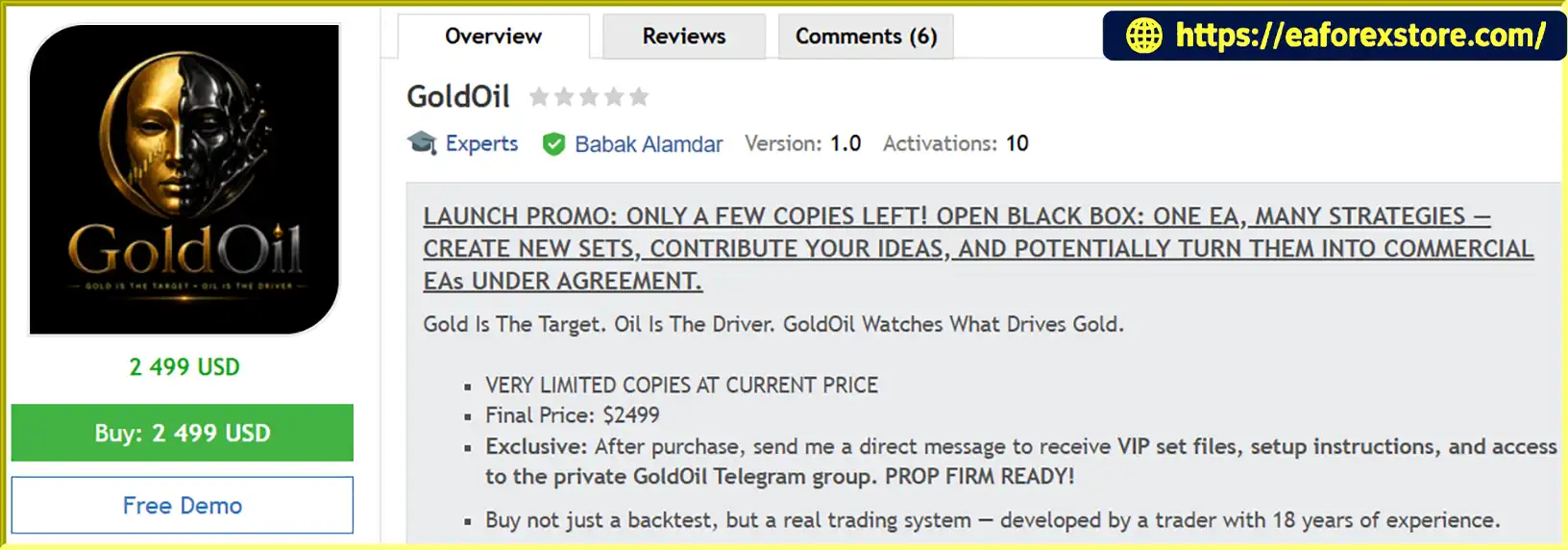
- Author: Babak Alamdar
- Experience: Over 2 years of experience on MQL5.
- Notable Products: GoldOil EA MT5, US100 Nasdaq EA, GoldMind AI MT5, Brent Oil MT5, SilverPulse AI MT5, US30 Dow Jones EA and other advisors.
- Flagship Product: GoldOil EA MT5 is rated as the best performing product of the year.
>>> Delivery time 24h-48h after payment.
>>> Refund if not delivered.
>>> You will receive the latest version without any limitations (ID+Time).Reviewed by Jason Stap <<<
Key Features of GoldOil EA MT5
1. Multi-Market Analysis: Gold, Oil, and Nasdaq
GoldOil EA MT5 can monitor three markets simultaneously: Gold, Oil, and Nasdaq (US100).
Gold remains the target instrument, while Oil and Nasdaq provide additional market information that can help the EA evaluate the surrounding trading environment.
This approach is based on the idea that energy prices, inflation expectations, geopolitical developments, and equity market sentiment can sometimes influence Gold price behavior. However, these relationships are not constant and do not guarantee predictive accuracy.
2. Gold-Only Trade Execution
Although the EA analyzes multiple markets, it does not trade Oil.
All trading decisions ultimately target Gold (XAUUSD), while Oil and Nasdaq serve as analytical inputs or filters. This distinction allows the system to explore cross-market relationships without opening positions across all three instruments.
3. Open Black Box Framework
GoldOil uses an Open Black Box Framework that separates its protected internal trading engine from its configurable strategy layer.
Users can combine available modules, filters, entry conditions, and trade-management settings to build different configurations. This means GoldOil should not be viewed as a single strategy with one fixed set of parameters.
Different configurations may produce different trade frequencies, entry behaviors, holding periods, and risk profiles.
4. Gold/Oil Cross-Market Momentum
The system can be configured to incorporate Gold and Oil market relationships into its analytical process.
Oil price movements can sometimes reflect changes in energy supply, geopolitical risk, and inflation expectations. These developments may also influence Gold, although the direction and strength of the relationship can vary considerably.
Cross-market analysis therefore provides additional context rather than a guaranteed directional signal.
5. Nasdaq Confirmation
GoldOil can use Nasdaq or US100 market information as an additional filter.
Equity market movements may provide clues about changing risk appetite, particularly during periods of market uncertainty. The EA's configurable framework allows users to explore how this information can be combined with Gold-specific entry conditions.
6. Multiple Technical and Market-Structure Modules
GoldOil offers a collection of optional analytical components that can be combined according to the selected configuration, including:
- Multi-timeframe Gold trend analysis
- Liquidity sweep and reclaim setups
- Compression and breakout conditions
- Premium and discount zones
- Order-block retests
- Fair Value Gaps (FVG)
- Round-number liquidity
- ATR expansion
- Higher-timeframe directional bias
- Double tops and double bottoms
- RSI and MACD divergence
- Head and Shoulders structures
- Market-structure breaks
- London and New York trading sessions
The availability of these modules provides flexibility for users who want to experiment with different trading approaches. Actual behavior depends on the enabled modules and the supplied or user-created set file.
7. Flexible Entry and Exit Configurations
The EA supports different entry filters and trade-management models. Users can combine available options to create configurations with different trading characteristics.
This flexibility may be useful when developing strategies for different account types or trading objectives. However, each configuration requires independent testing because changing filters and exit rules can materially affect results.
8. HFT Mode for Prop Firm Challenges
The default GoldOil configuration uses High-Frequency Trading mode, which the developer primarily designed for prop firm verification and challenge accounts.
In this mode, trades may close after reaching a small positive profit. This can make trading costs especially important. The developer recommends a Standard or non-commission account rather than an ECN account when using the default HFT mode on a real account, because commissions can significantly reduce small gains.
HFT mode does not guarantee that a prop firm challenge will be passed. Traders must also consider spread, slippage, execution quality, account rules, and the risk of losing trades.
9. Intraday Set Files for Personal Accounts
For personal real-account trading, the developer recommends the supplied Intraday set files rather than relying on the default HFT configuration.
These sets are described as less broker-sensitive and intended for more consistent operation across different brokers. Actual performance can still vary according to execution conditions, spreads, market volatility, and the chosen configuration.
Recommended Intraday and VIP set files, along with the user manual and private Telegram group link, are available by contacting the developer after purchase, according to the product description.
10. Automatic Broker Symbol Detection
GoldOil is designed to detect broker-specific Gold, Oil, and Nasdaq symbols, including symbols with prefixes or suffixes.
If automatic detection fails, users can enter their broker's symbol names manually through the available settings.
For Oil, the developer prioritizes UK Oil symbols such as UKOIL, XBRUSD, BRENT, and BRN. If UK Oil is unavailable, users can consider supported US Oil equivalents such as USOIL, XTIUSD, WTI, or USCRUDE, depending on the broker.
Correct symbol configuration is important because missing or incorrectly identified market data may prevent the EA from evaluating its intended filters properly.
11. No Grid and No Martingale
GoldOil is described as operating without grid trading or martingale position sizing. It is designed around configured entry logic and trade-management rules rather than progressively increasing exposure through a grid recovery sequence.
This avoids the specific risk of accumulating grid positions or using martingale multipliers. However, the absence of grid and martingale does not eliminate ordinary trading losses or account drawdown.
12. Personal Account and Prop Firm Compatibility
The developer positions GoldOil for both personal accounts and prop firm or funded accounts.
The default HFT configuration is primarily aimed at challenge and verification environments, while Intraday set files are recommended for personal real-account trading.
Users should select a configuration appropriate to their broker, account type, trading costs, and applicable account rules. Compatibility with a particular prop firm should always be verified independently.
13. User Manual and Community Support
GoldOil buyers can request the user manual, recommended Intraday and VIP set files, and access to the private Telegram group by contacting the developer directly after purchase.
The developer also invites users to submit promising set files for review. Configurations that demonstrate robust results through historical testing, out-of-sample validation, and forward testing may be considered for future inclusion or further development.
Any potential commercial collaboration or profit-sharing arrangement would require separate validation and agreement.
How GoldOil EA MT5 Works
GoldOil combines cross-market analysis, configurable technical modules, and trade-management rules within one automated trading framework.
Step 1: Attach the EA to a Gold Chart
Install GoldOil EA MT5 on an XAUUSD chart in MetaTrader 5. The EA is designed to identify broker-specific symbol variations for Gold, Oil, and Nasdaq.
If automatic detection fails, enter the appropriate broker symbol names manually.
Step 2: Monitor Connected Markets
The EA can analyze Gold alongside Oil and Nasdaq to evaluate the wider market environment. These additional markets provide context for the system's configurable trading filters.
The EA does not open Oil trades; Gold remains the target instrument.
Step 3: Apply the Selected Strategy Modules
Depending on the chosen set file, GoldOil can combine cross-market momentum, trend analysis, liquidity sweeps, breakouts, market-structure patterns, volatility filters, session rules, and other available modules.
Not every module needs to be enabled in every configuration. The final trading logic depends on the selected settings.
Step 4: Evaluate Potential Gold Entries
The active filters evaluate whether the current market conditions satisfy the configured entry requirements.
For example, a configuration may combine Gold trend direction with Oil movement, Nasdaq confirmation, or a technical setup. These are examples of possible configurations rather than a guarantee that every set file uses all of these conditions.
Step 5: Execute and Manage Gold Trades
When the active conditions are satisfied, the EA can open a Gold position and manage it according to the selected trade-management rules.
Exit behavior, risk settings, and holding periods depend on the configuration being used.
Step 6: Select a Suitable Set File
For prop firm verification or challenge trading, the developer provides the default HFT mode. For personal real-account use, the recommended approach is to start with the supplied Intraday set files.
Because different configurations can behave very differently, users should test the selected set file rather than assuming that every GoldOil configuration will produce similar results.
Step 7: Test and Monitor Performance
Evaluate the configuration through historical testing, out-of-sample validation, and forward testing on a demo account before using it with real funds.
Monitor execution costs, trading frequency, drawdown, and performance across different market conditions. Multi-market analysis can provide additional information, but it cannot guarantee accurate predictions or profitable trades.
Why Choose GoldOil EA MT5?
A Different Approach to Gold Trading
GoldOil is built around the idea that Gold can be influenced by developments in other markets. By incorporating Oil and Nasdaq into its analytical framework, it offers an alternative to systems that use only Gold price data.
Multiple Strategies Within One Engine
The Open Black Box Framework allows users to combine available modules and filters to create different trading configurations. This provides flexibility for traders who want to explore trend-following, breakout, liquidity-based, session, or cross-market approaches without requiring a separate EA for every idea.
Gold-Only Trading With Broader Market Context
Although it analyzes Gold, Oil, and Nasdaq, the system targets Gold for trade execution. This keeps the trading objective focused while allowing the EA to consider information from connected markets.
Separate Approaches for Different Account Objectives
The default HFT mode is intended primarily for prop firm verification and challenges, while the developer recommends Intraday set files for personal real-account trading.
This separation gives users a starting point for choosing a configuration based on their intended use, although neither configuration guarantees a particular outcome.
No Grid or Martingale
The EA's no-grid and no-martingale design avoids the specific exposure-growth mechanisms associated with grid recovery and martingale systems.
Risk remains dependent on position sizing, trade frequency, stop-loss behavior if configured, market volatility, and execution conditions.
Community-Driven Development
The developer encourages users to test different configurations and submit promising set files for review. Strong candidates may be considered for future strategies or commercial products after appropriate validation and a separate agreement where necessary.
GoldOil EA MT5 Backtest Results
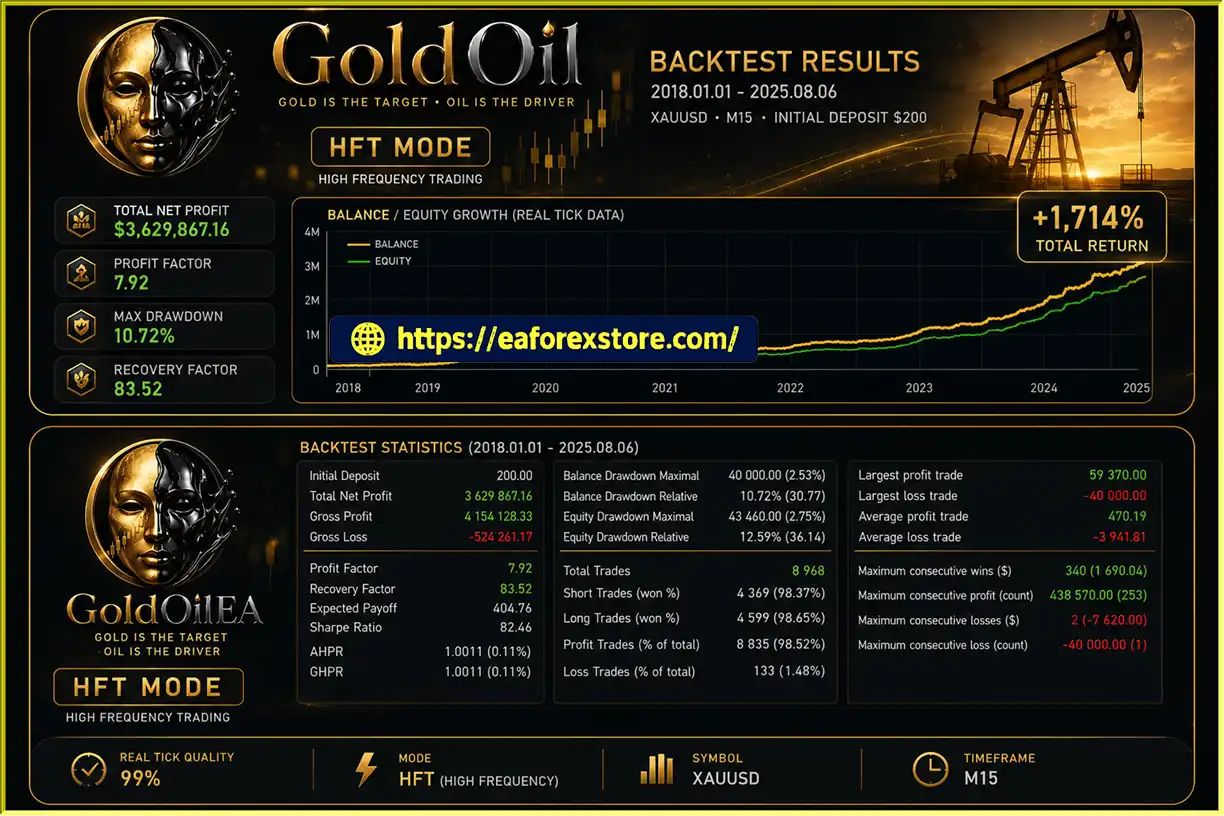
- Initial Deposit: $200
- Total Net Profit: $3,629,867.16
- Win Rate: 83.52%
- Maximum Drawdown: 10.72%
Risk Management & Alerts
GoldOil's multi-market analysis and configurable strategy modules do not remove the risks associated with automated trading. Users should pay particular attention to the selected set file, account type, transaction costs, and testing quality.
Choose the Correct Trading Mode
The default HFT mode is designed mainly for prop firm verification and challenge environments. The developer recommends Standard or non-commission accounts when using this mode on a real account because small positive exits can be heavily affected by commissions.
For personal real-account trading, evaluate the recommended Intraday set files first.
Account for Trading Costs
Spread, commission, slippage, and execution delays can significantly influence results, especially when a strategy targets small profits or trades frequently.
A configuration that performs well under ideal historical assumptions may behave differently under real trading conditions.
Verify Broker Symbols
Make sure the EA correctly identifies the Gold, Oil, and Nasdaq symbols used by your broker. If automatic detection fails, enter the correct symbol names manually and confirm that the required market data is available.
Test Each Set File Independently
Different set files can produce different trade frequencies, entry conditions, exits, and risk profiles. Do not assume that testing one configuration validates every other configuration supported by the EA.
Validate Across Different Market Conditions
Gold, Oil, and Nasdaq do not maintain stable relationships at all times. Correlations can weaken, reverse, or become less useful during unusual market conditions.
Use out-of-sample testing and forward testing to evaluate whether a configuration remains effective beyond the data used to develop it.
Monitor Drawdown and Position Exposure
Although GoldOil is described as having no grid or martingale, losing trades remain possible. Position sizing and account exposure should be set conservatively, and the EA should be monitored for changes in behavior during volatile markets.
Understand Prop Firm Rules
Before using GoldOil on a funded or challenge account, check the provider's restrictions regarding trading frequency, news events, maximum daily loss, overall drawdown, holding periods, and permitted trading strategies.
The developer's intended use case does not guarantee acceptance by any specific prop firm.
Avoid Overfitting
The ability to combine numerous filters can produce many possible configurations. Selecting a set file solely because it performs exceptionally well on historical data can lead to overfitting.
Prefer configurations that demonstrate reasonable consistency across different testing periods and market conditions.
Pros and Cons of GoldOil EA MT5
Pros
- Multi-market analysis: Monitors Gold, Oil, and Nasdaq for additional market context.
- Gold-only execution: Uses Oil and Nasdaq as analytical inputs rather than target trading instruments.
- Open Black Box Framework: Supports a broad range of configurable modules and filters.
- Multiple strategy possibilities: Allows combinations of trend, breakout, liquidity, session, volatility, and technical analysis.
- No grid or martingale: Avoids these specific position-recovery methods.
- HFT and Intraday options: Provides different starting configurations for different trading objectives.
- Broker symbol detection: Supports automatic detection of broker-specific symbol variations, with manual entry as a fallback.
- Personal and prop firm use cases: Designed for personal accounts and prop firm or funded accounts.
- User manual and set files: The developer offers documentation and recommended configurations to buyers.
- Community participation: Users can submit strategies for review and possible future development.
Cons
- Market relationships can change: Oil and Nasdaq do not provide reliable Gold signals in every market environment.
- Configuration complexity: The large number of available modules requires careful testing and setup.
- HFT sensitivity to costs: Small positive profits can be significantly reduced by commissions, spreads, and slippage.
- Different set files behave differently: Results from one configuration cannot automatically be applied to another.
- Symbol detection may require manual input: Broker naming conventions can prevent automatic identification.
- No guaranteed prop firm success: Passing a challenge depends on performance, risk controls, execution, and the firm's rules.
- No guarantee of profitability: Multi-market analysis does not eliminate losing trades or drawdown.
- Validation is essential: Historical performance may not translate into live trading results without robust out-of-sample and forward testing.
How to Install GoldOil EA MT5
Follow these general steps to install GoldOil EA MT5 on MetaTrader 5.
- Obtain the EA package. Download GoldOil EA MT5 from the official provider.
- Open MetaTrader 5. Launch the platform and sign in to your trading account.
- Open the data folder. Select
File → Open Data Folder. - Install the EA file. Copy the supplied EA file into the
MQL5/Expertsdirectory, following the provider's instructions. - Refresh the Navigator. Refresh the Expert Advisors list or restart the platform if necessary.
- Open an XAUUSD chart. Attach the EA to the Gold chart as specified in the user manual.
- Verify symbol detection. Confirm that the EA identifies the correct Gold, Oil, and Nasdaq symbols used by your broker.
- Enter symbols manually if needed. If the Journal reports a symbol-detection error, enter the correct broker-specific symbol names. Follow the developer's UK Oil priority and use a supported US Oil equivalent if UK Oil is unavailable.
- Choose a configuration. Select the supplied HFT configuration for its intended prop firm challenge use case, or evaluate the recommended Intraday sets for personal real-account trading.
- Review trading settings. Check position sizing, filters, entry conditions, exits, and any other risk-related parameters in the selected set file.
- Enable algorithmic trading. Confirm that MetaTrader 5 and the EA are configured to permit automated trading.
- Test before going live. Use the Strategy Tester where applicable, then validate the configuration through out-of-sample testing and forward testing on a demo account.
- Monitor the results. Review trade frequency, execution costs, drawdown, and behavior across different market conditions.
After purchase, contact the developer to request the user manual, recommended Intraday/VIP set files, and the private Telegram group link, as described in the product information.
Risk Management & Alerts
GoldOil's multi-market analysis and configurable strategy modules do not remove the risks associated with automated trading. Users should pay particular attention to the selected set file, account type, transaction costs, and testing quality.
Choose the Correct Trading Mode
The default HFT mode is designed mainly for prop firm verification and challenge environments. The developer recommends Standard or non-commission accounts when using this mode on a real account because small positive exits can be heavily affected by commissions.
For personal real-account trading, evaluate the recommended Intraday set files first.
Account for Trading Costs
Spread, commission, slippage, and execution delays can significantly influence results, especially when a strategy targets small profits or trades frequently.
A configuration that performs well under ideal historical assumptions may behave differently under real trading conditions.
Verify Broker Symbols
Make sure the EA correctly identifies the Gold, Oil, and Nasdaq symbols used by your broker. If automatic detection fails, enter the correct symbol names manually and confirm that the required market data is available.
Test Each Set File Independently
Different set files can produce different trade frequencies, entry conditions, exits, and risk profiles. Do not assume that testing one configuration validates every other configuration supported by the EA.
Validate Across Different Market Conditions
Gold, Oil, and Nasdaq do not maintain stable relationships at all times. Correlations can weaken, reverse, or become less useful during unusual market conditions.
Use out-of-sample testing and forward testing to evaluate whether a configuration remains effective beyond the data used to develop it.
Monitor Drawdown and Position Exposure
Although GoldOil is described as having no grid or martingale, losing trades remain possible. Position sizing and account exposure should be set conservatively, and the EA should be monitored for changes in behavior during volatile markets.
Understand Prop Firm Rules
Before using GoldOil on a funded or challenge account, check the provider's restrictions regarding trading frequency, news events, maximum daily loss, overall drawdown, holding periods, and permitted trading strategies.
The developer's intended use case does not guarantee acceptance by any specific prop firm.
Avoid Overfitting
The ability to combine numerous filters can produce many possible configurations. Selecting a set file solely because it performs exceptionally well on historical data can lead to overfitting.
Prefer configurations that demonstrate reasonable consistency across different testing periods and market conditions.
Pros and Cons of GoldOil EA MT5
Pros
- Multi-market analysis: Monitors Gold, Oil, and Nasdaq for additional market context.
- Gold-only execution: Uses Oil and Nasdaq as analytical inputs rather than target trading instruments.
- Open Black Box Framework: Supports a broad range of configurable modules and filters.
- Multiple strategy possibilities: Allows combinations of trend, breakout, liquidity, session, volatility, and technical analysis.
- No grid or martingale: Avoids these specific position-recovery methods.
- HFT and Intraday options: Provides different starting configurations for different trading objectives.
- Broker symbol detection: Supports automatic detection of broker-specific symbol variations, with manual entry as a fallback.
- Personal and prop firm use cases: Designed for personal accounts and prop firm or funded accounts.
- User manual and set files: The developer offers documentation and recommended configurations to buyers.
- Community participation: Users can submit strategies for review and possible future development.
Cons
- Market relationships can change: Oil and Nasdaq do not provide reliable Gold signals in every market environment.
- Configuration complexity: The large number of available modules requires careful testing and setup.
- HFT sensitivity to costs: Small positive profits can be significantly reduced by commissions, spreads, and slippage.
- Different set files behave differently: Results from one configuration cannot automatically be applied to another.
- Symbol detection may require manual input: Broker naming conventions can prevent automatic identification.
- No guaranteed prop firm success: Passing a challenge depends on performance, risk controls, execution, and the firm's rules.
- No guarantee of profitability: Multi-market analysis does not eliminate losing trades or drawdown.
- Validation is essential: Historical performance may not translate into live trading results without robust out-of-sample and forward testing.
How to Install GoldOil EA MT5
Follow these general steps to install GoldOil EA MT5 on MetaTrader 5.
- Obtain the EA package. Download GoldOil EA MT5 from the official provider.
- Open MetaTrader 5. Launch the platform and sign in to your trading account.
- Open the data folder. Select
File → Open Data Folder. - Install the EA file. Copy the supplied EA file into the
MQL5/Expertsdirectory, following the provider's instructions. - Refresh the Navigator. Refresh the Expert Advisors list or restart the platform if necessary.
- Open an XAUUSD chart. Attach the EA to the Gold chart as specified in the user manual.
- Verify symbol detection. Confirm that the EA identifies the correct Gold, Oil, and Nasdaq symbols used by your broker.
- Enter symbols manually if needed. If the Journal reports a symbol-detection error, enter the correct broker-specific symbol names. Follow the developer's UK Oil priority and use a supported US Oil equivalent if UK Oil is unavailable.
- Choose a configuration. Select the supplied HFT configuration for its intended prop firm challenge use case, or evaluate the recommended Intraday sets for personal real-account trading.
- Review trading settings. Check position sizing, filters, entry conditions, exits, and any other risk-related parameters in the selected set file.
- Enable algorithmic trading. Confirm that MetaTrader 5 and the EA are configured to permit automated trading.
- Test before going live. Use the Strategy Tester where applicable, then validate the configuration through out-of-sample testing and forward testing on a demo account.
- Monitor the results. Review trade frequency, execution costs, drawdown, and behavior across different market conditions.
After purchase, contact the developer to request the user manual, recommended Intraday/VIP set files, and the private Telegram group link, as described in the product information.
What’s Included in the Download Package?
- Experts:
- GoldOil.ex5
- SetFiles
- low risk.set
- $1000_equity_low risk.set
- $1000_balance_low risk.set
>>> Join VIP Membership Now <<<
Final Thoughts
GoldOil EA MT5 offers a distinctive approach to automated Gold trading by combining cross-market analysis of Gold, Oil, and Nasdaq with a flexible framework of technical filters, market-structure modules, and trade-management options.
Its Open Black Box architecture allows users to explore different strategies through configurable modules rather than relying on one fixed trading method. The system also distinguishes between its default HFT mode, primarily intended for prop firm verification and challenges, and the recommended Intraday configurations for personal real-account trading.
The main advantage is flexibility: users can investigate how different market inputs and trading filters interact while keeping Gold as the target instrument. However, this flexibility also increases the importance of proper testing, broker configuration, and realistic expectations.
Oil and Nasdaq relationships with Gold can change, and a large collection of filters does not automatically create a profitable strategy. HFT configurations are particularly sensitive to transaction costs, while custom set files need independent validation before live deployment.
For traders interested in multi-market Gold analysis and configurable strategy development, GoldOil EA MT5 provides a broad framework to explore. Before using it with real funds, test the selected configuration across different market conditions, verify symbol detection, account for all trading costs, and establish clear risk limits.
Past performance does not guarantee future results, and no configuration can guarantee profitability or successful completion of a prop firm challenge.