


What is Greezly Bot Pro EA MT4?
Greezly Bot Pro EA is a sophisticated automated trading software specifically designed for the forex market. This Expert advisor (EA) enables traders to execute trades automatically based on predefined criteria and algorithmic strategies, eliminating the need for constant market monitoring.
Ideal for both novice and experienced forex traders, Greezly Bot Pro EA helps users capitalize on market opportunities efficiently by leveraging reliable algorithmic trading technology. This makes it a valuable tool for anyone looking to improve trading accuracy and consistency in the fast-paced forex environment.
Key Features of Greezly Bot Pro EA MT4
-
Optimal trading results primarily on EURUSD, with ability to adapt to other currency pairs
-
Works effectively on short timeframes from M1 to M15
-
Accurate candlestick pattern analysis for precise trade entries
-
Customizable risk management tools to protect capital
-
High flexibility to tailor settings based on user’s trading style and currency preferences
-
Multi-platform compatibility (works with various MT4 brokers)
Why Choose Greezly Bot Pro EA MT4?
-
Proven efficiency on EURUSD pair
-
Ideal for traders who prefer fast timeframes (M1, M15)
-
Strong risk management reduces potential losses
-
User-friendly customization to suit different trading strategies
Greezly Bot Pro EA MT4 Review
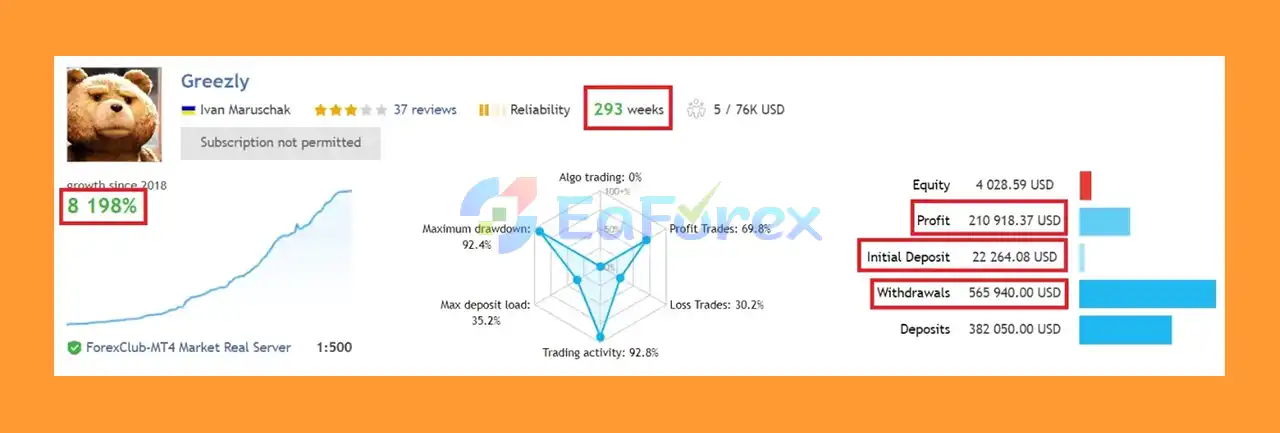
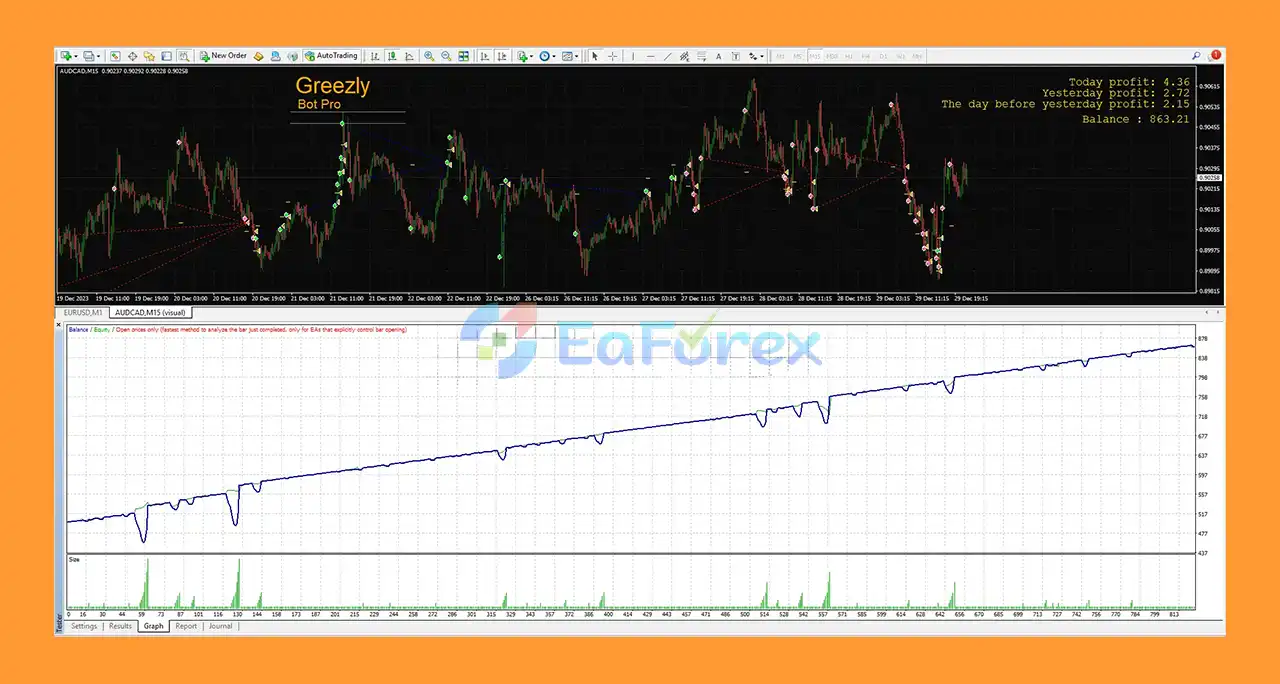
- Initial Deposit: $22.246.08
- Profit: $210.918.37
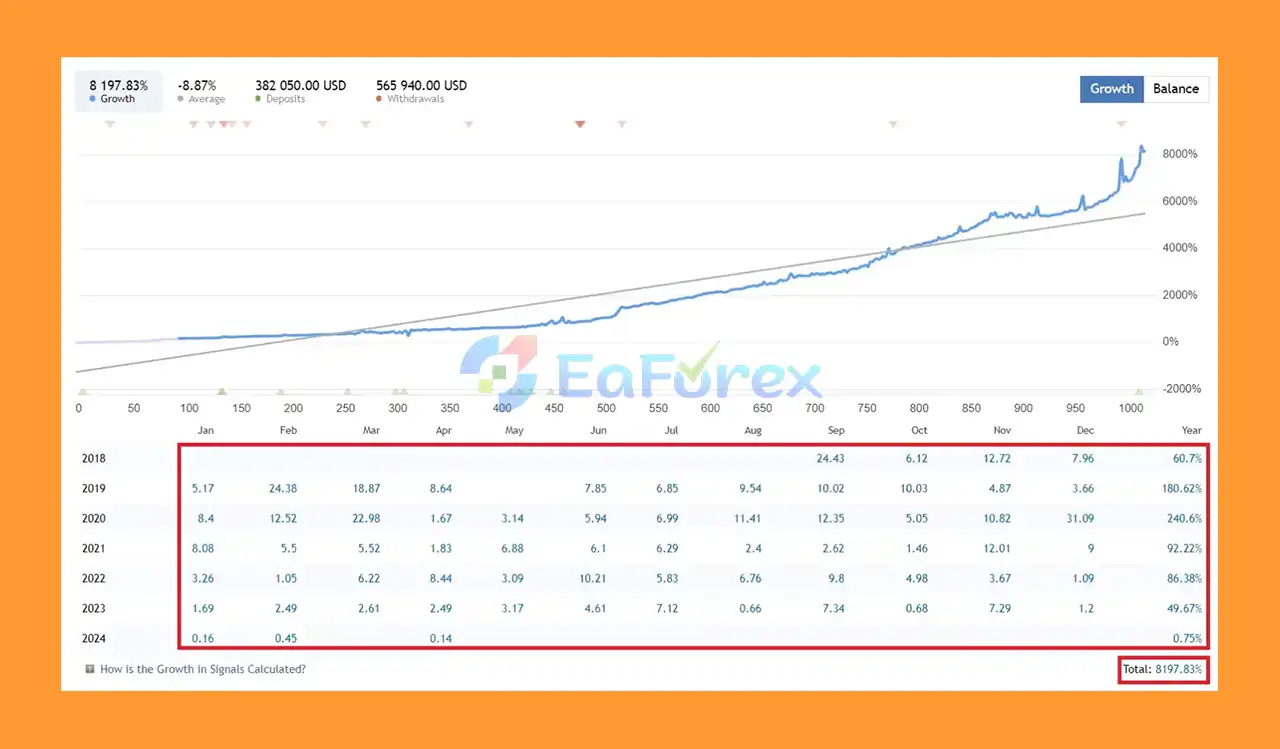
- Total Growth: +8,198%
- Duration: ~293 years
What is included in the package?
- Experts: Greezly bot Pro_fix_1420+.ex4
>>> Join VIP Membership Now <<<
How To Set Up EA
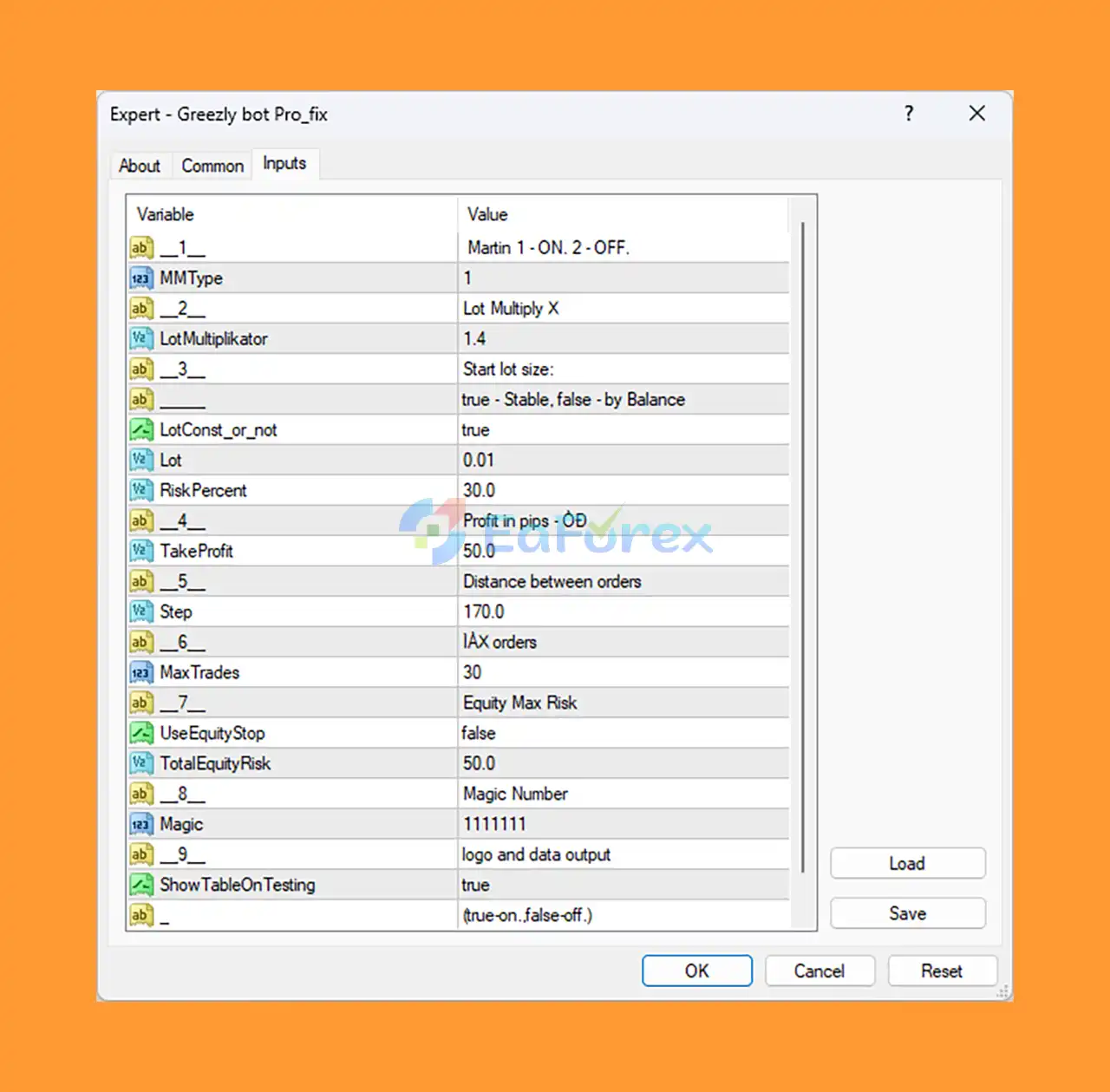
🔻Greezly bot Pro EA MT4 is a Forex Expert Advisor designed for automated trading with a strong focus on martingale strategy and risk management. Below is a detailed analysis and guide to setting up trading parameters and their impact on performance.
🔵 Step 1: Installation
- Download the Greezly bot Pro_fix EA file compatible with MetaTrader 4 (MT4).
- Open MT4, navigate to
File > Open Data Folder > MQL4 > Experts. - Paste the EA file into the
Expertsfolder. - Restart MT4 or refresh the Expert Advisors list in Navigator.
🔵 Step 2: Attach EA to Chart
- Open a chart of your preferred Forex pair.
- Drag the Greezly bot Pro_fix EA from Navigator > Expert Advisors onto the chart.
- Enable “Allow automated trading” in the EA settings.
🔵 Step 3: Essential Input Settings
- MMType: Set to
1to enable the martingale strategy for aggressive recovery. - LotMultiplikator: Use
1.4to increase lot sizes progressively after losses. - LotConst_or_not: Set to
truefor fixed lot sizes, enhancing predictability. - Lot: Start with
0.01to minimize initial risk exposure. - RiskPercent: Configure at
30.0for higher drawdown tolerance. - TakeProfit: Set profit target at
50pips for steady gains. - Step: Use
170pips distance between trades to avoid trade clustering. - MaxTrades: Allow up to
30simultaneous trades for maximum martingale scaling. - UseEquityStop: Keep
falsebut monitor manually to prevent large losses. - TotalEquityRisk: Set at
50%to allow significant equity drawdown before intervention. - Magic: Use a unique ID like
1111111to avoid EA conflicts.
🔵 Step 4: Monitoring and Risk Management
- Since equity stop is disabled, active manual risk monitoring is critical.
- Ensure sufficient account balance to support large trade scaling.
- Use backtesting data (enabled by
ShowTableOnTesting) to evaluate performance before live trading.
Conclusion
In summary, Greezly Bot Pro EA MT4 is a sophisticated and powerful automated forex trading robot designed specifically for the MetaTrader 4 platform. Built with an emphasis on the martingale strategy combined with advanced risk management, this EA excels in fast timeframes—particularly on the EURUSD currency pair—offering traders a robust tool to maximize profit potential while managing drawdown effectively.
>>> Reviewed by Jason Stap <<<



