

What is IS Lime EA?
The IS Lime EA is a highly effective Expert Advisor (EA) designed to implement a conservative scalping strategy with low risk exposure. By utilizing fixed lot sizes and stringent entry conditions, this EA focuses on securing frequent, small profits while keeping drawdowns to a minimum. It is specifically crafted to enhance long-term portfolio stability, making it an ideal choice for traders who prioritize safety and disciplined risk management in their trading approach.
About the Developer
- Author: InvestSniper.
- Experience: Over +8 years of experience on MQL5.
- Notable Products: IS Lime EA, IS Purple EA, IS Yellow EA, IS Red EA, IS White EA, IS Grey EA, IS Blue EA, IS Green EA and other advisors.
- Flagship Product: IS Lime EA is the best performing product.
>>> Join our Channel Telegram <<<
Key Features of IS Lime EA
🔻Conservative Risk Management:
- Uses a fixed lot size with a low-risk profile to ensure minimal exposure and protect capital.
- Ideal for traders who want to avoid large drawdowns and focus on safe portfolio growth.
🔻Scalping-Oriented Approach:
- Aims for small, frequent profits, making it perfect for scalping and micro-profit strategies.
- Focus on quick trades with tight risk parameters.
🔻Strict Entry Conditions:
- The EA operates only when the market conditions are stable, ensuring trades are triggered at the right time.
- High threshold for entry conditions to avoid unnecessary risk.
🔻Time-Based Trading:
- Trades are executed only during specific hours to avoid risks during rollover periods and wider spreads.
- Time filter ensures optimal trade execution and reduced slippage.
Additional Features of IS Lime EA
🔻Wide Stop Loss:
- Wide stop loss offers greater flexibility, allowing trades to survive market fluctuations while still protecting capital.
- Prevents unnecessary stop-outs during market volatility.
🔻Frequent Trade Checks:
- Evaluates trades every bar, ensuring timely entries and frequent opportunities while preventing overtrading.
🔻Unique Trade Identifier:
- Each trade is assigned a unique magic number to prevent conflicts with other Expert Advisors running on the same account.
🔻User-Friendly Setup:
- Fixed lot sizing and a simple configuration make the EA easy to set up and use, even for beginners.
Why Use IS Lime EA?
🔻High Capital Safety:
- The EA’s low-risk settings and minimal exposure per trade ensure capital preservation even in volatile markets.
🔻Steady and Consistent Growth:
- By focusing on small, frequent profits, IS Lime EA provides consistent returns with low drawdowns, making it ideal for long-term growth.
🔻Disciplined Execution:
- Strict entry conditions and time-based filters ensure a disciplined and safe trading approach, minimizing unnecessary risk.
🔻Ideal for Beginners:
- With simple setup, fixed lot sizing, and a low-risk profile, IS Lime EA is a great choice for new traders or those looking for a cautious trading approach.
IS Lime EA Performance Review
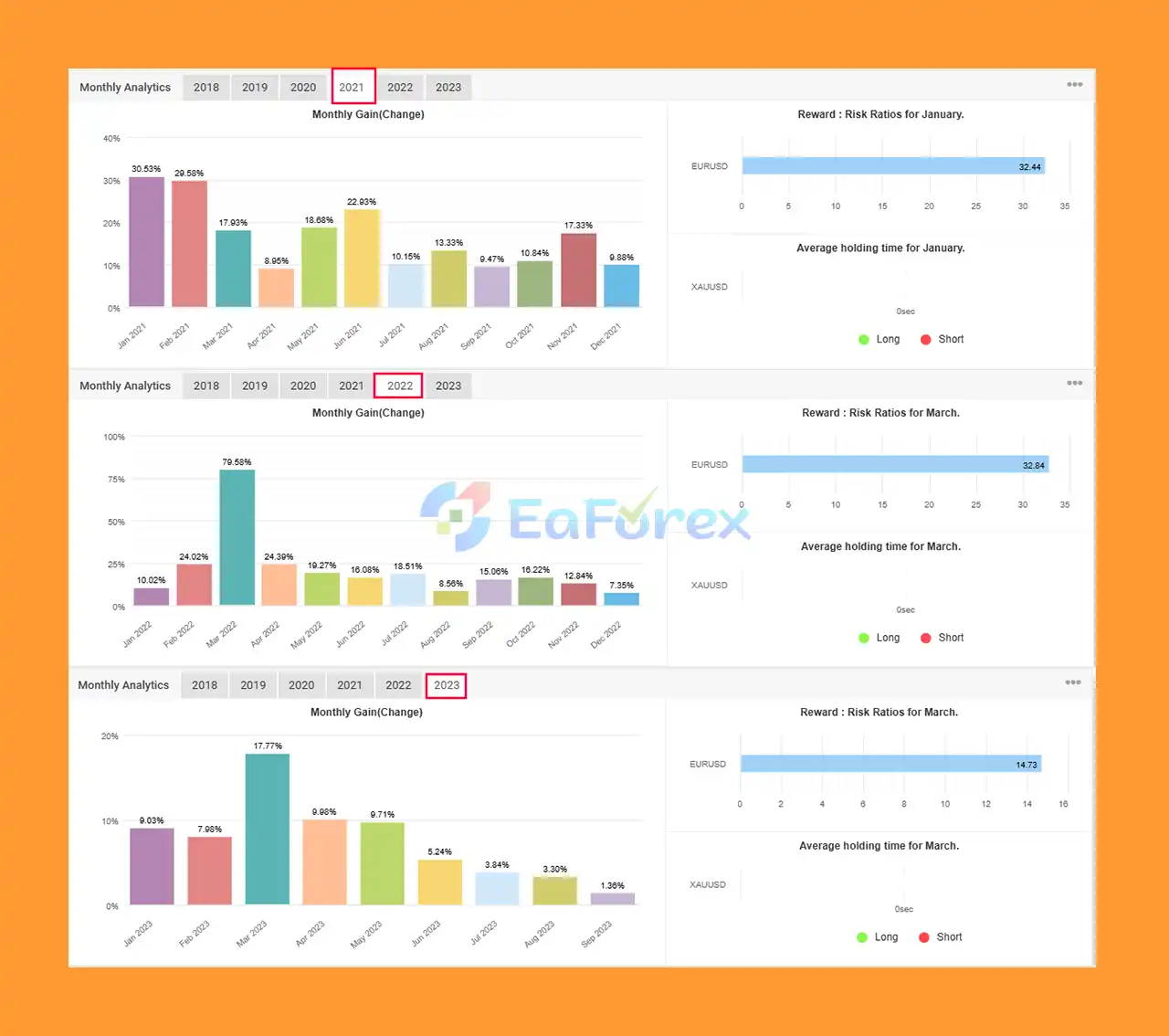
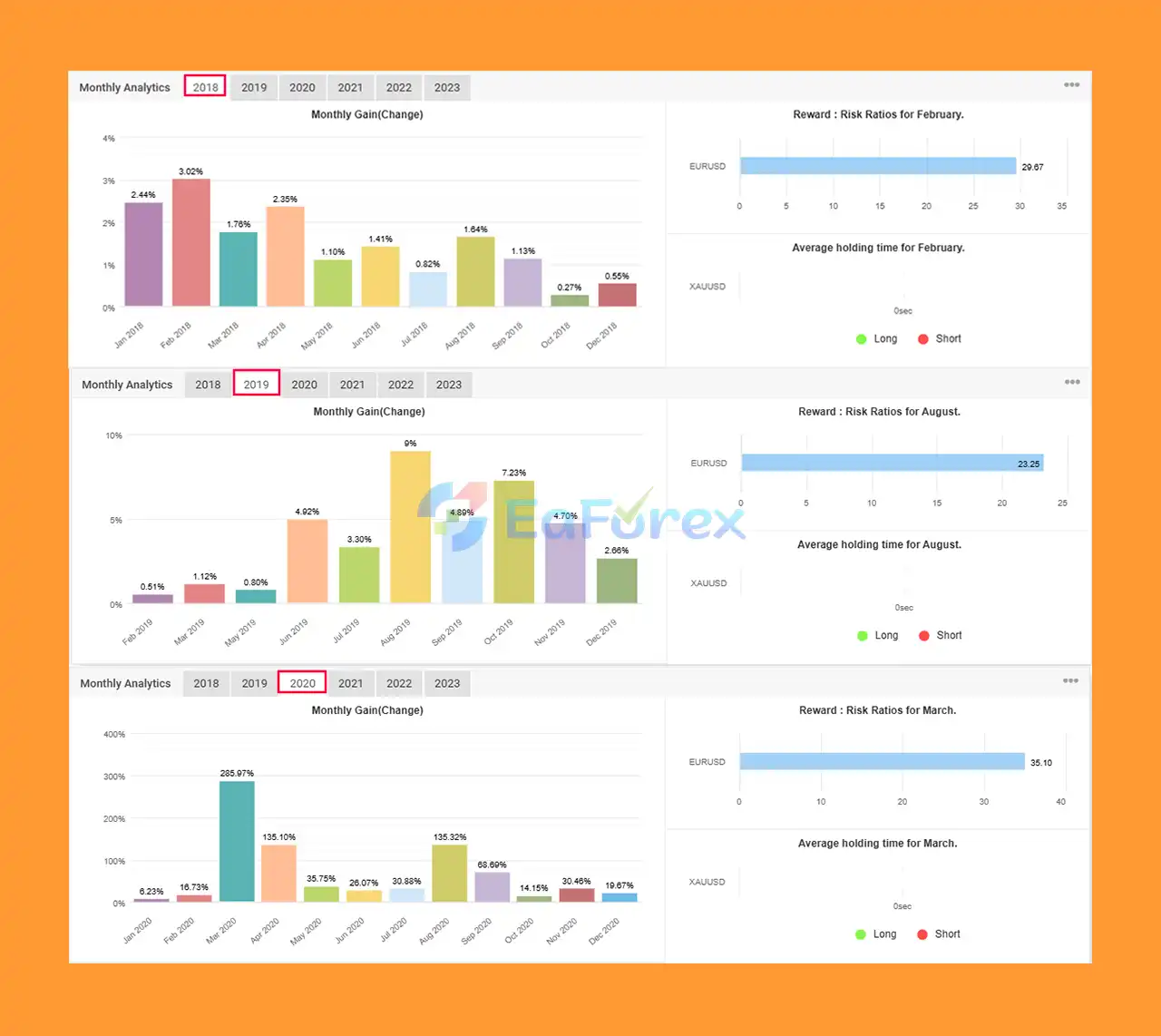
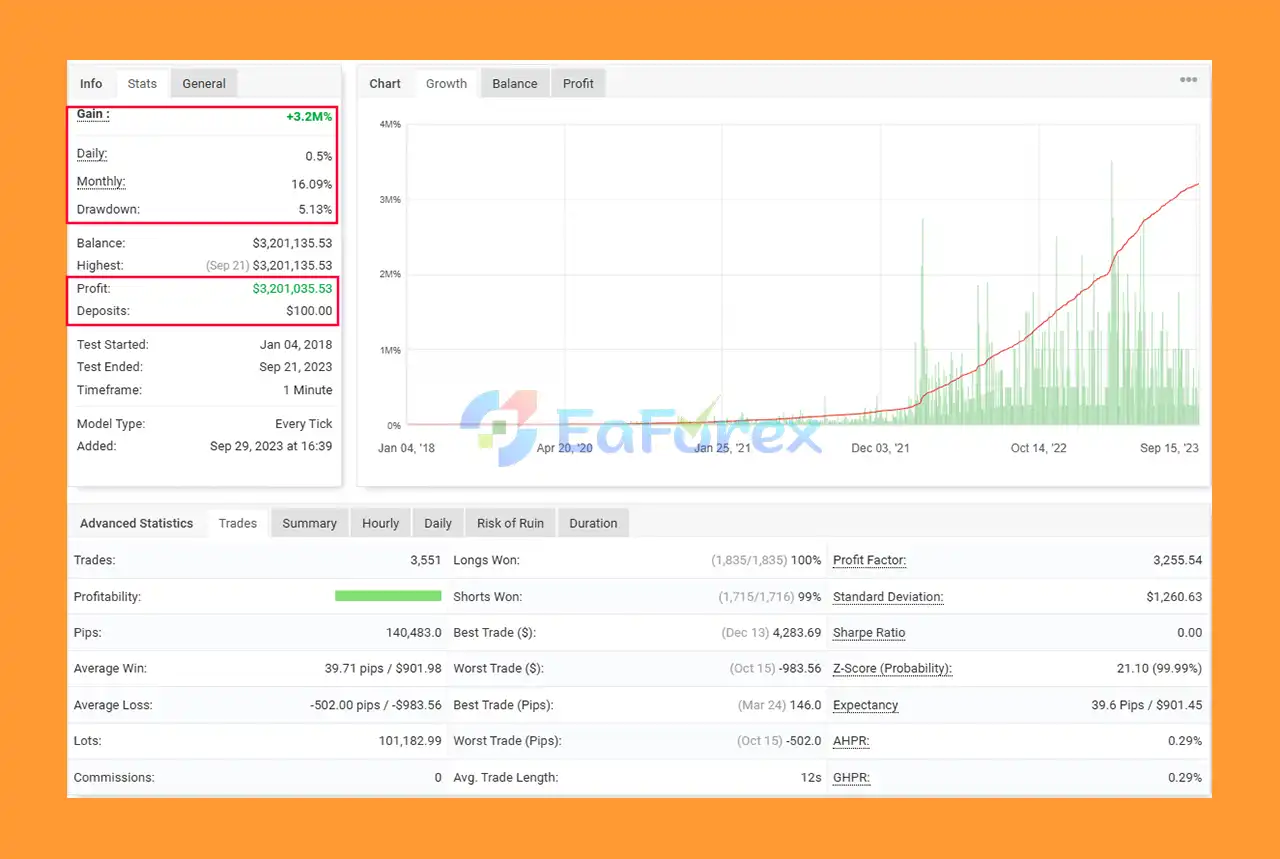
🟢 MyFxBook Performance (2018–2023):
- Initial Deposit: $100
- Total Gain: +3.2M%
- Daily Gain: 0.5%
- Monthly Gain: 16.09%
- Maximum Drawdown: 5.13%
- Long-Term Success: Impressive results verified by MyFxBook over 6 years.
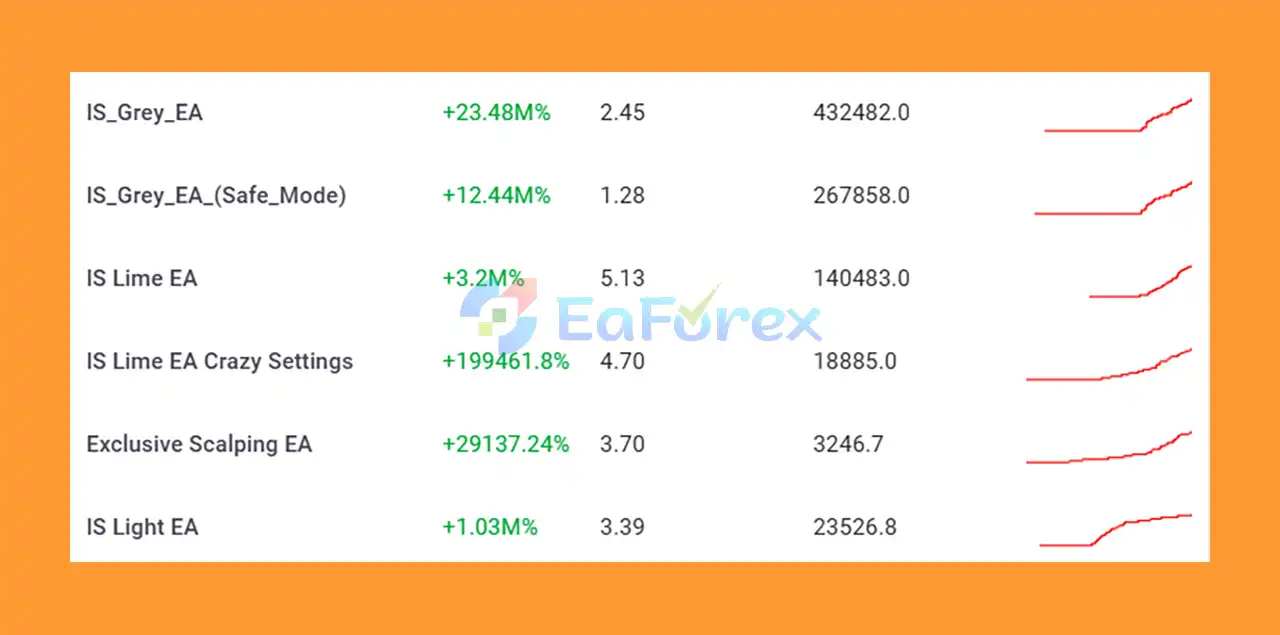
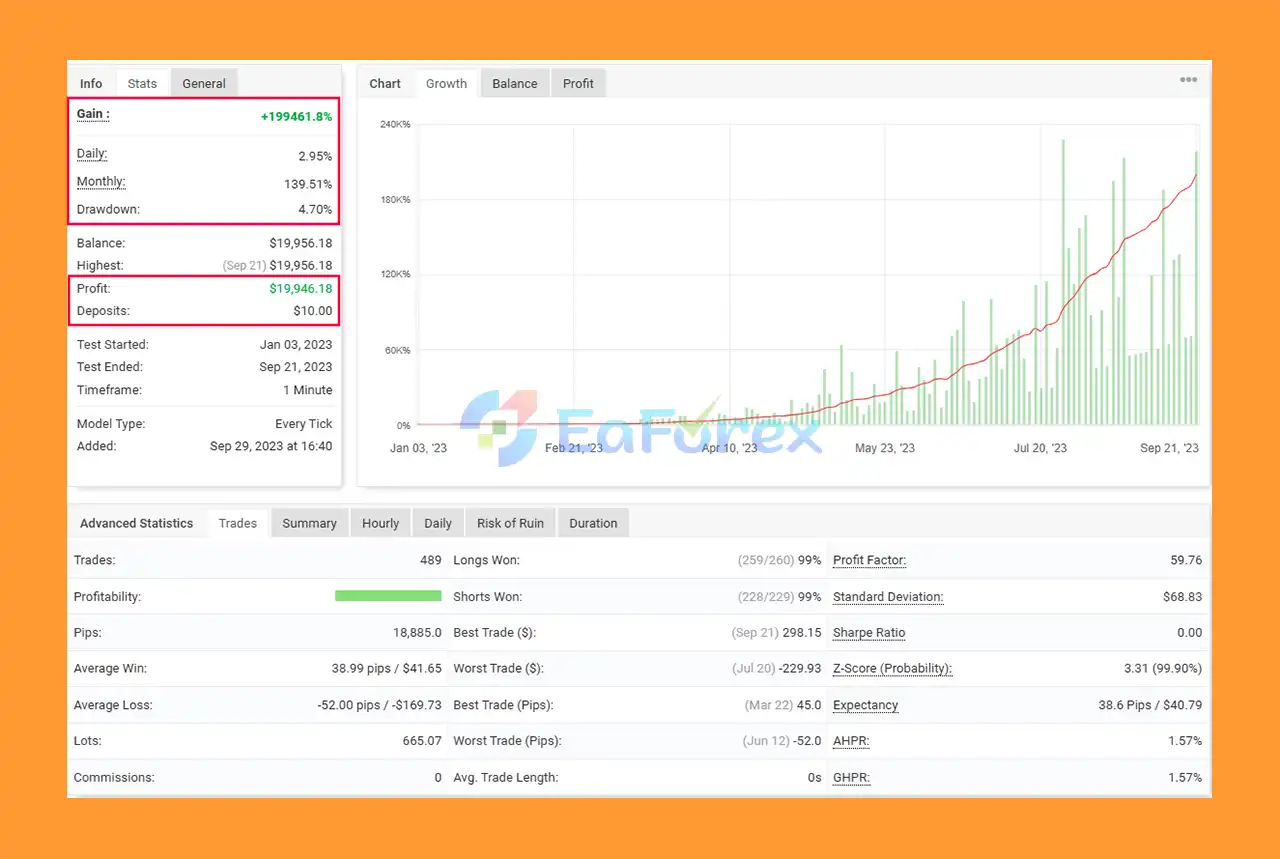
🟢 2023 Performance (XAU/USD):
- Initial Deposit: $10
- Total Gain: +199,461.8%
- Daily Gain: 2.95%
- Monthly Gain: 139.51%
- Maximum Drawdown: 4.70%
- Proven Success: Showed incredible profitability and low drawdowns in 2023 while trading XAU/USD (Gold).
What’s Included in the Download Package?
🔶Source Code MQ4:
- IS Lime EA.mq4
🔶Experts:
- IS Lime EA.ex4
🔶Presets:
- Lime_Gold.set
- Lime_MajorPairs.set
>> Join VIP Membership Now <<<
How To Set Up EA
🔻The EA IS Lime for MetaTrader 4 (MT4) is a highly configurable expert advisor designed to automate trading strategies with precision and risk management. Here is a detailed installation guide for the EA.
♦️Step 1: Download IS Lime EA
-
Download the IS Lime EA file from the official website or trusted provider compatible with MetaTrader 4 (MT4).
♦️Step 2: Install the Expert Advisor (EA)
- Open MetaTrader 4.
- From the File menu, select Open Data Folder.
- Navigate to the MQL4 folder, then the Experts subfolder.
- Copy the downloaded IS Lime EA file into the Experts folder.
♦️Step 3: Activate the EA
- Restart MetaTrader 4.
- Open the Navigator window (Ctrl+N).
- Under Expert Advisors, locate IS Lime EA.
- Drag and drop the EA onto the chart of your selected currency pair.
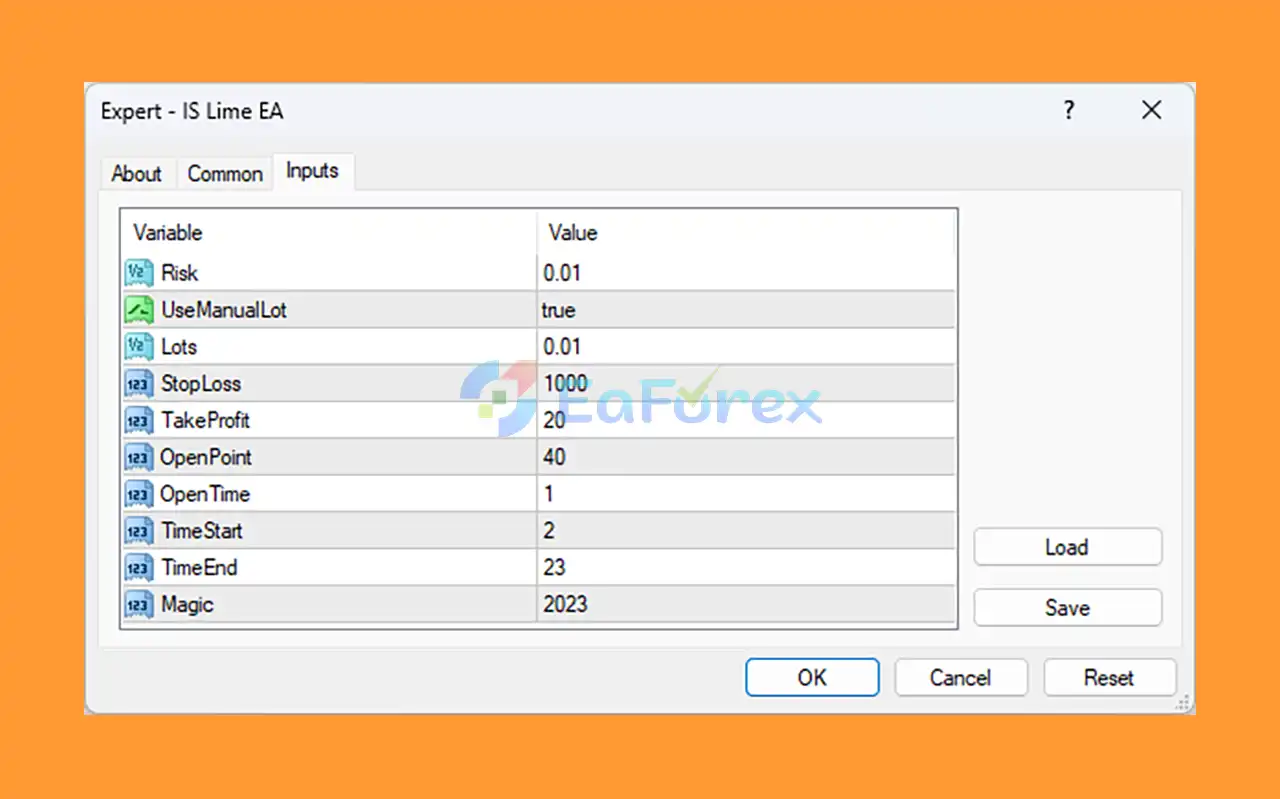
♦️Step 4: Adjust Key Parameters for Optimal Performance
- Risk: 0.01 (1% risk per trade, ideal for low-risk exposure)
- UseManualLot: true (manual lot size for full control over trade size)
- Lots: 0.01 (micro lot size, suitable for smaller accounts or controlled exposure)
- StopLoss: 1000 pips (wide stop loss for larger market moves)
- TakeProfit: 20 pips (tight target for capturing quick profits)
- OpenPoint: 40 pips (triggers trades only after 40 pips price movement)
- OpenTime: 1 minute (ensures smoother execution and prevents impulsive entries)
- TimeStart: 02:00 & TimeEnd: 23:00 (operates during high liquidity hours)
- Magic: 2023 (unique identifier for EA's trades)
♦️Step 5: Enable Automated Trading
-
Ensure AutoTrading is enabled by clicking the AutoTrading button in MetaTrader 4.
Conclusion
In summary, IS Lime EA is a highly effective and reliable Expert Advisor designed to offer a conservative scalping approach with minimal risk exposure. Its strategic use of fixed lot sizes, low-risk settings, and strict entry conditions makes it an ideal choice for traders seeking long-term portfolio stability and consistent growth. The EA focuses on securing small, frequent profits while maintaining a disciplined trading strategy that minimizes drawdowns, making it perfect for those who prioritize safety over aggressive risk-taking.
>>> Reviewed by Jason Stap <<<