
What is IS SevenTrade EA?
IS SevenTrade EA is a multi-currency, grid-based Expert Advisor (EA) designed for trading the seven major currency pairs. Operating on a short time frame, this EA focuses on capturing short-term price movements while diversifying risk across multiple assets. With conservative risk settings and customizable trading windows, IS SevenTrade EA offers a versatile and effective solution for traders seeking intraday profits through a grid-style approach. Its flexibility makes it an ideal tool for traders looking to maximize returns while managing risk across a range of major currency pairs.
About the Developer
- Author: InvestSniper.
- Experience: Over +8 years of experience on MQL5.
- Notable Products: IS SevenTrade EA, IS Smart Scalper EA, IS Orange EA, IS Lime EA, IS Purple EA, IS Yellow EA and other advisors.
- Flagship Product: IS SevenTrade EA is the best performing product.
>>> Join our Channel Telegram <<<
Key Features of IS SevenTrade EA
🔻Multi-Pair Diversification:
- Designed to trade seven major forex pairs, providing diversified risk exposure across correlated and uncorrelated markets.
🔻Ultra-Short-Term Scalping:
- Operates on a very short timeframe, enabling rapid entries and exits to capitalize on small market movements.
🔻Conservative Risk Settings:
- Controlled exposure per trade with a conservative risk setting, ensuring safe trading while seeking consistent profits.
🔻Grid-Based Trading:
- Uses a grid-style system with a fixed pip step to scale into positions, capturing opportunities across multiple pairs.
Additional Features of IS SevenTrade EA
🔻Time-Based Trading:
- The EA operates within specific timeframes, avoiding rollover hours and low-liquidity sessions, reducing slippage and spread widening.
🔻High Trade Capacity:
- With a high maximum trade capacity, the EA is flexible enough for aggressive grid trading strategies.
🔻Execution Speed Optimization:
- Fast market response ensures optimal execution speed, essential for scalping and making quick trades.
🔻Unique Trade Identifier:
- A unique magic number identifies the EA’s trades, ensuring no conflicts with other EAs or manual trades on the same account.
Why Use IS SevenTrade EA?
🔻High Diversification:
- Trading across seven major forex pairs reduces risk exposure and provides a diverse range of opportunities.
🔻Enhanced Execution Efficiency:
- Time filters and optimized execution cycles minimize slippage and ensure the EA reacts quickly to market conditions.
🔻Flexible Grid-Based Trading:
- The EA’s grid-based system allows for an aggressive trading approach, scaling into positions across multiple currency pairs.
🔻Controlled Risk Exposure:
- Conservative risk settings ensure long-term safety when paired with effective money management strategies.
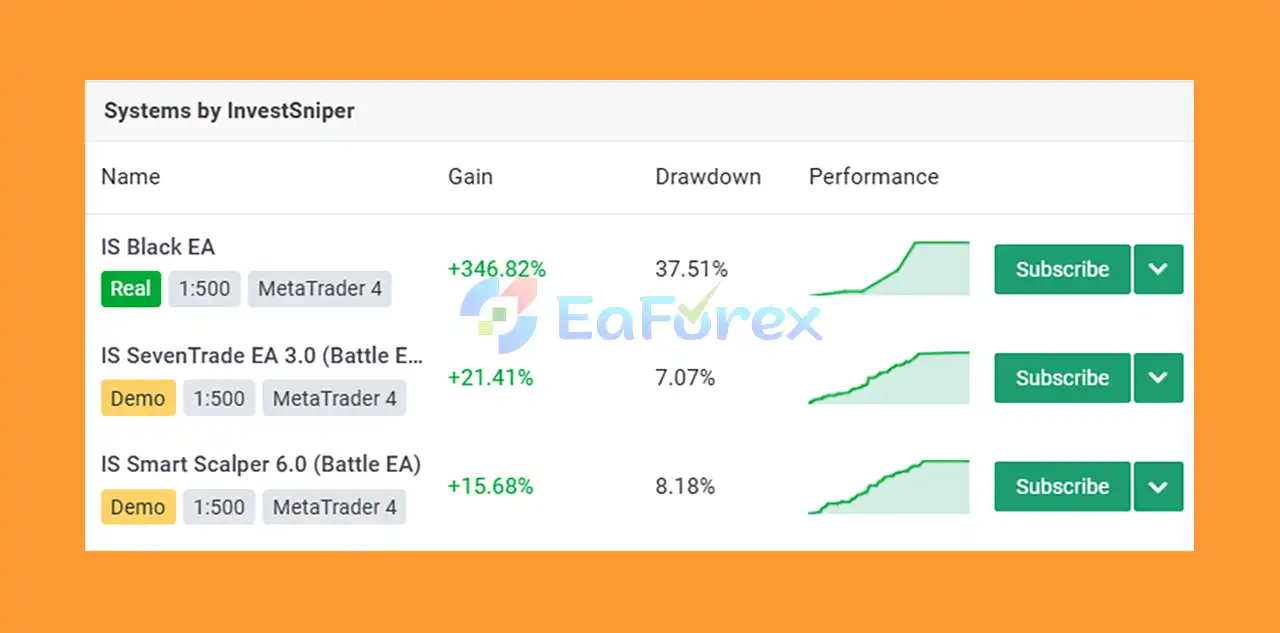
IS SevenTrade EA Performance Review
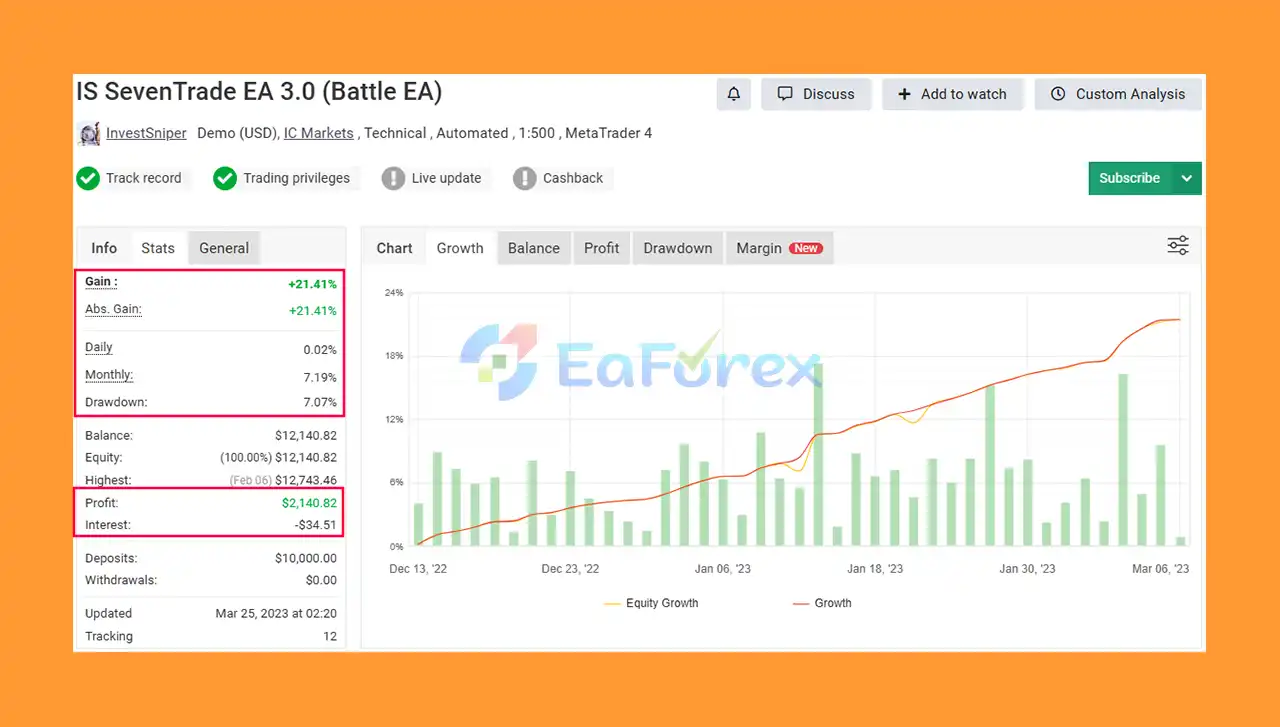
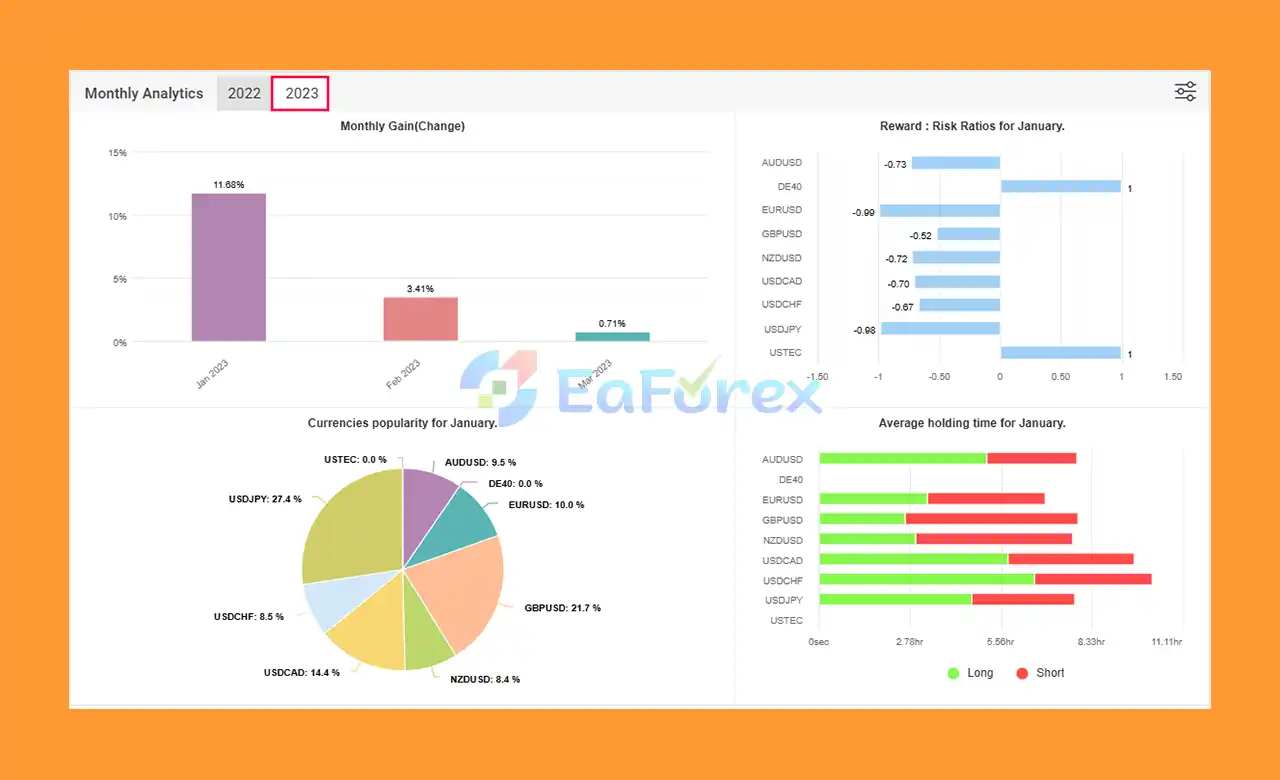
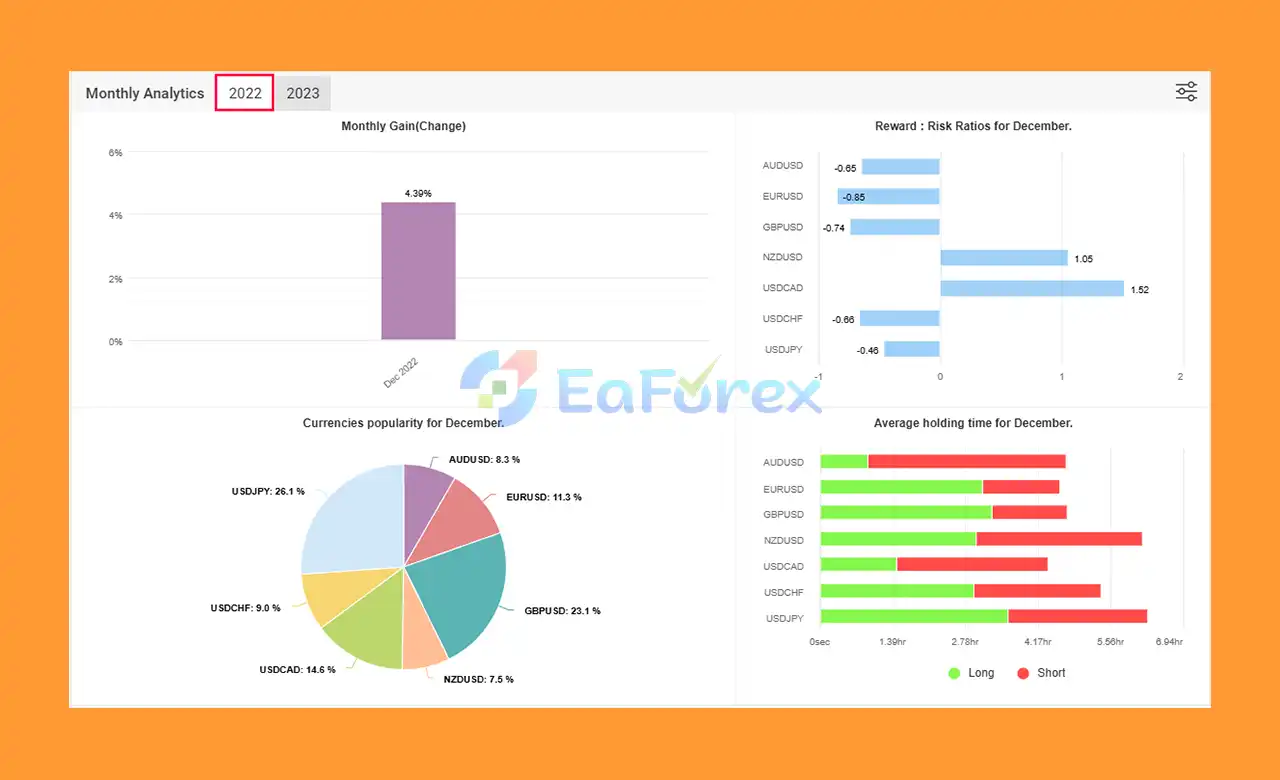
🟠 Verified Myfxbook Results (2023):
- Initial Deposit: $10,000
- Total Gain: +21.41%
- Monthly Growth: 7.19%
- Maximum Drawdown: 7.07%
- Verified Myfxbook Results: Proven performance showing consistent profits with controlled drawdowns.
What’s Included in the Download Package?
- Source Code MQ4: IS SevenTrade EA 3.0.mq4
- Experts: IS SevenTrade EA 3.0.ex4
- Presets: IS SevenTrade.set
>> Join VIP Membership Now <<<
How To Set Up EA
🔻The IS SevenTrade EA is an advanced expert advisor for MetaTrader 4 (MT4) designed to trade multiple currency pairs simultaneously. It is built to enhance the trading experience by automating strategies for various pairs, optimizing risk management, and supporting a high level of customization.
🟢 Step 1: Download IS SevenTrade EA 3.0
-
Visit the official website or trusted source to download the IS SevenTrade EA 3.0 file compatible with MetaTrader 4 (MT4).
🟢 Step 2: Install the Expert Advisor (EA)
- Open MetaTrader 4.
- In the File menu, select Open Data Folder.
- Navigate to the MQL4 folder, then the Experts folder.
- Copy the downloaded IS SevenTrade EA 3.0 file into the Experts folder.
🟢 Step 3: Activate the EA
- Restart MetaTrader 4.
- Go to the Navigator window (Ctrl+N).
- Under Expert Advisors, find IS SevenTrade EA 3.0.
- Drag the EA onto a chart for the desired currency pair.
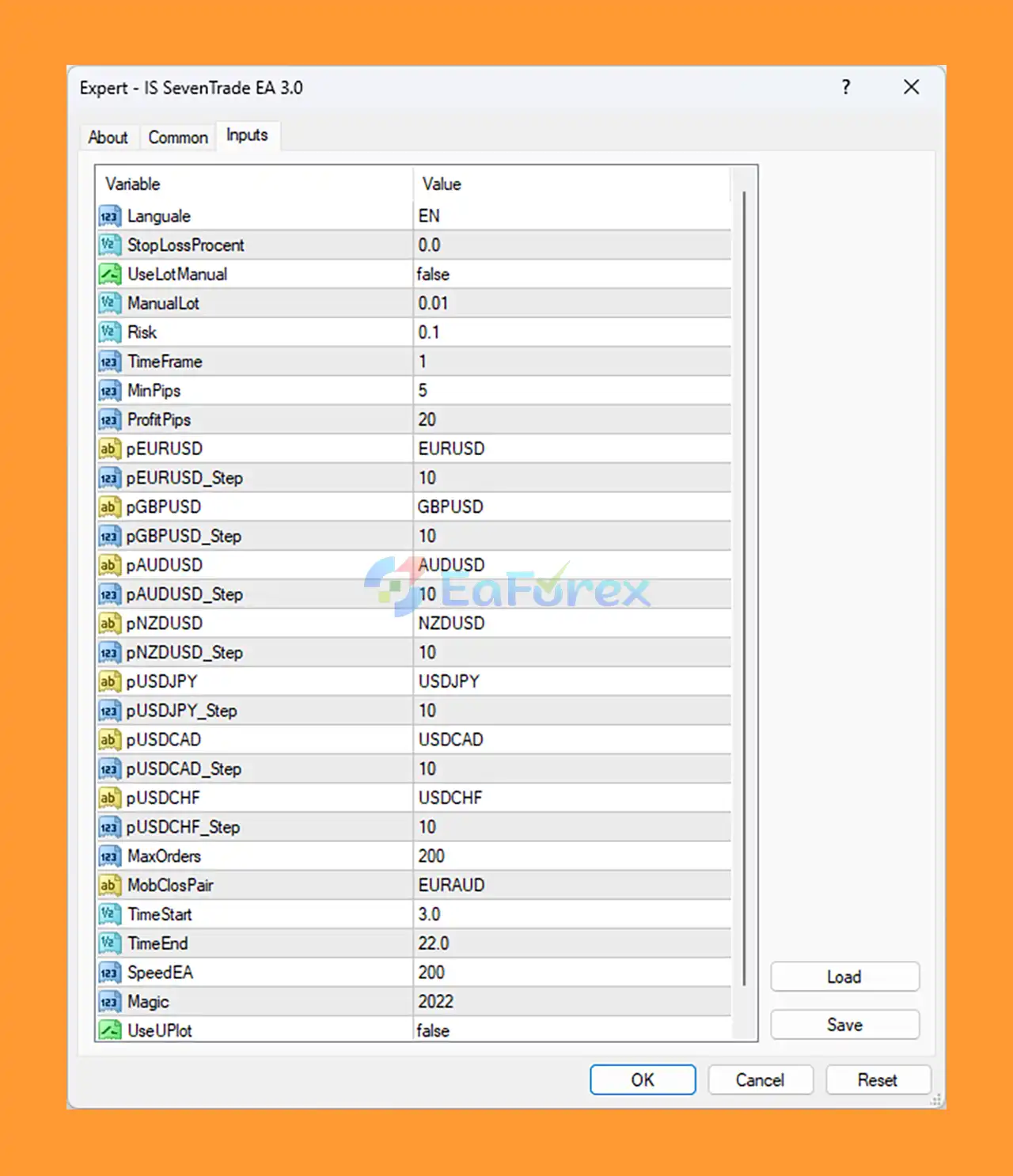
🟢 Step 4: Set Up Key Parameters for Optimal Performance
- Language: EN (default)
- StopLossPercent: 0.0 (no fixed stop loss)
- UseLotManual: false (automatic lot calculation)
- ManualLot: 0.01 (micro lot)
- Risk: 0.1% per trade
- TimeFrame: 1 minute
- MinPips: 5
- ProfitPips: 20
- MaxOrders: 200
- Currency Pairs: EURUSD, GBPUSD, AUDUSD, NZDUSD, USDJPY, USDCAD, USDCHF, EURAUD
- Trading Hours: 03:00 – 22:00
🟢 Step 5: Configure Additional Settings (Optional)
- Magic Number: 2022 (for trade identification)
- MobClosePair: EURAUD (priority closing for this pair)
🟢 Step 6: Enable Automated Trading
-
Ensure that AutoTrading is enabled in MetaTrader 4. You can do this by clicking the AutoTrading button at the top of the platform.
Conclusion
In summary, IS SevenTrade EA is a highly efficient, multi-currency, grid-based Expert Advisor designed to offer traders a dynamic and diversified approach to intraday forex trading. Specially optimized for the seven major currency pairs, this EA leverages a grid trading strategy to capture short-term price movements across multiple assets while maintaining controlled risk exposure. With its conservative risk settings, time-based trading filters, and fast execution speed, IS SevenTrade EA ensures that traders can take advantage of a wide range of opportunities with minimal risk.
>>> Reviewed by Jason Stap <<<