

Product Overview
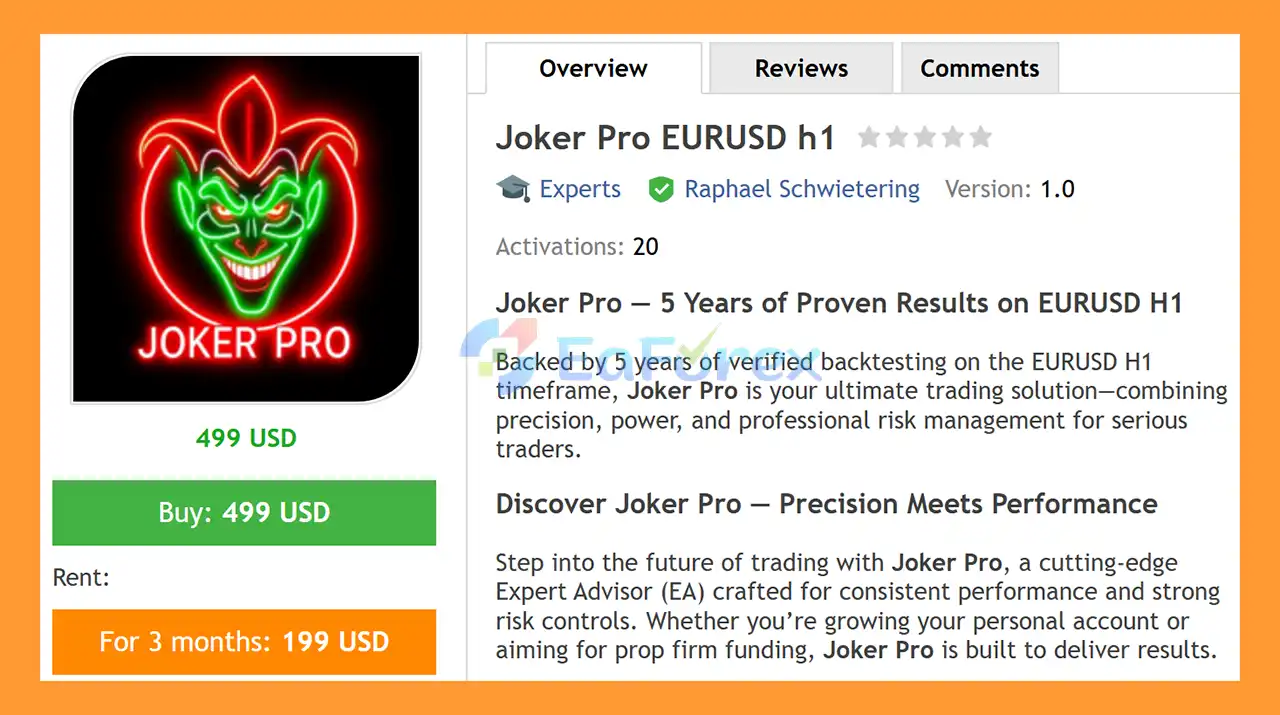
Joker Pro EURUSD H1 MT5 is an automated Forex Expert Advisor designed specifically for EURUSD on the H1 timeframe. According to the supplied specifications, the EA has been validated through 5 years of backtesting, combining automated market entries with structured risk-management and account-protection features.
Joker Pro is designed for traders who want a systematic approach to EURUSD trading without manually monitoring every market movement. The EA provides configurable position sizing, hard Stop Loss and Take Profit protection, trading-session controls, spread filtering, daily loss limits, and equity safeguards.
The system also supports multiple trading modes, including Hedge, Only Long, and Only Short, allowing traders to adapt the EA to different account structures and trading preferences.
For traders interested in automated Forex strategies, Joker Pro EURUSD H1 MT5 focuses on controlled execution, predefined risk parameters, and flexible account management rather than relying solely on entry signals.
About the Developer
- Author: Raphael Schwietering
- Experience: Over +8 years of experience on MQL5.
- Notable Products: Joker Pro EURUSD h1 MT5, Supernova XAUUSD h1 MT5, Goldrise XAUUSD h1, Prime Plus XAUUSD h1, Franklin XAUUSD h1 mt5, Gold Pump Pro XAUUSD h1, Gladiator Pro XAUUSD h1 and other advisors.
- Flagship Product: Joker Pro EURUSD h1 MT5 is rated as the best performing product of the year.
>> Delivery time 24h-48h after payment.
>>> Refund if not delivered.
>>> You will receive the latest version without any limitations (ID+Time).>>Reviewed by Jason Stap <<
Main Features of Joker Pro EURUSD h1 MT5
EURUSD H1 Trading System
Joker Pro is specifically designed for EURUSD on the H1 timeframe, making it suitable for traders looking for an automated medium-term Forex trading approach.
5 Years of Backtesting
The EA is backed by 5 years of historical backtesting on EURUSD H1, providing a longer historical period for evaluating how the strategy behaved under different market conditions.
Backtest results should always be treated as historical data rather than a guarantee of future live performance.
Flexible Trading Modes
Joker Pro EURUSD H1 MT5 supports several trading modes:
- Hedge Mode
- Only Long Mode
- Only Short Mode
This gives traders greater control over how positions are opened and managed.
Flexible Money Management
The EA allows traders to choose between:
- Fixed lot sizing
- Balance-based money management
- Equity-based money management
- Adjustable risk percentage
This makes it possible to configure position sizing according to account size and individual risk preferences.
Custom Magic Number and Order Comment
Each trading setup can use a unique Magic Number, helping separate Joker Pro trades from other Expert Advisors or manual positions.
A custom order comment is also available for easier trade identification.
How Does Joker Pro Work?
Joker Pro EURUSD H1 MT5 is designed to automate the trading process on EURUSD H1, from market entry through position management and account protection.
The EA evaluates its trading conditions and can automatically open positions according to its programmed strategy. Once a position is opened, predefined risk-management rules can control the trade using Stop Loss and Take Profit levels.
The system also incorporates multiple protective layers designed to prevent excessive exposure.
These include:
- Maximum spread filtering
- Maximum open positions
- Maximum open lots
- Maximum positions per candle
- Daily loss limits
- Daily drawdown limits
- Maximum equity drawdown
- Minimum equity protection
- Maximum equity protection
- Trading-session restrictions
This structure allows Joker Pro to manage both trade-level risk and account-level risk.
Stop Loss and Take Profit Management
Risk management is an important part of the Joker Pro architecture.
Every trade can be protected using a hard Stop Loss and Take Profit, helping define the potential risk and profit targets before the trade is opened.
Users can configure:
- Stop Loss in pips
- Take Profit in pips
- Custom SL/TP settings
- Enable or disable custom SL/TP functionality
Using predefined SL and TP levels can help traders maintain a more structured trading plan instead of relying on discretionary trade management.
Why Choose Joker Pro?
Joker Pro EURUSD H1 MT5 may be suitable for traders looking for an automated EURUSD H1 Expert Advisor with extensive account-management features.
Designed Specifically for EURUSD H1
Rather than presenting the EA as a generic multi-market robot, Joker Pro is focused on EURUSD H1, allowing traders to evaluate the strategy on its intended market and timeframe.
Extensive Risk Controls
The EA includes several layers of protection covering individual trades, daily performance, open exposure, and overall account equity.
Flexible Position Sizing
Traders can select fixed lots or dynamic money management based on balance or equity.
Daily Trading Protection
Users can define daily profit and loss thresholds. Once a configured daily target is reached, trading can automatically pause according to the selected settings.
Suitable for Different Account Objectives
Joker Pro EURUSD H1 MT5 includes features that can be useful for both personal trading accounts and accounts operated under stricter risk parameters, including prop-firm-style environments.
However, actual compatibility with a specific prop firm always depends on that firm's current rules.
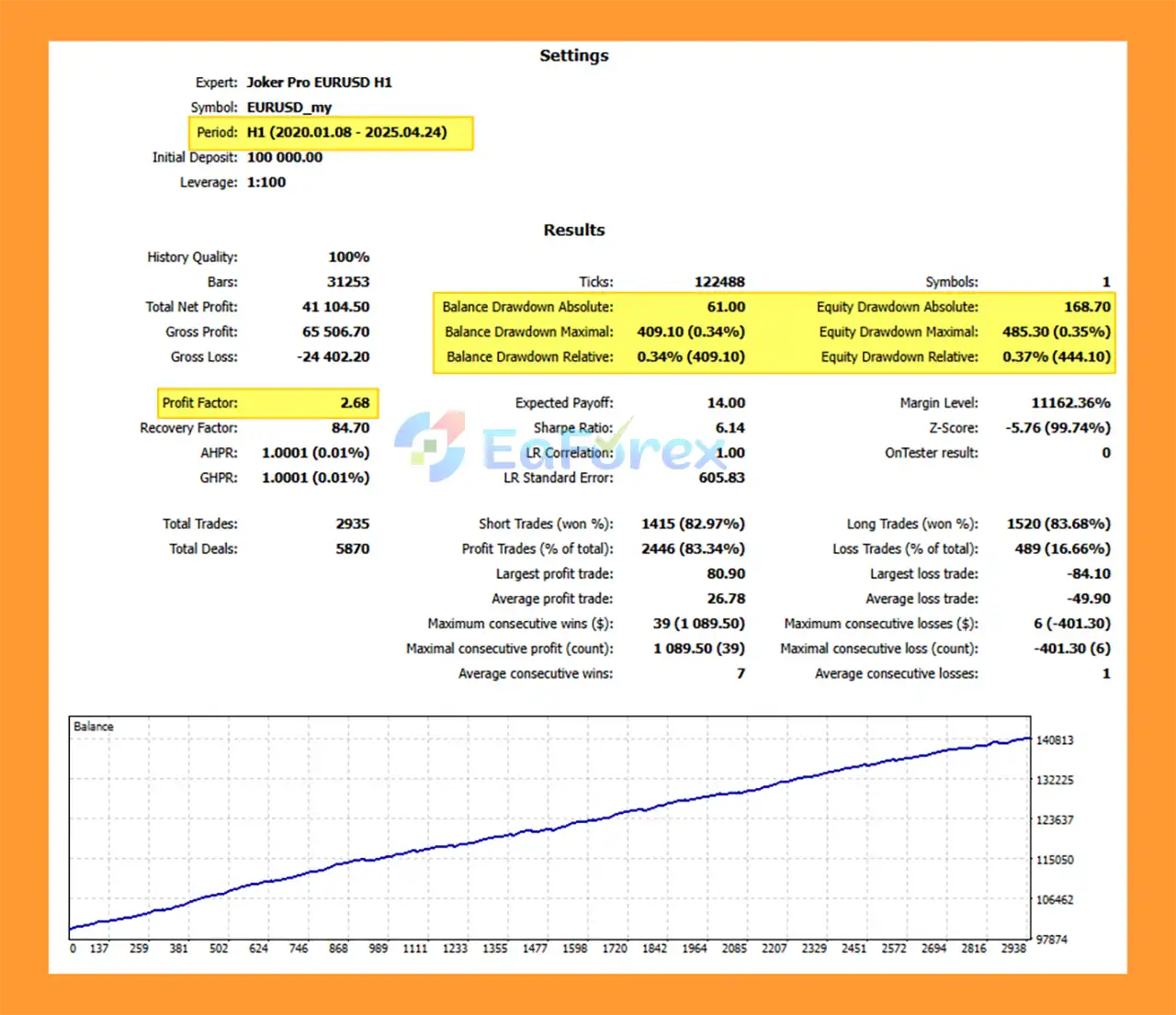
Joker Pro EURUSD h1 MT5 Backtest Results
🔺EURUSD – 64 month
- Initial Deposit: $100,000
- Total Net Profit: $41.104,50
- Win Rate: 83,34%
- Maximum Drawdown: 0.34%
Performance and Risk Management
The supplied Joker Pro EURUSD H1 MT5 specification states that the EA has undergone 5 years of backtesting on EURUSD H1.
The system also provides a comprehensive collection of risk-management tools, including:
- Risk percentage control
- Fixed-lot trading
- Balance-based position sizing
- Equity-based position sizing
- Hard Stop Loss
- Take Profit
- Maximum spread filter
- Maximum open positions
- Maximum open lots
- Maximum positions per candle
- Daily loss limit
- Daily drawdown limit
- Daily reset schedule
- Minimum equity protection
- Maximum equity protection
- Maximum equity drawdown control
- Automatic trading pause
- Session-based trading controls
- Automatic trade closure at session end
- Optional Friday trade closure
These controls can help traders establish predefined boundaries around the EA's trading activity.
Nevertheless, backtesting cannot guarantee future live performance. Results can differ because of spreads, commissions, slippage, execution speed, broker conditions, liquidity, and changes in market behavior.
Prop Firm Friendly
Joker Pro EURUSD H1 MT5 includes several features that can be useful for traders participating in prop-firm evaluations or funded-account environments.
Relevant controls include:
- Daily loss limits
- Daily drawdown protection
- Maximum equity drawdown
- Position limits
- Lot exposure limits
- Spread filtering
- Trading-session restrictions
- Automatic trading pauses
- Risk percentage management
These tools can help traders configure the EA around predefined risk boundaries.
However, “prop firm friendly” does not mean guaranteed prop-firm compliance. Every funding provider can have different rules regarding maximum daily loss, maximum drawdown, trading hours, news trading, weekend positions, lot exposure, and other restrictions. Traders should verify the current rules of their specific provider before using an automated EA.
Trading Session Management
Joker Pro EURUSD H1 MT5 includes a flexible weekly trading schedule that allows traders to control when the EA is permitted to operate.
Depending on the configuration, traders can use:
- Weekly trading schedules
- Session-end trade closure
- Friday automatic trade closure
- Optional Sunday trading
- Scheduled trading resumption after daily protection triggers
These settings can help reduce unwanted exposure during periods when the trader does not want the EA to open or maintain positions.
Weaknesses and Risk Warnings
Although Joker Pro EURUSD H1 MT5 provides extensive protection features, automated trading still involves substantial risk.
The most important considerations include:
- Historical backtests do not guarantee future results.
- EURUSD market conditions can change over time.
- Live execution can differ from backtest execution.
- Spread and slippage can affect actual results.
- Broker execution quality can influence trading performance.
- Risk-based position sizing can increase exposure as account equity changes.
- Daily protection settings do not eliminate market risk.
- Extreme volatility can cause execution conditions to differ significantly from normal conditions.
- Prop-firm rules vary and can change without notice.
- Using higher risk percentages can significantly increase drawdown potential.
For these reasons, traders should consider testing Joker Pro on a demo account or controlled-risk environment before deploying it with significant capital.
Never trade with money you cannot afford to lose.
Pros and Cons
Pros
- Designed specifically for EURUSD H1
- 5 years of supplied historical backtesting
- Automated trading execution
- Hard Stop Loss and Take Profit protection
- Fixed-lot and dynamic money-management options
- Adjustable risk percentage
- Hedge, Only Long, and Only Short modes
- Maximum spread protection
- Position and lot exposure controls
- Daily profit and loss protection
- Daily drawdown limits
- Maximum equity drawdown protection
- Minimum and maximum equity safeguards
- Flexible trading-session controls
- Optional Friday trade closure
- Suitable for evaluating prop-firm-style risk configurations
Cons
- Focused primarily on EURUSD H1 rather than being a broad multi-market EA
- Backtest performance may differ from live trading
- Results depend on broker conditions and execution quality
- Incorrect risk settings can increase account exposure
- Prop-firm compatibility depends on the individual firm's rules
- No automated strategy can eliminate market risk
How to Install Joker Pro EA MT5
Installing Joker Pro on MetaTrader 5 is straightforward.
Step 1: Install MetaTrader 5
Download and install MetaTrader 5 from your preferred broker.
Step 2: Install the EA
Copy the Joker Pro EA file into the appropriate MT5 Experts directory.
In MetaTrader 5, open:
File → Open Data Folder → MQL5 → Experts
Place the EA file inside the Experts folder.
Step 3: Restart MetaTrader 5
Restart MT5 or refresh the Expert Advisors section in the Navigator window.
Step 4: Open EURUSD H1
Open a EURUSD chart and select the H1 timeframe.
Step 5: Attach Joker Pro
Drag the Joker Pro EURUSD H1 MT5 onto the EURUSD H1 chart and enable automated trading.
Step 6: Configure Risk Settings
Before starting live trading, configure:
- Lot size or risk percentage
- Stop Loss
- Take Profit
- Maximum spread
- Maximum positions
- Maximum lots
- Daily loss limit
- Daily drawdown limit
- Equity protection
- Trading sessions
- Friday and Sunday settings
It is recommended to test the configuration on a demo account first and verify that the broker's trading conditions are suitable.
What’s Included in the Download Package?
- Setting (If Any).docx
- Installation Guide.docx
>>> Join VIP Membership Now <<<
Final Thoughts
In summary, Joker Pro EURUSD H1 MT5 is an automated Forex Expert Advisor focused on EURUSD trading on the H1 timeframe, with the supplied specifications highlighting 5 years of backtesting and a broad set of risk-management controls.
Its combination of automated execution, configurable money management, hard SL/TP protection, daily limits, equity safeguards, exposure controls, and session management gives traders considerable flexibility when configuring the system.
For traders evaluating automated EURUSD strategies, Joker Pro can be assessed through its historical backtest data, risk parameters, execution requirements, and behavior during forward testing.
As with any Expert Advisor, historical results should not be interpreted as a guarantee of future profitability. Proper risk management, realistic expectations, suitable broker conditions, and thorough demo or forward testing remain essential before using the EA on a live account.
Trade systematically. Control your risk. Let the data guide your evaluation.



