









-
 Unlimited Activations
-
 Instant delivery
-
 Easy to install






 Unlimited Activations
Instant delivery
Easy to install
Unlimited Activations
Instant delivery
Easy to install
 Free Update
 Free Install Support

Lock Recovery EA MT5 is an advanced MetaTrader 5 Expert Advisor (EA) designed to help traders manage and recover positions that have moved into a losing state. The system combines lock management, grid averaging, trend-based entries, virtual stop loss and take profit, trailing stop, break-even controls, and automated partial closing to provide a structured approach to drawdown management.
Instead of simply accepting a losing position, Lock Recovery EA MT5 is designed to manage the recovery process through configurable trading and position-management rules. The EA can work with both Buy and Sell positions, while its multi-symbol control can limit the number of forex pairs exposed to risk at the same time.
The EA provides extensive settings for lot management, grid distance, position limits, lock methods, partial profit closing, trading schedules, spread protection, and other execution controls. This makes it suitable for experienced traders who want greater control over an automated forex recovery and drawdown management strategy.
• Author: Sugianto.
• Experience: Over 10 years of experience on MQL5.
• Notable Products: Lock Recovery EA, Black Mamba EA, Super Gold Trend, Golden Shine EA MT5, Omni Gold MT5, Net Z EA MT5, DuniaMaya EA, NetZ, Bitcoin Wizard MT5, South East EA MT5 and other advisors.
• Flagship Product: Lock Recovery EA MT5 is rated as the best performing product of the year.
>> Delivery time 24h-48h after payment.
>>> Refund if not delivered.
>>> You will receive the latest version without any limitations (ID+Time).>>Reviewed by Jason Stap <<
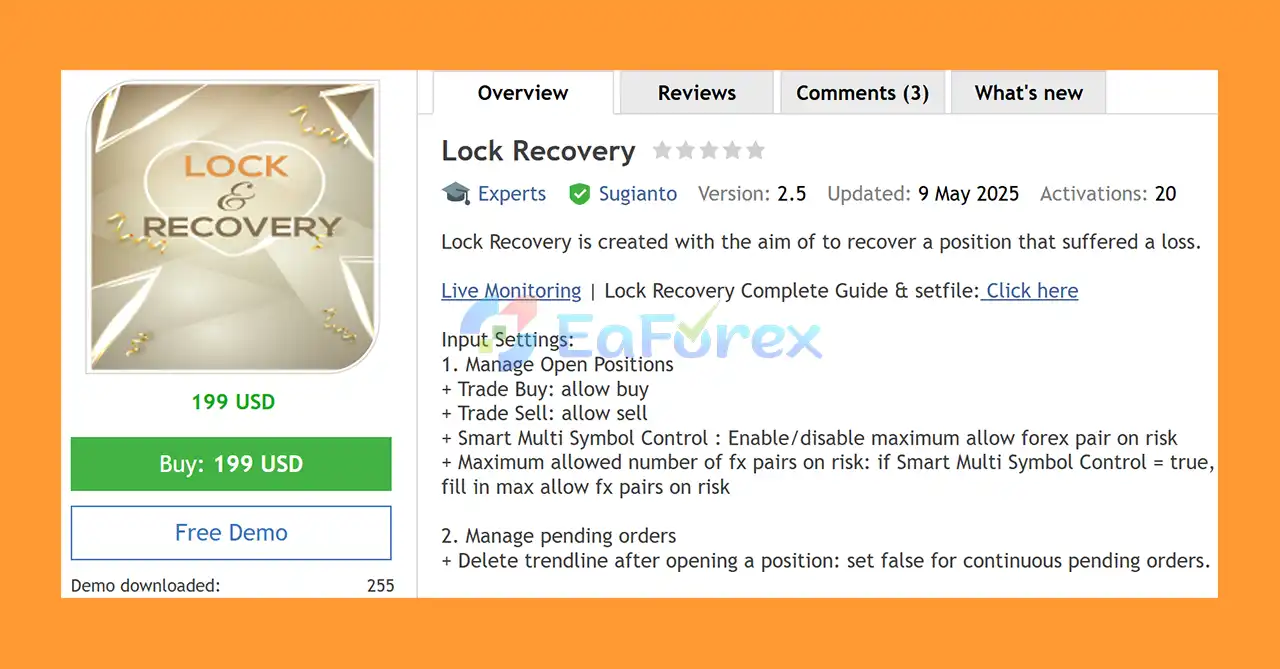
Lock Recovery EA MT5 allows traders to control which trading directions the EA can use.
The Smart Multi-Symbol Control feature can help prevent excessive simultaneous exposure across multiple forex pairs.
The EA provides controls for managing pending orders and trendline-based entries.
A trendline can be automatically deleted after a position is opened, or traders can disable this function when they want to maintain continuous pending-order behavior.
The lot-management system allows traders to customize how position sizes are calculated.
Available controls include:
These settings give traders greater control over how the EA increases or manages trade volume during a recovery sequence.
The Buy Grid Parameters allow the EA to add averaging positions under specific conditions.
Key settings include:
The grid can be configured to add positions only when a valid Buy signal is present, helping create a more structured averaging approach.
The Sell Grid Parameters provide equivalent functionality for short positions.
Traders can configure:
This allows the EA to manage both bullish and bearish recovery scenarios.
Lock Recovery EA MT5 includes a Change Step function that can modify grid spacing after a specified trading volume is reached.
Users can configure:
This can help make the grid structure more adaptable as the recovery cycle develops.
The EA supports virtual protection and profit-management mechanisms.
Available features include:
These tools allow traders to create customized exit and protection rules without relying exclusively on conventional broker-side stop orders.
One of the core features of the EA is its Lock Management system.
Traders can specify a lock line name and select how the lock position should be handled.
Available lock methods include:
This provides flexibility when managing opposite positions and recovery trades.
Lock Recovery EA MT5 includes several partial-close mechanisms designed to reduce drawdown and manage profitable and losing positions.
The EA can use:
For example, the EA can be configured to partially close a profitable position while simultaneously reducing exposure from a losing position.
The built-in time-management system allows traders to define when the EA can open a new trading cycle.
Users can specify:
The schedule is based on the broker’s server time and applies to the opening of new cycles.
The Test Auto Trade feature can be used to study how Lock Recovery works inside the MT5 Strategy Tester.
It can also be used as an automated trading function in live environments.
The Add Grid Trend option can allow additional positions when the trading conditions match the detected trend.
The EA includes additional execution controls such as:
These settings can be particularly useful during periods of increased market volatility when brokers may dynamically change trading conditions.
Lock Recovery EA MT5 is designed around the concept of position recovery and drawdown management.
When a position moves against the trader, the EA can use its configured recovery mechanisms to manage the open exposure. Depending on the settings, this can include adding grid positions, managing opposite positions through locks, adjusting grid spacing, and partially closing profitable or losing positions.
A typical recovery process can involve the following stages:
1. Initial Position
The EA or trader opens a Buy or Sell position according to the selected trading conditions.
2. Market Moves Against the Position
If the position enters drawdown, the EA monitors the configured recovery conditions.
3. Grid Management
If enabled, additional positions can be opened according to the selected grid distance, trend direction, maximum trade count, and lot-management rules.
4. Lock Management
The EA can use a locking mechanism to manage exposure through an opposite position, depending on the selected lock configuration.
5. Dynamic Position Management
Virtual stop loss, take profit, trailing, break-even, and grid-step settings can be used to control the recovery cycle.
6. Drawdown Reduction
When profitable positions or recovery conditions meet the specified requirements, the EA can perform partial closing to reduce exposure.
7. Recovery or Exit
The objective is to gradually reduce the overall drawdown and manage the trading cycle according to the configured rules.
Because recovery trading can involve increased exposure, traders should carefully optimize the lot multiplier, maximum trades, grid distance, and maximum lot settings.
Lock Recovery EA MT5 may be suitable for traders who want more than a simple entry-and-exit Expert Advisor.
The EA focuses specifically on managing positions during adverse market conditions through configurable recovery and locking mechanisms.
Almost every important part of the strategy can be adjusted, including:
Smart Multi-Symbol Control allows traders to limit the number of forex pairs simultaneously exposed to recovery risk.
The combination of locking, grid management, trailing, break-even, and partial closing provides multiple ways to manage an open recovery cycle.
The Auto Trade Test functionality allows traders to examine the recovery mechanism in the MetaTrader 5 Strategy Tester before considering live deployment.
With its extensive configuration options, the EA is particularly interesting for traders who understand grid, hedging, recovery, and automated money-management techniques.
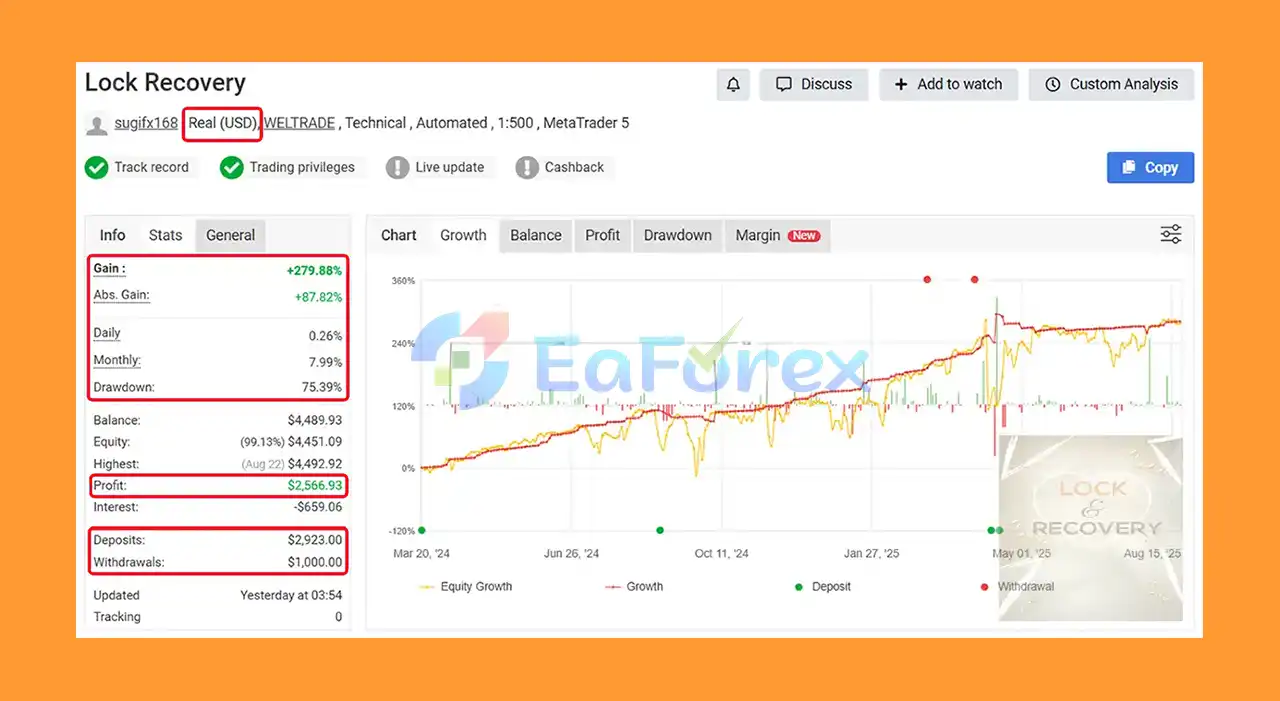
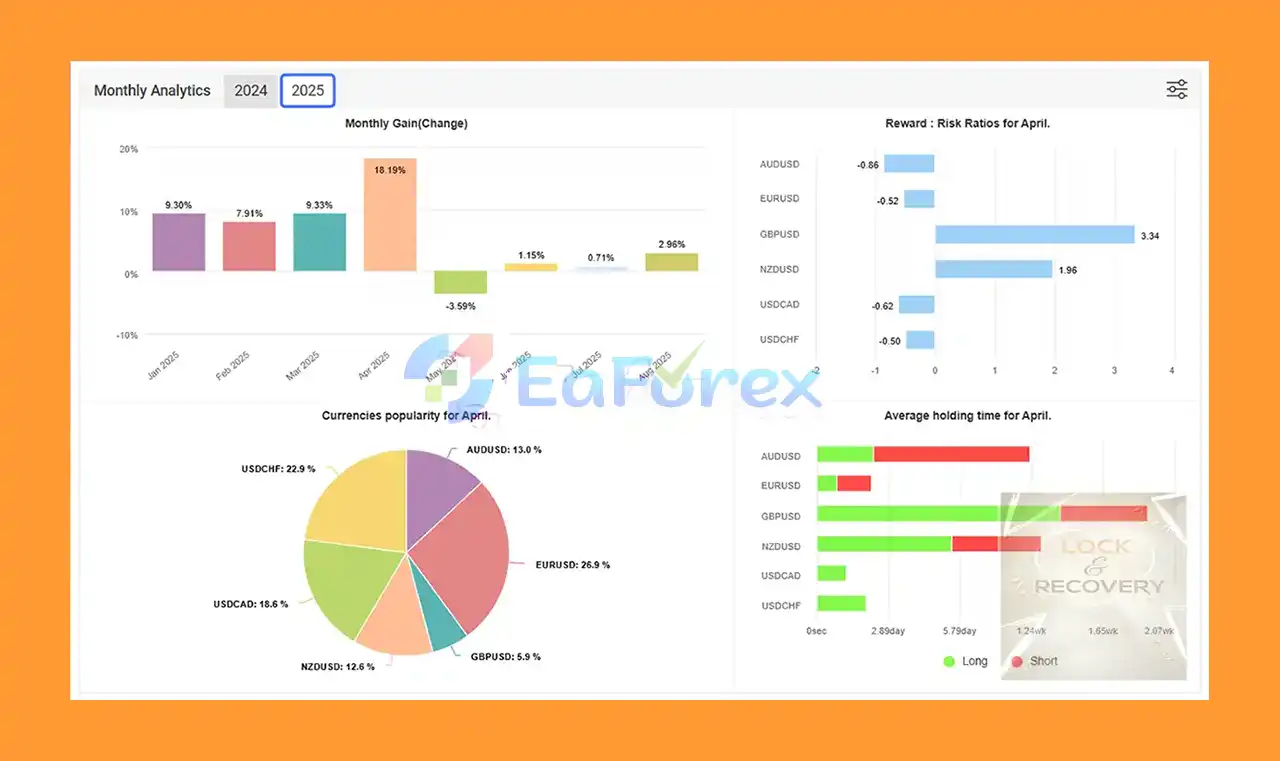
🔻Key statistics:
Lock Recovery EA Myfxbook Signal Results
Lock Recovery EA Myfxbook Results
The performance of Lock Recovery EA MT5 depends heavily on market conditions and configuration settings. Recovery-based systems can behave very differently during trending, ranging, and highly volatile markets.
Important risk-management parameters include:
The Max Lots per Trade setting can help prevent individual recovery positions from becoming excessively large.
Separate maximum trade settings for Buy and Sell grids can limit the number of positions added during a recovery cycle.
The Buy Step and Sell Step determine the distance between additional positions. Expanding coefficients can increase the spacing between subsequent entries.
Smart Multi-Symbol Control can restrict the number of forex pairs simultaneously carrying risk.
Virtual Stop Loss can provide a predefined exit level according to the configured pip distance.
Break-even and trailing functions can help protect gains once positions move favorably.
Partial-close functions can gradually reduce exposure instead of requiring the entire basket to be closed at once.
The maximum spread parameter can help prevent new trades from being opened when transaction costs become excessive.
Time management can restrict the opening of new cycles during periods the trader considers unsuitable.
Risk Warning: No combination of these settings can guarantee profitability. Grid, averaging, Martingale-style multipliers, and recovery strategies can experience substantial drawdowns or account losses if the market continues moving against the recovery positions.
Despite its extensive risk-management features, Lock Recovery EA MT5 has important limitations.
Adding positions to a losing trade can increase total market exposure. If the market continues moving in the wrong direction, drawdown can increase rapidly.
The configurable lot multiplier can significantly increase position size. Aggressive multiplier settings may create substantial margin requirements.
Grid systems can perform differently depending on market structure. Strong one-directional trends can create extended sequences of losing positions.
A locked position may reduce directional exposure, but it does not automatically eliminate losses, spreads, commissions, swaps, or margin requirements.
During major economic news, market gaps, spread expansion, and rapid price movements may affect execution and recovery behavior.
Minimum lot sizes, stop levels, freeze levels, spreads, execution speed, leverage, and trading conditions can influence EA performance.
Over-optimizing settings based only on historical backtests can produce parameters that perform poorly in future market conditions.
Past backtest results or successful recovery cycles should never be interpreted as a guarantee of future performance.
For safer deployment, traders should consider using conservative settings, sufficient account capital, appropriate leverage, and extensive forward testing.
Installing Lock Recovery EA MT5 on MetaTrader 5 is straightforward.
Launch your MetaTrader 5 trading platform and log in to your trading account.
From the MT5 terminal, go to:
File → Open Data Folder
Then navigate to:
MQL5 → Experts
Copy the Lock Recovery EA MT5 file into the Experts folder.
If the EA is provided as an .ex5 file, place the file directly into the Experts directory.
Restart MetaTrader 5 or refresh the Expert Advisors section in the Navigator window.
The EA should then appear under:
Navigator → Expert Advisors
Open the desired trading chart and timeframe, then drag Lock Recovery EA MT5 onto the chart.
Before activating the EA, carefully review:
Make sure Algo Trading / AutoTrading is enabled in MetaTrader 5.
Use the MT5 Strategy Tester and preferably a demo account to evaluate the EA under different market conditions before deploying it on a live account.
Start with conservative risk settings and avoid aggressive lot multipliers until the strategy has been thoroughly tested.
🔻Experts:
🔻Presets:
Lock Recovery EA MT5 is a specialized forex recovery Expert Advisor for MetaTrader 5 that focuses on managing losing positions through a combination of locking, grid averaging, trend-based entries, dynamic grid steps, partial closing, trailing, break-even, and virtual risk-management tools.
Its biggest advantage is flexibility. Traders can customize nearly every component of the recovery process, from position size and grid distance to maximum exposure, lock methods, partial closing, and trading schedules.
However, flexibility also means responsibility. Because the EA can use grid averaging and configurable lot multipliers, aggressive settings may create significant drawdown and margin requirements. It should therefore be considered a high-risk recovery trading tool, not a guaranteed-profit solution.
For the best results, traders should thoroughly backtest the EA, conduct forward testing on a demo account, use conservative risk parameters, and ensure their broker’s trading conditions are compatible with the strategy.
When properly configured and used with disciplined risk management, Lock Recovery EA MT5 can serve as a powerful tool for traders seeking an automated approach to forex position recovery, drawdown reduction, lock management, and MT5 algorithmic trading.
1. What is Lock Recovery EA MT5 and how does it help traders?
Lock Recovery EA MT5 is an advanced Expert Advisor designed to efficiently recover losing positions using a customizable grid system, intelligent drawdown reduction, and locking strategies to minimize losses and stabilize trading performance.
2. How does Lock Recovery EA MT5 manage risk and drawdowns?
It uses advanced drawdown reduction techniques like auto partial close based on profit or percentage, loss locking mechanisms, and virtual stop loss/take profit settings to control risk and reduce margin usage.
3. What is the grid averaging system in Lock Recovery EA MT5?
The EA uses a customizable buy/sell grid averaging system that adds positions only when confirmed by trend signals, allowing traders to recover losses strategically without overexposure.
4. Can Lock Recovery EA MT5 manage multiple currency pairs simultaneously?
Yes, the EA supports smart multi-symbol control to limit exposure across different currency pairs, providing robust risk management for diversified trading portfolios.
5. Is Lock Recovery EA MT5 suitable for manual trading or third-party trades?
Yes, it supports manual intervention and can manage user-opened or third-party trades, offering flexible control alongside its automated strategies.
6. What kind of performance can traders expect from Lock Recovery EA MT5?
Verified live results show a total gain of nearly 280%, daily growth around 0.26%, and monthly growth close to 8%, indicating effective loss recovery and consistent profitability.
7. How customizable is Lock Recovery EA MT5?
Highly customizable, it offers adjustable grid spacing, dynamic lot sizing with Martingale multipliers, max lot limits, and various settings tailored for advanced traders seeking precise control.
8. What is included in the Lock Recovery EA MT5 download package?
The package includes expert files, multiple preset files for popular currency pairs, an installation guide, and configuration settings to help traders deploy the EA easily.
In stock
In stock
In stock
In stock
In stock
Out of stock
No account yet?
Create an Account












 Automatic EA
 EA Best Seller
 Expert Advisor MT4
 Expert Advisor MT5
 HFT EA


Reviews
Clear filtersThere are no reviews yet.