


What is Prop GT MT4
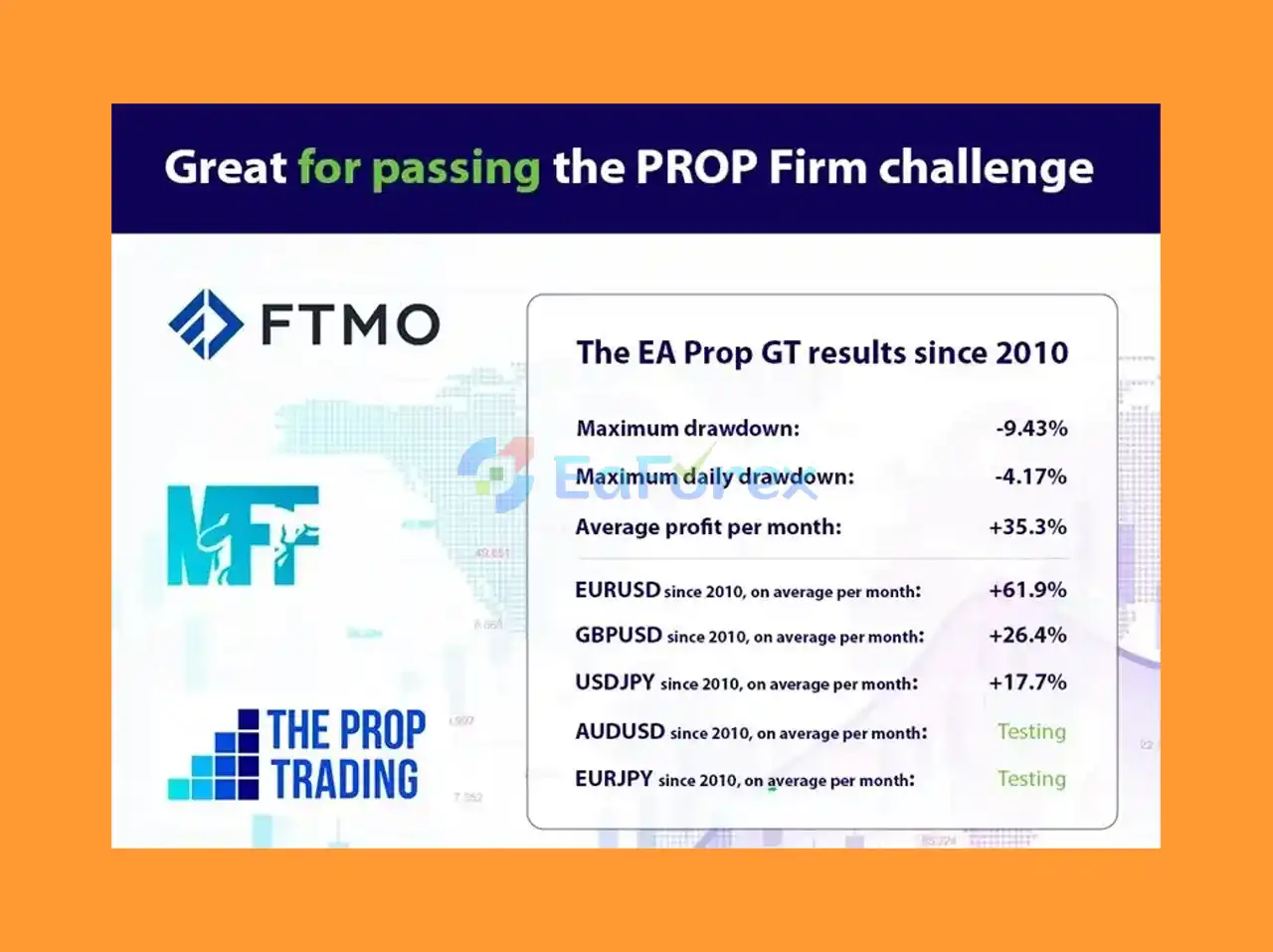
Prop GT EA is a sophisticated algorithmic trading system built to optimize trading strategies and maximize profits on the MetaTrader 4 (MT4) platform. This expert advisor enhances the features, performance, and overall value of Prop GT MT4, offering traders a powerful and efficient automated trading solution. Prop GT EA has also proven its effectiveness with popular proprietary trading firms like FTMO, making it a trusted choice for serious traders aiming to improve their trading results.
Key Features of Prop GT MT4
🔻Built for Prop Trading Success
- Strategically designed to comply with rules of firms like FTMO or MyForexFunds.
- Helps traders pass prop firm evaluations through precise and low-risk trades.
🔻Professional Risk Management
- Automatically sets Stop Loss (SL) and Take Profit (TP) for every trade.
- Includes customizable lot sizes and drawdown protection.
🔻Strategy Versatility
- Implements breakout scalping strategy on H1 timeframe.
- Can adapt to different trading styles from short-term to long-term.
Benefits of Prop GT MT4
-
Prop Firm-Ready: Used by traders to pass FTMO and similar challenges.
-
Stable Performance: Low drawdown with consistent profit generation.
-
Fully Automated: Set-and-forget logic, no manual intervention needed.
-
MT4 Compatibility: Seamless installation and use on the MetaTrader 4 platform.
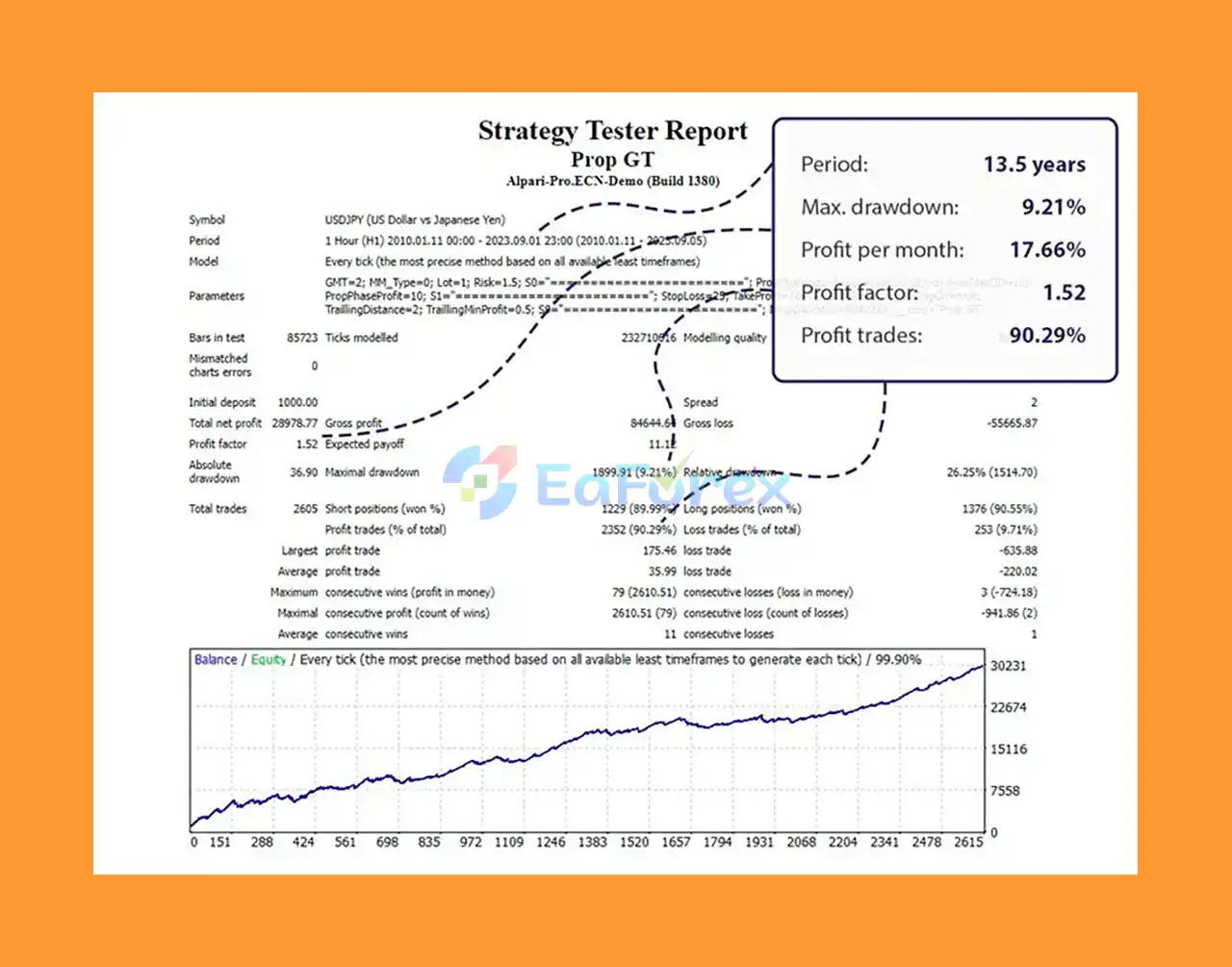
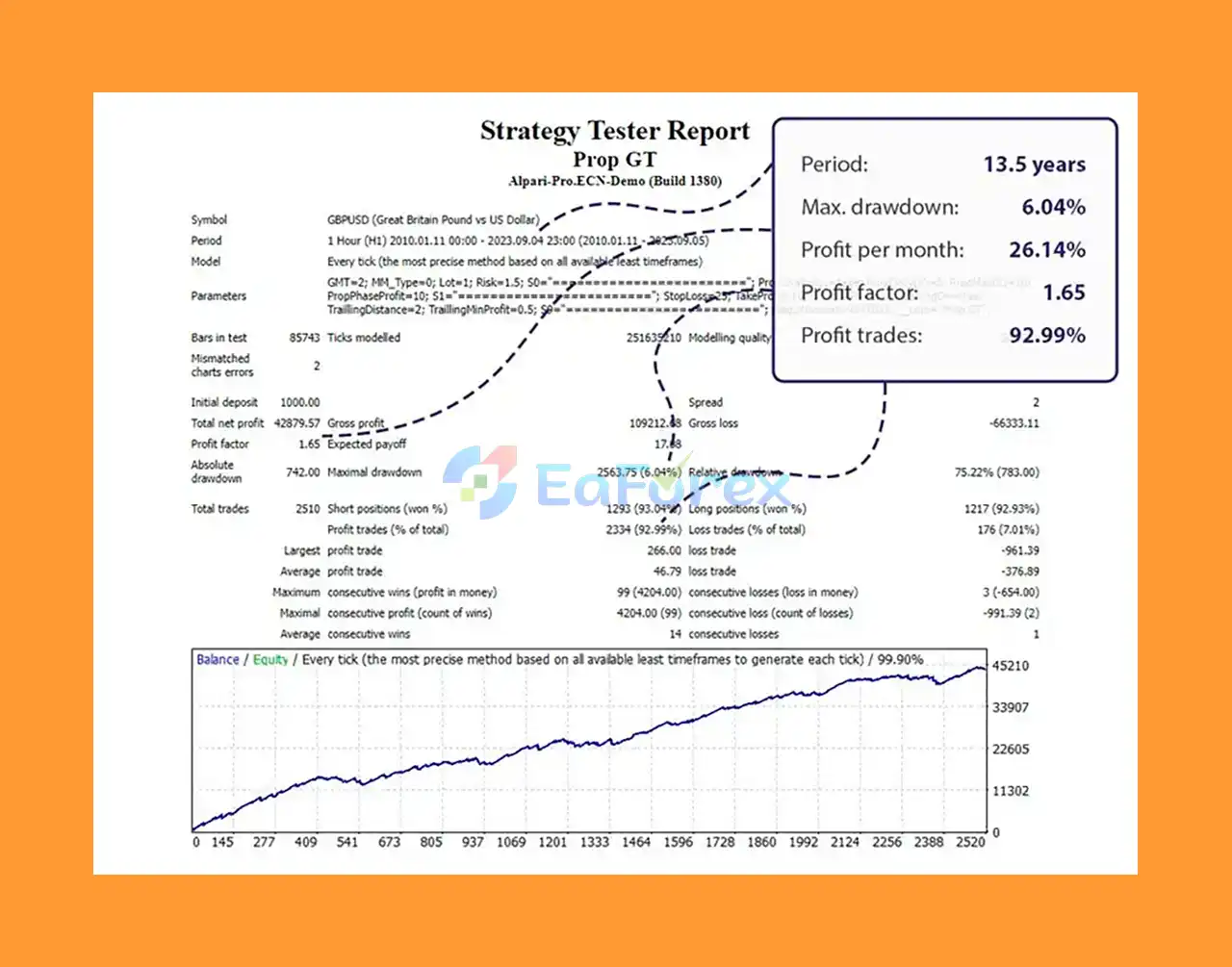
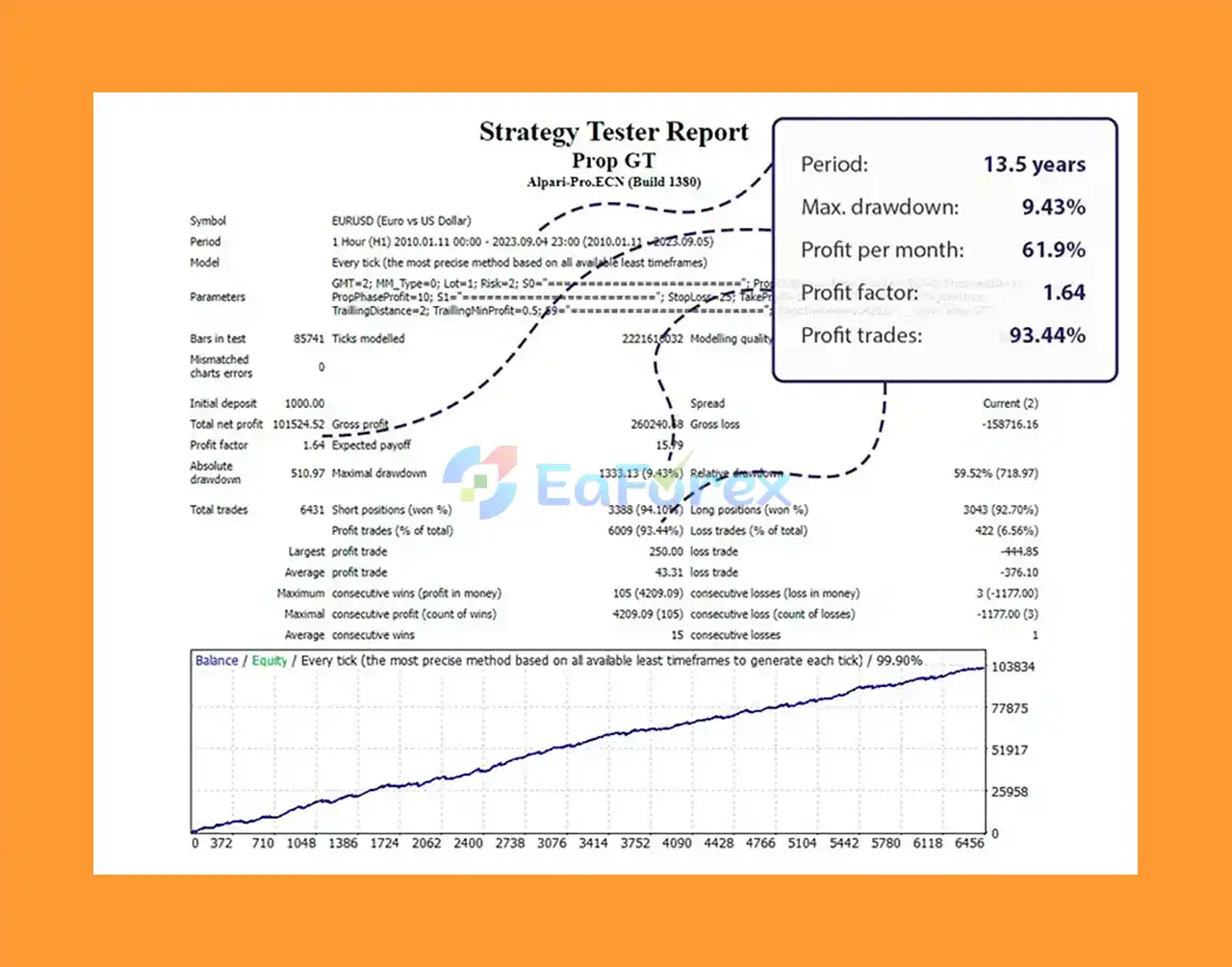
Prop GT MT4 Review and Performance
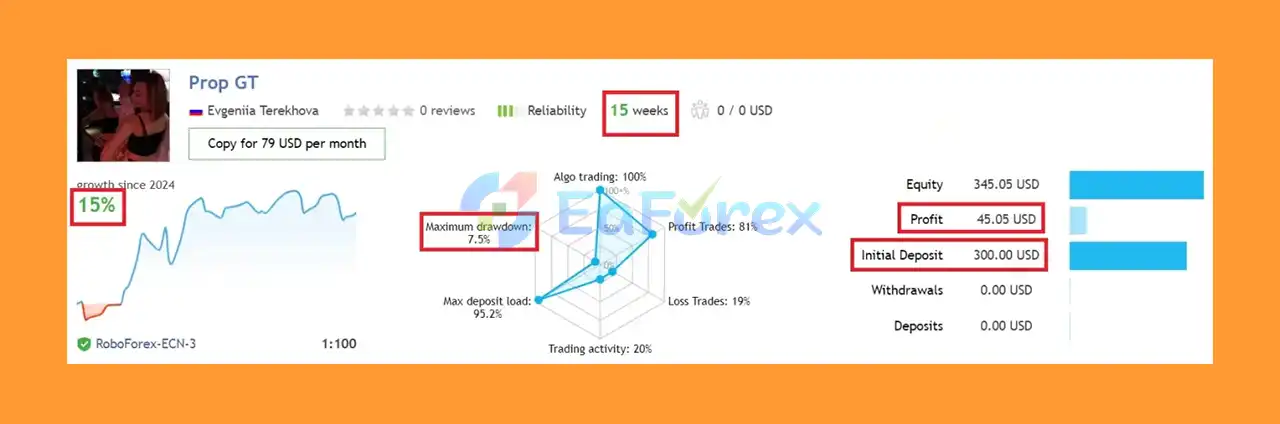
🔻Real Estate Company Results:
- Includes evidence of successful trades used in the PropFirm environment.
- Evidence of real results with low risk and consistent returns.
- Testimonials from real traders using Prop GT EA with Real Estate Companies.
- Highlights pass rates, profit factors and ease of use.
What’s Included in the Package?
- Experts: Prop GT MT4 v1.5_fix.ex4
>>> Join VIP Membership Now <<<
How To Set Up EA
🔻The Prop GT MT4 EA is a powerful MetaTrader 4 Expert Advisor designed for precise risk management, news filtering, and dynamic market condition adaptation. Follow these key steps for quick setup and optimal performance:
🔵 Installation Guide
-
Download the Prop GT MT4 EA file and place it into your MetaTrader 4
Expertsfolder. -
Restart MT4 platform to load the EA.
-
Attach the EA to your preferred forex chart, ideally EUR/USD pairs.
-
Enable AutoTrading on MT4 to allow the EA to execute trades automatically.
🔵 Essential Settings for Optimal Use
-
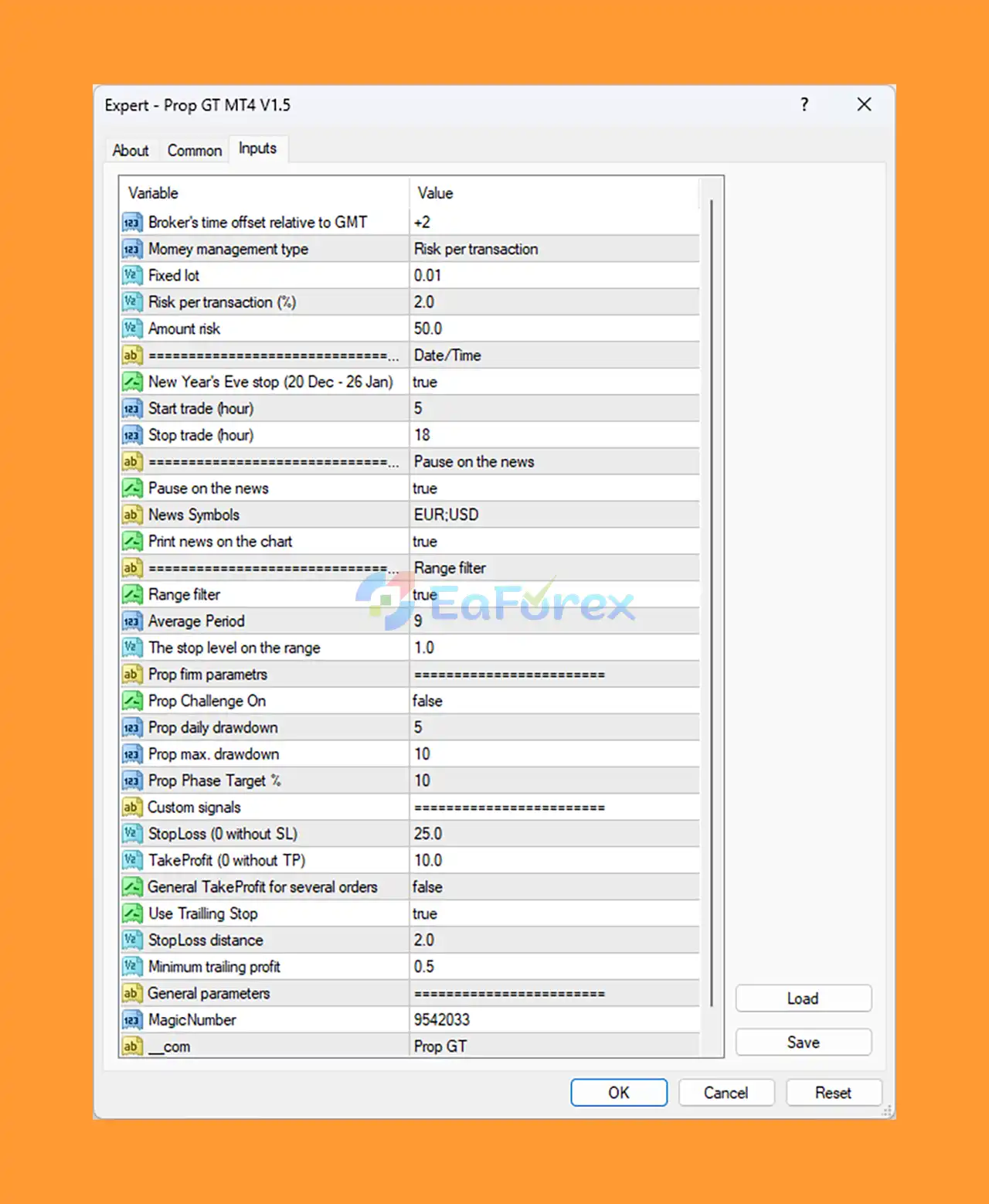
Money Management: Set risk per transaction at 2% with a minimum lot size of 0.01 to control exposure.
-
Trading Time: Activate trading from 5 AM to 6 PM to align with major market sessions and liquidity.
-
News Filter: Enable automatic trading pause during high-impact EUR and USD news to avoid volatility risks.
-
Range Filter: Turn on range filtering with an average period of 9 and a stop level of 1.0 to avoid unfavorable market conditions.
-
Stop Loss & Take Profit: Use a fixed stop loss of 25 pips, take profit of 10 pips, and enable trailing stop with a minimum trailing profit of 0.5 pips.
-
Drawdown Controls: Limit daily drawdown to 5% and max drawdown to 10% to protect your account.
Conclusion
In summary, Prop GT MT4 stands out as a highly sophisticated and reliable automated trading system built specifically for the MetaTrader 4 (MT4) platform. Designed with prop firm challenges in mind, such as FTMO and MyForexFunds, this EA offers traders a strategic edge by combining precise risk management, breakout scalping strategies, and dynamic market adaptability. Its focus on low drawdown and consistent profit generation makes it a top choice for traders aiming to pass prop firm evaluations and maintain stable trading performance.
With features like automated stop loss and take profit settings, customizable lot sizes, and built-in news filtering to avoid high-volatility events, Prop GT MT4 ensures a safer and more controlled trading environment. The EA’s compatibility with major currency pairs, especially EUR/USD, alongside its fully automated "set-and-forget" functionality, allows traders of all skill levels to capitalize on forex opportunities without constant manual oversight.
>>> Reviewed by Jason Stap <<<



