









-
 Unlimited Activations
-
 Instant delivery
-
 Easy to install






 Unlimited Activations
Instant delivery
Easy to install
Unlimited Activations
Instant delivery
Easy to install
 Free Update
 Free Install Support

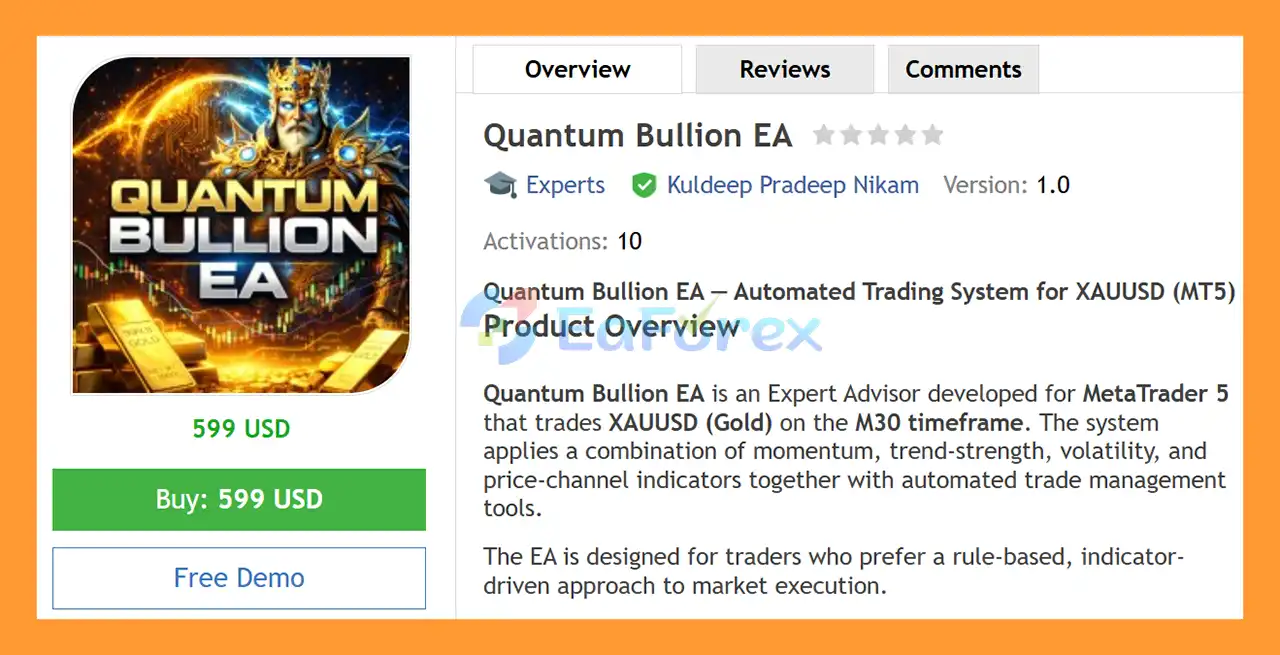
Quantum Bullion EA MT5 is a rule-based automated trading system developed for MetaTrader 5, designed to trade XAUUSD (Gold) using a combination of momentum, trend-strength, volatility, and price-channel analysis.
The EA integrates several established technical indicators, including QQE, ADX, Bollinger Bands, and ATR, to identify potential trading opportunities and determine entry conditions.
Rather than relying on artificial intelligence or external trading signals, Quantum Bullion EA MT5 operates according to clearly defined technical rules. The system can automatically manage positions using features such as Breakeven, One-Directional Trailing Stop, Pyramiding, Re-Entry Logic, Pending Order Expiration, Time Filters, and Weekend Protection.
The EA is suitable for traders who prefer a structured, indicator-driven approach to automated Gold trading with customizable trade-management parameters.
>> Delivery time 24h-48h after payment.
>>> Refund if not delivered.
>>> You will receive the latest version without any limitations (ID+Time).>>Reviewed by Jason Stap <<
Quantum Bullion EA MT5 combines four technical tools, with each indicator serving a specific role in the trading process:
The combination creates a rule-based framework for evaluating Gold market conditions.
The QQE component is used to identify potential changes in momentum.
A bullish QQE shift can contribute to a potential buy setup, while a bearish shift can contribute to a potential sell setup.
The EA uses the relationship between DI+ and DI- to confirm directional conditions.
A bullish crossover occurs when DI+ moves above DI-, while a bearish crossover occurs when DI- moves above DI+.
ATR is used to measure current market volatility.
Pending orders are positioned at a volatility-adjusted distance from the Bollinger Bands middle line, allowing entry positioning to adapt to the current market environment.
Instead of entering immediately at market price, Quantum Bullion can place pending stop orders based on its predefined entry conditions.
If an order is not triggered within the specified number of bars, it automatically expires.
The EA can automatically move the Stop Loss to the entry price after the trade reaches a predefined profit distance.
This feature is designed to reduce exposure after the market has moved favorably.
The trailing mechanism follows the most favorable price reached during the trade.
Importantly, the trailing Stop Loss only moves in the favorable direction and does not reverse when the market temporarily moves against the position.
Quantum Bullion EA MT5 supports pyramiding, allowing additional positions to be opened in the same direction when the required conditions are met.
The spacing between additional positions can be configured through the EA parameters.
The EA can optionally attempt a new entry after a Stop Loss event.
A configurable delay filter can be used to prevent immediate re-entry and reduce unnecessary consecutive trades.
Trading activity can be restricted to specific hours.
This allows users to customize when the EA is permitted to search for and execute new trading opportunities.
The EA includes an optional weekend-protection feature that can close positions before the market closes for the weekend.
This can help traders manage exposure to weekend gaps and reduced liquidity.
Quantum Bullion EA MT5 follows a structured multi-stage trading process.
The EA continuously analyzes the Gold market on the configured MetaTrader 5 chart.
The QQE indicator evaluates whether market momentum is shifting upward or downward.
The EA checks the ADX indicator, specifically the relationship between DI+ and DI-, to confirm the directional condition.
The ATR indicator measures current market volatility.
This information is used to determine the appropriate distance for pending orders and certain trade-management parameters.
The EA uses the Bollinger Bands middle line as a reference and calculates a volatility-adjusted distance using ATR.
A pending stop order is then positioned according to the programmed entry rules.
If the pending order is triggered, the EA begins automated position management.
If the order remains inactive for the configured number of bars, it is automatically removed.
Once a trade is active, the EA can apply:
All available parameters can be customized from the EA settings.
Quantum Bullion EA MT5 is designed for traders who prefer transparent, rule-based technical analysis rather than systems based on external signals or artificial intelligence.
Key characteristics include:
The strategy provides traders with a clearly defined technical framework while allowing them to adjust the main trading and risk-management parameters.
🔺XAUUSD (Gold)
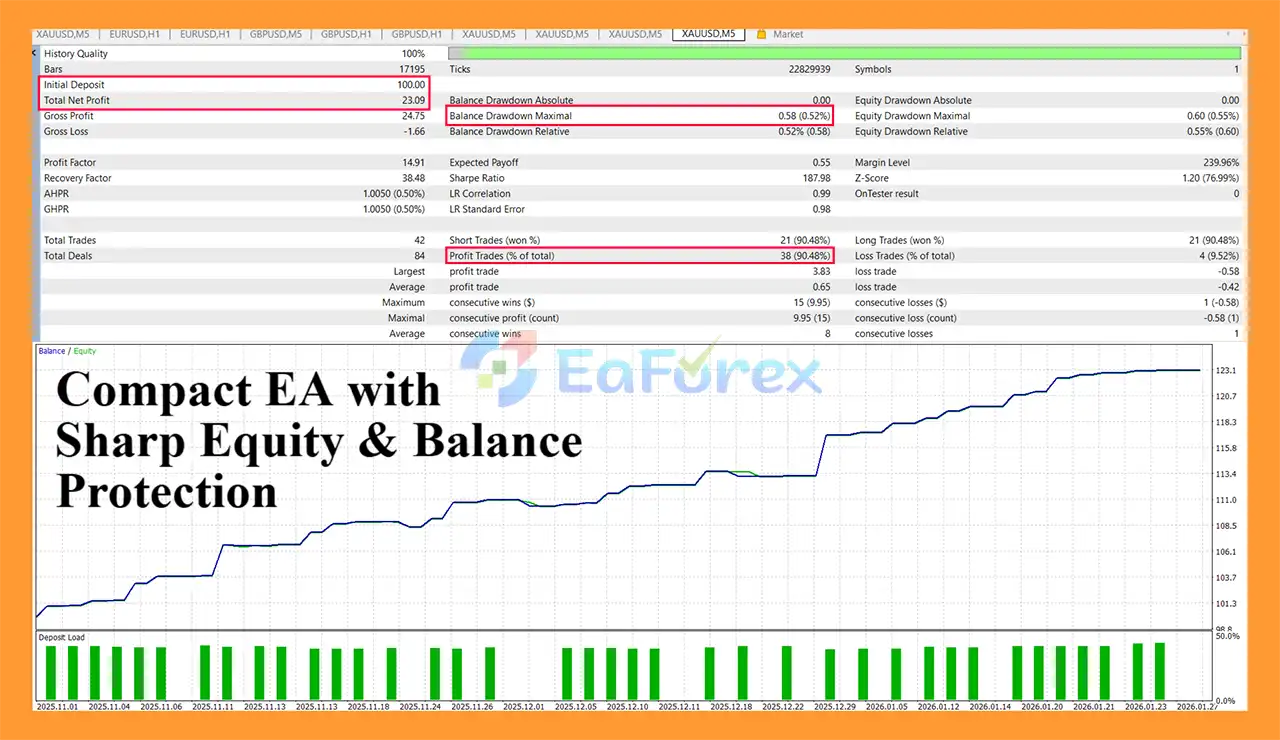
Quantum Bullion EA MT5 backtets
Quantum Bullion EA MT5 uses a fixed-lot model by default, with the default lot size set to 0.01.
Traders can customize the lot size and other parameters according to their account size and preferred risk level.
| Parameter | Default Value |
|---|---|
| Lot Size | 0.01 |
| Stop Loss | 45 pips |
| Trailing Stop Distance | 15 pips |
| Trailing Activation | 10 pips |
| Maximum Positions per Direction | 3 |
| Pyramiding Distance | 20 pips |
| Pending Order Expiration | 18 bars |
All of these parameters can be customized in the EA settings.
Quantum Bullion EA MT5 provides several tools designed to help manage open positions:
These features provide flexibility, but they do not eliminate trading risk.
Actual performance may differ depending on:
Quantum Bullion EA MT5 is a rule-based technical system. Its decisions depend on programmed indicator conditions and therefore may perform differently across changing market environments.
XAUUSD can experience rapid price movements, particularly around major economic announcements. Sudden volatility can result in slippage or execution at prices different from expected levels.
Although pyramiding can increase exposure in a favorable trend, multiple positions in the same direction can also increase potential losses if the market reverses.
The re-entry function can create additional exposure following a stopped-out trade. Traders should carefully configure the delay and position parameters.
The default fixed-lot approach does not automatically adjust position size according to account equity unless the trader changes the configuration.
The EA’s actual execution quality depends on the broker’s spread, liquidity, slippage, and order-processing speed.
The supplied specifications indicate that the EA is intended for MT5 Netting mode. Traders should verify account compatibility before deployment.
Quantum Bullion EA MT5 does not guarantee profitable trading or protection against drawdowns.
Users should test the EA on a demo account and evaluate it under realistic broker conditions before using real capital.
Download the official Quantum Bullion EA MT5 package and extract the files if necessary.
Launch MetaTrader 5 and select:
File → Open Data Folder
Open:
MQL5 → Experts
Copy the Quantum Bullion EA file into the Experts folder.
Restart MetaTrader 5 or refresh the Expert Advisors section inside the Navigator window.
Open an XAUUSD chart and use the timeframe recommended by the developer.
The supplied product description references M30, while the technical requirements section specifies M5. Traders should therefore verify the latest official setup guide or set file before live deployment.
Go to:
Navigator → Expert Advisors
Find Quantum Bullion EA and drag it onto the XAUUSD chart.
Review and configure:
Make sure Algo Trading is enabled in MetaTrader 5.
Before using the EA with real funds, test it under the same broker and account conditions intended for live trading.
Pay particular attention to spread, slippage, execution speed, and the behavior of multiple-position features.
According to the supplied product information, the Forex Trading Arena official communication channel is used to provide product-related information and support.
Members can receive:
Traders should verify that they are using the developer’s official communication channel before downloading updates or configuration files.
>>> Join VIP Membership Now <<<
In summary, Quantum Bullion EA MT5 is a structured XAUUSD automated trading system that combines momentum, trend strength, volatility, and price-channel analysis into one rule-based framework.
Its core strategy combines QQE, ADX, Bollinger Bands, and ATR, with automated trade-management tools such as Breakeven, One-Directional Trailing Stop, Pyramiding, Re-Entry Logic, Order Expiration, Time Filters, and Weekend Protection.
Unlike systems that depend on artificial intelligence or external signals, Quantum Bullion operates according to predefined technical rules. This makes its trading logic easier to understand and configure at the parameter level.
The EA is particularly suited to traders looking for a customizable, indicator-driven Gold trading system for MetaTrader 5.
However, traders should carefully evaluate the differences between backtest and live execution, especially when trading XAUUSD. Spread, slippage, volatility, broker conditions, and position-management settings can all influence actual results.
Quantum Bullion EA MT5 — a rule-based Gold trading system combining momentum, trend, volatility, and automated trade management.
1. What is Quantum Bullion EA MT5 and how does it work?
Quantum Bullion EA MT5 is an automated gold trading Expert Advisor for MetaTrader 5 that trades XAUUSD using a strict rule- and indicator-based strategy. It combines momentum, trend strength, volatility, and price channel logic to execute trades with structured risk management.
2. Is Quantum Bullion EA MT5 designed only for XAUUSD (Gold)?
Yes. Quantum Bullion EA MT5 is developed exclusively for XAUUSD (Gold). This gold-focused design ensures precise execution and avoids cross-asset interference, improving consistency and strategy reliability.
3. Which indicators does Quantum Bullion EA MT5 use?
Quantum Bullion EA MT5 uses a combination of QQE, ADX (DI+/DI-), Bollinger Bands, and ATR. These indicators work together to confirm momentum shifts, trend strength, volatility conditions, and price channel levels.
4. Does Quantum Bullion EA MT5 use pending orders?
Yes. Quantum Bullion EA MT5 places pending stop orders at ATR-based distances. This allows adaptive execution based on market volatility and avoids impulsive market entries.
5. Is Quantum Bullion EA MT5 a non-repainting strategy?
Yes. Quantum Bullion EA MT5 operates with a rule-based, non-repainting execution model. All trades are triggered only when predefined indicator conditions are met, ensuring transparent and verifiable behavior.
6. What risk management features are included in Quantum Bullion EA MT5?
Quantum Bullion EA MT5 includes fixed lot sizing, automatic breakeven, one-directional trailing stop, position limits, pending order expiration, weekend protection, and time-based trading filters to control risk exposure.
7. Can Quantum Bullion EA MT5 open multiple trades at the same time?
Yes. Quantum Bullion EA MT5 supports pyramiding, allowing multiple positions in the same direction with controlled spacing. This feature helps maximize profits during strong gold trends while maintaining risk discipline.
8. Is Quantum Bullion EA MT5 suitable for beginners?
Yes. Quantum Bullion EA MT5 is suitable for beginners who prefer a clear, indicator-driven trading system. All settings are customizable, and the EA comes with an installation guide for easy setup on MT5.
9. What are the backtest results of Quantum Bullion EA MT5?
In historical backtests on XAUUSD with a $100 initial deposit, Quantum Bullion EA MT5 achieved a win rate of 90.48%, a net profit of $23.09, and a maximum drawdown of only 0.52%, demonstrating low-risk performance.
In stock
In stock
In stock
In stock
In stock
Out of stock
No account yet?
Create an Account












 Automatic EA
 EA Best Seller
 Expert Advisor MT4
 Expert Advisor MT5
 HFT EA


Reviews
Clear filtersThere are no reviews yet.