


What is SFE Freedom EA MT4?
SFE Freedom EA MT4 is a professional Expert Advisor (EA) developed for the MetaTrader 4 platform, integrating 13 specialized trading strategies into a single automated system. This EA is designed to deliver consistent performance in a variety of market conditions by combining momentum, reversal, and trend analysis, making it a reliable solution for professional and systematic traders.
About the Developer
- Author: Joel Juanpere.
- Experience: Over +4 years of experience on MQL5.
- Notable Products: SFE Freedom EA, SFE Impulse MT5, SFE Impulse MT4 and others.
- Flagship Product: SFE Freedom EA MT4 is rated as the best performing product of the year.
>>> Join our Channel Telegram <<<
Core Features of SFE Freedom EA MT4
- Multi-Strategy Integration: Combines 13 professional trading strategies into one unified EA.
- Smart Market Analysis: Uses momentum, reversal, and trend detection for adaptive trade decisions.
- All-Market Compatibility: Designed to operate effectively across different market conditions.
- Single Chart Management: Requires only one M5 chart to control the entire EA system.
- Stable Trading Performance: Focuses on consistency and controlled execution rather than overtrading.
- Professional Trading Logic: Built to meet the standards of experienced and institutional-style traders.
- MT4 Platform Optimization: Fully compatible with MetaTrader 4 for reliable execution.
Additional Features
- Flexible Parameter Customization: Allows adjustment of broker settings, risk levels, and account ratios.
- Independent Strategy Operation: Each integrated strategy operates separately without interference.
- Risk Diversification Framework: Uses multiple strategies to reduce dependence on a single market condition.
- Adaptive Trading Behavior: Automatically adjusts to changing market dynamics.
- Broker-Friendly Design: Works smoothly across different brokers and execution environments.
- Simplified EA Management: Centralized control makes monitoring and adjustments easy.
- Strategy Flexibility: Supports tailored configurations for different trading styles.
Why Choose SFE Freedom EA MT4?
- All-in-One Trading Solution: Eliminates the need to run multiple separate EAs.
- Designed for Professionals: Built with structured logic and disciplined execution.
- Effective Risk Distribution: Multiple strategies help balance exposure and volatility.
- Versatile Market Coverage: Suitable for trending, ranging, and reversing markets.
- Easy Deployment: Simple setup with minimal charts and configuration effort.
- High Customization Potential: Fits different brokers, accounts, and risk preferences.
- Long-Term Trading Focus: Prioritizes stability and adaptability over short-term speculation.
SFE Freedom EA MT4 Performance Review
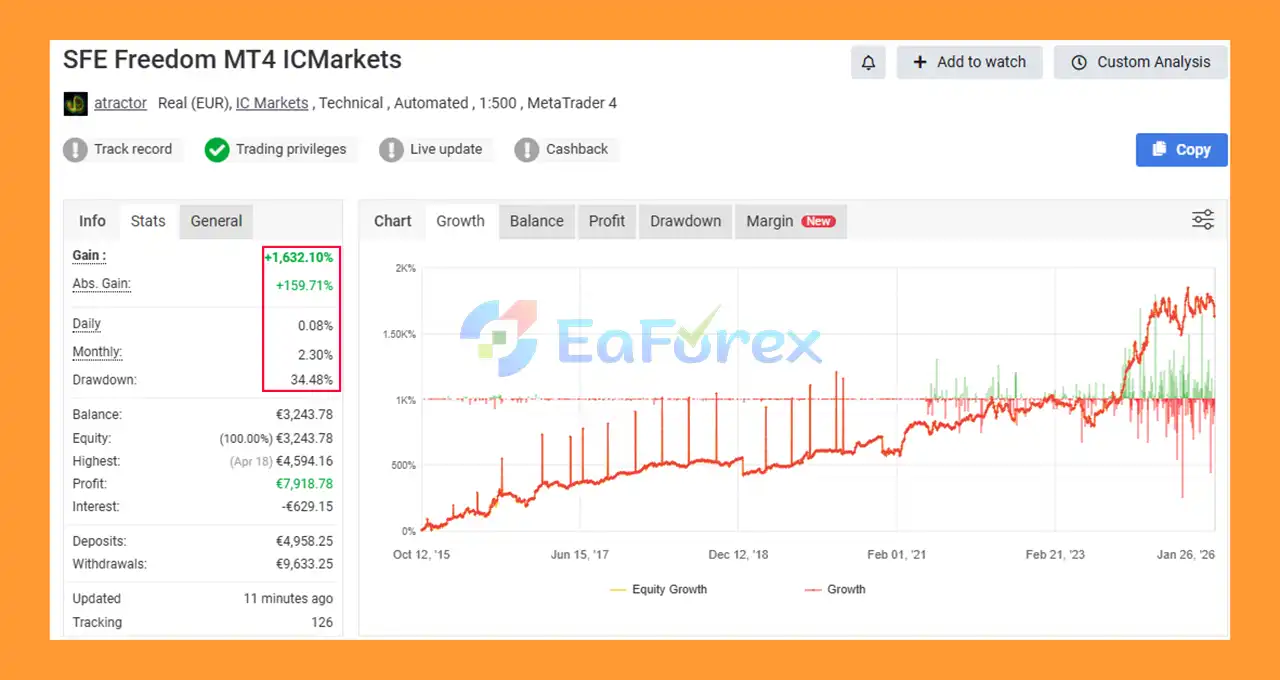
🟢Verified Myfxbook
- Initial Deposit: €4,958.25
- Total Gain: +1,632,10%
- Monthly Growth: 2.30%
- Maximum Drawdown: 34.48%
🟢Signal Results
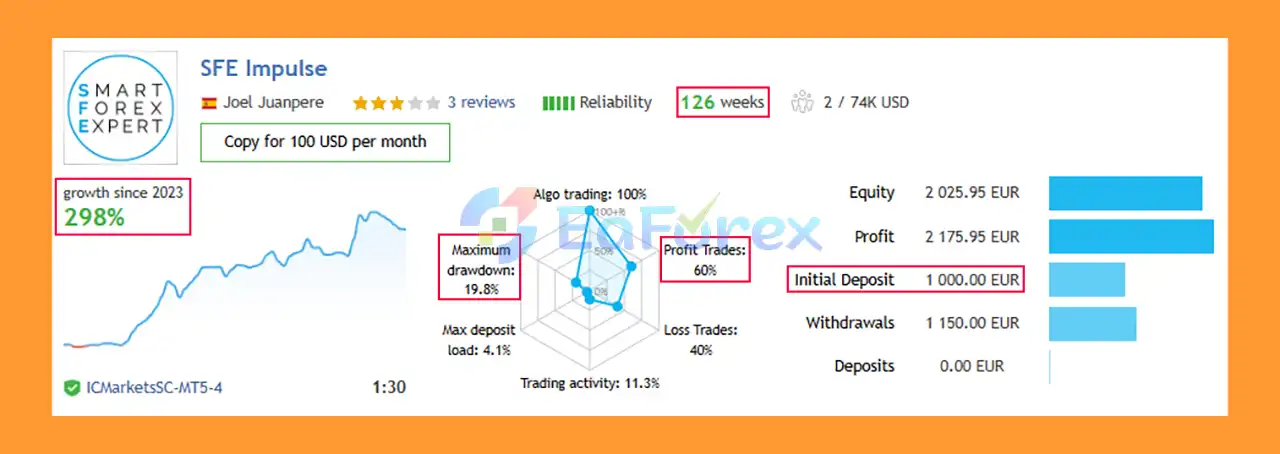
🔺XAUUSD (Gold) & FX Pairs - 47 consecutive weeks
- Initial Deposit: €1,000
- Growth Rate: +152%
- Win Rate (% of total): 67%
- Maximum Drawdown: 19.8%
What’s Included in the Download Package?
- Experts: SFE Freedom EA v3.1_fix.ex4
>>> Join VIP Membership Now <<<
How To Set Up EA
🔻 SFE Freedom EA is a powerful multi-strategy Forex and Crypto Expert Advisor designed for MetaTrader 4 and MetaTrader 5. To achieve optimal performance, it is important to install and configure the EA correctly. This guide will show you how to set up SFE Freedom EA properly, even if you are a beginner.
Step 1: Copy the EA Files
- Open MetaTrader (MT4 or MT5)
- Go to File → Open Data Folder
- Navigate to:
- MQL4 → Experts (for MT4)
- MQL5 → Experts (for MT5)
- Copy the SFE Freedom EA (.ex4 / .ex5) file into the folder
Step 2: Restart MetaTrader
- Close and reopen MetaTrader
- In the Navigator panel, you should now see SFE Freedom EA
🟡Enable Auto Trading (Important)
- Go to Tools → Options → Expert Advisors
- Enable:
- ✅ Allow automated trading
- ✅ Allow DLL imports
- ✅ Allow WebRequest (if required by EA)
- Click OK
- Turn on AutoTrading (green button on top)
🟡Attach SFE Freedom EA to a Chart
- Open any chart (recommended: EURUSD H1 or H4)
- Drag SFE Freedom EA onto the chart
- Confirm settings and click OK
➡️SFE Freedom EA can trade multiple symbols automatically, so only one chart is usually enough.
🟡Main Input Settings (Recommended)
🔺Broker Time Settings
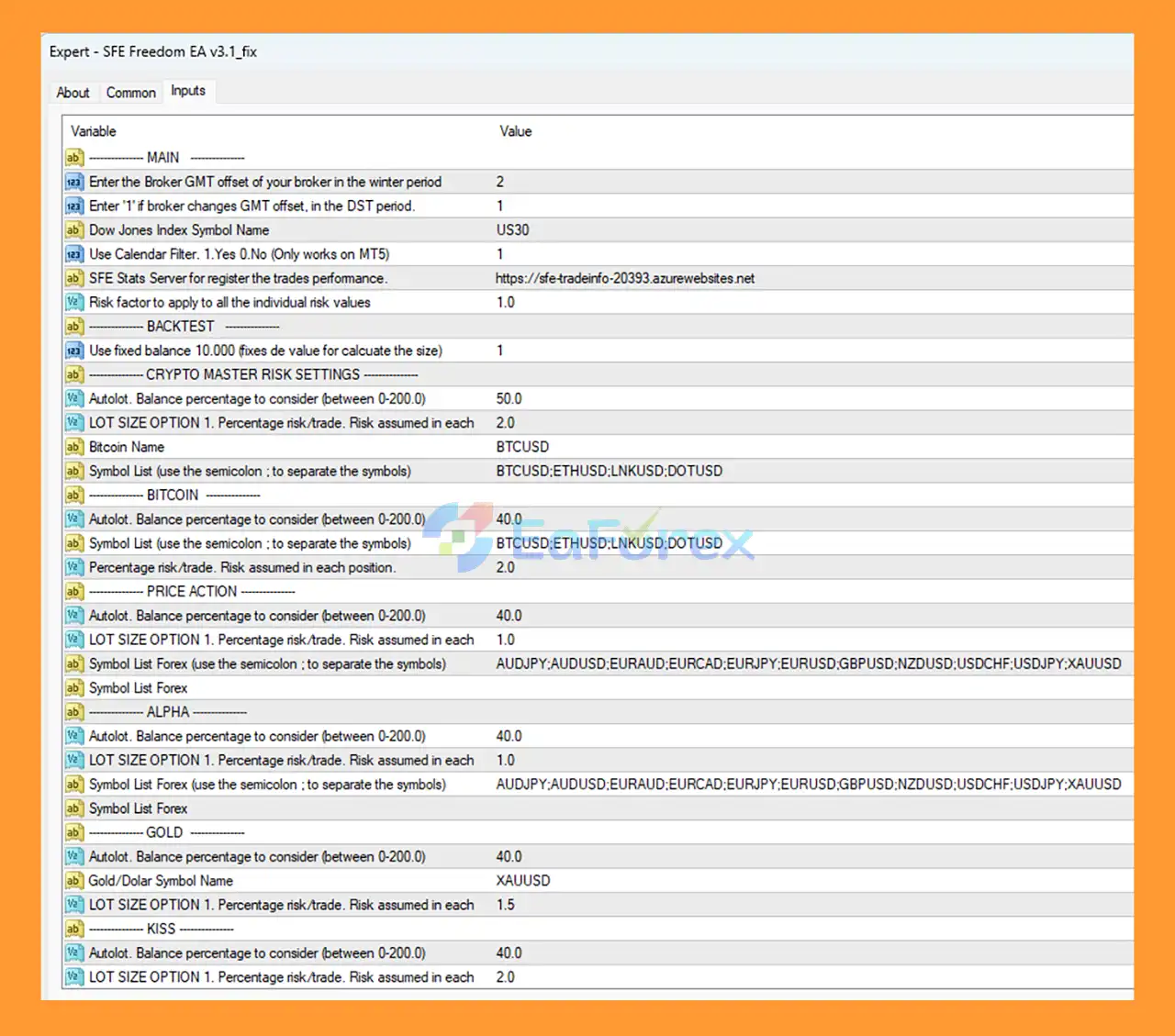
- GMT Offset (Winter): Set according to your broker (example: GMT+2)
- DST Offset: Usually +1 if your broker uses Daylight Saving Time
➡️Correct GMT settings are critical for accurate trading sessions.
🟡Risk & Money Management Settings
🔺Autolot Configuration
- Autolot Balance Percentage: 40.0
- Risk per Trade: 1.0 – 2.0 (safe range)
➡️ Beginners should start with 1% risk per trade.
🟡Strategy Modules Configuration
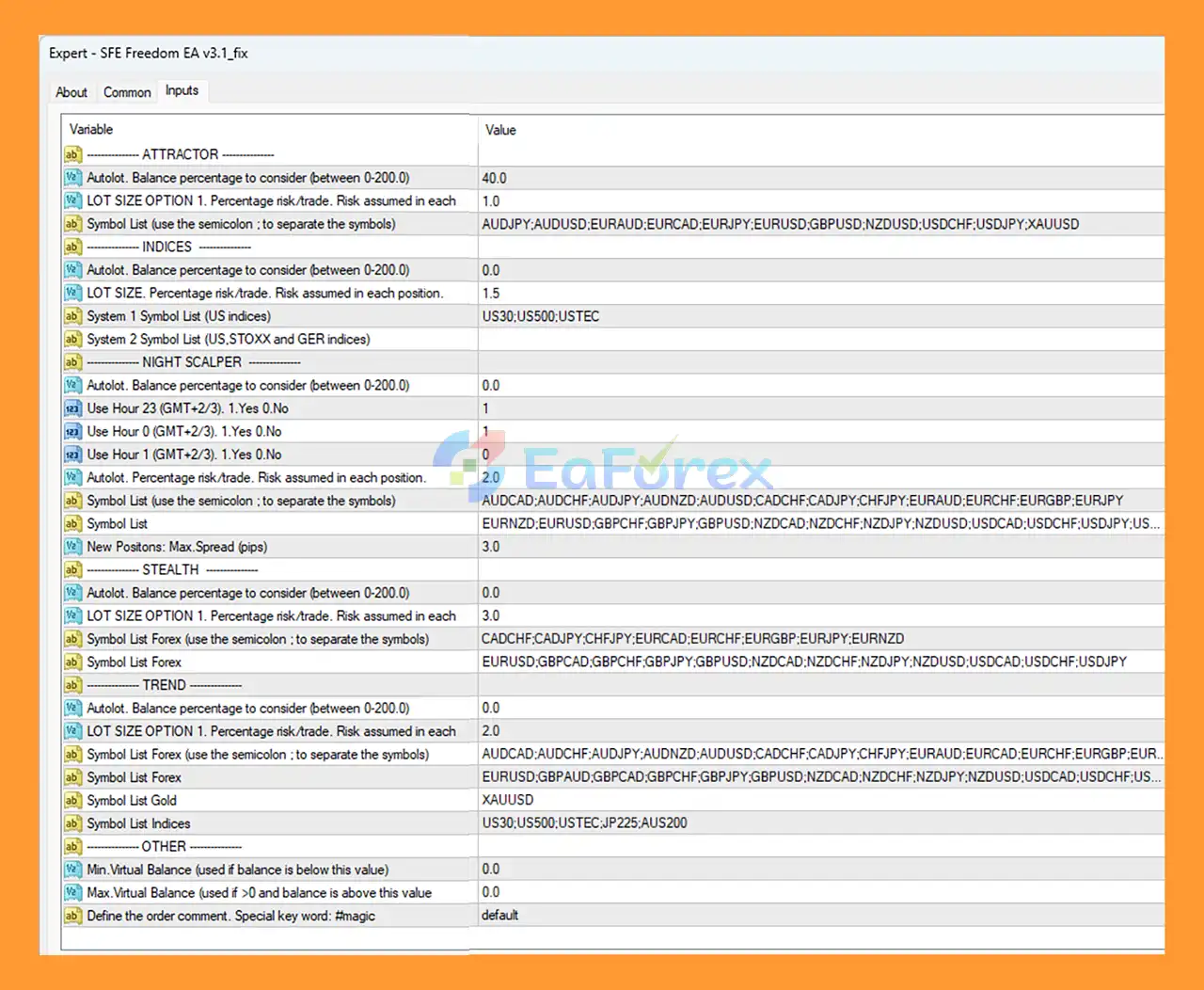
- SFE Freedom EA includes multiple trading modules. You can enable or disable them depending on your strategy.
🔺Forex Trading
-
Symbol list example:
AUDJPY;AUDUSD;EURAUD;EURCAD;EURJPY;EURUSD;GBPUSD;NZDUSD;USDCHF;USDJPY;XAUUSD
🔺Crypto Trading
-
Recommended symbols:
BTCUSD;ETHUSD;LNKUSD;DOTUSD
🔺Gold Trading
- Symbol Name: XAUUSD
- Risk per trade: 1.5%
🟡Time Filter Settings (Optional)
➡️You can restrict trading hours:
- Enable trading during London & New York sessions
- Disable low-volatility Asian hours if needed
➡️This helps reduce drawdown and false signals.
🟡VPS & Live Trading Tips
➡️For best performance:
- Use a low-latency VPS
- Keep MetaTrader running 24/7
- Avoid changing settings frequently
- Test on demo account first
Conclusion
In summary, SFE Freedom EA MT4 is a robust and professional multi-strategy Expert Advisor for MetaTrader 4, designed to deliver consistent and adaptive performance across changing market conditions. By integrating 13 independent trading strategies that combine momentum, trend, and reversal logic, it provides effective risk diversification, stable execution, and long-term trading reliability. Supported by verified performance results, flexible customization, and broker-friendly design, SFE Freedom EA MT4 is an ideal all-in-one automated trading solution for traders seeking structured, professional-grade automation with balanced risk and versatility.
>>> Reviewed by Jason Stap <<<



