









-
 Unlimited Activations
-
 Instant delivery
-
 Easy to install




 Unlimited Activations
Instant delivery
Easy to install
Unlimited Activations
Instant delivery
Easy to install
 Free Update
 Free Install Support

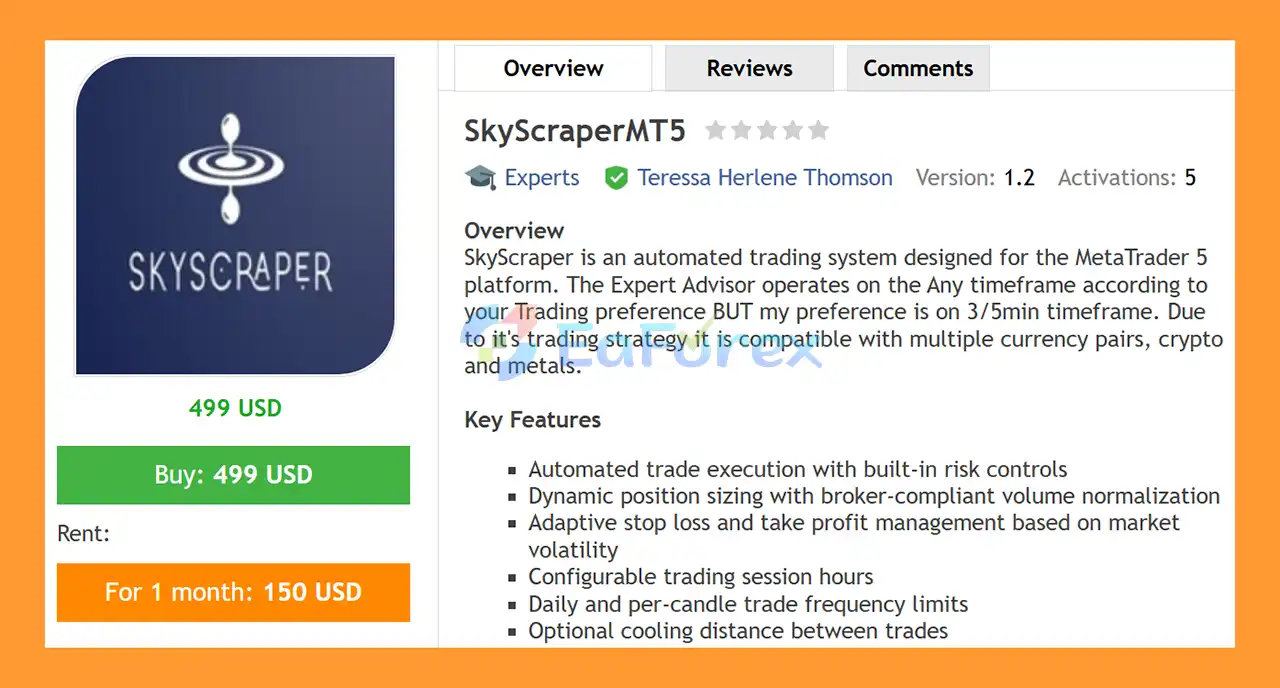
SkyScraperMT5 is a sophisticated and flexible automated trading system for MetaTrader 5, designed to operate across a wide range of financial instruments, including Forex pairs, cryptocurrencies, and XAUUSD (Gold).
The EA is built around adaptive trade execution and comprehensive risk-management controls rather than relying on a single fixed market condition. It can operate on any timeframe, with 3-minute to 5-minute charts recommended for users looking for a more active trading approach.
SkyScraper combines ATR-based volatility analysis, dynamic Stop Loss and Take Profit, position controls, trading-session filters, breakeven protection, trailing stops, and trade-frequency limitations into one configurable Expert Advisor.
The system also supports both Hedging and Netting MT5 accounts, allowing traders to adapt the EA to different account structures and broker environments.
One of the key characteristics of SkyScraper EA MT5 is its flexibility. Traders can adjust position sizing, maximum open trades, daily trade limits, candle-based trade limits, volatility parameters, trading sessions, and profit-protection settings according to their preferred risk profile.
The developer also provides personalized assistance with EA configuration, helping users adjust the available parameters according to their selected market, trading style, and risk tolerance.
>> Delivery time 24h-48h after payment.
>>> Refund if not delivered.
>>> You will receive the latest version without any limitations (ID+Time).>>Reviewed by Jason Stap <<
SkyScraperMT5 is designed to automate trade execution while applying multiple layers of risk and position controls.
The EA can automatically manage:
This allows traders to automate the execution and management process without having to manually monitor every position.
SkyScraper uses Average True Range (ATR) to measure current market volatility.
The EA can then use configurable ATR multipliers to determine Stop Loss and Take Profit distances.
Available parameters include:
This approach allows the EA’s trade-management distances to adapt to changing market volatility instead of relying exclusively on fixed pip values.
The LotSize parameter allows users to define the position size according to their account and risk preferences.
The system is designed to accommodate different broker requirements while giving traders control over their trading exposure.
Users should always ensure that the selected lot size is appropriate for their account balance, leverage, instrument specifications, and risk tolerance.
The MaxOpenTrades parameter allows traders to limit the number of simultaneous positions.
This can help prevent excessive exposure when several trading opportunities appear within a short period.
The MaxTradesPerDay setting allows users to define the maximum number of trades the EA can open during a trading day.
This can help reduce overtrading and prevent the system from continuously entering the market during unfavorable conditions.
The MaxTradesPerCandle parameter provides another layer of trade-frequency control.
Users can restrict how many entries are allowed within a single candle, helping to control excessive trade activity during rapid market movements.
The optional CoolingDistance parameter can be used to create additional spacing between trades.
This may help prevent multiple entries from being opened too close together when the market is moving rapidly.
SkyScraper includes customizable trading-session settings:
Traders can therefore define the period during which the EA is allowed to open new trades.
This can be useful for avoiding periods of low liquidity or focusing the system on specific market sessions.
The LockInCurrency parameter allows the EA to activate profit protection once a predefined currency-based profit level has been reached.
This can move the trade toward a reduced-risk or breakeven state after the position has developed sufficiently.
SkyScraper includes a configurable TrailingStepCurrency mechanism.
Instead of relying solely on a fixed pip distance, the system can use currency-based profit increments when managing the trailing process.
This gives traders additional flexibility when managing profitable positions.
The MinAtrFilter can be used to avoid trading when market volatility falls below the selected threshold.
This feature may help prevent the EA from entering trades during excessively quiet market conditions.
SkyScraperMT5 is designed to work with both:
This provides compatibility with different MT5 account structures.
SkyScraperMT5 combines automated trade execution with a series of configurable market and risk-management rules.
The EA first evaluates whether the current market conditions meet the configured requirements, including the selected trading session and volatility conditions.
The ATR system measures current market volatility. If the market satisfies the required volatility threshold, the EA can calculate appropriate Stop Loss and Take Profit distances using the configured ATR period and multipliers.
When a trade is opened, the EA continuously manages the position according to the selected settings.
The process can include:
Market Conditions → Volatility Filter → Entry → Position Management → Breakeven → Trailing Stop → Exit
The user controls how much exposure the EA can take through parameters such as LotSize, MaxOpenTrades, MaxTradesPerDay, and MaxTradesPerCandle.
Once a trade reaches the configured profit-protection level, the EA can activate breakeven and subsequently use the trailing mechanism to protect additional gains.
This architecture allows SkyScraper to combine automated execution and dynamic trade management rather than simply opening trades and leaving them unmanaged.
SkyScraperMT5 is designed for traders who want a flexible Expert Advisor that can be adapted to different markets and trading conditions.
Unlike an EA limited to one specific symbol, SkyScraper can be used across:
The EA also supports multiple timeframes, with M3-M5 charts recommended for its intended active trading configuration.
Another important advantage is the extensive level of parameter control.
Traders can customize:
This makes SkyScraper suitable for users who prefer to configure their own trading environment instead of relying on completely fixed EA parameters.
The developer also offers personalized support, allowing users to request assistance with configuration and optimization according to their selected instrument, trading objectives, and risk preferences.
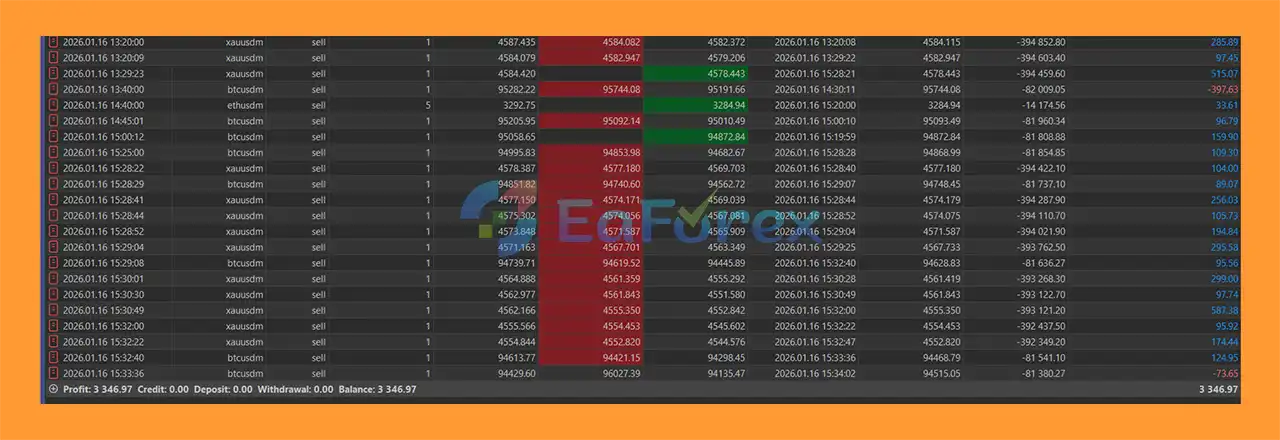
SkyScraperMT5 backtets
SkyScraperMT5 reviews
SkyScraperMT5 has been tested using 99% modeling-quality tick data, according to the product information.
High-quality tick data can provide a more detailed historical simulation than lower-quality modeling methods. However, backtest results remain historical simulations and should not be considered a guarantee of future live performance.
Actual results can vary depending on:
The EA includes several risk-management features designed to control exposure:
The stated recommended capital is at least $500.
However, the appropriate account size ultimately depends on the selected lot size, instrument volatility, leverage, broker contract specifications, and risk settings.
For this reason, traders should test SkyScraper on their specific broker feed before using it with real capital.
Despite its extensive risk-management features, SkyScraperMT5 does not guarantee profits.
One important consideration is that the EA can be used across many different markets. Parameters that perform well on one instrument may not necessarily produce the same results on another.
For example, XAUUSD, Forex, and cryptocurrencies have very different volatility and liquidity characteristics. A configuration optimized for one market may require significant adjustment before being used elsewhere.
The recommended 3-5 minute timeframes can produce more frequent market noise, spread impact, and execution sensitivity.
Small differences in:
can have a greater effect on short-term automated strategies.
ATR-based Stop Loss and Take Profit levels are dynamic, but inappropriate ATR periods or multipliers can lead to stops that are too tight or targets that are too distant for the selected market.
SkyScraperMT5 offers many configurable parameters, traders may be tempted to optimize the EA excessively against historical data.
A configuration that performs exceptionally well in a backtest may not necessarily maintain the same performance in live trading.
Increasing MaxOpenTrades or MaxTradesPerDay can increase overall market exposure.
Traders should understand the combined risk of simultaneous positions rather than evaluating each trade individually.
The stated 99% modeling-quality testing is useful for historical evaluation, but it does not eliminate the difference between backtesting and live trading.
Always conduct forward testing on your own broker and use conservative risk settings before deploying SkyScraper on a live account.
Obtain the SkyScraperMT55 files after purchase.
Make sure you have the correct MT5-compatible EA file and any installation instructions supplied by the developer.
Launch MetaTrader 5 and select:
File → Open Data Folder
Then navigate to:
MQL5 → Experts
Place the SkyScraper EA file inside this folder.
Restart MT5 or right-click the Expert Advisors section in the Navigator and select Refresh.
You should then see SkyScraper EA MT5 in the Expert Advisors list.
Open the instrument you want to trade.
SkyScraper can be used on:
The EA supports any timeframe, while M3-M5 is recommended according to the product configuration.
Drag SkyScraperMT5 from the Navigator onto your selected chart.
Make sure Algo Trading / Auto Trading is enabled.
Review and configure:
Adjust the parameters according to your account size, instrument, and risk tolerance.
Before trading with real money, use the MT5 Strategy Tester and conduct forward testing on a demo account.
For more realistic evaluation, test the EA using your actual broker’s symbol, spread, commission, and trading conditions.
Once sufficient testing has been completed, the EA can be deployed on a live account with conservative settings.
A VPS is recommended if you want SkyScraper to operate continuously without interruption.
>>> Join VIP Membership Now <<<
In summary, SkyScraperMT5 is a flexible automated Expert Advisor for MetaTrader 5, designed to operate across Forex pairs, cryptocurrencies, and XAUUSD with configurable volatility and trade-management controls. Its ATR-based analysis, dynamic Stop Loss and Take Profit, breakeven protection, trailing stop, trading-session filters, and trade-frequency limits provide a structured framework for automated position management.
One of the main characteristics of SkyScraperMT5 is its high level of configurability. Traders can control position size, maximum open trades, daily and per-candle trade limits, cooling distance, ATR parameters, and trading sessions. Support for both Hedging and Netting accounts also provides additional flexibility when adapting the EA to different broker environments.
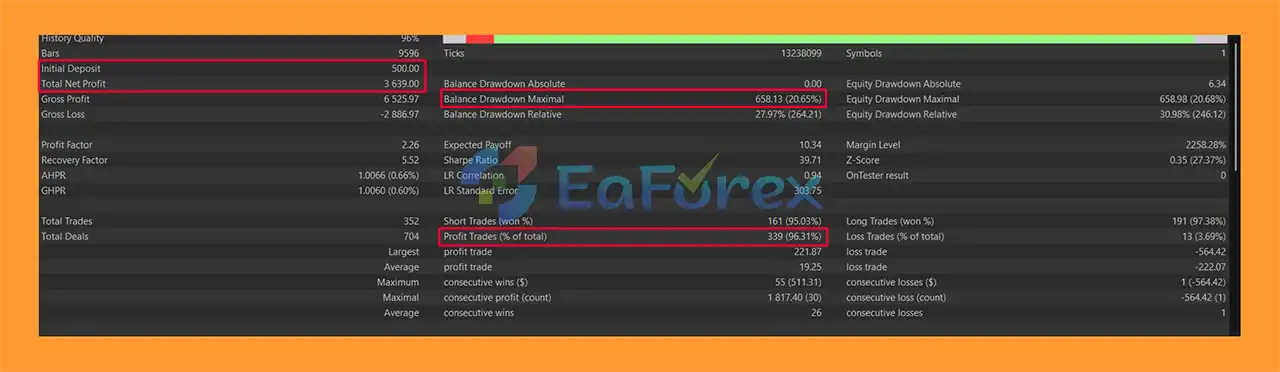
The supplied backtest reports $3,639.00 total net profit, a 96.31% win rate, and 20.56% maximum drawdown from an initial deposit of $500, using reportedly 99% modeling-quality tick data. These historical results do not guarantee future live performance. The relatively high reported drawdown should also be considered alongside the return figures when evaluating the strategy’s risk profile.
Because SkyScraper can be used on different instruments and short timeframes, actual performance may vary significantly depending on the selected market, spread, commission, slippage, execution speed, liquidity, leverage, and parameter configuration. Excessive optimization or aggressive trade limits can also increase live-market risk.
Overall,SkyScraperMT5 offers a configurable framework for automated multi-market trading with several built-in risk-management tools. Thorough broker-specific backtesting, extended demo and forward testing, realistic trading costs, and conservative position sizing are recommended before considering live deployment.
1. What is SkyScraperMT5 and how does it work?
SkyScraperMT5 is an advanced automated trading system for MetaTrader 5 (MT5) designed for high-performance trading on 3–5 minute charts. It uses intelligent automation, ATR-based stop loss and take profit calculations, and adaptive position sizing to execute trades across Forex, cryptocurrencies, and metals like XAUUSD while maintaining strict capital protection.
2. What markets can SkyScraperMT5 trade?
SkyScraperMT5 supports multi-asset trading, including:
Major and minor Forex pairs
Cryptocurrencies
Metals such as XAUUSD (Gold)
This flexibility makes it suitable for traders who want one MT5 Expert Advisor for multiple markets.
3. What timeframe is SkyScraperMT5 optimized for?
The EA is specifically optimized for 3–5 minute charts (M3–M5), making it ideal for short-term intraday trading strategies that focus on fast market movements and efficient execution.
4. How does the ATR-based Stop Loss and Take Profit system work?
SkyScraperMT5 uses the Average True Range (ATR) indicator to calculate dynamic Stop Loss (SL) and Take Profit (TP) levels based on real-time market volatility. This ensures that risk parameters automatically adjust to changing market conditions.
5. Does SkyScraperMT5 include risk management features?
Yes. The EA includes multi-layer risk management such as:
ATR-based SL/TP
Automatic breakeven activation
Currency-based trailing stop
Daily trade limit system
Balanced exposure management
Cooling distance between trades
These features help reduce overtrading and protect account equity.
6. Is SkyScraperMT5 compatible with both hedging and netting accounts?
Yes. SkyScraperMT5 is fully compatible with all MetaTrader 5 account types, including both hedging and netting modes.
7. How does SkyScraperMT5 prevent overtrading?
The EA includes:
Daily maximum trade limits
Per-candle entry control
Session-based trading filters
Cooling distance parameters
These mechanisms help maintain disciplined and structured execution.
8. What is the minimum deposit required for SkyScraperMT5?
The backtest example was conducted with a $500 initial deposit. While smaller balances may be possible depending on broker requirements, $500 is generally recommended for stable performance.
9. What are the backtest results of SkyScraperMT5?
According to reported backtest data:
Initial Deposit: $500
Total Net Profit: $3,639.00
Win Rate: 96.31%
Maximum Drawdown: 20.56%
These results demonstrate high win-rate performance under historical testing conditions.
In stock
In stock
In stock
In stock
In stock
Out of stock
No account yet?
Create an Account












 Automatic EA
 EA Best Seller
 Expert Advisor MT4
 Expert Advisor MT5
 HFT EA


Reviews
Clear filtersThere are no reviews yet.