
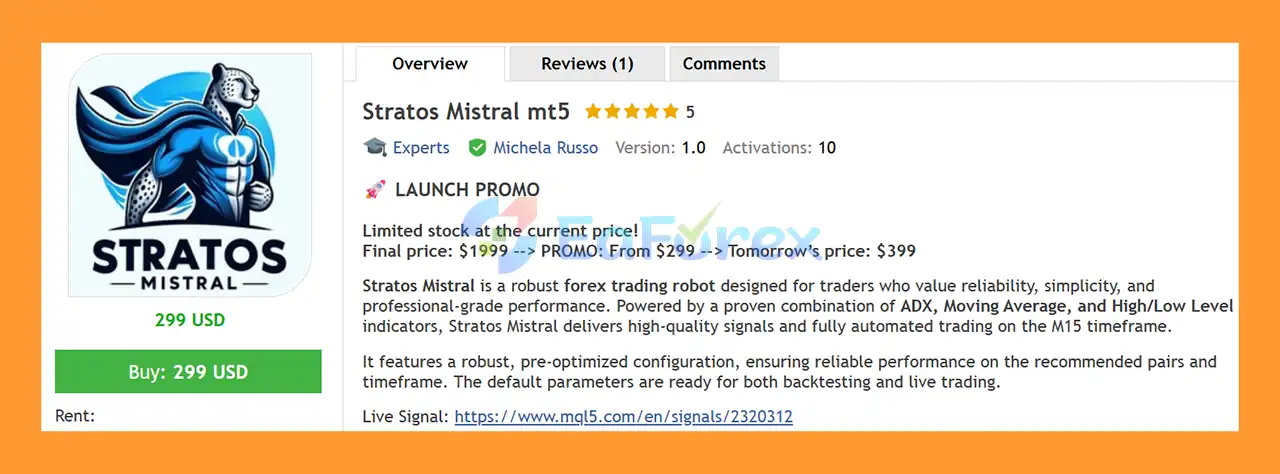
Product Overview
Stratos Mistral MT5 is a robust and professional Forex trading EA for MetaTrader 5 (MT5), designed for traders who value reliability, simplicity, and disciplined automated trading. The EA combines several proven technical indicators, including ADX, Moving Average, and High/Low Level detection, to identify potential market opportunities and execute trades automatically.
Designed primarily for the M15 timeframe, Stratos Mistral MT5 comes with pre-optimized default settings, allowing traders to begin backtesting or live trading without complicated parameter optimization.
The EA is recommended mainly for AUDCHF, EURCHF, and GBPCHF, with CADCHF and EURGBP available as optional trading pairs. It is also designed with dedicated risk-management functions for traders who use prop firm or funded trading accounts.
Rather than relying on marketing terms such as AI, Machine Learning, or Quantum Trading, Stratos Mistral focuses on a straightforward methodology based on established technical analysis and systematic risk control.
About the Developer
• Author: Michela Russo.
• Experience: Over +2 years of experience on MQL5.
• Notable Products: Stratos Mistral MT5, Hippo Trader Pro, Dragon Scalper Pro, Lizard Scalper Pro, Snake Crazy Pro and other advisors.
• Flagship Product: Stratos Mistral MT5 is rated as the best performing product of the year.
>>> Delivery time 24h-48h after payment.
>>> Refund if not delivered.
>>> You will receive the latest version without any limitations (ID+Time).>>Reviewed by Jason Stap <<
Key Features of Stratos Mistral MT5
Pre-Optimized Settings
Stratos Mistral MT5 comes with carefully tested and pre-optimized default parameters. Traders can use the recommended settings for backtesting and live trading without spending significant time on manual optimization.
At the same time, experienced users can customize the available parameters according to their trading preferences.
Advanced Signal Generation
The trading logic combines multiple technical components to improve entry filtering:
- ADX Strength Filter – evaluates market strength before allowing trades.
- Dual Moving Average Filter – confirms market direction and helps refine trading signals.
- High/Low Level Detection – identifies important price areas that may provide potential entry opportunities.
- Market Order Execution – trades are opened using market orders when the strategy conditions are satisfied.
Professional Risk Management
Stratos Mistral MT5 includes several tools designed to control trading exposure:
- Automatic lot sizing
- Adjustable risk level
- Starting trade volume
- Maximum drawdown controls
- Prop firm maximum drawdown settings
- Maximum daily drawdown protection
- Spread filter
- Scheduled trading
- Unique Magic Number
These features allow traders to organize their automated strategies while maintaining greater control over account exposure.
How Does Stratos Mistral MT5 Work?
Stratos Mistral MT5 uses a combination of trend and market-strength filters to determine whether current market conditions are suitable for trading.
The ADX indicator is used to evaluate market strength, while the Moving Average filters help confirm the prevailing market direction. The EA also analyzes High/Low price levels to identify potentially important areas for market entries.
When the required conditions are satisfied, Stratos Mistral can automatically execute a market order.
The EA can also manage position sizing according to the selected risk level and account balance. Additional filters, such as the maximum allowed spread and trading schedule, can help prevent the robot from opening trades under unfavorable conditions.
For prop firm traders, dedicated drawdown parameters can be configured to help keep trading within predefined risk limits.
The recommended configuration is:
- Main Symbols: AUDCHF, EURCHF, GBPCHF
- Optional Symbols: CADCHF, EURGBP
- Timeframe: M15
- Settings: Default / Pre-Optimized
- Execution: Market Orders
- Broker: Low-spread broker recommended
- Testing Period: From 2003
- Minimum Recommended Deposit: $1,500
- Recommended Capital: $3,000
Why Choose Stratos Mistral MT5?
Designed for Simplicity
One of the main advantages of Stratos Mistral MT5 is its straightforward configuration. Traders do not need to perform complicated optimization before testing the EA because the default settings are already designed for the recommended markets and timeframe.
Prop Firm Friendly
Stratos Mistral MT5 includes dedicated risk controls that can be useful for prop firm and funded account trading, including:
- Prop Firm Maximum Drawdown Percentage
- Prop Firm Maximum Daily Drawdown
- Adjustable risk level
- Spread control
- Trading schedule
These features give traders additional tools for managing risk when operating under strict account rules.
Based on Proven Technical Concepts
The strategy does not depend on complicated marketing claims. Instead, it uses established technical concepts such as ADX, Moving Averages, and price-level analysis.
This makes the system easier to understand and evaluate compared with strategies that rely on opaque trading terminology.
Built for Systematic Trading
Stratos Mistral is designed to remove emotional decision-making from the trading process. Once configured correctly, the EA can continuously monitor the market and execute trades according to its predefined rules.
Stratos Mistral MT5 Performance Overview
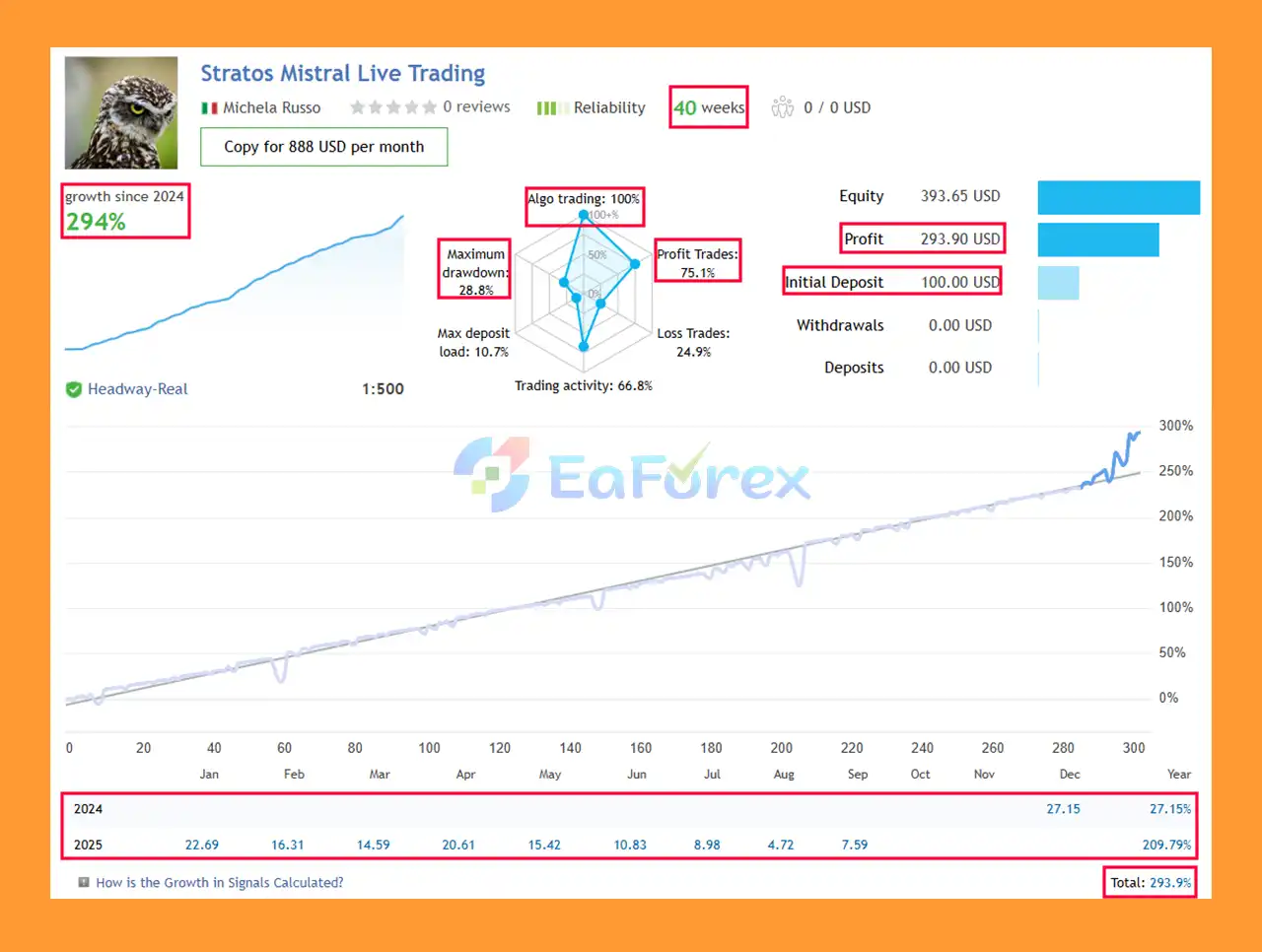
1. Live Trading Results
🔺Tracked on Real Accounts Over 35 Weeks
- Growth: +294%
- Initial Deposit: $100
- Net Profit: $293.90
- Win Rate: 75.1%
- Max Drawdown: 28.8%
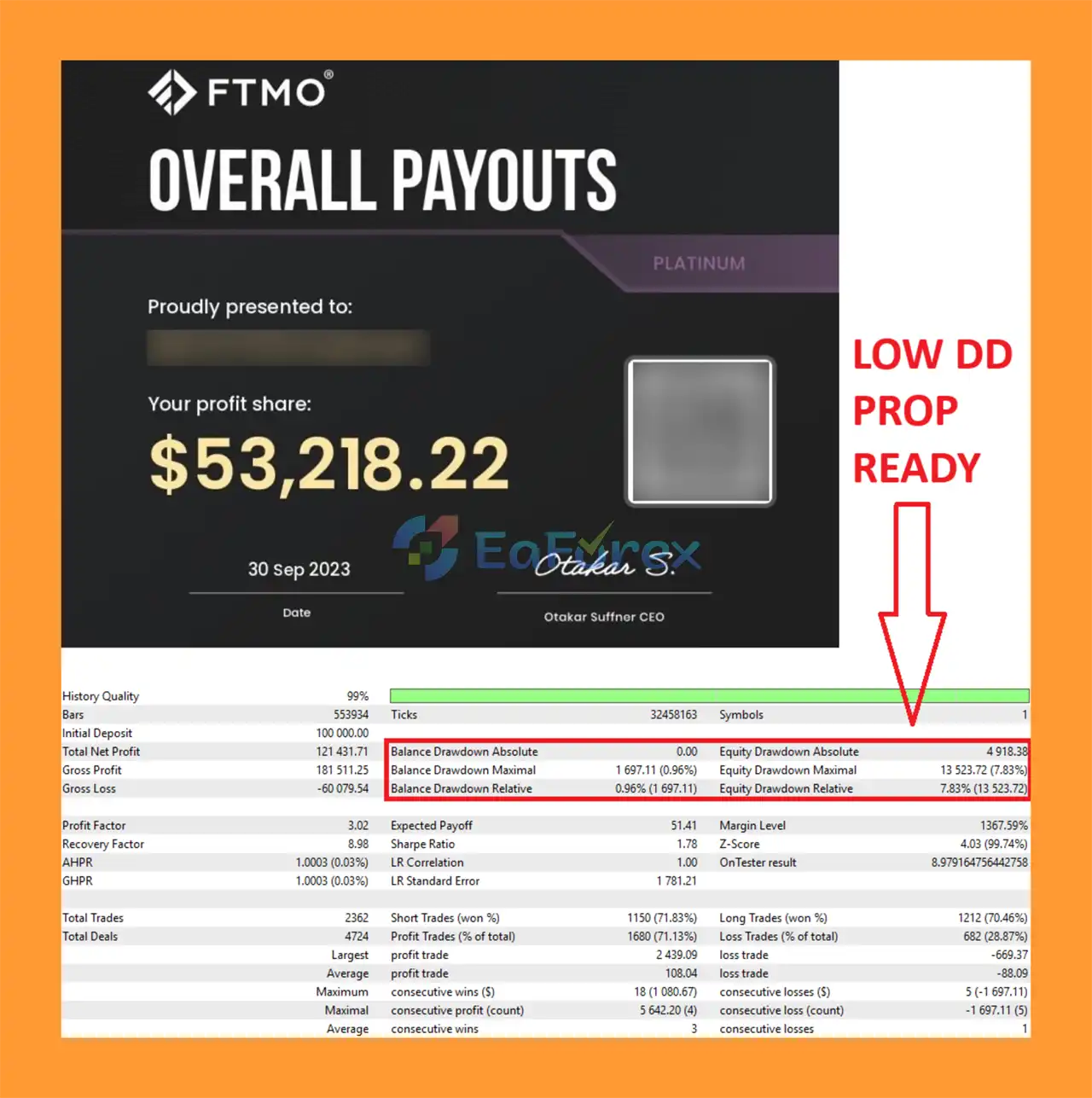
2. Backtest Performance (2003–2025)
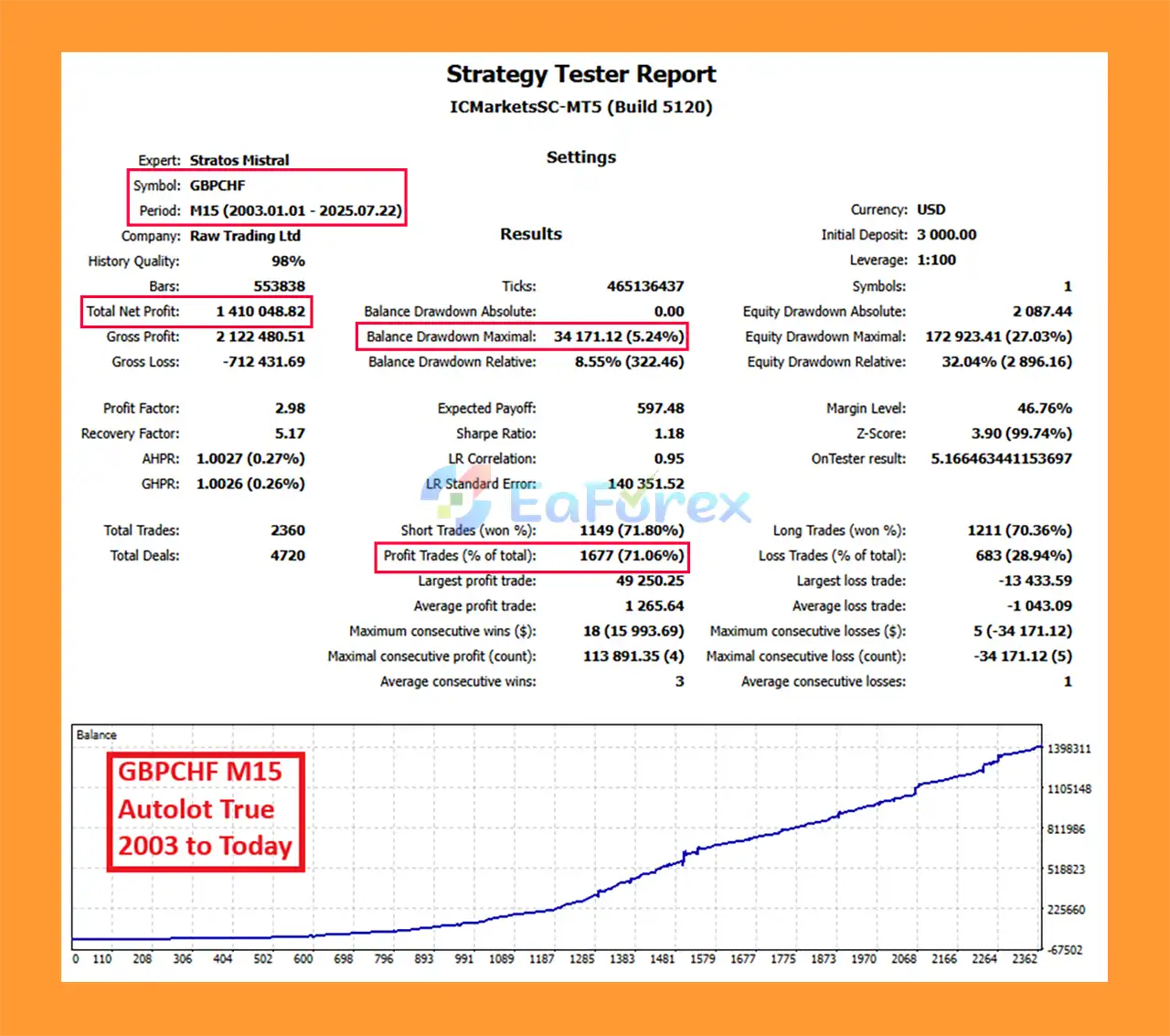
🟢 GBP/CHF – M15 Timeframe
- Initial Deposit: $3,000
- Total Net Profit: $1,410,448.82
- Win Rate: 71.06%
- Maximum Drawdown: 5.24%
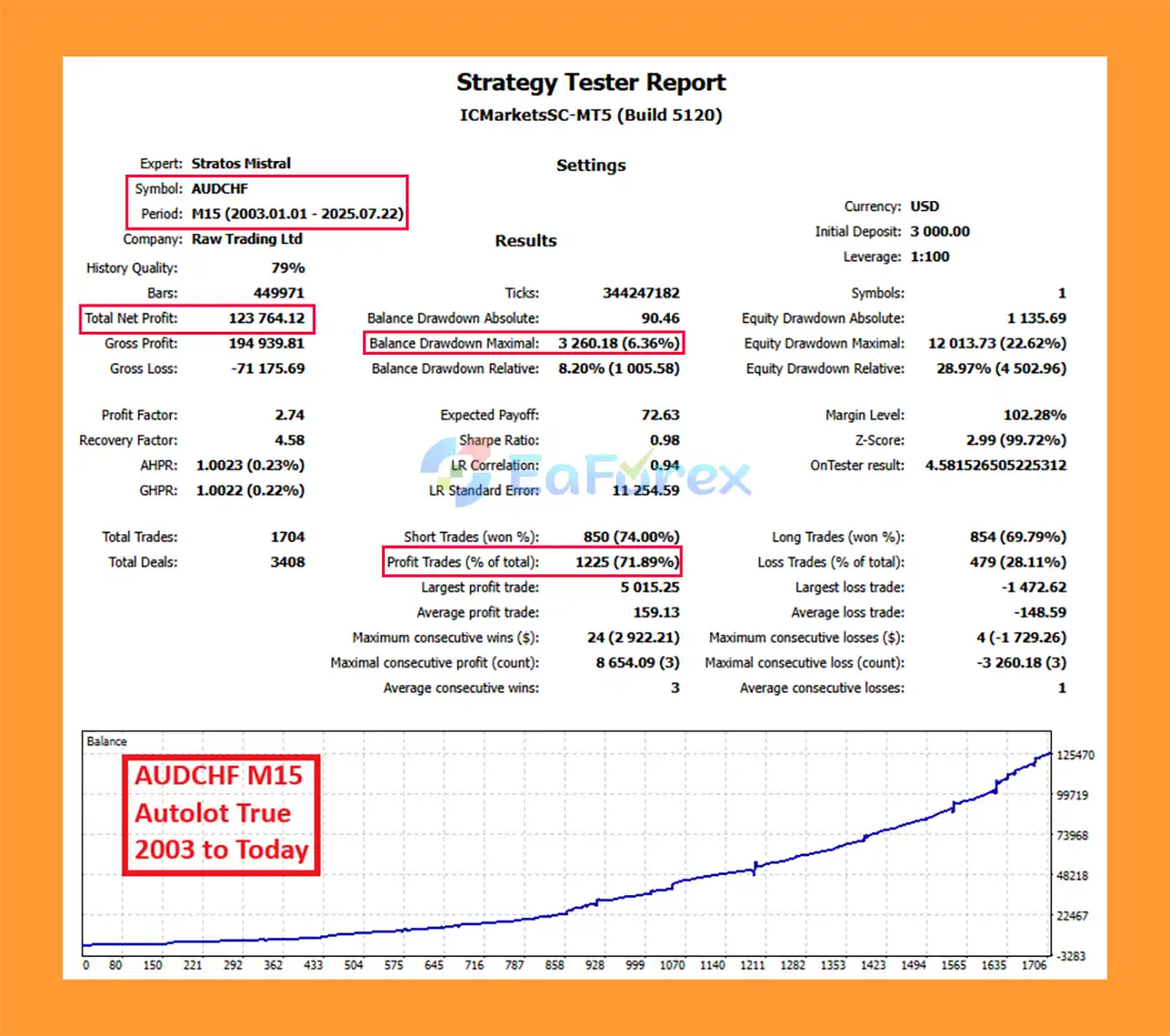
🟢 AUD/CHF – M15 Timeframe
- Initial Deposit: $3,000
- Total Net Profit: $123,764.12
- Win Rate: 71.89%
- Maximum Drawdown: 6.36%
Performance and Risk Management
Stratos Mistral MT5 has been developed with an emphasis on systematic testing, stress testing, and robust optimization. The recommended configuration is designed around the specified currency pairs and the M15 timeframe.
For accurate evaluation, traders should use appropriate historical data and realistic trading conditions when performing backtests.
Recommended Trading Configuration
| Parameter | Recommendation |
|---|---|
| Main Symbols | AUDCHF, EURCHF, GBPCHF |
| Optional Symbols | CADCHF, EURGBP |
| Timeframe | M15 |
| Testing From | 2003 |
| Settings | Default / Pre-Optimized |
| Execution | Market Order |
| Broker | Low Spread Required |
| Minimum Deposit | $1,500 |
| Recommended Deposit | $3,000 |
| MT5 Tester | 1 Minute OHLC or Every Tick |
| FIFO Compliance | Yes, with the appropriate set file |
Risk Management Tools
The EA provides several configurable controls, including Autolot, Risk Level, Spread Allowed, Prop Firm Maximum DD, Prop Firm Maximum Daily DD, and Scheduled Trading.
These settings can help traders adjust the strategy according to their account size and risk tolerance.
However, risk management settings cannot eliminate trading losses. Forex markets can experience sudden volatility, slippage, spread expansion, and unexpected price movements.
For this reason, traders should begin with conservative risk parameters and thoroughly test the EA on a demo account before considering live deployment.
Weaknesses and Risk Warnings
Although Stratos Mistral MT5 is designed with professional risk-management features, no automated trading system can guarantee profits.
Market Risk
Forex markets are unpredictable. Strong economic news, central-bank decisions, geopolitical events, and sudden market volatility can negatively affect trading performance.
Low Spread Requirement
The recommended configuration requires a low-spread trading environment. Excessive spreads may affect entry conditions, trading costs, and overall EA performance.
Recommended Capital
The stated minimum deposit is $1,500, with $3,000 recommended. Traders using smaller accounts may need to reduce risk substantially and should not assume that historical results will translate directly to smaller balances.
Backtest vs. Live Trading
Historical backtests are useful for evaluating a strategy, but they cannot perfectly reproduce live-market conditions. Real trading can involve:
- Slippage
- Variable spreads
- Execution delays
- Broker limitations
- Liquidity changes
- Market gaps
- News-related volatility
Prop Firm Risk
Although Stratos Mistral includes prop-firm-oriented drawdown settings, compatibility with a particular prop firm should always be checked against that firm's current rules.
Passing a backtest or having drawdown protection enabled does not guarantee that an account will pass a prop firm challenge.
Never risk money you cannot afford to lose.
Pros and Cons
Pros
- Professional MT5 Forex Expert Advisor
- Designed primarily for the M15 timeframe
- Pre-optimized default settings
- Uses ADX and Moving Average filters
- Adaptive High/Low level detection
- Automatic lot and risk management
- Prop firm drawdown controls
- Maximum daily drawdown settings
- Spread filter
- Scheduled trading functionality
- Unique Magic Number for trade management
- Supports multiple recommended currency pairs
- Designed around systematic testing and optimization
- User-friendly configuration
Cons
- Requires a low-spread broker
- Recommended capital may be relatively high for some traders
- Primarily optimized for specific currency pairs
- Performance can vary between brokers
- Backtest results may differ from live trading
- No automated strategy can eliminate market risk
- Traders still need to configure risk parameters carefully
How to Install Stratos Mistral MT5
Installing Stratos Mistral MT5 follows the standard procedure for adding an Expert Advisor to MetaTrader 5.
Step 1: Install MetaTrader 5
Download and install MetaTrader 5 from your preferred broker or the official MetaTrader platform.
Step 2: Open the MT5 Data Folder
Inside MetaTrader 5, click:
File → Open Data Folder
Then navigate to:
MQL5 → Experts
Step 3: Copy the EA File
Copy the Stratos Mistral MT5 Expert Advisor file into the Experts folder.
If the package includes a .set file, documentation, or additional files, place them in their appropriate folders according to the supplied instructions.
Step 4: Restart MetaTrader 5
Restart MT5 or refresh the Expert Advisors section in the Navigator window.
Step 5: Select the Recommended Symbol
For the initial setup, use one of the recommended currency pairs:
- AUDCHF
- EURCHF
- GBPCHF
CADCHF and EURGBP can be considered as optional pairs.
Step 6: Select the M15 Timeframe
Attach the EA to an M15 chart, as this is the recommended timeframe for Stratos Mistral.
Step 7: Configure Risk Settings
Review the following parameters before enabling automated trading:
- Start Trade Volume
- Autolot
- Risk Level
- Spread Allowed
- Trading Schedule
- Prop Firm Maximum DD
- Prop Firm Maximum Daily DD
- Magic Number
For new users, starting with conservative risk settings and testing on a demo account is recommended.
Step 8: Enable Algo Trading
After verifying all settings, enable Algo Trading in MetaTrader 5 and monitor the EA's activity.
Before moving to a live account, perform adequate backtesting and forward testing using your intended broker and trading conditions.
Real User Reviews and Feedback
🔻Stratos Mistral is highly appreciated by the MQL5 community for bringing stable and reliable profits. Below are 5 star reviews from users:
- Joshua Cohen (2025.07.28): “I’ve been using the “Stratos” series of EA’s for a while and have found them to be the most consistent and reliable of any EA. They work, low DD, and offer continuous profit. The same can be said for the newest in the series, Mistral. I am using it on all the recommended pairs and so far has done exactly what the developer has said it would do. Recommended for anyone.”
What’s Included in the Download Package?
- Setting (If Any).docx
- Installation Guide.docx
Final Thoughts
Stratos Mistral MT5 is a professional Forex trading robot designed for traders who prefer a systematic and relatively straightforward approach to automated trading. By combining ADX, Moving Average filters, and High/Low level detection, the EA aims to identify suitable market conditions while its risk-management tools provide greater control over trading exposure.
Its pre-optimized settings, M15 strategy, multi-pair support, spread filter, and dedicated prop firm drawdown controls make Stratos Mistral an interesting option for traders exploring automated Forex strategies on MetaTrader 5.
However, traders should remember that even a thoroughly tested Expert Advisor cannot guarantee future profits. Proper position sizing, realistic expectations, broker selection, and extensive forward testing remain essential.
Stratos Mistral MT5 is best viewed as a systematic trading tool—not a guaranteed profit machine. Traders should evaluate the EA under realistic market conditions and choose risk settings that match their own account size and risk tolerance.