
Product Overview
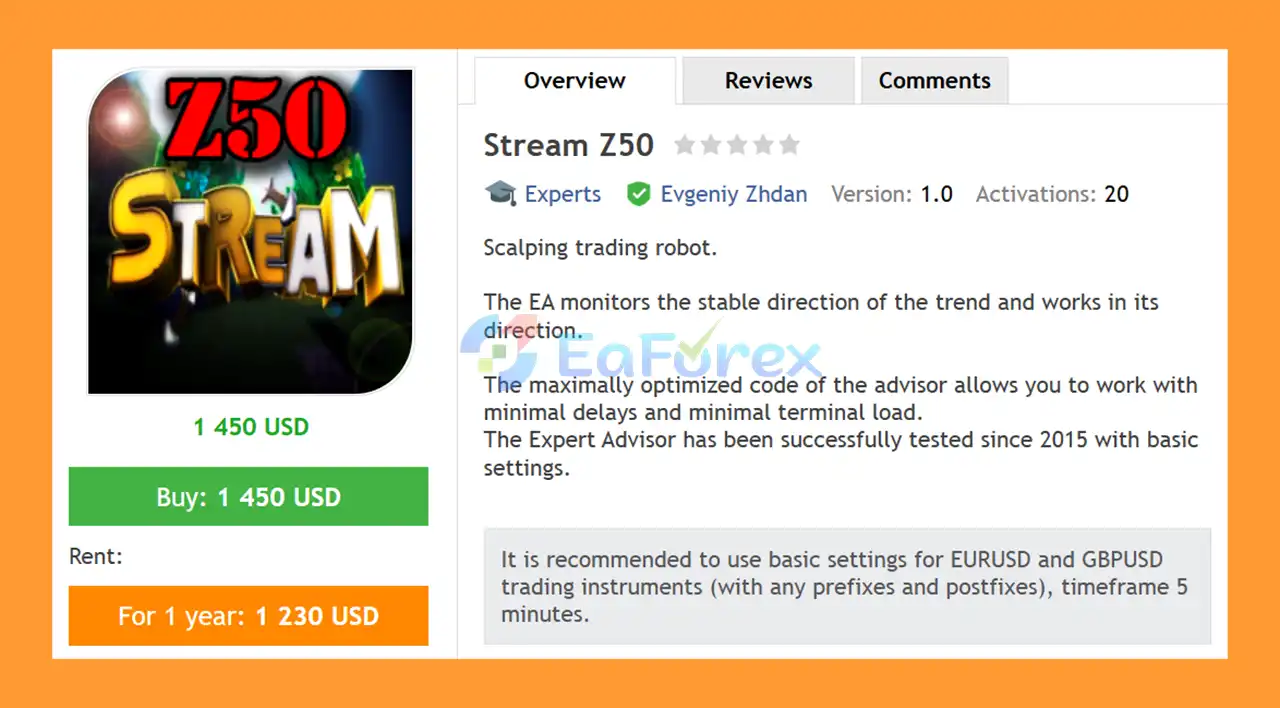
Stream Z50 EA MT4 is an automated Forex scalping Expert Advisor designed for the MetaTrader 4 (MT4) trading platform. The EA monitors the prevailing market trend and opens trades in the direction of a stable trend, aiming to capture short-term price movements in the Forex market.
Designed with optimized code, Stream Z50 EA MT4 aims to minimize processing delays and reduce the load on the trading terminal. According to the developer, the Expert Advisor has been tested with its basic settings since 2015, making it an option for traders interested in a trend-following approach to automated scalping.
The recommended trading instruments are EURUSD and GBPUSD, including broker symbols with different prefixes or postfixes. The suggested chart timeframe is M5 (5 minutes), which is commonly used for short-term trading strategies.
Stream Z50 EA MT4 includes configurable parameters such as fixed lot size, automatic lot sizing, risk percentage, Take Profit, Stop Loss, Trailing Stop, and slippage. These settings allow traders to adjust position sizing and trade management according to their account size and trading conditions.
For the intended trading setup, the developer recommends choosing a broker with low spreads and low commissions, as transaction costs can significantly affect the results of a scalping strategy.
About the Developer
- Author: Evgeniy Zhdan
- Experience: Over 12 years of experience on MQL5.
- Notable Products: Stream Z50 EA, IncaGold EA, Prey EA, PGold Standard, Plodder EA MT4, Conductor EA MT4, MagicBands EA MT4, Tug EA, EA Tiamat MT4, PinTrade MT4 and other advisors.
- Flagship Product: Stream Z50 EA MT4 is rated as the best performing product of the year.
>>> Delivery time 24h-48h after payment.
>>> Refund if not delivered.
>>> You will receive the latest version without any limitations (ID+Time).
Reviewed by Jason Stap <<<
Key Features of Stream Z50 EA MT4
Automated Trend-Following Strategy
Stream Z50 EA MT4 monitors the prevailing trend and trades in the direction of a stable market movement. This trend-following approach is designed to help the EA identify short-term trading opportunities without requiring the trader to manually analyze every market movement.
As with any trend-following system, performance may vary depending on market volatility, trend strength, and periods of sideways price action.
Forex Scalping on the M5 Timeframe
The EA is recommended for the 5-minute timeframe, allowing it to evaluate short-term price movements and execute trades according to its programmed strategy.
The M5 setup is intended for traders who prefer automated intraday trading rather than holding positions for extended periods.
Recommended EURUSD and GBPUSD Trading
The developer recommends using Stream Z50 EA MT4 with EURUSD and GBPUSD under its basic settings.
The EA is also described as compatible with broker symbols that use prefixes or postfixes, such as modified currency-pair names. Actual compatibility should be verified with the specific broker and EA version.
Fixed Lot and Automatic Lot Sizing
The EA supports two position-sizing approaches:
- Fixed Lot: Uses the lot size specified by the trader when automatic risk-based sizing is disabled.
- Automatic Lot Sizing: Uses the Risk setting and Risk Percent parameter to determine position size according to the EA's implementation.
These options allow traders to configure position sizing based on their preferences and risk-management requirements. The exact calculation used for automatic lot sizing should be verified in the EA documentation.
Configurable Take Profit and Stop Loss
Stream Z50 EA MT4 includes Take Profit and Stop Loss parameters for defining trade exit levels.
Take Profit specifies the intended profit-taking level, while Stop Loss defines a price level at which a losing position should be closed, subject to execution conditions.
Using appropriate exit parameters can help traders establish a more structured trading plan, although stop-loss orders cannot guarantee an exact execution price during gaps or severe slippage.
Trailing Stop Functionality
The Trailing Stop parameter allows traders to configure trailing-stop behavior according to the EA's supported settings.
A trailing stop is generally designed to adjust the protective stop level as a position moves favorably. Its effectiveness depends on market movement, the configured distance, and order execution conditions.
Optimized Code and Low Terminal Load
According to the developer, Stream Z50 EA MT4 uses optimized code intended to minimize processing delays and reduce the load on the MT4 terminal.
Efficient execution can be useful for automated trading, particularly when running multiple charts or Expert Advisors. However, actual performance also depends on the computer or VPS, broker server, network connection, and order execution speed.
Adjustable Trading Parameters
The EA provides several inputs that traders can customize, including:
- Lot
- Risk on / off
- Risk Percent
- Take Profit
- Stop Loss
- Trailing Stop
- Comment to order
- Bulls Period
- Bears Period
- Magic Number
- Slippage
These settings provide flexibility when configuring the EA for a particular account and broker environment.
How It Works
Stream Z50 EA MT4 follows a trend-based trading process designed for short-term Forex opportunities.
Step 1: Monitor Market Direction
The EA evaluates market conditions using its programmed trend-analysis logic. The Bulls Period and Bears Period inputs configure the periods associated with the respective indicators used by the strategy.
The exact entry conditions depend on the EA's internal implementation and should be checked in the official documentation.
Step 2: Identify Potential Trading Opportunities
When the EA identifies a sufficiently stable trend according to its rules, it looks for trading opportunities in the direction of that trend.
The strategy is intended to follow the prevailing market direction rather than trade randomly against it. However, trend identification cannot eliminate false signals or unexpected reversals.
Step 3: Calculate or Apply Position Size
The EA uses the configured lot size when fixed-lot trading is selected. If Risk is enabled, it uses the Risk Percent parameter according to its programmed position-sizing method.
Traders should verify how the EA calculates risk and ensure that the resulting lot size is appropriate for their account balance, equity, leverage, and stop-loss distance.
Step 4: Execute and Manage Trades
Once its entry conditions are satisfied, the EA can place trades automatically through MT4, provided automated trading is enabled and the broker permits execution.
Take Profit, Stop Loss, and Trailing Stop settings govern the intended trade-management behavior.
Actual results may differ because of spreads, commissions, slippage, market gaps, and execution delays.
Step 5: Continue Monitoring the Trend
The EA continues evaluating market conditions and searches for new opportunities according to its strategy rules.
Because the recommended timeframe is M5, traders should monitor execution costs carefully. Even a small difference in spread or commission can have a meaningful effect on a scalping system's net results.
Why Choose Stream Z50 EA MT4?
Simple Trend-Following Approach
Stream Z50 EA MT4 focuses on trading in the direction of a stable trend. This approach may appeal to traders who prefer a clearly defined strategy concept rather than manually identifying every entry opportunity.
Designed for Short-Term Forex Trading
The recommended M5 timeframe makes the EA suitable for evaluating short-term price movements in EURUSD and GBPUSD.
Traders should still test whether the strategy performs consistently across different market sessions and volatility conditions.
Flexible Risk and Lot Settings
The availability of fixed-lot and automatic lot-sizing options allows users to choose a position-sizing method that fits their trading plan.
The Risk Percent, Stop Loss, and Take Profit settings provide additional controls for customizing the intended risk and exit structure.
Automated Trade Management
With automated entries and configurable exit parameters, the EA can manage supported trading operations without requiring constant manual intervention.
Nevertheless, automated trading still requires supervision, platform maintenance, and periodic performance reviews.
Optimized MT4 Performance
The developer describes the EA's code as optimized for low processing delays and reduced terminal load.
This may be useful for traders who want to run an Expert Advisor on MT4, although low terminal load does not guarantee fast broker execution or profitable trades.
Straightforward Currency-Pair Recommendations
The recommended basic configuration focuses on EURUSD and GBPUSD, both widely traded currency pairs.
Using the suggested instruments and timeframe provides a practical starting point for backtesting before considering other symbols or customized settings.
Stream Z50 EA MT4 Backtest Results
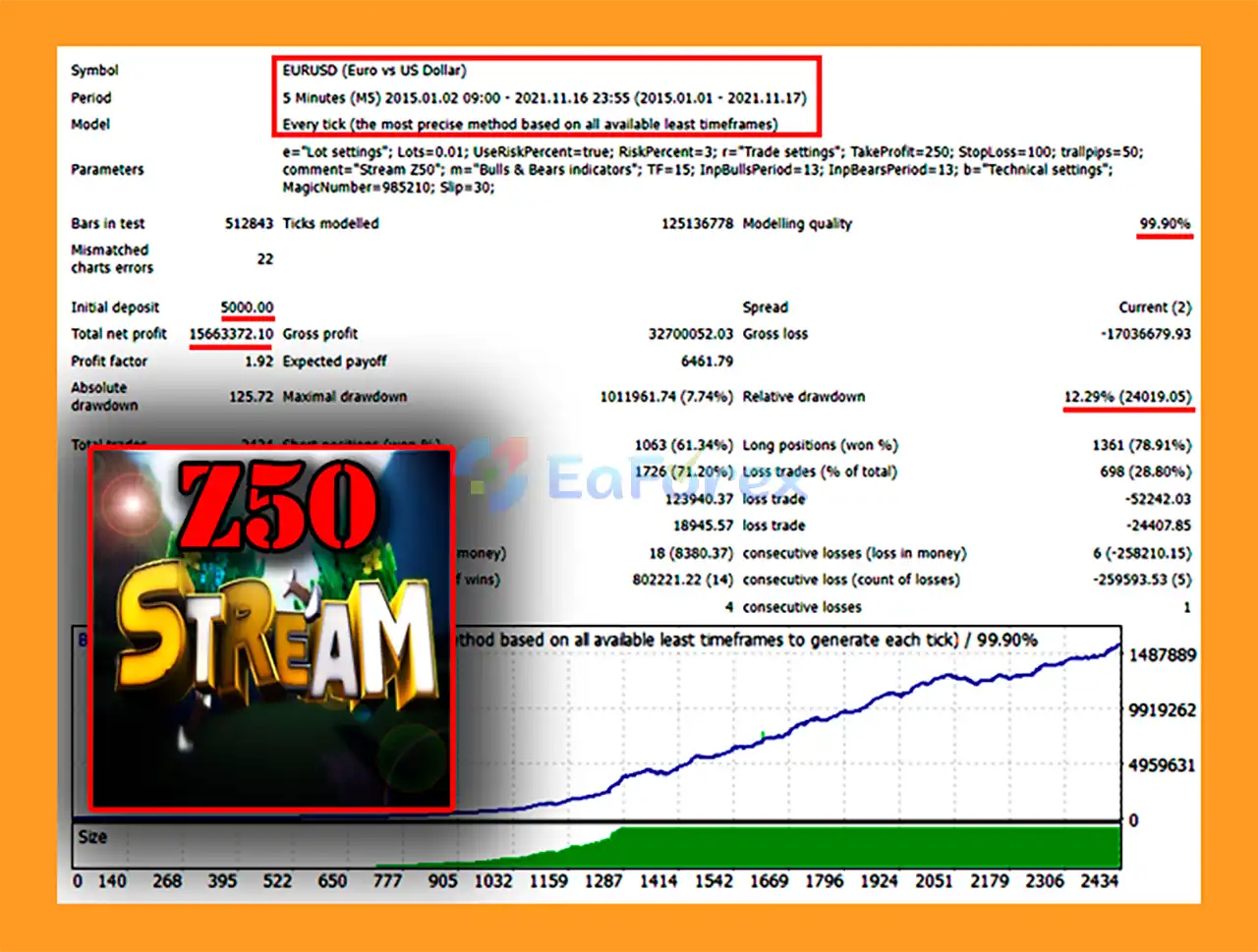
🔺EURUSD – 7 years
- Initial Deposit: $5,000
- Total Net Profit: $15.66 million
- Win Rate (% of total): 71.20%
- Maximum Drawdown: 7.74%
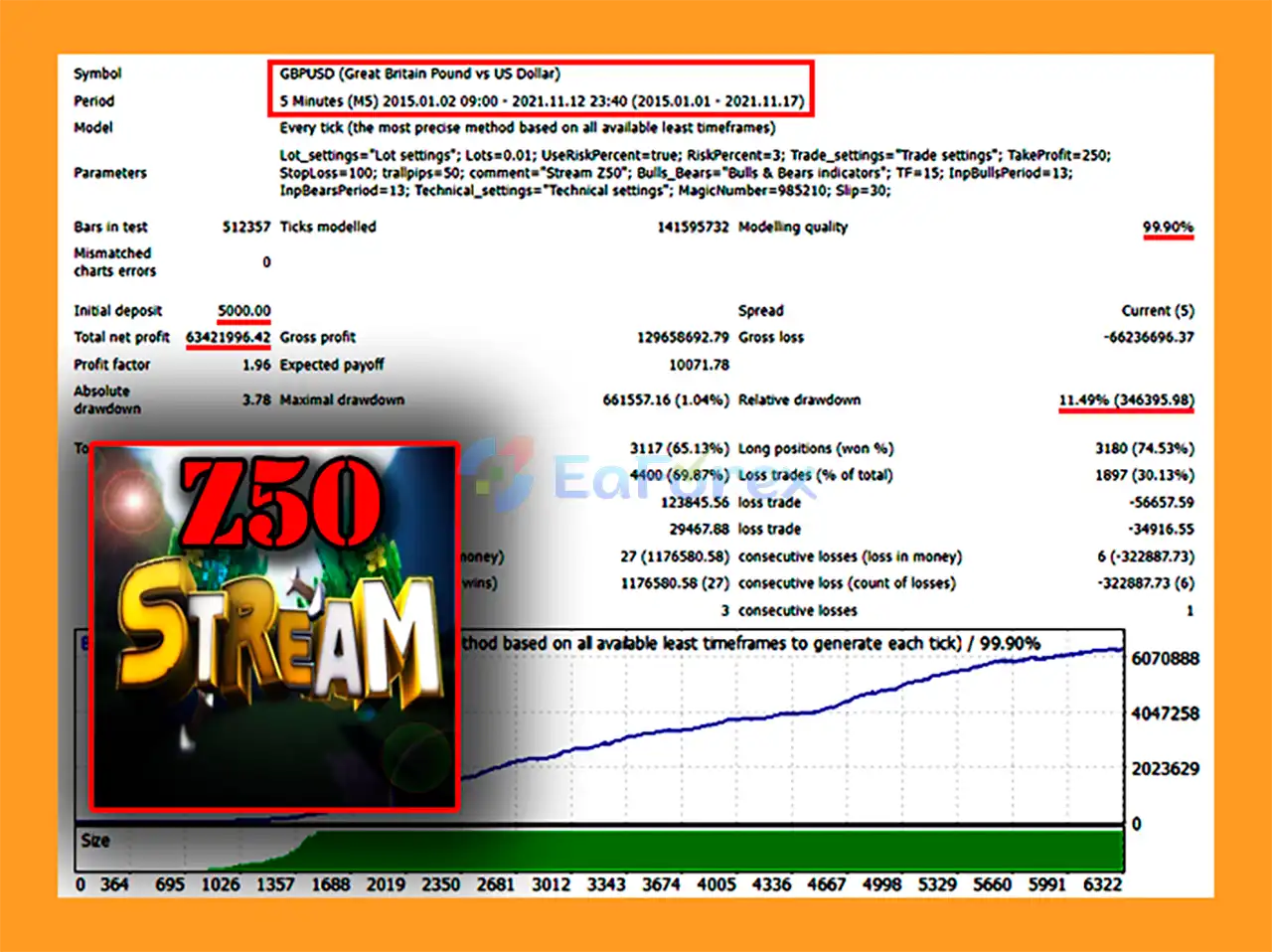
🔺GBPUSD – 7 years
- Initial Deposit: $5,000
- Total Net Profit: $63.42 million
- Win Rate (% of total): 69.87%
- Maximum Drawdown: 1.04%
Risk Management & Alerts
Forex scalping involves market risk, and Stream Z50 EA MT4 should be tested carefully before being used on a live trading account.
Configure Risk Percent Carefully
When using automatic lot sizing, review the Risk Percent input and confirm how it affects position size.
A higher risk percentage can increase potential gains and losses. Do not assume that the selected percentage represents the maximum possible loss unless the EA's calculation method and protective exit behavior have been verified.
Set Appropriate Stop Loss and Take Profit Levels
Configure Stop Loss and Take Profit according to the strategy's behavior, instrument volatility, and trading costs.
A Stop Loss can help define an intended exit level, but it does not eliminate the possibility of losses exceeding expectations because of gaps, slippage, or execution limitations.
Use a Trailing Stop Only After Testing
Test different Trailing Stop settings to understand how they affect exits during trending and ranging markets.
A trailing stop that is too tight may close positions prematurely, while a wider setting may allow larger unrealized losses before a position is closed.
Choose a Low-Cost Broker
The developer recommends low spreads and low commissions for EURUSD and GBPUSD.
Before using the EA, compare the broker's typical spreads, commissions, slippage, and execution quality during the trading sessions in which the EA operates.
Do not evaluate performance using gross profit alone. Net results should account for all trading costs.
Monitor Slippage and Execution
The Slippage input controls a configured slippage parameter, subject to the EA's implementation and the broker's execution model.
During fast market movements, actual fills can differ from expected prices. This is particularly relevant to scalping strategies that aim to capture relatively small price movements.
Backtest and Forward-Test
Before live deployment:
- Backtest the EA on EURUSD and GBPUSD using suitable historical data.
- Evaluate maximum drawdown, trade frequency, win rate, and net profit after costs.
- Test the EA on an MT4 demo account under realistic trading conditions.
- Verify fixed-lot and automatic lot-sizing behavior.
- Test Stop Loss, Take Profit, and Trailing Stop settings.
- Monitor performance across trending and sideways markets.
The developer's reported testing history since 2015 does not, by itself, establish independently verified profitability or guarantee future performance.
Pros and Cons
Pros
- Automated trend-following: Designed to trade in the direction of a stable market trend.
- M5 scalping setup: Recommended for short-term trading on EURUSD and GBPUSD.
- Flexible position sizing: Supports fixed lots and automatic lot sizing.
- Configurable risk parameters: Includes Risk Percent, Stop Loss, Take Profit, and Trailing Stop settings.
- Adjustable indicator periods: Provides Bulls Period and Bears Period inputs.
- Optimized code: The developer states that the EA is designed to minimize processing delays and terminal load.
- Simple recommended setup: Basic settings are suggested for two major currency pairs.
- Order identification: Magic Number and order comments help organize and distinguish trades.
Cons
- Sensitive to trading costs: Spreads and commissions can significantly reduce net scalping profits.
- Market-condition dependency: Trend-following strategies may struggle during sideways markets or sudden reversals.
- Execution sensitivity: Slippage and delays may affect short-term trading results.
- Requires parameter testing: Optimal indicator periods, exit levels, and risk settings may vary across brokers and market conditions.
- No guaranteed returns: Historical testing and optimized code do not ensure future profitability.
- Requires ongoing monitoring: Connection issues, broker restrictions, and unexpected market movements can affect automated trading.
How to Install Stream Z50 EA MT4
Follow these steps to install and configure Stream Z50 EA MT4 on MetaTrader 4.
Step 1: Obtain the EA
Purchase or download Stream Z50 EA MT4 from the developer's authorized distribution source. Verify that the file is genuine and compatible with your version of MetaTrader 4.
Step 2: Open MetaTrader 4
Launch MT4 and log in to your trading account. For initial testing, use a demo account rather than immediately risking real funds.
Step 3: Open the Data Folder
In MT4, select File → Open Data Folder.
Open the MQL4 directory and then the Experts folder.
Step 4: Install the EA
Copy the supplied EA file into the appropriate Experts directory if manual installation is required.
Return to MT4, refresh the Navigator panel, or restart the terminal so that the EA appears in the Expert Advisors list.
If the EA is delivered through an integrated marketplace, follow the installation method provided by that marketplace instead.
Step 5: Attach the EA to a Chart
Open an EURUSD or GBPUSD chart and select the M5 timeframe.
Locate Stream Z50 EA MT4 in the Navigator panel and drag it onto the chart. Review the EA's settings before confirming the configuration.
Step 6: Configure the Inputs
Adjust the available parameters according to your trading plan:
- Lot: Fixed trading lot when Risk is disabled.
- Risk on / off: Enables or disables automatic lot sizing.
- Risk Percent: Configures the risk-related input used by automatic lot sizing.
- Take Profit: Sets the intended profit-taking level.
- Stop Loss: Sets the intended protective exit level.
- Trailing Stop: Configures trailing-stop behavior.
- Comment to order: Defines the comment attached to orders.
- Bulls Period: Sets the Bulls indicator period.
- Bears Period: Sets the Bears indicator period.
- Magic Number: Identifies trades associated with the EA.
- Slippage: Sets the EA's configured slippage parameter.
Available settings and their precise behavior may vary by version. Refer to the developer's documentation for the correct units and supported values.
Step 7: Enable Automated Trading
Enable MT4's AutoTrading function and confirm that the EA has the necessary permissions to trade.
Check that the smiley-face or equivalent EA status indicator shows that the Expert Advisor is active, where applicable. Review the Experts and Journal tabs for any errors.
Step 8: Test Before Live Trading
Allow the EA to operate on a demo account and monitor its entries, exits, spreads, and execution quality.
Once you have collected sufficient test data, review the results and determine whether the strategy's risk profile is suitable for your account.
What’s Included in the Download Package?
- Experts: Stream Z50_fix.ex4
>> Join VIP Membership Now <<<
Final Thoughts
Stream Z50 EA MT4 is a trend-following Forex scalping robot designed for traders who want to automate short-term trading on MetaTrader 4.
Its main features include automated trend monitoring, recommended M5 trading on EURUSD and GBPUSD, fixed-lot and automatic lot-sizing options, configurable Stop Loss and Take Profit levels, Trailing Stop functionality, and adjustable Bulls and Bears indicator periods.
The developer also highlights optimized code and testing with basic settings since 2015. These claims may be useful background information, but traders should evaluate the EA using their own backtests and forward tests rather than relying solely on historical claims.
For the best evaluation, start with the recommended currency pairs, use realistic trading costs, and test the EA on a demo account before considering live deployment. Pay particular attention to spread, commission, slippage, drawdown, and the behavior of the risk settings.
If you are looking for an automated MT4 trend-following scalping system, Stream Z50 EA MT4 is a candidate to evaluate as part of a disciplined trading strategy.
Risk Disclaimer: Forex trading involves substantial financial risk. Stream Z50 EA MT4 does not guarantee profits, and past performance does not guarantee future results. Always test the EA thoroughly and use risk settings appropriate for your financial circumstances.



