


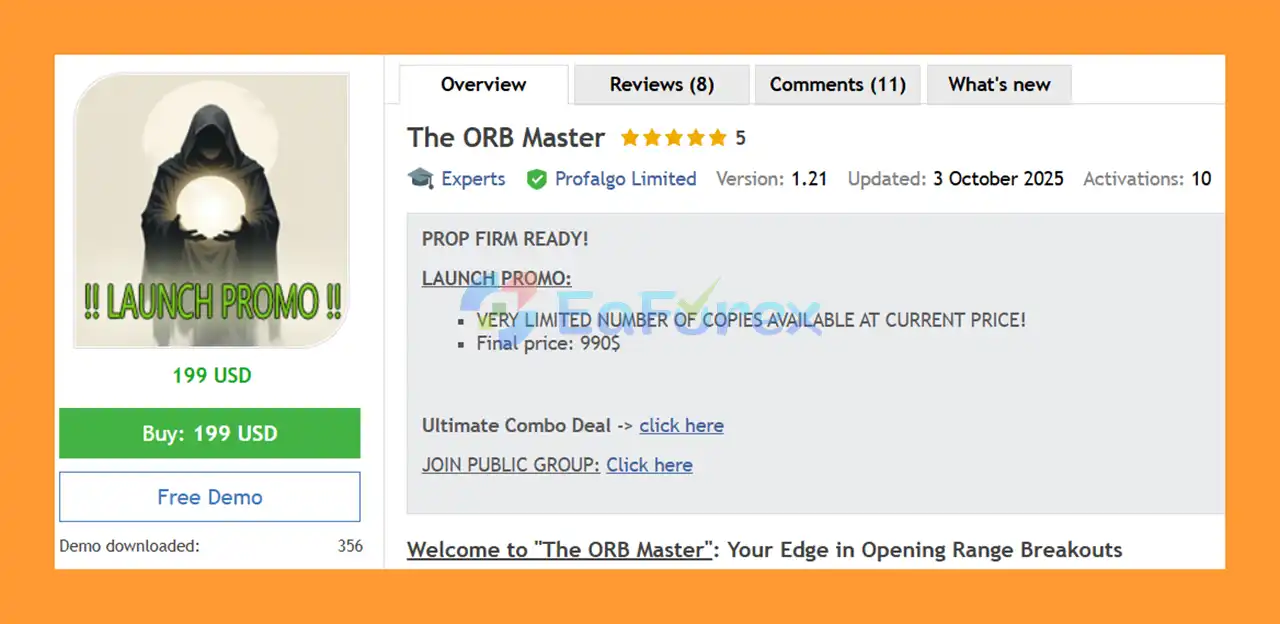
Product Overview
The ORB Master MT5 is an automated Expert Advisor built around the Opening Range Breakout (ORB) trading strategy, a popular approach for capturing early-session momentum in major financial markets.
The EA is specifically designed to trade major indices around the opening of the US and European stock markets, focusing on SP500, US30 (Dow Jones), NASDAQ, and DAX. By analyzing the initial market range and looking for breakout opportunities, The ORB Master aims to identify directional momentum during some of the most active trading periods of the day.
Instead of relying on a single strategy, the EA combines three different strategy variations for each index, creating a total of 12 strategy variations. These approaches are designed to provide diversified exposure and reduce dependence on a single trading model.
The ORB Master also includes advanced trade management features such as trailing stop-loss, trailing take-profit, spread filters, trading-hour controls, economic-news filters, and dynamic position sizing.
It operates from an EURUSD M15 chart, while automatically managing the configured index symbols in the background.
About the Developer
• Author: Wim Schrynemakers
• Experience: Over +12 years of experience on MQL5.
• Notable Products: The ORB Master MT5, The Bitcoin Reaper, Ultimate Breakout System EA, Advanced Scalper MT5 and others.
• Flagship Product: The ORB Master MT5 is rated as the best performing product of the year.
>> Delivery time 24h-48h after payment.
>>> Refund if not delivered.
>>> You will receive the latest version without any limitations (ID+Time).>> Reviewed by Jason Stap <<<
Key Features of The ORB Master MT5
- Opening Range Breakout (ORB) strategy focused on early-session momentum.
- Trades SP500, US30, NASDAQ, and DAX.
- 12 strategy variations running across four major indices.
- Three strategy models available for each supported index.
- Designed to capture potential breakout and continuation movements.
- M15 recommended timeframe.
- Operates from a single EURUSD M15 chart.
- Dynamic trailing Stop Loss management.
- Trailing Take Profit functionality.
- No traditional Grid strategy.
- No Martingale strategy.
- Adjustable maximum spread filters.
- Flexible trading-hour filters.
- NFP, Interest Rate, and CPI filters.
- Automatic or manual GMT offset configuration.
- Maximum daily drawdown protection.
- Fixed-lot and risk-based lot calculation.
- Equity-based position sizing option.
- Prop-firm-oriented risk management settings.
- Trade randomization for greater execution diversity.
- Configurable pending-order management.
- Support for virtual expiration when required by broker conditions.
- Extensive out-of-sample and stress-testing methodology.
- Designed to work with low-spread trading environments.
- Suitable for both demo and live MT5 accounts.
How Does The ORB Master MT5 Work?
The ORB Master MT5 is based on the principle that the opening of major stock markets can generate significant volatility and directional momentum.
When the relevant US or European market session begins, the EA monitors the opening range of the selected indices. When predefined breakout conditions are met, the corresponding strategy can initiate a trade.
Multi-Index Trading
The EA focuses on four major indices:
- SP500
- US30
- NASDAQ
- DAX
Each index can use up to three independent strategy variations. This creates a portfolio of 12 trading approaches, allowing the EA to diversify its exposure across different instruments and strategy configurations.
Automated Trade Management
After entering a position, the EA can automatically manage the trade using its trailing SL and TP mechanisms. This allows the system to adapt trade protection as the market moves.
News and Trading-Time Filters
The EA provides filters for major economic events, including:
- NFP
- Interest Rate decisions
- CPI releases
Depending on the configuration, the EA can close existing positions, remove pending orders, and temporarily stop trading around important events.
Trading-hour filters can also restrict the system to predefined market sessions.
Why Choose The ORB Master MT5?
Specialized Opening Breakout Strategy
The EA is designed specifically around the Opening Range Breakout concept, rather than attempting to trade every market condition throughout the day.
Four Major Indices
By supporting SP500, US30, NASDAQ, and DAX, traders can access several highly liquid index markets through one automated system.
12 Strategy Variations
The combination of three strategies per index creates 12 different approaches. This diversification can help reduce dependence on the performance of one individual strategy.
No Grid or Martingale
The ORB Master does not rely on traditional Grid or Martingale recovery techniques. This can make the strategy easier to understand from a risk-management perspective.
Prop Firm Features
The EA includes several features designed to help traders manage account-level risk, including:
- Maximum daily drawdown
- Risk-based lot sizing
- Trading-hour restrictions
- News filters
- Trade randomization
- Custom entry and exit settings
These features may be useful for traders operating under specific proprietary trading firm rules, although compatibility should always be verified against the individual firm's current requirements.
Extensive Testing Approach
According to the developer, The ORB Master has been subjected to out-of-sample stress testing using unseen data to reduce the risk of excessive curve fitting.
This type of testing can provide additional information about strategy robustness, but historical testing can never guarantee future trading performance.
The ORB Master MT5 Backtest Results
-
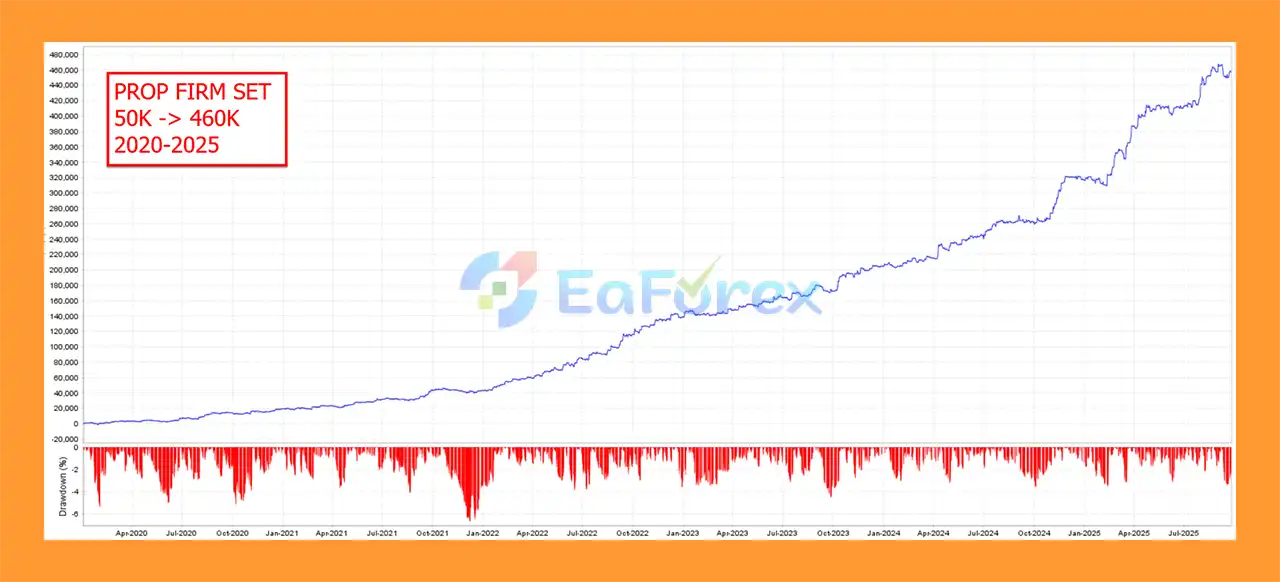
2022–2025 Prop Firm Challenge ($50,000) → Net Profit $460,000
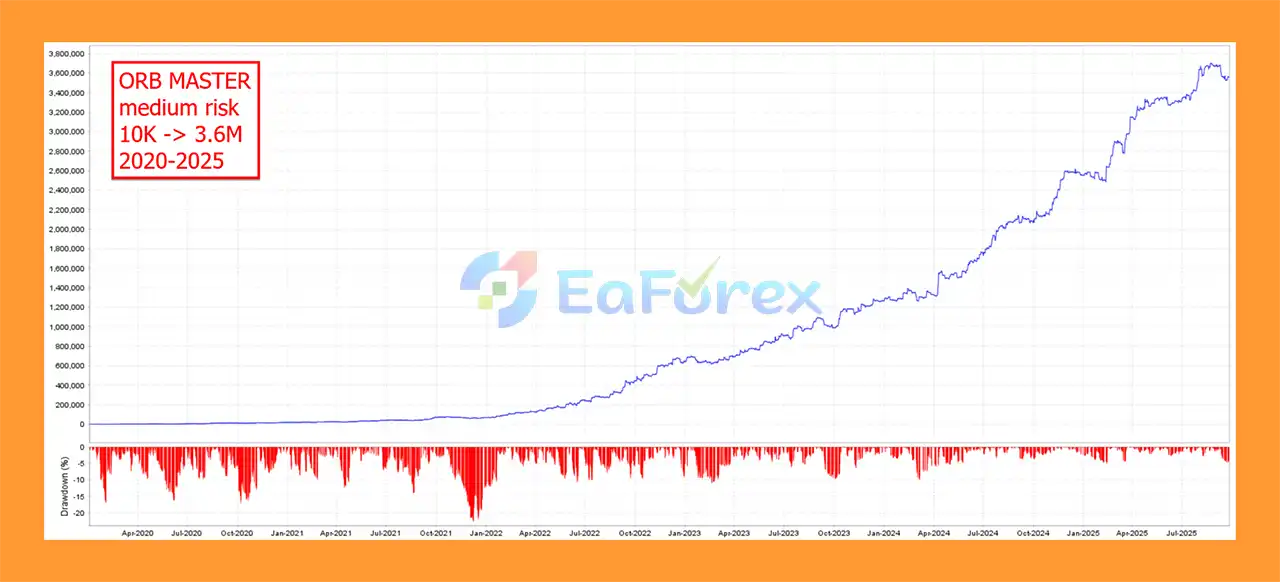
- 2020–2025 Medium Risk (Deposit $10,000) → Net Profit $3.6M
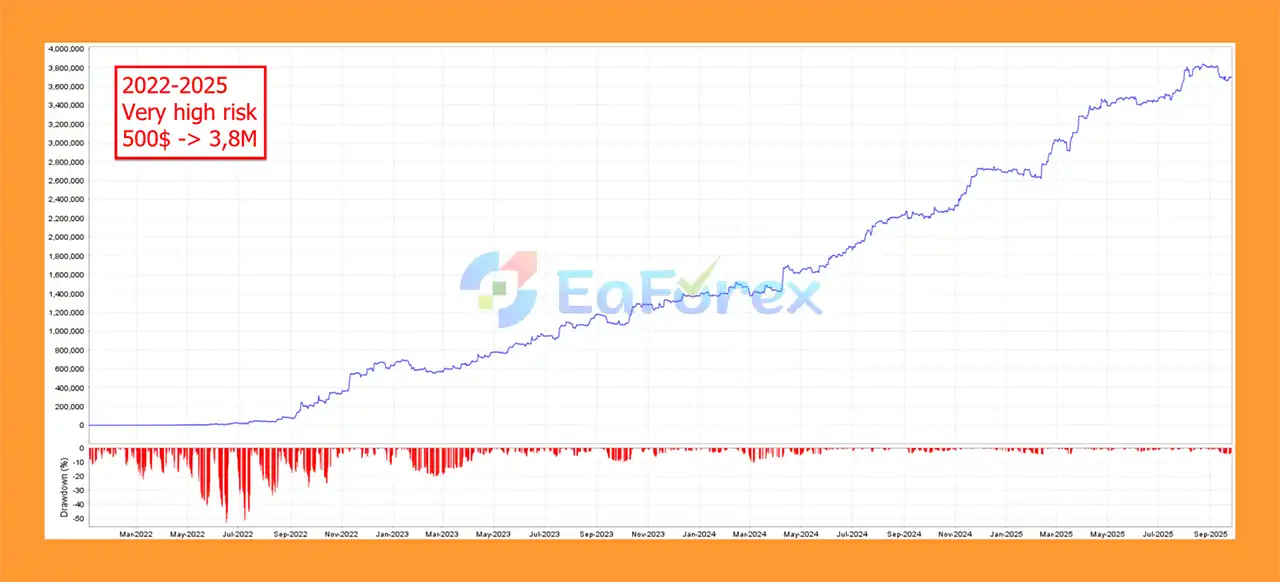
- 2022–2025 (Deposit $500) → Net Profit $3.8M
Performance and Risk Management
The ORB Master MT5 places significant emphasis on automated risk control and position sizing.
Risk-Based Lot Calculation
Traders can choose between different lot-sizing methods, including:
- Fixed lot size
- Risk-based lot calculation
- Maximum risk per strategy
When using the risk-based method, the EA can calculate position size according to the selected risk parameters and historical drawdown characteristics of each strategy.
Maximum Daily Drawdown
A maximum daily drawdown can be configured. If the predefined threshold is reached, the EA can close open positions, remove pending orders, and stop trading until the following trading day.
This feature can be particularly useful for accounts where daily loss limits are important.
Equity-Based Calculation
The EA can use either account balance or equity when calculating position sizes.
Using equity can provide a more dynamic representation of the account's current financial condition.
Maximum Spread Filter
Each index can have its own maximum spread setting. This helps prevent the EA from entering trades when trading costs become abnormally high.
Economic News Protection
The NFP filter can be configured to:
- Close open trades before NFP.
- Delete pending orders before NFP.
- Wait for a predefined period after the event.
- Resume trading automatically afterward.
Similar functionality is available for Interest Rate and CPI events.
Important Risk Considerations
Although the EA includes multiple risk-management features, automated index trading can still experience significant losses during sudden market movements, gaps, slippage, unexpected volatility, or abnormal liquidity conditions.
The recommended minimum balance is $500, but the appropriate account size depends on the broker's minimum lot size, contract specifications, leverage, spread, and the selected risk settings. A larger capital buffer may be more appropriate for conservative risk management.
Weaknesses and Risk Warnings
Despite its sophisticated design, The ORB Master MT5 has several potential limitations that traders should understand.
Breakout Strategies Can Experience False Signals
Opening breakouts do not always develop into sustained trends. The market may break an opening range and then quickly reverse, resulting in losing trades.
Index Volatility Can Be High
US30, NASDAQ, SP500, and DAX can experience rapid price movements, particularly around market openings and major economic announcements.
Broker Conditions Matter
Execution quality can significantly influence breakout strategies. High spreads, slippage, execution delays, and poor liquidity can negatively affect results.
A low-spread broker with reliable execution is generally preferable.
GMT Settings Must Be Correct
Incorrect GMT or daylight-saving settings can cause the EA to operate during the wrong market session.
Users should carefully configure:
- AutoGMT
- GMT_OFFSET_Winter
- GMT_OFFSET_Summer
- Trading-hour filters
when necessary.
Backtests Are Not Guarantees
Historical backtests and out-of-sample testing can help evaluate an EA, but they cannot guarantee future profitability. Live trading conditions may differ because of spreads, commissions, slippage, liquidity, execution speed, and market behavior.
Prop Firm Compatibility Is Not Universal
The EA provides several prop-firm-oriented features, but no EA should be considered universally compatible with every proprietary trading firm. Always check the firm's current rules regarding daily drawdown, maximum drawdown, news trading, holding times, and automated trading.
Pros and Cons
Pros
- Uses the popular Opening Range Breakout concept.
- Focuses on four major global indices.
- SP500, US30, NASDAQ, and DAX support.
- 12 strategy variations.
- Three strategies per index.
- No traditional Grid or Martingale.
- Automated trailing SL and TP.
- Maximum daily drawdown protection.
- Risk-based lot calculation.
- Fixed-lot option available.
- NFP, CPI, and Interest Rate filters.
- Adjustable trading hours.
- Maximum spread controls.
- Automatic GMT functionality.
- Prop-firm-oriented configuration options.
- Can operate from a single EURUSD M15 chart.
- Designed with out-of-sample testing and stress testing in mind.
Cons
- Breakout systems can generate false breakouts.
- Index markets can be highly volatile.
- Execution quality can affect results significantly.
- Correct broker symbol names are required.
- GMT settings must be configured correctly when automatic detection is not used.
- Low-spread execution is recommended.
- Requires careful risk configuration.
- Historical performance does not guarantee future results.
- Different prop firms may have different restrictions.
How to Install The ORB Master MT5
Installing The ORB Master MT5 is relatively straightforward.
Step 1 – Install the EA
Copy the EA files into your MetaTrader 5 installation:
File → Open Data Folder → MQL5 → Experts
Restart MetaTrader 5 or refresh the Navigator window after installation.
Step 2 – Enable Algo Trading
Make sure Algo Trading is enabled in MT5.
Step 3 – Add the Required URL
If required by the EA, add the following website to the allowed URLs under:
Tools → Options → Expert Advisors
https://www.worldtimeserver.com/
This allows the EA to access the required time information.
Step 4 – Open EURUSD M15
Open an EURUSD M15 chart.
The EA is designed to use this chart as the main control chart while managing the configured index symbols.
Step 5 – Attach The EA
Drag The ORB Master MT5 onto the EURUSD M15 chart.
Step 6 – Load the Preset
In the EA's Inputs window, use Load to select the appropriate preset .set file.
Step 7 – Configure Broker Symbols
This step is extremely important.
Broker symbol names can vary. For example, SP500, US30, NASDAQ, and DAX may have different names depending on the broker.
Configure the corresponding parameters correctly, including:
- US500_Symbol
- US30 symbol
- NAS100/USTECH symbol
- DAX symbol
Incorrect symbol names may prevent the EA from trading the intended instruments.
Step 8 – Configure Risk Settings
Choose the preferred lot-sizing method:
- Fixed lot size
- Risk-based calculation
- Maximum risk per strategy
Set the maximum daily drawdown and other account protection parameters according to your trading plan.
Step 9 – Configure GMT and News Filters
Check the broker's time settings and configure:
- AutoGMT
- Winter GMT offset
- Summer GMT offset
- NFP Filter
- CPI Filter
- Interest Rate Filter
- Trading Hours
Step 10 – Start Trading
Click OK and monitor the EA on a demo account before considering live deployment.
Real User Reviews and Feedback
🔻The ORB Master MT5 is highly appreciated by the MQL5 community for bringing stable and reliable profits. Below are 5 star reviews from users:

What’s Included in the Download Package?
- Experts:
- Setting (If Any).docx
- Installation Guide.docx
- Presets:
- OrbMaster_prop firm set.set
- OrbMaster_low risk.set
- OrbMaster_high risk.set
- OrbMaster_very high risk.set
- OrbMaster_combo_setup.set
- OrbMaster_prop firm_Combo set.set
Final Thoughts
The ORB Master MT5 is an automated Opening Range Breakout Expert Advisor designed for traders interested in capturing momentum around major stock-market openings.
Its combination of SP500, US30, NASDAQ, and DAX trading, 12 strategy variations, trailing trade management, news filters, spread protection, dynamic position sizing, and daily drawdown controls makes it a comprehensive solution for automated index trading.
One of its notable strengths is the focus on multiple independent strategies rather than relying on a single breakout model. The inclusion of out-of-sample testing and stress-testing methodology also demonstrates an effort to reduce excessive curve fitting.
However, traders should remember that opening-range breakout systems are naturally exposed to false breakouts and sudden volatility. Proper broker selection, accurate symbol configuration, realistic risk settings, and thorough forward testing are essential.
For traders looking for an automated MT5 ORB strategy for SP500, US30, NASDAQ, and DAX, The ORB Master MT5 offers a structured approach to trading market-opening momentum while providing a broad range of risk-management and customization tools.



