









-
 Unlimited Activations
-
 Instant delivery
-
 Easy to install








 Unlimited Activations
Instant delivery
Easy to install
Unlimited Activations
Instant delivery
Easy to install
 Free Update
 Free Install Support

TurboGain EA MT5 is a fully automated Forex Expert Advisor developed specifically for XAUUSD (Gold) trading on MetaTrader 5. The system is designed for traders who prefer a structured approach based on specific price zones, momentum, and potential price attraction areas.
Unlike aggressive automated trading systems, TurboGain EA MT5 does not use Martingale, Grid, or Hedging strategies. Instead, it focuses on controlled entries, fixed Stop Loss protection, dynamic position sizing, and intelligent profit management.
The EA currently operates exclusively on XAUUSD (Gold) and is designed to run on the H1 timeframe.
TurboGain EA MT5 also includes an advanced News Shield and Blacklist System, helping prevent new trades around selected high-impact economic events. The system has undergone backtesting, forward demo testing, and live trading deployment, with live execution conducted using VT Markets.
The EA is also designed with prop firm trading in mind and has been tested with FTMO real-account reports according to the provided product information.
>>> Delivery time 24h-48h after payment.
>>> Refund if not delivered.
>>> You will receive the latest version without any limitations (ID+Time).>>Reviewed by Jason Stap <<
TurboGain EA MT5 automatically analyzes the market and executes trades without requiring manual intervention. Once configured correctly, the Expert Advisor can manage entries, Stop Loss, position sizing, and profit protection automatically.
The current version of TurboGain EA MT5 operates exclusively on XAUUSD. Gold is known for its volatility and liquidity, making risk management particularly important when using an automated strategy.
The trading system uses a defined Stop Loss to protect positions against unfavorable market movements. The focus on controlled Stop Loss levels is intended to limit individual trade risk rather than allowing losing positions to remain open indefinitely.
TurboGain EA MT5 does not use a Martingale strategy. Losing trades are not automatically followed by progressively larger positions in an attempt to recover previous losses.
The EA does not rely on Grid trading, where multiple positions are progressively opened at different price levels. This can help avoid the potentially large exposure associated with uncontrolled grid structures.
The system does not use a hedging approach as part of its core strategy. This keeps the trading methodology more straightforward and focused on directional opportunities.
TurboGain EA MT5 can dynamically adjust position size according to the configured risk parameters. This allows traders to adapt exposure to different account sizes while maintaining a defined risk framework.
The EA incorporates multiple profit-management mechanisms, including a dynamic trailing system and an intelligent profit-locking mechanism. These tools are designed to protect accumulated gains while allowing trades to respond to changing market conditions.
One of the key features of TurboGain EA MT5 is its advanced news-filtering system.
The News Shield can identify selected economic events and block trading according to predefined keywords and target currencies. Events such as NFP and FOMC can therefore be filtered according to the configured rules.
The EA can also display:
This provides traders with additional market-event awareness directly on the MetaTrader 5 chart.
TurboGain EA MT5 is designed with prop firm requirements in mind and has been tested with major proprietary trading environments according to the supplied product information.
A real-account performance report with FTMO is also referenced as part of the product’s verification and testing history.
TurboGain EA MT5 is based on identifying specific price zones where momentum may develop or where price may show an attraction toward particular market areas.
The basic concept is relatively traditional: identify a potentially meaningful price area, wait for the required market conditions, and execute a trade when the system’s criteria are satisfied.
Once a position is opened, the EA automatically applies its risk and trade-management rules.
The general process includes:
This creates a fully automated trading workflow designed to minimize manual intervention.
TurboGain EA MT5 may be suitable for traders looking for an XAUUSD Expert Advisor with strict risk controls and automated trade management.
The absence of these aggressive position-management techniques is an important characteristic for traders who want to avoid strategies that can rapidly increase market exposure.
The current version concentrates exclusively on XAUUSD, allowing the system to be specifically configured around Gold’s price behavior.
Dynamic lot sizing and defined Stop Loss levels help create a more structured approach to capital management.
The News Shield and Blacklist System provides an additional layer of protection by allowing selected economic events to be filtered.
TurboGain EA MT5 combines trailing and profit-locking mechanisms to manage profitable positions dynamically.
The EA has been tested in prop firm environments and includes risk-management characteristics that can be useful when trading under account drawdown restrictions.
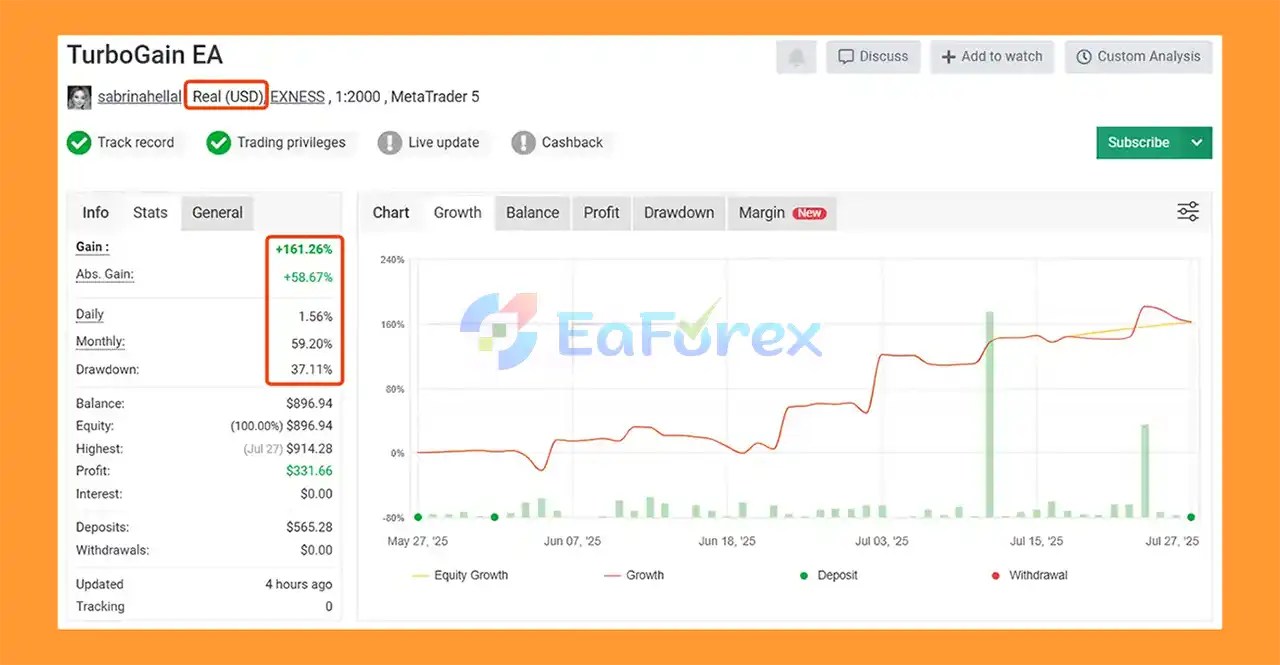
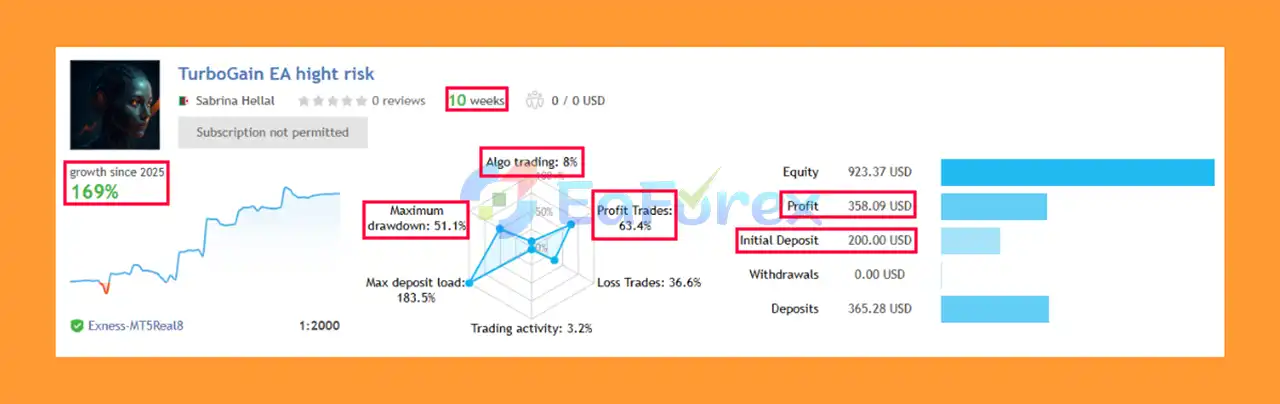
TurboGain EA MT5 Myfxbook
TurboGain EA MT5 Live Trading Results
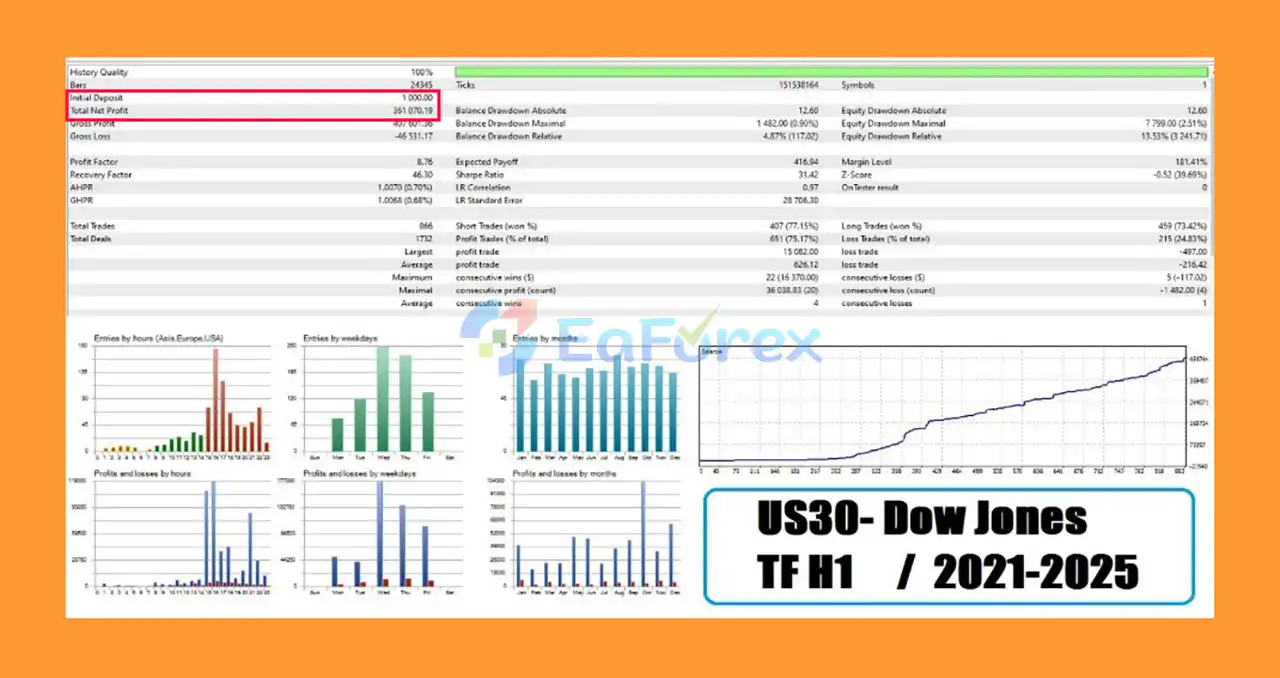
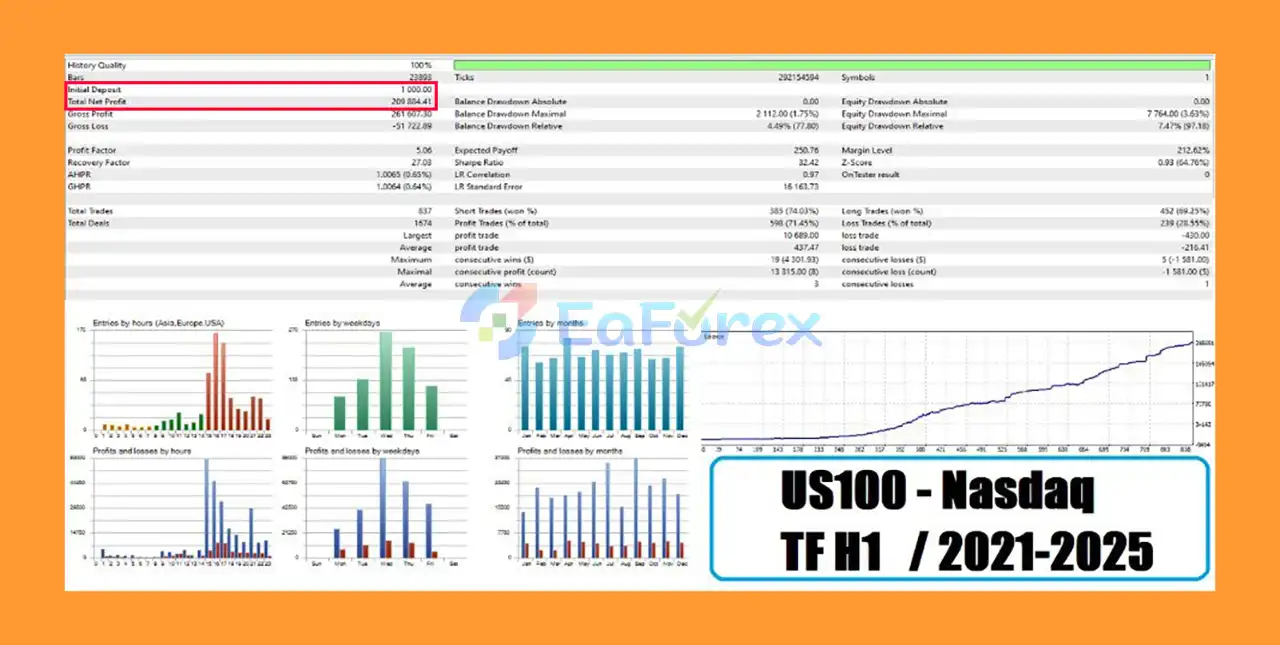
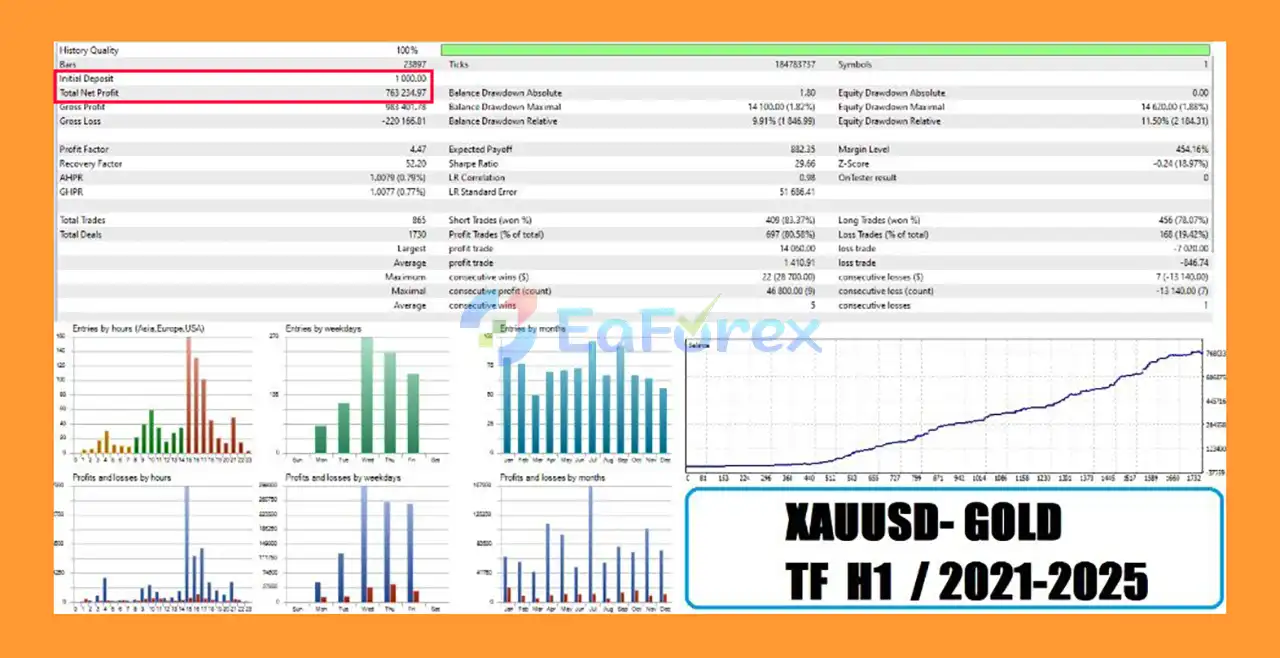
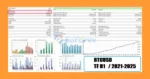
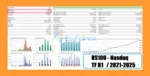
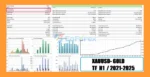
TurboGain EA MT5 Backtest Results
TurboGain EA Backtest Trading Results
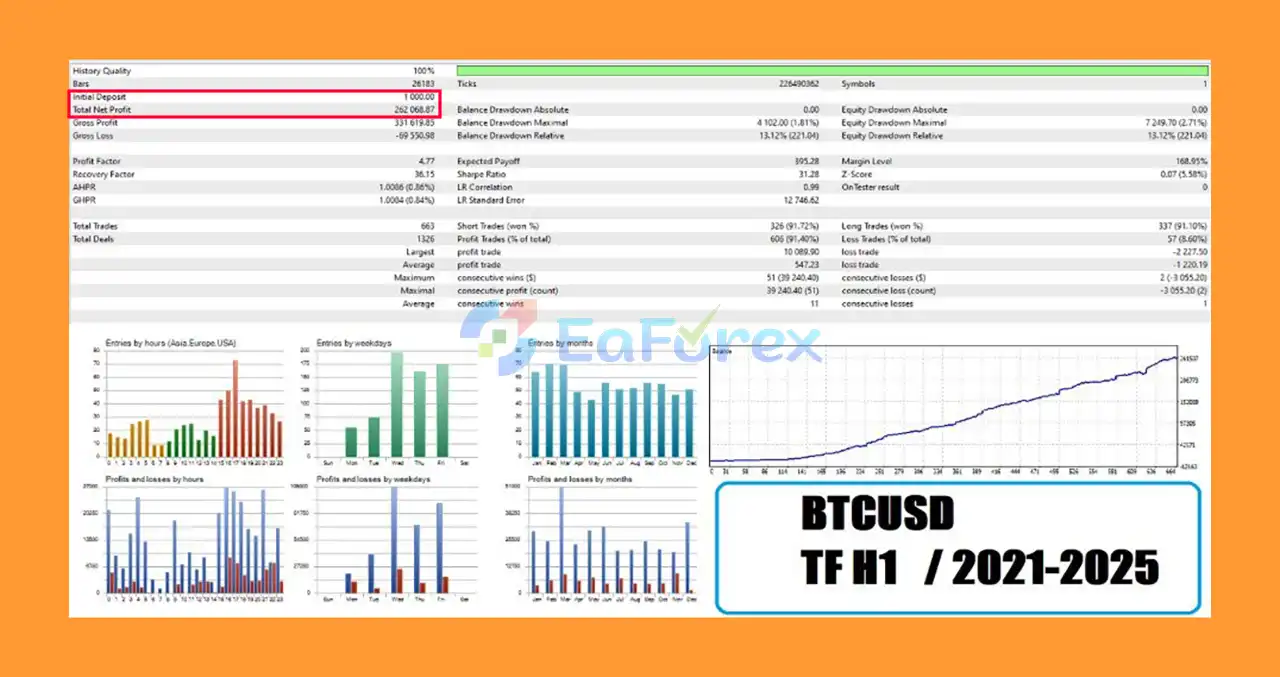
TurboGain EA Backtests Results
TurboGain MT5 Backtests Trading Results
Risk management is one of the main components of TurboGain EA MT5.
The system uses fixed Stop Loss protection, dynamic lot sizing, and automated profit-management tools. Unlike Martingale-based systems, the EA does not attempt to recover losses by continuously increasing position sizes.
TurboGain EA has reportedly gone through several testing phases, including:
These testing stages can provide useful information about how an automated strategy behaves under different conditions. However, historical testing and reported live results should not be interpreted as guarantees of future performance.
Because TurboGain focuses on XAUUSD, traders should remember that Gold can experience rapid price movements, especially around major economic announcements. Appropriate risk settings, sufficient margin, and reliable execution are essential.
For traders using prop firm accounts, the EA should also be configured according to the specific firm’s daily loss, maximum drawdown, lot-size, news-trading, and other account rules.
Despite its risk-control features, TurboGain EA MT5 cannot guarantee consistent profits or eliminate trading risk.
Important considerations include:
Traders should always start with a demo account and evaluate the EA under their own broker’s conditions before deploying it with real capital.
Installing TurboGain EA MT5 on MetaTrader 5 is straightforward.
Install MetaTrader 5 through your preferred broker and log in to your trading account.
Open MetaTrader 5 and go to:
File → Open Data Folder → MQL5 → Experts
Copy the TurboGain EA MT5 files into the Experts folder.
Restart the platform or refresh the Expert Advisors section in the Navigator window.
Open the XAUUSD (Gold) trading chart and select the H1 timeframe.
Drag TurboGain EA MT5 onto the XAUUSD H1 chart.
Make sure automated trading is enabled in MetaTrader 5.
Configure the EA according to your preferred risk level.
For initial testing, it is recommended to use the supplied Medium Risk SET file if available.
Check the following settings carefully:
Run the EA on a demo account first. Monitor its behavior, execution, drawdown, spreads, and trading frequency before considering a live account.
| Feature | Requirement |
|---|---|
| Minimum Deposit | $100 |
| Platform | MetaTrader 5 |
| Asset | XAUUSD |
| Timeframe | H1 |
| Recommended Account | RAW, ECN, or ZERO Spread |
| VPS | Any reliable VPS recommended |
Always test TurboGain EA MT5 on a demo account before using real capital. This allows you to understand how the system behaves under your broker’s specific execution conditions.
For initial operation, use the supplied Medium Risk SET file when available. Avoid immediately increasing risk settings without sufficient testing.
Use the latest stable version of TurboGain EA MT5 and monitor software updates, configuration changes, and performance information.
A stable VPS can help maintain continuous MT5 operation and reduce interruptions caused by local computer shutdowns or unstable internet connections.
Do not use excessive leverage or risk an amount you cannot afford to lose. The absence of Martingale and Grid does not mean the EA is risk-free.
🔻Experts:
🔻Presets:
TurboGain EA MT5 is a fully automated XAUUSD Gold Expert Advisor for MetaTrader 5 built around price-zone analysis, momentum opportunities, controlled Stop Loss protection, and intelligent profit management.
Its most notable characteristics are its No Martingale, No Grid, and No Hedging approach, combined with dynamic lot sizing, profit protection, and an advanced News Shield and Blacklist System.
The EA is currently designed exclusively for XAUUSD on H1, making it a focused solution rather than a multi-asset trading robot. Its reported testing process includes historical backtesting, forward demo testing, live deployment, and prop firm testing.
For traders considering TurboGain EA MT5, the most important step is not simply looking at potential returns, but understanding the system’s risk profile and testing it under real-world broker conditions.
Start conservatively, use the recommended settings, monitor drawdown carefully, and always remember that past performance does not guarantee future results.
1. What is TurboGain EA MT5 and how does it work?
TurboGain EA MT5 is an advanced Expert Advisor for MetaTrader 5 that uses AI, Deep Learning, and Neural Networks to perform fully automated trading on the H1 timeframe. It supports major assets including Gold (XAUUSD), Dow Jones (US30), Nasdaq 100 (US100), and Bitcoin (BTC). The EA is designed to mimic institutional trading strategies using the Smart Money Concept for precise, data-driven trade execution.
2. What assets can TurboGain EA MT5 trade?
TurboGain EA MT5 is a multi-asset trading robot capable of trading:
Gold (XAUUSD)
Dow Jones (US30)
Nasdaq 100 (US100)
Bitcoin (BTC)
It’s optimized for high-volatility markets and uses AI-driven logic tailored to each instrument for maximum performance.
3. Is TurboGain EA MT5 safe and does it use martingale or grid strategies?
Yes, TurboGain EA MT5 is built with strict risk management. It does not use martingale, grid, or hedging strategies, making it suitable for long-term, sustainable growth. Key safety features include:
Fixed Stop Loss
Dynamic Lot Sizing
Capital Protection Mechanisms
4. How does TurboGain EA MT5 handle high-impact news events?
TurboGain EA MT5 features an intelligent news filter system that:
Detects upcoming high-impact news
Enters “smart tracking mode” to avoid entering risky trades
Pauses or adjusts trading during volatility spikes
This makes it highly resilient during news-driven market conditions.
5. What are the real trading results of TurboGain EA MT5?
Live Myfxbook performance includes:
Total Gain: +161.26%
Monthly Gain: 59.20%
Max Drawdown: 37.11%
Backtest results also show high profitability:
Gold: $763,254 profit, 80.58% win rate
Nasdaq 100: $209,484 profit, 71.45% win rate
Bitcoin: $262,068 profit, 91.40% win rate
Dow Jones: $361,070 profit, 75.17% win rate
6. What do I receive when I purchase TurboGain EA MT5?
When you download TurboGain EA MT5, you get:
The EA files for MT5
Multiple preset files for XAUUSD (for different brokers)
Installation Guide (.docx)
Settings (.docx)
Access to Telegram support and updates
It's easy to install and ready to run on most brokers and VPS setups.
In stock
In stock
In stock
In stock
In stock
Out of stock
No account yet?
Create an Account












 Automatic EA
 EA Best Seller
 Expert Advisor MT4
 Expert Advisor MT5
 HFT EA


Reviews
Clear filtersThere are no reviews yet.