


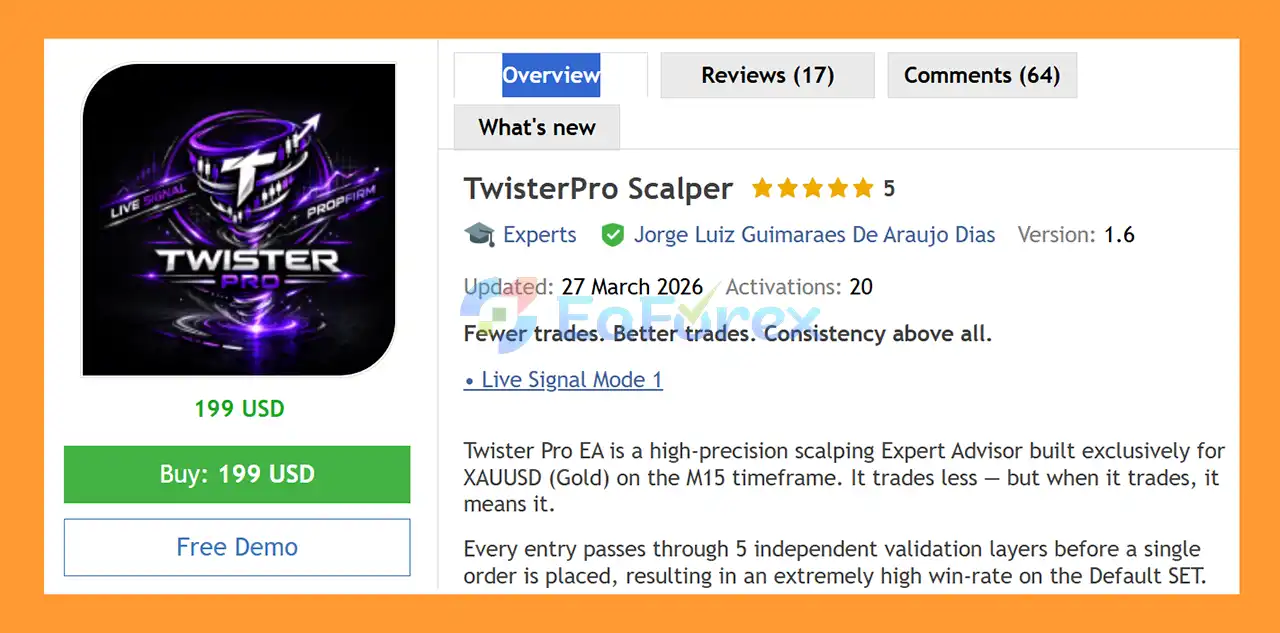
Product Overview
TwisterPro Scalper EA MT5 is a high-precision automated scalping Expert Advisor designed exclusively for XAUUSD (Gold) on the M15 timeframe. The EA is built around a selective trading philosophy: instead of opening a large number of positions, it aims to trade only when multiple market conditions align.
According to its specifications, every potential entry passes through five independent validation layers before a trade is opened. This multi-layer confirmation approach is designed to filter out lower-quality signals and focus on setups with stronger technical confluence.
TwisterPro Scalper EA MT5 offers two trading modes, allowing traders to choose between a more selective approach or a shorter-stop-loss configuration with greater market exposure.
Importantly, Twister Pro does not use Grid or recovery-style trading. Each position is opened with a predefined Take Profit (TP) and Stop Loss (SL), giving traders a clearly defined risk structure for every trade.
About the Developer
- Author: Luiz Guimaraes De Araujo Dias
- Experience: Over +1 years of experience on MQL5.
- Notable Products: TwisterPro Scalper EA MT5, NeonScalper MT5, CatFather EA MT5 and other advisors.
- Flagship Product: TwisterPro Scalper EA MT5 is rated as the best performing product of the year.
>> Delivery time 24h-48h after payment.
>>> Refund if not delivered.
>>> You will receive the latest version without any limitations (ID+Time).>>Reviewed by Jason Stap <<
Main Features of TwisterPro Scalper EA MT5
1. XAUUSD M15 Scalping
TwisterPro Scalper EA MT5 is specifically optimized for Gold (XAUUSD) and operates on the M15 timeframe. Its specialized design allows the EA to focus on the unique volatility and price behavior of the gold market.
2. Five-Layer Entry Validation
One of the key features of Twister Pro is its multi-layer entry validation system. A trade is only considered when it passes five independent validation layers.
This selective approach is intended to reduce unnecessary entries and prioritize higher-quality trading opportunities rather than maximizing trade frequency.
3. Two Trading Modes
TwisterPro Scalper EA MT5 provides two configurations for different trading preferences:
Mode 1 – Recommended
- Very high assertiveness
- Few trades per week
- More selective trading approach
- Designed around disciplined market participation
- Suitable for traders who prefer fewer entries
Mode 2 – Short SL
- Significantly shorter Stop Loss
- More trading opportunities than Mode 1
- Smaller individual loss potential
- Designed for traders seeking greater market exposure
- Maintains predefined risk on each position
The two modes allow users to choose between a more selective trading style and a configuration that aims to participate in the market more frequently.
4. No Grid or Recovery System
TwisterPro Scalper EA MT5 does not rely on Grid trading. Instead, every trade has its own predefined Stop Loss and Take Profit.
This is an important distinction for traders who want to avoid strategies that continuously add positions when the market moves against an existing trade.
5. Defined Trade Risk
Because each position uses a Stop Loss, traders can establish a clear maximum-loss framework for individual trades. However, the actual monetary risk will depend on lot size, account balance, broker conditions, and the distance of the Stop Loss.
6. Low-Frequency Trading Approach
The recommended Mode 1 is designed to trade only a few times per week. This makes Twister Pro different from high-frequency scalpers that continuously search for new entries.
Fewer trades can mean less market exposure, but it also means there may be periods when the EA does not open any positions.
7. RAW Spread Requirement
A RAW Spread account is essential according to the EA's specifications. This requirement is particularly relevant for Gold scalping because spread and execution costs can have a meaningful impact on short-term trading results.
8. VPS Recommended
A VPS is strongly recommended to keep MetaTrader 5 running continuously and reduce potential interruptions caused by computer shutdowns, internet problems, or unstable local connections.
How Does Twister Pro EA MT5 Work?
- TwisterPro Scalper EA MT5 follows a selective, confirmation-based trading process.
- The general workflow can be summarized as follows:
- Market Analysis → Five Validation Layers → Entry Confirmation → Trade Execution → TP/SL Management
- The EA continuously monitors XAUUSD on the M15 chart and evaluates potential trading conditions. Before placing an order, the setup must pass its five validation layers.
- When the required conditions are satisfied, Twister Pro can open a position according to the selected trading mode.
- Once the trade is active, the position is managed using its predefined Take Profit and Stop Loss parameters.
- This approach means Twister Pro is not designed to recover losing positions by continuously increasing exposure. Instead, individual trades have predefined exit levels.
Why Choose Twister Pro EA MT5?
There are several characteristics that may make Twister Pro interesting for traders looking for an automated Gold scalping system.
Selective Trading Instead of Overtrading
TwisterPro Scalper EA MT5 is designed to trade less frequently, particularly in its recommended Mode 1. The objective is to wait for stronger conditions instead of entering the market simply because a short-term price movement occurs.
Specialized for Gold
Rather than supporting a large number of currency pairs, Twister Pro focuses exclusively on XAUUSD. This specialization can simplify testing and configuration because the strategy is designed around one specific market.
No Grid Strategy
The absence of Grid trading may appeal to traders who prefer individual trade management rather than accumulating multiple positions during adverse market movements.
Two Risk Profiles
Mode 1 and Mode 2 give traders flexibility. Users can choose the more selective configuration or the Short SL mode depending on their preferred trading frequency and per-trade risk profile.
Simple Trading Environment
The setup is relatively focused:
- XAUUSD
- M15 timeframe
- RAW Spread account
- VPS recommended
- Defined TP and SL
- No Grid
This makes the EA straightforward to evaluate and test under its intended conditions.
TwisterPro Scalper EA MT5 Performance Review
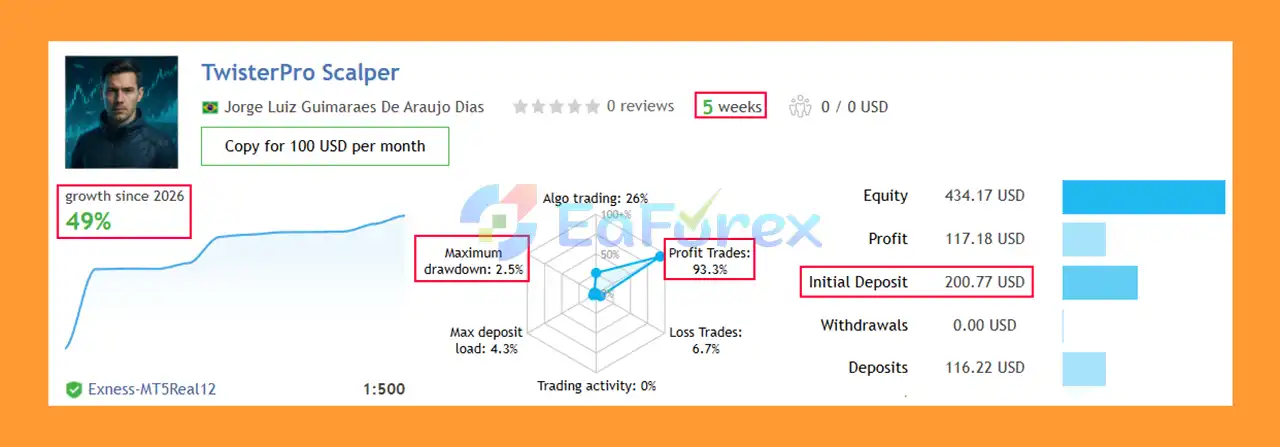
🟢Signal Results
🔺XAUUSD (Gold) – 5 consecutive weeks of trading
- Initial Deposit: $200
- Growth Rate: +49%
- Win Rate (% of total): 92.9%
- Maximum Drawdown: 2.5%
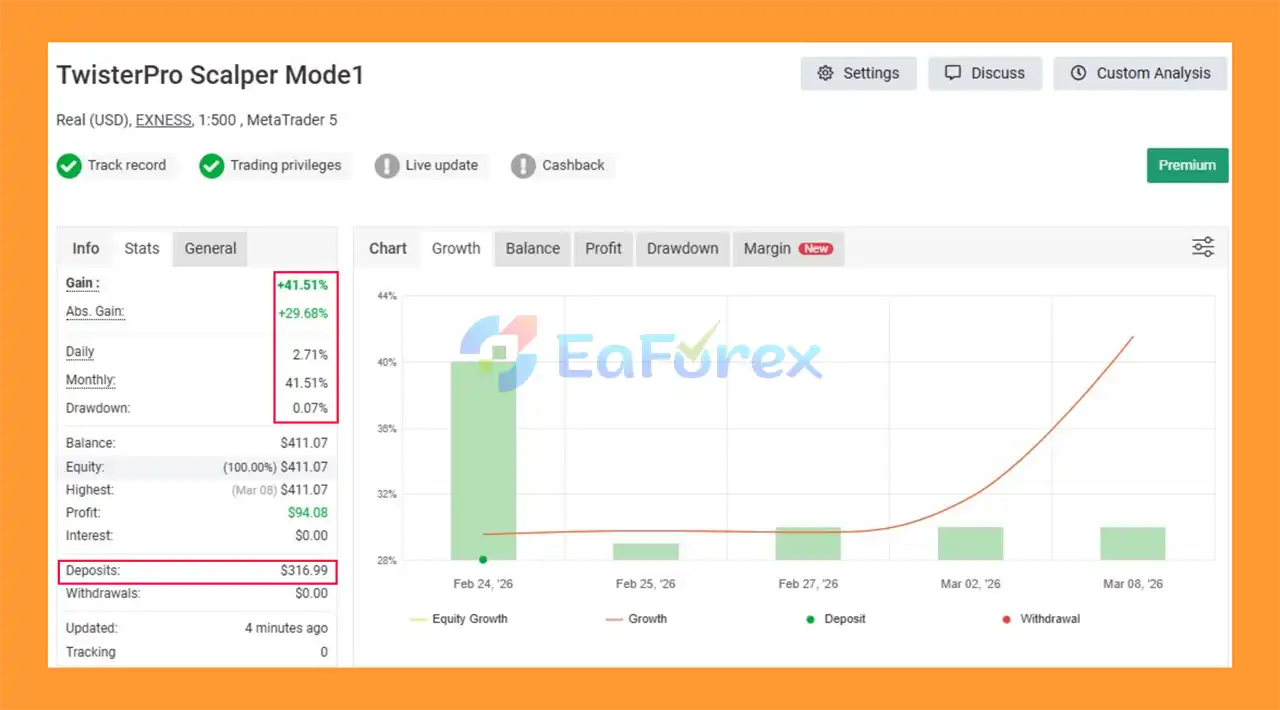
🟢Myfxbook Results
🔺XAUUSD (Gold) – 5 consecutive weeks of trading
- Initial Deposit: $316.99
- Total Gain: +41.51%
- Average Daily Profit: 2.71%
- Average Monthly Profit: 41.51%
- Maximum Drawdown: 0.07%
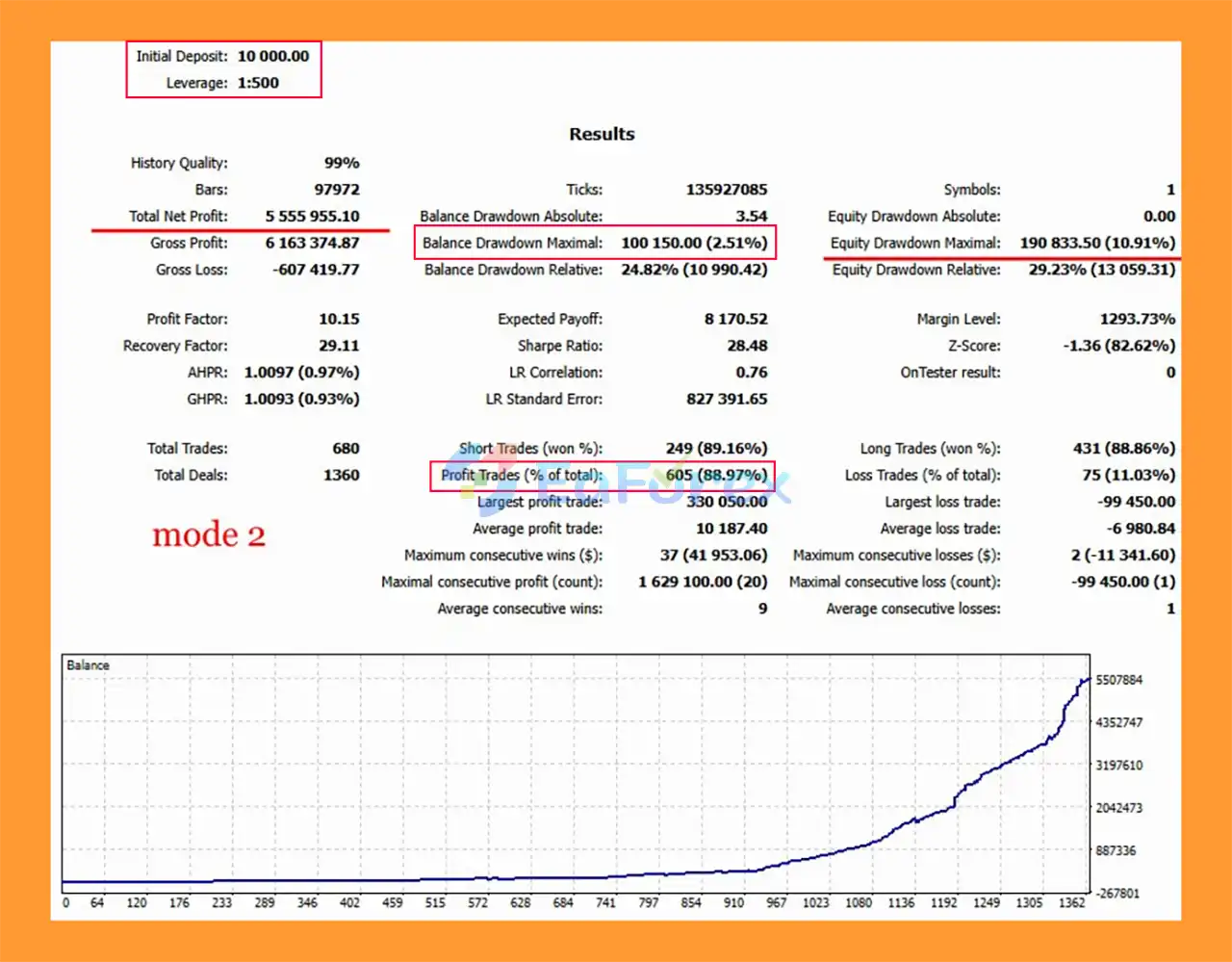
🟢Backtest Results
🔺XAUUSD (Gold) – For many years
- Initial Deposit: $10,000
- Total Net Profit: $5.55 million
- Win Rate (% of total): 88.97%
- Maximum Drawdown: 2.51%
Performance and Risk Management
TwisterPro Scalper EA MT5 is presented as having an extremely high win rate on its Default configuration. However, a high win rate by itself should not be considered sufficient evidence of profitability or low overall risk.
Trading performance should also be evaluated using metrics such as:
- Maximum drawdown
- Profit factor
- Average win versus average loss
- Number of trades
- Consecutive losses
- Recovery factor
- Risk per trade
- Trading costs
- Slippage
- Spread conditions
The EA's two modes provide different approaches to risk management.
Mode 1 focuses on fewer trades and a more selective trading style. This may reduce the frequency of market exposure, although fewer trades do not automatically mean lower overall risk.
Mode 2 uses a significantly shorter Stop Loss and is intended to generate more market exposure. While individual losses may be smaller, a shorter Stop Loss can also make a strategy more sensitive to normal XAUUSD price fluctuations, spread expansion, and execution quality.
For this reason, users should test both modes under realistic broker conditions before deciding which configuration is appropriate.
Broker and Execution Requirements
Twister Pro's specifications state that a RAW Spread account is essential.
Recommended brokers include:
- Exness Raw
- Vantage
- Fusion Markets
Because Twister Pro is a scalping EA, execution conditions can have a significant effect on real-world results. Traders should pay particular attention to:
- Spread
- Slippage
- Execution speed
- Order execution quality
- Server stability
- Commission costs
- XAUUSD contract specifications
A VPS is also strongly recommended for continuous operation.
The minimum stated deposit is $100, while $250 is recommended. These figures should be treated as product specifications rather than guarantees that the EA will perform safely or profitably at those account sizes.
Weaknesses and Risk Warnings
Despite its selective trading design, TwisterPro Scalper EA MT5 still carries the normal risks associated with automated Gold trading.
XAUUSD Can Be Highly Volatile
Gold can experience rapid price movements during major economic releases, central-bank events, geopolitical developments, and periods of changing market liquidity. Even a predefined Stop Loss cannot eliminate the possibility of slippage or execution differences.
A High Win Rate Does Not Eliminate Risk
A high percentage of winning trades does not necessarily mean that an EA will remain profitable. The size and frequency of losing trades are equally important.
Mode 2 May Be More Sensitive to Market Noise
The Short SL mode uses a significantly shorter Stop Loss. While this can limit the loss on individual trades, it can also increase sensitivity to short-term price fluctuations.
RAW Spread Is Essential
Using an unsuitable account with wider spreads can negatively affect scalping performance. Traders should follow the stated RAW Spread requirement rather than assuming that any MT5 account will produce comparable results.
Few Trades Can Mean Long Waiting Periods
Mode 1 is designed to trade only a few times per week. Traders expecting continuous activity may find this approach less suitable.
Backtest and Live Results Can Differ
Historical or backtested results may not fully represent future live trading performance. Differences in spread, slippage, liquidity, execution speed, broker conditions, and market behavior can all influence actual results.
Past performance does not guarantee future results. Trade responsibly and use appropriate risk management.
Pros and Cons
Pros
- Designed specifically for XAUUSD
- Uses the M15 timeframe
- Five-layer entry validation
- Selective trading approach
- Two trading modes
- No Grid strategy
- No Martingale-style recovery mentioned
- Every trade has predefined TP and SL
- Mode 2 provides shorter Stop Loss exposure
- RAW Spread account requirement is clearly stated
- VPS strongly recommended for continuous operation
- Minimum deposit starts from $100
Cons
- Limited exclusively to XAUUSD
- Only designed for the M15 timeframe
- Mode 1 may generate relatively few trades
- Short Stop Loss Mode 2 may be more vulnerable to market noise
- Scalping performance can be strongly affected by spread and slippage
- Requires suitable RAW Spread trading conditions
- VPS is strongly recommended
- A high win rate does not guarantee profitability
- Live results can differ from historical or backtest results
Real User Reviews and Feedback
🔺 TwisterPro Scalper EA MT5 is highly appreciated by the MQL5 community for bringing stable and reliable profits. Below are 5 star reviews from users:
- MiguelEn (2026.03.26): “Trades not very often but in the precise points, this EA gives peace of mind.”
- Nonsense (2026.03.24): “This is a Legit EA for gold 15m timeframe, it use quality over quantity trades. Author is very responsive as well. I will update again my review next month.”
- Thierryouellet (2026.03.11): “Really impressed so far! This EA did not missed one trade in my live account. It’s been one of my top performing EA lately.”
- Femke (2026.03.26): “Very satisfied with this EA. It is early, im running it for a week now, but it has not have a losing trade. It is a great addition to a portfolio. Happy to see what happens in the future.”
What’s Included in the Download Package?
- Experts:
- Setting (If Any).docx
- Installation Guide.docx
- SetFiles:
- TwisterPro_Exness_Default.set



