









-
 Unlimited Activations
-
 Instant delivery
-
 Easy to install






 Unlimited Activations
Instant delivery
Easy to install
Unlimited Activations
Instant delivery
Easy to install
 Free Update
 Free Install Support

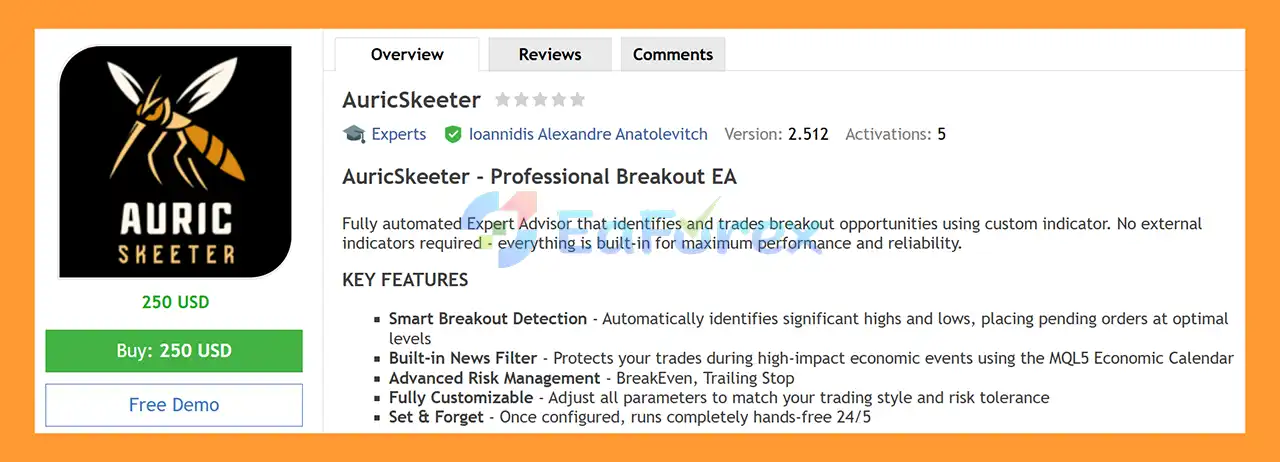
AuricSkeeter EA MT5 is a fully automated Gold Breakout Expert Advisor for MetaTrader 5, designed specifically for trading XAUUSD (Gold) on the M30 timeframe.
The EA uses a built-in custom breakout detection system to identify significant market highs and lows and automatically place pending orders around potential breakout levels. No external indicators are required because the core trading logic is integrated directly into the Expert Advisor.
AuricSkeeter EA MT5 also includes a built-in MQL5 Economic Calendar news filter, spread protection, BreakEven, and Trailing Stop functionality to help manage trades under changing market conditions.
Once configured, the EA is designed to operate automatically throughout the trading week, providing a set-and-forget automated Gold trading solution for traders who prefer breakout-based strategies.
>> Delivery time 24h-48h after payment.
>>> Refund if not delivered.
>>> You will receive the latest version without any limitations (ID+Time).>>Reviewed by Jason Stap <<
AuricSkeeter automatically analyzes market structure to identify significant highs and lows that may become important breakout levels.
When suitable conditions are detected, the EA can place pending orders around these levels and wait for the market to confirm the breakout.
This allows the system to focus on potential price expansion rather than continuously entering trades in the middle of a trading range.
The breakout detection system is integrated directly into the EA.
No additional third-party indicators are required, helping simplify installation and reducing the need to manage external indicator dependencies.
Instead of requiring manual entry, AuricSkeeter can automatically place pending orders at calculated breakout levels.
When price reaches the required level and the breakout conditions are satisfied, the corresponding order can be activated automatically.
AuricSkeeter includes a built-in MQL5 Economic Calendar filter designed to pause or restrict trading around major economic announcements.
This feature can help reduce exposure to potentially unpredictable market conditions surrounding high-impact news events.
The EA includes an automatic spread filter that prevents new trading activity when the current spread exceeds the configured acceptable level.
This can be particularly relevant when trading XAUUSD because Gold spreads can expand during volatile periods and around major market events.
The BreakEven function can automatically adjust a trade’s Stop Loss once the position reaches a predefined level of profit.
This can help protect accumulated gains while reducing the risk of allowing a profitable position to return fully into loss.
The built-in Trailing Stop allows the EA to dynamically adjust the protective Stop Loss as the trade moves in the expected direction.
This can help maintain exposure to larger Gold movements while automatically managing downside risk.
Once the parameters are configured, AuricSkeeter can monitor the market, identify breakout conditions, place pending orders, and manage open trades automatically.
The system is designed for hands-free operation during the trading week.
The EA provides configurable parameters so traders can adjust its behavior according to their preferred trading style and risk tolerance.
This flexibility allows users to customize elements such as risk controls, breakout conditions, trading filters, and trade-management settings.
AuricSkeeter EA MT5 follows a breakout-oriented trading process.
The EA continuously monitors XAUUSD on the M30 timeframe and analyzes price behavior to identify significant highs and lows.
These levels can represent areas where the market may potentially break out of its current range.
When the internal breakout logic identifies a relevant trading level, the EA prepares the corresponding pending order.
Rather than entering immediately at the current market price, the system waits for price to reach the predefined breakout area.
Before placing or activating a trade, the EA can apply its protection mechanisms, including:
If market conditions do not meet the required parameters, trading activity can be restricted.
When price reaches the required breakout level and the trading conditions are satisfied, the pending order can be triggered automatically.
After entry, AuricSkeeter manages the trade using its configured BreakEven and Trailing Stop functions.
This allows the EA to automatically adjust protective levels as the position develops.
The EA continues monitoring XAUUSD throughout its configured trading schedule, searching for new breakout opportunities while applying its risk and market-condition filters.
AuricSkeeter EA MT5 is designed for traders who want an automated XAUUSD breakout strategy without relying on external indicators or manual trade execution.
The EA combines breakout detection with several practical trading protections:
Its breakout-focused structure makes it different from systems that rely primarily on continuous grid entries, averaging, or frequent market orders.
For traders looking for a Gold Breakout EA MT5 with integrated trade protection and automated execution, AuricSkeeter provides a straightforward technical framework.
🔺XAUUSD (Gold) pair
AuricSkeeter EA MT5 backtets
AuricSkeeter EA MT5 is designed primarily for XAUUSD on the M30 timeframe.
| Parameter | Recommendation |
|---|---|
| Trading Symbol | XAUUSD (Gold) |
| Recommended Timeframe | M30 |
| Minimum Deposit | $100 |
| Recommended Capital | $200+ |
| Suggested Leverage | 1:100 or higher |
The $100 minimum deposit should be considered a starting requirement rather than a guarantee that the EA can safely operate under all market conditions.
A larger balance may provide greater flexibility for managing margin requirements and temporary drawdown.
The automatic spread filter is an important component of the risk-management system.
Gold spreads can change significantly depending on market liquidity, broker conditions, session, and economic events. The spread filter can prevent the EA from entering new positions when trading costs become unfavorable.
The integrated MQL5 Economic Calendar allows the EA to identify scheduled high-impact economic events and restrict trading around those events according to its configured settings.
However, unexpected market events can occur outside scheduled economic releases, so a news filter cannot eliminate all event-driven risk.
Once a position moves into profit, the EA can use BreakEven and Trailing Stop mechanisms to manage the trade.
These functions can help protect open profits, but they cannot guarantee that a profitable trade will close with a profit because rapid market movements and slippage can affect execution.
Breakout strategies can experience false breakouts, where price temporarily moves beyond a significant high or low before reversing.
This can result in losing trades even when the breakout level has been identified correctly.
XAUUSD can experience rapid price movements, especially during major economic announcements, changes in market liquidity, and periods of elevated volatility.
Fast price movements can increase slippage and execution risk.
The economic calendar filter can help manage scheduled high-impact events, but it cannot predict unexpected geopolitical, financial, or market-moving developments.
The EA’s performance can vary depending on broker spread, commission, liquidity, execution speed, and slippage.
The spread filter helps control entry conditions but does not completely eliminate execution-related risk.
Although the EA lists $100 as the minimum deposit, smaller accounts have less margin available to absorb adverse market movements.
Traders should consider using conservative risk settings and thoroughly test the EA before deploying it on a small live account.
Higher leverage can increase the amount of exposure available relative to account equity, but it can also increase the speed at which losses and margin requirements accumulate.
The suggested 1:100 or higher leverage should not be interpreted as a recommendation to maximize available leverage.
Install and open MetaTrader 5 and log in to your trading account.
Inside MetaTrader 5, go to:
File → Open Data Folder → MQL5 → Experts
Copy the AuricSkeeter EA MT5 file into the Experts folder.
Restart MetaTrader 5 or refresh the Expert Advisors section in the Navigator window.
The EA should then appear in the list of available Expert Advisors.
Open the XAUUSD trading symbol provided by your broker and select the M30 timeframe.
Make sure the broker’s symbol specifications and trading conditions are compatible with the EA.
Drag AuricSkeeter EA MT5 from the Navigator onto the XAUUSD M30 chart.
Enable Algo Trading when prompted.
Review the EA’s available settings and adjust them according to your trading requirements.
Pay particular attention to:
Make sure the MT5 platform can access the MQL5 Economic Calendar so that the built-in news filter can function correctly.
Before using real funds, run AuricSkeeter EA MT5 on a Demo Account.
Monitor:
After sufficient forward testing, the EA can be considered for live deployment using an appropriate risk level.
Avoid assuming that the minimum $100 balance is suitable for every broker or market condition. A larger account and conservative risk parameters may provide more room for normal market fluctuations.
In summary, AuricSkeeter EA MT5 is a specialized XAUUSD Gold Breakout Expert Advisor for MetaTrader 5, designed for automated trading on the M30 timeframe. Its core strategy focuses on identifying significant market highs and lows and using pending orders to capture potential breakout movements rather than relying on continuous market entries.
The EA combines its built-in breakout detection system with practical trade-management tools, including the MQL5 Economic Calendar news filter, automatic spread protection, BreakEven, and Trailing Stop. These features provide additional control over entry conditions and open-position management, although they cannot eliminate the risks associated with Gold trading.
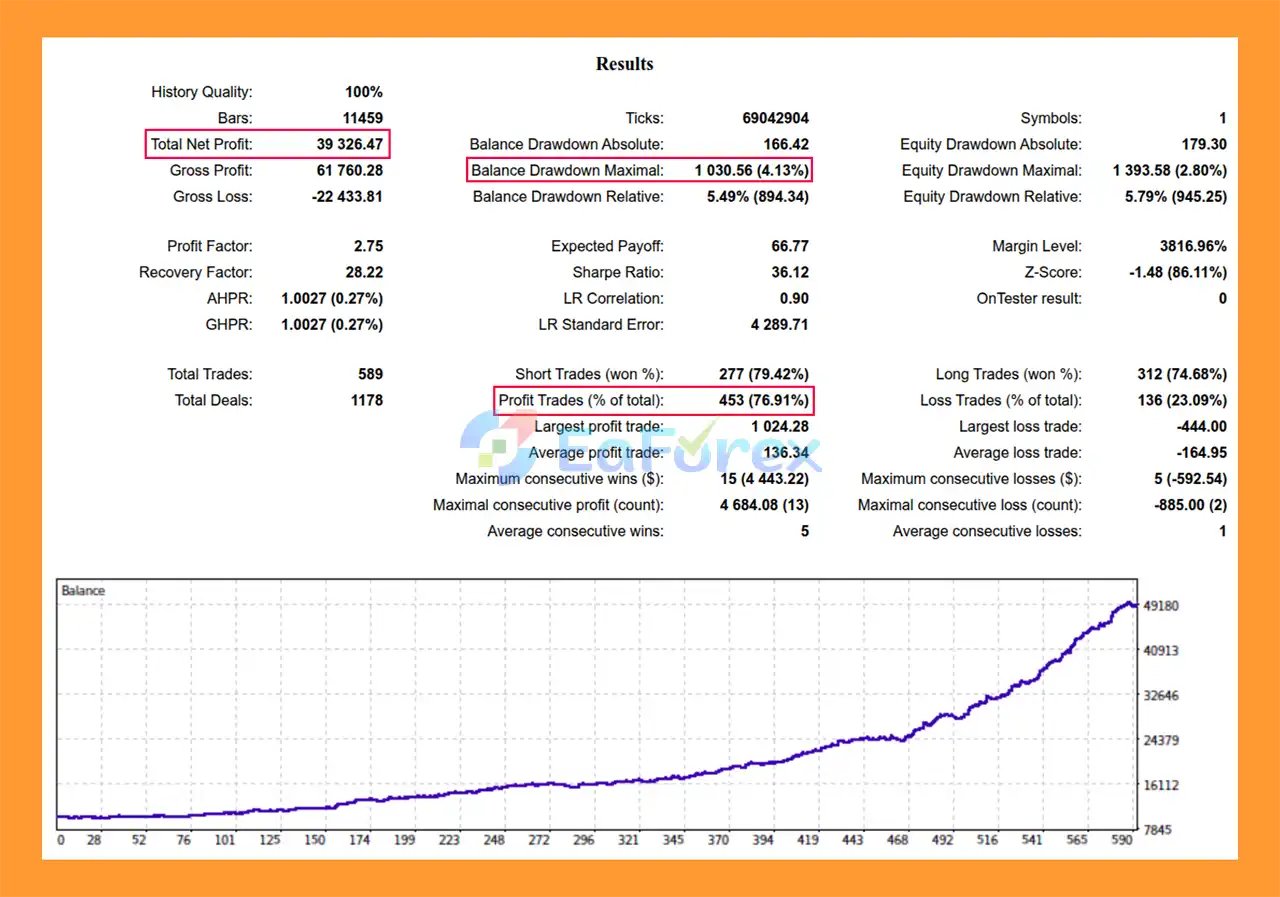
The supplied XAUUSD backtest reports $39,326.47 total net profit, a 76.91% win rate, and 4.13% maximum drawdown. These are historical backtest results and should not be interpreted as a guarantee of future live performance. Actual results may differ due to XAUUSD volatility, false breakouts, spread, slippage, commissions, execution quality, liquidity, leverage, and broker conditions.
Overall, AuricSkeeter EA MT5 provides a structured framework for automated Gold breakout trading with integrated market filters and position-management features. Traders should verify broker compatibility, test the EA under realistic conditions, and evaluate its behavior during both trending and ranging markets. Thorough demo and forward testing, conservative position sizing, and sufficient account margin are recommended before considering live deployment.
1. What is AuricSkeeter EA MT5 and how does it work?
AuricSkeeter EA MT5 is a fully automated breakout trading robot designed for the MetaTrader 5 platform. It analyzes market price structure to identify key peaks and troughs, then places pending orders at strategic levels where breakouts are likely to occur. Once a breakout is confirmed, the EA automatically executes trades and manages them using built-in risk management tools such as trailing stop and break-even functions.
2. Which markets and currency pairs work best with AuricSkeeter EA MT5?
AuricSkeeter EA MT5 is specifically optimized for trading XAUUSD (Gold) due to its strong volatility and frequent breakout opportunities. However, depending on the settings and broker conditions, the EA may also be adapted to trade other high-volatility instruments on MetaTrader 5.
3. Do I need trading experience to use AuricSkeeter EA MT5?
No advanced trading experience is required. AuricSkeeter EA MT5 is designed as a hands-free automated trading system. Once installed and configured, it can automatically analyze the market, place trades, and manage positions without constant manual intervention.
4. Does AuricSkeeter EA MT5 use indicators?
Yes. AuricSkeeter EA MT5 includes a built-in indicator system integrated directly into the EA. This means users do not need to install any external indicators or tools, ensuring better stability and optimized performance.
5. How does AuricSkeeter EA MT5 manage trading risk?
The EA includes several risk management features such as:
BreakEven function to secure profits
Trailing Stop to protect gains
Automatic spread protection
Economic news filter to avoid high-impact events
Customizable lot size and strategy settings
These tools help traders maintain disciplined risk control during automated trading.
6. Can AuricSkeeter EA MT5 avoid trading during major news events?
Yes. AuricSkeeter EA MT5 includes an economic news filter connected to the MQL5 economic calendar. This feature allows the EA to automatically pause trading during high-impact economic announcements that could cause unpredictable market volatility.
7. What is the trading strategy used by AuricSkeeter EA MT5?
AuricSkeeter EA MT5 uses a breakout trading strategy. The system identifies consolidation zones and key support and resistance levels. It then places pending orders at those levels to capture strong price movements when the market breaks out of the range.
8. What is the recommended minimum deposit for AuricSkeeter EA MT5?
Based on the provided backtest results, the EA was tested with an initial deposit of $100. However, many traders prefer starting with a larger balance to improve stability, manage drawdowns more effectively, and allow more flexible risk settings.
9. Is AuricSkeeter EA MT5 compatible with all brokers?
AuricSkeeter EA MT5 is designed to work with most brokers that support MetaTrader 5. For best performance, it is recommended to use brokers with low spreads, fast execution, and ECN trading conditions, especially when trading volatile assets like gold.
In stock
In stock
In stock
In stock
In stock
Out of stock
No account yet?
Create an Account












 Automatic EA
 EA Best Seller
 Expert Advisor MT4
 Expert Advisor MT5
 HFT EA


Reviews
Clear filtersThere are no reviews yet.