









-
 Unlimited Activations
-
 Instant delivery
-
 Easy to install





 Unlimited Activations
Instant delivery
Easy to install
Unlimited Activations
Instant delivery
Easy to install
 Free Update
 Free Install Support

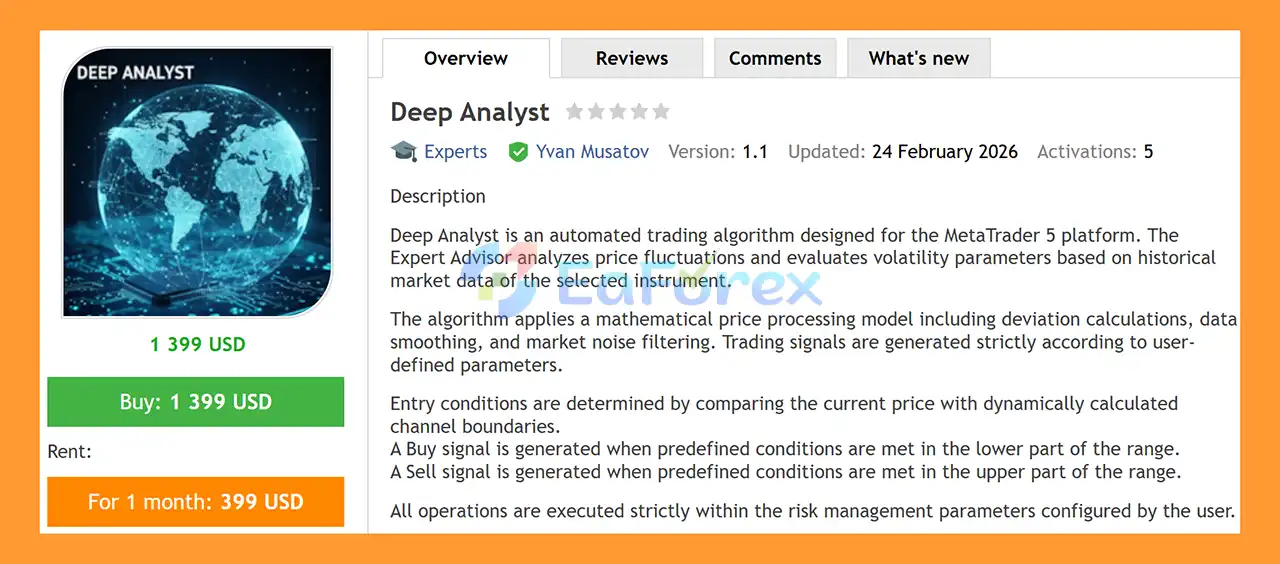
Deep Analyst EA MT5 is an automated MetaTrader 5 Expert Advisor designed to analyze price fluctuations, market volatility, and historical price behavior to identify potential trading opportunities.
The EA uses a mathematical price-processing model that incorporates price deviation calculations, data smoothing, volatility analysis, and market noise filtering. Instead of relying on external indicators or third-party signal services, Deep Analyst EA MT5 operates exclusively using the price data available within the selected trading instrument.
Trading signals are generated according to user-defined parameters and dynamically calculated price channels.
A Buy signal can be generated when predefined conditions occur in the lower portion of the calculated trading range, while a Sell signal can be generated when corresponding conditions occur in the upper portion of the range.
The Expert Advisor also includes configurable Take Profit, Stop Loss, Trailing Stop, fixed or dynamic position sizing, trade-series limitations, and multiple order execution modes, giving traders control over both strategy behavior and risk management.
Designed primarily for the H1 timeframe, Deep Analyst EA MT5 can be tested through the MT5 Strategy Tester before being deployed on a live account.
>> Delivery time 24h-48h after payment.
>>> Refund if not delivered.
>>> You will receive the latest version without any limitations (ID+Time).>>Reviewed by Jason Stap <<
Deep Analyst EA MT5 Overview
Deep Analyst EA MT5 processes historical and current price data using a mathematical model designed to evaluate market behavior.
The system considers:
This creates the foundation for the EA’s trading decisions.
The EA calculates dynamic channel boundaries based on configured volatility parameters.
These boundaries help define the upper and lower areas of the current trading range.
Potential Buy and Sell conditions are then evaluated in relation to these dynamically calculated boundaries.
A potential Buy signal is generated when the predefined entry conditions occur in the lower portion of the calculated range.
The exact behavior can be adjusted through parameters such as PriceDeviationSens, CorrectionCycle, MinTradeZoneWidth, and StandardDevMult.
A potential Sell signal is generated when predefined conditions occur in the upper portion of the calculated price range.
This allows the EA to evaluate both sides of the calculated volatility channel rather than relying on a single directional signal.
The NoiseFilteringLevel parameter allows users to configure how aggressively the system filters market noise.
This is designed to reduce the influence of smaller or potentially less meaningful price fluctuations when evaluating trading conditions.
The ImpulseSmoothing parameter controls the smoothing of input price data.
Smoothing can help the algorithm process price movements in a more structured way and reduce the influence of short-term fluctuations.
Deep Analyst EA MT5 supports two primary position-sizing approaches:
When UseDynamicEquityRisk is enabled, the EA can calculate position size according to the configured EquityRiskPercent.
The EA supports a configurable limit for the number of trades within a series through MaxGridSeries.
This allows traders to control how many positions can belong to the same trading sequence.
The ProgressionRatio parameter controls volume adjustment within a trading sequence.
Users should understand that increasing position size during a sequence can increase both potential recovery capacity and overall exposure.
The EA supports configurable:
These parameters allow traders to define the intended profit target and protective stop distance in points.
Deep Analyst EA MT5 includes a configurable Trailing Stop system.
The EnablePriceFollowing parameter activates the feature, while FollowStartDistance and FollowStepSize control when and how the trailing mechanism follows price.
Depending on the selected configuration, trailing can operate in real or virtual mode.
The EA provides independent controls for:
This allows traders to enable only Buy trades, only Sell trades, or both directions.
Deep Analyst EA MT5 supports different order execution configurations, including DirectExecutionMode for ECN-style environments and customizable ExecutionPolicy settings based on broker requirements.
The algorithm operates exclusively on price data from the selected trading instrument.
It does not depend on external signal providers or third-party trading signals.
Deep Analyst EA MT5 follows a structured price-analysis process to identify potential entries.
The EA evaluates price behavior using the selected instrument’s historical market data.
The TrendAnalysisPeriod defines the primary calculation period used by the algorithm.
The system applies its configured smoothing and mathematical processing parameters.
ImpulseSmoothing helps control the degree of data smoothing, while PriceDeviationSens determines the sensitivity to price deviations.
The EA evaluates the current market range using its volatility parameters.
The StandardDevMult parameter influences the calculation of the channel boundaries, while VolatilityChannelLimit controls the maximum permitted width of the calculated range.
The NoiseFilteringLevel is used to filter smaller market fluctuations that may not meet the strategy’s required conditions.
The goal is to focus the algorithm on price movements that satisfy the configured analytical criteria.
The EA evaluates whether the current price is positioned within an appropriate area of the calculated range.
A potential Buy condition is evaluated toward the lower portion of the channel, while a potential Sell condition is evaluated toward the upper portion.
The CorrectionCycle parameter provides an additional confirmation period before an entry condition is accepted.
The EA then checks the remaining user-defined trading and risk parameters.
Depending on the configuration, the EA can use either:
Fixed Volume
or
Dynamic Equity Risk
When dynamic risk is enabled, position size is calculated according to the configured equity-risk percentage.
Once all conditions are satisfied, the EA executes the order using the selected execution mode.
The position can then be managed through:
Deep Analyst EA MT5 is designed for traders looking for an automated trading system based on mathematical price analysis and dynamic volatility channels rather than external trading signals.
The EA provides a relatively broad range of configuration options, allowing traders to customize the system around their preferred risk and trading parameters.
Key advantages include:
For traders interested in a price-action and volatility-based EA for MT5, Deep Analyst provides a configurable framework centered on mathematical processing of market data.
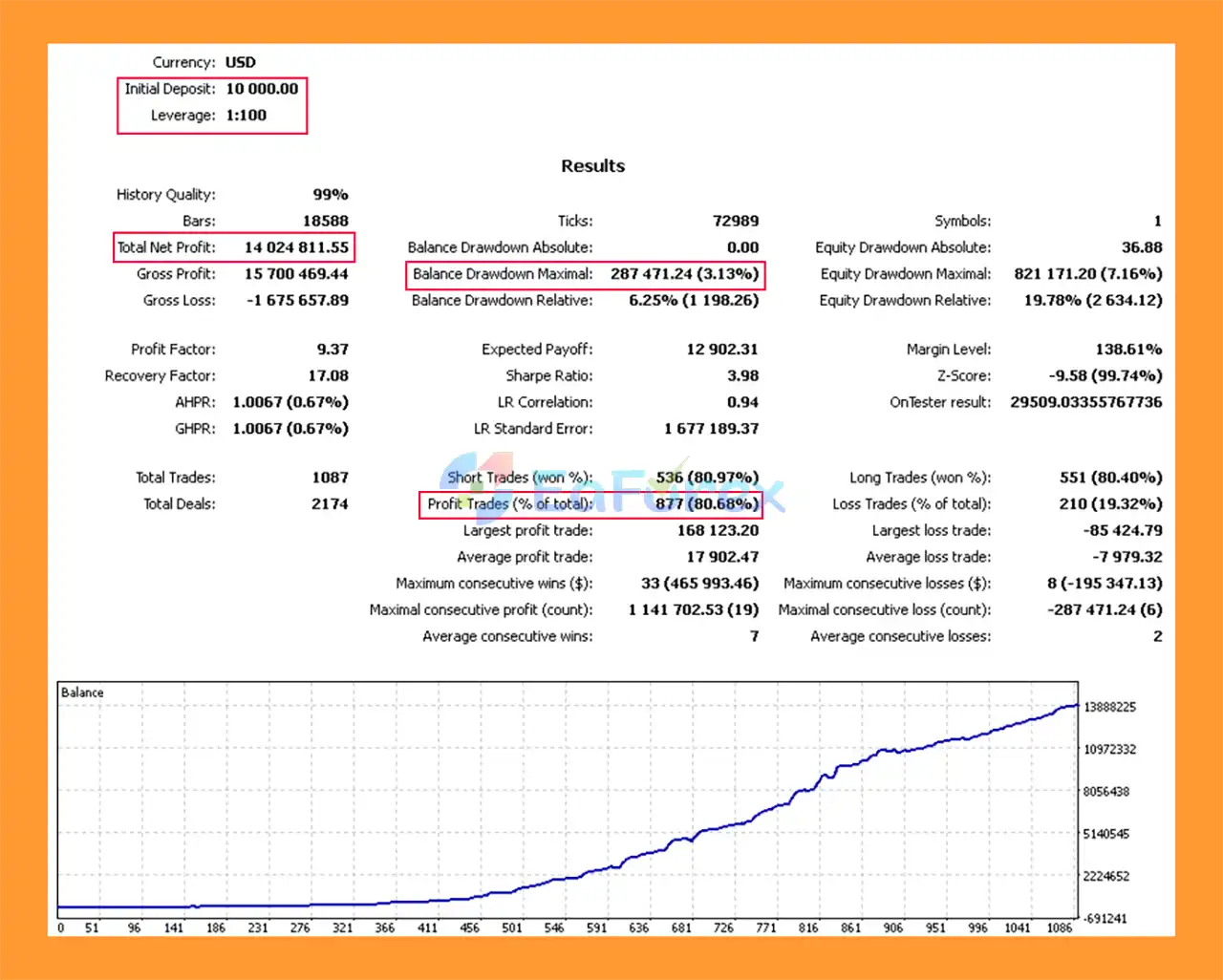
Deep Analyst EA MT5 backtets
Deep Analyst EA MT5 is recommended for the H1 timeframe, where its price analysis and volatility calculations can operate over a broader market context than very short-term scalping systems.
| Parameter | Recommendation |
|---|---|
| Timeframe | H1 |
| Account Type | ECN or Low-Spread Account |
| Testing | MT5 Strategy Tester + Demo Account |
| Trading Platform | MetaTrader 5 |
Using an ECN or low-spread account may help reduce transaction costs, although actual results will depend on the broker’s spread, commission, execution, and liquidity conditions.
When UseDynamicEquityRisk is enabled, the EA can automatically calculate position size according to the configured EquityRiskPercent.
This can provide more flexible position sizing as account equity changes.
However, a risk percentage does not eliminate the possibility of losses. Actual exposure can also be affected by market volatility, stop distance, trade frequency, and the number of positions in a series.
The MaxGridSeries parameter limits the number of trades that can belong to a particular series.
This is an important setting because allowing multiple positions within a sequence can increase total market exposure.
The ProgressionRatio controls volume adjustment within a trade sequence.
If the progression increases position size after additional entries, the resulting exposure can become significantly larger than the initial position. Traders should therefore test this parameter carefully before using it on a live account.
The EA supports configurable TargetProfitPoints and EmergencyStopPoints.
These parameters should be adapted to the instrument, broker’s point specification, volatility, and account size.
A mathematical model based on historical price behavior may perform differently when market conditions change significantly.
Past market characteristics do not guarantee that future price movements will behave in the same way.
Although the EA includes a configurable trade-series limit, multiple positions within one sequence can increase overall exposure.
The ProgressionRatio can further affect position size during a sequence.
Sudden changes in volatility can cause price to move rapidly through calculated channel boundaries.
This may result in entries occurring under conditions that differ from historical behavior.
No mathematical model can eliminate false signals.
A price movement into the upper or lower portion of a calculated range does not guarantee a subsequent reversal or profitable trade.
Actual trading results depend partly on:
For this reason, an EA may produce different results across different brokers.
Backtest results depend on the selected historical period, modeling method, spread assumptions, commission, and other testing parameters.
Backtest performance should not be interpreted as a guarantee of future live results.
Install and launch MetaTrader 5, then log in to your trading account.
In MT5, navigate to:
File → Open Data Folder → MQL5 → Experts
Copy the Deep Analyst EA MT5 file into the Experts folder.
Restart MetaTrader 5 or refresh the Expert Advisors section in the Navigator window.
Open the instrument you want to trade and select the H1 timeframe, which is the recommended timeframe for Deep Analyst EA MT5.
Drag Deep Analyst EA MT5 from the Navigator onto the chart.
Make sure Algo Trading is enabled.
Review the available inputs before starting the EA.
Important parameters include:
If you are using an ECN account, review the DirectExecutionMode and ExecutionPolicy settings and make sure they are compatible with your broker.
Before using real funds, run the Expert Advisor through the MT5 Strategy Tester.
Test different historical periods and realistic trading costs where possible.
After backtesting, run Deep Analyst EA MT5 on a Demo Account to evaluate its behavior under live market conditions.
Monitor drawdown, trade frequency, spread, execution, trade-series exposure, and position sizing.
Only after sufficient testing should the EA be considered for live deployment.
Use position sizing and risk parameters that are appropriate for your account size and acceptable level of risk.
In summary,
1. What is Deep Analyst EA MT5?
Deep Analyst EA MT5 is an automated trading robot designed for the MetaTrader 5 platform. It analyzes market price behavior using mathematical models, statistical deviations, and volatility analysis to identify structured trading opportunities.
2. How does Deep Analyst EA MT5 work?
The EA processes market data using statistical calculations, volatility analysis, and dynamic price channels. It compares current price movements against calculated channel boundaries and executes buy or sell trades when predefined conditions are met.
3. What trading strategy does Deep Analyst EA MT5 use?
Deep Analyst EA MT5 uses a mathematical price analysis strategy. The system calculates statistical deviations and volatility-based channels to identify potential market reversals or breakout opportunities.
4. Which markets can Deep Analyst EA MT5 trade?
Deep Analyst EA MT5 can be used to trade forex currency pairs and other financial instruments available on the MetaTrader 5 platform, depending on the broker’s supported assets.
5. Is Deep Analyst EA MT5 fully automated?
Yes. Once installed on the MetaTrader 5 platform, the EA can automatically analyze the market, open trades, and manage positions based on the configured parameters.
6. What risk management tools are included in Deep Analyst EA MT5?
The EA includes several configurable risk management features:
Stop Loss and Take Profit settings
Trailing Stop management (real or virtual)
Dynamic lot size calculation based on equity
Maximum trade series limitation
These tools help traders maintain controlled exposure.
7. Can traders customize the settings of Deep Analyst EA MT5?
Yes. The EA offers flexible parameter customization, allowing traders to adjust:
Trading direction (buy, sell, or both)
Channel deviation multipliers
Risk percentage and position size
Maximum number of trades per series
This flexibility makes the system adaptable to different trading styles.
8. Does Deep Analyst EA MT5 work with ECN brokers?
Yes. The EA is compatible with ECN and low-spread brokers that support the MetaTrader 5 platform, ensuring efficient order execution.
9. What are the backtest results of Deep Analyst EA MT5?
According to the provided backtest results:
Initial Deposit: $10,000
Total Net Profit: $14.024 million
Win Rate: 80.68%
Maximum Drawdown: 3.13%
These results highlight the EA’s strong statistical trading performance in historical testing.
In stock
In stock
In stock
In stock
In stock
Out of stock
No account yet?
Create an Account












 Automatic EA
 EA Best Seller
 Expert Advisor MT4
 Expert Advisor MT5
 HFT EA


Reviews
Clear filtersThere are no reviews yet.