









-
 Unlimited Activations
-
 Instant delivery
-
 Easy to install






 Unlimited Activations
Instant delivery
Easy to install
Unlimited Activations
Instant delivery
Easy to install
 Free Update
 Free Install Support

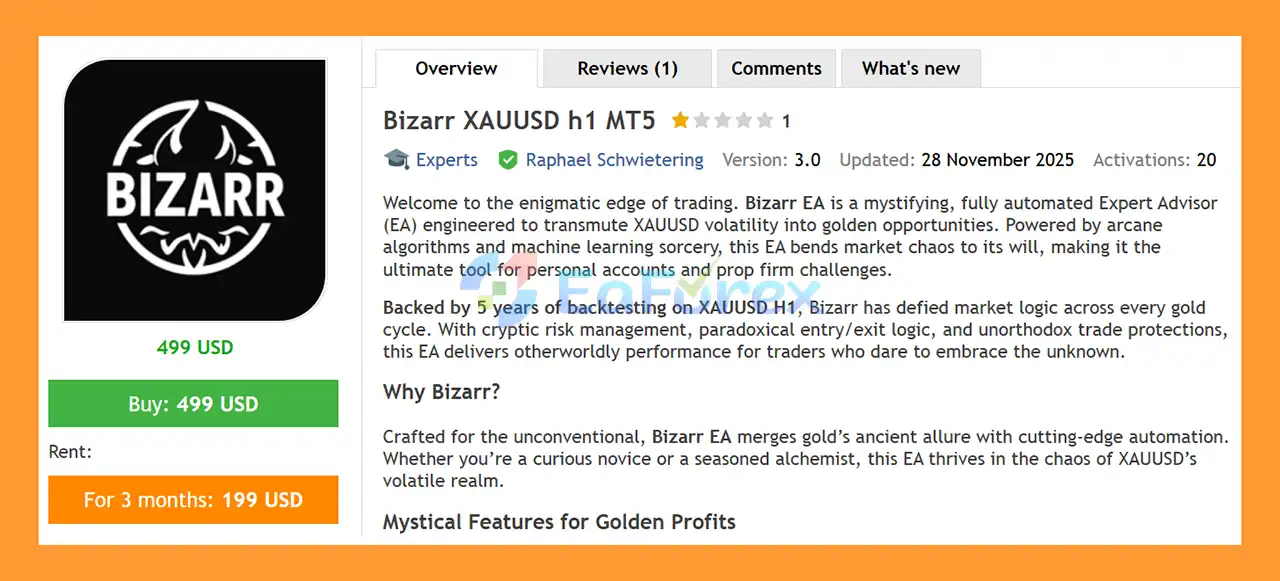
Bizarr XAUUSD H1 MT5 is a fully automated Expert Advisor (EA) for MetaTrader 5, specifically designed for trading XAUUSD (Gold) on the H1 timeframe. The EA is built to automate market analysis, trade execution, position management, and risk controls while allowing traders to customize important trading parameters.
Bizarr EA has been developed with a focus on the unique volatility and price behavior of the Gold market. The system has been evaluated using approximately 5 years of XAUUSD H1 historical data, covering different market environments from 2020 to 2025.
The EA combines automated trading logic with configurable Stop Loss, Take Profit, money management, spread filtering, daily loss protection, drawdown controls, equity protection, and trading-session management.
Bizarr XAUUSD H1 MT5 can be configured for different trading approaches, including Hedge, OnlyLong, and OnlyShort modes. Traders can also choose fixed-lot trading or percentage-based risk management based on account balance or equity.
>> Delivery time 24h-48h after payment.
>>> Refund if not delivered.
>>> You will receive the latest version without any limitations (ID+Time).>>Reviewed by Jason Stap <<
Bizarr XAUUSD H1 MT5 provides several settings for controlling and monitoring automated trading.
These settings allow traders to adapt the EA to different account structures and trading preferences.
Risk and trade management are important components of the EA.
Bizarr provides:
Traders can adjust these settings according to their preferred risk/reward structure and account-management strategy.
Bizarr includes configurable daily trading limits designed to help control automated exposure.
Key functions include:
These controls can help prevent the EA from continuing to open new positions after predefined daily thresholds have been reached.
The EA includes several filters designed to control trade entries and overall exposure.
These settings can help limit excessive exposure during periods of unfavorable trading conditions or unusually high market costs.
Bizarr provides multiple risk-management tools for automated Gold trading.
Traders can use these settings to establish predefined limits for daily trading activity.
Additional account-level controls include:
These features are designed to provide additional safeguards during unfavorable market conditions.
Bizarr allows traders to control when the EA is permitted to trade.
Features include:
This gives traders greater control over when automated trading is active.
Bizarr XAUUSD H1 MT5 is designed to automate trading decisions on the XAUUSD H1 chart.
After the EA is installed and activated on MetaTrader 5, it continuously monitors the Gold market according to its programmed trading logic and the parameters selected by the trader.
The general workflow can be understood as follows:
Market Monitoring → Entry Conditions → Protection Filters → Position Sizing → Trade Execution → SL/TP Management → Risk Monitoring
When trading conditions meet the EA’s internal requirements, Bizarr can open a position according to the selected trading mode.
Before entering a trade, configurable filters can help control whether trading is permitted. These include spread conditions, maximum open positions, lot limits, and maximum positions per candle.
Once a position is opened, the configured Stop Loss and Take Profit parameters provide predefined trade-management levels.
At the account level, Bizarr can monitor daily profit, daily loss, drawdown, and equity conditions. If configured protection limits are reached, the EA can restrict further trading according to its settings.
Because Bizarr is designed for the H1 timeframe, its trading behavior differs from short-term M1 or M5 scalping systems. Trading frequency may vary depending on market conditions and the EA’s configuration.
Bizarr XAUUSD H1 MT5 may be suitable for traders looking for an automated Gold trading system with extensive customization and risk-management features.
The EA is focused on XAUUSD, allowing its trading configuration to be tailored to the characteristics of Gold rather than being presented as a generic multi-market robot.
The H1 timeframe provides a structured environment for automated Gold trading and is different from ultra-short-term scalping strategies.
Bizarr has been tested using approximately 5 years of XAUUSD H1 historical data from 2020 to 2025, covering different Gold market environments.
Traders can select:
This provides additional flexibility depending on the desired trading direction and account configuration.
The EA provides several layers of protection, including:
Users can choose between fixed lot sizes and percentage-based risk calculations based on balance or equity.
Bizarr XAUUSD H1 MT5 has been evaluated using approximately five years of historical XAUUSD H1 data covering 2020–2025.
Long-term historical testing can provide useful information about how an automated strategy behaved across different market environments. However, backtesting should not be interpreted as a guarantee of future profitability.
The EA includes several tools designed to control trading risk.
Each trade can be managed using predefined Stop Loss and Take Profit parameters.
A maximum daily loss can be configured to limit additional trading after a specified loss threshold has been reached.
Maximum daily drawdown settings provide another layer of control over account exposure.
The EA can monitor account equity and restrict trading when predefined equity thresholds are reached.
Maximum open positions and maximum lot settings help control the amount of simultaneous exposure.
The spread filter can prevent new trades when trading costs exceed the configured threshold.
Protection settings can automatically reset according to the EA’s configured daily schedule.
These features are intended to help traders manage automated exposure, but no risk-management system can completely eliminate the possibility of losses.
Although Bizarr includes multiple protection features, traders should understand the potential limitations and risks of using an automated Gold Expert Advisor.
XAUUSD can experience rapid and significant price movements. Major economic announcements, interest-rate decisions, inflation data, geopolitical events, and changes in market sentiment can create substantial volatility.
The five-year backtest provides historical information only. Future market conditions may differ significantly from the conditions observed during the testing period.
Live performance may vary depending on:
High leverage can significantly increase both potential profits and potential losses. Traders should select leverage and risk settings carefully.
Aggressive lot sizes, excessive risk percentages, or loose protection settings can significantly increase account exposure.
For continuous automated trading, a reliable VPS is recommended. Platform shutdowns, internet interruptions, or server problems can interfere with EA operation.
Bizarr XAUUSD H1 MT5 cannot guarantee profits. Even strategies with positive historical backtests can experience losing periods or drawdowns in live markets.
| Pros | Cons |
|---|---|
| Designed specifically for XAUUSD | Focused primarily on Gold trading |
| Uses the H1 timeframe | Not designed as an ultra-short-term scalper |
| Approximately 5 years of historical testing | Backtest results do not guarantee future performance |
| Fixed-lot money management | Incorrect lot sizing can increase risk |
| Percentage-based risk management | Requires careful configuration |
| Stop Loss and Take Profit controls | Gold can experience sudden volatility |
| Daily loss protection | Broker conditions can affect results |
| Drawdown protection | Slippage may affect live execution |
| Equity protection | VPS is recommended for continuous operation |
| Spread filter | High leverage can increase potential losses |
| Maximum position and lot controls | No automated strategy eliminates market risk |
| Custom trading sessions | Results may vary between brokers |
| Hedge, OnlyLong and OnlyShort modes | Requires appropriate MT5 account configuration |
Installing Bizarr XAUUSD H1 MT5 on MetaTrader 5 is straightforward.
Obtain the Bizarr XAUUSD H1 MT5 Expert Advisor file from the official product source.
Launch MetaTrader 5 and log in to the trading account where you want to install the EA.
In MetaTrader 5, select:
File → Open Data Folder
Then navigate to:
MQL5 → Experts
Copy the Bizarr EA file into the Experts folder.
Restart the platform or refresh the Expert Advisors section in the Navigator window.
Open an XAUUSD chart and select the:
H1 – 1 Hour timeframe
Make sure your broker’s Gold symbol matches the symbol supported by the EA. Some brokers may use different symbol names or suffixes.
Open:
Navigator → Expert Advisors
Find Bizarr and drag it onto the XAUUSD H1 chart.
Review the EA parameters carefully, including:
Make sure Algo Trading / AutoTrading is enabled in MetaTrader 5 and confirm that the EA has permission to trade.
Run Bizarr on a demo account first and evaluate its behavior under your broker’s actual spread, commission, execution, and trading conditions.
For continuous operation, a stable VPS is recommended.
🔺XAUUSD – 11 months
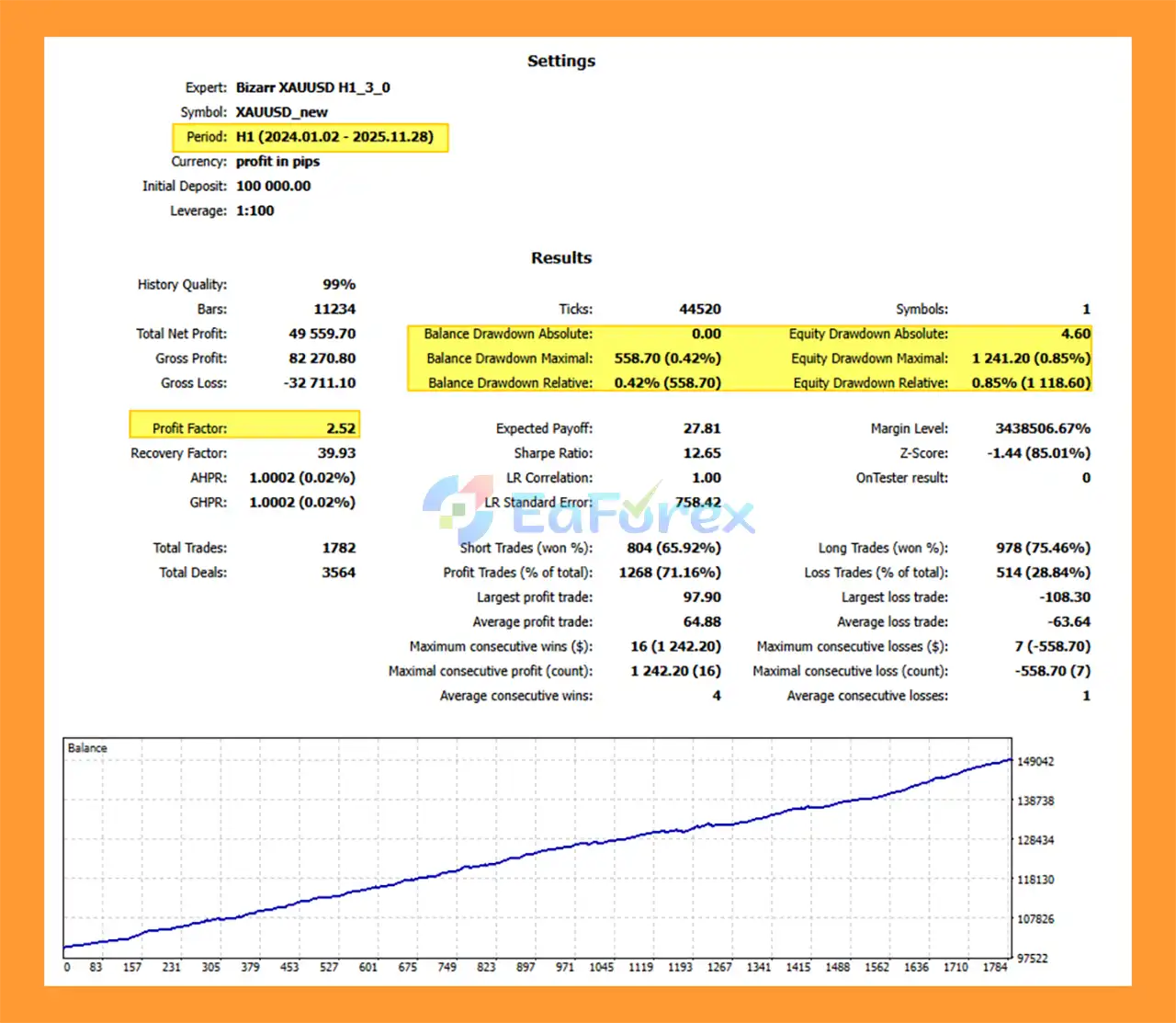
Bizarr XAUUSD h1 MT5 backtets
Bizarr XAUUSD H1 MT5 has been evaluated using approximately five years of historical XAUUSD H1 data covering 2020–2025.
Long-term historical testing can provide useful information about how an automated strategy behaved across different market environments. However, backtesting should not be interpreted as a guarantee of future profitability.
The EA includes several tools designed to control trading risk.
Each trade can be managed using predefined Stop Loss and Take Profit parameters.
A maximum daily loss can be configured to limit additional trading after a specified loss threshold has been reached.
Maximum daily drawdown settings provide another layer of control over account exposure.
The EA can monitor account equity and restrict trading when predefined equity thresholds are reached.
Maximum open positions and maximum lot settings help control the amount of simultaneous exposure.
The spread filter can prevent new trades when trading costs exceed the configured threshold.
Protection settings can automatically reset according to the EA’s configured daily schedule.
These features are intended to help traders manage automated exposure, but no risk-management system can completely eliminate the possibility of losses.
Although Bizarr includes multiple protection features, traders should understand the potential limitations and risks of using an automated Gold Expert Advisor.
XAUUSD can experience rapid and significant price movements. Major economic announcements, interest-rate decisions, inflation data, geopolitical events, and changes in market sentiment can create substantial volatility.
The five-year backtest provides historical information only. Future market conditions may differ significantly from the conditions observed during the testing period.
Live performance may vary depending on:
High leverage can significantly increase both potential profits and potential losses. Traders should select leverage and risk settings carefully.
Aggressive lot sizes, excessive risk percentages, or loose protection settings can significantly increase account exposure.
For continuous automated trading, a reliable VPS is recommended. Platform shutdowns, internet interruptions, or server problems can interfere with EA operation.
Bizarr XAUUSD H1 MT5 cannot guarantee profits. Even strategies with positive historical backtests can experience losing periods or drawdowns in live markets.
| Pros | Cons |
|---|---|
| Designed specifically for XAUUSD | Focused primarily on Gold trading |
| Uses the H1 timeframe | Not designed as an ultra-short-term scalper |
| Approximately 5 years of historical testing | Backtest results do not guarantee future performance |
| Fixed-lot money management | Incorrect lot sizing can increase risk |
| Percentage-based risk management | Requires careful configuration |
| Stop Loss and Take Profit controls | Gold can experience sudden volatility |
| Daily loss protection | Broker conditions can affect results |
| Drawdown protection | Slippage may affect live execution |
| Equity protection | VPS is recommended for continuous operation |
| Spread filter | High leverage can increase potential losses |
| Maximum position and lot controls | No automated strategy eliminates market risk |
| Custom trading sessions | Results may vary between brokers |
| Hedge, OnlyLong and OnlyShort modes | Requires appropriate MT5 account configuration |
Installing Bizarr XAUUSD H1 MT5 on MetaTrader 5 is straightforward.
Obtain the Bizarr XAUUSD H1 MT5 Expert Advisor file from the official product source.
Launch MetaTrader 5 and log in to the trading account where you want to install the EA.
In MetaTrader 5, select:
File → Open Data Folder
Then navigate to:
MQL5 → Experts
Copy the Bizarr EA file into the Experts folder.
Restart the platform or refresh the Expert Advisors section in the Navigator window.
Open an XAUUSD chart and select the:
H1 – 1 Hour timeframe
Make sure your broker’s Gold symbol matches the symbol supported by the EA. Some brokers may use different symbol names or suffixes.
Open:
Navigator → Expert Advisors
Find Bizarr and drag it onto the XAUUSD H1 chart.
Review the EA parameters carefully, including:
Make sure Algo Trading / AutoTrading is enabled in MetaTrader 5 and confirm that the EA has permission to trade.
Run Bizarr on a demo account first and evaluate its behavior under your broker’s actual spread, commission, execution, and trading conditions.
For continuous operation, a stable VPS is recommended.
For traders planning to use Bizarr XAUUSD H1 MT5, the following setup can provide a practical starting point:
The appropriate deposit, leverage, and risk percentage should be determined according to the trader’s own risk tolerance and account-management plan rather than relying solely on historical backtest performance.
>>> Join VIP Membership Now <<<
Bizarr XAUUSD H1 MT5 is a fully automated Gold Expert Advisor for MetaTrader 5 designed specifically for XAUUSD on the H1 timeframe. The EA combines automated trading functionality with a broad selection of money-management and account-protection features.
Its key features include fixed-lot and percentage-based risk management, customizable Stop Loss and Take Profit, spread filtering, maximum position controls, daily profit and loss limits, drawdown protection, equity protection, and customizable trading sessions.
The approximately five-year XAUUSD H1 backtest covering 2020–2025 provides a historical reference for evaluating the strategy across different Gold market environments. Nevertheless, historical testing cannot guarantee future live performance.
For traders considering Bizarr EA, proper configuration is essential. A suitable broker, reliable execution, appropriate risk settings, and a stable VPS can all contribute to a more consistent automated trading environment.
Before deploying the EA with real funds, traders should test Bizarr XAUUSD H1 MT5 on a demo account, evaluate its behavior with their preferred broker and settings, and carefully consider the risks associated with XAUUSD trading.
Bizarr XAUUSD H1 MT5 is best viewed as an automated trading tool—not a guarantee of profit. Proper risk management and realistic expectations remain essential when using any Forex or Gold Expert Advisor.
1. What is Bizarr XAUUSD H1 MT5?
Bizarr XAUUSD H1 MT5 is a fully automated Expert Advisor designed exclusively for trading Gold (XAUUSD) on the H1 timeframe, using advanced algorithms and machine learning logic to deliver structured and disciplined trading.
2. How does Bizarr EA trade XAUUSD?
Bizarr EA uses machine learning–enhanced algorithms that analyze gold price behavior, volatility, and liquidity to identify high-probability trading opportunities and execute trades automatically.
3. Is Bizarr XAUUSD H1 MT5 suitable for prop firm trading?
Yes. Bizarr EA is prop-firm ready, featuring strict drawdown limits, daily loss protection, equity safeguards, and disciplined risk control aligned with funded account requirements.
4. What timeframe and symbol does Bizarr EA MT5 support?
Bizarr EA is exclusively optimized for XAUUSD on the H1 timeframe, ensuring precision and stability tailored to gold market conditions.
5. Does Bizarr XAUUSD H1 MT5 use martingale or grid strategies?
No. Bizarr EA uses no martingale, no grid, no averaging, and no over-leveraging, prioritizing capital protection and professional trading discipline.
6. How does Bizarr EA MT5 manage risk?
The EA includes advanced risk management, such as hard stop loss and take profit on every trade, maximum daily loss limits, drawdown protection, and flexible money management options.
7. Can Bizarr XAUUSD H1 MT5 trade automatically?
Yes. Bizarr EA MT5 is fully automated, requiring no manual intervention and removing emotional and psychological trading errors.
8. Does Bizarr XAUUSD H1 MT5 include equity protection?
Yes. The EA features minimum and maximum equity protection, automatic daily reset functions, and trading pauses when predefined risk thresholds are reached.
9. Is Bizarr XAUUSD H1 MT5 beginner-friendly?
Yes. With its plug-and-play installation, real-time information panel, and no optimization required, Bizarr EA is suitable for both beginner and professional traders.
10. Is Bizarr XAUUSD H1 MT5 backed by reliable backtest results?
Yes. Bizarr EA has been backtested over 5 years (2020–2025), demonstrating stable performance across extreme gold market conditions with low drawdown and consistent profitability.
In stock
In stock
In stock
In stock
In stock
Out of stock
No account yet?
Create an Account












 Automatic EA
 EA Best Seller
 Expert Advisor MT4
 Expert Advisor MT5
 HFT EA


Reviews
Clear filtersThere are no reviews yet.