

Product Overview
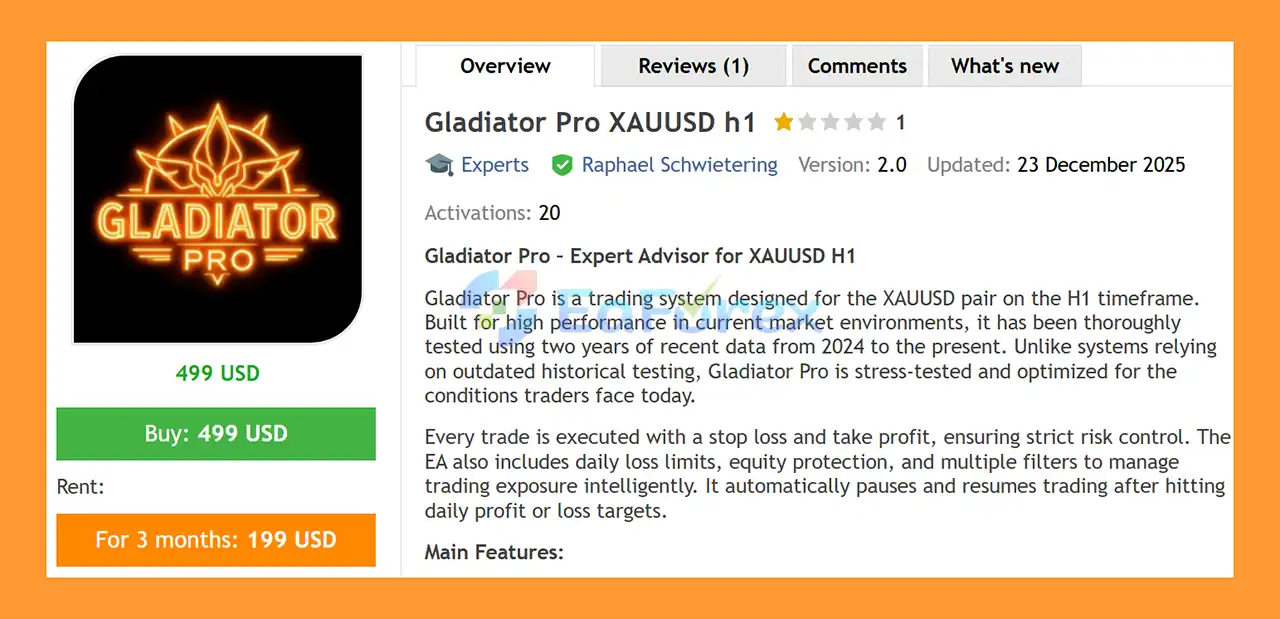
Gladiator Pro XAUUSD H1 MT5 is an automated Expert Advisor (EA) for MetaTrader 5, specifically designed to trade XAUUSD (Gold) on the H1 timeframe. The system is built around a structured trading approach with integrated trade protection, money management, session controls, and daily account safeguards.
Gladiator Pro focuses on adapting to recent market conditions, with testing based on approximately two years of data from 2024 to the present. This recent-data approach is intended to evaluate how the EA behaves under market conditions that are more relevant to current Gold trading environments.
Every trade is designed to use a Stop Loss and Take Profit, while additional controls such as spread filtering, position limits, daily loss limits, drawdown protection, and equity controls help manage trading exposure.
The EA also supports fixed-lot and percentage-based risk management, allowing traders to adjust position sizing according to their account size and preferred risk settings.
About the Developer
- Author: Raphael Schwietering
- Experience: Over +8 years of experience on MQL5.
- Notable Products: Gladiator Pro XAUUSD h1 MT5, Gold Zombie XAUUSD h1 MT5, Fortune Pro XAUUSD h1 MT5, Bizarr XAUUSD h1 MT5, Diamond Pro XAUUSD EA, Supergold XAUUSD h1, Goldrise XAUUSD h1, Prime Plus XAUUSD h1, Franklin XAUUSD h1 mt5, Joker Pro EURUSD h1, Supernova XAUUSD h1, Gold Pump Pro XAUUSD h1 and other advisors.
- Flagship Product: Gladiator Pro XAUUSD h1 MT5 is rated as the best performing product of the year.
>> Delivery time 24h-48h after payment.
>>> Refund if not delivered.
>>> You will receive the latest version without any limitations (ID+Time).>>Reviewed by Jason Stap <<
Main Features of Gladiator Pro XAUUSD h1 MT5
Flexible General Settings
Gladiator Pro XAUUSD H1 MT5 includes several settings designed to make the EA easier to configure and monitor.
- Backtest mode for strategy testing and simulations
- Custom order comments
- Unique Magic Number
- On-chart information panel
- Hedge trading mode
- Long-only trading mode
- Short-only trading mode
These options allow traders to configure the EA according to their account structure and trading preferences.
Advanced Money Management
Proper position sizing is an important part of automated Gold trading. Gladiator Pro XAUUSD H1 MT5 provides multiple money-management methods:
- Fixed lot size
- Percentage-based risk
- Risk calculated from account balance
- Risk calculated from account equity
- Risk based on a fixed currency amount
This flexibility allows traders to choose a position-sizing method that matches their risk-management approach.
Stop Loss, Take Profit & Trade Control
Each trade can be managed using predefined protection levels.
Key trade-control features include:
- Hard Stop Loss
- Hard Take Profit
- Optional Trailing Stop
- Daily profit target
- Daily loss limit
- Automatic trading pause after reaching configured limits
- Timed trading resume
These features are designed to prevent the EA from continuing to trade without limits after reaching predefined daily objectives.
Entry Protection Filters
Gold can experience periods of high volatility and changing spreads. Gladiator Pro XAUUSD H1 MT5 includes several entry-control mechanisms:
- Spread filter
- Maximum open positions
- Maximum lot limits
- Maximum positions per candle
These controls can help restrict excessive exposure when market conditions do not meet the configured requirements.
Daily & Account Protection
The EA includes multiple account-level protection settings:
- Daily loss limit
- Daily drawdown limit
- Minimum equity protection
- Maximum equity protection
- Daily reset of protection parameters
These settings provide additional control over how much exposure the EA can take during a trading day.
Flexible Trading Sessions
Gladiator Pro XAUUSD H1 MT5 allows traders to define when the EA is permitted to trade.
Available session-management options include:
- Custom trading sessions for individual days
- Sunday trading option
- Close trades at the end of a trading session
- Close trades at Friday market close
This can be useful for traders who want to restrict automated trading to specific market periods.
How Does Gladiator Pro XAUUSD H1 MT5 Work?
Gladiator Pro XAUUSD H1 MT5 is designed to automate trading on XAUUSD using the H1 timeframe. After being attached to a suitable MetaTrader 5 chart, the EA monitors the market according to its programmed trading conditions and configured filters.
When the required conditions are satisfied, the EA can open a trade according to the selected trading mode and money-management settings.
Before entering or managing positions, the EA can apply several layers of control, including:
- Trading session conditions – Determines whether trading is currently allowed.
- Spread filter – Helps prevent entries when spreads exceed the configured limit.
- Position limits – Controls the number of open trades and total exposure.
- Money management – Calculates the appropriate lot size based on the selected risk method.
- Stop Loss and Take Profit – Provides predefined trade protection and profit targets.
- Trailing Stop – Can be enabled to dynamically manage an open position.
- Daily protection – Monitors daily profit, loss, drawdown, and equity conditions.
- Trading pause/resume – The EA can stop opening new trades after configured daily limits are reached and resume according to the selected settings.
Because the EA operates on H1, traders should not expect it to behave like a high-frequency scalping system. Its trading frequency and results can vary depending on market conditions, broker execution, spread, leverage, and configuration.
Why Choose Gladiator Pro XAUUSD H1 MT5?
Gladiator Pro XAUUSD H1 MT5 may be suitable for traders looking for an automated XAUUSD H1 Expert Advisor with a strong focus on configurable risk and account protection.
Several characteristics make the EA flexible for different trading setups:
Designed for Gold
The EA is specifically designed for XAUUSD, one of the most actively traded and volatile instruments in the forex/CFD market.
H1 Trading Timeframe
Using the H1 timeframe provides a different trading environment from very short-term M1 or M5 scalping systems. Traders who prefer fewer market decisions and a higher timeframe approach may find this structure more suitable.
Multiple Risk Settings
The availability of fixed-lot and percentage-based risk management gives traders greater control over position sizing.
Extensive Protection Features
Daily loss limits, drawdown controls, equity protection, spread filtering, position limits, and session management provide several tools for controlling automated trading exposure.
Recent Market Testing
The system has been tested using approximately two years of recent market data from 2024 to the present, rather than relying exclusively on much older historical data.
However, backtesting does not guarantee future results, and traders should evaluate the EA using their own broker, spread conditions, and risk parameters before using it on a live account.
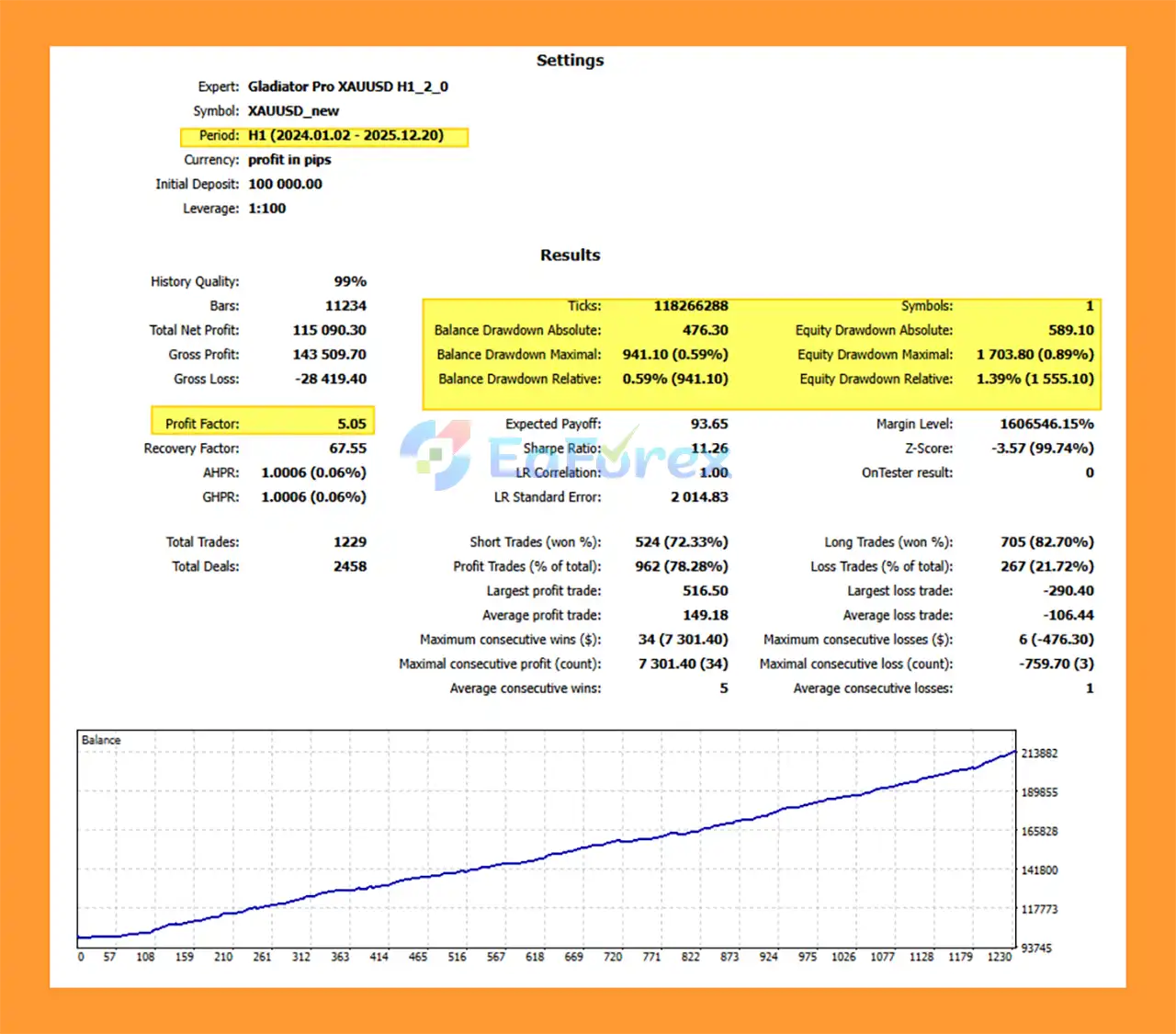
Gladiator Pro XAUUSD h1 MT5 Backtest Results
🔺XAUUSD – 12 month
- Initial Deposit: $100,000
- Total Net Profit: $115.090,30
- Win Rate: 78,28%
- Maximum Drawdown: 0.59%
Performance and Risk Management
Gladiator Pro XAUUSD H1 MT5 is designed with several risk-management mechanisms rather than relying solely on entry and exit signals.
Stop Loss and Take Profit
Each trade uses a predefined Stop Loss and Take Profit, providing a structured framework for managing individual positions.
Daily Loss Protection
The daily loss limit can be configured to restrict further trading after a specified level of loss has been reached.
Drawdown Protection
Daily drawdown controls can help limit account exposure during unfavorable trading periods.
Equity Protection
Minimum and maximum equity controls provide additional account-level safeguards.
Risk-Based Position Sizing
Traders can select percentage-based risk or other position-sizing methods depending on their account-management strategy.
Spread Protection
The spread filter can help prevent new positions from being opened when trading costs become higher than the configured threshold.
Position & Lot Limits
Maximum position and lot settings can be used to control overall exposure and prevent excessive simultaneous trades.
Session Controls
Trading sessions can be customized by day, while the EA can also close trades at session end or before the Friday market close, depending on configuration.
Important: Risk-management features can reduce exposure but cannot eliminate trading risk. Gold can experience rapid price movements, slippage, spread expansion, and significant volatility, particularly around major economic events.
Weaknesses and Risk Warnings
Although Gladiator Pro XAUUSD H1 MT5 includes extensive protection features, automated trading still involves significant risks.
Gold Can Be Highly Volatile
XAUUSD can move rapidly during major economic announcements, geopolitical events, changes in interest-rate expectations, and periods of increased market volatility.
Backtest Results Are Not Guaranteed
Historical testing from 2024 to the present can provide useful information about historical behavior, but it does not guarantee similar performance in future market conditions.
Broker Conditions Matter
Actual results may differ between brokers because of differences in:
- Spread
- Commission
- Execution speed
- Slippage
- Liquidity
- Swap charges
- Trading conditions
Leverage Increases Risk
The recommended leverage of up to 1:500 can increase both potential returns and potential losses. High leverage should not be interpreted as a recommendation to use aggressive risk settings.
VPS Is Recommended
A stable VPS is strongly recommended for continuous automated operation. Internet interruptions, computer shutdowns, platform disconnections, or VPS problems may interfere with EA operation.
Hedging Account Required
The recommended account type is Hedging. Traders should confirm that their MT5 broker account supports the required trading mode before installation.
Minimum Deposit Is Not a Guarantee
The suggested minimum deposit of $500 and recommended deposit of $1,000 are configuration guidelines, not guarantees of profitability or safety.
Risk Disclaimer: Trading forex, CFDs, and Gold involves substantial risk and may result in the loss of invested capital. Use appropriate risk settings, test the EA on a demo account first, and never trade with money you cannot afford to lose.
Pros and Cons
| Pros | Cons |
|---|---|
| Designed specifically for XAUUSD | Focused on one primary trading instrument |
| Uses the H1 timeframe | Not intended for very short-term scalping |
| Stop Loss and Take Profit on trades | No trading system can guarantee profits |
| Fixed-lot and percentage-based risk options | Results can vary between brokers |
| Daily profit and loss controls | Gold volatility can cause significant losses |
| Daily drawdown protection | Requires careful configuration |
| Equity protection features | VPS is strongly recommended |
| Spread filter | High leverage increases account risk |
| Maximum position and lot controls | Hedging account is recommended |
| Custom trading sessions | Backtest performance may differ from live results |
How to Install Gladiator Pro XAUUSD H1 MT5
Installing Gladiator Pro XAUUSD H1 MT5 on MetaTrader 5 is straightforward.
Step 1: Open MetaTrader 5
Launch your MetaTrader 5 trading platform and log in to your trading account.
Step 2: Open the Data Folder
In MetaTrader 5, go to:
File → Open Data Folder
Then navigate to:
MQL5 → Experts
Copy the Gladiator Pro EA file into the Experts folder.
Step 3: Restart MetaTrader 5
Close and reopen MetaTrader 5, or refresh the Expert Advisors section in the Navigator window.
Step 4: Open the XAUUSD H1 Chart
Open an XAUUSD chart and change the timeframe to:
H1 – 1 Hour
Make sure your broker's symbol name matches the EA's supported symbol. Some brokers may use suffixes or prefixes.
Step 5: Attach the EA
Find Gladiator Pro under:
Navigator → Expert Advisors
Drag the EA onto the XAUUSD H1 chart.
Step 6: Configure the Settings
Review the following settings carefully:
- Lot size or risk percentage
- Stop Loss
- Take Profit
- Trailing Stop
- Maximum positions
- Maximum lots
- Spread limit
- Daily profit target
- Daily loss limit
- Drawdown protection
- Equity protection
- Trading sessions
- Friday close settings
Step 7: Enable Automated Trading
Make sure Algo Trading / AutoTrading is enabled in MetaTrader 5 and confirm that the EA is allowed to trade.
Step 8: Test Before Going Live
Before using real funds, test Gladiator Pro on a demo account under conditions similar to your intended live account.
For continuous operation, a reliable VPS is strongly recommended.
Recommended Setup
- Platform: MetaTrader 5
- Symbol: XAUUSD
- Timeframe: H1
- Minimum Deposit: $500
- Recommended Deposit: $1,000
- Leverage: Minimum 1:100; ideally 1:500
- Account Type: Hedging
- Broker: Low-spread broker; IC Markets is listed as the recommended broker
- VPS: Strongly recommended
What’s Included in the Download Package?
- Setting (If Any).docx
- Installation Guide.docx
>>> Join VIP Membership Now <<<
Final Thoughts
Gladiator Pro XAUUSD H1 MT5 is an automated Gold trading Expert Advisor designed for traders who want to trade XAUUSD on the H1 timeframe while having access to a broad range of risk-management and account-protection settings.
Its feature set includes fixed or risk-based lot sizing, Stop Loss and Take Profit, optional trailing stop, spread filtering, position limits, daily profit and loss controls, drawdown protection, equity protection, and customizable trading sessions.
The use of recent testing data from 2024 to the present provides a useful reference for evaluating the EA under more recent market conditions. Nevertheless, historical backtests should not be treated as a guarantee of future live performance.
For traders considering Gladiator Pro, proper configuration is essential. A low-spread broker, suitable leverage, controlled risk settings, a Hedging MT5 account, and a reliable VPS can help create a more stable environment for automated trading.
As with any Forex or Gold Expert Advisor, it is advisable to test the EA on a demo account first, evaluate its behavior under your broker's actual trading conditions, and only then consider live deployment with an amount of capital appropriate for your risk tolerance.



