

Product Overview
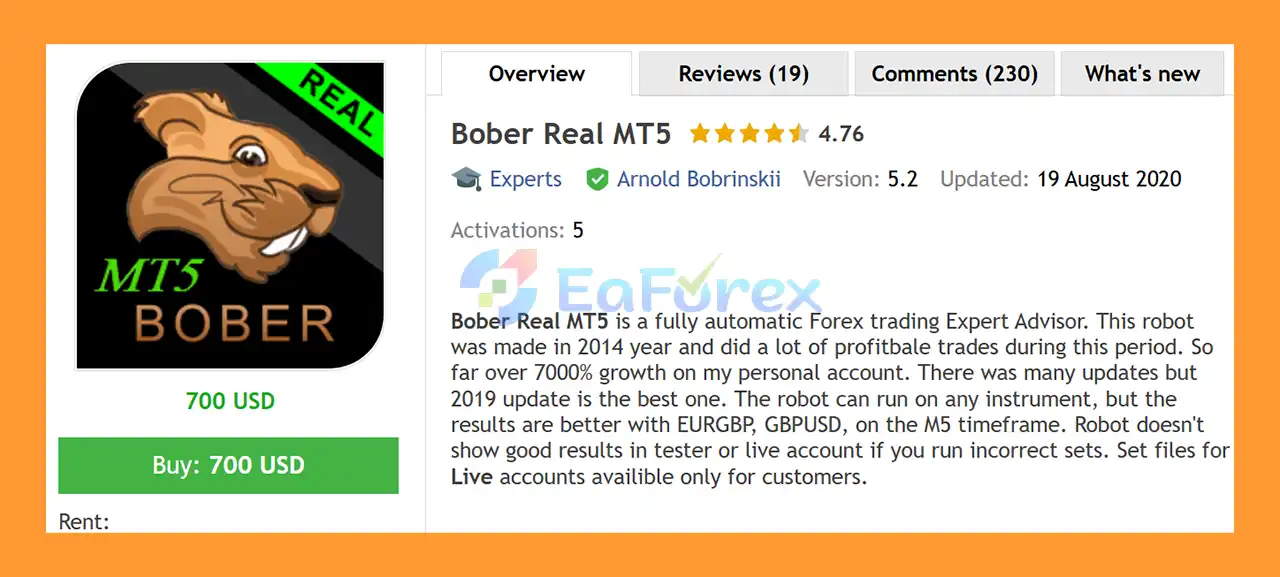
Bober Real MT5 is a fully automated Forex Expert Advisor designed for algorithmic trading on MetaTrader 5. According to the developer, the robot was originally created in 2014 and has undergone multiple updates over the years, with the 2019 version described by the developer as the strongest update.
The developer also reports achieving more than 7,000% growth on a personal account over the stated period. This is a historical, developer-reported result and should not be interpreted as a guarantee of future performance. Actual results can vary depending on the broker, account conditions, settings, spreads, execution, market conditions, and risk level.
Bober Real MT5 can technically run on different trading instruments, but the developer specifically identifies EURGBP and GBPUSD as preferred markets, with M5 among the recommended timeframes. The product description also mentions M2 and M5 as suitable timeframes.
A key characteristic of Bober Real is that it does not use Martingale, Hedging, or Averaging. Instead, positions are managed with predefined or virtual Stop Loss and Take Profit mechanisms.
The EA also includes an optional Dynamic Take-Profit, an automated economic news filter, automatic GMT adjustment, ATR-based market filters, RSI entry options, spread controls, and several position-management parameters.
About the Developer
• Author: Arnold Bobrinskii.
• Experience: Over +11 years of experience on MQL5.
• Notable Products: Bober Real MT5, Bober Crypto MT5 and other advisors.
• Flagship Product: Bober Real MT5 is rated as the best performing product of the year.
>> Delivery time 24h-48h after payment.
>>> Refund if not delivered.
>>> You will receive the latest version without any limitations (ID+Time).>>Reviewed by Jason Stap <<
Key Features of Bober Real MT5
Fully Automated Forex Trading
Bober Real MT5 is designed to automate the complete trading process, from market analysis and entry conditions to position management and exits.
The EA can operate without requiring the trader to manually monitor every individual trade.
No Martingale, Hedging, or Averaging
According to the developer, Bober Real does not use:
- Martingale
- Hedging
- Averaging
The system instead uses Stop Loss and Take Profit-based position management.
This makes its trade-management structure different from recovery systems that increase exposure through additional positions when the market moves against the original trade.
RSI Entry Filter
Bober Real can use an RSI-based entry tool.
The relevant parameters include:
- RSI period
- Number of RSI bars
- Entry tool selection
The RSI functionality can be enabled or adjusted according to the selected configuration.
ATR Market Filter
The EA includes two ATR-related periods and an ATR entry range:
- ATR Period 1
- ATR Period 2
- ATR From
- ATR To
These settings can be used to filter market conditions based on measured volatility before allowing new trades.
Dynamic Take-Profit
One of the optional features is Dynamic Take-Profit.
When enabled, the EA can adapt its Take Profit based on detected channel highs and lows. The ChannelBars setting determines the historical lookback used for channel detection, while DynTP_Speed controls how quickly the dynamic target adjusts.
This provides an alternative to using only a fixed Take Profit level.
Automated News Filter
Bober Real includes an integrated economic calendar filter designed to avoid trading around important scheduled news events.
The calendar system can:
- Detect relevant economic events
- Filter events according to importance
- Adjust the filtering period
- Record news-related decisions in the log
This feature is designed to reduce exposure to potentially disruptive scheduled announcements.
Automatic GMT Detection
The AutoGMT functionality can automatically detect the broker's server-time offset.
This can simplify the configuration of the daily trading schedule and reduce the need to manually calculate GMT differences after broker time changes.
How Does Bober Real MT5 Work?
Bober Real combines several market filters and trading-management components to determine when trading conditions are suitable.
The EA can use RSI as an entry tool, while ATR filters help evaluate market volatility. Additional restrictions can be applied through maximum spread, trading hours, and the economic calendar filter.
Once the required conditions are satisfied, the EA can open a position using the configured order type and volume.
Entry Conditions
The entry system can incorporate:
- RSI
- ATR Period 1
- ATR Period 2
- ATR range filtering
- Indicator timeframe
- Maximum spread
- Slippage conditions
- Trading-hour restrictions
- Economic news filtering
The exact combination depends on the selected settings and set file.
Position Management
After entering a trade, the EA can manage the position using:
- Static Stop Loss
- Static Take Profit
- Virtual Stop Loss
- Virtual Take Profit
- Dynamic Take Profit
The developer states that the EA always operates with Stop Loss and Take Profit-based trade management rather than Martingale, Hedging, or Averaging.
Order Limits
The EA includes controls for:
- Order distance
- Maximum number of orders
- Additional order limits
These parameters can help control how many positions are permitted and how closely new orders can be placed under the configured strategy.
Why Choose Bober Real MT5?
Bober Real may be of interest to traders looking for an automated Forex EA with a relatively structured trade-management approach and several built-in market filters.
Its notable characteristics include:
- Long development history according to the developer
- Fully automated trading
- No Martingale
- No Hedging
- No Averaging
- Stop Loss and Take Profit management
- Optional Dynamic Take-Profit
- RSI entry functionality
- ATR volatility filtering
- Automated news filtering
- Automatic GMT adjustment
- Spread protection
- Configurable trading hours
- Fixed-lot or percentage-based risk settings
- Fast backtesting and optimization
- Support for multiple instruments
- Recommended focus on GBPUSD and EURGBP
- Suitable for M2/M5 configurations
- VPS-friendly operation
The combination of market filters and automated time/news management can be useful for traders who prefer a system that handles many routine execution decisions automatically.
Bober Real MT5 Performance Review
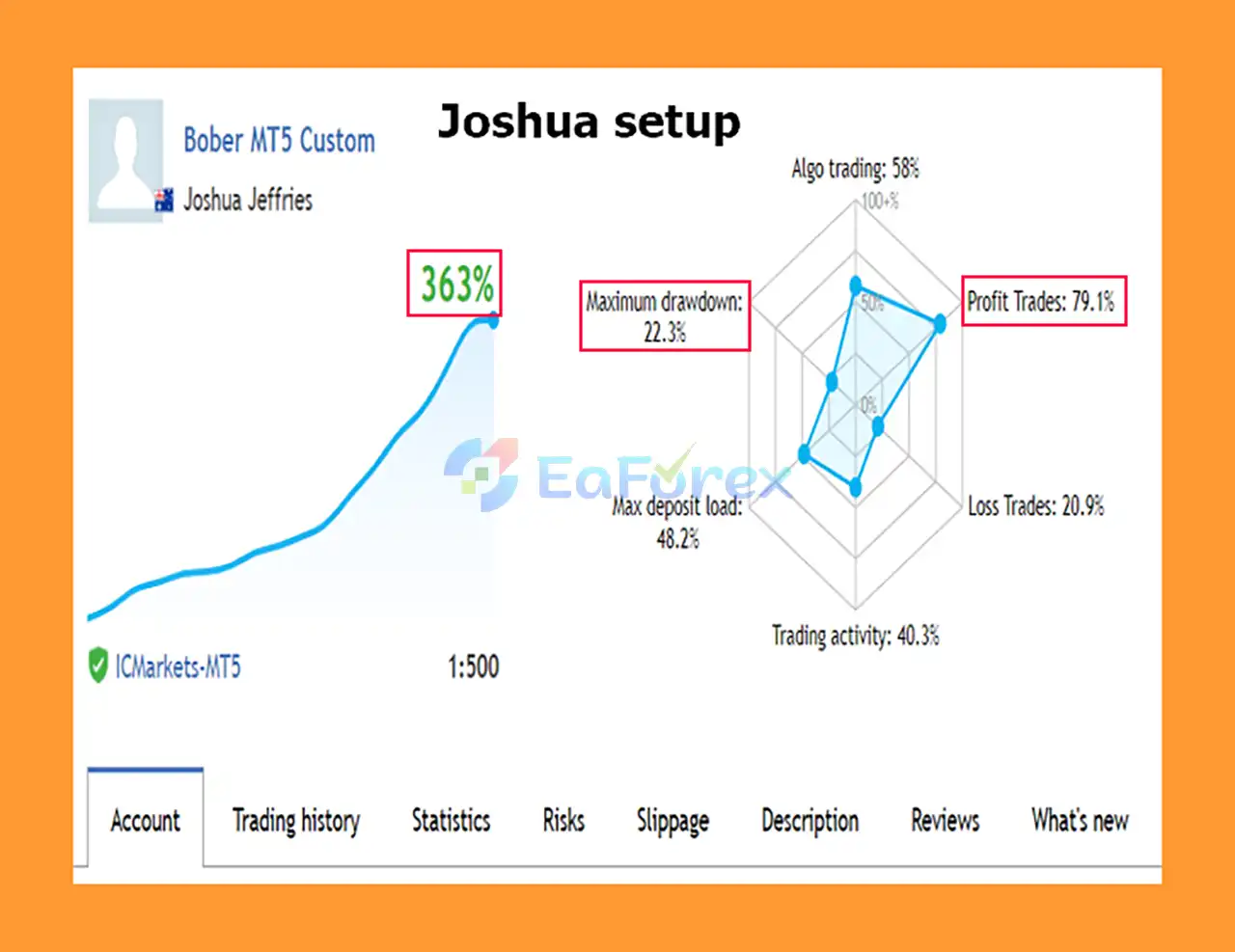
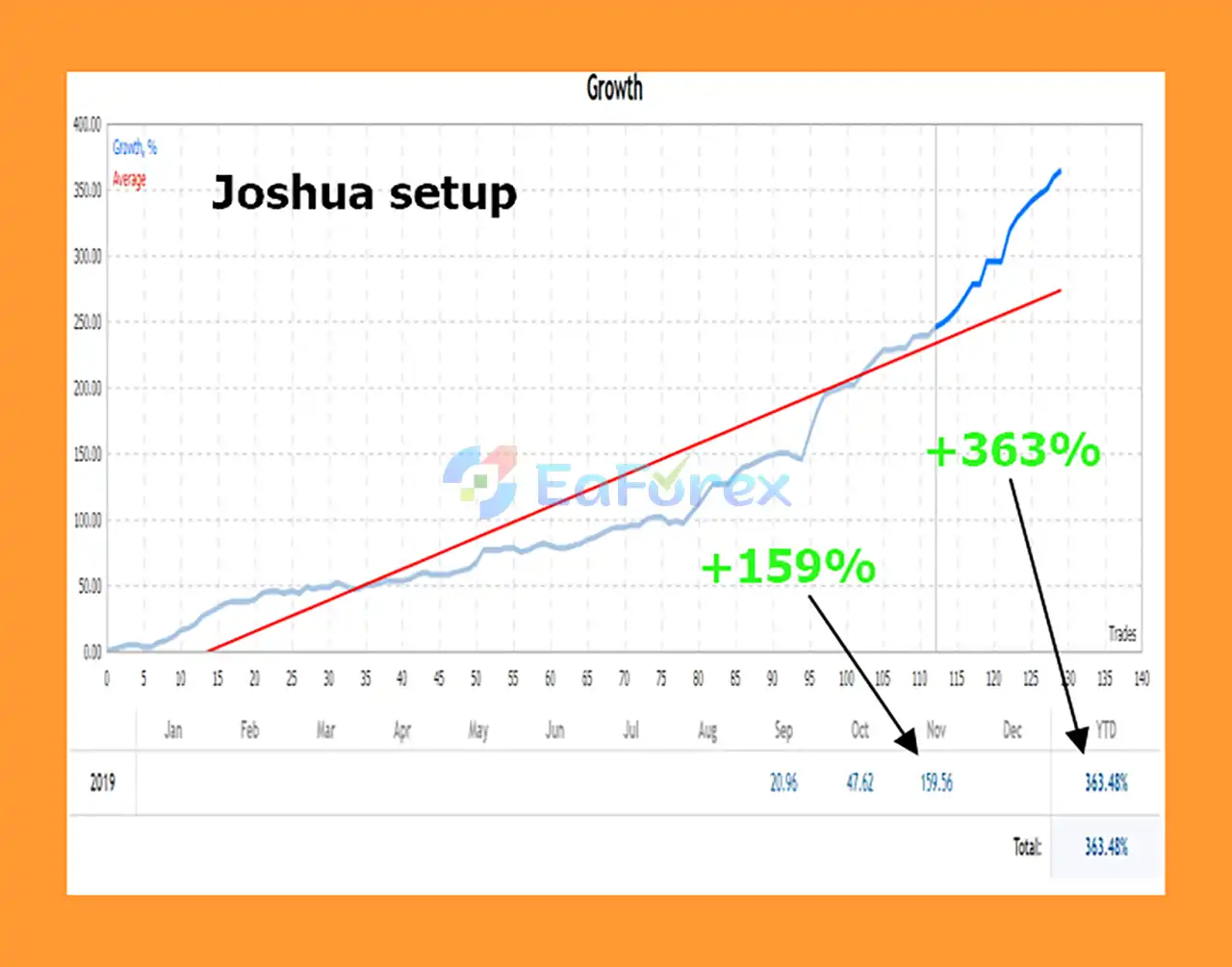
🟢 Live trading results:
- Total Profit (Growth): +363%
- Profit Trades: 79.1%
- Maximum Drawdown: 22.3%
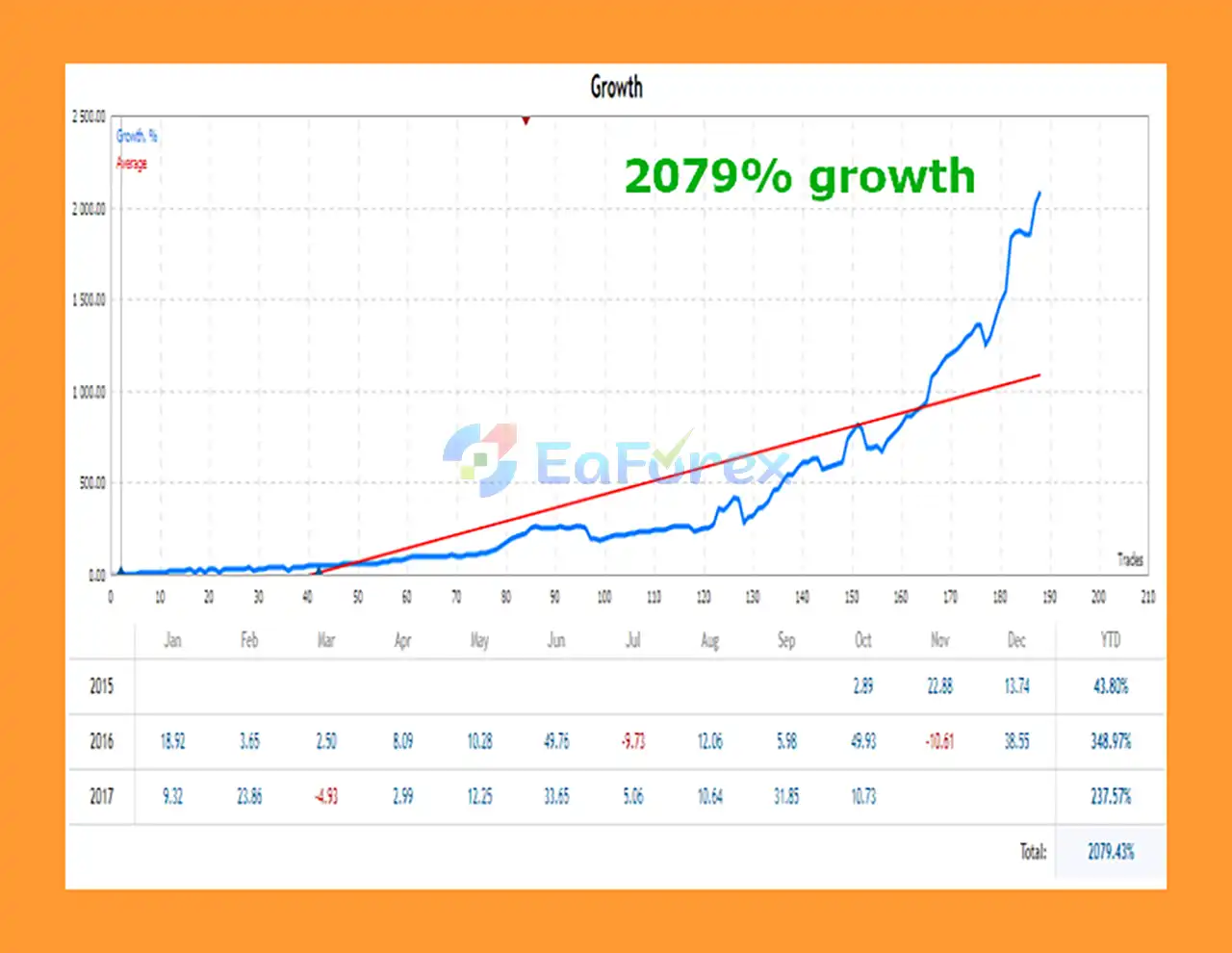
➡️In previous years (2015–2017), Bober Real MT5 achieved an impressive +2079% total growth, proving its long-term profitability and robust algorithmic structure.
Performance and Risk Management
The developer reports that Bober Real has been used since 2014 and claims more than 7,000% growth on a personal account. This figure should be treated as a historical, developer-provided claim rather than a forecast or guaranteed return.
The developer also notes that results can differ significantly when incorrect settings or set files are used.
This is particularly important because the EA's performance can depend on:
- Trading symbol
- Timeframe
- Broker
- Spread
- Execution
- Set-file configuration
- Risk percentage
- Lot size
- Trading hours
- Market volatility
Lot Management
Bober Real provides two main volume approaches:
- Fixed Lot
- Percent-based risk
The relevant parameters include:
- Risk
- Lot
- Maximum volume considerations through the selected configuration
Traders should select position size based on their account equity and acceptable drawdown rather than simply attempting to reproduce historical results.
Stop Loss and Take Profit
The EA supports static Stop Loss and Take Profit settings in points.
It also provides virtual versions:
- Virtual Stop Loss
- Virtual Take Profit
These options allow the trader to configure different methods of managing trade exits.
Dynamic Take-Profit
When UseDynamicTP is enabled, the EA can calculate a more adaptive profit target using channel information.
The main parameters are:
- ChannelBars
- DynTP_Speed
Dynamic Take-Profit does not guarantee better results. Its effectiveness can vary depending on market structure and volatility.
Spread and Slippage Protection
Bober Real includes:
- Maximum Spread
- Slippage controls
These are particularly relevant for shorter timeframes, where transaction costs and execution quality can have a greater influence on individual trade outcomes.
Trading Style and Recommended Conditions
According to the developer, Bober Real is intended for calmer, high-liquidity market periods rather than excessive overtrading.
The recommended instruments include:
- GBPUSD
- EURGBP
- EURUSD
The developer identifies M2 and M5 as suitable timeframes, while the product description particularly highlights EURGBP and GBPUSD on M5.
A VPS is also recommended for maintaining continuous operation and potentially improving execution consistency.
These recommendations should be treated as starting configurations rather than universal settings. Different brokers and market conditions can produce different results.
Weaknesses and Risk Warnings
Historical performance is not a guarantee: The reported 7,000% account growth is a historical result claimed by the developer. It does not establish that the same return can be achieved by other traders.
Set files matter: The developer explicitly states that incorrect settings can produce poor results in both testing and live trading. Users should therefore avoid assuming that default settings are appropriate for every symbol or broker.
Short-timeframe sensitivity: M2 and M5 trading can be sensitive to spread, commissions, slippage, execution speed, and broker liquidity.
Market conditions change: A strategy that performed well during certain historical periods may behave differently when volatility, liquidity, trends, or market structure change.
News filter limitations: The economic calendar filter can help avoid scheduled events, but unexpected news and rapid price movements can still occur.
Risk-based sizing: Percentage-based position sizing can result in larger or smaller volumes depending on account conditions. Poor risk settings can significantly increase drawdown.
Virtual protection: Virtual Stop Loss and Take Profit mechanisms may depend on the EA remaining active and functioning correctly. Traders should understand how these settings behave under terminal, VPS, connection, or execution interruptions.
No guaranteed profit: Automated trading always involves financial risk. Bober Real cannot guarantee profitable trades or a specific level of future return.
Pros and Cons
Pros
- Fully automated MetaTrader 5 Expert Advisor
- Long development history according to the developer
- No Martingale
- No Hedging
- No Averaging
- Uses Stop Loss and Take Profit
- Optional Dynamic Take-Profit
- RSI entry functionality
- ATR volatility filters
- Automated economic news filter
- Automatic GMT adjustment
- Maximum spread control
- Slippage control
- Configurable trading hours
- Fixed or percentage-based lot management
- Fast backtesting and optimization
- Supports multiple instruments
- Suitable for M2 and M5 configurations
- VPS-friendly
Cons
- Results can depend heavily on the correct set-file configuration
- Short-timeframe trading is sensitive to execution costs
- Historical performance cannot guarantee future results
- Dynamic Take-Profit may perform differently under changing market conditions
- News filtering cannot eliminate unexpected-event risk
- Incorrect risk settings can increase drawdown
- Virtual SL/TP require the EA to function correctly
- Recommended settings may not work equally well across all brokers
How to Install Bober Real MT5
Install Bober Real MT5 into your MetaTrader 5 terminal.
Open the Navigator window and locate the Expert Advisor under the Expert Advisors section.
Attach the EA to your selected trading chart.
For initial testing, the developer recommends focusing on:
- EURGBP
- GBPUSD
- EURUSD
with M2 or M5 timeframes, particularly M5 for the highlighted EURGBP and GBPUSD configurations.
Configure the important parameters, including:
- Order filling type
- Trade direction
- RSI settings
- ATR settings
- Indicator timeframe
- Lot method
- Risk or fixed lot
- Stop Loss
- Take Profit
- Virtual SL/TP
- Maximum spread
- Slippage
- Dynamic Take-Profit
- Trading hours
- AutoGMT
- Economic calendar filter
- Magic Number
If you are running multiple instances, use appropriate Magic Numbers so that positions can be identified separately.
A VPS is recommended for continuous operation, especially when using short timeframes.
Before live deployment, perform backtesting with the intended broker conditions and then conduct forward testing on a demo account. The developer specifically emphasizes that using incorrect settings can lead to poor results.
Real User Reviews and Feedback
🔻Bober Real MT5 is highly appreciated by the MQL5 community for bringing stable and reliable profits. Below are 5 star reviews from users:

What’s Included in the Download Package?
🔺 Experts:
- Installation Guide.docx
- Setting (If Any).docx
🔺 Presets:
- Optimization_example_M2.set
- EURUSD_M5_2018.06.18-2019.06.18_v2.set
- EURUSD_M5_2018.06.01-2019.07.05_v3.set
Final Thoughts
In summary, Bober Real MT5 is a fully automated Forex Expert Advisor built around a structured approach to short-term trading. According to the developer, the EA has been developed and updated since 2014, with the 2019 update described as a particularly important version.
Its main characteristics include no Martingale, no Hedging, and no Averaging, while positions are managed through Stop Loss and Take Profit mechanisms. The EA also provides optional Dynamic Take-Profit, RSI and ATR filters, automated GMT handling, trading-hour controls, and an integrated economic news filter.
The developer highlights EURGBP and GBPUSD on M5, with EURUSD also listed among the recommended instruments. M2 and M5 are identified as suitable timeframes, and VPS hosting is recommended for continuous operation.
The reported historical performance, including the developer's claim of more than 7,000% growth on a personal account, should be evaluated as historical information rather than an expectation of future returns. Correct set files and broker-specific execution conditions are particularly important because the developer states that incorrect configurations can result in poor testing or live performance.
For traders considering Bober Real MT5, realistic backtesting, appropriate risk sizing, forward testing, and careful selection of symbol-specific settings are essential before using the EA with real capital.



