









-
 Unlimited Activations
-
 Instant delivery
-
 Easy to install











 Unlimited Activations
Instant delivery
Easy to install
Unlimited Activations
Instant delivery
Easy to install
 Free Update
 Free Install Support

Razor EA MT5 is a fully automated and highly configurable Expert Advisor designed around a multi-currency mean-reversion trading strategy with built-in drawdown protection and a fixed Stop Loss.
Unlike systems marketed around artificial intelligence or complex neural-network models, Razor EA MT5 is based on a transparent algorithm with open parameters that allow traders to inspect, adjust, optimize, and create their own configurations.
The default configuration is designed to operate from one AUDCAD M15 chart while simultaneously trading three currency pairs:
This multi-currency structure allows the EA to manage several related instruments from a single chart rather than requiring separate EA instances for every pair.
Razor EA MT5 uses market mean reversion, a Market Volatility Filter, adaptive broker-condition technology, and a built-in Strong News Filter (SNF) covering major events such as FOMC and NonFarm Payroll releases.
The system also supports 1 Minute OHLC (1OHLC) testing mode, which can significantly reduce Strategy Tester processing time on lower-performance computers, although the developer notes that this mode provides a less detailed simulation than tick-based testing.
• Author: Anton Kondratev
• Experience: Over +3 years of experience on MQL5.
• Notable Products: Razor EA MT5, Aurum EA MT5 and other advisors.
• Flagship Product: Razor EA MT5 is rated as the best performing product of the year.
>> Delivery time 24h-48h after payment.
>>> Refund if not delivered.
>>> You will receive the latest version without any limitations (ID+Time).>>Reviewed by Jason Stap <<
Razor EA MT5 is designed to trade three currency pairs from a single chart:
The default setup uses an AUDCAD M15 chart, while the EA manages the broader multi-currency strategy automatically.
This approach can simplify installation and portfolio management because traders do not need to attach separate instances to every supported currency pair.
The system uses a common Stop Loss structure as part of its risk-management framework.
A fixed SL provides a predefined loss-control mechanism rather than relying exclusively on discretionary or dynamic exits.
Razor EA MT5 includes a drawdown protection mechanism designed to manage exposure during unfavorable market conditions.
The system can also add up to six additional trades during a drawdown, according to its predefined strategy rules.
Because adding positions during drawdown increases market exposure, this feature should be thoroughly tested and understood before being used with significant live capital.
Razor EA MT5 is described as not a simple Grid and not a Martingale system.
It also does not rely on:
Instead, the strategy is based on market mean reversion combined with volatility and execution filters.
The EA uses market mean reversion as a core component of its trading methodology.
Mean-reversion strategies generally attempt to identify situations where price moves away from an established market condition and may subsequently return toward a reference level.
Such strategies can perform differently depending on market regime, making volatility filtering and risk management important components of the overall system.
Razor EA MT5 includes a Market Volatility Filter designed to identify market conditions that may provide more suitable entry opportunities.
The filter is intended to prevent the system from treating every market environment in the same way.
The built-in Strong News Filter (SNF) is designed to account for major economic events, including:
This feature is intended to help manage exposure during periods when volatility and spreads may increase substantially.
The EA includes an Adaptive Broker Real-Time (ABRT) mechanism designed to account for changing broker conditions.
According to the supplied specifications, the system continuously monitors relevant broker conditions and can adapt its operation accordingly.
Razor EA MT5 includes protection mechanisms designed to address unfavorable execution conditions, including:
However, no software can completely eliminate slippage or guarantee execution at a specific price during fast markets.
The EA provides open parameters, allowing experienced users to inspect and adjust available settings.
This also makes it possible to experiment with optimization and develop alternative configurations for other instruments, subject to proper testing.
For computers with limited processing power, Razor EA MT5 supports 1 Minute OHLC mode.
This can make backtesting considerably faster than detailed tick-based testing.
However, the 1OHLC approach is a simplified simulation and may be less accurate than tick-based testing, particularly for strategies where intrabar price behavior is important.
Razor EA MT5 combines several components into a multi-currency automated trading process.
The general workflow can be summarized as:
Market Data → Volatility Analysis → Mean-Reversion Conditions → News Filter → Broker Condition Check → Entry → Position Management → Fixed SL / Exit
The EA monitors its supported currency pairs while being attached to a single chart.
Its core strategy evaluates market conditions for potential mean-reversion opportunities.
Before entering a position, the system can take into account factors such as:
When the required conditions are satisfied, the EA can automatically execute and manage trades.
The strategy also uses a common Stop Loss framework and may add additional positions during drawdown according to its internal rules, with a maximum of six additional trades described in the supplied specifications.
The purpose of these additional entries is not the same as a simple Martingale system; nevertheless, adding trades while a strategy is already experiencing drawdown can increase total exposure and therefore remains an important risk factor.
Razor EA MT5 is designed for traders looking for a transparent, configurable, multi-currency automated trading system rather than an AI- or neural-network-based Expert Advisor.
One of its distinguishing characteristics is that it operates three currency pairs from one chart, using AUDCAD M15 as the default chart configuration.
The strategy also combines several market filters rather than relying solely on an entry signal.
These include:
Another advantage for experienced users is the availability of open parameters. Traders can inspect and optimize the system rather than being limited to a completely closed configuration.
The EA is also designed to support different broker environments, including configurations intended for prop-firm accounts, although compatibility always depends on the individual firm’s rules and account conditions.
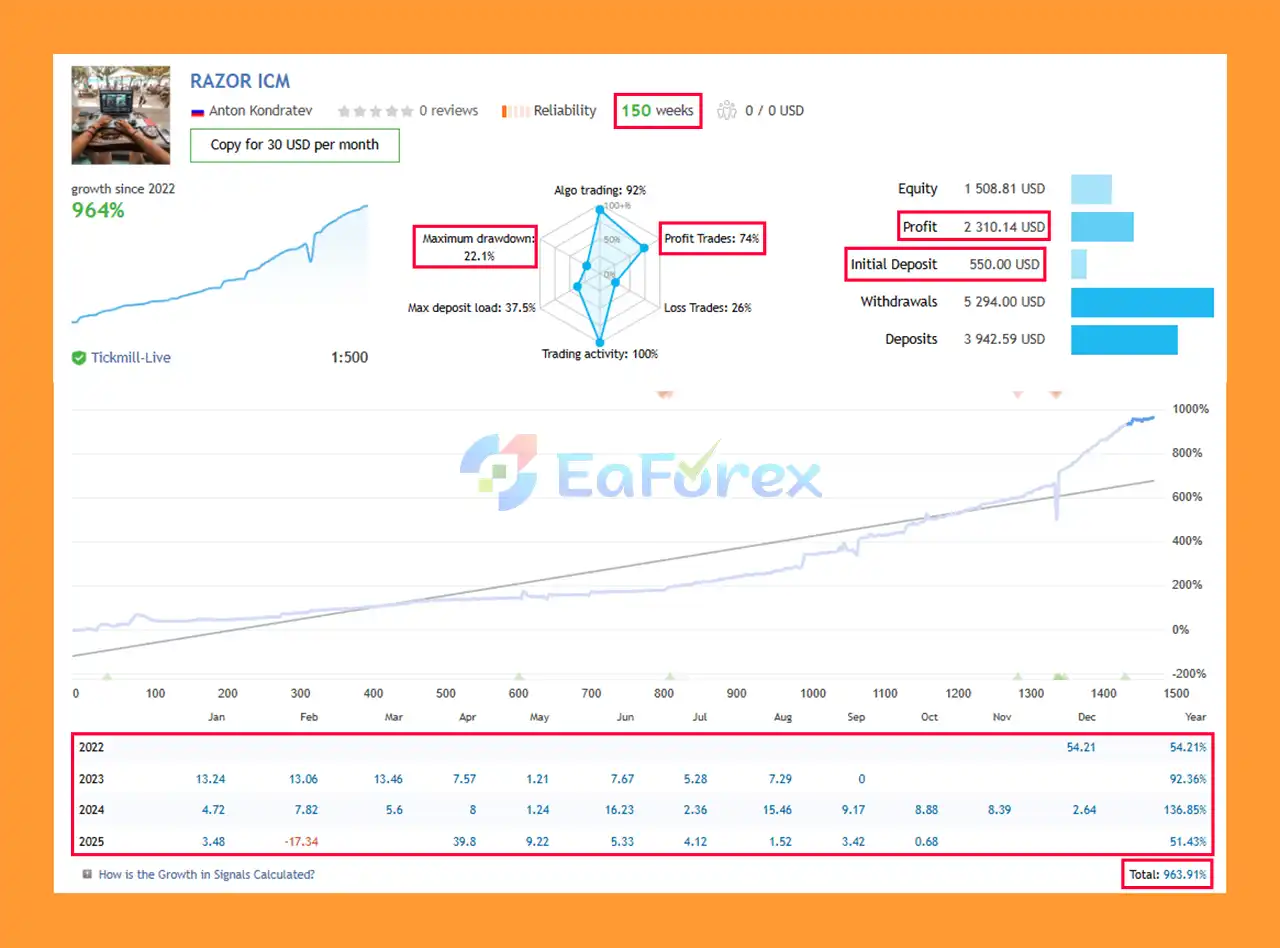
Razor EA Live Trading
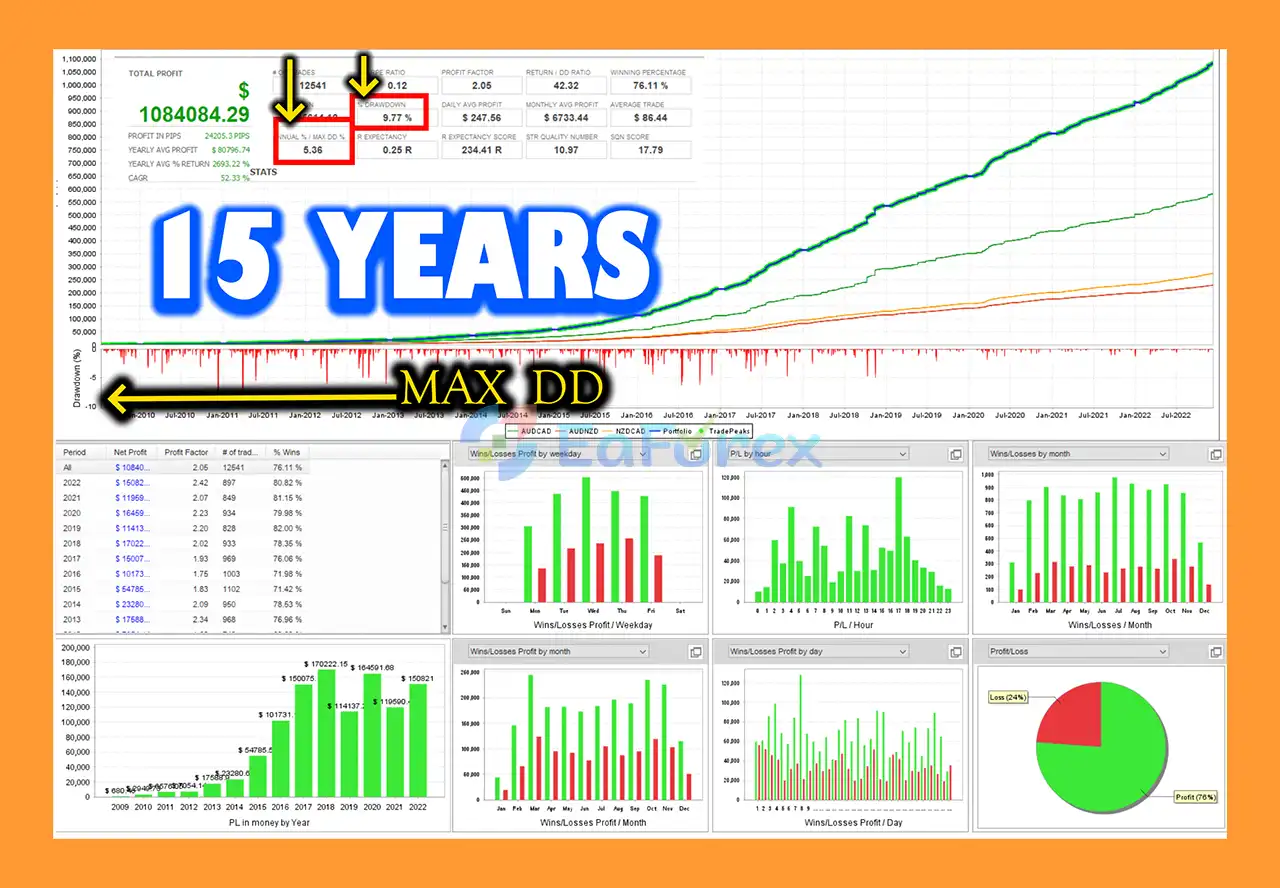
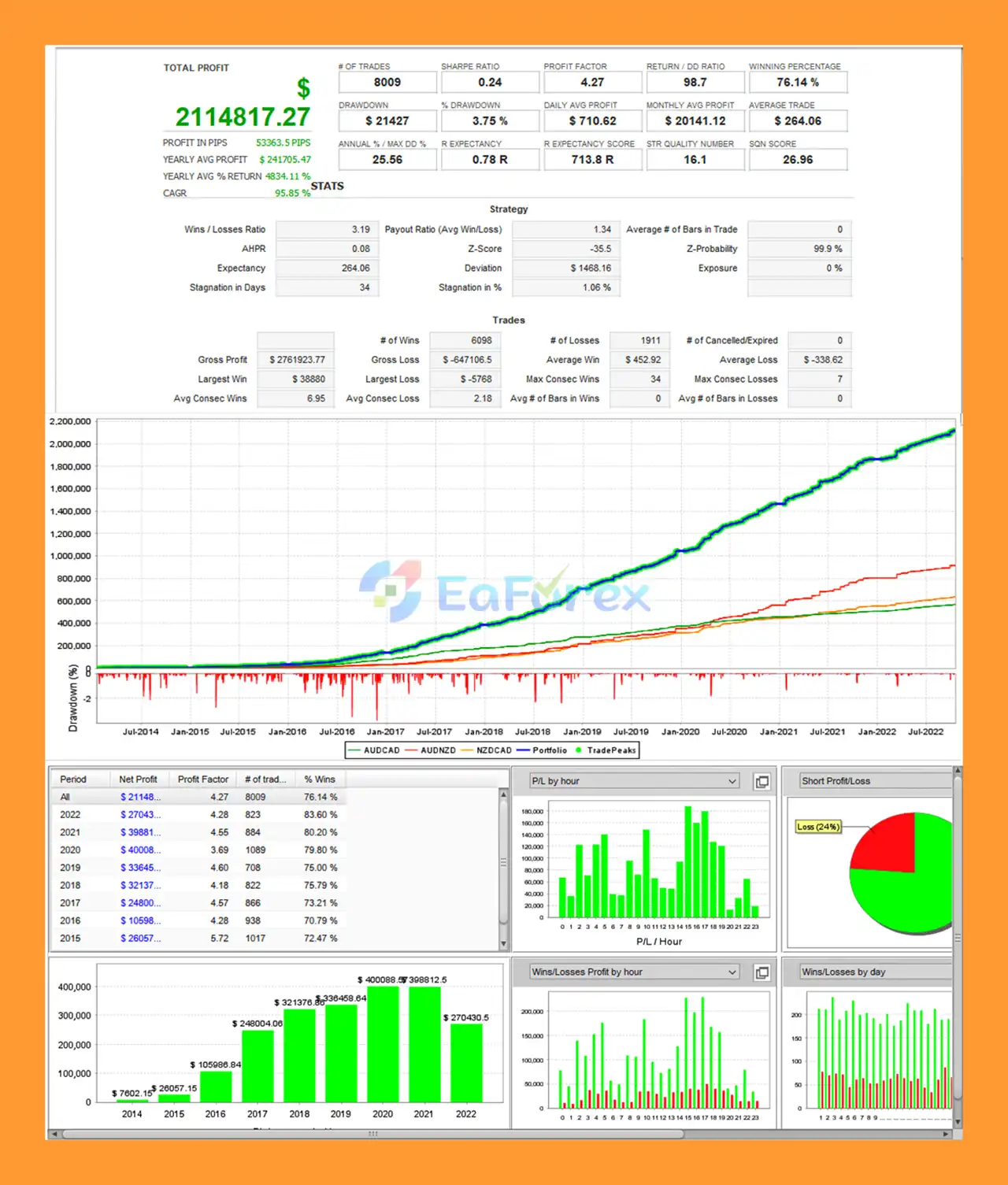
Razor EA Backtest Results
Razor EA Performance Verified
Razor EA MT5 is designed with multiple layers of risk and execution management.
| Parameter | Recommended Setting |
|---|---|
| Strategy Type | Multi-Currency Mean Reversion |
| Default Chart | AUDCAD |
| Timeframe | M15 |
| Trading Pairs | AUDCAD, AUDNZD, NZDCAD |
| Chart Requirement | One Chart |
| Stop Loss | Fixed |
| Additional Trades | Up to 6 during drawdown |
| News Filter | FOMC / NonFarm Strong News Filter |
| Volatility Filter | Yes |
| Spread Protection | Yes |
| Slippage Protection | Yes |
| Testing Mode | Tick / 1OHLC |
| Broker Type | RAW / Pro / ECN recommended |
| VPS | Recommended for 24/7 operation |
The EA uses adaptive lot-size calculation according to the supplied specifications.
However, account leverage and available margin can affect whether calculated position sizes can be executed.
The developer specifically notes that accounts with low leverage, such as 1:70 or below, may encounter margin requirements when capital is limited.
Traders should therefore check their broker’s margin specifications before using the EA on a live account.
The system may be sensitive to spread and slippage.
For this reason, the recommended environment is a quality RAW, Pro, or ECN-style broker with competitive spreads and reliable execution.
Actual results can vary considerably between brokers because the same trading signal can produce different execution prices.
Because the Expert Advisor continuously reads broker and market conditions, 24/7 VPS hosting is recommended for uninterrupted operation.
A VPS can help maintain the MetaTrader 5 terminal online when the trader’s personal computer is switched off or disconnected.
Although Razor EA MT5 incorporates several protection mechanisms, automated trading still involves significant risk.
The EA can add up to six additional trades during a drawdown.
Even though this is not described as a traditional Martingale strategy, increasing the number of positions while an account is already experiencing adverse movement can increase overall exposure.
Traders should understand this behavior before using aggressive risk settings.
Mean-reversion strategies can struggle when a market enters a strong and persistent directional trend.
A price that moves away from its historical or reference level may continue moving rather than returning quickly.
The strategy can be sensitive to spread conditions. During major news events or periods of low liquidity, spreads may widen significantly.
Fast market movements can cause the actual execution price to differ from the requested price.
Slippage protection can reduce exposure to certain unfavorable conditions but cannot eliminate execution slippage entirely.
Adaptive lot sizing can interact with broker leverage and account equity.
Low-leverage accounts with insufficient capital may encounter margin limitations.
Live performance may vary according to:
The supplied product information states that the algorithm has been tested against approximately 20 years of real MT5 quotes.
Historical testing can provide useful information about how a strategy behaved under past conditions, but it does not guarantee future profitability.
Razor EA MT5 is presented as compatible with certain prop-firm environments, including FTMO-related MT5 setups.
However, traders must independently verify the rules of their specific prop firm. Daily drawdown limits, maximum overall drawdown, news restrictions, trading-hour requirements, and other rules can vary.
Open MetaTrader 5 and log into your trading account.
Copy the Razor EA MT5 files into the appropriate Expert Advisors directory.
Restart MetaTrader 5 or refresh the Navigator window after installation.
Open the AUDCAD chart and select the M15 timeframe.
This is the recommended default chart configuration.
Locate Razor EA MT5 under Expert Advisors and drag it onto the AUDCAD M15 chart.
Enable Algo Trading when prompted.
Check the available settings, including:
Confirm that the EA is configured to trade the intended three symbols:
AUDCAD + AUDNZD + NZDCAD
Because the strategy is designed to operate from one chart, there is generally no need to attach additional copies of the EA to the other supported charts.
For continuous automated operation, a 24/7 VPS is recommended.
This helps maintain the MT5 terminal and EA connection when your local computer is offline.
Run the EA through the MT5 Strategy Tester and use a demo account before committing real capital.
For weaker computers, 1OHLC mode can be used for faster preliminary testing, while more detailed tick-based testing can provide a more comprehensive simulation.
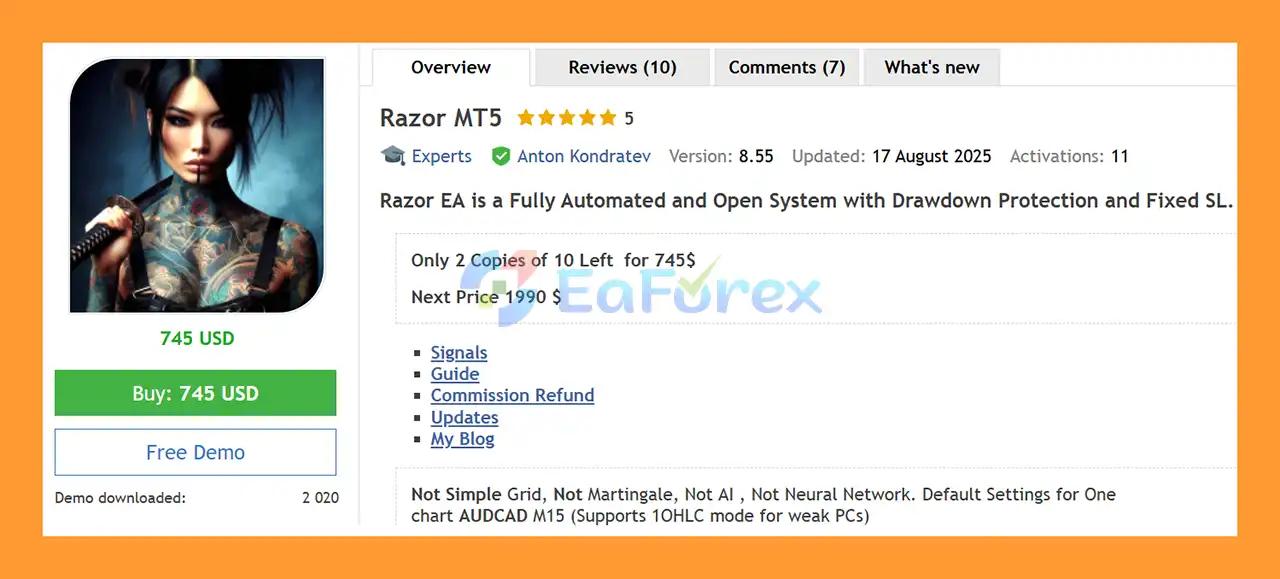
🔺Razor EA MT5 is highly appreciated by the MQL5 community for bringing stable and reliable profits. Below are 5 star reviews from users:
User Review
In summary, Razor EA MT5 is a fully automated multi-currency Expert Advisor built around market mean reversion, volatility filtering, execution protection, and configurable risk management.
The default system operates from a single AUDCAD M15 chart while trading AUDCAD, AUDNZD, and NZDCAD. Its architecture is designed to simplify multi-currency automation while allowing traders to access open parameters for further configuration and optimization.
Unlike traditional Grid or Martingale systems, Razor EA is presented as a strategy based on market conditions and mean reversion. However, its ability to add additional positions during drawdown means traders still need to understand total portfolio exposure and the potential for increased losses.
The inclusion of a Market Volatility Filter, FOMC/NonFarm Strong News Filter, spread protection, slippage protection, fixed Stop Loss, and adaptive broker-condition technology provides multiple layers of trade and execution management.
For users with limited computer resources, the 1OHLC testing mode offers a faster way to evaluate the EA, although it is less detailed than tick-based testing.
Razor EA MT5 is best evaluated under the actual broker conditions where it will be used. Traders should pay particular attention to spread, slippage, leverage, margin requirements, drawdown behavior, and the effect of additional positions during adverse market conditions.
Razor EA MT5 — Open Multi-Currency Mean-Reversion Trading for AUDCAD, AUDNZD & NZDCAD with Fixed SL, Drawdown Protection, News Filtering, and Adaptive Broker Management.
1. What is Razor EA MT5?
Razor EA MT5 is a fully automated Forex trading system designed for long-term, reliable profitability. It primarily trades AUDCAD M15 but also supports AUDNZD and NZDCAD on a single chart.
2. How does Razor EA MT5 manage risk?
It features a Fixed Stop Loss (SL), drawdown protection with up to 6 additional trades, and a Strong News Filter (SNF) to safeguard trades during high-impact events like FOMC and NonFarm.
3. Does Razor EA MT5 use risky strategies like Grid or Martingale?
No. Razor EA MT5 avoids Grid, Martingale, AI, or Neural Network systems, focusing on market mean reversion and adaptive algorithms for safer trading.
4. Can Razor EA MT5 be used for professional accounts?
Yes. It is PropFirm and FTMO-ready, with customizable optimization parameters for other instruments like Gold, making it suitable for both standard and professional trading accounts.
5. What performance can traders expect?
Live trading results:
Initial Deposit: $550
Total Profit: $2,310.14
Win Rate: 74%
Max Drawdown: 21.1%
Backtest results (AUDNZD M15, 2014–2022):
Total Net Profit: $2.1M
Win Rate: 76.16%
Maximum Equity Drawdown: 8.95%
6. Why choose Razor EA MT5?
It offers safe and reliable automated trading, adaptive market algorithms, multi-currency strategy, drawdown recovery, and long-term verified performance. Ideal for traders seeking consistent profits with controlled risk.
In stock
In stock
In stock
In stock
In stock
Out of stock
No account yet?
Create an Account












 Automatic EA
 EA Best Seller
 Expert Advisor MT4
 Expert Advisor MT5
 HFT EA


Reviews
Clear filtersThere are no reviews yet.