









-
 Unlimited Activations
-
 Instant delivery
-
 Easy to install







 Unlimited Activations
Instant delivery
Easy to install
Unlimited Activations
Instant delivery
Easy to install
 Free Update
 Free Install Support

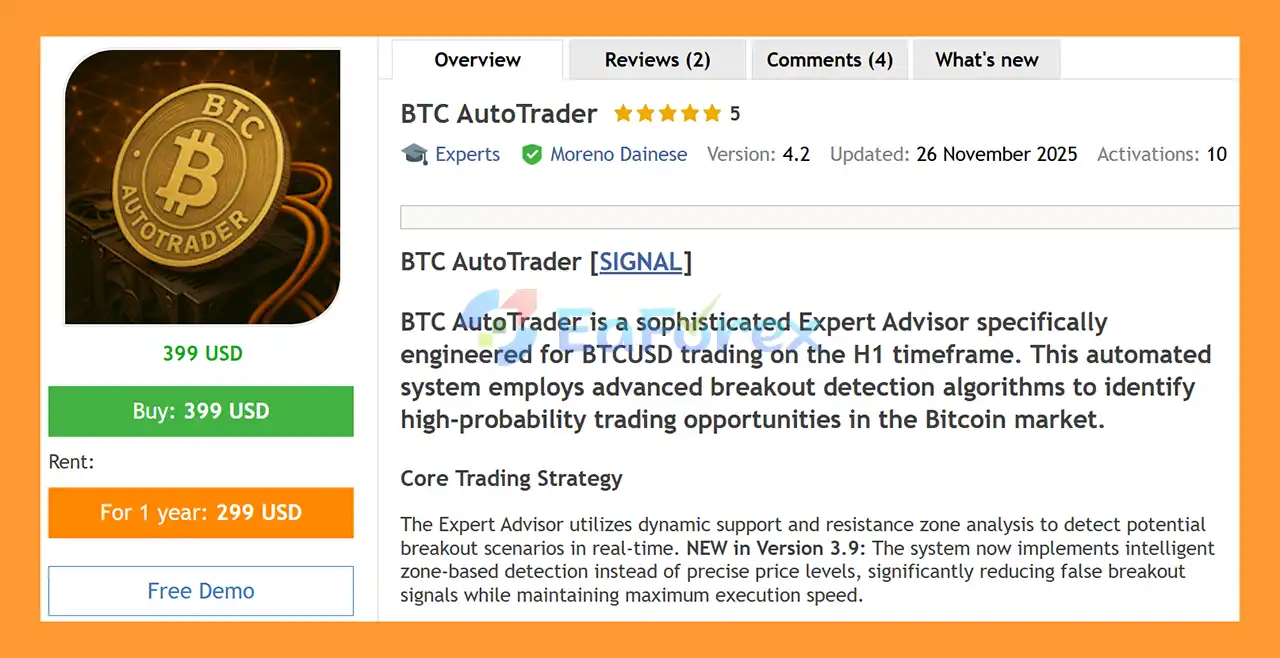
BTC AutoTrader EA MT5 is an automated Bitcoin trading Expert Advisor for MetaTrader 5, specifically designed to trade BTCUSD on the H1 timeframe. The EA uses a breakout-based trading approach that analyzes dynamic support and resistance zones to identify potential trading opportunities in the Bitcoin market.
Instead of relying on grid trading, martingale, or high-frequency scalping, BTC AutoTrader focuses on identifying price breakouts from dynamically detected market zones. Pending orders with expiration are used to help control entry timing and prevent outdated trading opportunities from remaining active indefinitely.
The EA also includes several risk-management tools, including adaptive trailing stops, configurable lot sizing, spread protection, slippage control, and a news filter.
Version V5.1, released in May 2026 according to the supplied product information, adds a CSV News Builder that allows traders to incorporate historical high- and medium-impact news events into MT5 Strategy Tester backtests.
Because BTCUSD execution conditions can vary considerably between brokers, the developer strongly recommends testing the EA using your own broker’s data before committing real funds.
>> Delivery time 24h-48h after payment.
>>> Refund if not delivered.
>>> You will receive the latest version without any limitations (ID+Time).>>Reviewed by Jason Stap <<
BTC AutoTrader EA MT5 is designed specifically for:
The strategy is therefore not intended as a universal multi-symbol Expert Advisor.
The EA analyzes price action to detect dynamic support and resistance zones in real time.
These zones form the foundation of the breakout strategy and are used to identify potential areas where Bitcoin price may move beyond an established trading range.
The core trading methodology focuses on identifying potential breakouts from dynamically detected price zones.
Rather than attempting to trade every small movement, the EA is designed to look for situations where price breaks through relevant support or resistance areas.
Zone-based analysis is used to help filter potential false breakout signals.
By incorporating the structure of the surrounding price zone into the decision process, the EA attempts to distinguish meaningful breakout opportunities from less significant price movements.
BTC AutoTrader can use pending orders to prepare entries around potential breakout levels.
Pending orders are subject to expiration, helping prevent old signals from remaining active after market conditions have changed.
BTC AutoTrader does not use a traditional grid trading methodology.
It does not continuously add positions at predefined levels simply because price moves against an existing trade.
The EA does not use martingale position sizing.
It therefore does not rely on progressively increasing lot sizes to recover previous losses.
The strategy is designed for BTCUSD H1 breakout trading, rather than high-frequency scalping.
This means the EA is intended to operate on broader intraday price structures instead of attempting to capture every short-term fluctuation.
The EA includes an adaptive trailing-stop module designed to adjust protective stop levels as a trade develops.
Version V5.1 also includes improvements related to broker stop-level validation.
Spread controls can help prevent the EA from entering trades when transaction costs become unsuitable according to the configured parameters.
The EA includes configurable slippage protection to help manage execution conditions during order placement.
BTC AutoTrader includes an integrated news filter designed to restrict trading around selected high-impact events.
Version V5.1 extends this functionality to historical backtesting through the CSV News Builder.
BTC AutoTrader EA MT5 follows a breakout-oriented trading process based on dynamic price zones.
The EA monitors BTCUSD on the H1 timeframe and evaluates recent price behavior.
The system identifies relevant support and resistance areas based on current market structure.
These zones can change as new price information becomes available.
When price approaches a relevant zone, the EA evaluates whether the conditions are suitable for a potential breakout setup.
The zone-based approach is designed to reduce some false signals that can occur when price temporarily moves beyond a simple static level.
If the required conditions are satisfied, the EA can place a pending order around the relevant breakout level.
The order includes an expiration mechanism so that outdated opportunities can be removed.
Before and during trade execution, the EA can use:
Once a position is active, the adaptive trailing-stop module can adjust the protective stop according to the trade’s development.
Pending orders can be automatically cancelled when their conditions are no longer considered relevant or when the EA is removed or MT5 is closed, according to the supplied product information.
BTC AutoTrader EA MT5 may be suitable for traders who are specifically interested in automated BTCUSD breakout trading on MetaTrader 5.
One of its defining characteristics is its focus on dynamic support and resistance rather than a conventional grid or martingale recovery system.
The EA also avoids high-frequency scalping and instead operates on the H1 timeframe, which allows its strategy to focus on broader Bitcoin market structures.
Another notable feature is the integrated news-filter functionality. With V5.1, traders can create a historical news CSV file directly through the EA’s dashboard and use that information during Strategy Tester runs.
This is useful because historical news conditions can influence cryptocurrency market behavior and can otherwise be difficult to reproduce in standard MT5 backtests.
The EA also includes configurable spread protection, slippage control, lot sizing, trailing stops, trading sessions, and zone-detection settings.
However, BTC AutoTrader’s performance can depend heavily on broker-specific BTCUSD pricing and execution. Therefore, testing the EA with the exact broker intended for live trading is particularly important.
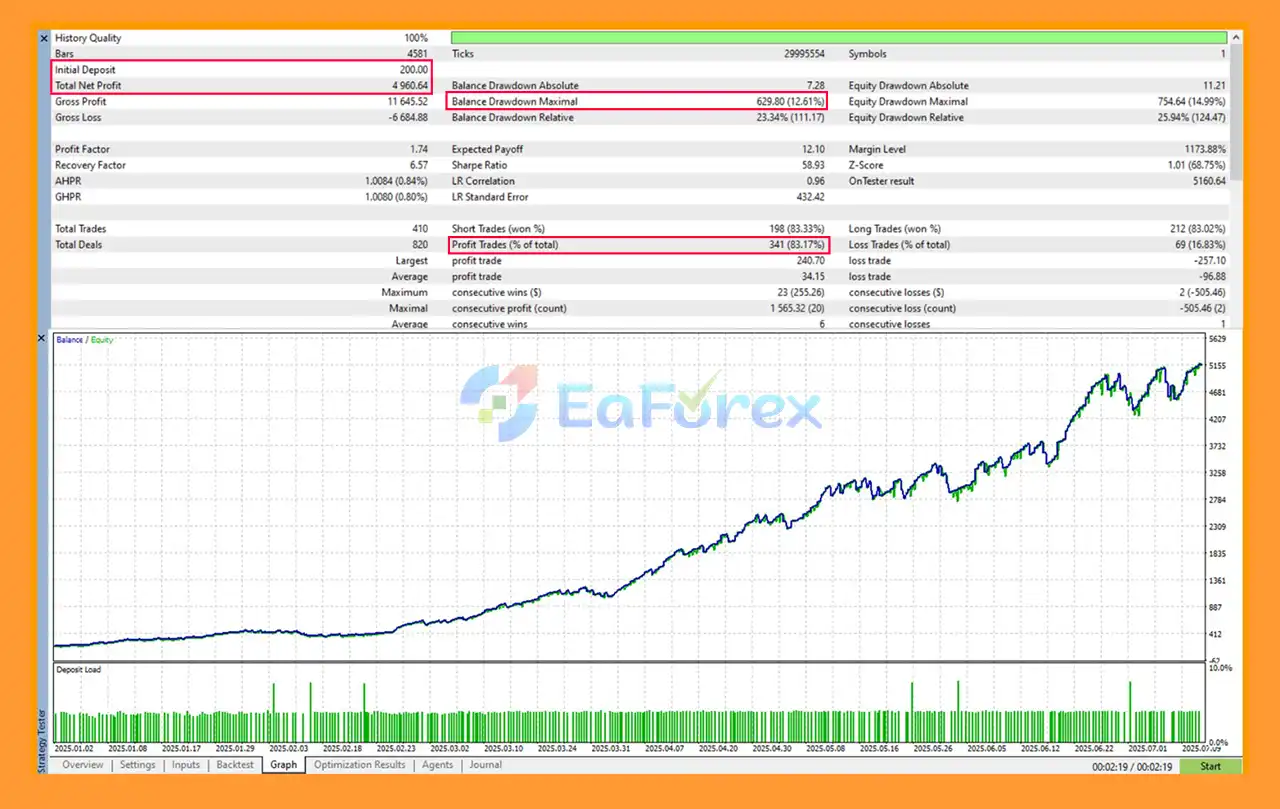
🔺BTCUSD (Gold) – 6 months
BTC AutoTrader EA MT5 Backtest
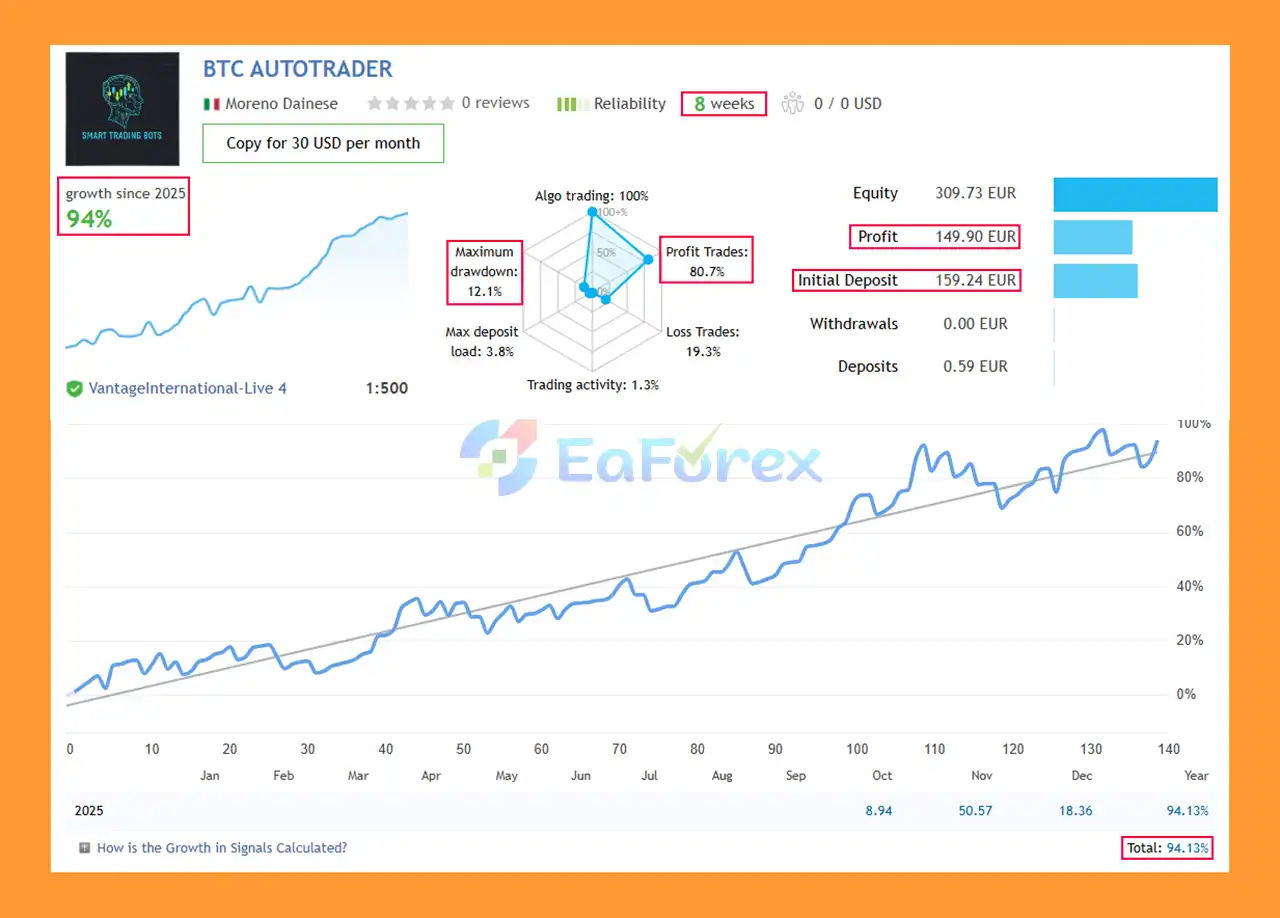
🔺BTCUSD – 8 consecutive weeks
BTC AutoTrader EA Signal Results
The performance of BTC AutoTrader EA MT5 can vary significantly depending on the broker, BTCUSD price feed, spread, commission, liquidity, execution, account conditions, and selected settings.
The developer recommends a minimum deposit of approximately $200, but this should not be interpreted as a guarantee that this amount will provide sufficient margin or acceptable risk under every broker’s conditions.
The adaptive trailing-stop system is designed to adjust protective stops as the position develops.
Version V5.1 also includes improvements to stop-level validation to reduce invalid-stop rejections.
Traders can adjust position sizing according to their account size and preferred risk level.
Using a larger lot size increases the monetary impact of both winning and losing trades.
Spread protection can help prevent new positions from being opened when the spread exceeds the configured threshold.
This is particularly relevant for BTCUSD because cryptocurrency CFD trading conditions can differ substantially between brokers.
Slippage settings allow traders to define acceptable execution deviation.
However, extreme market conditions can still result in execution differences.
The integrated news filter can be used to restrict trading around high-impact events.
V5.1 adds the ability to generate historical news data through the CSV News Builder, allowing the same type of news filtering to be incorporated into Strategy Tester backtests.
The developer emphasizes that BTC AutoTrader depends heavily on broker conditions.
Different brokers can have different:
Consequently, backtest results from one broker should not automatically be assumed to apply to another broker.
According to the supplied product information, BTC AutoTrader EA MT5 V5.1 was released in May 2026 with several updates.
The major addition is the integrated CSV News Builder, accessible directly from the EA dashboard.
Users can:
This provides a way to incorporate historical news filtering into Bitcoin strategy backtests.
V5.1 also improves the trailing-stop module by:
The supplied information states that the core trading logic, signals, lot sizing, and entry rules remain unchanged from V5.0.
The supplied product information also lists several V4.9 updates from May 2026.
The EA can place orders within seconds of being attached to the chart when the relevant conditions are present.
Pending orders can be automatically cancelled when the EA is removed or when MetaTrader 5 is closed.
The code was optimized for MQL5 Market validation requirements.
According to the supplied information, trading behavior remained identical to V4.8.
The biggest consideration when using BTC AutoTrader EA MT5 is its dependence on broker-specific BTCUSD conditions.
The same EA settings can produce different results across brokers because of differences in pricing, spread, execution, contract specifications, and server conditions.
Bitcoin can experience substantial price movements within relatively short periods.
Sudden volatility can cause:
No breakout strategy can eliminate false signals.
BTCUSD can temporarily move beyond a support or resistance zone before reversing back into the previous range.
Although the news filter provides an additional layer of protection, not every market-moving event can necessarily be predicted or incorporated into a historical news database.
Unexpected cryptocurrency-specific events can also affect Bitcoin independently of traditional economic-calendar events.
Historical backtests cannot perfectly reproduce live execution.
Differences can arise from:
The product information specifies an ECN account as a requirement.
Traders should confirm that their broker’s account structure is compatible before purchasing.
Past performance does not guarantee future performance.
A profitable historical test should not be interpreted as a promise of future returns.
Although approximately $200 is recommended, the appropriate account size depends on broker margin requirements, lot sizing, leverage, and the trader’s risk tolerance.
Before installation, confirm that your broker provides:
Obtain the BTC AutoTrader EA MT5 files from the official or authorized source.
In MetaTrader 5, select:
File → Open Data Folder
Navigate to:
MQL5 → Experts
Place the EA files in the appropriate directory.
Restart MT5 or refresh the Expert Advisors section in the Navigator.
Open the BTCUSD chart and select the H1 timeframe.
Navigate to:
Navigator → Expert Advisors
Locate BTC AutoTrader EA MT5 and drag it onto the BTCUSD H1 chart.
Review the available settings, including:
If you are using V5.1, open the dashboard’s CSV News Builder.
Select the desired historical period and news-impact levels, then generate the CSV file.
This allows the historical news filter to be incorporated into Strategy Tester runs.
Use the MT5 Strategy Tester with your own broker’s BTCUSD data.
Evaluate:
The developer recommends running the EA on a demo account for approximately 2–4 weeks before considering live deployment.
This can help identify differences between historical testing and actual broker execution.
A VPS is recommended for continuous automated operation because MetaTrader 5 needs to remain connected and running while the EA is active.
>>> Join VIP Membership Now <<<
In summary, BTC AutoTrader EA MT5 is an automated BTCUSD H1 breakout Expert Advisor built around dynamic support and resistance zones. Its strategy focuses on identifying potential Bitcoin breakouts using zone-based analysis rather than grid trading, martingale, or high-frequency scalping.
The EA combines breakout detection with pending orders, order expiration, adaptive trailing stops, configurable lot sizing, spread protection, slippage control, and news filtering.
One of its most notable features is the V5.1 CSV News Builder, which provides a way to incorporate historical high- and medium-impact news events into MT5 Strategy Tester backtests. This can make historical evaluation more representative of the EA’s configured news-filter behavior.
However, BTC AutoTrader should be evaluated with particular attention to broker compatibility. Bitcoin CFD pricing, spreads, liquidity, execution, contract specifications, and server conditions can vary considerably between brokers. Therefore, a backtest performed with one broker should not automatically be treated as representative of another broker.
The recommended approach is to first use the free demo with your intended broker, test multiple historical periods using the V5.1 news functionality, and then conduct a 2–4 week demo forward test before considering live trading.
BTC AutoTrader EA MT5 is ultimately a technical trading tool, not a guarantee of profit. Historical results can help evaluate its past behavior, but actual future performance will depend on market conditions, broker execution, configuration, and risk management.
In stock
In stock
In stock
In stock
In stock
Out of stock
No account yet?
Create an Account












 Automatic EA
 EA Best Seller
 Expert Advisor MT4
 Expert Advisor MT5
 HFT EA


Reviews
Clear filtersThere are no reviews yet.