









-
 Unlimited Activations
-
 Instant delivery
-
 Easy to install









 Unlimited Activations
Instant delivery
Easy to install
Unlimited Activations
Instant delivery
Easy to install
 Free Update
 Free Install Support

Ultimate Pulse EA MT5 is an automated position management Expert Advisor for MetaTrader 5, designed to capture potential profits from natural price movements by following established market trends.
The EA identifies the prevailing trend using multi-timeframe Exponential Moving Average (EMA) analysis, then opens positions in the direction of the detected trend. Instead of relying on a single large take-profit target, Ultimate Pulse manages individual positions with separate profit targets.
When the market moves favorably, positions can be closed independently at their respective take-profit levels. If price temporarily pulls back while the broader trend remains valid, the EA can add another position at a potentially improved average entry price.
The system also includes automatic position-size scaling, multiple risk profiles, spread and volatility filters, news protection, drawdown protection, margin safety checks, and a real-time trading dashboard.
Ultimate Pulse EA MT5 is primarily optimized for XAUUSD (Gold).
>> Delivery time 24h-48h after payment.
>>> Refund if not delivered.
>>> You will receive the latest version without any limitations (ID+Time).>>Reviewed by Jason Stap <<
Ultimate Pulse EA MT5 uses multi-timeframe EMA analysis to determine the current market direction.
The EA evaluates trend conditions across multiple timeframes and uses this information to identify potential trend-following opportunities.
Once the system identifies a suitable directional bias, it can open positions in the direction of the prevailing trend.
This approach is designed to participate in established price movements rather than attempting to predict every short-term market fluctuation.
Each position can have its own take-profit target.
Instead of requiring the entire position sequence to close at one common target, individual positions can be closed independently when their respective profit objectives are reached.
This position-management approach is designed to allow realized profits to accumulate progressively as the market moves.
If price temporarily moves against the initial position while the broader trading conditions remain valid, Ultimate Pulse can add another position at a potentially more favorable price.
This can improve the average entry price of the overall position sequence.
However, additional positions also increase market exposure and should therefore be considered carefully when selecting the appropriate risk mode.
The EA can automatically adjust lot sizes according to account balance and the selected risk level.
Available scaling levels include:
| Risk Level | Position Size |
|---|---|
| Low | 0.01 lots per $5,000 |
| Medium | 0.01 lots per $4,000 |
| Medium-High | 0.01 lots per $3,000 |
| High | 0.01 lots per $2,000 |
| Extreme | 0.01 lots per $1,000 |
Profit targets are also designed to scale with account balance so that the trading framework can remain proportional as account equity changes.
Ultimate Pulse includes four main risk profiles that automatically configure the EA’s trading behavior.
Safe uses more conservative filters and entry conditions and is positioned for users seeking a more cautious configuration.
Medium provides a more balanced approach between filtering and trading frequency.
High applies fewer restrictions and can generate more frequent entries.
Ultimate uses the fastest timeframe and allows greater position capacity. It is intended for experienced traders who understand the additional exposure involved.
Ultimate Pulse EA MT5 follows a trend-based position management process.
The EA analyzes multiple timeframe EMA data to determine the prevailing market direction.
The objective is to establish whether the current price environment provides a suitable directional trend.
When the required conditions are satisfied, the EA opens a position in the direction of the detected trend.
This means the system primarily attempts to participate in existing price momentum rather than continuously trade against it.
After entering a position, the EA continuously monitors market conditions and price behavior.
If price continues moving in the expected direction, the individual position can approach its predefined take-profit target.
If price temporarily pulls back, the EA may add another position when its conditions allow.
The additional entry can create a potentially improved average entry price for the overall position sequence.
However, this also increases total exposure, making the selected risk profile an important part of the overall strategy.
Each position can be managed independently according to its own take-profit objective.
This allows profitable positions to be realized progressively rather than requiring every position to close simultaneously.
The EA can automatically scale its position size according to account balance and the selected risk level.
This allows the position-sizing framework to adapt as account equity changes.
Ultimate Pulse EA MT5 may be suitable for traders looking for an automated system focused on trend-following and structured position management, particularly for XAUUSD.
One of its main characteristics is that the EA does not simply open a trade and wait for one fixed exit. Instead, it actively manages individual positions and can respond to pullbacks by adding positions when its conditions are met.
The combination of multi-timeframe EMA trend detection, individual take-profit management, automatic lot scaling, and multiple protection filters provides a comprehensive automated trading framework.
Key features include:
The four built-in risk profiles also allow users to select a predefined trading approach without manually adjusting every parameter.
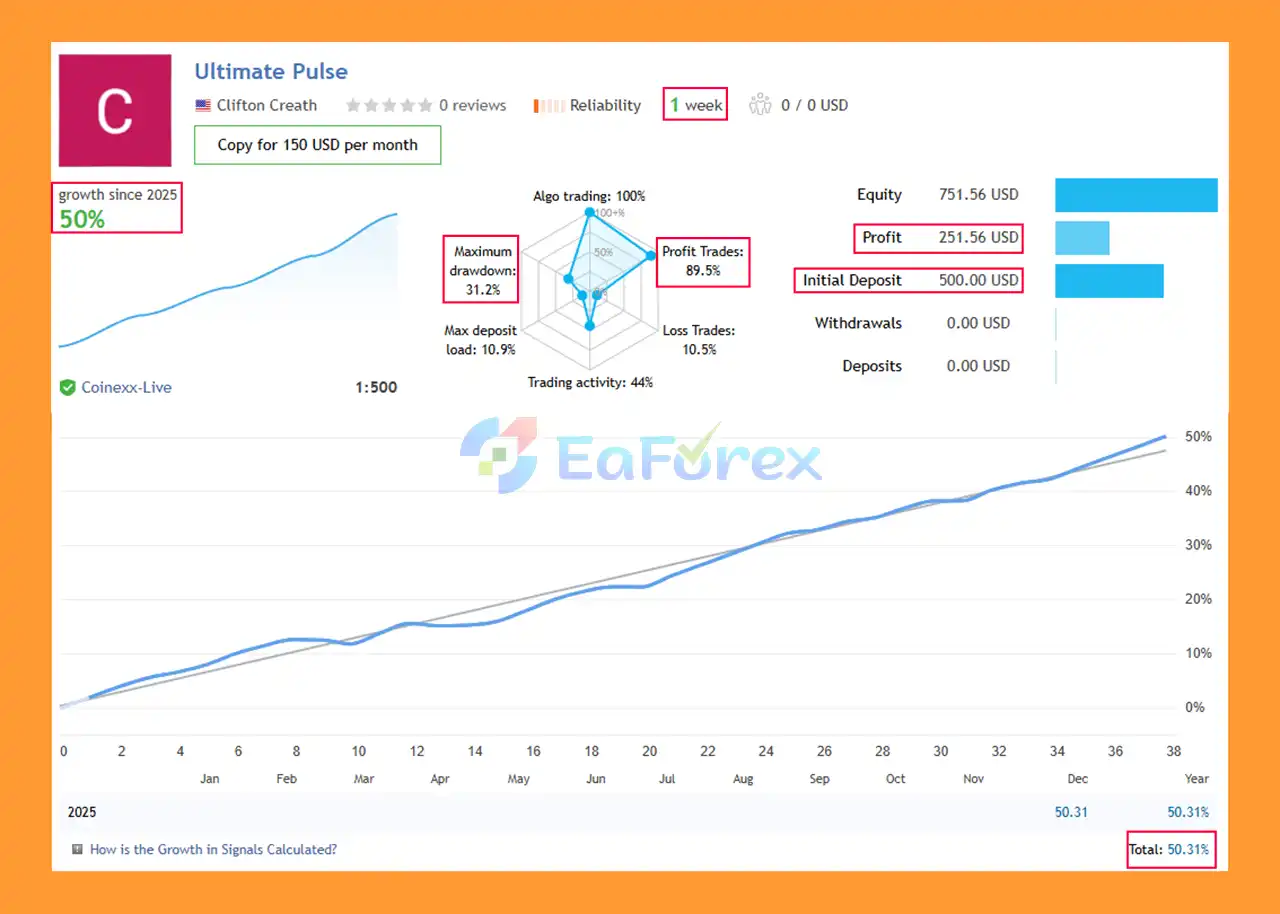
🔺 GOLD pair – 1 consecutive weeks
Ultimate Pulse EA MT5 Signal Results
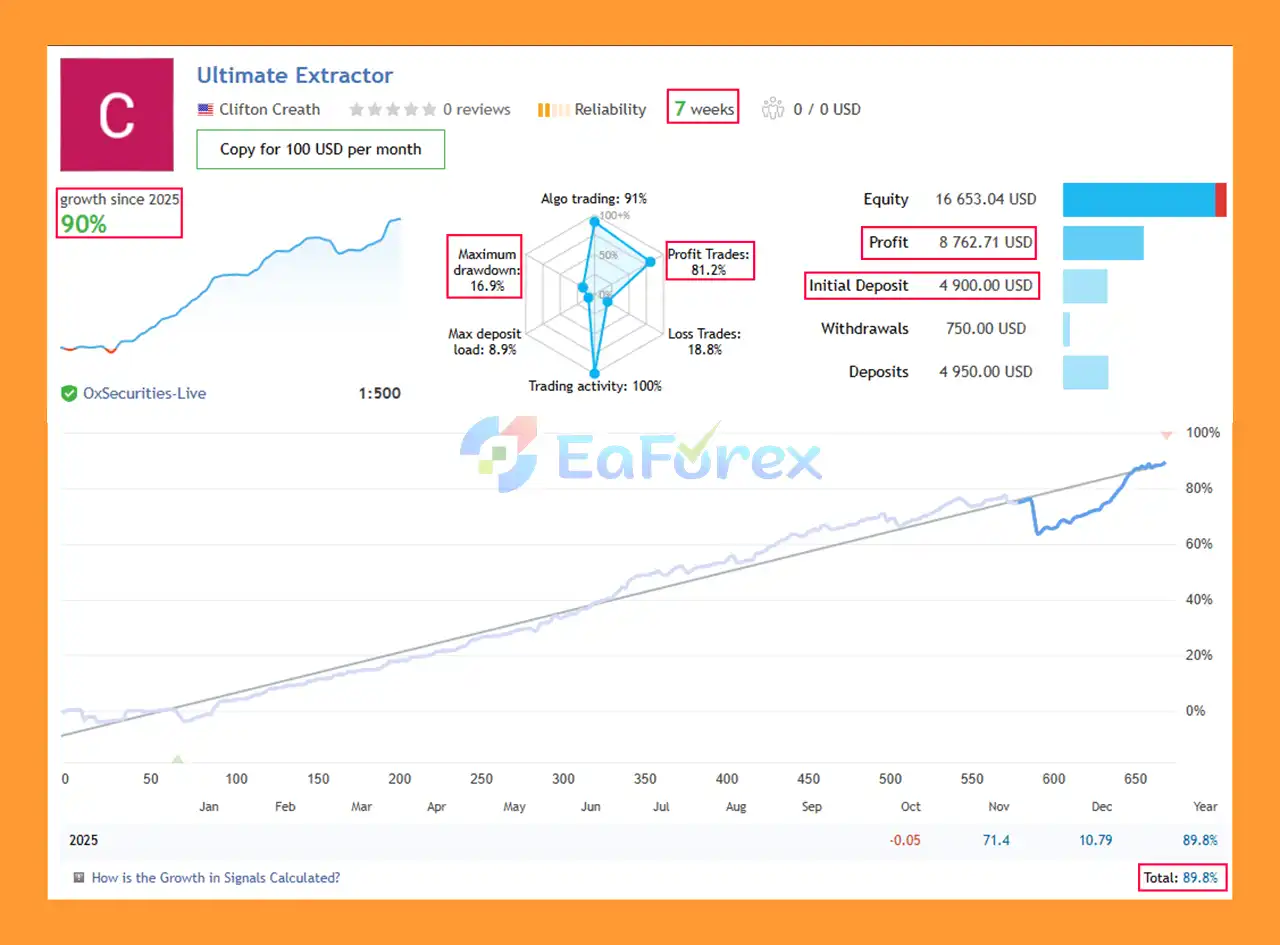
🔺 GOLD pair – 7 consecutive weeks
Ultimate Pulse EA Signal Results
Ultimate Pulse EA MT5 incorporates several mechanisms designed to manage market exposure and protect the trading account.
The EA can monitor spread conditions and wait for more suitable trading conditions when spreads become excessive.
This can help reduce entries during periods when transaction costs are unusually high.
A volatility filter is included to help identify extreme market movements.
The system can reduce or avoid trading activity when market conditions become unusually volatile.
Ultimate Pulse includes a news filter designed to pause trading around major events such as NFP and FOMC announcements.
News events can produce rapid price movements, spread expansion, and slippage, making this protection particularly relevant for automated trading.
The Friday filter can prevent new entries before the weekend, reducing exposure to potential weekend gaps and unpredictable market conditions.
The EA includes maximum drawdown protection with an automatic cooldown mechanism.
If account drawdown reaches the configured protection level, the system can temporarily stop opening new positions.
Before opening trades, the EA performs margin-related checks designed to reduce the possibility of excessive account exposure.
Position sizes can scale automatically according to account balance and the selected risk level.
This provides a predefined framework for adjusting trade volume as account equity changes.
However, automatic scaling should not be interpreted as guaranteed risk control. Increasing position size as an account grows can also increase the absolute amount of money exposed to market fluctuations.
Despite its built-in protection features, Ultimate Pulse EA MT5 carries the normal risks associated with automated Forex and CFD trading.
The EA can add positions when price pulls back. While this may improve the average entry price, it also increases total market exposure.
If the market continues moving against the position sequence, drawdown can increase.
Automatic position scaling means that larger account balances can result in larger position sizes.
This can increase both potential profits and potential losses in monetary terms.
Trend-following systems can perform differently in trending and ranging markets.
When the market lacks a clear direction or repeatedly changes direction, trend-following entries may experience a series of losing trades.
Ultimate Pulse is optimized for XAUUSD, an instrument that can experience significant price movements and rapid changes in volatility.
Traders should consider the specific risks associated with Gold trading before using the EA with real capital.
Although the EA includes a news filter, no automated news filter can guarantee complete protection against unexpected market events.
Major announcements can cause rapid price changes, slippage, spread expansion, and liquidity changes.
Maximum drawdown protection can help control trading activity, but it cannot guarantee that losses will remain below a specific level under all market conditions.
Past performance, backtests, or previous trading results do not guarantee future performance.
Live results can vary because of broker execution, spreads, slippage, liquidity, market conditions, account settings, and other external factors.
Download and install MetaTrader 5 through your broker or the appropriate official source.
Open MetaTrader 5 and select:
File → Open Data Folder
Navigate to:
MQL5 → Experts
Copy the Ultimate Pulse EA MT5 file into this folder.
Restart MT5 or refresh the Expert Advisors section in the Navigator window.
Open an XAUUSD (Gold) chart.
Ultimate Pulse EA MT5 is optimized specifically for XAUUSD.
Find Ultimate Pulse EA MT5 under Expert Advisors and drag it onto the appropriate chart.
Choose the risk profile that matches your trading requirements:
New users should consider starting with the more conservative configuration and evaluating the EA on a demo account first.
Review the account balance, position-size scaling, trading permissions, and other available parameters.
The EA is designed to automatically configure key trading settings according to the selected risk profile.
Make sure Algo Trading is enabled in MetaTrader 5.
Check that the EA is running correctly and that no error messages appear.
Before using significant real capital, test the EA on a demo account.
Monitor:
This can help you understand how the selected risk profile behaves under your broker’s specific trading conditions.
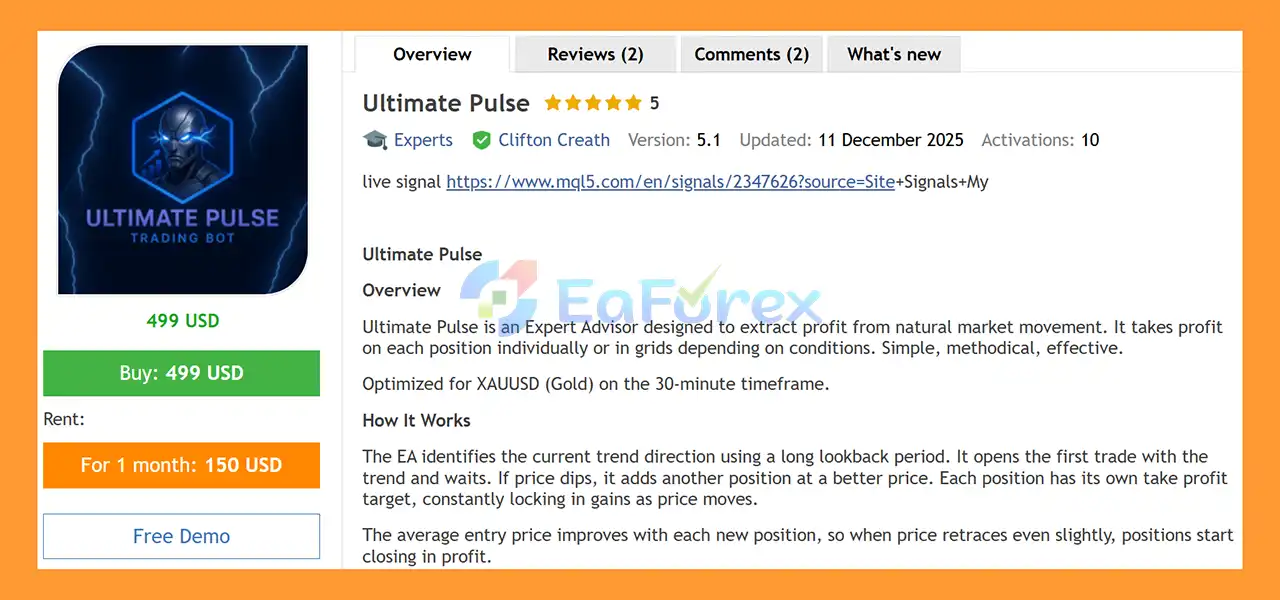
🔺Ultimate Pulse EA MT5 is highly appreciated by the MQL5 community for bringing stable and reliable profits. Below are 5 star reviews from users:
User Reviews
>>> Join VIP Membership Now <<<
In summary, Ultimate Pulse EA MT5 is an automated XAUUSD trading and position-management Expert Advisor designed around trend-following, multi-timeframe EMA analysis, and individual position management.
The EA identifies potential trends, enters in the direction of the market, and manages positions using individual take-profit targets. When market conditions allow, it can also add positions during pullbacks, potentially improving the average entry price while increasing overall market exposure.
One of its key features is the combination of automatic position-size scaling and predefined risk modes. Users can select from Safe, Medium, High, or Ultimate configurations without manually tuning every aspect of the strategy.
The system also includes several protective mechanisms, including spread filtering, volatility protection, news filtering, Friday protection, maximum drawdown controls, and margin safety checks.
However, these features do not eliminate trading risk. The ability to add positions during pullbacks and automatically increase position sizes as the account grows can increase exposure, particularly under unfavorable market conditions.
For this reason, traders should evaluate Ultimate Pulse EA MT5 using a demo account first, carefully select an appropriate risk profile, and monitor drawdown, position exposure, and margin usage before considering live deployment.
Ultimate Pulse EA MT5 should be evaluated based on its actual trading behavior and risk characteristics rather than relying solely on historical performance or the promise of automated profit.
1. What is Ultimate Pulse EA MT5?
Ultimate Pulse EA MT5 is a trend-based Expert Advisor designed to trade XAUUSD (Gold) on the 30-minute timeframe. It uses trend detection, incremental position management, and smart risk scaling to capture profits while managing drawdowns effectively.
2. Who developed Ultimate Pulse EA MT5?
The EA was developed by Clifton Creath, an experienced MQL5 developer with over 2 years of expertise. He is also known for other products like Ultimate Extractor MT5.
3. How does Ultimate Pulse EA MT5 trade Gold?
It identifies the market trend using a long lookback period, opens positions aligned with the trend, and optionally adds positions during dips. Each position has individual take profit targets, and grid-style entries are used only when favorable.
4. What are the main features of Ultimate Pulse EA MT5?
Key features include trend detection, incremental positioning, individual take profits, optional grid trading, smart risk scaling, drawdown control, built-in market filters, visual dashboard, and adjustable risk modes.
5. Can Ultimate Pulse EA MT5 manage trading risk automatically?
Yes, it automatically scales lot sizes based on account balance and drawdowns. Built-in filters, such as spread, ATR, ADX, and loss filters, further reduce risk and improve trade quality.
6. How reliable is Ultimate Pulse EA MT5’s live performance?
Live signal results show high win rates and strong growth. For example, one account achieved 50% growth in 1 week with an 89.5% win rate, and another achieved 90% growth over 7 weeks with a 16.9% maximum drawdown.
7. Is Ultimate Pulse EA MT5 user-friendly?
Yes, it comes with an installation guide, settings document, and a visual dashboard showing EA status, floating P/L, drawdown, position count, and TP targets. Quick control buttons allow easy pausing, resuming, or adjusting directly from the chart.
8. What brokers and account types are compatible with Ultimate Pulse EA MT5?
It is optimized for brokers supporting XAUUSD trading on the 30-minute timeframe. The EA’s smart risk management and flexible lot scaling make it suitable for both personal and funded accounts.
9. Why should I choose Ultimate Pulse EA MT5 over other Gold EAs?
Ultimate Pulse EA MT5 combines trend-following with incremental position management, smart risk scaling, customizable take profits, optional grid trading, and built-in market filters. It is optimized for XAUUSD volatility and praised by the MQL5 community for consistent, reliable profits.
In stock
In stock
In stock
In stock
In stock
Out of stock
No account yet?
Create an Account












 Automatic EA
 EA Best Seller
 Expert Advisor MT4
 Expert Advisor MT5
 HFT EA


Reviews
Clear filtersThere are no reviews yet.