


Product Overview
Cheeky Monkey AI Robot EA MT4 is a multi-strategy automated trading Expert Advisor (EA) designed for MetaTrader 4 (MT4). It combines different price action techniques, swing trading, trend-following, reversal, pullback, sideways market detection, candlestick analysis, and Bid-Ask price movement strategies within a flexible trading framework.
The EA offers multiple strategy modules, including Cheeky Monkey Ai-1, Ai-2, Ai-CLPro, Ai Pro, Ai Gold, Ai Pullback, Ai Spread, Ai 3CS, Ai EKG, Ai BBMA, Ai Swing-Plus, and Ai Colour. Each strategy follows a different approach to market analysis, allowing traders to configure their trading systems according to their preferred instruments, timeframes, and market conditions.
One of the main features of Cheeky Monkey AI Robot EA for MT4 is its Level Snowball trading mechanism, which is incorporated into multiple strategy modules. The EA also provides configurable trade-closing functions, monetary profit targets, trading frequency settings, and weekday-based strategy selection.
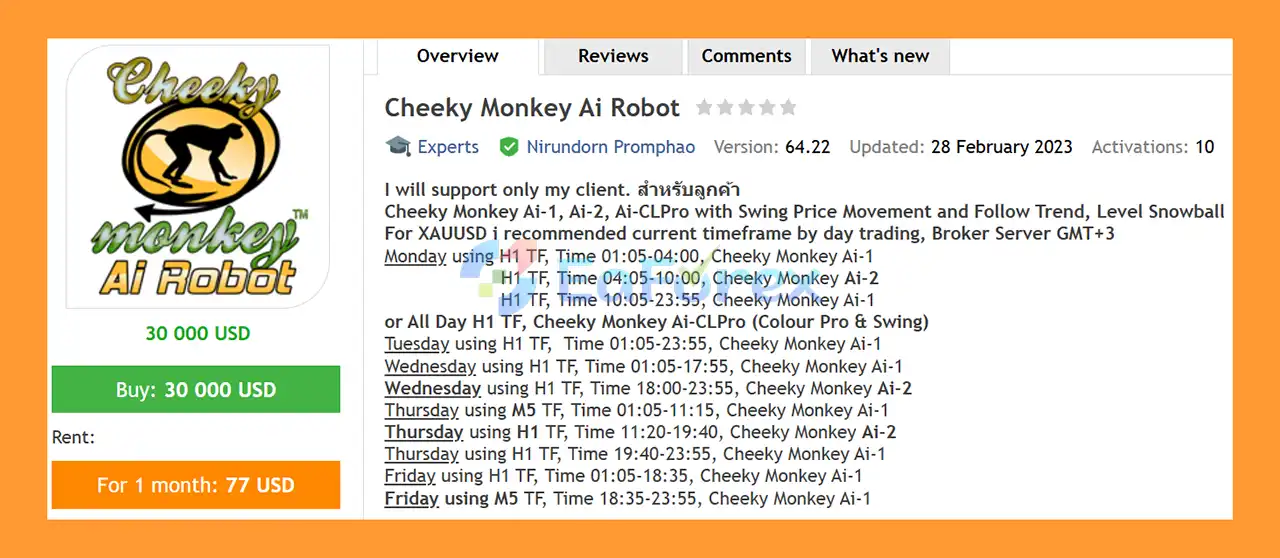
Cheeky Monkey is particularly recommended for XAUUSD (Gold) day trading, with specific timeframe and trading-session recommendations for different days of the week. Additional strategies support other currency pairs, indices, stocks, and cryptocurrencies, depending on the selected strategy and configuration.
For traders seeking a flexible MT4 automated trading system with multiple strategy options and customizable trading parameters, Cheeky Monkey AI Robot EA MT4 offers a comprehensive environment for building and testing different trading approaches.
About the Developer
- Author: Nirundorn Promphao
- Experience: Over +7 years of experience on MQL5.
- Notable Products: Cheeky Monkey Ai Robot EA, WOW Dash DotFX5 NY Ai Robot EA MT4, Win Sniper Follow EA MT4, Multi Gold Ai Robot, Candy Ai Robot, Ava Ai Robot, WinWiFi Fund Ai Robot, Fullerton Fund Ai Robot and other
- Flagship Product: Cheeky Monkey Ai Robot EA MT4 is rated as the best performing product of the year.
>>> Delivery time 24h-48h after payment.
>>> Refund if not delivered.
>>> You will receive the latest version without any limitations (ID+Time).Reviewed by Jason Stap <<<
Key Features of Cheeky Monkey AI Robot EA MT4
Multi-Strategy Trading System
Cheeky Monkey AI Robot EA MT4 includes a collection of strategy modules designed for different market behaviors:
- Cheeky Monkey Ai-1: Uses the current chart and timeframe for swing trading, sideways market conditions, and Level Snowball execution.
- Cheeky Monkey Ai-2: Uses the current chart and timeframe, with an option to open opposite positions relative to Ai-1, alongside Level Snowball logic.
- Cheeky Monkey Ai-CLPro: Combines swing-based trading with Colour Pro functionality and operates without an MTG strategy, according to the supplied specifications.
- Cheeky Monkey Ai Pro: Uses H1-based swing and pullback strategies with Level Snowball.
- Cheeky Monkey Ai Gold: Combines trend-following and reversal strategies on the H1 timeframe.
- Cheeky Monkey Ai Pullback: Applies trend-following and pullback logic on the H1 timeframe.
- Cheeky Monkey Ai Spread: Uses Bid-Ask price movement on the current chart and timeframe.
- Cheeky Monkey Ai 3CS: Uses three candlestick-based follow levels on the H1 timeframe.
- Cheeky Monkey Ai EKG: Applies one to four candlestick levels on the current chart and timeframe.
- Cheeky Monkey Ai BBMA: Combines Bollinger Bands (BB), Moving Averages (MA), and candlestick analysis using H1-based logic.
- Cheeky Monkey Ai Swing-Plus: Combines swing, trend, and sideways market approaches using daily timeframe analysis.
- Cheeky Monkey Ai Colour: Uses a fixed M5 timeframe with swing logic, trend-following, one-to-two-candlestick analysis, and Level Snowball.
The available strategies allow traders to select an approach that matches their preferred trading style rather than relying on a single market-entry method.
Flexible Timeframe Support
The EA supports different timeframe configurations depending on the selected strategy. Recommended settings include M5, M15, M30, H1, H4, and D1.
For XAUUSD day trading, the recommended timeframe varies according to the day of the week and strategy module. Other suggested configurations include:
- XAUUSD: M15 for the Ai Spread strategy.
- USDCAD: M5 for the Ai Spread strategy.
- US100, indices, and stocks: M15 for the Ai Spread strategy.
- Bitcoin and other cryptocurrencies: M30 for the Ai Spread strategy.
- H4 for the GMT+3 Mix and GMT+0 Mix strategies.
- D1 for the Ai Swing-Plus strategy.
Always confirm the appropriate timeframe for the specific strategy before enabling automated trading.
Weekday-Based Strategy Selection
Cheeky Monkey AI Robot EA MT4 supports configurable weekday filters, allowing traders to select different strategies for Monday, Tuesday, Wednesday, Thursday, and Friday.
This feature makes it possible to apply different trading approaches to individual charts throughout the week. Traders can also configure the EA to switch between compatible strategy modules according to their preferred trading schedule.
The supplied weekday-switch examples include Cheeky Monkey Prop 6 AI Robot for Monday, Prop 3 AI Robot for Tuesday, Beast Wars2 AI for Wednesday, Prop 5 AI Robot for Thursday, and Prop 4 AI Robot for Friday.
These selections should be treated as configurable examples, and users should verify the relevant input settings before applying them.
GMT+3 and GMT+0 Mix Strategies
The EA includes two additional mixed-strategy configurations:
Cheeky Monkey Ai-GMT+3-Mix
- Uses the H4 timeframe.
- Designed for automatic trading across supported asset pairs.
- Intended for brokers whose server time is GMT+3.
- Combines swing, reversal, and trend-following approaches during the specified daytime session.
- Uses price action, reversal, and swing approaches during the specified nighttime session.
Cheeky Monkey Ai-GMT+0-Mix
- Uses the H4 timeframe.
- Designed for automatic trading across supported asset pairs.
- Intended for brokers whose server time is GMT+0.
- Combines swing, reversal, and trend-following approaches during the specified daytime session.
- Uses price action and trend-following approaches during the specified nighttime session.
Correct broker server-time alignment is important when configuring session-dependent strategies.
Level Snowball Trading Mechanism
Level Snowball is a recurring component across several Cheeky Monkey AI Robot EA MT4 strategy modules. Depending on the selected configuration, the EA can combine this mechanism with swing movement, pullbacks, trend-following, reversal signals, sideways market conditions, or candlestick-based analysis.
Because the exact order-placement and position-management rules depend on the selected strategy and its inputs, traders should review the EA documentation and test the intended configuration before using it on a live account.
Configurable Trade Closing Functions
The EA provides a dedicated group of order-closing strategies, including:
- Close_Long_Position_CutOff
- Close_Long_Position_CutOff2
- Close_Short_Position_CutOff
- Close_Short_Position_CutOff2
- Close_Long_with_Money_Profit
- Close_Short_with_Money_Profit
- Close_All_with_Money_Profit
- Close_All_Loss_OpenTrade_Size
These functions provide additional control over closing long positions, short positions, or multiple open trades according to configured conditions.
The exact behavior of each function should be verified in the EA inputs and documentation. Monetary profit targets do not guarantee realized profits, and loss-management settings should be tested carefully.
Configurable Trade Frequency and Profit Targets
Cheeky Monkey AI Robot EA MT4 -Spread includes recommended settings for trade frequency and monetary profit targets.
The suggested next-trade interval is approximately 2–7 minutes, configurable through the Inputs tab. The supplied examples also recommend a $6 monetary profit target for a standard account with a balance or equity of $1,000–$2,000 using 0.01 lots.
For cent accounts with a balance or equity of 10,000–20,000 cents, the supplied example recommends 0.05–0.09 lots and a monetary profit target of 30–54 cents.
These values are example settings, not universal risk recommendations. Actual exposure depends on the instrument, contract specifications, leverage, broker conditions, and the EA's position-management behavior.
How It Works
Cheeky Monkey AI Robot EA MT4 operates through configurable strategy modules that analyze market information and execute trades according to the selected trading logic.
Step 1: Analyze Price Movement
The EA uses the logic associated with the selected strategy to evaluate market conditions. Depending on the module, this may involve swing price movement, trend direction, reversals, pullbacks, sideways conditions, candlestick patterns, Bollinger Bands, Moving Averages, or Bid-Ask price movement.
Different modules use different analytical approaches, so the selected strategy determines which signals are relevant.
Step 2: Apply the Selected Strategy
After configuration, the EA follows the selected strategy rules on the relevant chart and timeframe.
For example, Ai-1 focuses on swing and sideways market conditions, Ai-2 includes opposite-position functionality relative to Ai-1, Ai Gold uses trend-following and reversal logic, and Ai BBMA combines technical indicators with candlestick analysis.
The Ai Spread strategy focuses on Bid-Ask price movement and uses its own recommended timeframe settings.
Step 3: Execute Automated Trades
When the configured strategy identifies conditions that satisfy its entry rules, the EA can execute trades automatically through MT4, subject to terminal connectivity, broker permissions, and the selected settings.
Traders can adjust supported parameters in the Inputs tab, including relevant trading intervals and strategy-selection options.
Step 4: Manage Open Positions
The EA includes several order-closing functions designed to manage long positions, short positions, monetary profit targets, and specified loss-related conditions.
The outcome depends on the selected closing rules, position size, market movement, spreads, execution quality, and other account conditions.
Step 5: Adapt Strategy Selection to the Trading Schedule
Traders can configure weekday filters and use different strategies or timeframes on different days.
For XAUUSD, the supplied recommendations vary by weekday and session. The GMT+3 Mix and GMT+0 Mix configurations also provide different session-dependent trading approaches.
This structure allows traders to organize their automated trading setup around predefined schedules instead of using the same strategy configuration for every trading session.
Why Choose Cheeky Monkey AI Robot EA MT4?
Multiple Trading Approaches in One EA
Rather than focusing on only one trading technique, Cheeky Monkey AI Robot EA MT4 offers several strategy modules for swing movement, trends, reversals, pullbacks, candlestick analysis, and Bid-Ask price movement.
This variety gives traders more configuration choices when developing and testing an automated trading plan.
Designed for XAUUSD Day Trading
The EA provides specific Gold trading recommendations, including H1, M5, and other timeframe configurations depending on the strategy and weekday.
Gold traders can use these recommendations as a starting point for testing a strategy that fits their broker's execution conditions and preferred trading sessions.
Flexible Trading Schedule
Weekday filters and session-dependent strategies allow traders to configure different approaches for different days of the week.
This can be useful for traders who want to evaluate how alternative strategy configurations behave across different sessions.
Customizable Position Management
The available order-closing functions and monetary profit settings provide additional configuration options for managing open positions.
However, traders must distinguish between a profit target, which defines an exit objective, and a protective risk limit, which is intended to restrict losses.
Support for Multiple Markets
The supplied recommendations cover XAUUSD, selected forex pairs, indices, stocks, and cryptocurrencies, depending on the strategy.
This broad range of configurations can help traders test the EA across different instruments, provided the chosen strategy supports the instrument and the broker's trading conditions are suitable.
Suitable for Strategy Testing and Optimization
With multiple modules and timeframe options, Cheeky Monkey can be evaluated through historical backtesting and forward testing.
Traders can compare strategy behavior, drawdown, transaction costs, trade frequency, and performance consistency before deciding whether a configuration is appropriate for live use.
Cheeky Monkey Ai Robot EA MT4 Backtest Results
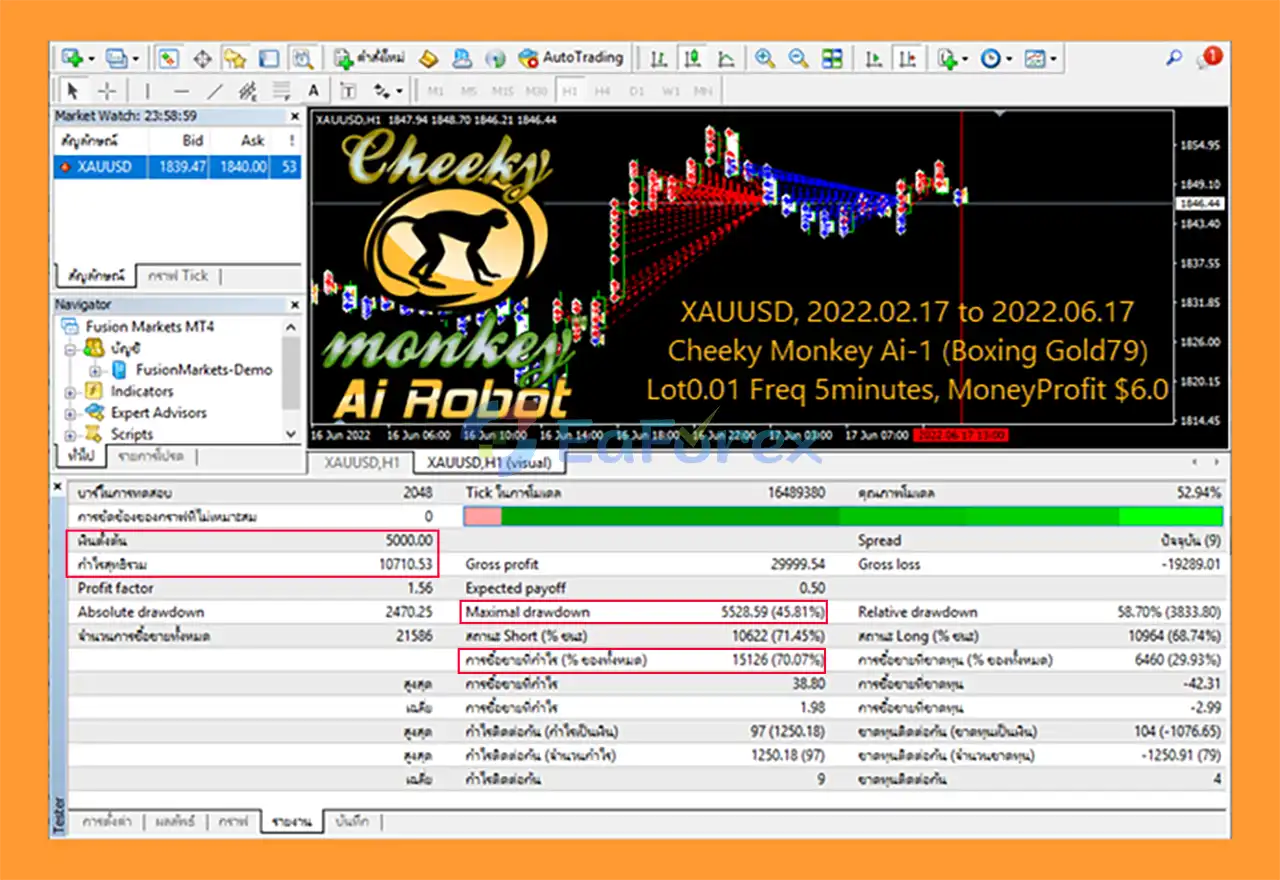
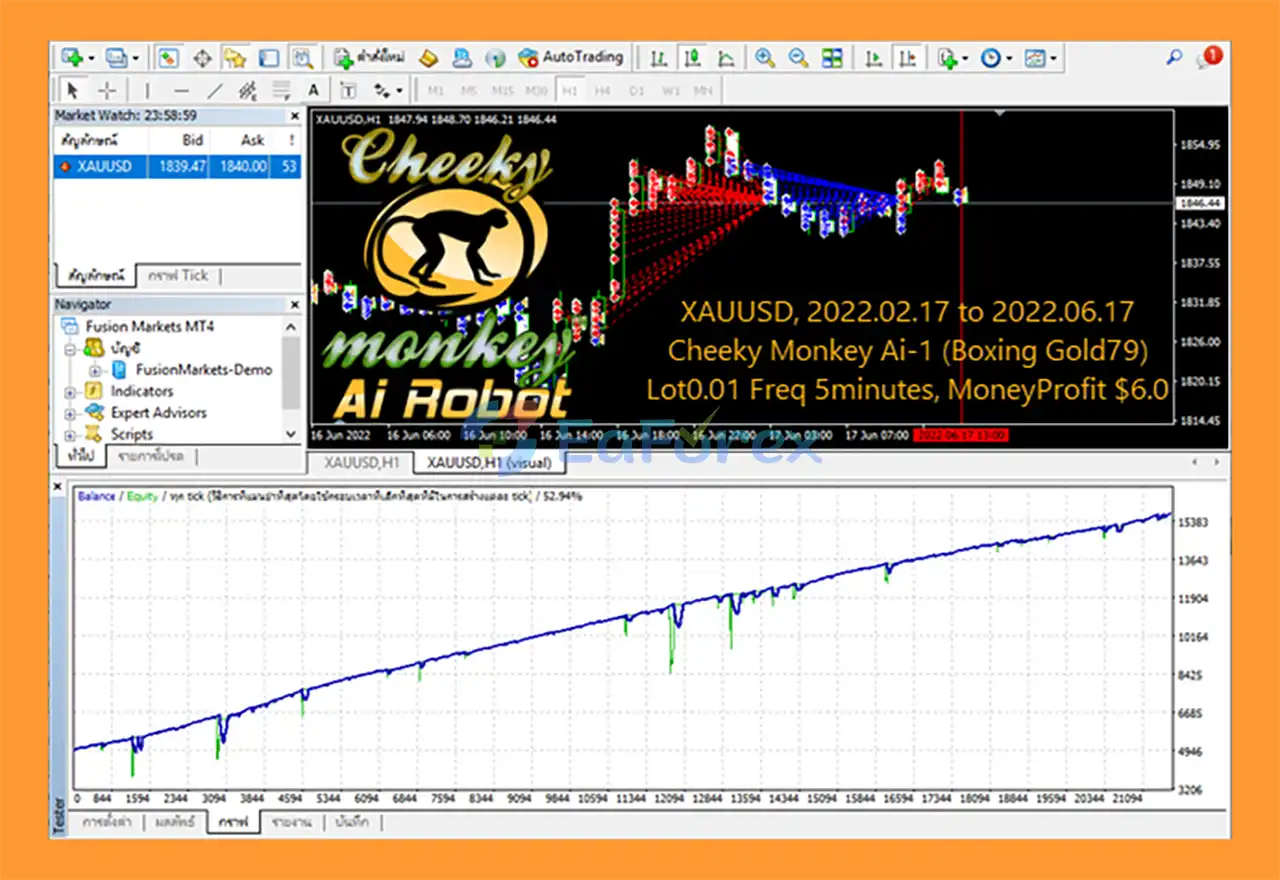
🔺XAUUSD – 4 months
- Initial Deposit: $5.000
- Total Net Profit: $10.710,53
- Win Rate (% of total): 70.07%
- Maximum Drawdown: 45,81%
Risk Management & Alerts
Automated trading involves financial risk, and Cheeky Monkey AI Robot EA MT4 should be configured carefully before being used on a live account.
Position Sizing
The supplied lot-size examples can help users understand the developer's suggested starting configurations, but lot size should always be evaluated against account equity, stop-loss distance where applicable, instrument volatility, and total exposure across open positions.
Do not assume that a fixed lot size is safe for every instrument or account.
Level Snowball Exposure
Because Level Snowball is used across multiple strategy modules, traders should investigate how each configuration adds, manages, or closes positions.
If a strategy can accumulate multiple positions, total exposure may increase during adverse market movements. Test the maximum number of positions, margin requirements, and potential floating losses before enabling it on a live account.
The presence of a loss-closing function does not, by itself, establish that the strategy has a guaranteed maximum drawdown.
Monetary Profit and Loss Settings
Use monetary profit targets in conjunction with a separately evaluated loss-management plan.
A profit target of $6, for example, does not mean that the EA will risk only $6 or that it can reliably earn that amount on each trading cycle.
Confirm the behavior of Close_All_with_Money_Profit and Close_All_Loss_OpenTrade_Size, including the exact conditions that activate them.
Spread, Slippage, and Execution
Spread-based and short-interval trading strategies can be particularly sensitive to trading costs and execution conditions.
Before using Ai Spread, evaluate the broker's spreads, commissions, slippage, execution speed, and any restrictions affecting automated trading.
Results may differ substantially between brokers and between live and simulated trading environments.
Broker Server Time
The GMT+3 Mix and GMT+0 Mix strategies depend on the broker's server-time configuration.
Verify the server time directly in MT4 and ensure that the chosen configuration matches the intended setup. Incorrect time alignment can cause the EA to operate during unintended sessions.
Backtesting and Demo Testing
Before live deployment:
- Backtest the selected strategy using suitable historical data.
- Forward-test it on a demo account.
- Evaluate maximum drawdown, floating losses, consecutive losing trades, and total exposure.
- Include realistic spreads, commissions, and slippage wherever possible.
- Test weekday filters, trading sessions, and order-closing conditions.
- Monitor the EA regularly and maintain sufficient free margin.
No automated trading system can guarantee profits or eliminate the possibility of losing the entire trading balance.
Pros and Cons
Pros
- Multiple strategy modules: Offers swing, trend-following, reversal, pullback, candlestick, BBMA, and Bid-Ask-based approaches.
- Flexible timeframe options: Includes configurations for M5, M15, M30, H1, H4, and D1, depending on the strategy.
- XAUUSD-focused recommendations: Provides weekday-based Gold trading configurations.
- Weekday strategy selection: Allows different strategy setups to be assigned to different days.
- GMT-specific configurations: Includes separate GMT+3 and GMT+0 mixed strategies.
- Configurable order-closing functions: Supports multiple long, short, monetary profit, and loss-related closing options.
- Multiple market configurations: Provides suggested settings for selected forex pairs, indices, stocks, and cryptocurrencies.
- Adjustable parameters: Enables users to configure supported trading inputs according to their testing requirements.
Cons
- Configuration complexity: The number of strategy modules and parameters may require time and experience to understand.
- Potential accumulated exposure: Level Snowball strategies may increase total position exposure, depending on their implementation.
- Broker dependency: Spread, slippage, execution speed, server time, and trading conditions can affect results.
- No guaranteed profitability: Performance depends on market conditions, strategy settings, and execution quality.
- Requires testing and monitoring: Users should evaluate each configuration instead of assuming that the recommended settings will work equally well on every account.
- Strategy compatibility must be verified: Different modules use different timeframes and entry logic, so selecting the correct chart and settings is important.
How to Install Cheeky Monkey AI Robot EA MT4
Follow these steps to install and configure the EA on MetaTrader 4.
Step 1: Purchase the Official EA
Purchase Cheeky Monkey AI Robot EA MT4 only through the developer's official MQL5.com product listing.
The developer warns that third-party sellers may distribute fake versions that do not work like the original and are not eligible for official updates or support.
Never share account credentials or payment information with unofficial sellers.
Step 2: Download the EA
After purchasing, download the EA through the official MQL5 delivery process and follow the installation instructions provided with the product.
Depending on how the product is delivered, installation may be handled through the MQL5 Market or by copying the supplied files into the appropriate MT4 directory.
Step 3: Open MetaTrader 4
Launch MT4 and log in to your trading account.
For initial setup, using a demo account is recommended so that you can verify the EA's behavior without risking real capital.
Step 4: Install or Locate the EA
If manual installation is required:
- Open MT4.
- Select File → Open Data Folder.
- Open the
MQL4directory. - Place the EA file in the appropriate
Expertsfolder, following the developer's installation instructions. - Return to MT4 and refresh the Navigator window or restart the terminal.
If the EA was installed through the MQL5 Market, locate it through the appropriate Market or Navigator section instead.
Step 5: Enable Automated Trading
Open the Navigator panel and locate Cheeky Monkey AI Robot EA.
Drag the EA onto the intended chart and review the settings in the configuration window.
Enable the relevant automated-trading permissions required by the EA, and confirm that the platform's AutoTrading control is enabled.
Only enable additional permissions when they are necessary and understood.
Step 6: Select the Strategy and Timeframe
Choose the appropriate strategy module and timeframe for the instrument you intend to trade.
For XAUUSD, consult the supplied weekday schedule and select the relevant Ai-1, Ai-2, or Ai-CLPro configuration where applicable.
For the GMT+3 Mix or GMT+0 Mix strategies, verify that the broker server time matches the selected configuration.
Step 7: Configure Trading Parameters
Review the available Inputs tab settings, including:
- Strategy selection and weekday filters.
- Lot size and position-management parameters.
- Trade frequency and entry-related settings.
- Monetary profit targets.
- Order-closing functions.
- Any available spread, session, or exposure controls.
The exact input names and available options may vary by EA version. Do not assume that every suggested parameter is available in every strategy module.
Step 8: Verify and Test
Confirm that the EA is attached to the correct chart, the intended timeframe is selected, and automated trading is enabled.
Check the Experts and Journal tabs for error messages and verify that the strategy is behaving as expected.
Run backtests where supported and forward-test the configuration on a demo account before considering live deployment.
What’s Included in the Download Package?
- Experts: Cheeky Monkey Ai Robot_fix.ex4
>>> Join VIP Membership Now <<<
Final Thoughts
Cheeky Monkey AI Robot EA MT4 is a multi-strategy Expert Advisor designed for traders who want configurable automated trading approaches on MetaTrader 4.
Its main strengths include a variety of strategy modules, Level Snowball functionality, weekday-based strategy selection, configurable order-closing functions, and specific recommendations for XAUUSD day trading. Additional GMT+3 and GMT+0 mixed strategies provide further configuration options for traders working with different broker server times.
However, the EA's flexibility also means that users need to understand the selected strategy, position-management behavior, and overall exposure before using it. The recommended timeframe, lot size, and monetary profit settings should be treated as starting points for testing rather than guarantees of performance.
For traders interested in exploring different automated trading approaches, Cheeky Monkey AI Robot EA MT4 can be evaluated through systematic backtesting, demo trading, and careful risk management.
Important purchasing notice: The developer states that Cheeky Monkey AI Robot EA is sold exclusively through MQL5.com. Purchases from other sources may be counterfeit and may not qualify for official updates or support. Always use the official MQL5 product listing and verify the product details before purchasing.
Trading forex, gold, indices, and cryptocurrencies involves substantial financial risk. Past performance does not guarantee future results, and no EA can guarantee profits.



