

Product Overview
DAX EA MT5 is an automated Expert Advisor designed specifically for trading the DAX and German stock indices on MetaTrader 5. The system was developed after extensive market research, live testing, and analysis of the underlying behavior of index markets.
Instead of relying purely on conventional technical indicators or static trading parameters, DAX EA uses a dynamic market-adaptation approach. Its key trading parameters can automatically adjust according to changing market conditions and the current value of the index.
One of the core ideas behind DAX EA is the relationship between specific market directions, calendar dates, and futures contract expiry cycles. According to the developer, these timing-based factors can provide additional confirmation for certain market movements.
The complete methodology is proprietary, so not every component of the strategy is publicly disclosed.
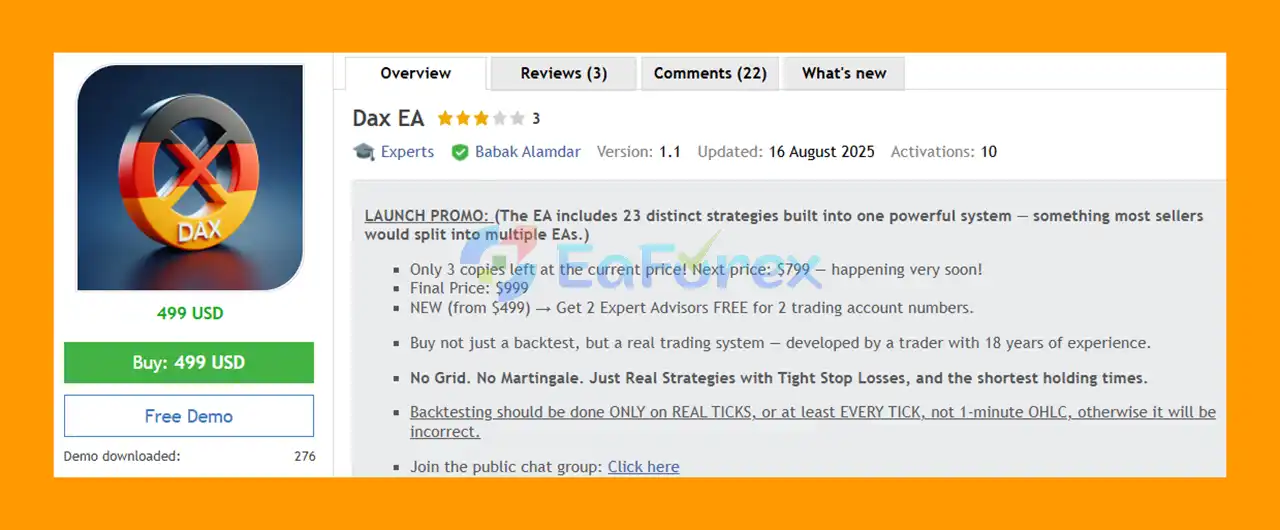
Dax EA MT5 includes 23 independent trading strategies, each using its own magic number and trade comments. This allows traders to test, analyze, enable, disable, and combine individual strategy groups according to their preferred risk profile.
The system is designed for both personal trading accounts and potentially funded/prop-firm accounts, subject to the specific rules and restrictions of each provider.
About the Developer
• Author: Babak Alamdar
• Experience: Over +2 years of experience on MQL5.
• Notable Products: Dax EA, US100 Nasdaq EA, SilverPulse AI MT5 and other advisors.
• Flagship Product: Dax EA is rated as the best performing product of the year.
>> Delivery time 24h-48h after payment.
>>> Refund if not delivered.
>>> You will receive the latest version without any limitations (ID+Time).>>Reviewed by Jason Stap <<
Key Features of Dax EA MT5
- Designed specifically for DAX and German stock indices
- 23 independent trading strategies
- Dynamic trading parameters
- Market-condition-based adaptation
- No Grid
- No Martingale
- No risky recovery-based money management
- Multiple independent strategy modules
- Individual magic numbers and trade comments
- Flexible risk configuration
- Adjustable maximum active strategies
- FIFO-compatible design
- Suitable for personal and potentially funded accounts
- Simple setup without external files
- Compatible with multiple DAX broker symbol names
- Designed for different trader experience levels
- Supports individual strategy backtesting
- Supports strategy-group backtesting
- Real Tick testing recommended for more accurate evaluation
- Built-in risk-to-reward structure
- Strategy parameters designed to adapt as index values change
How Does DAX EA MT5 Work?
Dax EA MT5 is built around a combination of dynamic market analysis, timing-based confirmation, and multiple independent trading strategies.
The developer identified a potential relationship between certain calendar dates and index market behavior, particularly around futures contract expiry cycles and their potential influence on the spot market.
Rather than publicly exposing every component of the trading logic, the EA incorporates these concepts internally and uses them as part of its proprietary decision-making process.
Dynamic Parameters
A major difference between DAX EA and many traditional Expert Advisors is its use of dynamic parameters.
Conventional EAs often rely on fixed values for:
- Stop Loss
- Take Profit
- Entry thresholds
- Price distances
- Risk parameters
As the value and volatility of an index change, static settings can become less appropriate.
DAX EA is designed to automatically adapt important parameters according to the current market environment and index value.
This reduces the need for users to constantly modify parameters as the DAX market changes.
23 Independent Trading Strategies
Dax EA MT5 contains 23 separate strategies, each operating independently.
Every strategy has its own:
- Magic number
- Trade comments
- Entry logic
- Risk allocation
- Backtesting identity
This structure provides greater control over portfolio construction.
Instead of running all strategies simultaneously, traders can select specific strategy groups and evaluate them independently.
For example, users can:
- Run a single strategy
- Run a selected group
- Run multiple strategy groups
- Backtest strategies individually
- Compare different strategy combinations
- Reduce the number of simultaneously active strategies
This modular structure can be particularly useful for traders who want to construct their own risk profile.
DAX Symbol Compatibility
Dax EA MT5 can be attached to different broker naming conventions for the German index.
Depending on the broker, the DAX may appear under names such as:
- DAX
- DE30
- GER30
- DE40
- GER40
- DAX40
- Germany30
- Germany40
Because brokers can use different symbol names and contract specifications, traders should always verify that their selected symbol corresponds correctly to the intended DAX index.
The EA is designed to be attached directly to the appropriate DAX index chart.
Why Choose DAX EA MT5?
Designed Specifically for DAX
Dax EA MT5 is not a generic currency-pair Expert Advisor. It was developed specifically around the behavior and characteristics of the German DAX index market.
Dynamic Instead of Static
The EA automatically adapts important parameters to changing market conditions and index values.
This approach aims to reduce dependence on outdated fixed settings.
23 Independent Strategies
The 23-strategy architecture allows traders to diversify their approach within the same EA rather than relying on a single trading algorithm.
No Grid or Martingale
DAX EA does not use traditional Grid or Martingale recovery techniques.
This is an important distinction for traders who prefer to avoid strategies that continually increase exposure in an attempt to recover previous losses.
Flexible Risk Control
Users can adjust the number of active strategies and modify the lot calculation to fit their account size and risk tolerance.
Simple Setup
The EA is designed to be straightforward to install and does not require external set files or complicated manual adjustments for its basic operation.
Suitable for Portfolio-Based Trading
Because the 23 strategies can be individually identified and managed, traders can construct different combinations instead of running the entire system as a single block.
Dax EA MT5 Backtest and Live Results
1. Live Trading Results
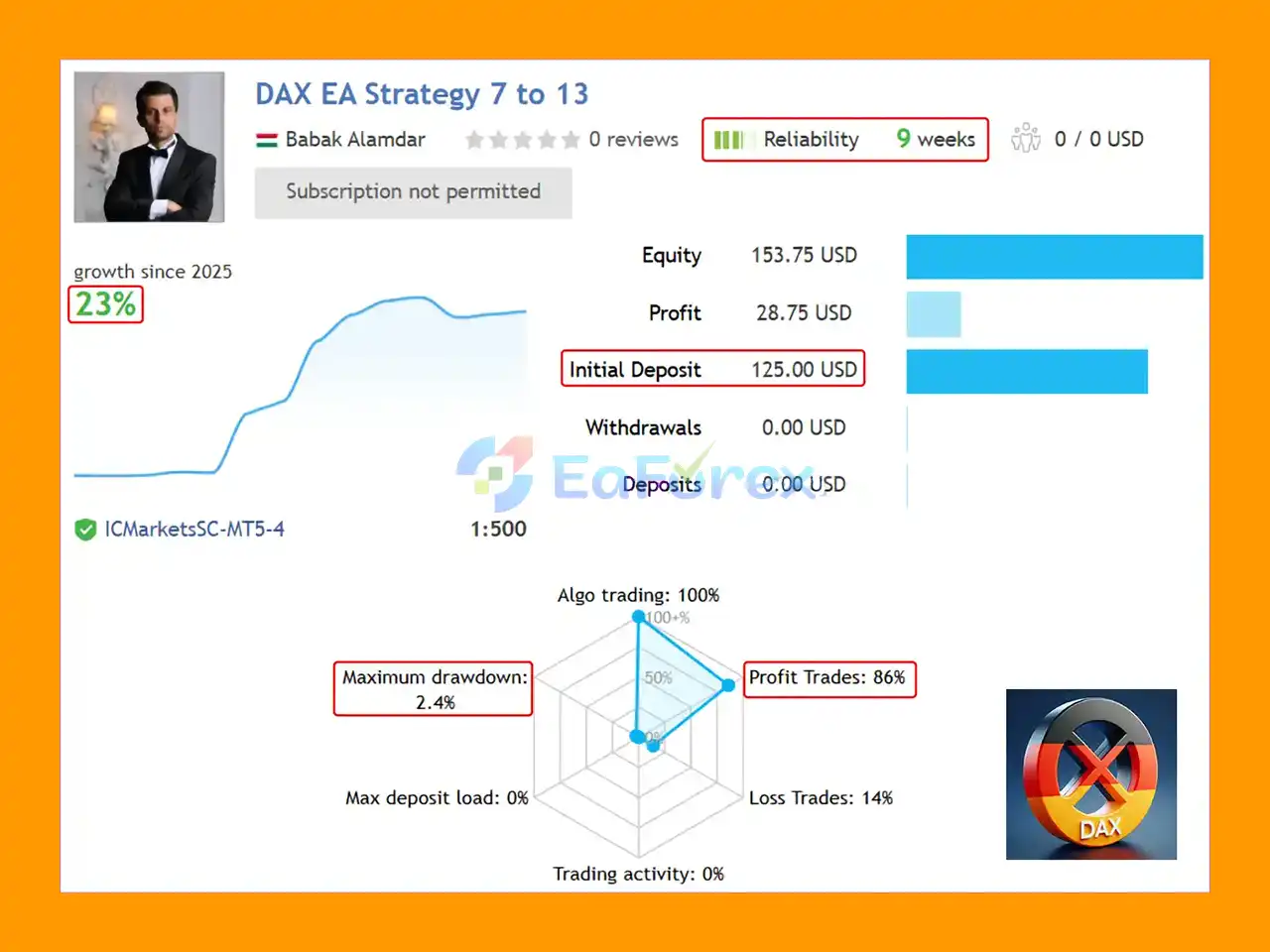
🔺DAX EA Strategy 14 to 20 (9-week)
- Initial Deposit: $125.00
- Growth Since 2025: 23%
- Win Rate: 86%
- Maximum Drawdown: 2.4%
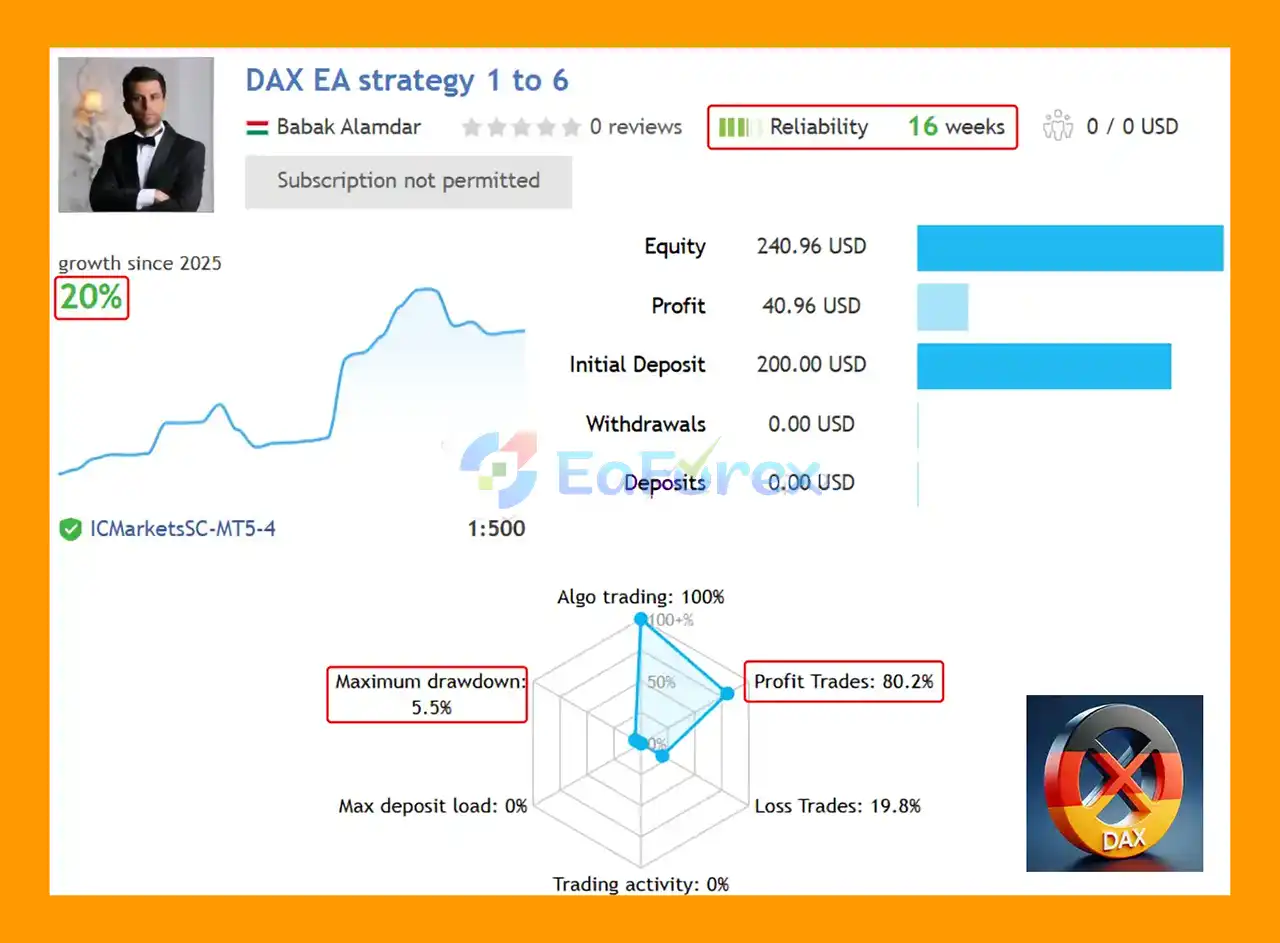
🔺DAX EA Strategy 1 to 6 (16-week):
- Initial Deposit: $200
- Growth Since 2025: 20%
- Win Rate: 80.2%
- Maximum Drawdown: 5.5%
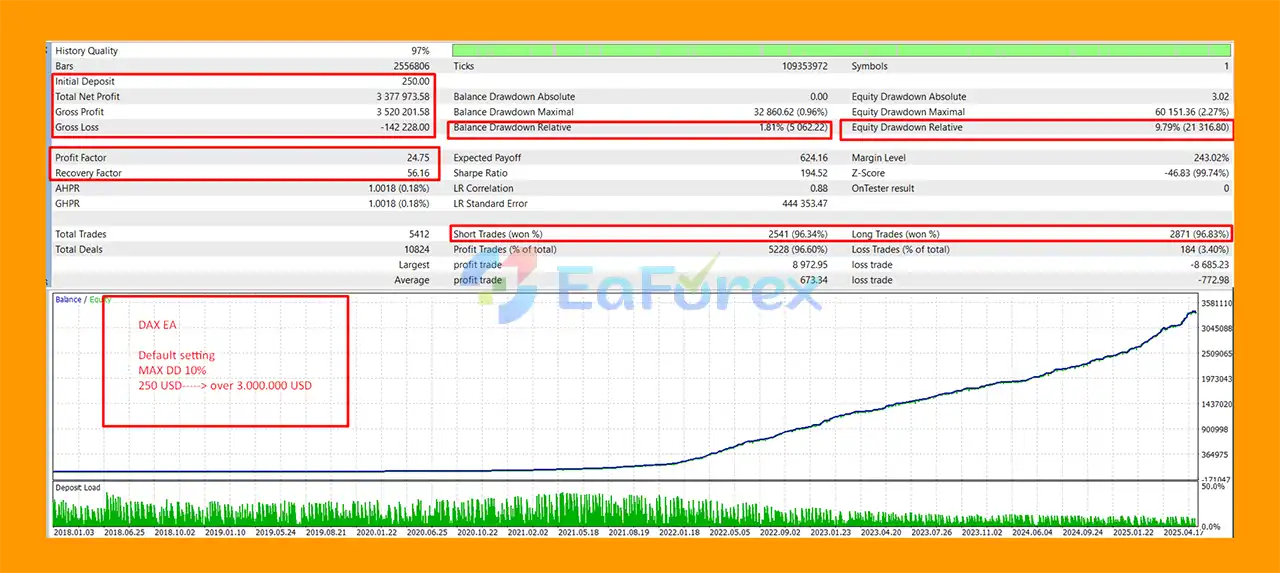
2. Backtest Results
- Exceptional long-term profitability with minimal drawdown
- Initial Deposit: $250
- Total Net Profit: $3,377,973.58
- Win Rate: 96.60%
- Maximum Drawdown: 0.96%
Performance and Risk Management
The developer recommends a default risk calculation of approximately 0.01 lot per $25, described as roughly 1–1.5% risk per strategy, depending on the instrument and broker conditions.
The EA allows traders to modify this calculation.
For example, a more conservative configuration could use:
- 0.01 lot per $50
- 0.01 lot per $75
- 0.01 lot per $100
Traders can also reduce total exposure by lowering the maximum number of simultaneously active strategies.
The default maximum is stated as 10 active strategies, but this value can be adjusted in the EA settings.
For example:
- Maximum 10 strategies → higher potential exposure
- Maximum 5 strategies → lower potential exposure
These settings should be evaluated carefully through backtesting and demo trading before live deployment.
Minimum Account Balance
The developer states a minimum recommended account balance of approximately $50.
However, this should not be interpreted as a universally safe starting capital requirement. The actual capital needed depends on:
- Broker minimum lot size
- Index contract specifications
- Margin requirements
- Leverage
- Spread
- Stop-loss distance
- Number of active strategies
- Selected risk settings
For smaller accounts, the developer recommends running only one strategy group at a time rather than activating the entire portfolio.
Prop Firm & Funded Account Trading
Dax EA MT5 is designed with features that may make it suitable for prop firm and funded-account environments.
Traders can potentially reduce risk by:
- Increasing the capital-per-lot calculation
- Reducing the maximum number of active strategies
- Selecting specific strategy groups
- Controlling overall exposure
For example, a trader could use a more conservative lot calculation such as 0.01 lot per $50, $75, or $100 rather than the default configuration.
The 23 independent strategies also allow traders to mix and rotate strategy groups.
However, no EA should be described as automatically compatible with every prop firm. Each provider may impose different rules regarding:
- Maximum daily drawdown
- Maximum overall drawdown
- News trading
- Holding periods
- Overnight positions
- Lot sizes
- Trading hours
- Automated trading
- Hedging
- Risk limits
Always check the current rules of the specific prop firm before deploying DAX EA on a funded account.
Real Tick Backtesting – Why It Matters for DAX
One of the important considerations when testing DAX EA is the quality of historical data used in the backtest.
Why OHLC Backtesting Can Be Misleading
Dax EA MT5 and other major stock indices can experience substantial volatility and rapid intrabar price movements.
A conventional OHLC backtest primarily represents each candle through four prices:
- Open
- High
- Low
- Close
This can create limitations when evaluating strategies that depend on precise intrabar price movements, particularly when Stop Loss and Take Profit distances are relatively tight.
The sequence in which price reaches the High and Low is not fully represented by four OHLC values.
Real Tick Backtesting
Real Tick testing uses a much more detailed sequence of historical price movements.
This can provide a more realistic evaluation of:
- Intrabar price movement
- Spread behavior
- Entry execution
- Stop Loss execution
- Take Profit execution
- Slippage effects
Real Tick testing can take significantly longer than simplified testing, but it may provide a more informative assessment for short-term DAX strategies.
For this reason, traders evaluating DAX EA should prioritize high-quality historical data and Real Tick testing where available.
Weaknesses and Risk Warnings
Although DAX EA includes several risk-control features and does not use Grid or Martingale, trading the DAX remains inherently risky.
DAX Is a Highly Volatile Market
The German index can experience rapid price movements, particularly around economic announcements, market openings, geopolitical events, and major European or US market developments.
Dynamic Does Not Mean Risk-Free
Automatically adjusting parameters can help the system respond to changing conditions, but it cannot guarantee that the strategy will remain profitable in every market environment.
23 Strategies Can Increase Exposure
Running multiple strategies simultaneously may increase diversification, but it can also increase total market exposure.
A trader should not assume that 23 strategies automatically mean 23 independent sources of risk.
Broker Conditions Matter
Different brokers may provide different:
- Spreads
- Commissions
- Execution speeds
- Contract sizes
- Minimum lots
- Trading hours
- Margin requirements
These differences can materially affect live results.
Backtests Are Not Guarantees
Even high-quality Real Tick backtests cannot perfectly reproduce future market conditions.
Live results can differ because of execution, spread changes, slippage, liquidity, and market regime changes.
Prop Firm Risk
Passing a prop firm challenge depends on much more than the EA's trading logic. Daily drawdown limits, maximum drawdown, trading restrictions, and other provider-specific rules must always be considered.
No Expert Advisor guarantees profits or guarantees successful prop firm challenges.
Pros and Cons
Pros
- Specifically designed for DAX index trading
- 23 independent trading strategies
- Dynamic market-based parameters
- No Grid
- No Martingale
- No aggressive recovery system
- Flexible risk management
- Adjustable maximum active strategies
- Individual magic numbers
- Individual trade comments
- Easy strategy identification
- Supports individual strategy testing
- Supports strategy-group testing
- Compatible with multiple DAX broker symbols
- Simple installation
- No external files required
- FIFO-compatible design
- Potentially suitable for personal and funded accounts
- Real Tick testing recommended for detailed evaluation
Cons
- Designed primarily around the DAX market
- DAX can experience substantial volatility
- Multiple strategies can increase overall exposure
- Proper risk configuration is essential
- Broker conditions can affect performance
- Real Tick backtesting requires more time and quality historical data
- Historical performance does not guarantee future results
- Prop firm rules must be checked individually
- Dynamic parameters cannot eliminate market risk
How to Install DAX EA MT5
Step 1 – Install the EA
Install DAX EA MT5 into your MetaTrader 5 terminal.
Step 2 – Find Your DAX Symbol
Open your broker's Market Watch and identify the appropriate DAX symbol.
It may be listed as:
DAX, DE30, GER30, DE40, GER40, DAX40, Germany30, Germany40, or another broker-specific variation.
Step 3 – Open the Chart
Open the DAX index chart and select your preferred timeframe.
The EA can be attached to the timeframe selected in the trading platform.
Step 4 – Attach DAX EA
Drag the EA onto the DAX chart and enable Algo Trading.
Step 5 – Configure Risk
Set the lot calculation according to your account size and risk tolerance.
For smaller accounts, consider activating only one strategy group rather than all 23 strategies.
Step 6 – Control Maximum Active Strategies
Set the maximum number of strategies that can be active simultaneously.
A lower value can be used when the goal is to reduce overall exposure.
Step 7 – Backtest
Use MetaTrader 5 Strategy Tester to evaluate the EA.
Where possible, use Real Tick data rather than relying exclusively on OHLC-based testing.
Step 8 – Demo Test Before Going Live
Run the EA on a demo account before using real capital.
Monitor:
- Drawdown
- Number of active strategies
- Spread
- Execution
- Slippage
- Trading frequency
- Individual strategy performance
- Overall portfolio exposure
What’s Included in the Download Package?
- Setting (If Any).docx
- Installation Guide.docx
Final Thoughts
DAX EA MT5 is a specialized DAX Expert Advisor built around dynamic market analysis and a portfolio of 23 independent trading strategies.
Its most distinctive concept is the use of timing-related market analysis associated with calendar dates and futures expiry cycles, combined with dynamic parameters that adapt to changes in the index market.
The absence of Grid and Martingale makes the EA particularly interesting for traders who prefer a more conventional risk structure, while the 23 independent strategies provide flexibility in building different trading configurations.
Another important advantage is the ability to control exposure by changing the number of active strategies and adjusting the lot calculation. This can be useful for both personal accounts and traders evaluating the system for funded-account environments.
Because DAX is a highly volatile index, however, proper testing and risk management remain essential. Traders should pay particular attention to Real Tick backtesting, broker execution conditions, strategy correlation, and total exposure when multiple strategies are active.
DAX EA MT5 should therefore be viewed as a dynamic, multi-strategy DAX trading system, not as a guaranteed-profit solution. Thorough demo testing and conservative risk management are recommended before deploying it with real capital.



