









-
 Unlimited Activations
-
 Instant delivery
-
 Easy to install








 Unlimited Activations
Instant delivery
Easy to install
Unlimited Activations
Instant delivery
Easy to install
 Free Update
 Free Install Support

Daytrade Pro Algo MT5 is a fully automated Expert Advisor for MetaTrader 5, developed around a price action strategy that trades market reactions near major daily support and resistance levels.
The core concept is straightforward: major daily highs and lows often act as important price zones where the market can react, reverse, or consolidate. Daytrade Pro Algo MT5 is designed to identify these areas and automatically look for trading opportunities around them.
The EA has been developed and tested across multiple brokers, platforms, and variable-spread environments. It is designed to be broker independent and spread independent, while maintaining robust behavior across different parameter configurations.
Daytrade Pro Algo MT5 currently supports 13 trading instruments, including major Forex pairs, cross pairs, and XAUUSD.
The system typically generates around 10 trades per week, although the actual trading frequency can vary depending on market conditions.
• Author: Wim Schrynemakers
• Experience: Over +11 years of experience on MQL5.
• Notable Products: Daytrade Pro Algo MT5, Advanced Scalper MT5, Stability Pro MT5, Apex Trader MT5, Goldbot One MT5, The Gold Reaper MT5 and others.
• Flagship Product: Daytrade Pro Algo MT5 is rated as the best performing product of the year.
>> Delivery time 24h-48h after payment.
>>> Refund if not delivered.
>>> You will receive the latest version without any limitations (ID+Time).>>Reviewed by Jason Stap <<
Daytrade Pro Algo MT5 focuses on price behavior around major daily support and resistance levels. These areas can attract significant market activity and provide potential opportunities for automated trading.
The EA can trade up to 13 different instruments, allowing users to diversify the strategy across multiple currency pairs and gold.
The OneChartSetup feature allows the EA to manage multiple trading pairs from a single EURUSD Daily chart.
Instead of attaching the EA separately to every supported instrument, users can enable OneChartSetup and select the pairs they want the algorithm to trade.
Every trade uses predefined Stop Loss (SL) and Take Profit (TP) levels to establish risk and reward parameters.
The EA also incorporates a trailing stop-loss mechanism designed to protect profitable positions and allow winning trades to continue developing when market conditions remain favorable.
Users can choose between fixed lot sizing and automatic lot calculation.
The automatic method can adjust position size according to account balance or equity through the LotsizeStep parameter.
According to the developer, testing has shown profitable results across hundreds of different parameter configurations. The system is also designed so that settings can be transferred between supported pairs without completely changing the underlying strategy behavior.
For example, settings optimized for USDJPY can still be tested on EURUSD or another supported instrument.
The Use Virtual Expiration option can be enabled when a broker does not support expiration dates for pending orders.
The EA includes an on-chart information panel that displays important trading information. Its size can also be adjusted for high-resolution displays.
Daytrade Pro Algo MT5 is based primarily on price action around major daily support and resistance levels.
The general trading process can be summarized as follows:
The system does not attempt to predict every market movement. Instead, it focuses on repeatable price behavior around significant market levels.
The developer specifically positions the EA as a conventional algorithmic trading system rather than a system based on exaggerated artificial intelligence claims, neural-network marketing, or unrealistic “holy grail” promises.
The strategy is based on a recognizable market concept: price interaction with major daily support and resistance levels.
The developer reports extensive testing using variable spreads across different brokers and environments, including MT4, MT5, and TDS2.
With 13 supported instruments, traders can use the EA across Forex pairs and XAUUSD rather than relying on a single market.
OneChartSetup makes the installation and management process easier by allowing multiple instruments to be controlled from one EURUSD Daily chart.
The EA provides different risk levels through the Max Risk Per Pair setting, making it possible to adjust position sizing according to the trader’s risk tolerance.
The developer openly acknowledges that trading systems experience losing periods and that backtests containing no losses should be treated with skepticism.
This realistic approach is important because no automated trading system can guarantee profits in all market conditions.
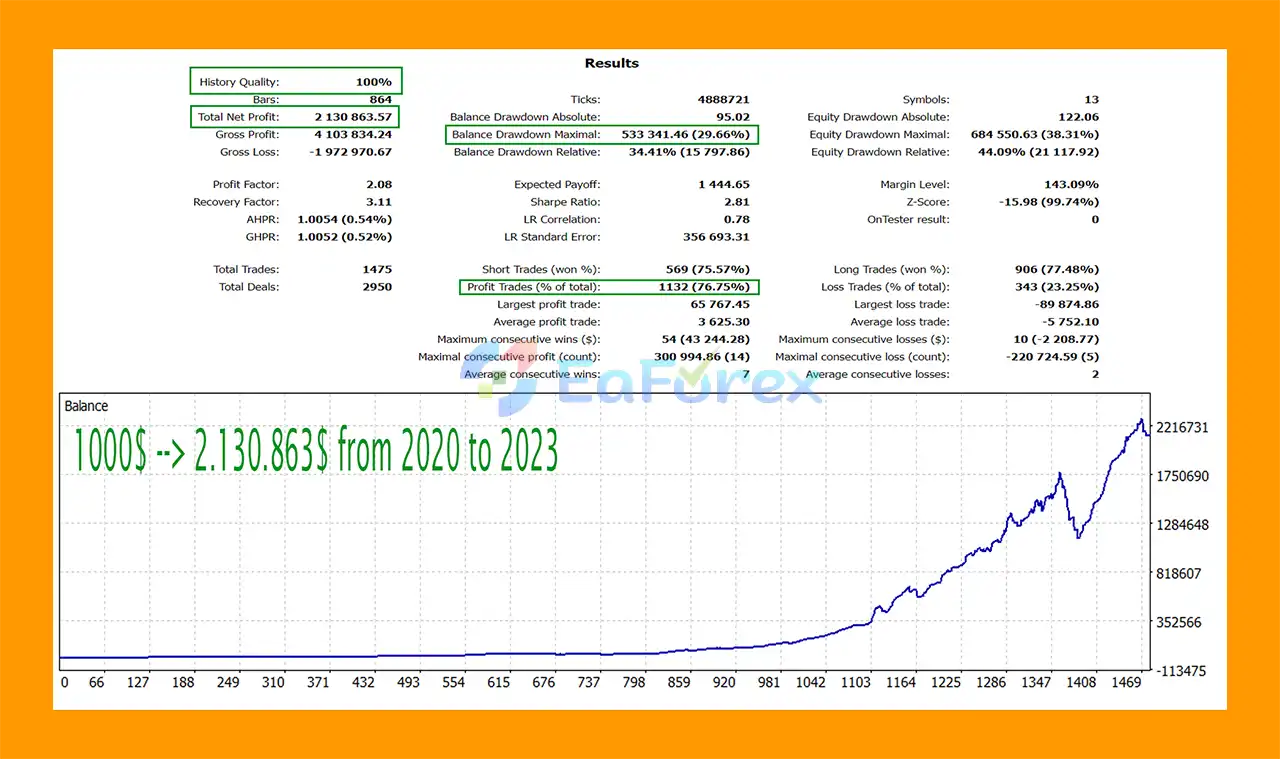
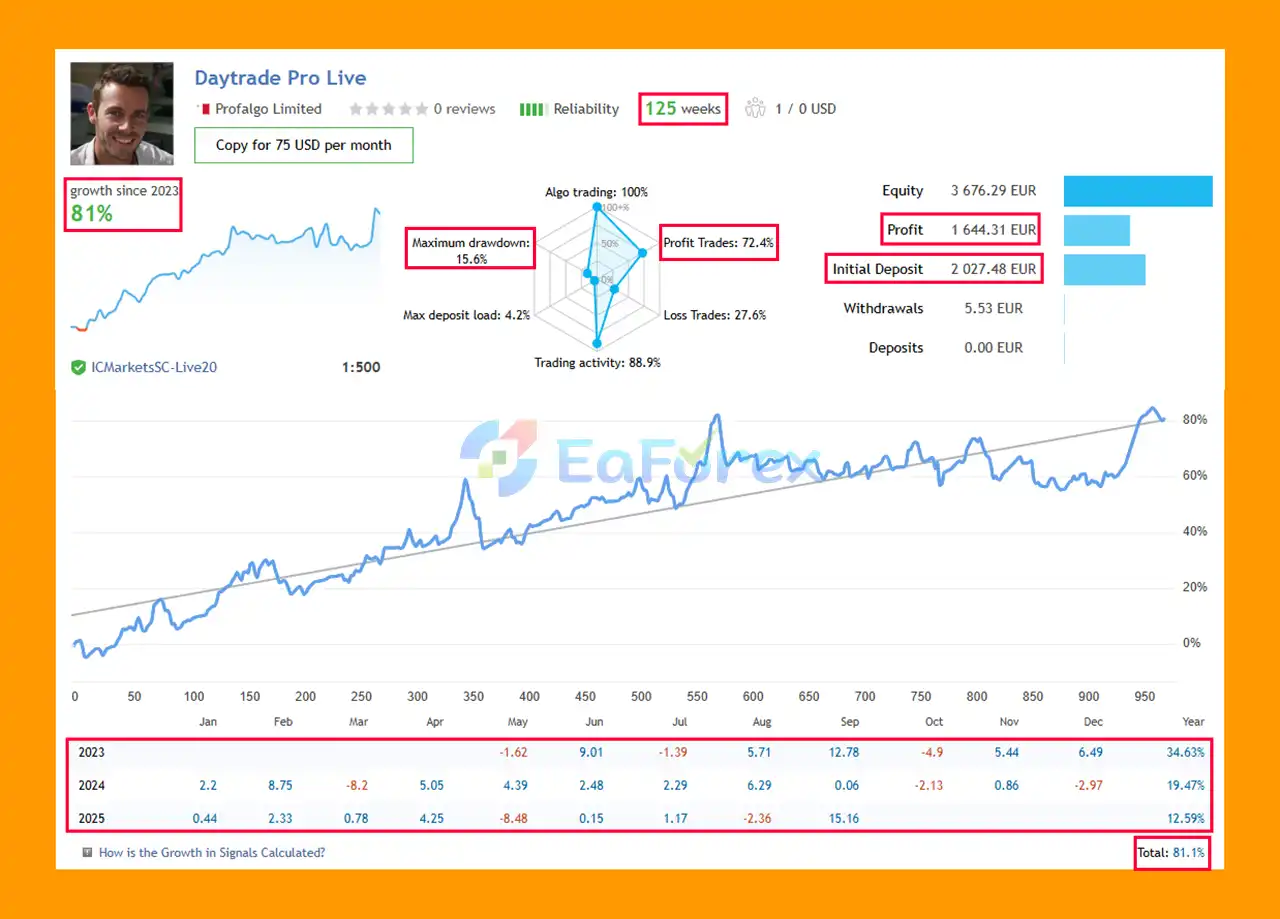
Daytrade Pro Algo MT5 Live Trading Results
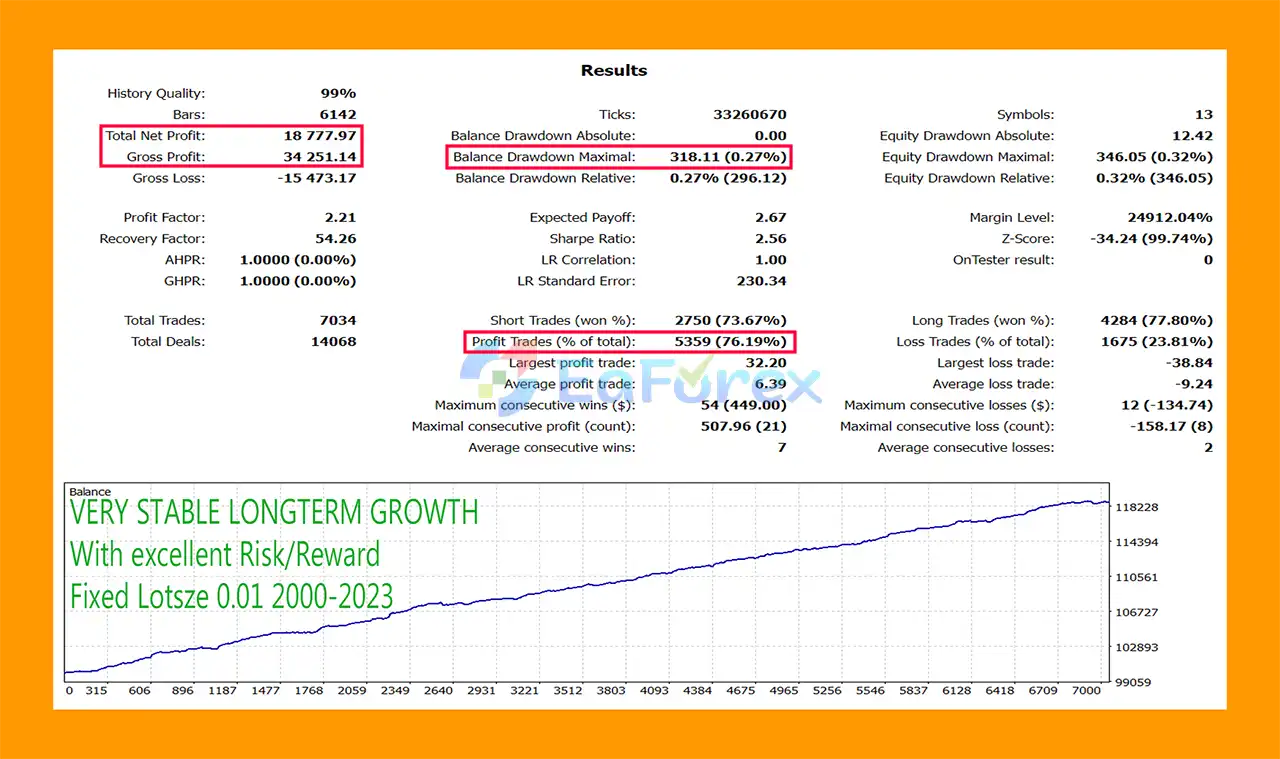
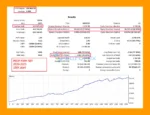
🔺 23-Year Backtest (2000–2023):
Daytrade Pro Algo MT5 Backtest Results
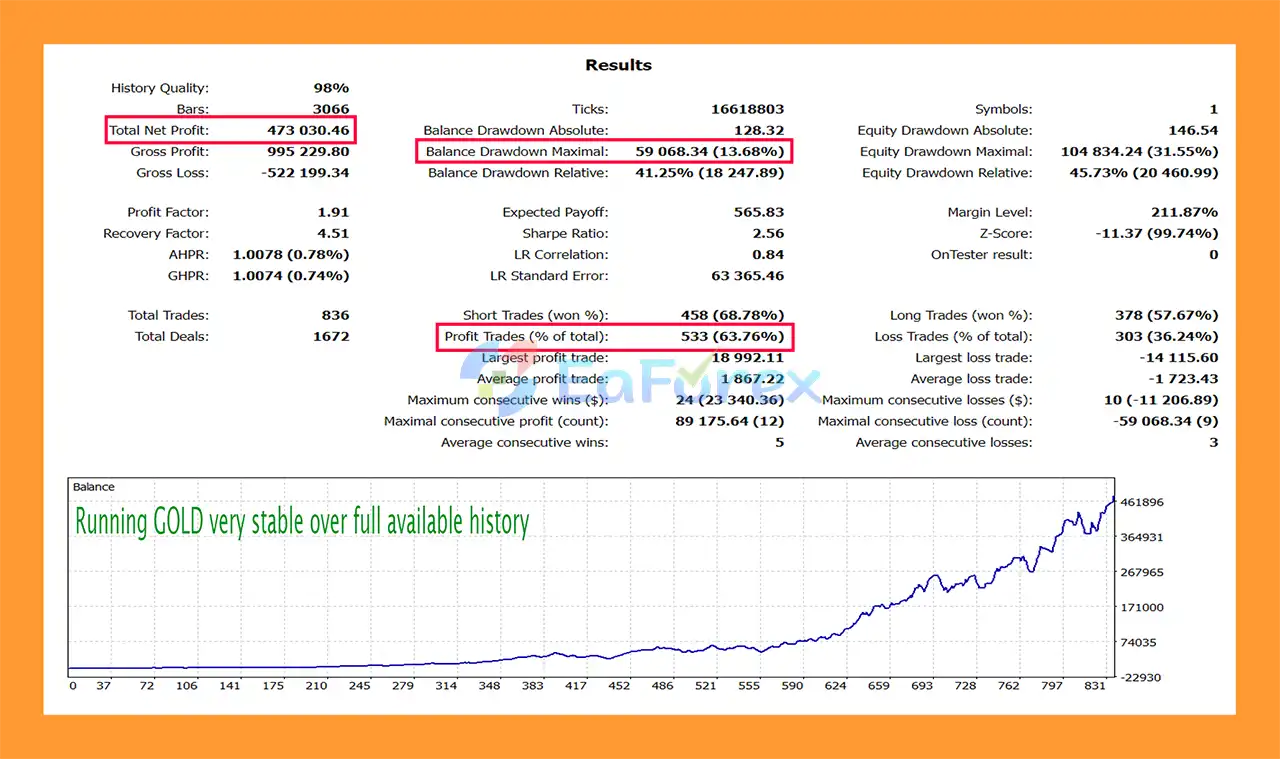
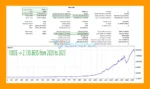
🔺 XAUUSD (Gold) Recovery Test:
Daytrade Pro Algo MT5 Backtests Trading Resultts
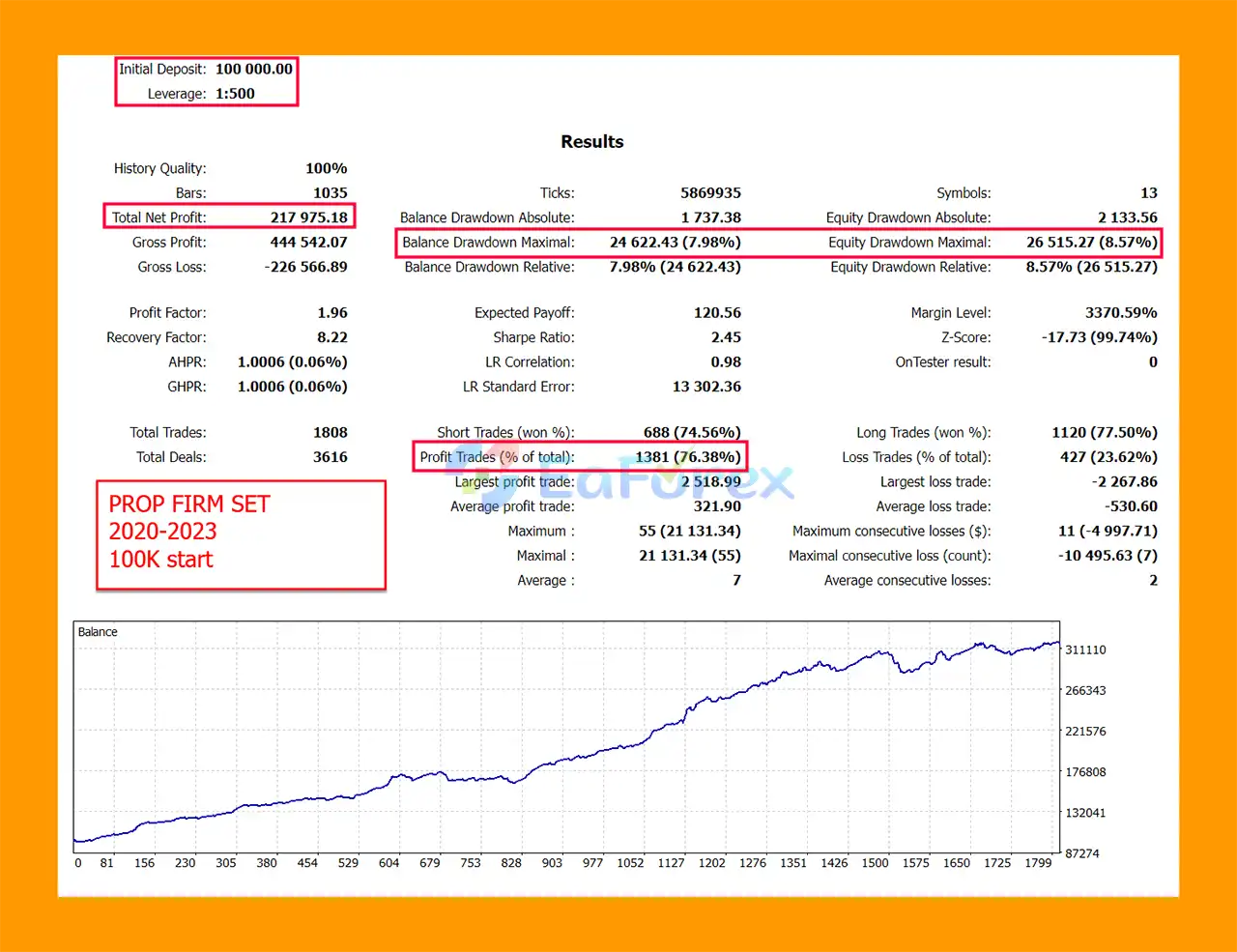
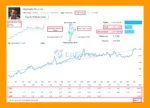
🔺 $100K Prop Firm Test (2020–2023):
Daytrade Pro Algo MT5 Backtests Trading Results
Daytrade Pro Algo MT5 is designed to operate with relatively flexible risk settings.
The recommended Max Risk Per Pair configurations are:
| Risk Level | Max Risk Per Pair |
|---|---|
| Low Risk | 3 |
| Medium Risk | 7 |
| High Risk | 15 |
These values should not be interpreted as guaranteed drawdown levels or guaranteed returns. Actual account risk can vary depending on broker conditions, market volatility, leverage, execution, and the number of pairs being traded simultaneously.
The developer recommends a minimum starting balance of approximately $400.
The EA supports both fixed and automatic position sizing.
The LotsizeStep parameter controls the automatic lot increment. For example:
Users can also select whether lot calculations should use Balance or Equity.
The OnlyUp parameter prevents the calculated lot size from decreasing after losses.
While this may allow faster recovery after losing trades, it can also increase exposure during recovery periods. Therefore, this option should be used carefully.
For testing Daytrade Pro Algo MT5, the developer recommends:
The EA does not require Every Tick modeling to produce useful backtest results because of the way its trade management operates.
However, traders can compare 1 Minute OHLC with Every Tick or Every Tick Based on Real Ticks to evaluate the difference under their own testing conditions.
For meaningful evaluation, it is recommended to test across sufficiently long historical periods and, where possible, include multiple market conditions rather than relying on a short or highly optimized period.
Enables or disables the information panel displayed on the chart.
Adjusts the information panel size, particularly useful for high-resolution monitors.
Controls whether the information panel is updated during backtesting. Disabling it can improve backtest speed.
Allows the EA to manage multiple instruments from one chart.
Defines which supported instruments should be traded through the OneChartSetup system.
Provides virtual expiration handling for brokers that do not support expiration dates on pending orders.
Defines the unique identifier used by the EA to distinguish its trades.
Sets the comment displayed on positions opened by the Expert Advisor.
Allows traders to choose between fixed lot sizing and automatic lot calculation.
Defines the fixed starting lot size when using manual lot sizing.
Determines the account-size increment used for automatic lot calculations.
Allows the EA to calculate position size using account equity rather than balance.
Prevents automatic lot size from decreasing after losing trades. This feature should be used cautiously because it can increase exposure during recovery periods.
Despite its robust testing claims, Daytrade Pro Algo MT5 is not a risk-free trading system.
Past backtests and historical performance cannot guarantee future results. Market conditions can change, and a strategy that performed well historically may experience weaker performance in the future.
The developer explicitly acknowledges that real trading strategies experience losing trades and losing periods.
A backtest with no losses should not automatically be considered superior. In fact, unrealistic loss-free results can be a warning sign of excessive optimization, unrealistic testing conditions, or manipulated presentation.
Higher values of Max Risk Per Pair can significantly increase exposure. The High Risk setting should therefore only be considered by traders who fully understand the associated drawdown potential.
Running all 13 instruments simultaneously can create substantial combined exposure, particularly when several correlated currency pairs experience unfavorable market movements at the same time.
The OnlyUp option can prevent position sizing from decreasing after losses. This may accelerate recovery in favorable conditions but can also increase account exposure during prolonged losing periods.
Although the EA is designed to be broker independent, real-world results can still be affected by:
There is no automated trading system that can guarantee continuous profits or eliminate drawdowns.
Daytrade Pro Algo MT5 should therefore be evaluated as a systematic trading tool rather than a guaranteed income solution.
Copy the Daytrade Pro Algo MT5 EA file into the appropriate MetaTrader 5 → MQL5 → Experts directory.
Restart MetaTrader 5 or refresh the Expert Advisors section in the Navigator.
Open:
EURUSD → D1 (Daily)
Attach Daytrade Pro Algo MT5 to the chart.
Enable:
UseOneChartSetup = true
Then select the instruments you want the EA to manage under the OneChartSetup pair settings.
Choose your preferred Lotsize Calculation Method.
For automatic risk-based sizing, use the appropriate LotsizeStep or Max Risk Per Pair configuration provided by the EA.
The developer’s suggested starting risk levels are:
For new users, starting conservatively and testing on a demo account is advisable.
Make sure Algo Trading is enabled in MetaTrader 5.
Before moving to a live account, verify the EA’s behavior under your broker’s specific spread, commission, leverage, and execution conditions.
Run historical backtests and forward tests on a demo account before committing real capital.
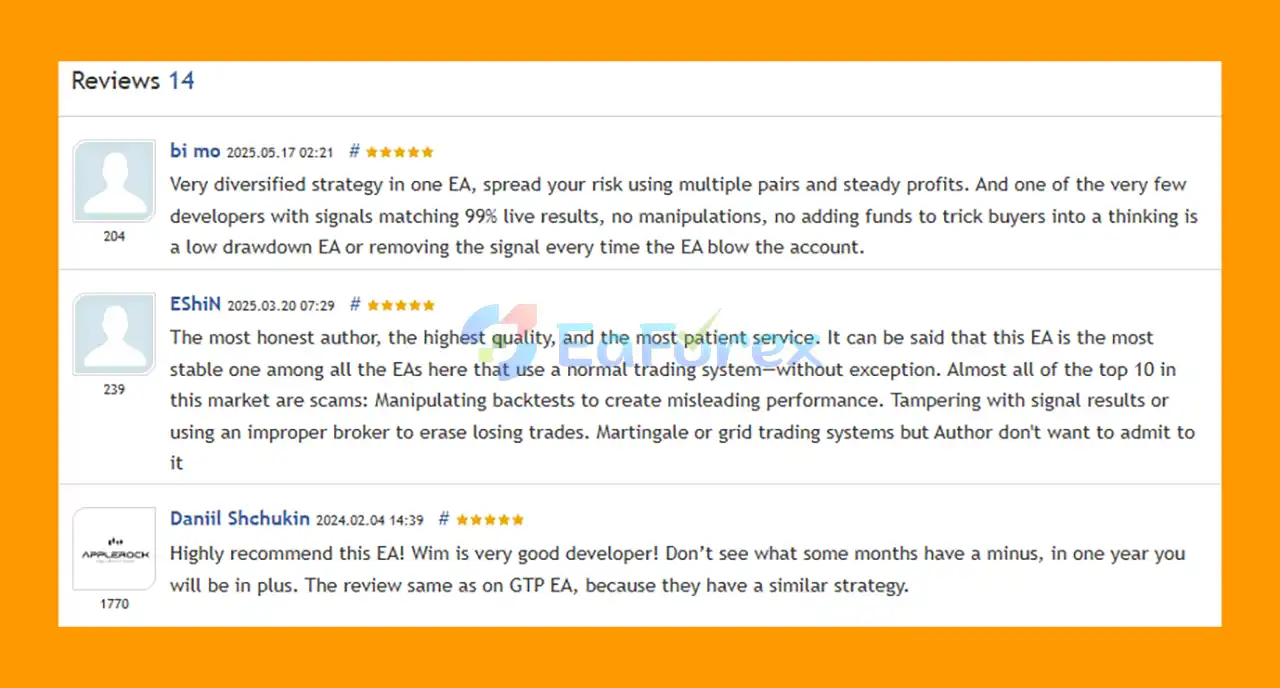
🔺Daytrade Pro Algo MT5 is highly appreciated by the MQL5 community for bringing stable and reliable profits. Below are 5 star reviews from users:
User Reviews
🔺Experts:
🔺Presets:
>>> Join VIP Membership Now <<<
Daytrade Pro Algo MT5 takes a relatively straightforward approach to automated trading by focusing on price action around major daily support and resistance levels.
Its key strengths are its multi-pair support, OneChartSetup functionality, flexible position sizing, SL/TP protection, trailing stop management, and emphasis on testing across different brokers and variable spread conditions.
Perhaps most importantly, the strategy is presented without claiming to be a “holy grail.” Losing trades and losing periods are considered a normal part of algorithmic trading, which is a more realistic expectation than backtests showing uninterrupted profits.
However, traders should still perform their own due diligence. Start with conservative risk, validate the EA using your broker’s conditions, perform forward testing, and avoid using excessive leverage.
Daytrade Pro Algo MT5 can be considered a systematic price-action trading tool, but its historical results should never be treated as a guarantee of future performance.
1. What is DayTrade Pro Algo MT5?
DayTrade Pro Algo MT5 is a professional Expert Advisor (EA) that trades price action around support and resistance zones across 13 currency pairs. It is broker-independent, spread-independent, and designed for long-term stability.
2. How does DayTrade Pro Algo MT5 manage risks?
The EA uses strict risk controls with Stop Loss, Take Profit, and Trailing Stop functions on every trade. It also supports equity-based or balance-based lot sizing for flexible money management.
3. Which trading pairs does DayTrade Pro Algo MT5 support?
It runs on 13 pairs, including EURUSD, GBPUSD, USDJPY, GBPJPY, and XAUUSD (Gold), making it a true multi-currency solution.
4. What kind of results can I expect with DayTrade Pro Algo MT5?
Backtests over 23 years show consistent profitability with a 76% win rate and minimal drawdown. Live accounts have also proven steady growth, with a 72% win rate and controlled drawdowns under 16%.
5. Is DayTrade Pro Algo MT5 suitable for prop firm challenges?
Yes. It includes preset files specifically optimized for $100K prop firm accounts, with risk settings tailored for compliance and long-term profitability.
6. Why should I choose DayTrade Pro Algo MT5 over other trading EAs?
Unlike many bots, DayTrade Pro Algo MT5 combines real price action logic, adaptability across brokers, and transparent results. It is easy to set up, reliable, and trusted by traders with 5-star reviews on MQL5.
In stock
In stock
In stock
In stock
In stock
Out of stock
No account yet?
Create an Account












 Automatic EA
 EA Best Seller
 Expert Advisor MT4
 Expert Advisor MT5
 HFT EA


Reviews
Clear filtersThere are no reviews yet.