









-
 Unlimited Activations
-
 Instant delivery
-
 Easy to install







 Unlimited Activations
Instant delivery
Easy to install
Unlimited Activations
Instant delivery
Easy to install
 Free Update
 Free Install Support

De Moore EA MT5 is an automated scalping Expert Advisor developed specifically for Gold (XAUUSD/GOLD) trading on the MetaTrader 5 platform. Designed to operate on the M5 timeframe, this trading robot combines trend-following concepts, price action analysis, and multi-timeframe market evaluation to identify potential short-term trading opportunities.
The strategy is intended for traders who want to automate their Gold trading activities without manually analyzing every price movement or placing every order themselves. By evaluating market conditions across multiple timeframes, De Moore EA aims to identify potential entries that align with its internal trading logic.
De Moore EA MT5 is designed for long-term use on the XAUUSD/GOLD market. However, short-term Gold trading involves considerable market risk, and occasional losing trades should be expected even when a strategy performs as intended.
The EA is designed to operate automatically after installation and configuration. Traders can purchase it through the MQL5 Market, install it on MetaTrader 5, and run it on a compatible trading account. A 24/7 VPS is recommended to help maintain platform availability and reduce interruptions caused by local computer downtime.
According to the supplied product information, De Moore EA MT5 requires a hedging account, a low-spread trading environment, and a recommended minimum deposit of $500. These requirements should be checked against the EA’s current documentation and the broker’s account specifications before deployment.
One important consideration is the economic news filter. The supplied information states that this filter is not applied during backtesting, meaning historical test results may differ from live trading behaviour. Traders should account for this limitation when evaluating the EA and avoid treating backtest performance as a guarantee of future profitability.
For traders seeking an automated Gold scalping EA for MT5 with trend-following, price action, and multi-timeframe analysis, De Moore EA MT5 offers a specialized approach to evaluating short-term XAUUSD trading opportunities.
Reviewed by Jason Stap <<<
De Moore EA MT5 is developed specifically for Gold trading, with XAUUSD/GOLD as its designated instrument.
Gold can experience rapid price movements in response to economic announcements, changes in market sentiment, and shifts in global financial conditions. A specialized trading system can focus its logic on the characteristics of this market rather than attempting to trade a wide range of unrelated instruments.
Users should confirm that their broker’s Gold symbol matches the EA’s supported instrument and that its contract specifications are compatible.
The EA is designed to operate on the five-minute timeframe, allowing it to evaluate short-term price movements and potential trading opportunities.
The M5 timeframe provides frequent market updates, but short-term trading can also be affected by spreads, slippage, execution speed, and temporary volatility.
For this reason, a low-spread trading account is recommended, and the EA should be tested under the same execution conditions intended for live use.
De Moore EA uses trend-following concepts as part of its market analysis.
This approach is intended to help the system identify potential trading opportunities that align with the prevailing market direction. The effectiveness of the trend analysis depends on the EA’s internal rules and the conditions present in the Gold market.
The exact indicators and trend-confirmation thresholds are not specified in the supplied information.
The EA also incorporates price action concepts into its trading logic.
Price action analysis focuses on market price behaviour to help identify potential entry conditions. When combined with trend-following logic, it can provide another perspective for evaluating short-term trading opportunities.
The precise price action patterns and entry rules used by De Moore EA MT5 have not been documented in the supplied description.
De Moore EA MT5 uses multi-timeframe analysis to evaluate market conditions across more than one timeframe.
This approach can help the strategy assess short-term opportunities in the context of broader price behaviour. However, the specific timeframes and confirmation rules used by the EA are not disclosed in the available information.
Once installed and configured on MetaTrader 5, De Moore EA is designed to automate its trading process.
Automated operation reduces the need for manual order placement and continuous chart monitoring. Nevertheless, users should regularly review the EA’s status, account exposure, execution quality, and trading results.
Automation does not eliminate market risk or guarantee profitable trades.
The product information describes De Moore EA as a system intended for long-term use on XAUUSD/GOLD.
This indicates that the EA is intended to be evaluated over an extended operating period rather than judged solely by a small number of trades. Long-term suitability should be assessed through forward testing, drawdown analysis, and performance consistency across different market conditions.
The supplied documentation states that the economic news filter is not applied during backtesting.
Consequently, backtests may not reproduce the EA’s live trading behaviour around scheduled economic announcements. Traders should consider this limitation when comparing historical results with actual performance.
The availability, configuration, and exact operation of the news filter should be confirmed through the EA’s current documentation.
De Moore EA follows a straightforward operating process: purchase the EA, install it on MT5, configure a compatible account, and run the system under appropriate trading conditions.
A VPS is recommended to maintain platform availability around the clock. However, VPS hosting does not guarantee uninterrupted execution or positive trading results.
De Moore EA MT5 combines trend-following concepts, price action analysis, and multi-timeframe evaluation to identify potential Gold scalping opportunities.
The EA evaluates XAUUSD/GOLD market conditions using its internal analysis logic.
Its approach incorporates trend-following concepts and price action analysis to assess whether the current market environment may offer a suitable trading opportunity.
The EA uses multi-timeframe analysis as part of its decision-making process.
By evaluating market conditions across different timeframes, the system is designed to consider short-term price behaviour alongside broader market direction.
The exact timeframe combination and confirmation requirements are not specified in the supplied product description.
When market conditions satisfy its internal trading rules, De Moore EA can initiate an automated trade.
The precise entry signals, exit conditions, Stop Loss settings, and Take Profit methodology have not been provided. These details should be verified rather than assumed.
Once the EA identifies a qualifying opportunity, it can manage order placement through MetaTrader 5, subject to the platform’s operating status and the broker’s execution conditions.
The EA is intended for a hedging account, so users should confirm that their account supports the required position-management behaviour.
After deployment, traders should monitor order execution, spreads, slippage, margin usage, floating drawdown, and account equity.
Although De Moore EA is designed for automated operation, regular monitoring remains important, particularly during major economic announcements and periods of elevated Gold volatility.
The EA is intended for long-term use, making extended evaluation more informative than judging it on a small number of trades.
When testing De Moore EA MT5, traders should consider the difference between historical backtesting and live trading, especially because the supplied documentation states that the news filter is not applied during backtests.
De Moore EA MT5 focuses specifically on XAUUSD/GOLD rather than presenting itself as a general-purpose multi-asset trading robot.
This specialized design may appeal to traders who want to evaluate automated strategies for the Gold market.
The EA combines trend-following, price action, and multi-timeframe analysis.
Using these concepts together is intended to provide a structured method for evaluating market conditions, although the actual effectiveness depends on the EA’s underlying rules and verified trading performance.
The EA is designed to execute its trading process automatically through MT5, reducing the need for constant manual chart analysis and order placement.
Users can spend less time managing individual trading decisions while continuing to monitor account risk and operational performance.
The recommended M5 timeframe makes De Moore EA suitable for evaluating short-term Gold trading opportunities.
However, M5 scalping can be particularly sensitive to transaction costs and execution quality, making broker selection and forward testing essential.
The product is intended for continued use on XAUUSD/GOLD. Traders can therefore evaluate its performance across different market conditions rather than relying solely on a short testing period.
A longer operating history is useful for analysis but does not, by itself, establish profitability or low risk.
A VPS can help keep MT5 running when a local computer is turned off or disconnected.
This is useful for automated trading systems that need continuous platform availability, although connectivity and execution issues may still occur.
The supplied workflow involves purchasing the EA through the MQL5 Market, installing it on MT5, and running it on a compatible account.
Users should follow the official installation instructions and verify the required account type and symbol settings before enabling live trading.
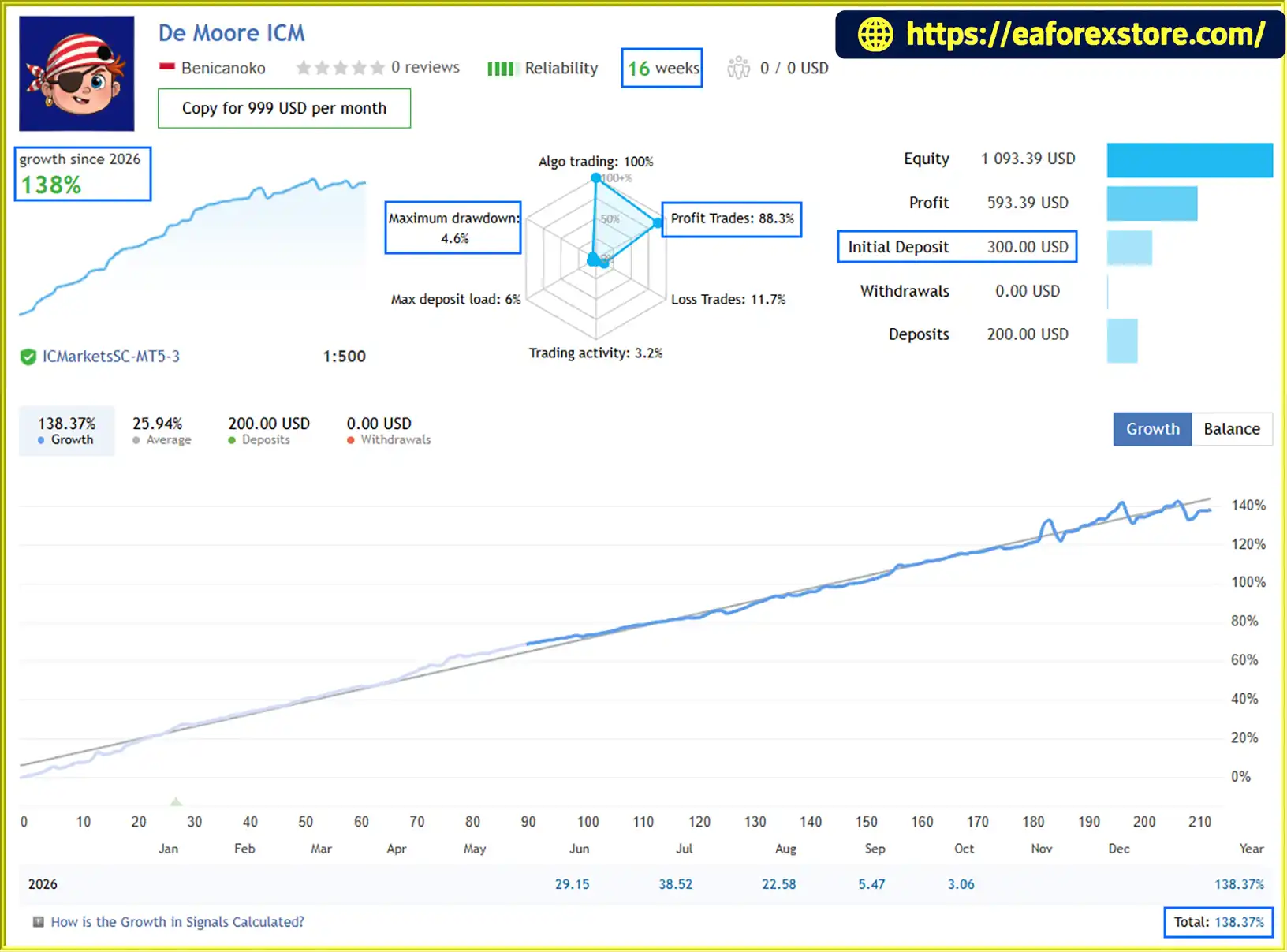
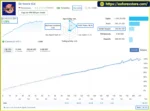
🔺De Moore ICM– 16 consecutive weeks
De Moore EA MT5 Live Signal
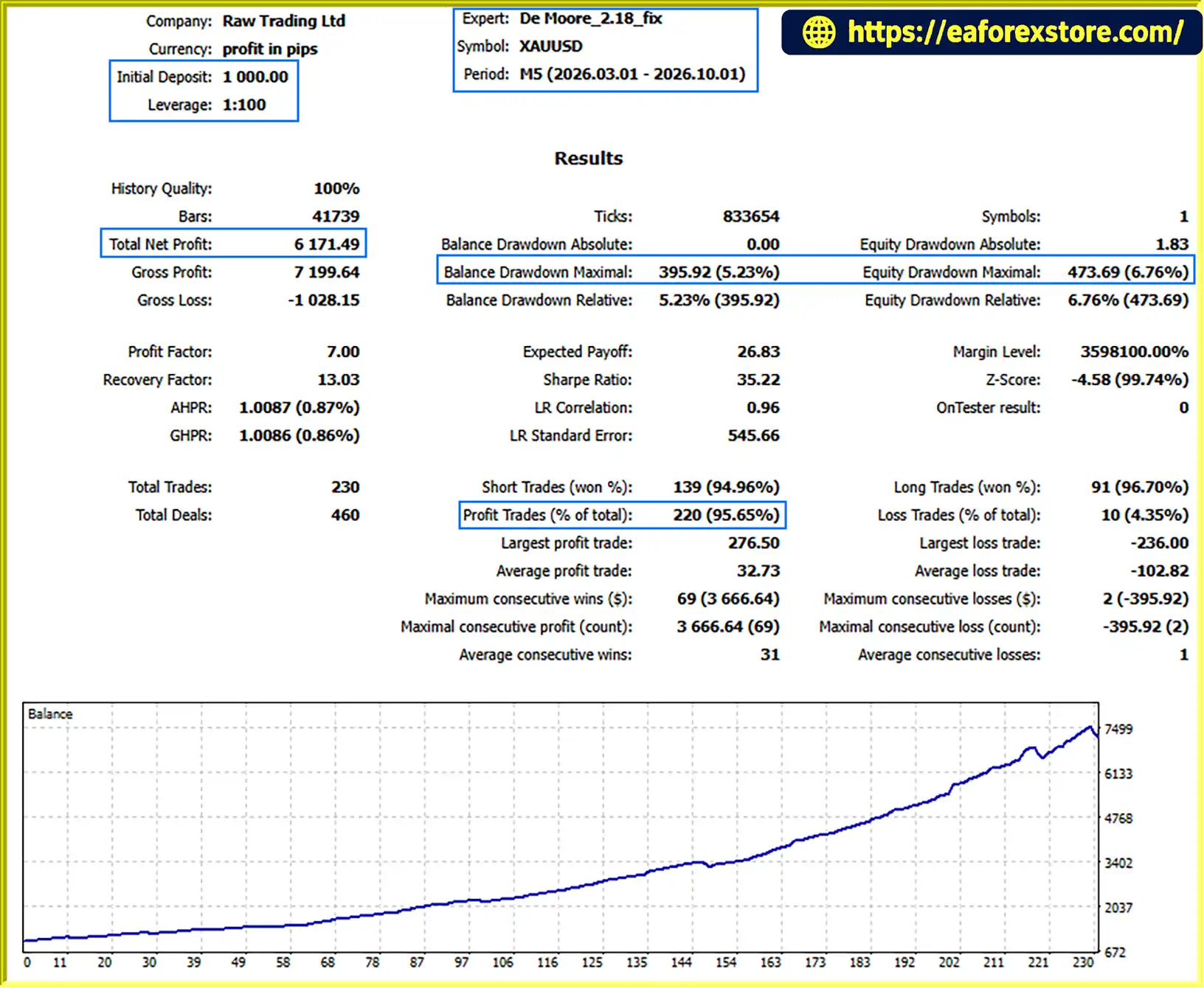
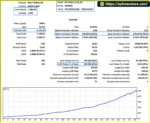
De Moore EA MT5 backtets
Risk management is essential when operating De Moore EA MT5 because Gold scalping involves short-term price movements and sensitivity to trading costs.
The supplied product description emphasizes low drawdown and risk-aware trading, but it does not include verified numerical drawdown statistics, specific risk parameters, or a complete explanation of the EA’s protective exit logic. These characteristics should therefore be independently evaluated.
The supplied specifications recommend the following trading environment:
The $500 figure is a stated minimum requirement, not a guarantee that the account will have sufficient capital for every trading condition. Appropriate capital requirements depend on leverage, lot size, margin requirements, the EA’s position-sizing method, and potential drawdown.
Scalping strategies can be sensitive to transaction costs because the distance between entry and exit prices may be relatively small.
Wide spreads, slippage, commissions, and execution delays can reduce profitability or cause live performance to differ from backtest results.
Traders should test the EA using the actual account type and broker they intend to use.
Gold can experience substantial price movements around major economic announcements.
The supplied information states that the news filter is not applied during backtesting. This limitation means historical results may not fully reflect the EA’s behaviour when the news filter operates during live trading.
Users should verify how the filter works and understand that it cannot eliminate all event-related market risk.
The product description identifies low drawdown as a key feature, but no numerical drawdown figure or verified risk statistics were provided.
Before live deployment, traders should evaluate maximum equity drawdown, consecutive losses, margin usage, and the system’s behaviour during unfavourable market conditions.
Do not interpret descriptions such as “low drawdown” or “risk-aware” as guarantees of capital preservation.
The supplied description does not specify the EA’s exact Stop Loss, Take Profit, trailing-stop, or maximum-loss settings.
Users should verify whether protective exits are implemented, how positions are closed, and what happens when the platform disconnects or market prices move rapidly.
The supplied product information does not confirm whether De Moore EA MT5 supports push notifications, email alerts, or dedicated drawdown alerts.
Until these functions are verified, traders should monitor the MT5 Terminal and their broker account regularly. A VPS can support continuous operation but should not be treated as a substitute for risk monitoring.
Before using De Moore EA MT5 on a live account:
Follow these steps to install De Moore EA MT5 on MetaTrader 5.
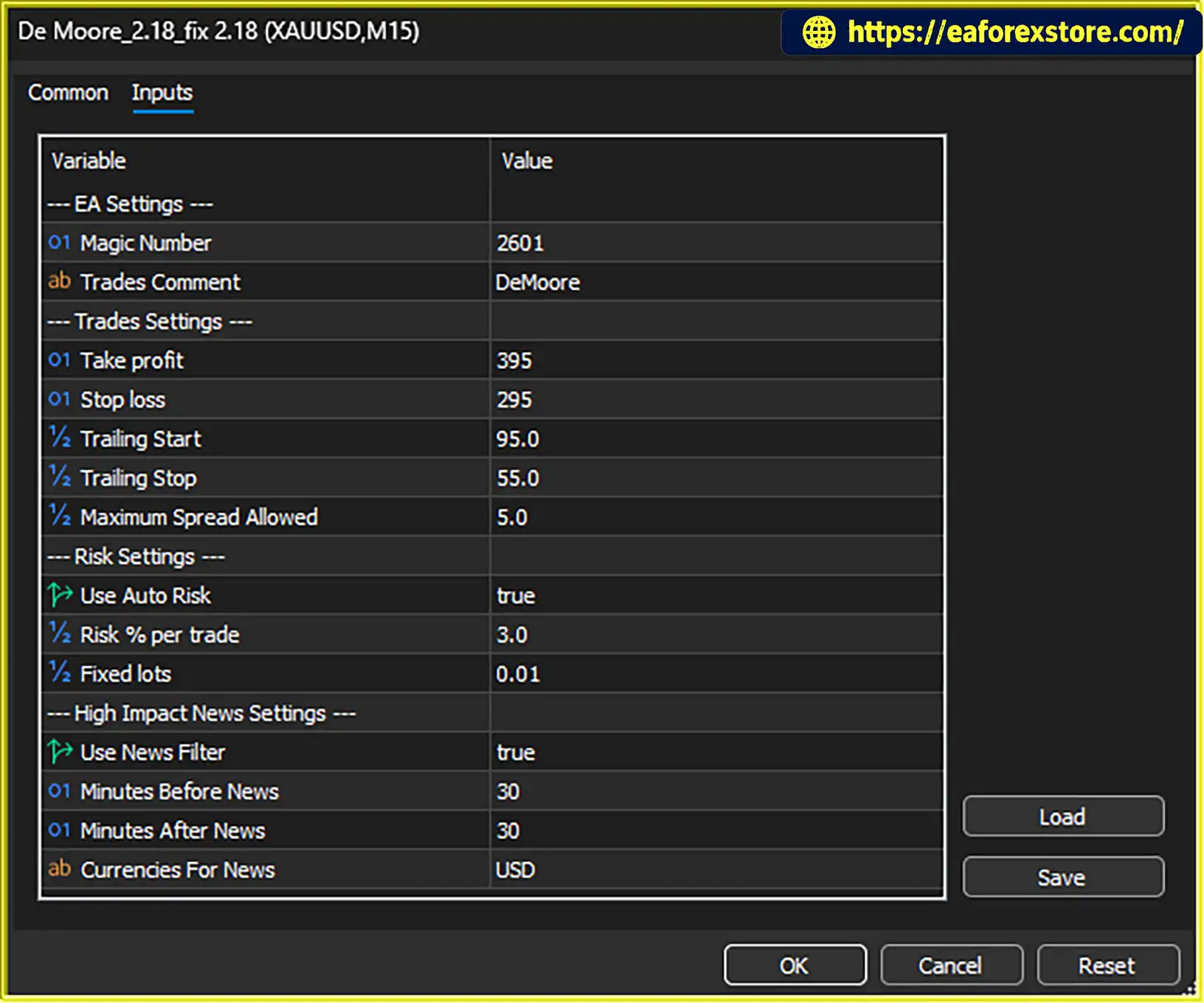
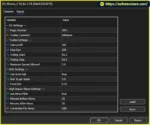
setting
Purchase De Moore EA through the official MQL5 Market listing.
Make sure the product is compatible with your MT5 account and review the provider’s installation and licensing instructions.
Launch MetaTrader 5 and sign in to the trading account you intend to use for testing.
If you purchased the EA through the MQL5 Market, use the platform’s available Market or purchased-product interface to locate and install it.
Follow the official installation procedure for the purchased product.
If the provider supplies a downloadable EA file, the usual manual installation path is File → Open Data Folder → MQL5 → Experts. Copy the file into the appropriate directory and refresh the Navigator panel.
For Market purchases, follow the installation method supported by the MT5 platform and the product’s licensing requirements.
Open the XAUUSD/GOLD symbol offered by your broker.
Set the chart to the M5 timeframe, which is the recommended operating timeframe for De Moore EA MT5.
Verify the symbol name and contract specifications because some brokers use different names for Gold instruments.
Locate De Moore EA in the Navigator panel and attach it to the Gold chart.
Review the available input settings and follow the provider’s recommended configuration. Do not assume that the default settings are suitable for every account balance, leverage level, or broker.
The supplied requirements specify a hedging account and low-spread conditions.
Confirm that your broker supports hedging and that your account’s trading conditions are appropriate for Gold scalping.
The stated minimum deposit is $500, but actual capital requirements depend on the EA’s position sizing, leverage, margin usage, and drawdown.
Check that automated trading is enabled in MT5 and that the EA has the necessary permissions to operate.
Confirm that the EA is active on the chart and that the platform is receiving market data.
Before trading with real money, test De Moore EA MT5 on a demo account.
Monitor order placement, trade management, execution costs, drawdown, and behaviour around major economic announcements. Remember that the supplied documentation states that the news filter is not applied during backtesting.
A VPS is recommended to help keep MT5 operating continuously without depending on your personal computer.
Choose a reliable hosting provider and, where practical, a server close to your broker’s trading server. Monitor connectivity and platform status even when using VPS hosting.
Review trading history, account equity, floating drawdown, margin levels, and execution costs regularly.
Continue testing until you have sufficient evidence to understand the EA’s operating behaviour and determine whether its risk profile is appropriate for your account.
>>> Join VIP Membership Now <<<
De Moore EA MT5 is an automated XAUUSD scalping Expert Advisor designed for the M5 timeframe on MetaTrader 5. Its trading approach combines trend-following concepts, price action analysis, and multi-timeframe evaluation to identify potential short-term Gold trading opportunities.
The main attractions are its specialized Gold focus, automated trading workflow, and structured analytical approach. The supplied requirements also provide a clear starting point for evaluating account compatibility, including the recommendation for a hedging account, low spreads, and a minimum deposit of $500.
However, the available product description does not provide verified numerical performance statistics or sufficient details about the EA’s position sizing, Stop Loss, Take Profit, and drawdown-control mechanisms. Its claims of low drawdown and high profit factor should therefore be verified using reliable trading records rather than accepted without supporting data.
The news filter limitation is another important consideration. Because the filter is not applied during backtesting, historical simulations may not fully reproduce live trading behaviour.
For traders considering De Moore EA MT5, the most practical approach is to begin with demo testing, use realistic broker conditions, and evaluate execution quality and equity drawdown over an extended period before committing real capital.
Ultimately, the suitability of De Moore EA MT5 depends on its verified performance, the transparency of its risk controls, and its compatibility with the trader’s broker and account conditions. Automated trading can reduce manual workload, but it cannot eliminate Gold market risk or guarantee consistent profits.
1. What Is De Moore EA MT5?
De Moore EA MT5 is an automated Gold scalping Expert Advisor designed for the MetaTrader 5 platform. It focuses on XAUUSD/GOLD trading and combines trend-following concepts, price action analysis, and multi-timeframe market evaluation to identify potential short-term trading opportunities. Once installed and configured, the EA can automate trading operations without requiring constant manual order placement.
2. Which Trading Pair and Timeframe Does De Moore EA MT5 Use?
De Moore EA MT5 is specifically designed for XAUUSD/GOLD and uses the M5 (5-minute) timeframe as its recommended operating timeframe. Its strategy evaluates short-term price movements alongside broader market conditions. Traders should confirm that their broker's Gold symbol and trading specifications are compatible with the EA before use.
3. What Is the Minimum Deposit Required for De Moore EA MT5?
According to the supplied product information, De Moore EA MT5 recommends a minimum deposit of $500. The EA also requires a hedging account and a low-spread trading environment. However, the appropriate account balance depends on leverage, position sizing, margin requirements, and potential drawdown. Traders should test the EA on a demo account and verify their broker's conditions before trading with real money.
4. Is De Moore EA MT5 Profitable? What Are Its Backtest Results?
The supplied performance information reports a seven-month XAUUSD backtest with a net profit of $6,171.49 from an initial deposit of $1,000, a 95.65% win rate, and a 5.23% maximum drawdown. A separate 16-week live signal report shows 138% growth, an 88.3% win rate, and a 4.6% maximum drawdown. These results relate to different performance records and should be evaluated separately. Historical results do not guarantee future profitability, and traders should independently verify the reported figures before investing.
5. Does De Moore EA MT5 Require a Hedging Account?
Yes. The supplied product specifications state that De Moore EA MT5 requires a hedging account. Before purchasing or installing the EA, confirm that your MetaTrader 5 broker supports hedging and that your account allows the position-management behaviour required by the system. Using an incompatible account type may prevent the EA from operating as intended.
6. Does De Moore EA MT5 Use a News Filter, and How Does It Affect Backtesting?
De Moore EA MT5 includes an economic news filter, but the supplied documentation states that the filter is not applied during backtesting. As a result, historical test results may not fully reflect how the EA behaves around economic announcements during live trading. Since Gold prices can move sharply during major news events, traders should verify the filter's configuration and evaluate the EA under realistic market conditions.
7. Does De Moore EA MT5 Require a VPS for Automated Trading?
A VPS is recommended but is not stated to be mandatory. A reliable 24/7 VPS helps keep MetaTrader 5 running when your personal computer is switched off or disconnected. This can reduce interruptions to automated trading, although a VPS cannot guarantee uninterrupted execution or profitable results. Traders should also monitor platform connectivity, order execution, account equity, and margin usage.
8. How Do I Install De Moore EA MT5 on MetaTrader 5?
To install De Moore EA MT5, purchase the product through the MQL5 Market and follow the platform's installation instructions. Open an XAUUSD/GOLD chart, select the M5 timeframe, attach the EA, and review its available settings. Confirm that your account supports hedging and offers suitable spreads before enabling automated trading. Run the EA on a demo account first to evaluate execution quality, trading costs, drawdown, and its behaviour around major economic announcements.
In stock
In stock
In stock
In stock
In stock
Out of stock
No account yet?
Create an Account












 Automatic EA
 EA Best Seller
 Expert Advisor MT4
 Expert Advisor MT5
 HFT EA


Reviews
Clear filtersThere are no reviews yet.