









-
 Unlimited Activations
-
 Instant delivery
-
 Easy to install





 Unlimited Activations
Instant delivery
Easy to install
Unlimited Activations
Instant delivery
Easy to install
 Free Update
 Free Install Support

TitanForge EA MT5 is an automated trading Expert Advisor designed specifically for Gold (XAUUSD) on the MetaTrader 5 platform. Operating on the recommended H1 timeframe, this algorithmic trading system focuses on directional momentum, volatility expansion, and structured trade management to identify potential Gold trading opportunities.
Unlike trading robots that attempt to maintain constant market exposure, TitanForge EA follows a selective trading approach. It analyzes market conditions and waits for suitable combinations of momentum and price behaviour before initiating a position. This approach is designed to avoid forcing trades when market conditions are considered unsuitable.
One of the defining characteristics of TitanForge EA MT5 is its risk-management framework. The system combines a hard Stop Loss, dynamic trailing functionality, automatic position sizing, spread protection, slippage control, and economic news filtering. It also includes daily and overall loss protection to help users manage their trading exposure.
TitanForge EA MT5 does not use Grid or Martingale trading strategies, according to the supplied product specifications. Each position is opened with predefined Stop Loss protection, while profitable trades can be managed through the integrated trailing mechanism.
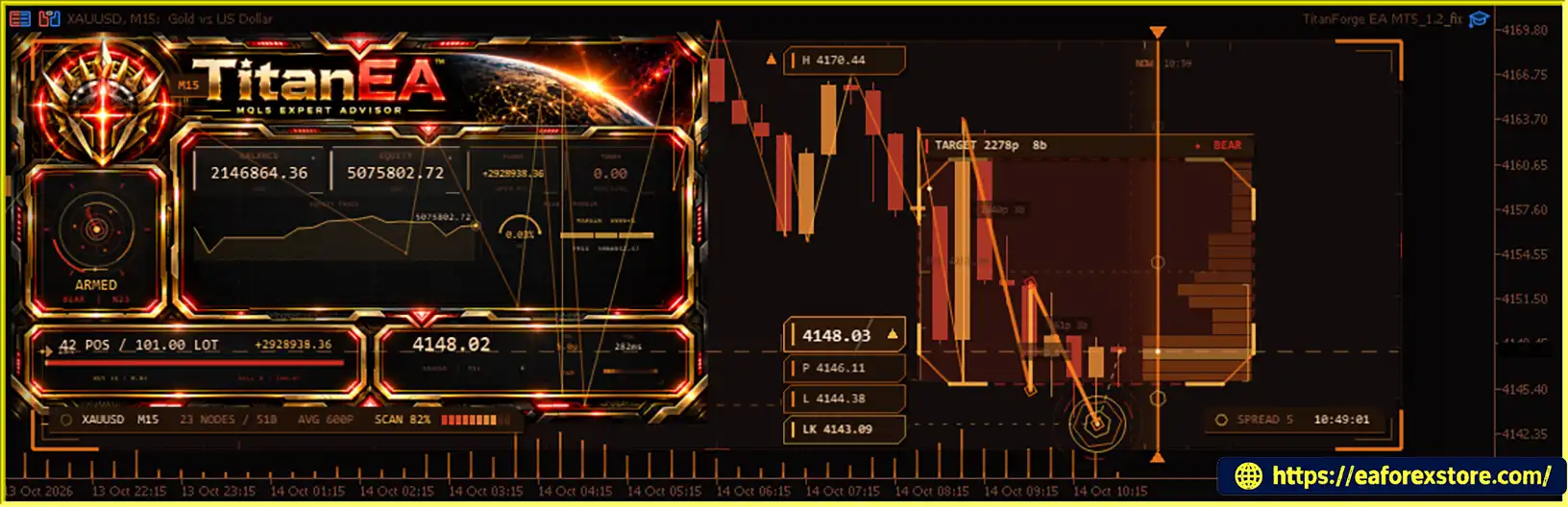
The EA also provides an on-chart information panel displaying important trading information, including EA status, current spread, candle countdown, trading levels, and execution details. Its configurable parameters allow users to adjust position sizing, risk settings, trade protection, and other operational preferences.
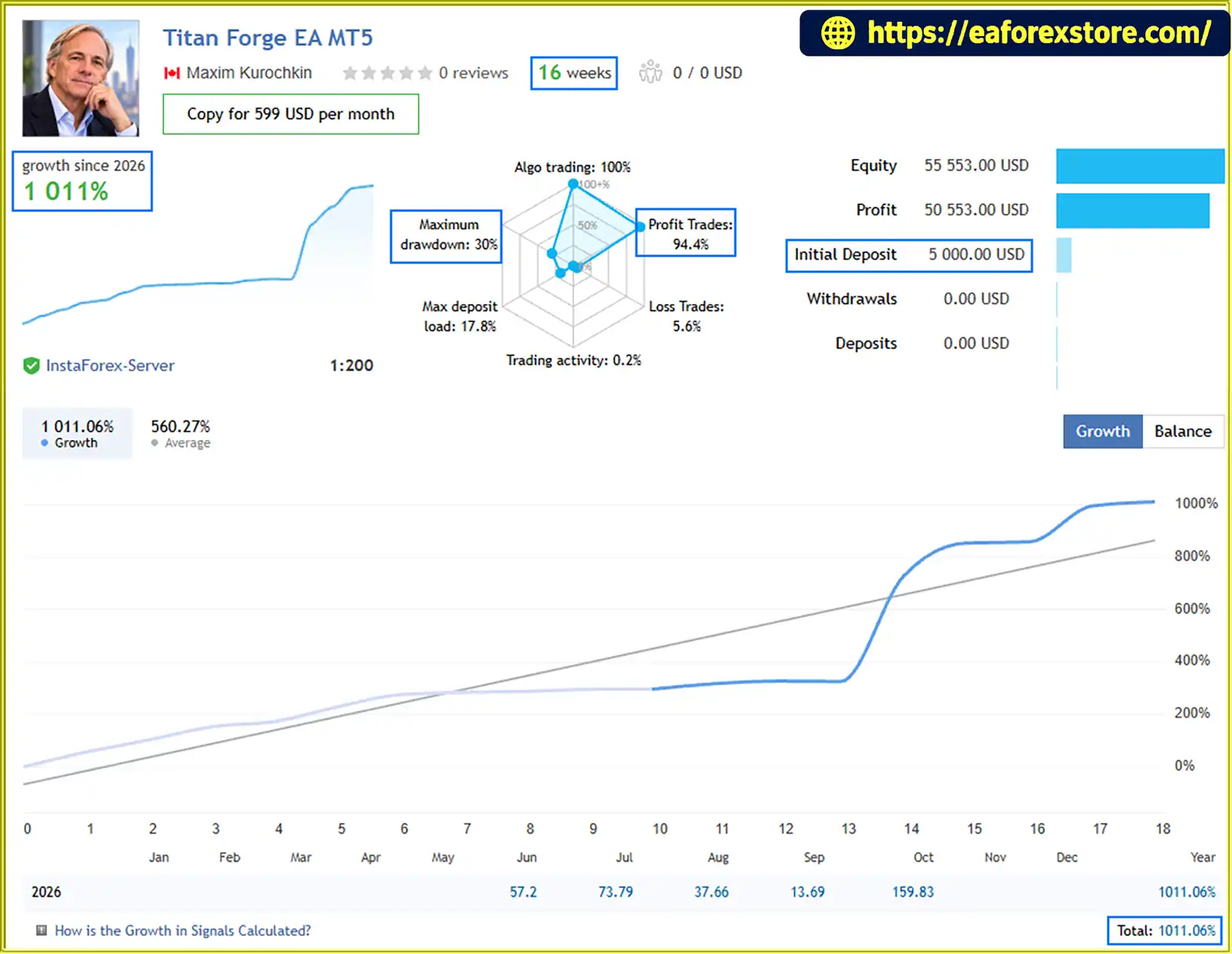
The supplied performance information includes live MQL5 signal statistics and historical Strategy Tester results covering different market periods. The reported live account figures include approximately 296% growth from an initial deposit of $5,000, with a reported maximum equity drawdown of approximately 14.1%. However, the historical backtests show substantially higher relative drawdowns under the tested configurations. These figures refer to different performance records and should not be treated as directly comparable.
For traders seeking an automated XAUUSD trading EA with structured risk controls, momentum-based trading logic, and configurable position management, TitanForge EA MT5 offers a feature-rich system for further evaluation. As with any automated strategy, its real-world performance depends on market conditions, broker execution, account settings, and the selected risk profile.
Reviewed by Jason Stap <<<
TitanForge EA MT5 Reviews
TitanForge EA MT5 is developed specifically for XAUUSD, with H1 as its recommended trading timeframe.
The strategy evaluates market conditions using its internal momentum, volatility, and price-behaviour logic. Rather than opening trades continuously, the EA waits for conditions that satisfy its trading criteria.
This selective approach is designed to help the system avoid unnecessary market exposure when suitable opportunities are not present.
According to the supplied specifications, TitanForge EA MT5 does not use Grid or Martingale strategies and does not rely on uncontrolled averaging.
This is an important distinction for traders who want to avoid systems that increase exposure through progressive lot escalation or repeated averaging into losing positions.
However, the absence of Grid and Martingale does not eliminate trading risk. Losses can still occur, and the strategy’s actual risk profile should be evaluated through independent testing.
Every position is opened with a predefined protective Stop Loss, according to the product specifications.
The default configuration includes a protective Stop Loss distance of 1,900 points. This parameter defines the configured distance from the entry price, subject to the EA’s implementation and the broker’s symbol specifications.
A Stop Loss helps define an intended exit level but cannot guarantee the exact execution price during gaps, slippage, or abnormal market conditions.
TitanForge EA includes a dynamic trailing mechanism designed to adjust the protective Stop Loss as a position moves into profit.
Once the required profit condition is reached, the EA can progressively move the Stop Loss behind the market price. This is intended to protect accumulated gains while allowing profitable positions room to develop.
The default trailing configuration includes a trailing distance of 140 points and a minimum trailing shift of 30 points.
Actual trailing behaviour depends on the EA’s internal rules, broker execution, and the market’s price movement.
The EA supports automatic lot calculation based on its configured Risk Level and account conditions.
This feature allows traders to select an intended risk profile instead of manually assigning a fixed volume to every trade. Users who prefer direct control can also configure fixed-lot trading.
Automatic position sizing should not be interpreted as a guarantee of fixed monetary risk. The resulting exposure depends on the calculation method, Stop Loss distance, account equity, contract specifications, and execution conditions.
Gold prices can react sharply to major economic announcements and unexpected changes in market expectations.
TitanForge EA MT5 includes an economic news filter designed to restrict new trading entries around selected high-impact events.
The supplied default settings specify a 50-minute period before major news and a 50-minute period after major news. This feature is intended to reduce exposure during potentially unstable market conditions.
The effectiveness of the filter depends on the accuracy of its news data source, supported events, and configuration.
TitanForge EA includes execution-related controls designed to help manage trading conditions.
These functions may be useful during rollover periods, temporary liquidity shortages, or periods of unusually wide spreads. They cannot eliminate execution risk or guarantee that every order will be filled at the requested price.
The EA includes account protection settings intended to suspend new trading activity when configured loss thresholds are reached.
The supplied default settings are:
These limits provide an additional layer of risk control. Users should verify how losses are calculated, whether floating losses are included, and whether the EA closes existing positions or only suspends new entries when a threshold is reached.
TitanForge EA MT5 features an integrated information panel that can be enabled or disabled through the EA settings.
Depending on the supplied configuration, the panel can display:
This information helps users monitor the EA’s operational state without relying exclusively on the MT5 Terminal window.
TitanForge EA MT5 provides a range of settings for adjusting its operation, including automatic position sizing, risk level, profit target distance, protective Stop Loss distance, trailing functionality, loss limits, and the economic news filter.
The product also comes with a default configuration, so an external SET file is not required to begin testing, according to the supplied information.
Users should understand each parameter before modifying the default settings, especially those affecting trading volume and account protection.
TitanForge EA MT5 follows an automated trading process built around market-condition analysis, selective entry logic, position sizing, and ongoing trade management.
The EA monitors Gold market conditions on the recommended H1 timeframe.
Its internal logic evaluates directional momentum, volatility expansion, and price behaviour to determine whether the market meets its trading criteria.
The exact indicator formulas and entry thresholds are not specified in the supplied description, so the system should be evaluated using its actual trading records rather than assumptions about undisclosed strategy components.
TitanForge EA is designed to avoid continuous trading when market conditions do not satisfy its entry requirements.
When the necessary conditions are met, the EA can proceed with a potential trade. An optional additional confirmation setting is also available for users who want another signal condition before opening a position.
The purpose of this approach is to make trading activity dependent on selected market conditions rather than forcing entries at all times.
Before executing a trade, the EA applies its configured position-sizing method.
In automatic mode, the lot size is calculated according to the selected Risk Level and the EA’s internal position-sizing logic. Alternatively, traders can choose fixed-lot trading for direct control over volume.
The chosen configuration should be tested against the account’s equity, leverage, Stop Loss distance, and broker contract specifications.
The EA includes a predefined protective Stop Loss and execution controls.
Its spread filter can restrict new entries when spreads exceed the configured threshold, while slippage control helps define acceptable execution deviation. The economic news filter can also restrict new entries around selected high-impact events.
These safeguards are intended to improve operational discipline, although they cannot prevent all losses caused by market gaps, liquidity changes, or execution failures.
After a trade is opened, TitanForge EA applies its configured trade-management rules.
The default configuration includes a Take Profit distance of 500 points and a Stop Loss distance of 1,900 points. The dynamic trailing mechanism can subsequently adjust the protective Stop Loss when its activation conditions are satisfied.
These values are configuration parameters rather than guaranteed monetary outcomes. Their practical effect depends on the symbol’s point definition, trade volume, execution price, and the EA’s internal implementation.
The EA includes daily and overall loss protection settings.
Under the supplied default configuration, the daily loss ceiling is 5% and the overall loss ceiling is 10%. When the configured protection threshold is reached, the EA can suspend new trading activity.
Users should verify whether these controls account for realized losses, floating drawdown, commissions, swaps, and all positions on the account.
Traders can monitor the EA’s operational status through its on-chart panel and review historical trading activity through MT5 account records.
The supplied MQL5 signal statistics and Strategy Tester reports provide additional information for performance evaluation. Live results should be monitored continuously because actual performance can differ from historical simulations.
TitanForge EA MT5 focuses on XAUUSD and recommends the H1 timeframe. Its specialized application provides a defined starting point for traders who want to evaluate automated Gold trading rather than a general-purpose multi-currency EA.
The EA combines Stop Loss protection, dynamic trailing, automatic position sizing, and configurable loss limits. These features provide several layers of trading and account management controls.
Their effectiveness still depends on correct configuration and the behaviour of the system under real execution conditions.
The supplied specifications explicitly state that TitanForge EA does not use Grid or Martingale strategies. This may appeal to traders who prefer to avoid those particular approaches to increasing or accumulating market exposure.
A non-Martingale strategy can still experience significant drawdown, especially under aggressive risk settings.
The strategy is designed to wait for suitable momentum and volatility conditions instead of maintaining continuous exposure.
This approach may reduce unnecessary entries during unsuitable conditions, although its effectiveness must be assessed using independent trading data.
The integrated trailing mechanism is designed to move the protective Stop Loss as the market progresses in a favourable direction.
This provides an additional trade-management feature beyond a static protective exit, but it does not guarantee that profits will be retained during reversals or execution disruptions.
Spread protection, slippage control, and the economic news filter are designed to address several practical challenges associated with automated Gold trading.
These controls can help restrict trading under selected conditions but cannot remove the underlying uncertainty of financial markets.
The on-chart information panel provides access to key operational details, including EA status, spread, candle countdown, and trading levels.
This can make it easier to monitor the system during testing and live operation.
The EA supports automatic position sizing and fixed-lot trading, allowing users to evaluate different operating configurations.
The supplied product information also describes optional setup guidance for Conservative, Prop Firm, Balanced Growth, and Higher Risk profiles. These labels describe intended configurations, not guaranteed outcomes or verified suitability for any particular account.
🔺TitanForge EA MT5 – 16 consecutive weeks
TitanForge EA MT5 Live Signall
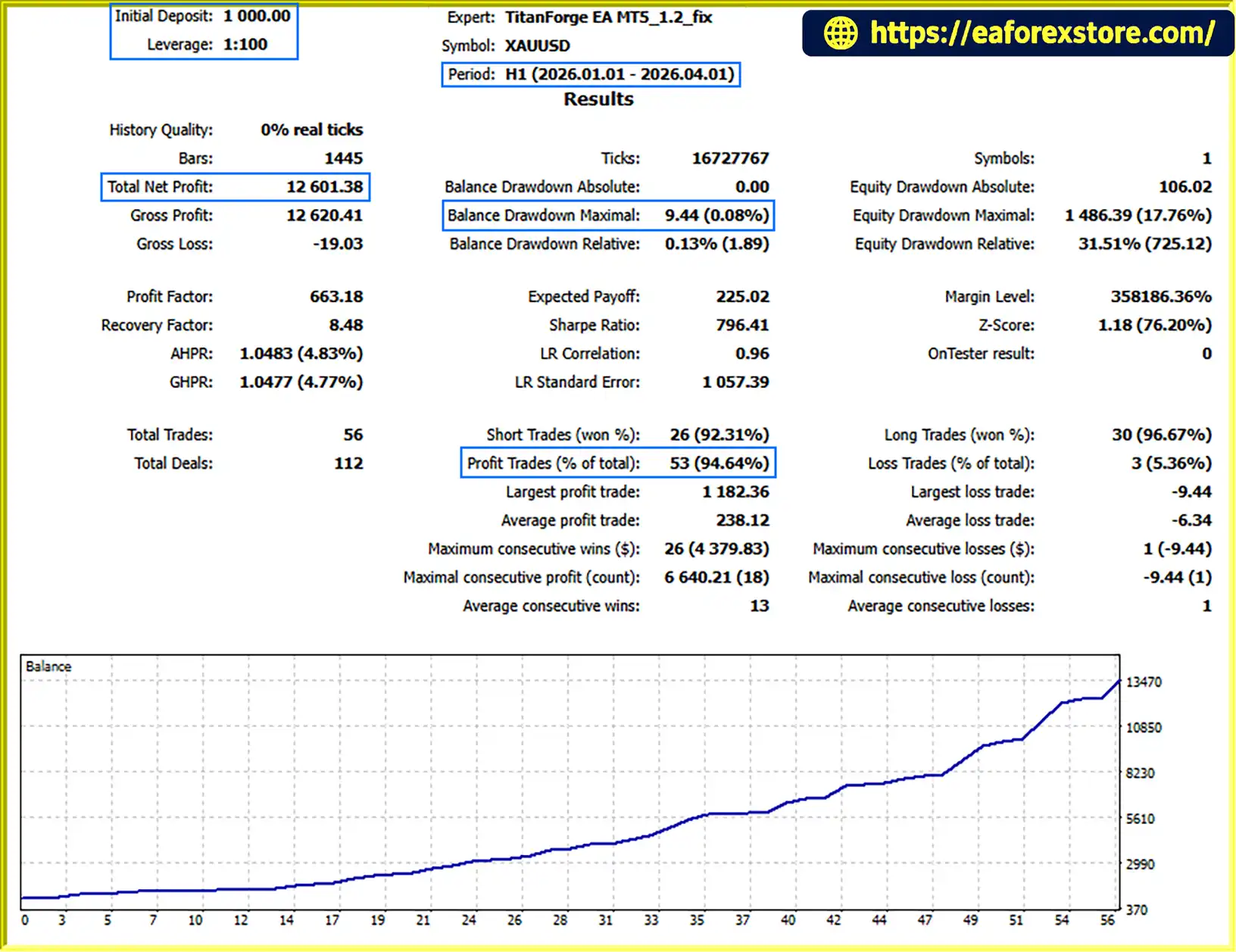
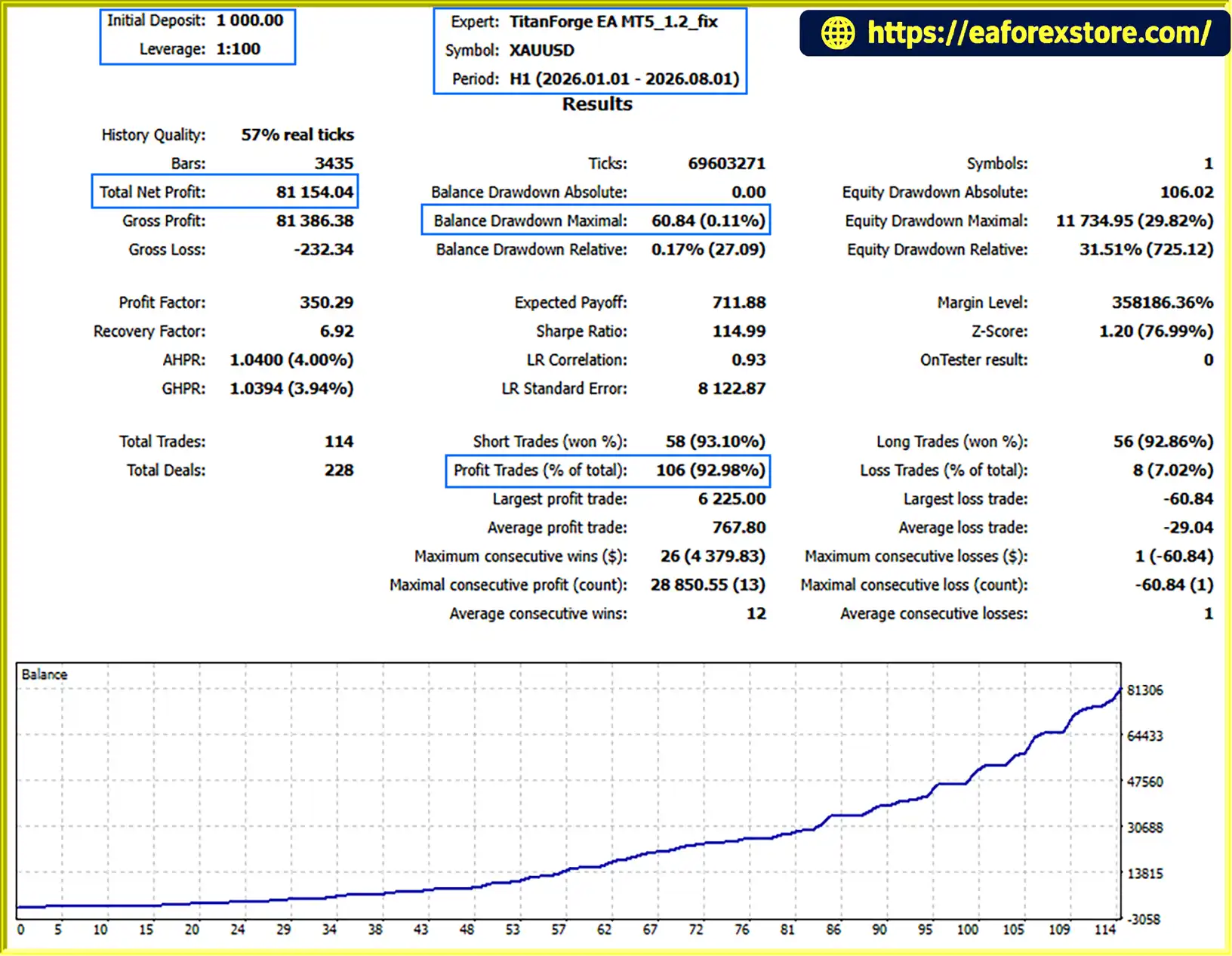
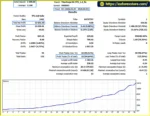
TitanForge EA MT5 backtets
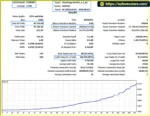
TitanForge EA backtets
Risk management is a central component of TitanForge EA MT5. The system provides multiple configurable controls intended to manage position exposure, trade exits, execution conditions, and account losses.
Automatic position sizing can calculate trading volume according to the selected Risk Level and current account conditions.
This may reduce the need to manually calculate each position size, but traders should verify the EA’s calculation method before live deployment. A risk setting does not automatically establish the exact percentage of account equity at risk on every trade.
The default daily loss ceiling is 5%.
When the configured threshold is reached, the EA can suspend new trading activity. Before relying on this protection, users should establish how the daily period is defined, which losses are counted, and whether existing positions remain open.
The default overall loss ceiling is 10%.
This setting is intended to provide an additional limit on account-level losses. Its precise operation should be confirmed through the EA documentation and controlled testing, including whether the threshold triggers trade closure, entry suspension, or another protective response.
The default protective Stop Loss distance is 1,900 points.
The Stop Loss is intended to define a predefined exit level for each position. However, actual losses can exceed the expected amount when gaps, slippage, or other execution issues prevent an order from closing at the specified price.
The EA’s trailing mechanism uses the configured trailing distance and minimum trailing shift to adjust the protective Stop Loss after the relevant profit conditions are met.
This can help manage open positions as prices move favourably, but a trailing Stop Loss does not guarantee that a profitable trade will close with a profit.
The supplied news filter settings specify 50 minutes before and 50 minutes after selected major news events.
This is intended to reduce new entries during periods of potentially elevated volatility. Users should verify the supported economic calendar, event classifications, and behaviour when news data is unavailable.
The spread filter can block entries when the spread exceeds its configured maximum, while slippage control defines the permitted execution deviation.
These controls are particularly relevant to Gold trading, where transaction costs and price movements can change quickly.
TitanForge EA includes an on-chart information panel for monitoring its operating status and trading information.
The supplied description does not explicitly confirm push notifications, email alerts, or other external alert channels. Users should verify these capabilities before relying on the EA to notify them about loss limits, execution errors, or changes in trading status.
The supplied long-term backtest reports a relative drawdown of 36.51%, while the recent market test reports a relative drawdown of 32.18%. These figures are substantially higher than the approximately 14.1% maximum equity drawdown reported for the live MQL5 signal.
The statistics refer to different records and testing configurations, so they should not be directly compared as if they were generated under identical conditions. In particular, the long-term test is described as a Maximum Risk Test.
Before using TitanForge EA MT5 with real capital, traders should conduct forward testing using their own broker, verify the operation of account protection features, and assess drawdown under the intended risk configuration.
Follow these steps to install TitanForge EA MT5 on MetaTrader 5 and prepare it for testing.
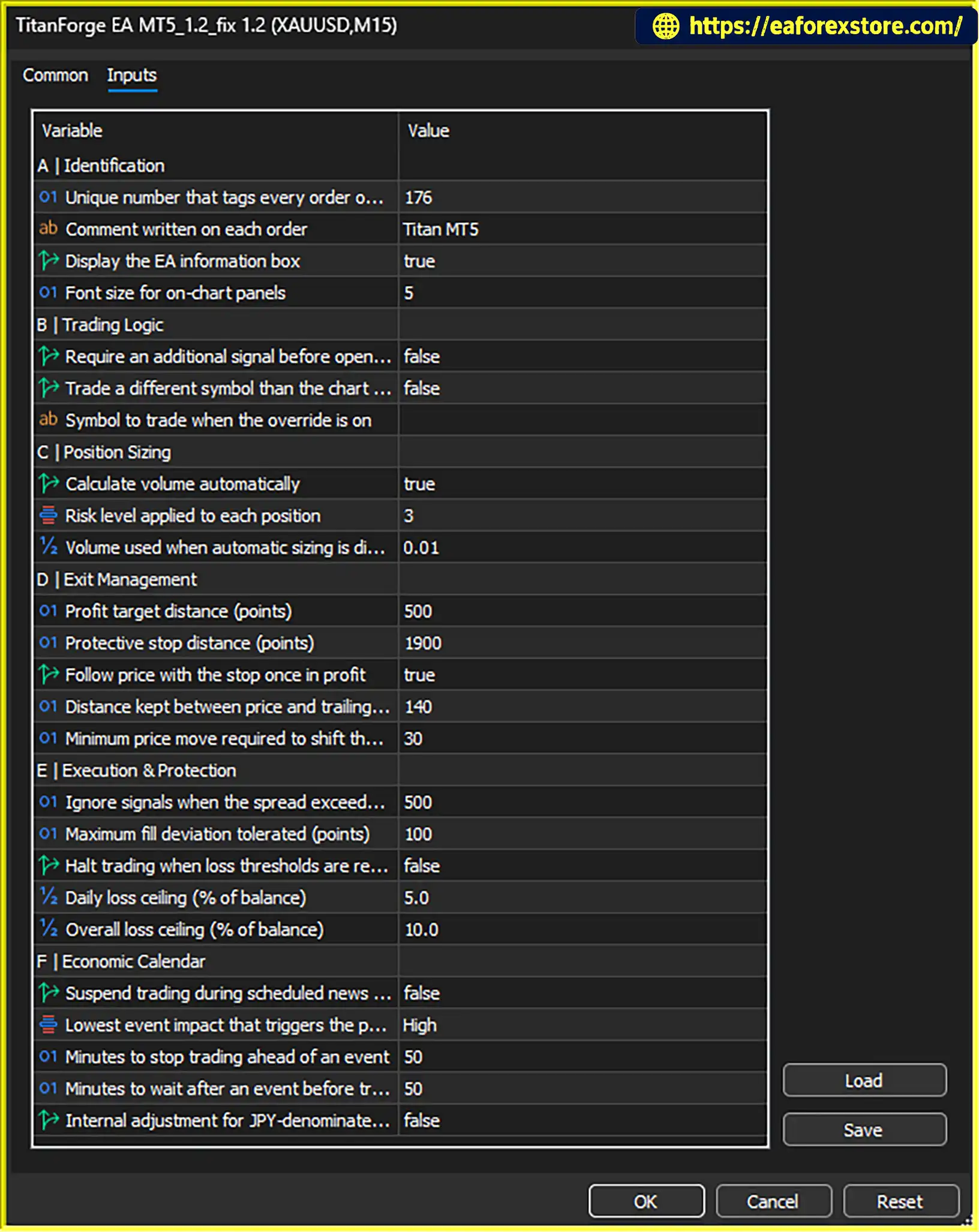
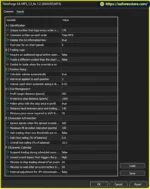
setting
Obtain the TitanForge EA MT5 file from the official product provider or the authorized MQL5 product page.
Review any included installation instructions and licensing requirements before proceeding.
Launch MetaTrader 5 and select File → Open Data Folder.
Locate the MQL5/Experts directory, which is used for Expert Advisor files.
Copy the TitanForge EA MT5 file into the MQL5/Experts folder.
If the provider supplies additional files or specific installation instructions, follow those instructions as required.
Return to MT5 and open the Navigator panel.
Right-click Expert Advisors and select Refresh. If the EA does not appear, restart the platform and check that the file is in the correct directory.
Open the Gold symbol supported by your broker.
Select the H1 timeframe, which is the recommended timeframe for TitanForge EA MT5. Confirm the broker’s symbol name, tick size, point value, and contract specifications before proceeding.
Drag the EA from the Navigator panel onto the XAUUSD H1 chart.
Review the available inputs before enabling automated trading.
The main parameters include:
The standard configuration includes a 500-point Take Profit distance, a 1,900-point Stop Loss distance, a 140-point trailing distance, and a 30-point minimum trailing shift.
These values should be reviewed against the broker’s symbol specifications rather than copied blindly to every trading environment.
Choose between automatic position sizing and fixed-lot trading according to the available EA options.
Confirm the intended risk profile, spread threshold, slippage setting, news filter, and account protection parameters.
The supplied defaults include a 5% daily loss limit and a 10% overall loss limit. Verify how these limits operate before relying on them for account protection.
Check that automated trading is permitted in MT5 and that the EA has the required permissions to operate.
Confirm that the EA is running correctly and that its on-chart information panel shows the expected status.
Run TitanForge EA MT5 on a demo account using the intended broker and account type.
Evaluate order execution, position sizing, Stop Loss placement, trailing behaviour, news filtering, and loss protection. Review both trading costs and drawdown over a meaningful testing period.
A VPS can help keep MT5 running when your personal computer is switched off or disconnected.
The supplied product recommendation suggests a VPS close to the broker’s trading server, with latency below approximately 20–30 milliseconds where possible.
Lower latency can help reduce communication delays, but it does not guarantee better fills or profitable trades.
>>> Join VIP Membership Now <<<
TitanForge EA MT5 is an automated Gold trading Expert Advisor built around directional momentum, volatility expansion, and structured position management on the XAUUSD H1 timeframe.
Its main strengths include a selective trading approach, the stated absence of Grid and Martingale strategies, hard Stop Loss protection, dynamic trailing, automatic position sizing, and multiple execution and account protection controls. The integrated information panel also provides convenient access to operational details while the EA is running.
The supplied performance records include encouraging reported live growth and strong historical backtest statistics. However, the long-term and recent market tests also report relative drawdowns of 36.51% and 32.18%, respectively. These figures highlight the importance of distinguishing headline profitability from the amount of risk required to achieve it.
The reported live signal statistics, backtests, and configured risk limits should all be evaluated independently. Different testing methods, risk profiles, broker conditions, and account configurations can produce substantially different outcomes.
For traders considering TitanForge EA MT5, the recommended approach is to begin with demo testing, confirm the behaviour of every important risk-management feature, and evaluate the system under realistic trading conditions before committing significant capital.
Ultimately, TitanForge EA MT5 may be worth investigating for traders seeking a structured, automated approach to Gold trading. Its suitability depends on verified performance, acceptable drawdown, reliable execution, and a risk profile that matches the user’s financial circumstances and trading objectives.
Automated trading can improve consistency and reduce manual workload, but it cannot remove market uncertainty or guarantee future profits.
1. What is TitanForge EA MT5?
TitanForge EA MT5 is an automated trading Expert Advisor designed specifically for Gold (XAUUSD) on the MetaTrader 5 platform. It uses directional momentum, volatility expansion, and price behavior analysis to identify potential trading opportunities. The EA also includes risk management features such as Stop Loss protection, dynamic trailing stops, automatic position sizing, and account loss limits.
2. Which Trading Pair and Timeframe Does TitanForge EA MT5 Support?
TitanForge EA MT5 is specifically developed for the XAUUSD (Gold) trading pair, with the H1 (1-hour) timeframe recommended by the developer. Its trading logic evaluates market momentum, volatility, and price behavior to identify potential entry opportunities. Traders should confirm their broker's Gold symbol specifications before running the EA.
3. Does TitanForge EA MT5 Use Grid or Martingale Strategies?
No. According to the supplied product specifications, TitanForge EA MT5 does not use Grid, Martingale, or uncontrolled averaging strategies. Instead, it uses predefined Stop Loss protection and structured position management. However, avoiding Grid and Martingale does not eliminate trading risk, and losses can still occur under unfavorable market conditions.
4. What Risk Management Features Does TitanForge EA MT5 Include?
TitanForge EA MT5 provides several risk management tools, including a hard Stop Loss, dynamic trailing stop, automatic position sizing, spread filtering, slippage control, an economic news filter, and daily and overall loss protection. The default settings specify a 5% daily loss limit and a 10% overall loss limit. Traders should verify how these protections operate and test their settings before using a live account.
5. Is TitanForge EA MT5 Profitable, and What Are Its Backtest Results?
The supplied performance reports show a reported win rate of 94.64% in a three-month XAUUSD backtest, with a reported net profit of $12,601.38 from an initial deposit of $1,000. The supplied live signal report also shows positive growth, although the performance records and risk configurations differ. Historical backtests have reported relative drawdowns of 32.18% and 36.51% in separate tests. These figures should be evaluated carefully because backtested performance does not guarantee future profits.
6. Can Beginners Use TitanForge EA MT5?
Yes, beginners can evaluate TitanForge EA MT5 because it automates market monitoring, trade execution, and position management. The EA also includes an on-chart information panel and a default configuration, so an external SET file is not required to begin testing. However, users should understand the basic principles of automated trading, lot sizing, leverage, Stop Loss settings, and drawdown before deploying the EA with real money. Starting with a demo account is recommended.
7. How Do I Install TitanForge EA MT5 on MetaTrader 5?
To install TitanForge EA MT5, download the EA file, open MetaTrader 5, and navigate to File → Open Data Folder → MQL5 → Experts. Copy the EA file into this folder, refresh the Navigator panel, and attach the EA to an XAUUSD H1 chart. Review the risk and execution settings, enable automated trading, and test the system on a demo account before live deployment. Follow any additional installation and licensing instructions provided by the vendor.
8. Does TitanForge EA MT5 Require a VPS, and Can I Customize Its Settings?
A VPS is not mandatory, but it can help keep MetaTrader 5 running continuously when your personal computer is switched off or disconnected. TitanForge EA MT5 also supports configurable parameters, including automatic or fixed-lot position sizing, risk level, Take Profit, Stop Loss, trailing stop, loss limits, and economic news filtering. The supplied package includes preset files for 1%, 2%, 3%, and 4% risk configurations. All settings should be tested carefully, as higher risk levels can increase potential losses and drawdown.
In stock
In stock
In stock
In stock
In stock
Out of stock
No account yet?
Create an Account












 Automatic EA
 EA Best Seller
 Expert Advisor MT4
 Expert Advisor MT5
 HFT EA


Reviews
Clear filtersThere are no reviews yet.