









-
 Unlimited Activations
-
 Instant delivery
-
 Easy to install








 Unlimited Activations
Instant delivery
Easy to install
Unlimited Activations
Instant delivery
Easy to install
 Free Update
 Free Install Support

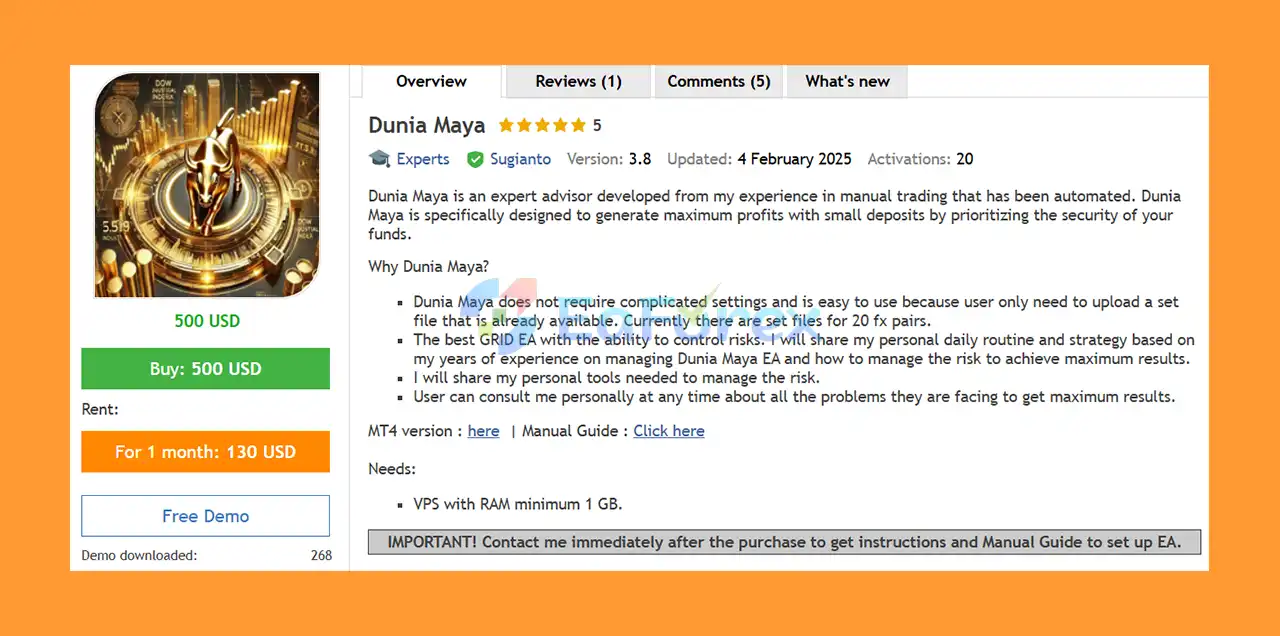
Dunia Maya EA MT5 is an automated Forex Expert Advisor for MetaTrader 5, developed from years of manual trading experience and transformed into a systematic algorithmic trading solution. The EA is designed with a primary focus on profit generation, account protection, drawdown management, and controlled recovery, making it suitable for traders who want to automate a grid-based strategy across multiple currency pairs.
Dunia Maya EA MT5 is particularly designed for traders starting with relatively small deposits while maintaining a strong focus on protecting trading capital. The system combines Grid Trading, controlled Martingale, virtual Stop Loss and Take Profit, trailing functionality, news filtering, money management, and account protection mechanisms.
One of its main advantages is its relatively simple setup process. Users can load the provided set files rather than manually configuring numerous parameters. Set files are available for multiple Forex pairs, allowing traders to deploy the EA across a diversified portfolio.
The EA requires a VPS with at least 1 GB RAM for stable 24/7 operation.
• Author: Sugianto
• Experience: Over 10 years of experience on MQL5.
• Notable Products: Dunia Maya EA MT5, Golden Shine EA MT5, Omni Gold MT5, Net Z EA MT5, DuniaMaya EA, NetZ, Bitcoin Wizard MT5, South East EA MT5, Gold Hype MT5, Neuron Net GOLD and other advisors.
• Flagship Product: Dunia Maya EA MT5 is rated as the best performing product of the year.
>> Delivery time 24h-48h after payment.
>>> Refund if not delivered.
>>> You will receive the latest version without any limitations (ID+Time).>>Reviewed by Jason Stap <<
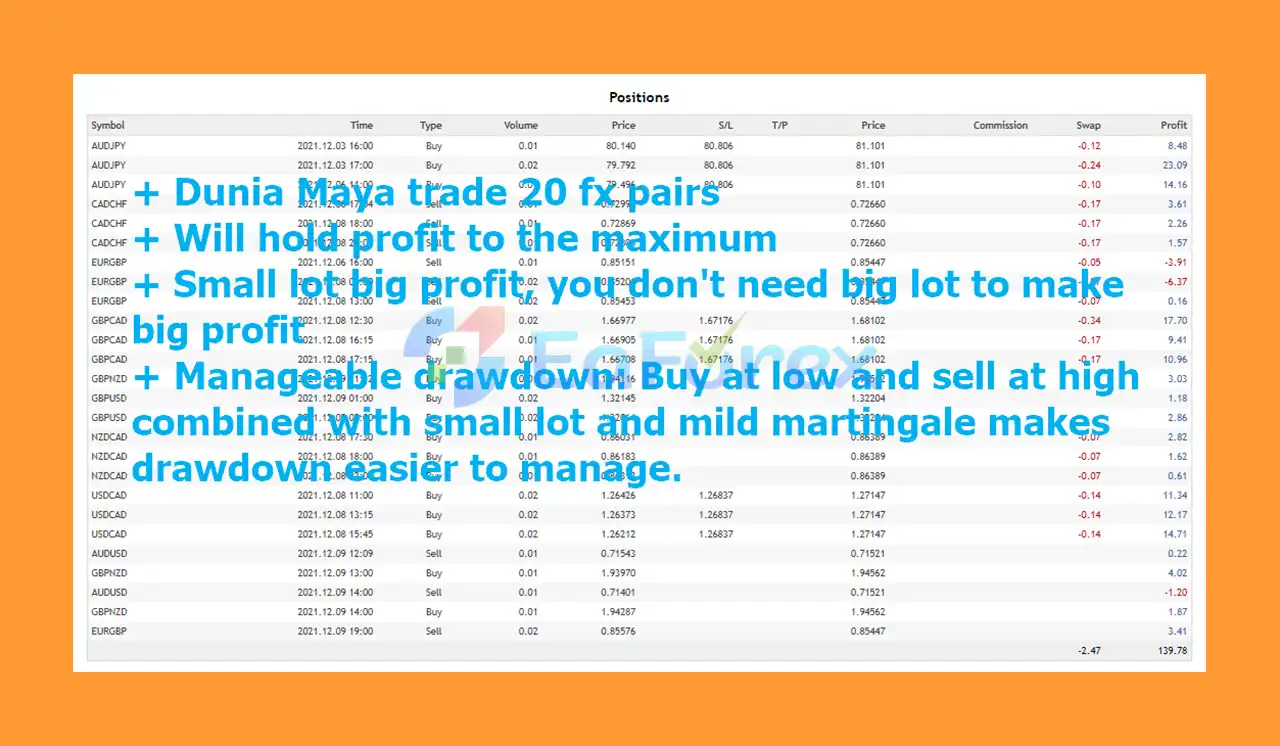
Dunia Maya EA MT5 uses a mild Martingale lot-sizing approach to accelerate trade recovery while attempting to keep risk under control. Unlike aggressive Martingale systems, the strategy incorporates several risk-management mechanisms designed to limit excessive exposure.
The EA uses grid averaging to manage unfavorable positions and potentially recover trades as price movements develop. Grid logic can add positions at predefined distances rather than relying on a single entry.
Virtual SL and TP levels are used to manage positions without necessarily placing traditional Stop Loss or Take Profit orders directly on the broker server. This approach is intended to reduce exposure to certain forms of stop-hunting behavior.
The trailing mechanism helps protect accumulated profits by dynamically managing profitable positions as the market moves in the desired direction.
The Close Partial function can close selected losing positions to reduce margin consumption and help control overall account exposure during difficult market conditions.
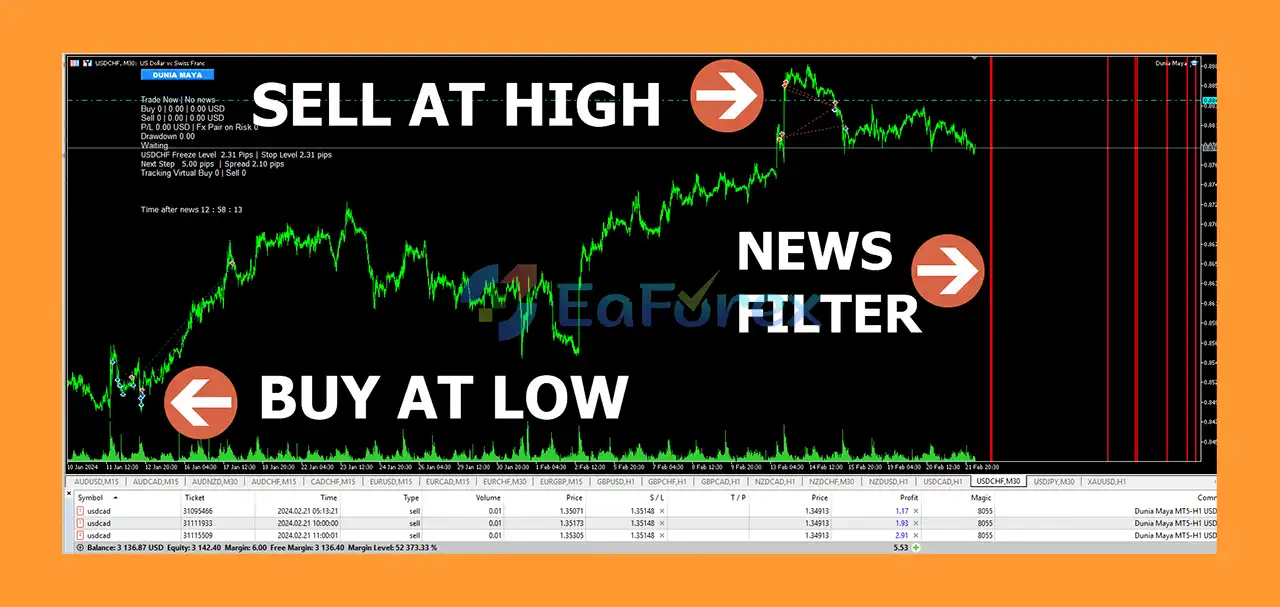
Dunia Maya includes a news filter designed to prevent the EA from opening new trades around high-impact economic events. This can help reduce unnecessary exposure during periods of extreme market volatility.
The EA supports different position-sizing approaches, including:
Virtual trade functionality is designed to assist with more precise entry management and strategy execution without necessarily opening an immediate broker-side position.
Dunia Maya EA MT5 can manage exposure across multiple currency pairs. This feature helps control the total number of symbols being traded simultaneously and can contribute to better portfolio-level risk management.
Holiday controls allow traders to restrict EA activity during selected dates or periods when market conditions may be less predictable.
Virtual Buy Stop, Sell Stop, Buy Limit, and Sell Limit functionality can be used to improve entry precision and provide additional flexibility in automated trading.
When the configured maximum drawdown level is reached, the EA can stop opening additional positions. This is an important protection feature because it helps prevent the system from continuously increasing exposure during adverse market conditions.
The Change Step function can increase the distance between subsequent grid positions. This helps prevent the EA from opening too many trades within a small price range.
Dunia Maya provides account-level protection through drawdown-based cut-loss controls. Traders can define limits based on:
When the configured protection threshold is reached, the system can activate its cut-loss mechanism.
The EA includes manual trading controls for:
These controls can be useful when manual intervention is required during particularly difficult market situations.
Dunia Maya EA MT5 combines several trading and risk-management components rather than relying on a single technical indicator.
The general process can be summarized as follows:
Market Analysis → Initial Entry → Grid Management → Recovery → Risk Control → Profit Protection
When the EA identifies a trading opportunity, it can initiate an automated position based on the selected configuration. If the market subsequently moves against the initial position, the grid and recovery mechanisms can be used to manage the trade sequence.
A controlled Martingale component may adjust position size to assist recovery, while the Change Step function can increase the distance between additional positions to reduce excessive trade clustering.
At the portfolio level, Smart Multi-Symbol Control monitors trading activity across supported symbols. Maximum drawdown controls can stop the EA from opening additional positions when the predefined risk threshold is reached.
The system can also use:
This combination is designed to help the EA respond to both normal market movements and unfavorable trading conditions.
Dunia Maya EA MT5 may be attractive to traders who want a multi-currency Grid EA with built-in risk-management features rather than a simple automated entry system.
The EA is designed to minimize complicated manual configuration. Users can load the appropriate set file for the selected trading pair and timeframe.
Available configurations cover a broad selection of Forex symbols, including:
AUDUSD, AUDCHF, AUDNZD, AUDCAD, CADCHF, EURUSD, EURCAD, EURCHF, EURGBP, GBPUSD, GBPCAD, GBPCHF, NZDCAD, NZDCHF, NZDUSD, USDCHF, USDCAD, and XAUUSD.
The Smart Multi-Symbol Control feature allows the EA to manage multiple symbols rather than treating every chart independently.
The combination of maximum drawdown limits, account protection, partial closing, Change Step, news filtering, and trading-time controls gives traders several tools for managing exposure.
When installed on a properly configured VPS, the EA can continuously monitor the market without requiring the trader to keep a personal computer running.
Although the strategy is automated, manual trading buttons allow the trader to intervene when exceptional market conditions require additional action.
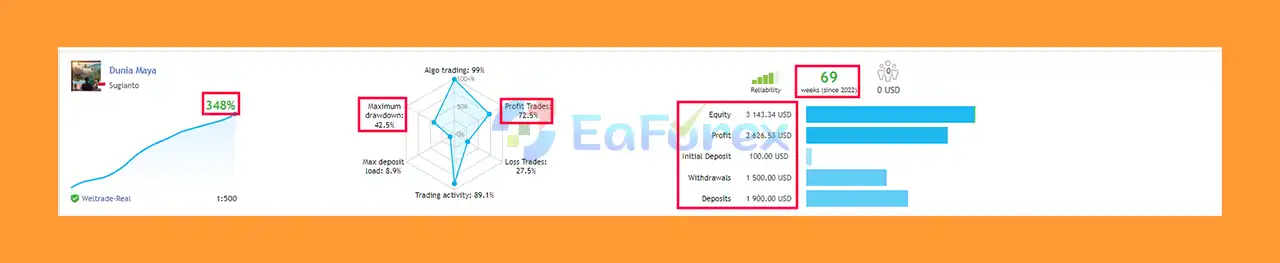
🔻Real account performance highlights:
➡️Emphasize consistent growth balanced with controlled risk for long-term trading
Dunia Maya EA MT5 Live Results
Dunia Maya EA MT5 Trading Results
Dunia Maya EA MT5 Review
Dunia Maya EA MT5 has been tested using historical data covering long periods, including 2010–2022, 2015–2022, and extended 2010–2023 / 2015–2023 testing periods for the provided set files.
The purpose of long-duration testing is to expose the strategy to different market environments and evaluate how the configurations behave across various historical conditions.
However, traders should understand an important limitation:
Backtest results should not be treated as a guarantee of live performance.
Several Dunia Maya features are specifically designed for live trading and do not operate in the same way during conventional backtesting. These include:
The supplied configuration indicates:
| Setting | Details |
|---|---|
| Trading Symbols | Multiple Forex pairs + XAUUSD |
| Timeframes | M15, M30, H1 |
| Backtest Periods | 2010–2023 / 2015–2023 |
| Minimum Deposit | $500 – High Risk |
| Recommended Deposit | $2,000 – Medium Risk |
| Account Type | Standard / Hedging |
| Recommended Leverage | Up to 1:500 |
| VPS | Minimum 1 GB RAM |
| Configuration | Set file required |
The $500 minimum deposit should be considered high risk, while the stated $2,000 recommended deposit is intended to provide a larger margin buffer.
Because Grid and Martingale strategies can experience significant floating drawdown, traders should use conservative risk settings and avoid assuming that historical recovery behavior will always repeat in live markets.
Despite its extensive risk-management features, Dunia Maya EA MT5 is not a risk-free trading system.
Grid and Martingale strategies can accumulate multiple positions when the market trends strongly against the initial trade. A prolonged directional movement can therefore produce substantial floating losses and margin requirements.
Even with maximum drawdown and account-protection functions, unfavorable market conditions can lead to significant drawdown before protective mechanisms are triggered.
Live execution involves factors that historical testing cannot perfectly reproduce, including:
Because automated trading is intended to operate continuously, a reliable VPS is strongly recommended. A minimum of 1 GB RAM is specified for the system.
The EA is designed to work with specific set files. Using inappropriate settings, excessive risk, or unsuitable leverage can significantly change the system’s behavior.
Past backtest performance does not guarantee future returns. Forex and gold trading involve substantial financial risk, and traders can lose part or all of their trading capital.
Installing Dunia Maya EA MT5 is relatively straightforward, but correct configuration is essential.
Download and install the MetaTrader 5 (MT5) trading platform from your broker or official MetaTrader provider.
Open MT5 and navigate to:
File → Open Data Folder → MQL5 → Experts
Copy the Dunia Maya EA file into the Experts folder.
Restart MetaTrader 5 or refresh the Expert Advisors section in the Navigator window.
Make sure Algo Trading / AutoTrading is enabled in MT5.
The EA may require additional permissions depending on its configuration.
Load the appropriate set file supplied for the selected currency pair and timeframe.
Do not randomly change important parameters unless you fully understand their impact on grid spacing, lot sizing, drawdown, and recovery behavior.
Dunia Maya supports multiple symbols, including major and cross currency pairs as well as XAUUSD.
Configure the EA according to the supplied manual and recommended portfolio structure.
Install the EA on a stable VPS with at least 1 GB RAM to maintain continuous operation.
Before deploying the EA with real funds, perform testing using your broker’s trading conditions and verify:
Do not begin with aggressive lot sizes simply because historical testing produced attractive returns. Start with a controlled risk level and monitor the EA’s behavior before increasing exposure.
Important: Obtain and follow the official Dunia Maya EA manual and setup instructions before using the EA on a live account.
Dunia Maya EA MT5 is a feature-rich automated trading system designed around Grid Trading, controlled Martingale recovery, multi-symbol management, and account protection. Its biggest strength is not simply its ability to open and manage trades, but the extensive collection of tools designed to manage unfavorable market conditions.
Features such as Maximum Drawdown Limitation, Change Step, Close Partial, Smart Multi-Symbol Control, News Filter, Virtual SL/TP, and Account Protection provide traders with multiple layers of risk management.
At the same time, users should remember that Grid and Martingale strategies inherently carry elevated risk during prolonged one-directional market movements. The EA should therefore be used with appropriate capital, conservative risk settings, reliable VPS hosting, and a clear understanding of its recovery mechanism.
For traders searching for a Dunia Maya EA MT5, Grid EA for MetaTrader 5, Forex recovery EA, multi-currency trading robot, or automated Martingale trading system, Dunia Maya offers a comprehensive set of tools for systematic trading and risk management.
Ultimately, successful use depends not only on the EA’s algorithm but also on proper set-file selection, capital allocation, leverage, drawdown limits, broker conditions, and disciplined risk management.
Trade responsibly, test thoroughly, and never risk more capital than you can afford to lose.
1. What is Dunia Maya EA MT5 and how does it work?
Dunia Maya EA MT5 is a grid-based Expert Advisor for MetaTrader 5 that uses a controlled grid strategy combined with mild Martingale lot sizing to maximize profits while managing risk. It trades multiple currency pairs simultaneously and focuses on capital preservation.
2. Is Dunia Maya EA MT5 suitable for beginners?
Yes, Dunia Maya EA MT5 is beginner-friendly with easy setup and pre-configured set files. It also includes robust risk management tools to help new traders protect their accounts while learning automated trading.
3. What risk management features does Dunia Maya EA MT5 include?
The EA features multi-layered account protection, including max drawdown limits, cut-loss mechanisms, partial trade closing, news and holiday filters, and virtual stop-loss/take-profit to reduce risk and prevent stop-loss hunting.
4. How much capital do I need to start using Dunia Maya EA MT5?
You can start trading with Dunia Maya EA MT5 with a small deposit, as low as $100, making it accessible for traders with limited capital while still aiming for strong growth.
5. Does Dunia Maya EA MT5 support multiple currency pairs?
Yes, it trades and manages multiple currency pairs simultaneously, allowing portfolio diversification and better balance of overall account growth.
6. Does Dunia Maya EA MT5 use high-risk strategies like Martingale or Grid trading?
It uses a controlled grid strategy combined with mild Martingale lot sizing, designed to accelerate recovery from losing trades while maintaining a safer risk profile than aggressive Martingale systems.
7. What kind of performance can I expect from Dunia Maya EA MT5?
Live results show consistent growth with over 348% profit since 2022 on a $100 initial deposit, with controlled drawdown around 42.5%, reflecting the balanced risk and reward approach of the EA.
8. What comes with the Dunia Maya EA MT5 package?
The download includes the EA Expert Advisor file, a detailed installation guide, setting files for multiple currency pairs, and support documents to help you get started quickly and trade confidently.
In stock
In stock
In stock
In stock
In stock
Out of stock
No account yet?
Create an Account












 Automatic EA
 EA Best Seller
 Expert Advisor MT4
 Expert Advisor MT5
 HFT EA


Reviews
Clear filtersThere are no reviews yet.