









-
 Unlimited Activations
-
 Instant delivery
-
 Easy to install








 Unlimited Activations
Instant delivery
Easy to install
Unlimited Activations
Instant delivery
Easy to install
 Free Update
 Free Install Support

Omni Gold MT5 is an advanced Expert Advisor (EA) designed specifically for XAUUSD (Gold) trading on MetaTrader 5. The system combines market trend analysis with strategically placed pending orders to seek precise trade entries while maintaining a disciplined approach to risk management.
Unlike aggressive trading systems that rely on martingale, grid trading, hedging, or lot multiplication after losses, Omni Gold focuses on a more controlled methodology. Each trade is protected by a Stop Loss, while the integrated MT5 economic news filter helps reduce exposure during major market events.
Omni Gold operates on the H1 timeframe and is designed to adapt to changing market conditions in real time. With its combination of trend analysis, pending-order execution, Stop Loss protection, and automated news filtering, the EA provides traders with a systematic solution for automated gold trading.
• Author: Sugianto.
• Experience: Over 9 years of experience on MQL5.
• Notable Products: Omni Gold MT5, Net Z EA MT5, DuniaMaya EA, NetZ EA MT4, Bitcoin Wizard MT5, South East EA MT5, Gold Hype MT5, Neuron Net GOLD MT5 and other advisors.
• Flagship Product: Omni Gold MT5 is rated as the best performing product of the year.
>> Delivery time 24h-48h after payment.
>>> Refund if not delivered.
>>> You will receive the latest version without any limitations (ID+Time).>>Reviewed by Jason Stap <<
Omni Gold MT5 does not rely on traditional high-risk recovery techniques such as:
This approach is designed to help control exposure and reduce the possibility of excessive drawdowns caused by continuously increasing trade volume.
The EA analyzes current market conditions and makes trading decisions dynamically. This allows Omni Gold to respond to changing XAUUSD price behavior rather than relying solely on static trading conditions.
Omni Gold uses pending orders to seek more controlled entry points. Instead of entering the market immediately, the system can wait for price conditions to reach predefined levels before activating a trade.
This methodology may help reduce unnecessary entries and improve execution discipline.
Every trade includes a Stop Loss, providing predefined protection against unfavorable market movements.
Stop Loss placement is an important part of Omni Gold’s risk-control methodology and can help limit the potential loss on individual positions.
Omni Gold includes a built-in economic news filter based on the MetaTrader 5 economic calendar.
The system can avoid trading around selected high-impact news events, helping reduce exposure to sudden volatility, unpredictable price spikes, and potentially unfavorable execution conditions.
No external news-filter URL or manual GMT configuration is required.
Omni Gold is configured for XAUUSD (Gold) and operates on the H1 timeframe, allowing the strategy to focus on the unique volatility and price behavior of the gold market.
The EA is designed for straightforward installation. Traders can load the supplied setfile and configure their MT5 trading environment according to the recommended specifications.
Omni Gold combines trend analysis, pending-order execution, Stop Loss protection, and news filtering into one automated trading system.
The general workflow is:
This systematic process is designed to remove emotional decision-making from the trading process and maintain consistent execution.
Choosing an automated trading system is not only about potential returns. Risk control, execution discipline, adaptability, and transparency are equally important.
Omni Gold MT5 may be suitable for traders who are looking for:
For traders who prefer a structured approach rather than manually monitoring Gold markets throughout the day, Omni Gold can provide a systematic framework for automated execution.
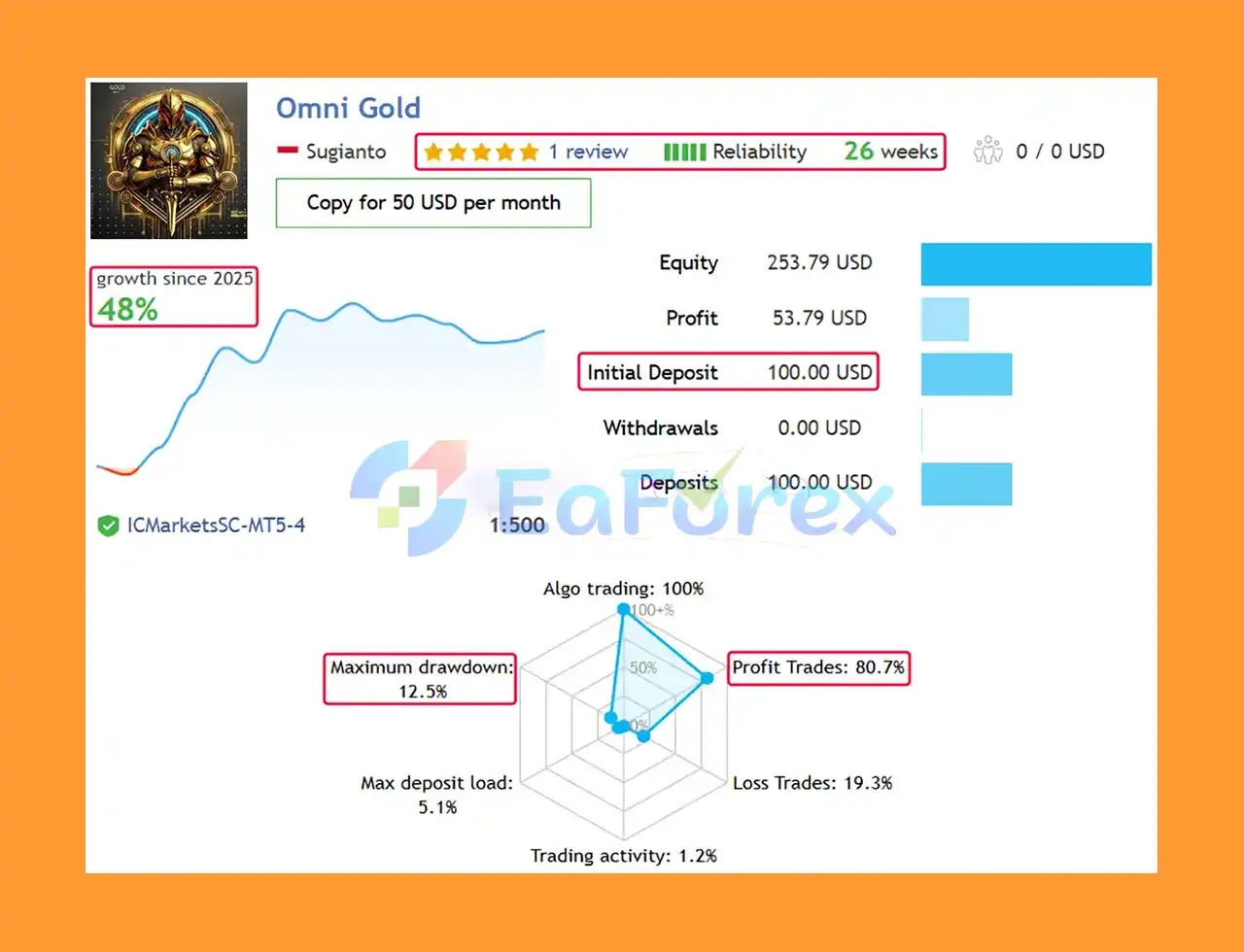
Omni Gold MT5 Live Results
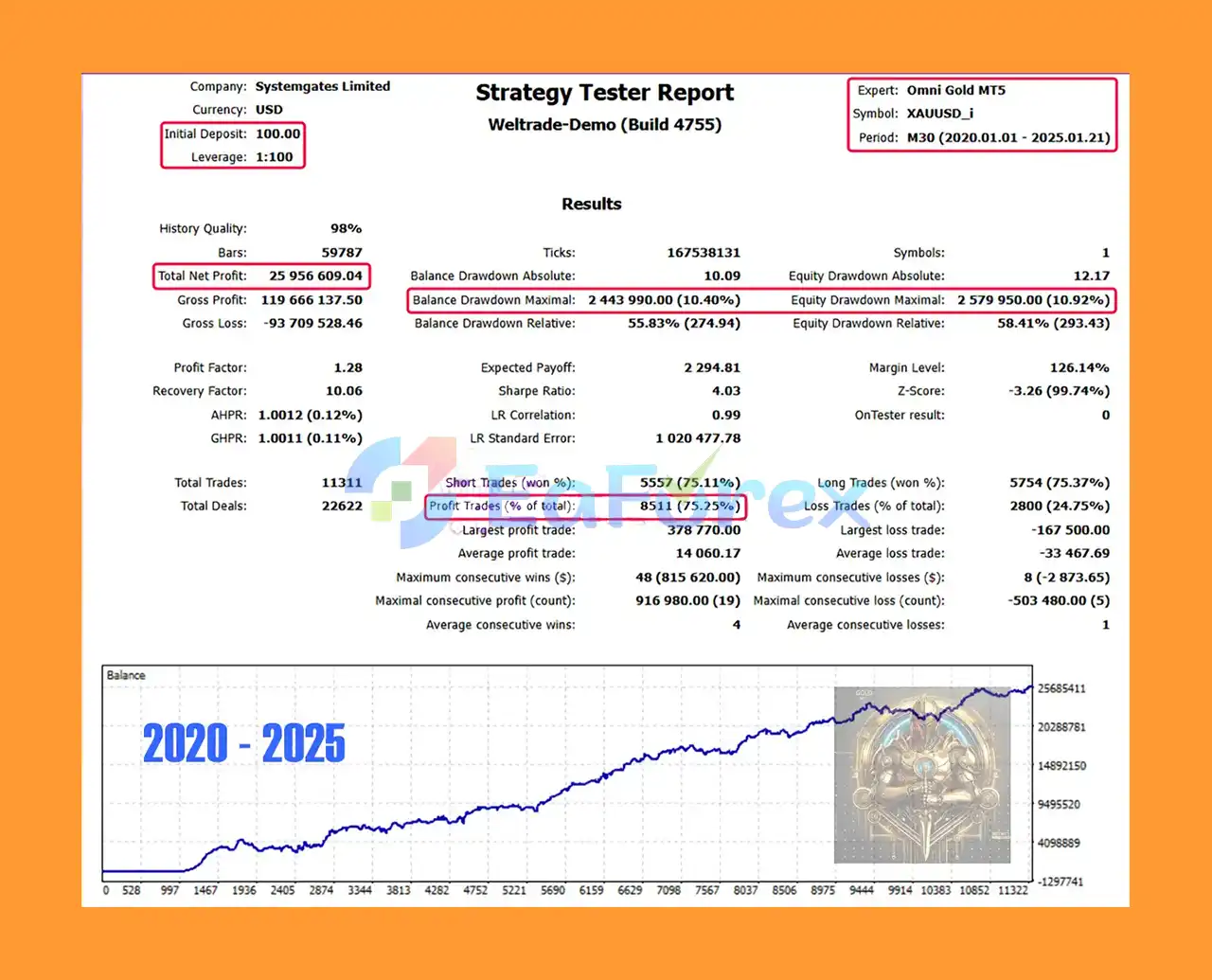
Omni Gold MT5 Backtest Trading Results
Omni Gold MT5 Backtest Results
Omni Gold MT5 is designed with risk management as a core component of its trading methodology.
The system avoids aggressive recovery techniques such as martingale and lot multipliers, which can cause exposure to increase rapidly during extended losing periods. Instead, the EA uses Stop Loss protection and controlled trade execution to help manage individual trade risk.
| Parameter | Recommended Setting |
|---|---|
| Trading Symbol | XAUUSD / GOLD |
| Timeframe | H1 |
| Minimum Deposit | $100+ |
| Account Type | Hedging |
| Recommended Leverage | 1:100 – 1:500 |
| Platform | MetaTrader 5 |
| VPS | Recommended |
For testing Omni Gold MT5, the recommended configuration includes:
For the most meaningful backtest results, traders should use high-quality historical data and realistic trading conditions, including spreads, commissions, execution delays, and other broker-specific costs.
A Virtual Private Server (VPS) is recommended when running Omni Gold continuously. A VPS can help maintain a stable internet connection and allow MetaTrader 5 to remain active even when the trader’s personal computer is turned off.
Risk management should always be customized according to account size, broker conditions, leverage, and individual risk tolerance.
Although Omni Gold MT5 is designed with several risk-control features, no Expert Advisor can eliminate trading risk.
Gold can experience significant volatility, especially during economic announcements, geopolitical events, interest-rate decisions, and unexpected market developments.
Even with a news filter, the EA cannot guarantee protection from every sudden market movement.
Past backtesting results or previous trading performance do not guarantee future results. Market conditions can change, and a strategy that performs well during one period may perform differently in another.
Execution quality can vary between brokers. Spreads, commissions, slippage, liquidity, leverage, minimum lot sizes, and execution speed can all affect actual trading results.
High leverage can amplify both profits and losses. Traders should avoid using excessive leverage simply because it is available through their broker.
Backtests are simulations and may not perfectly reproduce live-market conditions. Real trading can experience slippage, spread changes, execution delays, liquidity limitations, and other factors that are difficult to model precisely.
Although a starting balance of $100 or higher is specified, a small account can still be vulnerable to relatively large percentage drawdowns. Traders should determine position sizing and risk exposure carefully rather than assuming the minimum deposit is necessarily the optimal capital level.
Important: Trading financial markets involves substantial risk of loss. Only trade with capital you can afford to lose.
Installing Omni Gold MT5 is relatively straightforward.
Download and install the MetaTrader 5 trading platform from your broker or the official MetaTrader provider.
Inside MetaTrader 5, select:
File → Open Data Folder
Then navigate to the appropriate MQL5 → Experts directory.
Copy the Omni Gold MT5 EA files into the appropriate Experts folder.
After copying the files, restart MetaTrader 5 or refresh the Navigator window.
Open the XAUUSD / GOLD chart and select the H1 timeframe.
Make sure the symbol name matches your broker’s Gold symbol, as some brokers may use variations such as XAUUSD, GOLD, XAUUSDm, or other suffixes.
Find Omni Gold in the Navigator → Expert Advisors section and drag it onto the XAUUSD H1 chart.
Load the supplied setfile containing the recommended configuration parameters.
Review the settings carefully before enabling automated trading.
Make sure Algo Trading / AutoTrading is enabled in MetaTrader 5 and confirm that the EA is authorized to trade.
Before running the EA on a live account, verify:
For new users, testing the EA on a demo account first is strongly recommended.
🔻Experts:
🔻Presets:
Omni_Gold_XAUUSD_H1_Low_Risk.setOmni_Gold_MT5_XAUUSD_M30_SL50.setOmni Gold MT5 is a specialized automated trading solution for traders who want to trade XAUUSD Gold using a structured and risk-conscious methodology.
Its combination of trend analysis, pending orders, Stop Loss protection, real-time market adaptation, and an integrated MT5 news filter provides a disciplined framework for automated Gold trading.
One of the system’s notable characteristics is its avoidance of aggressive techniques such as martingale, grid trading, hedging-based recovery, and lot multiplication after losses. This does not eliminate risk, but it can make the overall methodology more focused on controlled exposure and capital preservation.
With an H1 trading framework, straightforward setfile installation, and VPS compatibility, Omni Gold MT5 can be considered by traders looking for a systematic alternative to manual XAUUSD trading.
However, traders should always evaluate the EA under realistic conditions and understand that forex and gold trading involve substantial financial risk. Backtested or historical performance should never be interpreted as a guarantee of future results.
Omni Gold MT5 is built for traders who value precision, automation, adaptability, and disciplined risk management when trading Gold on MetaTrader 5.
1. What is Omni Gold MT5 and how does it work?
Omni Gold MT5 is a fully automated trading system specifically developed for XAUUSD (Gold) on the MetaTrader 5 platform. It uses trend-following logic and strategically placed pending orders to ensure precise entry points, while avoiding high-risk strategies like Martingale, grid, or hedging.
2. Is Omni Gold MT5 safe for small trading accounts?
Yes, Omni Gold MT5 is designed with a strict risk-averse strategy, making it ideal for small accounts starting from just $100. It includes full stop-loss protection and conservative settings to limit drawdowns and protect capital.
3. What trading strategy does Omni Gold MT5 use?
The EA uses a pending order-based trend-following strategy, only entering trades when specific market conditions are met. This approach improves execution accuracy, reduces slippage, and avoids emotional or over-frequent trading.
4. Does Omni Gold MT5 use Martingale or Grid trading?
No, Omni Gold MT5 strictly avoids Martingale, Grid, and Hedging strategies. It’s built for long-term profitability and account safety, relying on disciplined trade setups and risk control.
5. What are the performance results of Omni Gold MT5?
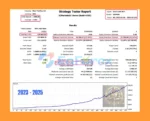
Live trading data shows +48% growth in 6 months with an 80.7% win rate and 12.5% max drawdown. Backtests confirm consistent profitability, with one 5-year test showing over $25 million in profit from a $100 deposit and 10.4% max drawdown.
6. Is Omni Gold MT5 beginner-friendly?
Yes, the EA is very easy to set up. It includes preset .set files, an installation guide, and requires no optimization. This makes it suitable for both beginners and experienced traders looking for a plug-and-play gold trading solution.
7. Can Omni Gold MT5 be used with any broker?
Omni Gold MT5 is compatible with most major brokers, including Exness, HTFX, and others. It supports flexible leverage options ranging from 1:100 to 1:500 and adapts to different account types and conditions.
8. What’s included with the Omni Gold MT5 purchase?
The download package includes:
The EA (Expert Advisor) file
A detailed installation guide
Multiple preset strategy files (e.g., Low Risk, SL50)
This allows for fast and accurate deployment right out of the box.
In stock
In stock
In stock
In stock
In stock
Out of stock
No account yet?
Create an Account












 Automatic EA
 EA Best Seller
 Expert Advisor MT4
 Expert Advisor MT5
 HFT EA


Reviews
Clear filtersThere are no reviews yet.