


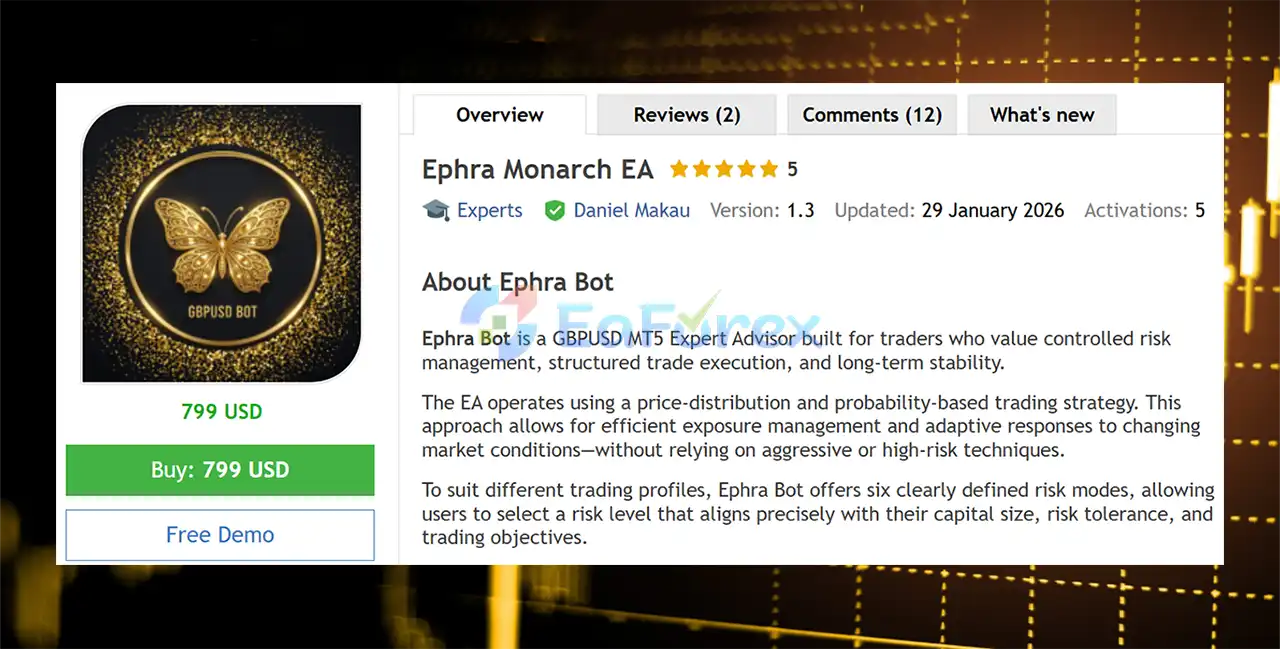
Product Overview
Ephra Monarch EA MT5 is an automated GBPUSD Expert Advisor for MetaTrader 5, designed for traders who prioritize structured trade execution, controlled risk management, and a systematic approach to long-term automated trading.
The EA uses a price-distribution and probability-based trading strategy to evaluate GBPUSD market conditions and manage market exposure according to its internal trading logic.
Rather than relying on aggressive position accumulation, Ephra Bot focuses on structured exposure management and provides six predefined risk modes, allowing traders to select a configuration based on their account size, preferred risk level, and trading objectives.
The EA also features a smart recovery mechanism designed to manage unfavorable positions and attempt to reduce drawdown before predefined stop-loss conditions are reached.
For the intended trading environment, Ephra Bot is recommended for GBPUSD on H1, using a hedging-enabled account and preferably a Raw ECN account with tight spreads and fast execution.
About the Developer
- Author: Daniel Makau
- Experience: Over +5 years of experience on MQL5.
- Notable Products: Ephra Monarch EA MT5, Ephra Monarch EA MT4 and other advisors.
- Flagship Product: Ephra Monarch EA MT5 is rated as the best performing product of the year.
>> Delivery time 24h-48h after payment.
>>> Refund if not delivered.
>>> You will receive the latest version without any limitations (ID+Time).>>Reviewed by Jason Stap <<
Main Features of Ephra Monarch EA MT5
Ephra Monarch EA MT5 Performance Review
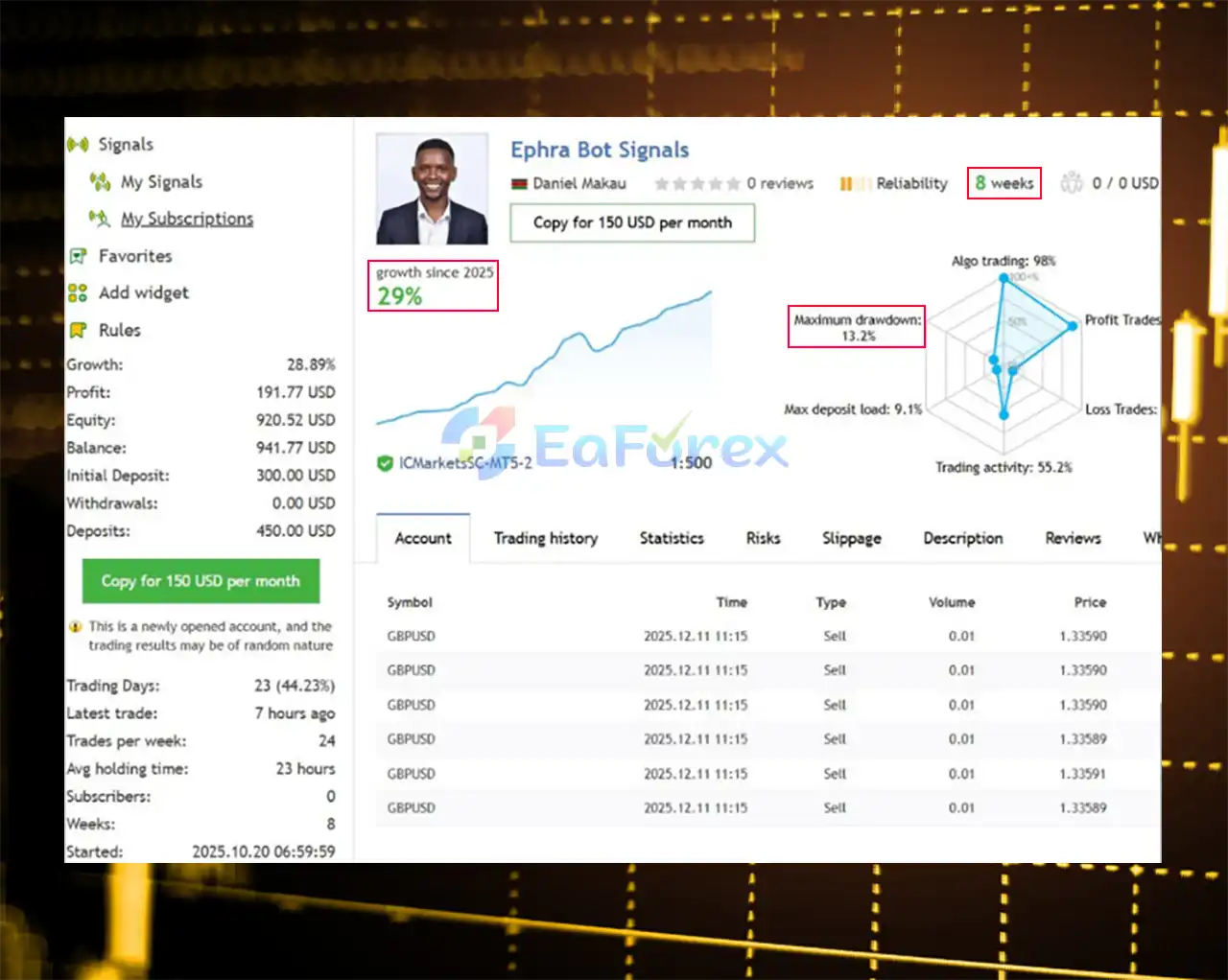
🟢Signal Results
🔺GBP/USD pair – 8 consecutive weeks of trading
- Initial Deposit: $300
- Growth Rate: +28.89%
- Win Rate (% of total): 89.79%
- Maximum Drawdown: 13.2%
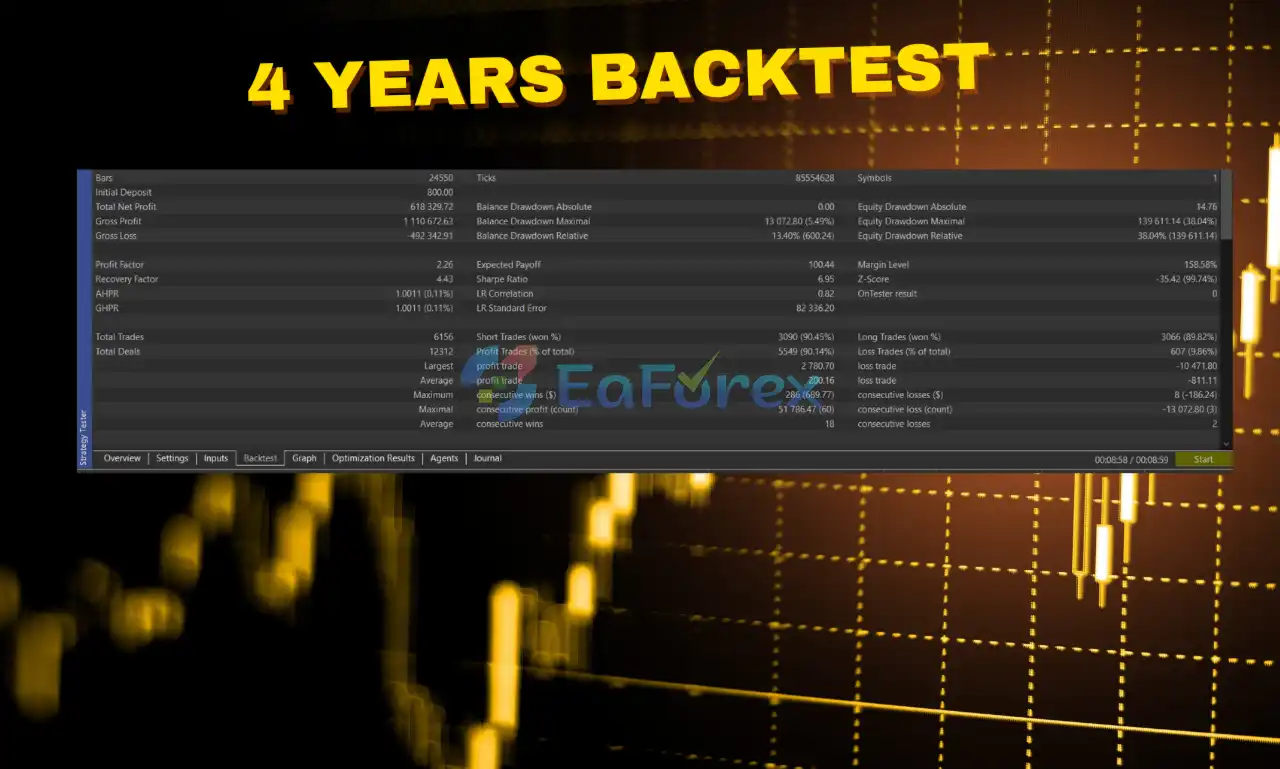
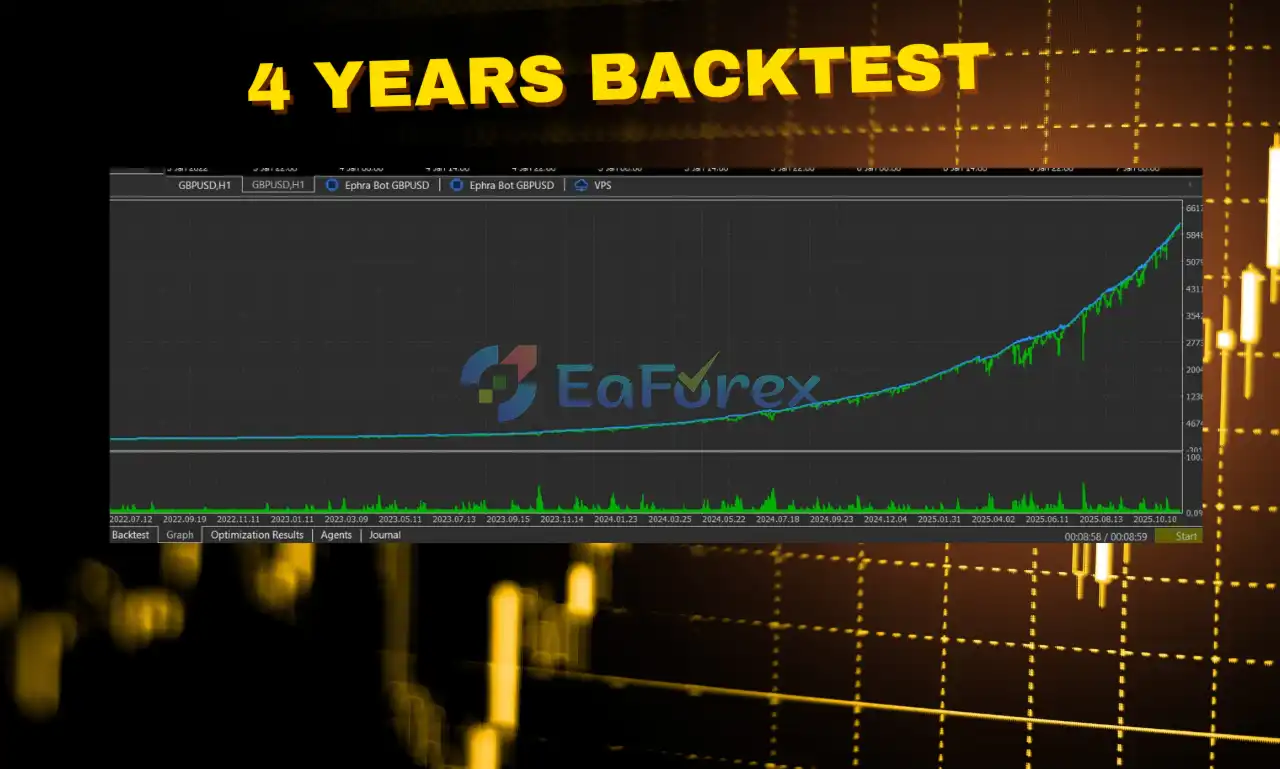
🟢Backtest Results
🔺GBPUSD pair – through years of testing
- Initial Deposit: $800
- Total Net Profit: $618,329.72
- Win Rate (% of total): 90.14%
- Maximum Drawdown: 5.49%
Performance and Risk Management
Ephra Monarch EA MT5 is designed around controlled exposure and multiple configurable risk profiles.
However, actual performance depends heavily on the selected risk mode, broker conditions, execution quality, historical data, and market environment.
Six Risk Modes
The six risk modes provide different levels of trading exposure.
Users should select a mode based on:
- Available capital
- Acceptable drawdown
- Trading objectives
- Broker conditions
- Personal risk tolerance
A higher-risk mode should not automatically be interpreted as a better-performing configuration. It simply represents a different level of potential exposure.
Smart Recovery Risk
The recovery mechanism is designed to manage losing positions and attempt to reduce drawdown.
However, recovery mechanisms can behave differently during prolonged directional movements or unusual market conditions.
Traders should therefore test the recovery behavior over sufficiently long historical and demo periods.
Recommended Trading Conditions
| Parameter | Recommended Setup |
|---|---|
| Platform | MetaTrader 5 |
| Symbol | GBPUSD |
| Timeframe | H1 |
| Minimum Balance | $1,000 |
| Account Type | Hedging Required |
| Broker | IC Markets Recommended |
| Account Type | Raw ECN Recommended |
| Execution | Fast / Low Latency |
| VPS | Recommended for continuous operation |
Broker Timezone Configuration
Broker timezone configuration is particularly important for Ephra Bot.
If using a broker other than IC Markets, users should select the correct broker timezone in the EA settings.
An incorrect timezone configuration can prevent the EA from operating according to its intended schedule.
If the broker's timezone is not available in the EA settings or the correct setting is uncertain, users should contact the developer before running the EA.
Backtest Data Quality
Backtest results depend heavily on the quality and accuracy of the historical market data used.
For more meaningful testing:
- Use high-quality historical data
- Select the correct broker conditions
- Match the intended account type
- Review spread and commission assumptions
- Check the Strategy Tester report
- Review the reported modelling quality
Historical backtest results should be treated as research data rather than a guarantee of future live performance.
Weaknesses and Risk Warnings
GBPUSD Market Risk
GBPUSD can experience significant volatility around economic announcements, central-bank decisions, employment data, inflation reports, and unexpected geopolitical developments.
Rapid movements can affect both entry and exit execution.
Recovery Risk
The smart recovery mechanism can increase or redistribute market exposure while attempting to manage unfavorable positions.
A recovery system cannot guarantee that a losing position will eventually become profitable.
Extended one-directional market movements may place additional pressure on the recovery logic.
Risk Modes Require Careful Selection
Ephra Monarch EA MT5 offers six risk modes, but choosing a higher-risk configuration can result in greater exposure and potentially larger drawdowns.
Users should not select a risk mode solely because of historical profitability.
Hedging Account Requirement
The EA requires a hedging account. It may not operate correctly on a netting account.
Always verify the account type before purchasing or deploying the EA.
Broker Timezone Risk
Incorrect broker timezone settings can interfere with the EA's operation.
This is particularly important when using a broker other than the recommended IC Markets environment.
Execution Conditions Matter
Spread, commission, latency, slippage, and liquidity can materially affect automated trading results.
A Raw ECN account with fast execution is recommended, but it cannot eliminate execution risk.
Backtest Limitations
Backtest quality depends on the historical data and testing configuration.
Different brokers can provide different historical prices, spreads, commissions, and trading conditions, meaning that two backtests of the same EA can produce different results.
No Guaranteed Returns
No Expert Advisor can guarantee profits or eliminate the possibility of substantial losses.
Past performance and backtest results do not guarantee future results.
Always test Ephra Monarch EA MT5 on a demo account before using real capital.
Pros and Cons
Pros
- Designed specifically for GBPUSD
- Recommended H1 timeframe
- Price-distribution and probability-based strategy
- Six predefined risk modes
- Smart recovery mechanism
- Structured exposure management
- Automated trade execution
- Designed for long-term automated operation
- Raw ECN account recommended
- Fast execution environment recommended
- Hedging account support
- Developer support and update notifications
- Suitable for VPS-based operation
Cons
- Limited to GBPUSD according to the recommended configuration
- Requires a hedging MT5 account
- Incorrect broker timezone settings can affect operation
- Smart recovery can increase market exposure
- Higher-risk modes can produce larger drawdowns
- Results can vary significantly between brokers
- Spread and execution quality affect live performance
- High-impact market events can produce rapid losses or slippage
- Backtest quality depends on historical data
- Past performance cannot guarantee future results
- Minimum $1,000 balance does not eliminate trading risk
How to Install Ephra Monarch EA MT5
Step 1 – Purchase the Official EA
According to the supplied developer information, Ephra Bot is distributed exclusively through the official MQL5 Marketplace.
Users should purchase the EA through the official marketplace to ensure access to the legitimate product, updates, and developer support.
Step 2 – Download the EA
After purchasing the Expert Advisor, download the available Ephra Bot MT5 files through the supported MQL5 distribution system.
Step 3 – Open MetaTrader 5
Launch MetaTrader 5 using a hedging-enabled account.
Confirm with your broker that the account supports hedging before proceeding.
Step 4 – Install the EA
If an .ex5 file is provided, open:
File → Open Data Folder → MQL5 → Experts
Copy the EA file into the Experts directory.
Step 5 – Restart or Refresh MT5
Refresh the Navigator panel or restart MetaTrader 5.
The EA should appear under:
Navigator → Expert Advisors
Step 6 – Open GBPUSD
Open a GBPUSD chart and select the recommended H1 timeframe.
Step 7 – Attach Ephra Bot
Drag Ephra Monarch EA MT5 onto the GBPUSD chart.
Step 8 – Configure the Broker Timezone
If you are using a broker other than the recommended IC Markets environment, carefully select the correct broker timezone in the EA settings.
An incorrect timezone configuration may prevent the EA from operating correctly.
If your broker's timezone is not listed or you are unsure which option to select, contact the developer before running the EA.
Step 9 – Select a Risk Mode
Choose one of the six available risk modes according to your account size and risk tolerance.
Avoid starting with an unnecessarily aggressive configuration.
Step 10 – Enable Algo Trading
Make sure Algo Trading is enabled in MetaTrader 5.
Step 11 – Demo Test
Run Ephra Bot on a demo account first and evaluate:
- Entry behavior
- Recovery behavior
- Drawdown
- Spread requirements
- Broker timezone
- Execution quality
- Trading frequency
- Risk-mode behavior
A VPS with a stable connection to the broker can also be used for continuous automated operation.
Real User Reviews and Feedback
🔺Ephra Monarch EA MT5 is highly appreciated by the MQL5 community for bringing stable and reliable profits. Below are 5 star reviews from users:
- John James Holmes (2025.11.10): “Great EA, ran it on demo for a few weeks before going live with it, great results on both.”
What’s Included in the Download Package?
- Setting (If Any).docx
- Installation Guide.docx
Final Thoughts
Ephra Monarch EA MT5 is a specialized GBPUSD H1 Expert Advisor built around price-distribution and probability-based trading, with six configurable risk modes and an integrated smart recovery mechanism.
Its architecture focuses on structured exposure management rather than aggressive trading techniques, while the recovery system is designed to manage unfavorable positions and attempt to reduce drawdown during adverse market movement.
The recommended environment is a hedging-enabled Raw ECN account, with IC Markets recommended, tight spreads, and fast execution. Correct broker timezone configuration is also essential, particularly when using a broker other than the recommended environment.
Ephra Bot may be suitable for traders looking for a systematic automated GBPUSD strategy with customizable risk settings, but the recovery mechanism and risk modes should be evaluated carefully because market exposure and drawdown can vary considerably under different configurations.
The developer states that Ephra Monarch EA MT5 is distributed exclusively through the MQL5 Marketplace and provides ongoing support, updates, and operational guidance after purchase. Traders should use the official distribution channel and conduct their own backtests and demo testing before deploying the EA with real capital.



