


What is Forex99 EA MT4?
Forex99 EA is a powerful automated trading software developed for the MetaTrader 4 (MT4) platform, one of the most widely used platforms in the forex trading world. This Expert Advisor (EA) is programmed to execute trades based on predefined strategies, eliminating the need for manual intervention. Designed for traders seeking reliable and hands-free trading solutions, Forex99 EA helps streamline trading operations, reduce emotional decision-making, and maximize efficiency in both volatile and stable market conditions.
Key Features of Forex99 EA MT4
🔻Trading Strategy:
- May include techniques like scalping, trend following, or Keltner Channel-based entries (based on included indicator)
🔻Risk Management Tools:
- Built-in stop-loss, take-profit, and customizable lot sizing
🔻Customizable Parameters:
- Adjustable to suit different risk tolerances and trading preferences
🔻Optimized for MT4 Platform:
- Easy to install and integrate with MetaTrader 4
🔻Supports Multiple Currency Pairs:
- GBPUSD, EURUSD, AUDUSD, USDJPY, and AUDJPY
🔻Timeframe Recommendation:
- Best used on M30 timeframe for optimal performance
Why Choose Forex99 EA MT4?
🔻100% Automated Trading:
- Run trades 24/5 with no need for manual execution
🔻Emotion-Free Strategy Execution:
- Trades are placed based on logic, not human emotions
🔻Backtesting Support:
- Evaluate historical performance before going live
🔻Consistent Performance:
- Delivers steady execution aligned with its programmed strategy
Forex99 EA MT4 Performance and Reviews
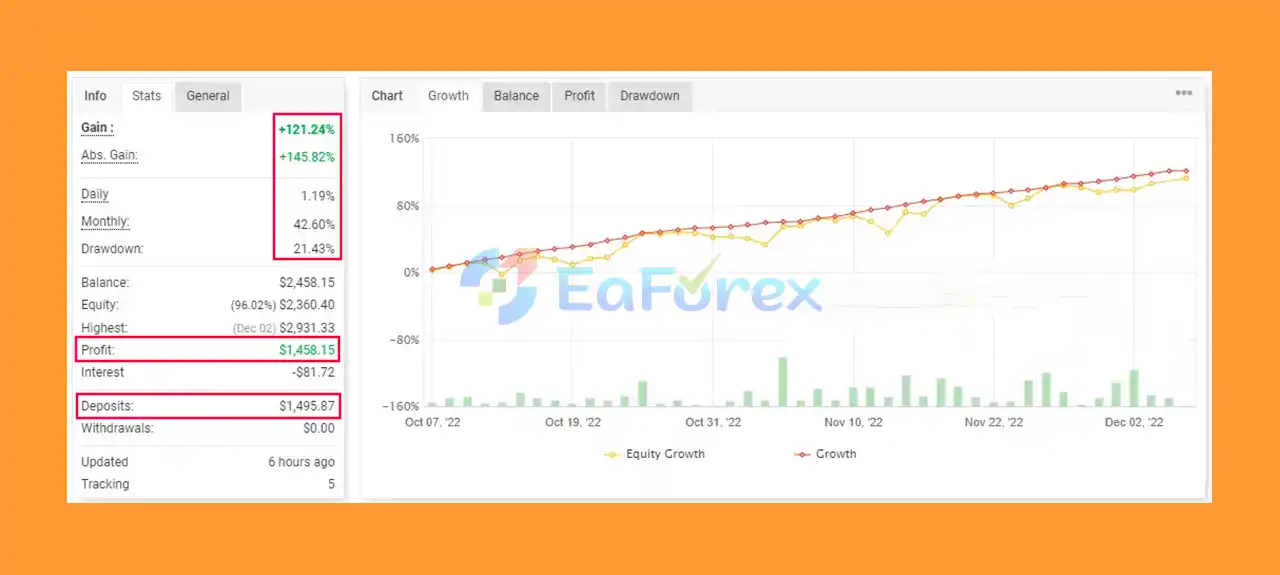
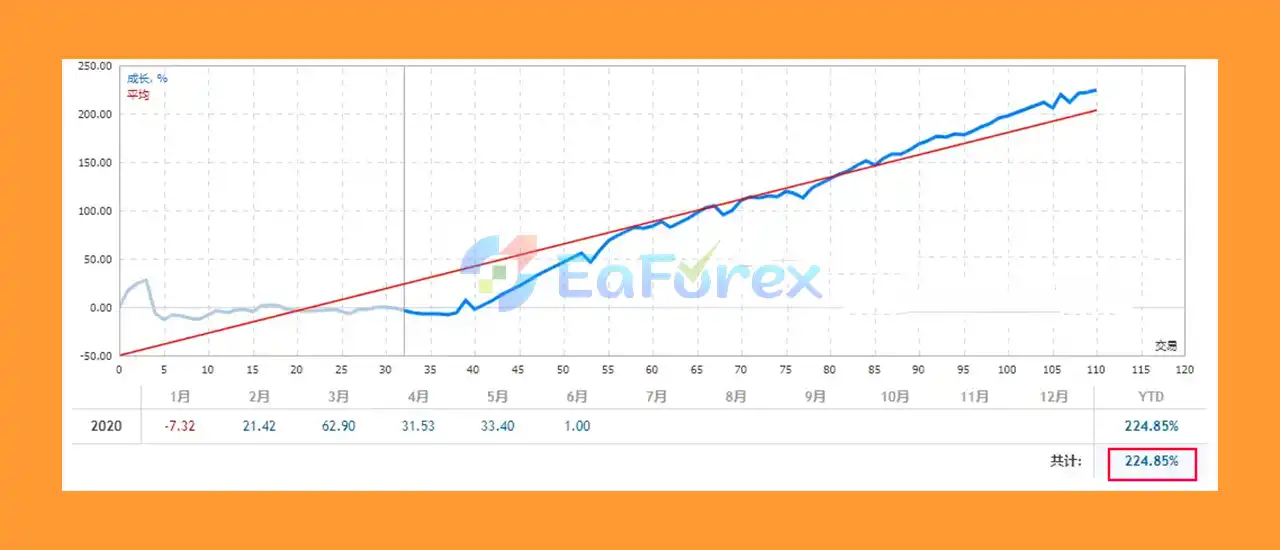
🔴 Verified Myfxbook Live Account Results:
- Highlighted features: profitability, ease of use, consistent trade logic, and stable performance on major pairs
- Total Gain: +121.24%
- Average Daily Growth: 1.19%
- Maximum Drawdown: 21.43%
What’s Included in the Download Package?
- Experts : Forex99 EA_fix_1420+.ex4
- Presets : Forex99 EA M30.set
- Indicators : Keltner_Channels.ex4
>>> Join VIP Membership Now <<<
How To Set Up EA
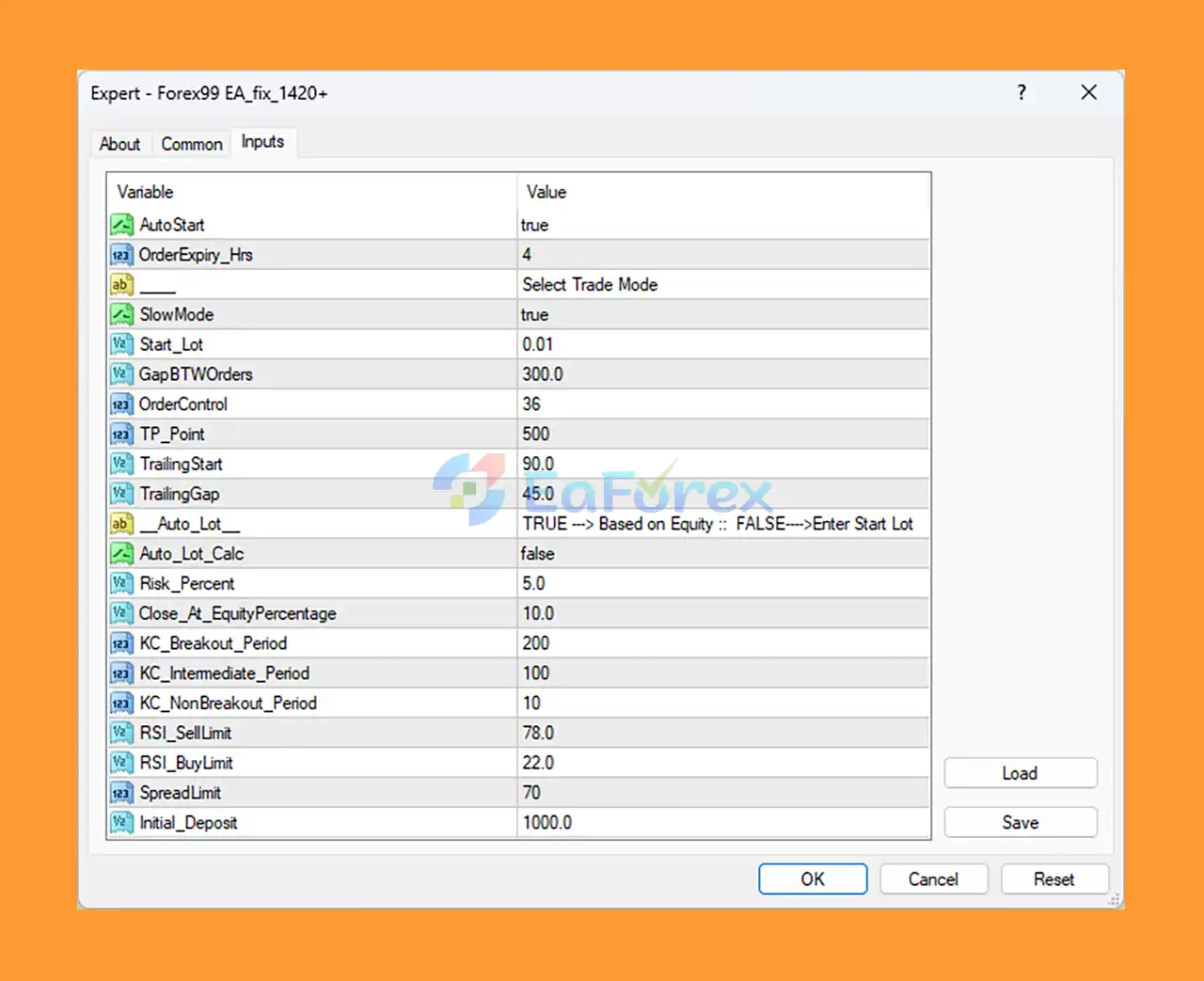
🔻The Forex99 EA is a fully automated Expert Advisor (EA) for MetaTrader 4 (MT4) designed to optimize trade entries using breakout and momentum-based strategies. It includes built-in risk management, RSI filters, and trailing functionality. Let’s break down the configuration to evaluate its trading behavior and potential performance.
🟢 Step 1: Install Forex99 EA on MT4
- Download Forex99 EA from your provider.
- Open MetaTrader 4 (MT4).
- Click File > Open Data Folder.
- Navigate to MQL4 > Experts, then paste the EA file here.
- Restart MT4 or refresh the Navigator panel.
🟢 Step 2: Attach EA to Chart
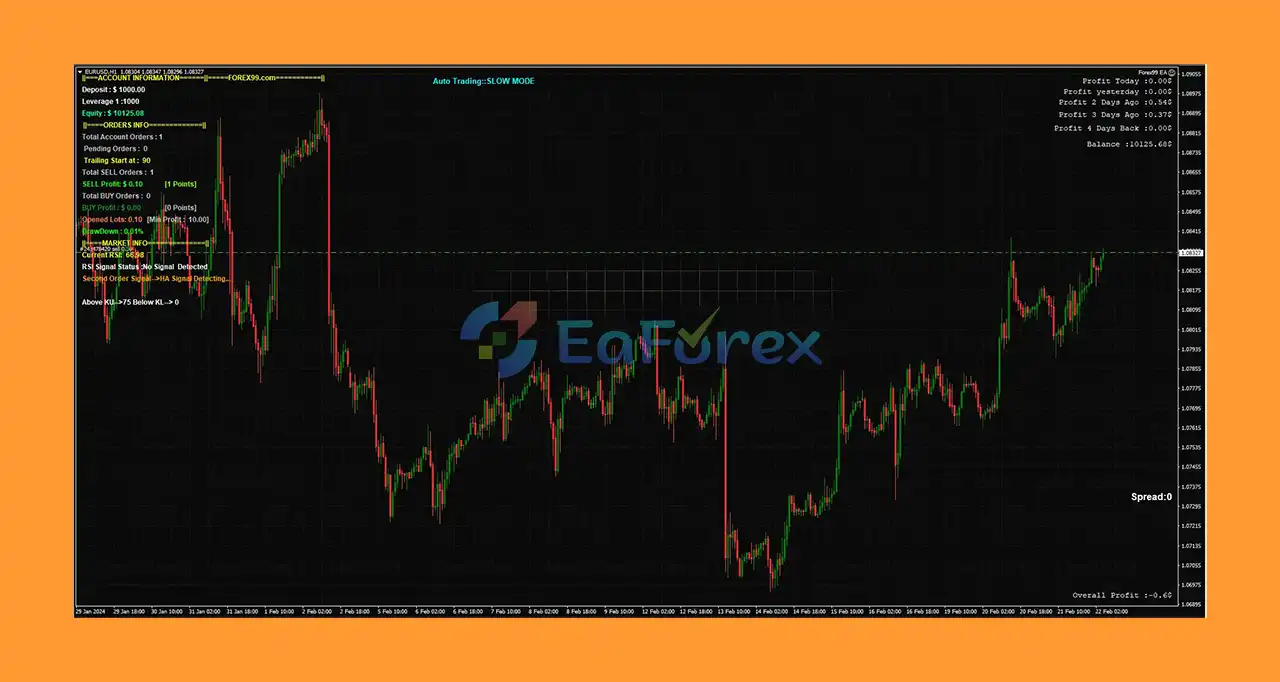
- Open a recommended pair chart (e.g., EURUSD or GBPUSD) on M15 or H1 timeframe.
- Drag Forex99 EA from the Navigator onto the chart.
- Enable:
-
- AutoTrading
- Allow DLL imports in the EA settings
🟢 Step 3: Recommended Settings Overview
♦️ Core Trading Configuration
- AutoStart:
true— EA launches automatically - OrderExpiry_Hrs:
4— Pending orders expire after 4 hours - SlowMode:
true— Adds conservative trade behavior - Start_Lot:
0.01— Minimum lot per trade - GapBTWOrders:
300points — Prevents overtrading - OrderControl:
36— Max open/pending orders
🔻Designed for conservative and low-drawdown trading setups.
♦️ Take Profit & Trailing Stop Logic
- TP_Point:
500(50 pips TP) - TrailingStart:
90(starts after 9 pips) - TrailingGap:
45(trails every 4.5 pips)
🔻Locks in profits while allowing trades to grow.
♦️ Risk Management Settings
- Auto_Lot:
false - Risk_Percent:
5.0 - Initial_Deposit:
1000
🔻Manual risk setting with fixed lot size — ideal for steady capital management.
♦️ Breakout and RSI Filtering
- KC_Breakout_Period:
200 - KC_Intermediate_Period:
100 - RSI_BuyLimit / SellLimit:
22 / 78
🔻Combines Keltner Channel breakouts and RSI filters to improve signal quality and avoid overbought/oversold traps.
Conclusion
In summary, Forex99 EA MT4 is a robust and fully automated Expert Advisor designed to enhance forex trading efficiency on the popular MetaTrader 4 platform. By utilizing advanced trading strategies such as scalping, trend following, and Keltner Channel-based entries, this EA delivers consistent and reliable trade execution across multiple major currency pairs including GBPUSD, EURUSD, AUDUSD, USDJPY, and AUDJPY. Its customizable parameters and built-in risk management tools like stop-loss and take-profit settings make it adaptable to various trader preferences and risk levels.
>>> Reviewed by Jason Stap <<<



