









-
 Unlimited Activations
-
 Instant delivery
-
 Easy to install






 Unlimited Activations
Instant delivery
Easy to install
Unlimited Activations
Instant delivery
Easy to install
 Free Update
 Free Install Support

FTMO Trading EA MT5 is an automated price action Expert Advisor for MetaTrader 5, designed for traders who want to automate their XAUUSD (Gold) trading with a structured approach to market analysis, trade execution, and risk management.
The EA uses algorithmic analysis of price movements to identify potential trading patterns and market opportunities without relying exclusively on traditional lagging indicators. It is designed to process market information in real time and execute trades automatically according to predefined conditions.
With customizable risk-management parameters, automated entry and exit functionality, capital-protection tools, and ready-made set files, FTMO Trading EA MT5 provides a flexible framework for both personal trading accounts and accounts subject to prop firm trading rules.
The recommended configuration focuses on XAUUSD on the M30 timeframe, with an ECN or Raw account and competitive spreads. A VPS is also recommended for traders who want the EA to operate continuously.
Technical Overview:
>> Delivery time 24h-48h after payment.
>>> Refund if not delivered.
>>> You will receive the latest version without any limitations (ID+Time).>>Reviewed by Jason Stap <<
FTMO Trading EA MT5 is designed around price action analysis, using algorithmic logic to evaluate real-time price movements and identify potential market patterns.
Instead of depending solely on traditional indicators, the EA focuses on the behavior and structure of price to determine potential entry and exit opportunities.
The EA provides adjustable parameters that allow traders to configure the trading system according to their preferred risk and account conditions.
Depending on the available settings, traders can customize factors related to:
This flexibility allows the same EA to be evaluated under different account sizes and trading environments.
Once the programmed trading conditions are satisfied, FTMO Trading EA MT5 can automatically execute trades.
Automated execution helps reduce the need for manual order placement and allows the system to monitor the market continuously while MetaTrader 5 and the trading environment remain active.
The EA uses a structured entry and exit framework designed to identify potential trading opportunities and manage positions automatically.
This allows traders to maintain predefined trading rules rather than making discretionary decisions for every market movement.
Risk management is an important component of the EA.
Available controls include tools such as:
These features are intended to help traders control exposure rather than eliminate market risk.
FTMO Trading EA MT5 includes a ready-made set file, making the initial setup easier for users who prefer to start with predefined parameters.
The supplied settings should still be tested under the user’s own broker conditions before being used on a live account.
The EA includes features designed to help manage account exposure and protect trading capital during unfavorable market conditions.
However, capital-protection mechanisms cannot guarantee that an account will avoid losses, especially during extreme volatility, gaps, spread expansion, or execution problems.
FTMO Trading EA MT5 is designed to be used on both:
However, prop firm compatibility is not universal. Each proprietary trading firm has its own rules regarding Expert Advisors, automated trading, news trading, drawdown, lot sizes, holding periods, and other trading activities.
Users should verify the current rules of their specific prop firm before deploying the EA.
FTMO Trading EA MT5 follows a systematic automated trading process based primarily on price action.
The EA continuously monitors the XAUUSD (Gold) market on the recommended M30 timeframe.
It evaluates incoming price data to identify conditions that may match its programmed trading logic.
The system analyzes price behavior and potential market patterns in real time.
The objective is to identify conditions that may provide a valid entry according to the EA’s strategy.
When the required conditions are satisfied, the EA evaluates the setup before executing an order.
This process is designed to help the system follow predefined trading rules rather than entering the market randomly.
Once a valid setup is detected, the EA can automatically open a Buy or Sell position.
The trader does not need to manually place every order.
After entering a position, the EA applies the configured risk-management parameters.
Depending on the selected settings, this can include stop-loss, take-profit, position sizing, and capital-protection functions.
The EA continuously monitors open positions and manages them according to its programmed exit conditions.
This creates an automated workflow from market analysis → entry → risk management → exit.
The recommended market is XAUUSD, allowing the EA to focus on one of the most actively traded and volatile instruments in the financial markets.
The system is designed around price movement analysis rather than relying exclusively on conventional indicators.
The EA can monitor the market and execute trades automatically, reducing the need for constant manual chart monitoring.
Adjustable risk parameters provide traders with greater control over their desired exposure.
The included set file can simplify the initial configuration process.
The EA can be used on personal accounts and may also be evaluated for prop firm environments, subject to each firm’s specific trading rules.
A VPS is recommended for continuous operation, especially when traders want the Expert Advisor to remain active without keeping their personal computer running.
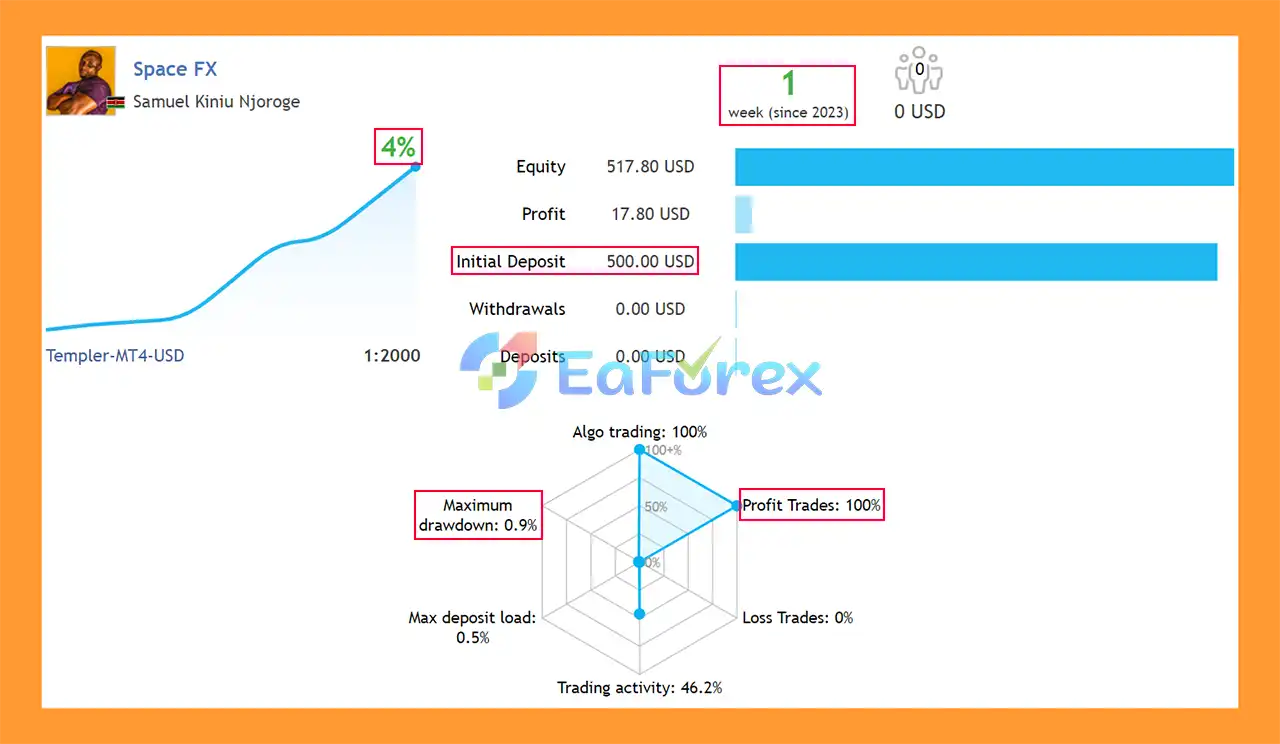
🔺XAUUSD (Gold) pai – 1 consecutive weeks of trading
FTMO Trading EA MT5 Signal Trading Results
FTMO Trading EA MT5 includes several tools designed to help traders manage risk and control account exposure.
The system provides configurable risk-management features such as stop-loss, take-profit, position sizing, and capital protection settings.
The product description also emphasizes small drawdown as a design objective. However, actual drawdown will depend on the trading parameters, broker conditions, market volatility, account size, and execution environment. Historical or backtested drawdown should not be interpreted as a guarantee of future drawdown.
The recommended setup is:
| Setting | Recommendation |
|---|---|
| Symbol | XAUUSD |
| Timeframe | M30 |
| Minimum Deposit | $100 |
| Account Type | ECN / Raw |
| Spread | As low as reasonably available |
| VPS | Recommended |
| Leverage | Any available leverage, subject to broker conditions |
XAUUSD can experience significant transaction costs when spreads widen.
For this reason, an ECN or Raw account with competitive spreads is recommended. Traders should also consider commissions, slippage, execution speed, and other broker-specific costs rather than looking at spread alone.
A VPS can help keep MetaTrader 5 and the EA running continuously.
This is particularly useful for automated trading because shutting down the computer, losing internet connectivity, or closing MetaTrader 5 can interrupt the EA’s operation.
XAUUSD can experience rapid price movements, especially during major economic announcements, changes in monetary-policy expectations, geopolitical developments, and periods of increased market volatility.
Large price movements can increase both profit opportunities and potential losses.
The EA is recommended for low-spread conditions because trading costs can have a meaningful impact on short- and medium-term trading performance.
During volatile market conditions, spreads may widen and slippage may occur.
Although the EA can be used for prop firm trading environments, traders should not assume that it is automatically permitted by every prop firm.
Rules can differ regarding:
Always check the current terms of the specific prop firm before using an automated EA.
The suggested $100 minimum deposit is a product recommendation and should not be interpreted as a guarantee that the EA can safely operate with that amount.
XAUUSD position sizing should always be evaluated in relation to account equity, leverage, contract specifications, stop-loss distance, and maximum acceptable risk.
FTMO Trading EA MT5 does not guarantee profits, a specific win rate, or a particular drawdown level.
Past performance and backtest results, if available, are not reliable indicators of future results.
Automated trading performance can be affected by:
Users should test the EA in their own trading environment before committing significant capital.
After purchasing FTMO Trading EA MT5, download the supplied EA files and any included set files.
Launch your MetaTrader 5 platform.
From the main menu, select:
File → Open Data Folder
Navigate to:
MQL5 → Experts
Copy the FTMO Trading EA MT5 file into this folder.
Restart MetaTrader 5 or refresh the Expert Advisors section in the Navigator window.
You should find the EA under:
Navigator → Expert Advisors
Open your broker’s XAUUSD (Gold) chart and select:
M30 – 30 Minute
Make sure you use the correct XAUUSD symbol provided by your broker, as some brokers may use suffixes such as XAUUSDm or other variations.
Drag FTMO Trading EA MT5 onto the XAUUSD M30 chart.
Check the EA settings and configure the risk-management parameters according to your account.
If a recommended .set file is supplied with the EA, load it through the EA’s input settings.
Review all parameters before activating automated trading.
Make sure Algo Trading is enabled in MetaTrader 5.
The EA can then begin monitoring the market and executing trades according to its programmed conditions.
Before using the EA with real funds, test it on a demo account.
Evaluate its behavior under your broker’s actual:
For continuous operation, a reliable VPS is recommended.
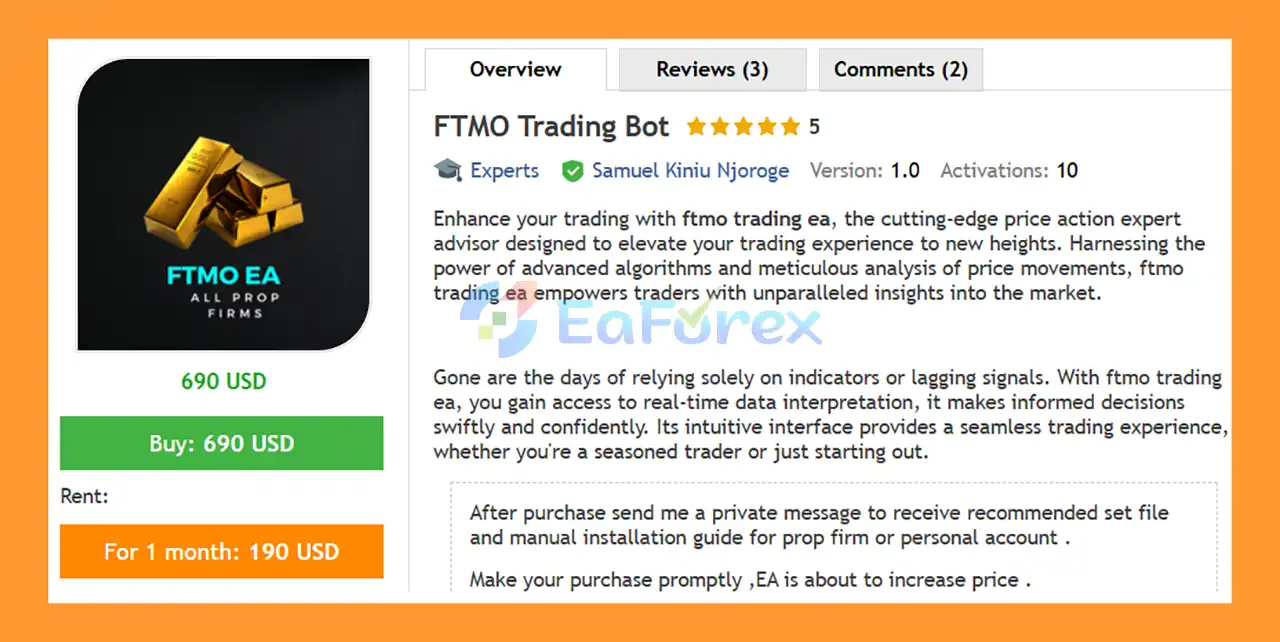
🔺FTMO Trading EA MT5 is highly appreciated by the MQL5 community for bringing stable and reliable profits. Below are 5 star reviews from users:
In summary, FTMO Trading EA MT5 is an automated XAUUSD price action Expert Advisor designed for traders who want to automate Gold trading while maintaining configurable risk-management controls. Its recommended setup focuses on the M30 timeframe, ECN or Raw accounts, competitive spreads, and continuous operation through a VPS.
The EA combines automated market analysis, entry and exit logic, stop-loss and take-profit functionality, capital-protection tools, and a ready-made set file to simplify the initial setup process.
For traders considering its use with a prop firm, it is important to verify the current rules of the specific provider before deployment. Compatibility with one firm’s rules does not necessarily mean compatibility with another firm’s conditions.
As with any automated trading system, users should test FTMO Trading EA MT5 on a demo account first, evaluate the strategy under their own broker conditions, and use appropriate position sizing. Forex and Gold trading involve substantial financial risk, and no EA can guarantee future profits or eliminate the possibility of loss.
1. What is FTMO Trading EA MT5?
FTMO Trading EA MT5 is a fully automated price action Expert Advisor developed for the MetaTrader 5. It analyzes real-time market structure, trend behavior, and price patterns to execute high-probability trades with predefined risk parameters.
2. What trading strategy does FTMO Trading EA MT5 use?
The EA uses advanced price action analysis and algorithmic pattern detection. Instead of relying only on lagging indicators, it evaluates live price movement, identifies structural setups, and executes trades based on predefined rules and confirmation logic.
3. Is FTMO Trading EA MT5 suitable for prop firm accounts?
Yes. The EA is designed with a prop firm–ready structure, including disciplined risk control, capital protection logic, and configurable exposure limits. Its structured execution model aligns with common evaluation and funded account requirements.
4. What symbol and timeframe are recommended?
FTMO Trading EA MT5 is optimized for:
Symbol: XAUUSD (Gold)
Timeframe: M30 (30-minute chart)
It can be tested on other pairs, but Gold on M30 is the recommended configuration.
5. Does FTMO Trading EA MT5 use martingale or grid strategies?
No. The system avoids martingale, grid, and aggressive recovery techniques. Every trade includes predefined Stop Loss and Take Profit levels to maintain controlled exposure.
6. How does risk management work?
The EA includes:
Adjustable lot sizing
Customizable risk settings
Integrated SL and TP per trade
Capital protection logic
Low drawdown–focused structure
These tools allow traders to configure the EA according to their personal risk tolerance and account size.
7. What are the reported signal results?
Signal Results (XAUUSD – 1 week):
Initial Deposit: $500
Growth Rate: +4%
Win Rate: 100%
Maximum Drawdown: 0.9%
Past performance does not guarantee future results, and live trading outcomes may vary.
8. Is FTMO Trading EA MT5 beginner-friendly?
Yes. The EA includes ready-made set files and requires minimal configuration. Users simply attach it to the recommended chart, adjust risk settings, and enable Algo Trading. It is suitable for both beginners and experienced traders.
9. What broker conditions are recommended?
For optimal performance, the EA is recommended for:
ECN or RAW spread accounts
Stable low-spread environments
VPS hosting for uninterrupted 24/7 execution
These conditions help ensure consistent and precise order execution.
10. Who should use FTMO Trading EA MT5?
FTMO Trading EA MT5 is ideal for traders who:
Focus on disciplined price action strategies
Trade Gold (XAUUSD) on MT5
Require prop firm–compatible risk control
Prefer structured automation over emotional trading
Seek steady and controlled account growth
If you are looking for a professional MT5 Expert Advisor that combines price action logic with strict capital protection and configurable risk management, FTMO Trading EA MT5 offers a structured and stability-oriented automated trading solution.
In stock
In stock
In stock
In stock
In stock
Out of stock
No account yet?
Create an Account












 Automatic EA
 EA Best Seller
 Expert Advisor MT4
 Expert Advisor MT5
 HFT EA


Reviews
Clear filtersThere are no reviews yet.