Product Overview
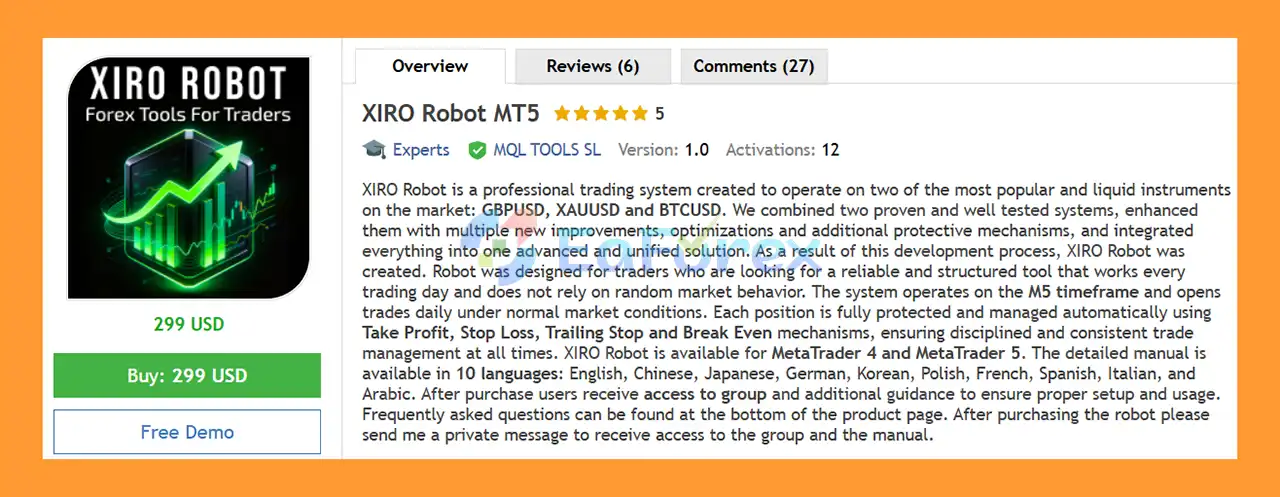
XIRO Robot MT5 is a fully automated Expert Advisor for MetaTrader 5, designed to trade three highly active instruments: GBPUSD, XAUUSD (Gold), and BTCUSD (Bitcoin).
The system combines two established trading approaches with additional improvements, optimizations, and protective mechanisms into one unified automated trading solution. XIRO Robot is designed for traders who want a structured system that can operate throughout the trading week while maintaining automated trade protection and position management.
Operating primarily on the M5 timeframe, XIRO Robot MT5 is designed to identify trading opportunities under normal market conditions and can open positions regularly. Each trade is managed automatically using a combination of Take Profit, Stop Loss, Trailing Stop, and Break-Even mechanisms.
XIRO Robot MT5 is available for both MetaTrader 4 and MetaTrader 5, while this product listing focuses on the MT5 version.
A detailed user manual is available in 10 languages, including English, Chinese, Japanese, German, Korean, Polish, French, Spanish, Italian, and Arabic.
About the Developer
>> Delivery time 24h-48h after payment.
>>> Refund if not delivered.
>>> You will receive the latest version without any limitations (ID+Time).
>>Reviewed by Jason Stap <<
Key Features of XIRO Robot MT5
Multi-Asset Trading
XIRO Robot MT5 is optimized for three markets:
This combination gives traders access to both traditional Forex and highly volatile markets through one automated trading system.
Fully Automated Trading
The EA can analyze the market and execute trades automatically without requiring the trader to manually monitor every entry and exit.
M5 Trading System
XIRO Robot MT5 is designed around the 5-minute timeframe, making it suitable for traders looking for a relatively active automated trading system.
Daily Trading Activity
Under normal market conditions, the system is designed to identify opportunities regularly rather than waiting for only rare setups.
However, the number of trades can vary according to market conditions, trading restrictions, spread, news filters, and other internal conditions.
Automatic Trade Protection
Every position can be managed using:
- Take Profit
- Stop Loss
- Trailing Stop
- Break-Even
These mechanisms are designed to provide structured trade management after a position has been opened.
Maximum Open Positions Control
The EA includes a setting for controlling the maximum number of open positions per day, helping users manage overall trading exposure.
Economic News Filter
According to the supplied product information, XIRO Robot includes an Economic News Filter designed to prevent new trades around major economic announcements.
This feature can help reduce exposure to potentially abnormal volatility, although it cannot eliminate market or execution risk.
Spread Protection
The system is designed to work across different broker environments, while low-spread accounts are recommended for potentially more efficient execution.
Informative Trading Panel
The built-in panel provides useful market and trading information, including:
- Daily pips
- Current market session
- Forex calendar
- Trading information
- Additional system data
Simple Configuration
The EA is designed to minimize the number of parameters users need to adjust.
For GBPUSD and XAUUSD, the primary user adjustment is generally the lot size, while the remaining settings can be left at their default values unless the user has a specific reason to modify them.
BTCUSD may require different TP, SL, Trailing Stop, and Break-Even values because Bitcoin’s price movement is significantly larger than that of many Forex instruments.
Free Updates
The current supplied version is XIRO Robot 4.0.
New updates and improvements are provided free of charge according to the developer’s stated update policy.
How Does XIRO Robot MT5 Work?
XIRO Robot MT5 combines automated market analysis with structured trade management.
Market Monitoring
The EA continuously monitors the selected instrument on the M5 timeframe.
It evaluates market conditions and looks for situations that satisfy its internal trading logic.
Entry Analysis
When the required conditions are met, XIRO Robot can automatically open a position.
The EA is designed to avoid relying on random manual entries and instead follows its predefined trading logic.
Risk and Trade Protection
Once a position is opened, the EA can automatically apply its configured protection mechanisms.
These include:
Stop Loss — limits downside exposure according to the configured setting.
Take Profit — automatically closes a trade when the specified profit target is reached.
Break-Even — can move trade protection toward the entry price after sufficient favorable movement.
Trailing Stop — can follow price movement to help protect accumulated profit.
News Filtering
The supplied product information states that the EA uses an economic news filter to block new trades around major announcements.
This is particularly relevant for GBPUSD and XAUUSD, which can experience rapid price changes during major economic releases.
Position Management
The system also includes controls for limiting the number of positions and managing exposure.
This creates a more structured automated trading process rather than allowing unlimited simultaneous entries.
Performance and Risk Management
XIRO Robot MT5 is designed to operate regularly, but frequent trading should not automatically be interpreted as lower risk.
The actual trading outcome can depend on several factors:
| Factor |
Why It Matters |
| Lot Size |
Directly affects potential profit and loss |
| Spread |
Higher spreads increase trading costs |
| Slippage |
Can affect actual entry and exit prices |
| Leverage |
Can significantly increase account exposure |
| Broker Execution |
Different brokers may produce different fills |
| Account Type |
Hedging, netting, ECN and other structures may behave differently |
| VPS |
Stable connectivity is important for automated trading |
| Market Volatility |
GBPUSD, Gold and especially Bitcoin can move rapidly |
| News Conditions |
Major announcements can create abnormal price movement |
The developer recommends a minimum deposit of $1,000, although the appropriate account size depends on the selected lot size, broker conditions, risk tolerance, and trading instrument.
Users should also consider starting with a demo account or conducting forward testing before deploying the system with significant capital.
Recommended Trading Conditions
According to the supplied specifications, XIRO Robot can be used under a variety of account configurations.
Recommended Instruments
Recommended Timeframe
M5
Minimum Lot
0.01
Suggested Minimum Deposit
$1,000
The minimum deposit is a developer recommendation rather than a guarantee that the account will withstand all possible market conditions.
Leverage
The supplied information specifies leverage from approximately 1:10 to 1:1000, depending on the broker and account.
Higher leverage does not reduce trading risk; it can allow larger positions relative to account equity.
Supported Account Types
The EA is stated to support:
- Hedging
- Netting
- Zero
- Cent
- Micro
- Standard
- Premium
- ECN
Actual compatibility should always be confirmed with the specific broker and account type before live deployment.
VPS Recommendation
A VPS is recommended because the EA needs MetaTrader to remain connected to the broker continuously during operation.
Why Choose XIRO Robot MT5?
Three Markets in One EA
XIRO Robot supports GBPUSD, XAUUSD and BTCUSD, giving traders access to different asset classes from a single automated system.
MetaTrader 5 Compatibility
The MT5 version provides access to the features and infrastructure of the MetaTrader 5 trading platform.
A separate MT4 version is also available.
Automated Trade Management
The combination of TP, SL, Break-Even and Trailing Stop allows positions to be managed automatically after entry.
News Filter
The economic news filter is designed to restrict new entries around major announcements.
Beginner-Friendly Setup
The EA is designed with a relatively simple setup process, allowing users to focus primarily on selecting an appropriate lot size and verifying broker conditions.
Multilingual Documentation
The detailed manual is available in 10 languages, helping users from different regions understand installation and configuration.
Community Support
According to the supplied product information, purchasers receive access to a private group where they can receive setup assistance and communicate with other users.
Community and Support
Purchasing XIRO Robot provides more than the EA file itself.
Users receive access to a private support group where they can:
- Get installation assistance
- Ask configuration questions
- Discuss trading settings
- Receive updates
- Review information shared by other users
- Get guidance from the support team
The product developer states that the community includes several thousand users.
As with any community-based trading information, individual user experiences may differ and should not be treated as independently verified performance evidence.
Platforms and Documentation
XIRO Robot is available for:
- MetaTrader 4
- MetaTrader 5
The detailed manual is available in:
- English
- Chinese
- Japanese
- German
- Korean
- Polish
- French
- Spanish
- Italian
- Arabic
This multilingual documentation is designed to simplify installation and configuration for international users.
XIRO Robot MT5 Backtest Results
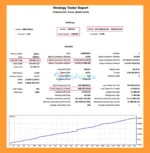
🔺GBPUSD pair – 6 years (2020 – 2026).
- Initial Deposit: $1,000
- Total Net Profit: $596,057.11
- Win Rate (% of total): 99.13%
- Maximum Drawdown: 2.23%
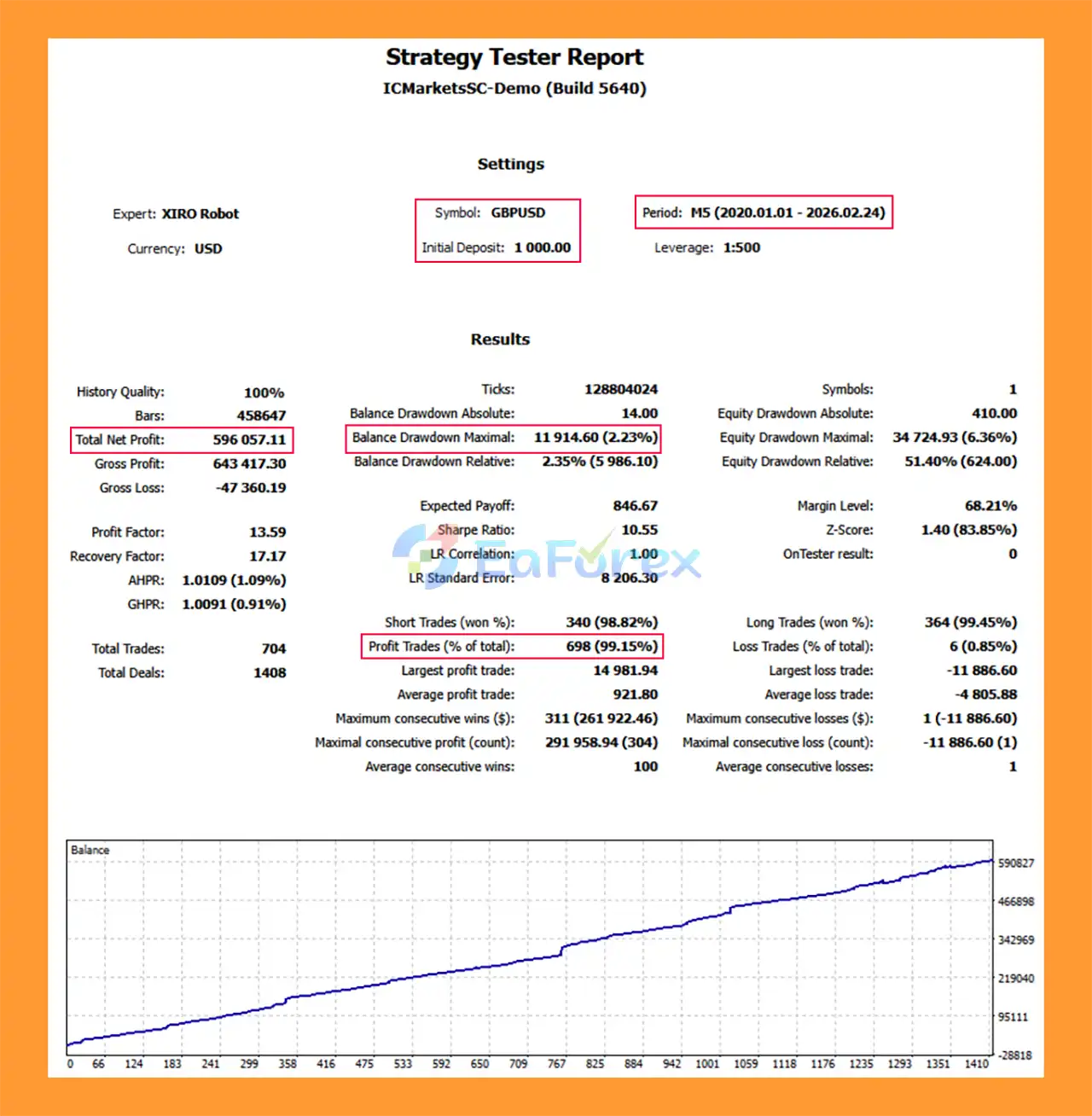
XIRO Robot MT5 Backtest
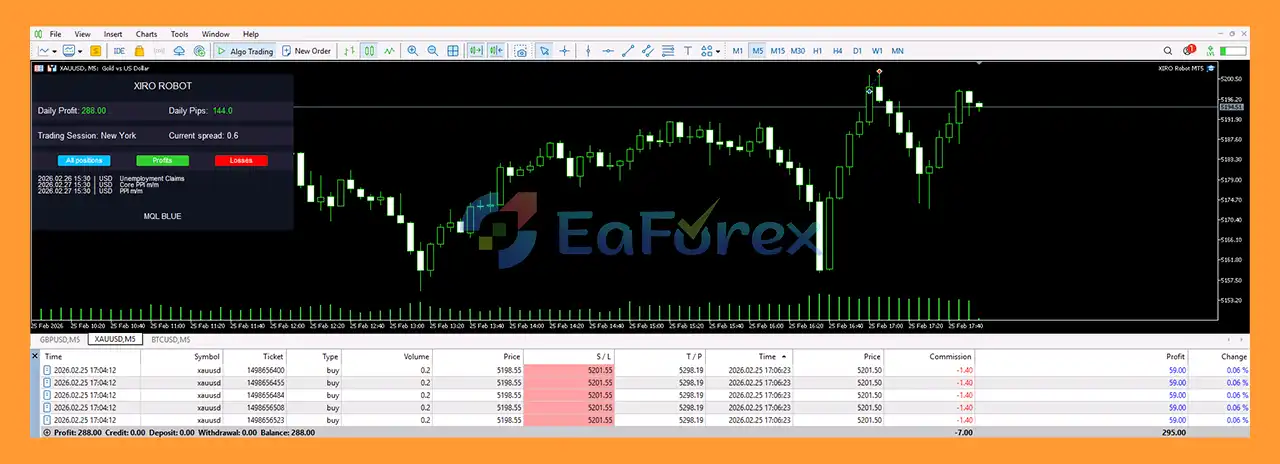
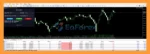
XIRO Robot MT5 Trading Result
Weaknesses and Risk Warnings
Although XIRO Robot MT5 includes several protective mechanisms, traders should understand the risks associated with automated trading.
Bitcoin Has Significantly Higher Volatility
BTCUSD can experience substantially larger price movements than traditional Forex pairs. The product documentation specifically notes that BTCUSD may require different TP, SL, Trailing Stop, and Break-Even values.
Daily Trading Does Not Mean Guaranteed Results
The EA is designed to trade regularly under normal market conditions, but no automated system can guarantee profitable trades every day.
Broker Conditions Matter
The claim that the EA can work with different brokers should not be interpreted as identical performance across every broker. Spreads, commissions, execution speed, liquidity, contract specifications, and slippage can vary significantly.
Lot Size Is Critical
The EA’s simplicity does not remove the importance of position sizing. Increasing the lot size increases the financial impact of both winning and losing trades.
News Filter Is Not Absolute Protection
A news filter can prevent new positions around scheduled economic events, but it cannot completely protect an account against unexpected market movements, gaps, liquidity changes, or execution problems.
Backtests and Live Results Can Differ
Historical testing and published live results provide useful information but cannot guarantee future performance.
VPS and Connectivity
Because the EA is fully automated, interruptions to the trading platform, VPS, internet connection, or broker connection can affect operation.
Pros and Cons
Pros
- Supports GBPUSD, XAUUSD and BTCUSD
- Available for MT4 and MT5
- M5 automated trading
- Fully automated entries and management
- Take Profit and Stop Loss protection
- Break-Even functionality
- Trailing Stop
- Economic News Filter
- Maximum position controls
- Spread-conscious operation
- Informative trading panel
- Simple setup
- Multilingual manual in 10 languages
- Private support group
- Free updates
- Low minimum lot of 0.01
Cons
- Primarily designed around the M5 timeframe
- BTCUSD requires different risk and trade-management settings
- Results can vary between brokers
- Low-spread conditions are preferable
- Requires continuous MT4/MT5 connectivity
- Higher lot sizes can substantially increase risk
- Regular trading can increase cumulative transaction costs
- Historical and live performance cannot guarantee future results
How to Install XIRO Robot MT5
Step 1: Purchase the EA
Purchase the XIRO Robot MT5 license and keep your purchase confirmation.
Step 2: Contact Support
Send a private message with a screenshot of your purchase confirmation.
According to the supplied instructions, the screenshot can be obtained from the Purchases section.
Step 3: Receive Group Access
After purchase verification, users receive access to the private support group and the relevant documentation.
Step 4: Install the EA
Install the XIRO Robot MT5 file into the MetaTrader 5 Experts directory and restart or refresh the platform.
Step 5: Open an M5 Chart
Open one of the supported instruments:
Use the M5 timeframe.
Step 6: Enable AutoTrading
Make sure Algo Trading / AutoTrading is enabled in MetaTrader 5.
Step 7: Configure Lot Size
For GBPUSD and XAUUSD, the supplied setup instructions indicate that the primary parameter users need to adjust is the lot size.
Do not select a lot size solely based on the minimum value. It should be appropriate for the account balance and risk level.
Step 8: Configure BTCUSD Separately
For BTCUSD, the supplied instructions recommend adjusting:
- Take Profit
- Stop Loss
- Trailing Stop
- Break-Even
because Bitcoin generally requires larger price-distance settings.
Step 9: Test on Demo
Before using the EA on a live account, forward-test it on a demo account with the intended broker.
Step 10: Use a VPS
For continuous automated operation, a reliable VPS is recommended so that MetaTrader 5 remains connected during the trading session.
Product Specifications
| Specification |
Details |
| Product |
XIRO Robot MT5 |
| Platform |
MetaTrader 5 |
| Also Available |
MetaTrader 4 |
| Instruments |
GBPUSD, XAUUSD, BTCUSD |
| Timeframe |
M5 |
| Minimum Lot |
0.01 |
| Suggested Minimum Deposit |
$1,000 |
| Leverage |
1:10–1:1000 |
| Account Types |
Hedging, Netting, Zero, Cent, Micro, Standard, Premium, ECN |
| News Filter |
Yes |
| Take Profit |
Yes |
| Stop Loss |
Yes |
| Trailing Stop |
Yes |
| Break-Even |
Yes |
| Position Limit |
Yes |
| Current Version |
4.0 |
| Updates |
Free according to supplied product policy |
| Manual |
10 languages |
| Support |
Private group |
Real User Reviews and Feedback
🔺XIRO Robot MT5 is highly appreciated by the MQL5 community for bringing stable and reliable profits. Below are 5 star reviews from users:
- Blvght (2026.02.25): “I tested it the right way first and once I matched the recommended setup and broker conditions, the performance became a lot more consistent.”
- Lorymia (2026.02.25): “It’s profitable and opens pending trades at a predetermined time. Based on market movements, the EA finds the right direction and takes the trade to profit. Great and works perfectly.”
- Dominic Isaiah (2026.02.25): “The XIRO Robot feels like a professional-grade, well-engineered tool rather than something slapped together. It’s clear the developers took time to combine proven strategies with thoughtful enhancements and they didn’t skimp on protective mechanisms. Whether you’re just testing automated trading or looking for a long-term system you can rely on, XIRO is definitely one of the stronger EA offerings out there right now.”
What’s Included in the Download Package?
- Setting (If Any).docx
- Installation Guide.docx
>>> Join VIP Membership Now <<<
Final Thoughts
In summary, XIRO Robot MT5 is a multi-asset Expert Advisor designed to automate trading on GBPUSD, XAUUSD and BTCUSD using an M5-based trading approach. Its feature set focuses not only on automated entries but also on structured position management through Take Profit, Stop Loss, Break-Even, Trailing Stop, spread controls, position limits, and an economic news filter.
One of the main practical advantages of the system is its simplified setup. For GBPUSD and XAUUSD, the supplied instructions indicate that users mainly need to select an appropriate lot size, while BTCUSD requires additional adjustment because of its higher price volatility.
The combination of MT4/MT5 compatibility, multilingual documentation, private community support, and free updates makes XIRO Robot a complete product package rather than simply an EA file.
Nevertheless, traders should evaluate the system under their own broker conditions before committing substantial capital. Spread, slippage, leverage, lot size, account type, execution quality, market volatility, and VPS stability can all affect live results. A demo or small-scale forward test is recommended before increasing exposure.
XIRO Robot MT5 — automated trading for GBPUSD, XAUUSD and BTCUSD with structured trade management and a simplified user experience.
















 Unlimited Activations
 Instant delivery
 Easy to install
















 Automatic EA
 EA Best Seller
 Expert Advisor MT4
 Expert Advisor MT5
 HFT EA


Reviews
Clear filtersThere are no reviews yet.