









-
 Unlimited Activations
-
 Instant delivery
-
 Easy to install








 Unlimited Activations
Instant delivery
Easy to install
Unlimited Activations
Instant delivery
Easy to install
 Free Update
 Free Install Support

Bazooka EA MT5 is a fully automated Expert Advisor for MetaTrader 5, designed to trade directional market movements using a combination of trend confirmation and momentum filtering. The system focuses on identifying trading opportunities when market direction and momentum conditions are aligned, helping avoid low-quality setups during uncertain or ranging market conditions.
Instead of relying on aggressive recovery techniques, Bazooka EA MT5 uses a structured trading approach with predefined Stop Loss, Take Profit, opposite-signal exits, trend-change exits, and position limits. This makes the EA suitable for traders who prefer a transparent, rule-based automated trading system with adjustable risk management.
Bazooka EA MT5 can be used across different symbols and timeframes, with recommended settings ranging from M1 to M15. It is particularly suitable for traders testing Forex major pairs, Gold, and indices on MT5 accounts.
>> Delivery time 24h-48h after payment.
>>> Refund if not delivered.
>>> You will receive the latest version without any limitations (ID+Time).>>Reviewed by Jason Stap <<
Bazooka EA MT5 analyzes market direction using Moving Average-based trend detection. The system looks for established directional conditions before considering a trade.
The EA incorporates RSI filtering to confirm market momentum. This additional condition helps ensure that entries are supported by sufficient momentum rather than being triggered solely by trend direction.
Once configured, Bazooka EA can automatically analyze the market, open positions, manage active trades, and close positions according to the selected parameters.
Users can configure Stop Loss (SL) and Take Profit (TP) levels to define trade risk and profit targets.
The EA can close an existing position when an opposite trading signal is detected, allowing the system to respond to changing market conditions.
Positions can also be managed according to changes in the underlying market trend.
A configurable limit on simultaneous positions helps control overall market exposure.
Bazooka EA MT5 includes execution-related parameters such as slippage control, which can be useful when trading during periods of changing liquidity.
The lot size can be adjusted according to the trader’s account size and preferred risk level.
A unique Magic Number allows Bazooka EA to identify and manage its own trades, which is particularly useful when running multiple EAs on the same MT5 account.
Bazooka EA MT5 does not use Martingale, Grid, Hedging, or Averaging techniques as part of its stated trading methodology. This keeps the strategy structure more straightforward and avoids relying on progressive recovery positions.
Bazooka EA MT5 follows a rule-based process designed to validate market conditions before executing a trade.
First, the EA evaluates the current market trend using Moving Average logic. This provides the directional component of the trading signal.
Next, the EA uses RSI momentum filtering to determine whether the current market movement has sufficient momentum to support the potential trade.
A position is considered only when the required trend and momentum conditions are aligned. This filtering process is designed to reduce unnecessary entries during unclear or low-probability market conditions.
After a trade is opened, Bazooka EA automatically manages the position according to the configured parameters. Depending on the selected settings, the position may be closed through:
The EA also monitors the number of open positions and applies the configured floating-loss protection and execution settings.
Because the main parameters are available as MT5 inputs, traders can optimize and forward-test the system using the MetaTrader 5 Strategy Tester before considering live deployment.
Bazooka EA MT5 is designed for traders who prefer a structured and systematic approach to automated trading rather than strategies based on aggressive position recovery.
One of its main characteristics is the combination of trend confirmation and RSI momentum filtering. Instead of entering every market movement, the EA attempts to validate the trading environment before executing an order.
The system also provides several practical trade-management controls, including Stop Loss, Take Profit, maximum open positions, floating-loss protection, slippage settings, and Magic Number identification.
Another important characteristic is its stated avoidance of Martingale, Grid, Hedging, and Averaging techniques. This can make the strategy easier to analyze during backtesting because its position management does not depend on progressively increasing exposure to recover previous losses.
Bazooka EA can also be tested across different instruments and timeframes, giving traders flexibility when evaluating its suitability for their preferred market.
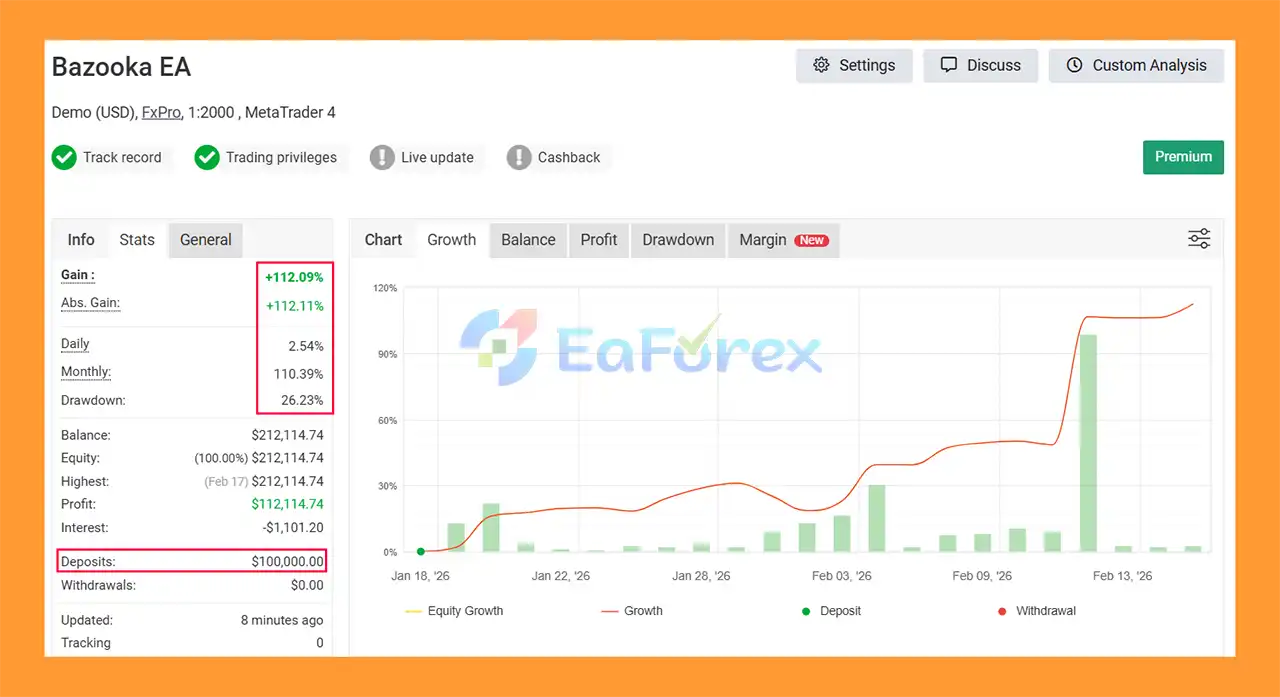
🔺XAUUSD (Gold) pair – 3 weeks of trading.
Bazooka EA MT5 Myfxbooks
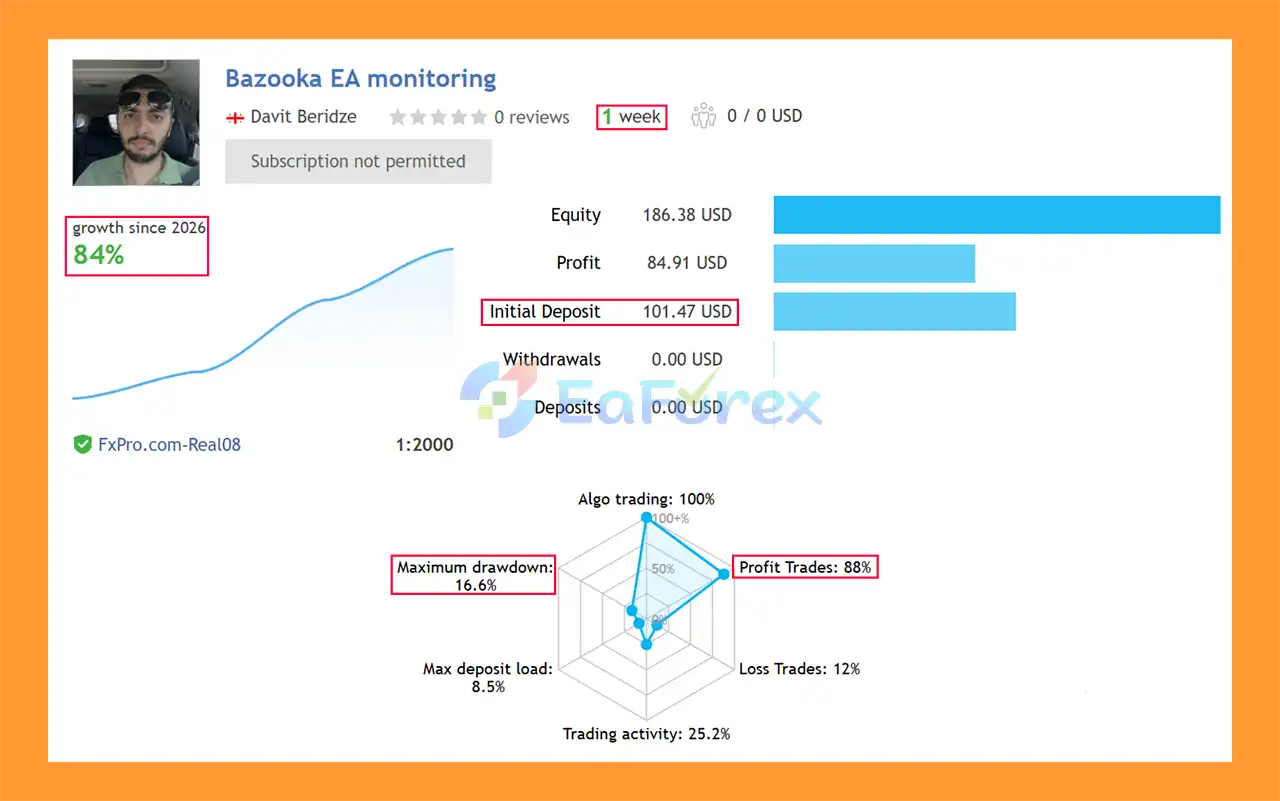
Bazooka EA MT5 Signal Results
🔺XAUUSD (Gold) pair – 2 Year
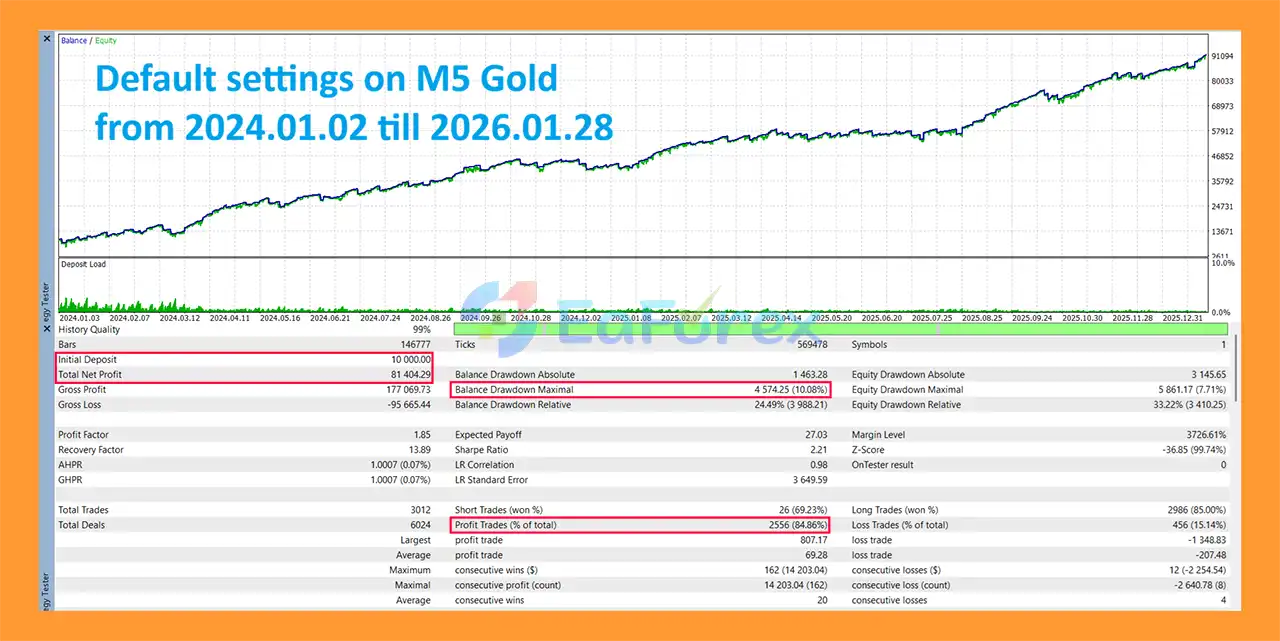
Bazooka EA MT5 Backtests
Bazooka EA MT5 includes several features designed to help traders control trading risk.
The lot size parameter allows users to determine the size of each position according to their account balance, capital, and risk tolerance. Traders should avoid using excessive lot sizes simply to increase potential returns.
The EA also supports a maximum number of simultaneous positions, helping limit the total number of trades that can be active at the same time.
Another important feature is maximum floating-loss protection, which can help control exposure when open positions move against the account.
Trade-level risk can additionally be managed through configurable Stop Loss and Take Profit settings. These parameters allow traders to define potential loss and profit targets before entering the market.
For multi-EA environments, the Magic Number helps separate Bazooka EA trades from positions generated by other automated systems.
The supplied recommendations include:
Actual performance can vary significantly depending on the symbol, timeframe, broker, spread, commission, execution speed, slippage, leverage, and risk settings.
Although Bazooka EA MT5 uses structured trend and momentum conditions, it cannot eliminate trading risk.
Because the EA relies on trend confirmation, performance may deteriorate when the market moves sideways or produces frequent false breakouts and trend reversals.
Moving Average and RSI-based signals are technical indicators rather than guarantees of future price direction. Sudden volatility can cause signals to become invalid shortly after a trade is opened.
The recommended M1, M5, and M15 timeframes can be particularly sensitive to spread, commission, slippage, and execution speed. Results from one broker may therefore differ substantially from results obtained with another broker.
Historical Strategy Tester performance should not be interpreted as a guarantee of future profitability. Real-market conditions can differ from historical data.
Even without Martingale or Grid trading, inappropriate lot sizing can expose an account to significant losses. Conservative risk settings and sufficient account capital should be considered before live deployment.
Different brokers may provide different spreads, execution speeds, contract specifications, trading sessions, and liquidity conditions. These factors can influence automated trading performance.
Important: Trading Forex, Gold, indices, and other financial instruments involves substantial risk. Always test the EA on a demo account and carefully evaluate its behavior under realistic trading conditions before using real capital.
Installing Bazooka EA MT5 on MetaTrader 5 is straightforward.
Obtain the Bazooka EA MT5 files after purchasing or receiving the product. Make sure the file is compatible with MetaTrader 5.
Launch your MetaTrader 5 trading platform and log in to the trading account where you want to test or use the EA.
In MetaTrader 5, go to:
File → Open Data Folder
Then navigate to:
MQL5 → Experts
Copy the Bazooka EA .ex5 file into the Experts folder.
Return to the MetaTrader 5 platform and refresh the Navigator window. If necessary, restart MT5 so that the EA appears under:
Navigator → Expert Advisors
Open the desired trading symbol and select your preferred timeframe, such as M1, M5, or M15.
Drag Bazooka EA MT5 from the Navigator window onto the chart.
Review and configure the available settings, including:
Use conservative settings when beginning your testing process.
Make sure Algo Trading / AutoTrading is enabled in MetaTrader 5 and confirm that the EA is allowed to trade automatically.
Before using a live trading account, test Bazooka EA with the MetaTrader 5 Strategy Tester and on a demo account.
Evaluate different market conditions, spreads, drawdowns, trade frequency, and execution behavior rather than relying only on the final backtest profit figure.
🔺 Bazooka EA MT5 is highly appreciated by the MQL5 community for bringing stable and reliable profits. Below are 5 star reviews from users:
In summary, Bazooka EA MT5 is a rule-based automated trading system that combines Moving Average trend detection with RSI momentum confirmation to identify directional trading opportunities. Its trade-management framework includes Stop Loss, Take Profit, opposite-signal exits, trend-change exits, position limits, floating-loss protection, and configurable execution parameters.
The absence of Martingale, Grid, Hedging, and Averaging techniques is an important part of its stated strategy structure. However, this does not remove market risk, and the EA’s actual results can vary depending on market conditions, broker execution, spread, slippage, account type, timeframe, and risk settings.
For traders considering Bazooka EA MT5, the most appropriate approach is to perform thorough backtesting, optimization, and forward testing on a demo account before deciding whether the system fits their trading objectives and risk tolerance.
1. What is Bazooka EA MT5 and how does it work?
Bazooka EA MT5 is a fully automated trend and momentum Expert Advisor developed for MetaTrader 5. It combines Moving Average trend detection with RSI momentum confirmation to identify high-probability trading opportunities. The system executes trades only when both direction and strength conditions align, ensuring disciplined and rule-based automation.
2. What trading strategy does Bazooka EA MT5 use?
Bazooka EA MT5 uses a structured trend-following and momentum confirmation strategy. It identifies the dominant market direction using Moving Averages and validates trade strength with RSI filters. This dual-layer confirmation helps reduce false signals and avoid trading during ranging or low-probability market conditions.
3. Does Bazooka EA MT5 use Martingale or Grid systems?
No. Bazooka EA MT5 does not use martingale, grid, or exposure multiplication techniques. It follows deterministic logic with controlled entries and exits, focusing on sustainable risk management rather than aggressive recovery strategies.
4. Which symbols can Bazooka EA MT5 trade?
Bazooka EA MT5 supports multi-symbol trading, including:
Forex major pairs
XAUUSD (Gold)
Indices
However, many of its verified performance examples are based on Gold (XAUUSD).
5. What timeframes are recommended for Bazooka EA MT5?
The EA is optimized for short-term intraday trading and performs best on:
M1
M5
M15
Users can choose the timeframe depending on their risk tolerance and preferred trading intensity.
6. How does Bazooka EA MT5 manage risk?
Bazooka EA MT5 includes multiple risk control features:
Configurable Stop Loss and Take Profit
Opposite signal auto-closure
Trend-change exit logic
Maximum open trades limitation
Floating loss protection
Adjustable lot sizing
These tools allow traders to tailor exposure according to their account size and risk profile.
7. What are the verified performance results of Bazooka EA MT5?
MyFxBook Verified (3 weeks on XAUUSD):
Initial Deposit: $100,000
Total Gain: +112.09%
Maximum Drawdown: 26.23%
Signal Results (1 week):
Initial Deposit: $1,000
Growth Rate: +84%
Win Rate: 88%
Maximum Drawdown: 16.6%
Backtest Results (2 years on XAUUSD):
Initial Deposit: $10,000
Net Profit: $81,404.29
Win Rate: 84.86%
Maximum Drawdown: 10.08%
Note: Past performance does not guarantee future results.
8. Is Bazooka EA MT5 suitable for beginners?
Yes. Bazooka EA MT5 includes ready-made set files for Gold (M1, M5, M15) and is designed for easy installation. Traders simply attach it to a chart, load the recommended settings, and enable Algo Trading. However, understanding basic risk management is still recommended.
9. Can I use Bazooka EA MT5 on ECN or RAW spread accounts?
Yes. The EA is optimized for low-spread environments such as ECN and RAW spread brokers. Lower spreads help improve execution accuracy, especially on lower timeframes.
10. Who should consider using Bazooka EA MT5?
Bazooka EA MT5 is ideal for traders who:
Prefer trend and momentum-based systems
Want configurable risk management tools
Avoid martingale and grid strategies
Trade Gold or Forex on lower timeframes
Seek structured, rule-based automated execution
If you are looking for a disciplined MT5 Expert Advisor that combines trend detection with momentum confirmation while maintaining transparent risk control, Bazooka EA MT5 positions itself as a systematic and professional automated trading solution.
In stock
In stock
In stock
In stock
In stock
Out of stock
No account yet?
Create an Account












 Automatic EA
 EA Best Seller
 Expert Advisor MT4
 Expert Advisor MT5
 HFT EA


Reviews
Clear filtersThere are no reviews yet.