









-
 Unlimited Activations
-
 Instant delivery
-
 Easy to install






 Unlimited Activations
Instant delivery
Easy to install
Unlimited Activations
Instant delivery
Easy to install
 Free Update
 Free Install Support

GoldMatrix Pro EA MT5 is a fully automated Gold Expert Advisor for MetaTrader 5, designed exclusively for XAUUSD on the H1 timeframe. The EA combines a proprietary price-action framework with multi-layer trade management to identify structured opportunities in one of the most volatile and actively traded markets.
Rather than relying on a single entry signal, GoldMatrix Pro EA MT5 uses several complementary trade types, including MAIN, MGMT, BOUNCE, and FADE positions. Each trade type has its own configurable parameters, allowing the EA to manage different market situations within a structured trading cycle.
The system also includes comprehensive risk controls such as daily loss protection, individual Stop Loss and Take Profit levels, dynamic or fixed lot sizing, spread filtering, margin validation, and trading-session controls.
An optional Equity Booster module can also be activated to provide additional H1 momentum-based entries. This secondary system operates independently from the main strategy and uses its own trade-management parameters.
GoldMatrix Pro EA MT5 is intended for traders looking for an automated XAUUSD trading system with clearly defined entry logic, multi-layer position management, and configurable exposure controls.
>> Delivery time 24h-48h after payment.
>>> Refund if not delivered.
>>> You will receive the latest version without any limitations (ID+Time).>>Reviewed by Jason Stap <<
GoldMatrix Pro EA MT5 is specifically designed for Gold (XAUUSD) on the H1 timeframe, allowing its strategy logic and parameters to be optimized around the characteristics of the gold market.
The EA uses four main trade categories:
Each component can be configured independently.
GoldMatrix Pro EA MT5 tracks positions as part of a trading cycle and maintains its internal state across platform restarts. This allows the EA to continue managing an active cycle without relying solely on the current chart session.
A configurable daily loss limiter monitors account equity against the beginning-of-day balance. When the defined threshold is reached, the EA can close open positions and pending orders and stop opening new trades for the remainder of the trading day.
Stop Loss and Take Profit levels are placed as real server-side orders, rather than relying exclusively on virtual levels. This provides an additional layer of trade protection if the trading platform or EA becomes temporarily unavailable.
The EA supports both:
This allows traders to adapt position size according to account size and preferred risk parameters.
Before placing an order, GoldMatrix Pro checks relevant trading conditions, including:
The EA provides configurable trading-hour and day-of-week filters, allowing traders to control when new positions can be opened.
The built-in dashboard displays important information such as:
GoldMatrix Pro EA MT5 is designed with defined risk boundaries for its additional management positions. The stated system does not use uncontrolled Martingale, and its management trades include their own Stop Loss and Take Profit parameters.
GoldMatrix Pro EA MT5 begins by analyzing the daily price structure to identify calculated areas where a potential trading opportunity may develop.
When price confirms a directional movement within the identified zone, the EA opens a MAIN position in the corresponding direction.
If the initial position moves against the expected direction, the EA can activate additional management layers, referred to as MGMT L1 and L2. These positions are opened at predefined price intervals and have independently configurable Stop Loss and Take Profit levels.
The purpose of these management layers is to manage an unfavorable trading cycle according to predefined rules rather than continuously adding positions without defined limits.
During an active cycle, GoldMatrix Pro EA MT5 can also use BOUNCE limit orders at calculated support and resistance levels derived from the market’s daily structure.
These orders are intended to capture potential mean-reversion movements when price reacts around important levels.
The FADE component looks for short-term counter-trend opportunities when market momentum appears to be losing strength around key price levels.
This provides another potential trading mechanism that complements the primary directional strategy.
The optional Equity Booster operates separately from the main GoldMatrix strategy.
It uses an independent EMA-based H1 signal to identify potential momentum-continuation opportunities. The module has its own:
The Equity Booster can be enabled or disabled through a single parameter and does not directly modify the main strategy’s trade logic.
GoldMatrix Pro EA MT5 is designed for traders who want a more structured approach to automated XAUUSD trading rather than a simple single-entry strategy.
One of its distinguishing characteristics is its multi-component trading architecture. Instead of treating every market condition in the same way, the EA separates directional entries, management trades, bounce opportunities, and counter-trend setups into different trade types.
The system also places considerable emphasis on risk controls and exposure management. Daily loss protection, real Stop Loss levels, configurable position sizing, spread filtering, margin checks, and position limits are integrated into the trading process.
Another advantage is the flexibility of the Equity Booster module. Traders who want additional H1 momentum entries can activate it, while those who prefer to use only the core GoldMatrix strategy can keep the module disabled.
The EA is also suitable for systematic testing because all major trade types can be evaluated in the MetaTrader 5 Strategy Tester.
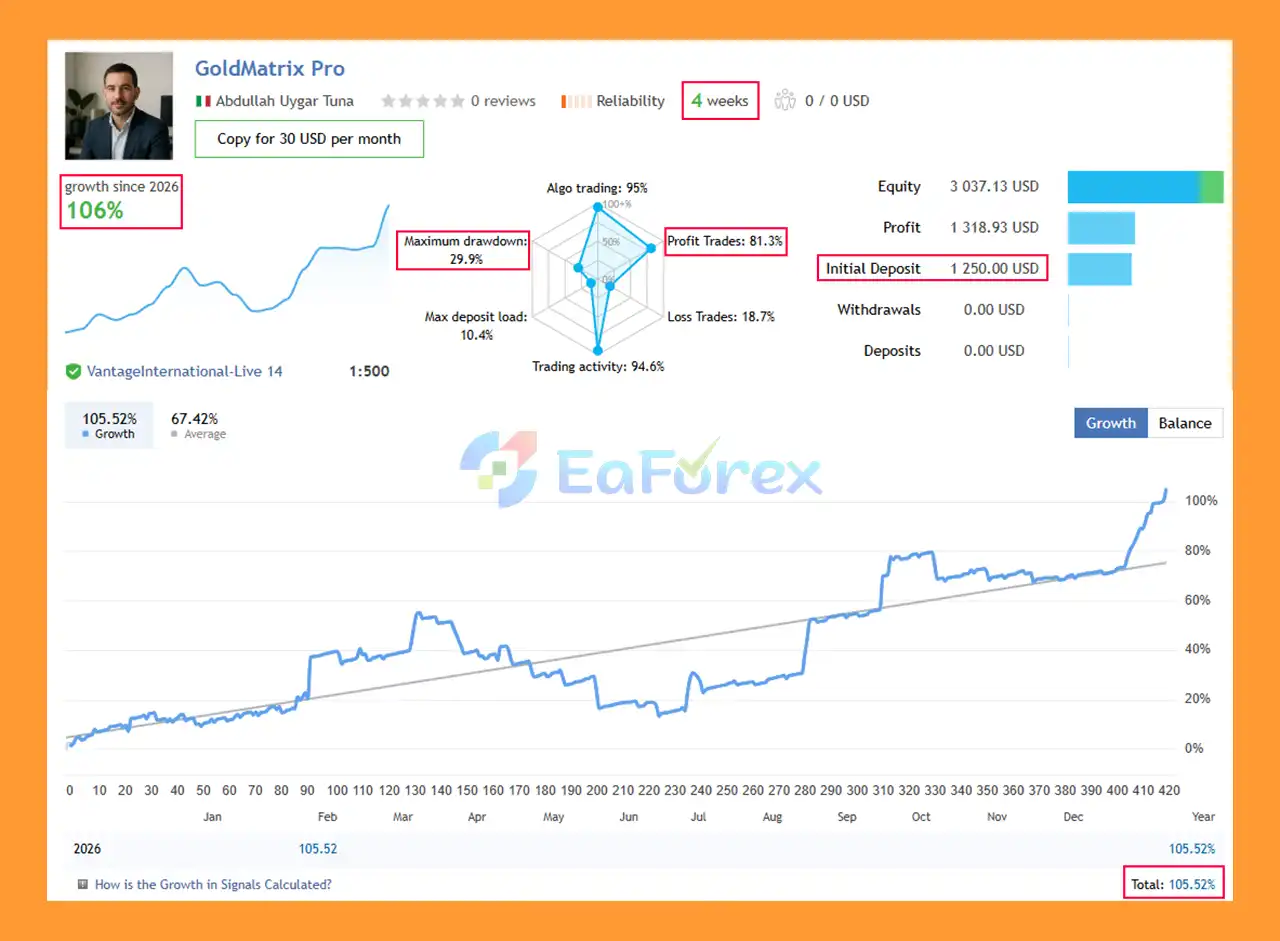
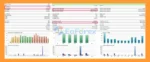
GoldMatrix Pro EA MT5 Signal Results
🔺Gold (XAUUSD)
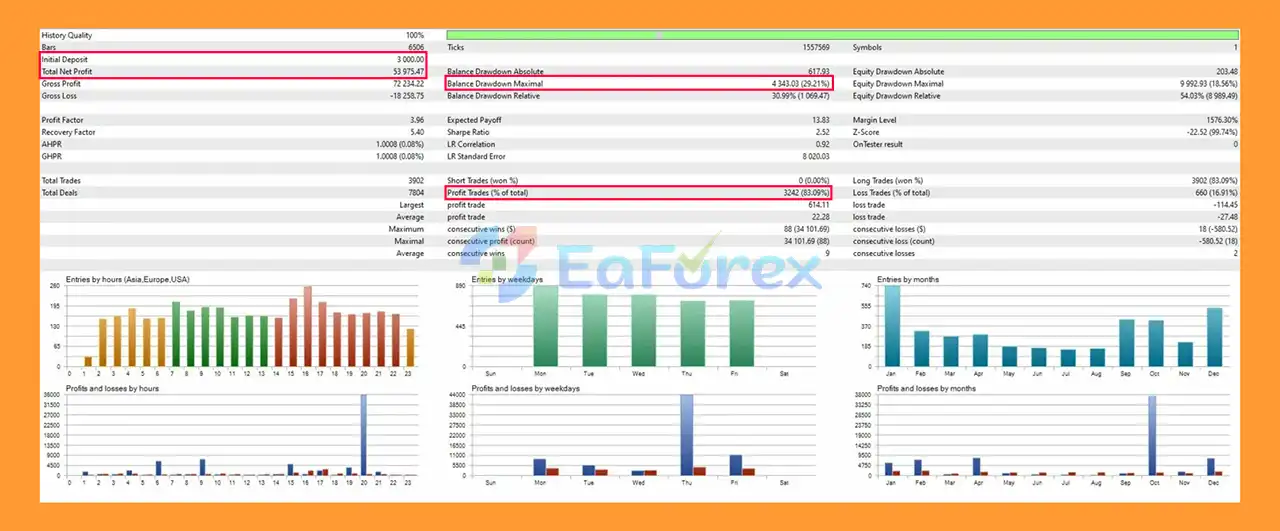
GoldMatrix Pro EA MT5 Backtests
GoldMatrix Pro EA MT5 includes several layers of automated risk management designed to limit account exposure and prevent trading from continuing after a defined daily loss threshold has been reached.
The daily loss limiter compares current account equity with the beginning-of-day balance.
If the configured loss threshold is reached, the EA can:
This provides an account-level protection mechanism beyond individual trade Stop Loss settings.
MAIN, MGMT, BOUNCE, and FADE trades can use their own configurable Stop Loss and Take Profit parameters.
This is important because each trade type serves a different purpose within the overall strategy.
Users can choose between fixed lot sizing and percentage-based risk calculations. Dynamic position sizing can help maintain a more consistent risk framework as account equity changes.
However, risk-percentage settings should still be used conservatively, especially because XAUUSD can experience substantial intraday volatility.
Before entering a trade, the EA checks available margin, symbol volume restrictions, spread conditions, and broker trading limitations.
These checks are intended to prevent orders from being submitted when execution conditions do not meet the configured requirements.
The optional Equity Booster has independent trade-management parameters, including Stop Loss, breakeven, trailing stop, and optional partial close.
It is also governed by the same daily loss protection mechanism as the main system.
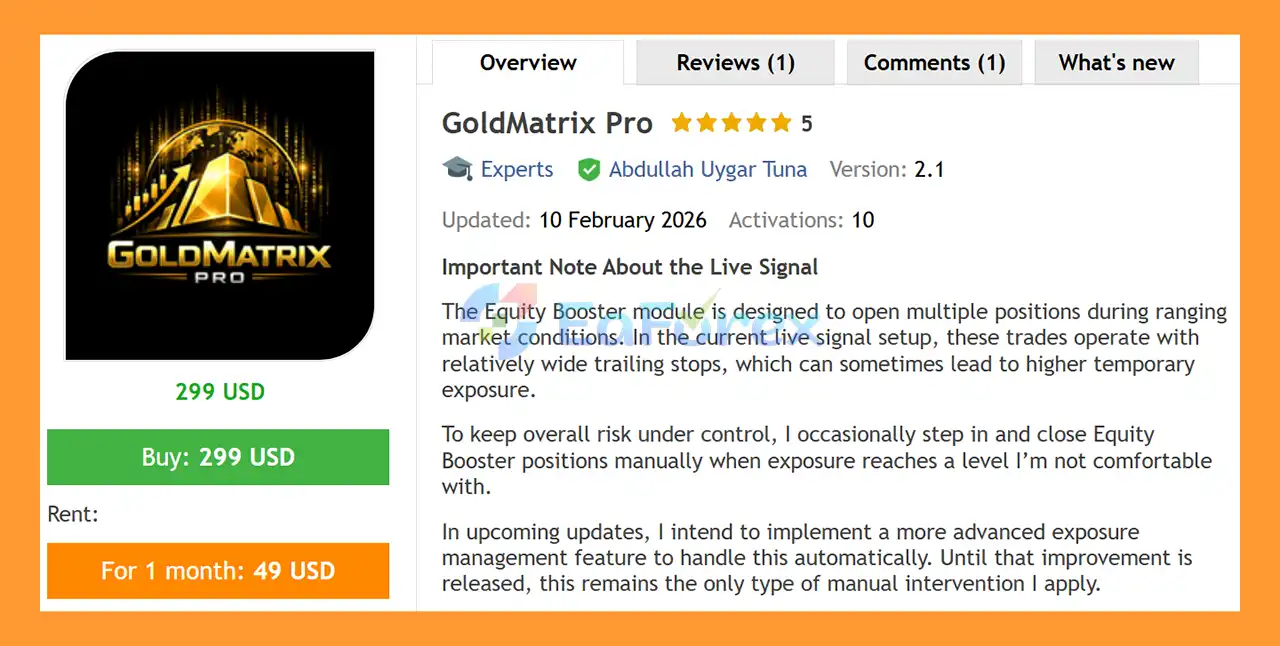
The Equity Booster is an optional module that can open multiple positions during certain ranging or momentum conditions.
In the current live-signal setup described by the developer, Equity Booster positions may use relatively wide trailing stops. As a result, these positions can sometimes create higher temporary exposure.
The developer has stated that they may manually close Equity Booster positions when the exposure reaches a level they consider uncomfortable. This means that, under the described live setup, the system should not be considered completely hands-off in every market condition.
An advanced exposure-management feature is planned for a future update to automate this process. Until such functionality is implemented, traders should understand that the current live configuration may involve occasional manual intervention related specifically to Equity Booster exposure.
This is an important consideration for traders seeking a strictly unattended automated trading system.
XAUUSD can experience rapid price movements caused by economic releases, central-bank decisions, geopolitical developments, changes in interest-rate expectations, and fluctuations in the US dollar.
Large price movements can therefore affect both individual trades and the overall trading cycle.
Although GoldMatrix Pro EA MT5 uses defined management rules and Stop Loss levels, multiple positions within the same cycle can increase total market exposure.
Traders should evaluate combined cycle exposure, not just the risk of an individual trade.
The optional Equity Booster can open additional positions and may use relatively wide trailing stops in certain configurations. This can increase floating exposure before trades are closed.
The current described live setup may also involve manual intervention for Equity Booster exposure.
MGMT L1/L2 positions are designed to manage unfavorable initial trades. Although they are not described as unlimited Martingale positions, adding positions to an existing market cycle can increase aggregate exposure.
This behavior should be carefully evaluated in Strategy Tester results and demo trading.
Historical Strategy Tester performance does not guarantee future live results. Backtests may differ from live trading because of spreads, slippage, liquidity, execution speed, broker conditions, data quality, and market regime changes.
Gold trading conditions vary between brokers. Spread, commission, contract specifications, minimum lot size, margin requirements, execution speed, and trading sessions can all affect EA performance.
The recommended starting deposit of $500 with 0.01 lot sizing should not be interpreted as a guarantee that the EA is suitable for every $500 account. Actual capital requirements depend on broker conditions, risk settings, leverage, and the number of positions that may be opened.
Important: Automated trading involves substantial financial risk. Always test GoldMatrix Pro EA MT5 on a demo account and evaluate realistic drawdown and exposure before committing real capital.
Obtain the GoldMatrix Pro EA MT5 files and make sure you have the MetaTrader 5-compatible version.
Launch MT5 and log into your preferred trading account.
For initial testing, a demo account is recommended.
Inside MetaTrader 5, select:
File → Open Data Folder
Then navigate to:
MQL5 → Experts
Copy the GoldMatrix Pro .ex5 file into this folder.
Return to MT5 and refresh the Navigator panel. Alternatively, restart the platform.
The EA should appear under:
Navigator → Expert Advisors
Open your broker’s XAUUSD chart and select the H1 timeframe.
GoldMatrix Pro is specifically designed around XAUUSD H1, so using other symbols or timeframes may produce behavior different from the intended configuration.
Drag GoldMatrix Pro EA MT5 from the Navigator window onto the XAUUSD H1 chart.
Make sure automated trading is enabled.
Review the available inputs carefully, especially:
Start with the default parameters and make changes only after understanding their effect.
Open:
View → Strategy Tester
Select GoldMatrix Pro EA MT5, choose XAUUSD, and set the timeframe to H1.
Use at least six months of historical data to observe different trading cycles and market conditions.
After backtesting, run the EA on a demo account before considering live deployment.
Monitor:
If the EA behaves as expected under your broker’s conditions, you can consider live deployment using conservative risk settings.
Never assume that backtest results will be reproduced exactly in a live trading environment.
🔺 GoldMatrix Pro EA is highly appreciated by the MQL5 community for bringing stable and reliable profits. Below are 5 star reviews from users:
In summary, GoldMatrix Pro EA MT5 is a specialized XAUUSD H1 Expert Advisor built around daily price structure, directional entries, multi-layer position management, and several complementary trading models.
Its combination of MAIN, MGMT, BOUNCE, and FADE trades provides a more comprehensive framework than a basic single-signal EA, while the integrated daily loss limiter, real server-side Stop Loss and Take Profit, spread filtering, margin validation, and configurable position sizing provide multiple layers of risk control.
The optional Equity Booster adds another H1-based trading component, but it should be evaluated separately because it can increase temporary exposure and, according to the current live setup described by the developer, may occasionally require manual intervention.
For this reason, traders should thoroughly test GoldMatrix Pro in the MT5 Strategy Tester and on a demo account, paying particular attention to total cycle exposure, drawdown, margin requirements, and Equity Booster behavior. As with any automated trading system, historical performance is not a guarantee of future results, and appropriate risk management remains essential.
1. What is GoldMatrix Pro EA MT5?
GoldMatrix Pro EA MT5 is a fully automated Expert Advisor designed specifically for trading Gold (XAUUSD) on the H1 timeframe within the MetaTrader 5 platform. It uses a proprietary price action framework and structured cycle-based trade management to automate gold trading with defined risk control.
2. Does GoldMatrix Pro EA MT5 only work on Gold (XAUUSD)?
Yes. GoldMatrix Pro EA MT5 is exclusively optimized for XAUUSD (Gold) on the H1 timeframe. The algorithm is precision-tuned for gold’s volatility, spread behavior, and price movement characteristics to ensure structured and consistent execution.
3. What timeframe is recommended for GoldMatrix Pro EA MT5?
The EA is specifically designed to operate on the H1 (1-hour) timeframe. Using it on other timeframes is not recommended, as the internal logic and trade cycle calculations are optimized for H1 gold market structure.
4. How does the cycle-based trading system work?
GoldMatrix Pro EA MT5 structures trades into defined cycles using four trade types:
MAIN
MGMT
BOUNCE
FADE
These trade types work together within a recovery framework (L1/L2 layers), each with independent stop-loss (SL) and take-profit (TP) levels to maintain controlled risk exposure.
5. Does GoldMatrix Pro EA MT5 use Martingale or grid strategies?
No. The EA does not use uncontrolled Martingale or grid averaging systems. All trades operate with predefined stop-loss boundaries and structured recovery logic, ensuring disciplined and transparent risk management.
6. What risk management features are included?
GoldMatrix Pro EA MT5 includes advanced capital protection tools such as:
Daily drawdown limiter
Server-side stop-loss and take-profit placement
Margin and spread validation checks
Configurable fixed or risk-based lot sizing
Independent equity booster with separate logic
These features help traders maintain strict control over account risk.
7. What are the reported performance results?
According to shared signal data:
Initial Deposit: $10,000 (4 weeks)
Growth Rate: +106%
Win Rate: 81.3%
Maximum Drawdown: 29.9%
Backtest results on XAUUSD showed:
Initial Deposit: $3,000
Total Net Profit: $53,875.47
Win Rate: 83.09%
Maximum Drawdown: 29.21%
Note: Past performance does not guarantee future results. Trading involves risk.
8. Can I backtest GoldMatrix Pro EA MT5?
Yes. The EA is fully compatible with the MetaTrader 5 Strategy Tester. It is recommended to perform at least 6 months of backtesting and forward testing on a demo account before trading live.
In stock
In stock
In stock
In stock
In stock
Out of stock
No account yet?
Create an Account












 Automatic EA
 EA Best Seller
 Expert Advisor MT4
 Expert Advisor MT5
 HFT EA


Reviews
Clear filtersThere are no reviews yet.