
Product Overview
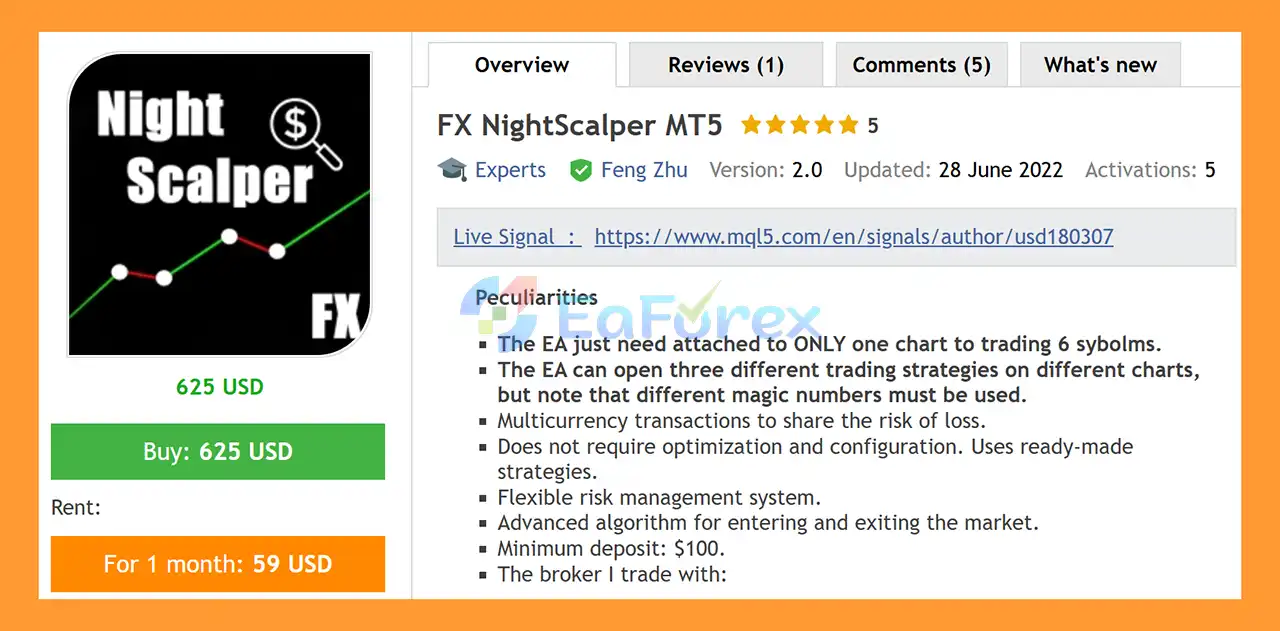
FX NightScalper MT5 is an automated Expert Advisor for MetaTrader 5 designed for multi-currency trading with a single-chart setup. One of its main advantages is that the EA only needs to be attached to one chart to trade up to six symbols, making the setup simple and efficient.
The EA uses ready-made trading strategies, so it does not require manual optimization or complicated configuration before use. Its algorithm is designed to manage market entries and exits while applying a flexible risk management system across multiple currency pairs.
By trading several symbols, FX NightScalper MT5 can distribute trading activity across different markets rather than relying on a single currency pair.
About the Developer
- Author: Feng Zhu.
- Experience: Over +7 years of experience on MQL5.
- Notable Products: FX NightScalper MT5, FX NightScalper MT4 and others.
- Flagship Product: FX NightScalper MT5 is rated as the best performing product of the year.
>> Delivery time 24h-48h after payment.
>>> Refund if not delivered.
>>> You will receive the latest version without any limitations (ID+Time).>>Reviewed by Jason Stap <<
Key Features of FX NightScalper MT5
- One-Chart Multi-Currency Trading – Attach the EA to only one chart and allow it to trade up to six symbols.
- Up to 6 Symbols – Designed to manage multiple currency pairs from a single EA instance.
- Multiple Trading Strategies – The EA can operate three different trading strategies.
- Ready-Made Strategies – No manual optimization or complicated configuration is required according to the developer.
- Multi-Currency Risk Distribution – Trading multiple symbols can help distribute exposure across different markets.
- Flexible Risk Management – Provides configurable risk-management functionality.
- Advanced Entry Algorithm – Uses internal logic to identify potential market entries.
- Advanced Exit Algorithm – Designed to manage trade exits automatically.
- Low Starting Capital – Minimum recommended deposit starts from $100.
- Fully Automated Trading – Designed for hands-free operation on MetaTrader 5.
- Simple Setup – A single-chart architecture makes the initial installation straightforward.
How Does FX NightScalper MT5 Work?
FX NightScalper MT5 is designed around a multi-currency automated trading architecture.
Instead of requiring a separate EA instance on every currency-pair chart, the EA can be attached to one chart and monitor or trade up to six supported symbols.
🔺Multi-Currency Trading
The EA can trade multiple currency pairs from a single chart.
This architecture can reduce the need to attach several EA instances to different charts and makes portfolio-level automated trading easier to manage.
🔺Ready-Made Strategies
FX NightScalper MT5 uses preconfigured trading strategies supplied by the developer.
According to the provided specifications, traders do not need to perform manual optimization or create their own strategy settings before using the EA.
🔺Automated Market Entries
The EA uses its internal entry algorithm to identify potential trading opportunities across the supported symbols.
🔺Automated Exits
Once a position is opened, the EA applies its internal exit logic to manage the trade without requiring the trader to manually monitor every position.
🔺Risk Distribution
Because the EA can trade multiple currency pairs, trading exposure is distributed across several markets rather than being concentrated on only one symbol.
However, trading multiple symbols does not eliminate risk. Currency pairs can become correlated during major market events, and several positions may experience losses at the same time.
Three Trading Strategies
FX NightScalper MT5 can open three different trading strategies on different charts.
If multiple instances of the EA are used, traders should pay close attention to the Magic Number configuration.
Each separate EA instance or strategy should use a different Magic Number to help the system distinguish its own trades and prevent order-management conflicts.
Important: Do not use the same Magic Number for different EA instances when the developer's configuration requires separate identifiers.
Why Choose FX NightScalper MT5?
FX NightScalper MT5 is designed for traders who want a relatively simple automated trading setup without spending significant time on manual optimization.
Its main characteristics include:
- One-chart architecture
- Up to six-symbol trading
- Ready-made trading strategies
- No manual optimization required according to the developer
- Flexible risk management
- Automated trade entry and exit
- Multi-currency exposure
- Low stated minimum deposit of $100
- Suitable for traders looking for hands-off MT5 automation
The single-chart architecture is particularly useful for traders who want to manage a multi-currency EA without attaching separate instances to every trading chart.
Recommended Setup
| Parameter | Recommended Setup |
|---|---|
| Platform | MetaTrader 5 |
| Trading Type | Automated |
| Trading Style | Multi-Currency |
| Chart Requirement | One chart |
| Maximum Symbols | Up to 6 |
| Trading Strategies | 3 |
| Optimization | Not required according to developer |
| Configuration | Ready-made strategies |
| Risk Management | Flexible |
| Minimum Deposit | $100 |
| Broker | Reliable broker recommended |
| Testing | Demo account first |
| Magic Number | Different numbers for separate EA instances/strategies |
FX NightScalper MT5 Signal Results
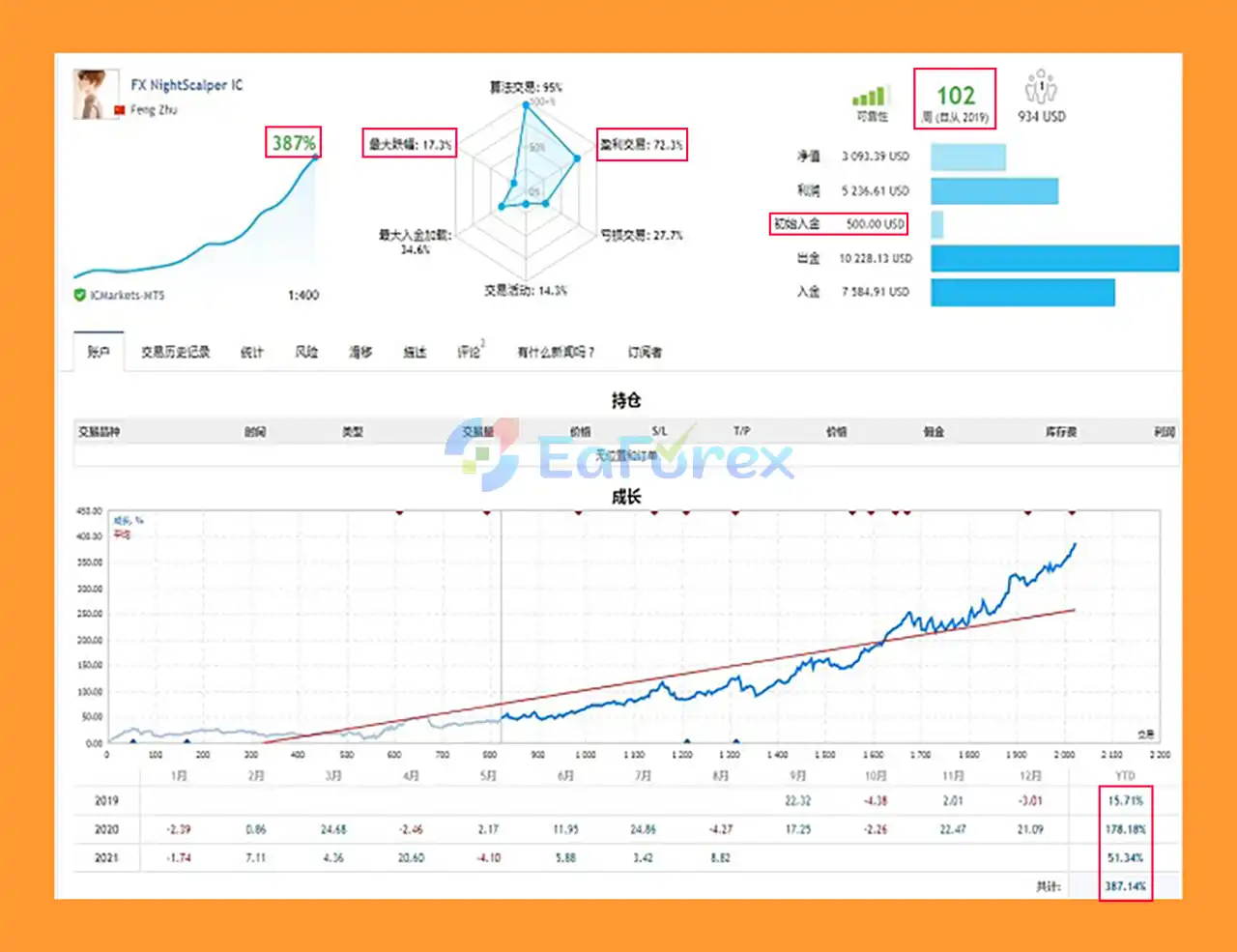
🔺 AUDUSD, EURAUD, EURCAD, EURGBP, USDCAD, USDCHF pairs – 102 consecutive weeks of trading
- Initial Deposit: $500
- Growth Rate: +387%
- Maximum Drawdown: 17.3%
- Win Rate (% of total): 72.3%
Performance and Risk Management
FX NightScalper MT5 includes a flexible risk management system designed to control trading exposure across its multi-currency operation.
However, the $100 minimum deposit should not be interpreted as a guarantee that $100 is sufficient for every trading configuration.
The appropriate account size depends on factors such as:
- Risk settings
- Trading volume
- Number of active symbols
- Broker conditions
- Spread
- Leverage
- Market volatility
- Simultaneous open positions
Trading six symbols can diversify exposure, but it can also increase the number of simultaneous positions and therefore increase total margin usage.
For this reason, traders should test the EA under realistic conditions before deploying it on a live account.
Broker Recommendations
The developer recommends using brokers that have demonstrated reliable trading conditions with this Expert Advisor.
When selecting a broker, traders should consider:
- Stable execution
- Competitive spreads
- Reliable liquidity
- Appropriate account type
- Stable MT5 server connection
- Suitable leverage
- Consistent trading conditions
Because broker conditions can vary, an EA that performs differently across brokers may produce different live results.
Demo Testing Is Recommended
Before using FX NightScalper MT5 on a real account, test it on a demo account with the broker you intend to use.
This allows you to evaluate:
- Execution behavior
- Spread conditions
- Trade frequency
- Position management
- Symbol compatibility
- Risk exposure
- Overall EA behavior
Weaknesses and Risk Warnings
Although FX NightScalper MT5 is designed to simplify automated trading, there are several important risks to understand.
Multi-Currency Risk
Trading several currency pairs can distribute exposure, but it does not guarantee lower losses. Currency pairs can become correlated, particularly during major economic events.
No Optimization Does Not Mean No Risk
The EA uses ready-made strategies and does not require manual optimization according to the developer. However, traders should still evaluate whether the supplied strategy configuration is appropriate for their broker, account size, and risk tolerance.
Minimum Deposit Risk
A $100 minimum deposit is a stated technical requirement, not a guarantee of safe or sustainable trading. A small account may have limited capacity to withstand drawdown or multiple simultaneous positions.
Broker Dependency
Actual trading conditions depend on the broker. Differences in spread, execution, liquidity, leverage, and server conditions can affect automated trading results.
Past Performance
Previous trading results do not guarantee future profitability. Market conditions can change, and an automated strategy may perform differently in future periods.
Multiple EA Instances
If you use the three strategies on different charts or multiple EA instances, ensure that different Magic Numbers are assigned as required. Incorrect Magic Number configuration can cause trade-management conflicts.
Pros and Cons
Pros
- One-chart setup
- Up to six symbols
- Multi-currency trading
- Three available trading strategies
- Ready-made strategies
- No manual optimization required according to the developer
- Flexible risk management
- Automated entries and exits
- Simple MT5 setup
- Low stated minimum deposit of $100
Cons
- Multi-currency trading does not eliminate risk
- Multiple simultaneous positions can increase margin requirements
- Results can vary between brokers
- Ready-made settings may not suit every account condition
- $100 is not necessarily sufficient for every risk configuration
- Separate strategies require careful Magic Number management
- Past performance does not guarantee future results
- Demo testing is still recommended before live deployment
How to Install FX NightScalper MT5
- Install MetaTrader 5 with your preferred broker.
- Open the Navigator panel.
- Locate the Expert Advisors section.
- Install or copy FX NightScalper MT5 into the appropriate MT5 directory.
- Restart MT5 or refresh the Navigator.
- Open the chart you want to use as the EA's main chart.
- Attach FX NightScalper MT5 to the chart.
- Check the EA's ready-made settings.
- Confirm the supported symbols and trading configuration.
- If using additional strategies or EA instances, assign different Magic Numbers.
- Enable Algo Trading/AutoTrading.
- Run the EA on a demo account first.
- Monitor its trades, exposure, and risk before considering live deployment.
Real User Reviews and Feedback
🔺FX NightScalper MT5 is highly appreciated by the MQL5 community for bringing stable and reliable profits. Below are 5 star reviews from users:
- Chua Wee Kiat (2022.09.09): “Actually I really like Night Scalper style EA , but one thing is when the price didn’t respect the bands and keep one way up or down, it will cause big losses, a few days profit will gone in one day..until now still cannot solve this kind of night scalper issue. but so far this night scalper ea I really like it.”
What’s Included in the Download Package?
- Setting (If Any).docx
- Installation Guide.docx
Final Thoughts
In summary, FX NightScalper MT5 is an automated multi-currency Expert Advisor for MetaTrader 5, designed to trade up to six currency pairs from a single chart. Its ready-made trading strategies, automated entry and exit logic, and flexible risk-management system make the setup relatively straightforward for traders who want to automate multiple Forex markets without attaching separate EA instances to every chart.
One of the main characteristics of FX NightScalper MT5 is its multi-currency architecture. Trading several symbols can distribute activity across different markets, but it does not eliminate overall account risk. Currency pairs can become correlated during major economic events, potentially causing multiple positions to move adversely at the same time. The number of simultaneous trades, margin usage, leverage, spread, and broker execution should therefore be monitored carefully.
The supplied 102-week signal results across AUDUSD, EURAUD, EURCAD, EURGBP, USDCAD, and USDCHF report +387% growth, a 72.3% win rate, and 17.3% maximum drawdown from an initial $500 deposit. These historical signal results do not guarantee future performance, and actual results may differ because of market conditions, spread, slippage, execution quality, liquidity, leverage, and broker specifications.
Overall, FX NightScalper MT5 provides a convenient framework for automated multi-currency Forex trading through a single-chart setup. Demo and forward testing with the intended broker, careful monitoring of combined exposure, and conservative risk settings are recommended before live deployment.



